How to Build a Create Profile Screen in Flutter (Full Code + Preview)
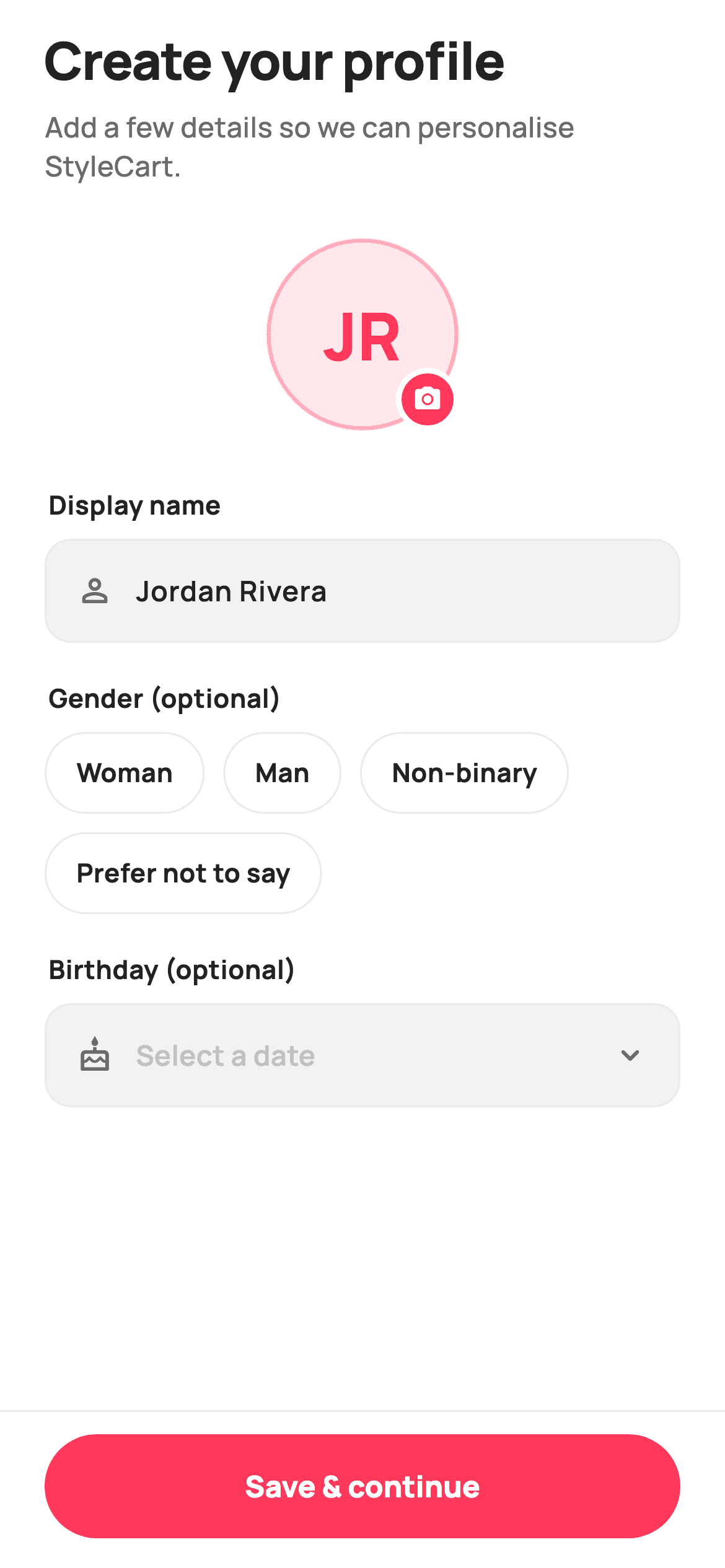
Right after someone signs up, most shopping apps ask them to finish their account. This tutorial builds StyleCart's create-profile screen in Flutter: a custom-painted monogram avatar that shows the user's initials, a camera badge for swapping in a photo, a display-name field, a row of selectable gender chips, and an optional birthday picker. A pinned 'Save & continue' button stays disabled until a name is entered. By the end you'll understand CustomPainter avatars, single-select chip state, a brand-themed Material date picker, and validation-gated buttons — all in pure Flutter with a bundled Manrope font.
Watch the Flutter UI walkthrough
A short screen recording of Create Profile running, if you'd rather see it before you read the code. The written tutorial below covers everything in it.
Can't see the video? Watch it on YouTube.
What you'll build
- ✓A circular monogram avatar drawn with CustomPainter — no image asset — showing the name's initials inside a brand-tinted ring
- ✓A camera badge overlaid on the avatar that fires an onPickAvatar callback
- ✓A pill-shaped gender chip group that toggles a single selection with a 140ms animation
- ✓An optional birthday field backed by a Material date picker re-themed to the brand colour
- ✓A pinned 'Save & continue' button that greys out until a display name is typed
Step-by-step build
Create the file
Add a new file at lib/ecom_auth_create_profile/ecom_auth_create_profile_screen.dart in your Flutter project.
Register the bundled fonts
No external packages — this is pure Flutter. It does bundle its design font (Manrope), so drop the font file into fonts/ and declare it in pubspec.yaml:
flutter:
  fonts:
    - family: Manrope
      fonts:
- asset: fonts/Manrope-Regular.ttfBuild it, piece by piece
Here's how the screen goes together. Each block below is a real slice of the code with a plain-English explanation — paste them in order, or grab the whole file from the next section.
Imports, the screen class, and its callbacks
import 'package:flutter/material.dart';

/// StyleCart — Create Profile.
///
/// Post-auth profile setup: a painted monogram avatar (initials fallback) with a
/// camera badge, display name, optional gender chips and an optional birthday
/// picker, gated save. Self-contained per CONVENTIONS.md: pure Flutter, bundled
/// Manrope, inline Airbnb-style tokens, own light theme + SafeArea. The avatar is a
/// CustomPainter (no asset, no emoji glyph). Exposes callbacks only.
class EcomAuthCreateProfileScreen extends StatefulWidget {
  const EcomAuthCreateProfileScreen({
    super.key,
    this.onSave,
    this.onPickAvatar,
  });

  /// Saved a valid profile (name provided).
  final VoidCallback? onSave;

  /// Tapped the avatar camera badge.
  final VoidCallback? onPickAvatar;

  @override
  State<EcomAuthCreateProfileScreen> createState() =>
      _EcomAuthCreateProfileScreenState();
The file imports only Flutter's material library — no packages — and a doc comment spells out the plan: a painted monogram avatar, name field, optional gender chips, optional birthday, and a gated save. EcomAuthCreateProfileScreen is a StatefulWidget because the avatar initials, the selected gender, and the chosen birthday all change while the user edits. Its constructor takes super.key plus two optional VoidCallback fields — onSave (fired when a valid profile is saved) and onPickAvatar (fired when the camera badge is tapped) — so the screen stays reusable and hands real actions back to its parent instead of hard-coding navigation.
Design tokens, state fields, and the initials getter
class _EcomAuthCreateProfileScreenState
    extends State<EcomAuthCreateProfileScreen> {
  static const String _font = 'Manrope';
  static const Color _canvas = Color(0xFFFFFFFF);
  static const Color _ink = Color(0xFF222222);
  static const Color _muted = Color(0xFF6A6A6A);
  static const Color _faint = Color(0xFFC1C1C1);
  static const Color _brand = Color(0xFFFF385C);
  static const Color _surface = Color(0xFFF2F2F2);
  static const Color _hairline = Color(0xFFEBEBEB);

  static const List<String> _genders = <String>[
    'Woman',
    'Man',
    'Non-binary',
    'Prefer not to say',
  ];

  final TextEditingController _name = TextEditingController(text: 'Jordan Rivera');
  String? _gender;
  DateTime? _birthday;

  @override
  void dispose() {
    _name.dispose();
    super.dispose();
  }

  String get _initials {
    final List<String> parts = _name.text
        .trim()
        .split(RegExp(r'\s+'))
        .where((String s) => s.isNotEmpty)
        .toList();
    if (parts.isEmpty) return '?';
    if (parts.length == 1) return parts.first[0].toUpperCase();
    return (parts.first[0] + parts.last[0]).toUpperCase();
  }

  bool get _valid => _name.text.trim().isNotEmpty;
The State class opens with the whole palette as static const values: _font 'Manrope', _canvas white, _ink (#222222) for headings, _muted grey for subtitles, _faint for placeholder text, _brand (#FF385C, the Airbnb-style pink), _surface (#F2F2F2) for field fills, and _hairline (#EBEBEB) for borders. A _genders list holds the four chip options. The mutable state is a TextEditingController _name seeded with 'Jordan Rivera', plus nullable _gender and _birthday. dispose() releases the controller to avoid a leak. The _initials getter trims the name, splits it on whitespace with a RegExp, and returns one or two uppercase letters (or '?' when empty); _valid is true only when the name isn't blank.
The brand-themed birthday picker and date formatter
  Future<void> _pickBirthday() async {
    final DateTime now = DateTime(2006, 1, 1);
    final DateTime? picked = await showDatePicker(
      context: context,
      initialDate: _birthday ?? now,
      firstDate: DateTime(1924),
      lastDate: DateTime(2012, 12, 31),
      builder: (BuildContext context, Widget? child) {
        return Theme(
          data: ThemeData.light(useMaterial3: true).copyWith(
            colorScheme: const ColorScheme.light(primary: _brand),
          ),
          child: child!,
        );
      },
    );
    if (picked != null) setState(() => _birthday = picked);
  }

  String _formatDate(DateTime d) {
    const List<String> months = <String>[
      'Jan', 'Feb', 'Mar', 'Apr', 'May', 'Jun',
      'Jul', 'Aug', 'Sep', 'Oct', 'Nov', 'Dec',
    ];
    return '${months[d.month - 1]} ${d.day}, ${d.year}';
  }
_pickBirthday is an async method that awaits showDatePicker, constrained to firstDate 1924 and lastDate end-of-2012 with an initialDate of Jan 1 2006 (a sensible default age). The key trick is the builder: it wraps the picker dialog in a Theme whose ColorScheme.light uses primary: _brand, so the calendar's selected day and header adopt the pink brand colour instead of the default Material blue. When a date comes back non-null, setState stores it in _birthday. _formatDate turns a DateTime into a compact label like 'Aug 13, 2026' by indexing a const list of month abbreviations.
Scaffold, header, and the painted avatar with camera badge
  @override
  Widget build(BuildContext context) {
    return Theme(
      data: ThemeData.light(useMaterial3: true),
      child: Scaffold(
        backgroundColor: _canvas,
        body: SafeArea(
          child: Column(
            children: <Widget>[
              Expanded(
                child: SingleChildScrollView(
                  padding: const EdgeInsets.fromLTRB(24, 8, 24, 24),
                  child: Column(
                    crossAxisAlignment: CrossAxisAlignment.stretch,
                    children: <Widget>[
                      const SizedBox(height: 4),
                      const Text(
                        'Create your profile',
                        style: TextStyle(
                          fontFamily: _font,
                          fontSize: 28,
                          fontWeight: FontWeight.w800,
                          letterSpacing: -0.6,
                          color: _ink,
                        ),
                      ),
                      const SizedBox(height: 6),
                      const Text(
                        'Add a few details so we can personalise StyleCart.',
                        style: TextStyle(
                          fontFamily: _font,
                          fontSize: 15,
                          fontWeight: FontWeight.w500,
                          color: _muted,
                        ),
                      ),
                      const SizedBox(height: 28),
                      Center(
                        child: GestureDetector(
                          onTap: widget.onPickAvatar,
                          child: SizedBox(
                            width: 104,
                            height: 104,
                            child: Stack(
                              children: <Widget>[
                                SizedBox(
                                  width: 104,
                                  height: 104,
                                  child: CustomPaint(
                                    painter: _MonogramPainter(
                                      initials: _initials,
                                    ),
                                  ),
                                ),
                                Positioned(
                                  right: 0,
                                  bottom: 0,
                                  child: Container(
                                    width: 34,
                                    height: 34,
                                    decoration: BoxDecoration(
                                      color: _brand,
                                      shape: BoxShape.circle,
                                      border: Border.all(
                                          color: _canvas, width: 3),
                                    ),
                                    child: const Icon(
                                      Icons.photo_camera_rounded,
                                      size: 16,
                                      color: _canvas,
                                    ),
                                  ),
                                ),
                              ],
                            ),
                          ),
                        ),
                      ),
build() wraps a Material 3 light Theme around a Scaffold painted _canvas white, then SafeArea and a Column. An Expanded SingleChildScrollView (24px side padding) holds the scrolling content so the form never overflows. The header stacks a 28px w800 'Create your profile' title with -0.6 letterSpacing over a 15px _muted subtitle. The avatar is a Center > GestureDetector (onTap: onPickAvatar) > 104x104 Stack: a CustomPaint driving _MonogramPainter with the live _initials, plus a Positioned 34x34 _brand circle badge — ringed by a 3px white border so it lifts off the avatar — holding a 16px photo_camera_rounded icon.
Name field, gender chips, birthday selector, and the gated save button
                      const SizedBox(height: 30),
                      const _Label('Display name'),
                      _Field(
                        controller: _name,
                        hint: 'Your name',
                        icon: Icons.person_outline_rounded,
                        onChanged: (_) => setState(() {}),
                      ),
                      const SizedBox(height: 20),
                      const _Label('Gender (optional)'),
                      Wrap(
                        spacing: 10,
                        runSpacing: 10,
                        children: _genders.map((String g) {
                          final bool on = _gender == g;
                          return GestureDetector(
                            onTap: () => setState(
                                () => _gender = on ? null : g),
                            child: AnimatedContainer(
                              duration: const Duration(milliseconds: 140),
                              padding: const EdgeInsets.symmetric(
                                  horizontal: 16, vertical: 11),
                              decoration: BoxDecoration(
                                color: on ? _brand : _canvas,
                                borderRadius: BorderRadius.circular(99),
                                border: Border.all(
                                    color: on ? _brand : _hairline),
                              ),
                              child: Text(
                                g,
                                style: TextStyle(
                                  fontFamily: _font,
                                  fontSize: 14,
                                  fontWeight: FontWeight.w700,
                                  color: on ? _canvas : _ink,
                                ),
                              ),
                            ),
                          );
                        }).toList(),
                      ),
                      const SizedBox(height: 20),
                      const _Label('Birthday (optional)'),
                      GestureDetector(
                        onTap: _pickBirthday,
                        child: Container(
                          height: 56,
                          padding: const EdgeInsets.symmetric(horizontal: 16),
                          decoration: BoxDecoration(
                            color: _surface,
                            borderRadius: BorderRadius.circular(14),
                            border: Border.all(color: _hairline),
                          ),
                          child: Row(
                            children: <Widget>[
                              const Icon(Icons.cake_outlined,
                                  size: 20, color: _muted),
                              const SizedBox(width: 12),
                              Expanded(
                                child: Text(
                                  _birthday == null
                                      ? 'Select a date'
                                      : _formatDate(_birthday!),
                                  style: TextStyle(
                                    fontFamily: _font,
                                    fontSize: 15,
                                    fontWeight: FontWeight.w600,
                                    color: _birthday == null ? _faint : _ink,
                                  ),
                                ),
                              ),
                              const Icon(Icons.expand_more_rounded,
                                  size: 20, color: _muted),
                            ],
                          ),
                        ),
                      ),
                    ],
                  ),
                ),
              ),
              Container(
                padding: const EdgeInsets.fromLTRB(24, 12, 24, 16),
                decoration: const BoxDecoration(
                  color: _canvas,
                  border: Border(top: BorderSide(color: _hairline)),
                ),
                child: SizedBox(
                  height: 56,
                  width: double.infinity,
                  child: FilledButton(
                    onPressed: _valid ? widget.onSave : null,
                    style: FilledButton.styleFrom(
                      backgroundColor: _brand,
                      foregroundColor: _canvas,
                      disabledBackgroundColor: _brand.withValues(alpha: 0.35),
                      disabledForegroundColor: _canvas,
                      shape: const StadiumBorder(),
                      textStyle: const TextStyle(
                        fontFamily: _font,
                        fontSize: 16,
                        fontWeight: FontWeight.w800,
                      ),
                    ),
                    child: const Text('Save & continue'),
                  ),
                ),
              ),
            ],
          ),
        ),
      ),
    );
  }
}
The display-name row pairs a _Label with a _Field wired to _name and a person icon; its onChanged calls setState so the avatar initials update as you type. Gender uses a Wrap (10px spacing) mapping _genders into pill GestureDetectors — each an AnimatedContainer that animates over 140ms, filling _brand with white text when selected and staying white with a _hairline border otherwise; tapping a selected chip clears it back to null. The birthday row is a 56-tall _surface container (radius 14) with a cake icon, faint 'Select a date' or the formatted date, and an expand_more chevron, opening _pickBirthday on tap. Finally a pinned bottom Container (top hairline border) holds a full-width 56-tall FilledButton with a StadiumBorder; onPressed is `_valid ? widget.onSave : null`, and its disabledBackgroundColor is _brand at 35% alpha, so the button visibly greys out until a name exists.
The reusable label, field, and monogram painter
class _Label extends StatelessWidget {
  const _Label(this.text);
  final String text;

  @override
  Widget build(BuildContext context) {
    return Padding(
      padding: const EdgeInsets.only(bottom: 8, left: 2),
      child: Text(
        text,
        style: const TextStyle(
          fontFamily: _EcomAuthCreateProfileScreenState._font,
          fontSize: 14,
          fontWeight: FontWeight.w700,
          color: _EcomAuthCreateProfileScreenState._ink,
        ),
      ),
    );
  }
}

class _Field extends StatelessWidget {
  const _Field({
    required this.controller,
    required this.hint,
    this.icon,
    this.onChanged,
  });

  final TextEditingController controller;
  final String hint;
  final IconData? icon;
  final ValueChanged<String>? onChanged;

  @override
  Widget build(BuildContext context) {
    return Container(
      height: 56,
      padding: const EdgeInsets.symmetric(horizontal: 16),
      decoration: BoxDecoration(
        color: _EcomAuthCreateProfileScreenState._surface,
        borderRadius: BorderRadius.circular(14),
        border: Border.all(color: _EcomAuthCreateProfileScreenState._hairline),
      ),
      child: Row(
        children: <Widget>[
          if (icon != null) ...<Widget>[
            Icon(icon, size: 20, color: _EcomAuthCreateProfileScreenState._muted),
            const SizedBox(width: 12),
          ],
          Expanded(
            child: TextField(
              controller: controller,
              onChanged: onChanged,
              style: const TextStyle(
                fontFamily: _EcomAuthCreateProfileScreenState._font,
                fontSize: 15,
                fontWeight: FontWeight.w600,
                color: _EcomAuthCreateProfileScreenState._ink,
              ),
              cursorColor: _EcomAuthCreateProfileScreenState._brand,
              decoration: InputDecoration(
                isCollapsed: true,
                border: InputBorder.none,
                hintText: hint,
                hintStyle: const TextStyle(
                  fontFamily: _EcomAuthCreateProfileScreenState._font,
                  fontSize: 15,
                  fontWeight: FontWeight.w500,
                  color: _EcomAuthCreateProfileScreenState._faint,
                ),
              ),
            ),
          ),
        ],
      ),
    );
  }
}

/// Paints a circular monogram avatar — brand-tinted ring + centred initials.
class _MonogramPainter extends CustomPainter {
  const _MonogramPainter({required this.initials});
  final String initials;

  @override
  void paint(Canvas c, Size size) {
    const Color brand = Color(0xFFFF385C);
    final Offset center = Offset(size.width / 2, size.height / 2);
    final double r = size.width / 2;

    c.drawCircle(center, r, Paint()..color = brand.withValues(alpha: 0.12));
    c.drawCircle(
      center,
      r - 1.5,
      Paint()
        ..style = PaintingStyle.stroke
        ..strokeWidth = 2
        ..color = brand.withValues(alpha: 0.35),
    );

    final TextPainter tp = TextPainter(
      text: TextSpan(
        text: initials,
        style: TextStyle(
          fontFamily: 'Manrope',
          fontSize: size.width * 0.34,
          fontWeight: FontWeight.w800,
          color: brand,
        ),
      ),
      textDirection: TextDirection.ltr,
    )..layout();
    tp.paint(
      c,
      Offset(center.dx - tp.width / 2, center.dy - tp.height / 2),
    );
  }

  @override
  bool shouldRepaint(_MonogramPainter oldDelegate) =>
      oldDelegate.initials != initials;
}
_Label is a tiny StatelessWidget: bold 14px _ink text with a little bottom padding, reused above every input. _Field is the shared input shell — a 56-tall _surface container (radius 14, hairline border) with an optional leading icon and an Expanded TextField that has a _brand cursor, InputBorder.none, and a faint hint — which is why the name field and the birthday box look identical. _MonogramPainter does the avatar drawing by hand: it paints a filled circle at 12% brand alpha, strokes a 2px ring at 35% alpha, then uses a TextPainter to centre the initials at fontSize size.width * 0.34 in w800 brand. shouldRepaint returns true only when the initials string changes, so it repaints exactly when the name does.
Full code
The complete, ready-to-paste source. Free to use in your projects — one click copies it all.
import 'package:flutter/material.dart';
/// StyleCart — Create Profile.
///
/// Post-auth profile setup: a painted monogram avatar (initials fallback) with a
/// camera badge, display name, optional gender chips and an optional birthday
/// picker, gated save. Self-contained per CONVENTIONS.md: pure Flutter, bundled
/// Manrope, inline Airbnb-style tokens, own light theme + SafeArea. The avatar is a
/// CustomPainter (no asset, no emoji glyph). Exposes callbacks only.
class EcomAuthCreateProfileScreen extends StatefulWidget {
const EcomAuthCreateProfileScreen({
super.key,
this.onSave,
this.onPickAvatar,
});
/// Saved a valid profile (name provided).
final VoidCallback? onSave;
/// Tapped the avatar camera badge.
final VoidCallback? onPickAvatar;
@override
State<EcomAuthCreateProfileScreen> createState() =>
_EcomAuthCreateProfileScreenState();
}
class _EcomAuthCreateProfileScreenState
extends State<EcomAuthCreateProfileScreen> {
static const String _font = 'Manrope';
static const Color _canvas = Color(0xFFFFFFFF);
static const Color _ink = Color(0xFF222222);
static const Color _muted = Color(0xFF6A6A6A);
static const Color _faint = Color(0xFFC1C1C1);
static const Color _brand = Color(0xFFFF385C);
static const Color _surface = Color(0xFFF2F2F2);
static const Color _hairline = Color(0xFFEBEBEB);
static const List<String> _genders = <String>[
'Woman',
'Man',
'Non-binary',
'Prefer not to say',
];
final TextEditingController _name = TextEditingController(text: 'Jordan Rivera');
String? _gender;
DateTime? _birthday;
@override
void dispose() {
_name.dispose();
super.dispose();
}
String get _initials {
final List<String> parts = _name.text
.trim()
.split(RegExp(r'\s+'))
.where((String s) => s.isNotEmpty)
.toList();
if (parts.isEmpty) return '?';
if (parts.length == 1) return parts.first[0].toUpperCase();
return (parts.first[0] + parts.last[0]).toUpperCase();
}
bool get _valid => _name.text.trim().isNotEmpty;
Future<void> _pickBirthday() async {
final DateTime now = DateTime(2006, 1, 1);
final DateTime? picked = await showDatePicker(
context: context,
initialDate: _birthday ?? now,
firstDate: DateTime(1924),
lastDate: DateTime(2012, 12, 31),
builder: (BuildContext context, Widget? child) {
return Theme(
data: ThemeData.light(useMaterial3: true).copyWith(
colorScheme: const ColorScheme.light(primary: _brand),
),
child: child!,
);
},
);
if (picked != null) setState(() => _birthday = picked);
}
String _formatDate(DateTime d) {
const List<String> months = <String>[
'Jan', 'Feb', 'Mar', 'Apr', 'May', 'Jun',
'Jul', 'Aug', 'Sep', 'Oct', 'Nov', 'Dec',
];
return '${months[d.month - 1]} ${d.day}, ${d.year}';
}
@override
Widget build(BuildContext context) {
return Theme(
data: ThemeData.light(useMaterial3: true),
child: Scaffold(
backgroundColor: _canvas,
body: SafeArea(
child: Column(
children: <Widget>[
Expanded(
child: SingleChildScrollView(
padding: const EdgeInsets.fromLTRB(24, 8, 24, 24),
child: Column(
crossAxisAlignment: CrossAxisAlignment.stretch,
children: <Widget>[
const SizedBox(height: 4),
const Text(
'Create your profile',
style: TextStyle(
fontFamily: _font,
fontSize: 28,
fontWeight: FontWeight.w800,
letterSpacing: -0.6,
color: _ink,
),
),
const SizedBox(height: 6),
const Text(
'Add a few details so we can personalise StyleCart.',
style: TextStyle(
fontFamily: _font,
fontSize: 15,
fontWeight: FontWeight.w500,
color: _muted,
),
),
const SizedBox(height: 28),
Center(
child: GestureDetector(
onTap: widget.onPickAvatar,
child: SizedBox(
width: 104,
height: 104,
child: Stack(
children: <Widget>[
SizedBox(
width: 104,
height: 104,
child: CustomPaint(
painter: _MonogramPainter(
initials: _initials,
),
),
),
Positioned(
right: 0,
bottom: 0,
child: Container(
width: 34,
height: 34,
decoration: BoxDecoration(
color: _brand,
shape: BoxShape.circle,
border: Border.all(
color: _canvas, width: 3),
),
child: const Icon(
Icons.photo_camera_rounded,
size: 16,
color: _canvas,
),
),
),
],
),
),
),
),
const SizedBox(height: 30),
const _Label('Display name'),
_Field(
controller: _name,
hint: 'Your name',
icon: Icons.person_outline_rounded,
onChanged: (_) => setState(() {}),
),
const SizedBox(height: 20),
const _Label('Gender (optional)'),
Wrap(
spacing: 10,
runSpacing: 10,
children: _genders.map((String g) {
final bool on = _gender == g;
return GestureDetector(
onTap: () => setState(
() => _gender = on ? null : g),
child: AnimatedContainer(
duration: const Duration(milliseconds: 140),
padding: const EdgeInsets.symmetric(
horizontal: 16, vertical: 11),
decoration: BoxDecoration(
color: on ? _brand : _canvas,
borderRadius: BorderRadius.circular(99),
border: Border.all(
color: on ? _brand : _hairline),
),
child: Text(
g,
style: TextStyle(
fontFamily: _font,
fontSize: 14,
fontWeight: FontWeight.w700,
color: on ? _canvas : _ink,
),
),
),
);
}).toList(),
),
const SizedBox(height: 20),
const _Label('Birthday (optional)'),
GestureDetector(
onTap: _pickBirthday,
child: Container(
height: 56,
padding: const EdgeInsets.symmetric(horizontal: 16),
decoration: BoxDecoration(
color: _surface,
borderRadius: BorderRadius.circular(14),
border: Border.all(color: _hairline),
),
child: Row(
children: <Widget>[
const Icon(Icons.cake_outlined,
size: 20, color: _muted),
const SizedBox(width: 12),
Expanded(
child: Text(
_birthday == null
? 'Select a date'
: _formatDate(_birthday!),
style: TextStyle(
fontFamily: _font,
fontSize: 15,
fontWeight: FontWeight.w600,
color: _birthday == null ? _faint : _ink,
),
),
),
const Icon(Icons.expand_more_rounded,
size: 20, color: _muted),
],
),
),
),
],
),
),
),
Container(
padding: const EdgeInsets.fromLTRB(24, 12, 24, 16),
decoration: const BoxDecoration(
color: _canvas,
border: Border(top: BorderSide(color: _hairline)),
),
child: SizedBox(
height: 56,
width: double.infinity,
child: FilledButton(
onPressed: _valid ? widget.onSave : null,
style: FilledButton.styleFrom(
backgroundColor: _brand,
foregroundColor: _canvas,
disabledBackgroundColor: _brand.withValues(alpha: 0.35),
disabledForegroundColor: _canvas,
shape: const StadiumBorder(),
textStyle: const TextStyle(
fontFamily: _font,
fontSize: 16,
fontWeight: FontWeight.w800,
),
),
child: const Text('Save & continue'),
),
),
),
],
),
),
),
);
}
}
class _Label extends StatelessWidget {
const _Label(this.text);
final String text;
@override
Widget build(BuildContext context) {
return Padding(
padding: const EdgeInsets.only(bottom: 8, left: 2),
child: Text(
text,
style: const TextStyle(
fontFamily: _EcomAuthCreateProfileScreenState._font,
fontSize: 14,
fontWeight: FontWeight.w700,
color: _EcomAuthCreateProfileScreenState._ink,
),
),
);
}
}
class _Field extends StatelessWidget {
const _Field({
required this.controller,
required this.hint,
this.icon,
this.onChanged,
});
final TextEditingController controller;
final String hint;
final IconData? icon;
final ValueChanged<String>? onChanged;
@override
Widget build(BuildContext context) {
return Container(
height: 56,
padding: const EdgeInsets.symmetric(horizontal: 16),
decoration: BoxDecoration(
color: _EcomAuthCreateProfileScreenState._surface,
borderRadius: BorderRadius.circular(14),
border: Border.all(color: _EcomAuthCreateProfileScreenState._hairline),
),
child: Row(
children: <Widget>[
if (icon != null) ...<Widget>[
Icon(icon, size: 20, color: _EcomAuthCreateProfileScreenState._muted),
const SizedBox(width: 12),
],
Expanded(
child: TextField(
controller: controller,
onChanged: onChanged,
style: const TextStyle(
fontFamily: _EcomAuthCreateProfileScreenState._font,
fontSize: 15,
fontWeight: FontWeight.w600,
color: _EcomAuthCreateProfileScreenState._ink,
),
cursorColor: _EcomAuthCreateProfileScreenState._brand,
decoration: InputDecoration(
isCollapsed: true,
border: InputBorder.none,
hintText: hint,
hintStyle: const TextStyle(
fontFamily: _EcomAuthCreateProfileScreenState._font,
fontSize: 15,
fontWeight: FontWeight.w500,
color: _EcomAuthCreateProfileScreenState._faint,
),
),
),
),
],
),
);
}
}
/// Paints a circular monogram avatar — brand-tinted ring + centred initials.
class _MonogramPainter extends CustomPainter {
const _MonogramPainter({required this.initials});
final String initials;
@override
void paint(Canvas c, Size size) {
const Color brand = Color(0xFFFF385C);
final Offset center = Offset(size.width / 2, size.height / 2);
final double r = size.width / 2;
c.drawCircle(center, r, Paint()..color = brand.withValues(alpha: 0.12));
c.drawCircle(
center,
r - 1.5,
Paint()
..style = PaintingStyle.stroke
..strokeWidth = 2
..color = brand.withValues(alpha: 0.35),
);
final TextPainter tp = TextPainter(
text: TextSpan(
text: initials,
style: TextStyle(
fontFamily: 'Manrope',
fontSize: size.width * 0.34,
fontWeight: FontWeight.w800,
color: brand,
),
),
textDirection: TextDirection.ltr,
)..layout();
tp.paint(
c,
Offset(center.dx - tp.width / 2, center.dy - tp.height / 2),
);
}
@override
bool shouldRepaint(_MonogramPainter oldDelegate) =>
oldDelegate.initials != initials;
}
Plus bundled 5 binary assets (fonts/images). The CLI and MCP install those for you automatically.
Two faster ways to add it
Copy-paste works, but you can skip it entirely.
1. FlutterKit CLI
One command drops this screen — and its fonts — straight into your project.
$ flutterkit add ecom-auth-create-profile2. AI agent (MCP)
Connect FlutterKit's MCP server in Claude or Cursor and just ask your agent to install ecom-auth-create-profile — it fetches and writes the files for you.
FAQ
Is this create-profile screen free to use?
Yes — the full Dart on this page is free to copy into your own apps, personal or commercial. Paste it directly, run 'flutterkit add ecom-auth-create-profile' with the CLI, or have an AI agent install it for you via MCP.
Does it need any external packages?
No — it's pure Flutter, built entirely on the material library (showDatePicker, FilledButton, and CustomPainter are all built in). The only asset is the bundled Manrope font, which ships in the Regular, Medium, SemiBold, Bold, and ExtraBold weights and is registered in pubspec.yaml as shown in step 2. The CLI and MCP install those font files for you.
Which Flutter version does it target?
It uses the modern Color.withValues() API (for example _brand.withValues(alpha: 0.35) on the disabled button and the painter's tinted circles) plus super parameters, so it targets Flutter 3.22+ (Dart 3). On an older SDK, swap each withValues(alpha: x) for withOpacity(x) and it will compile.


