How to Build a Forgot Password Screen in Flutter (Full Code + Preview)
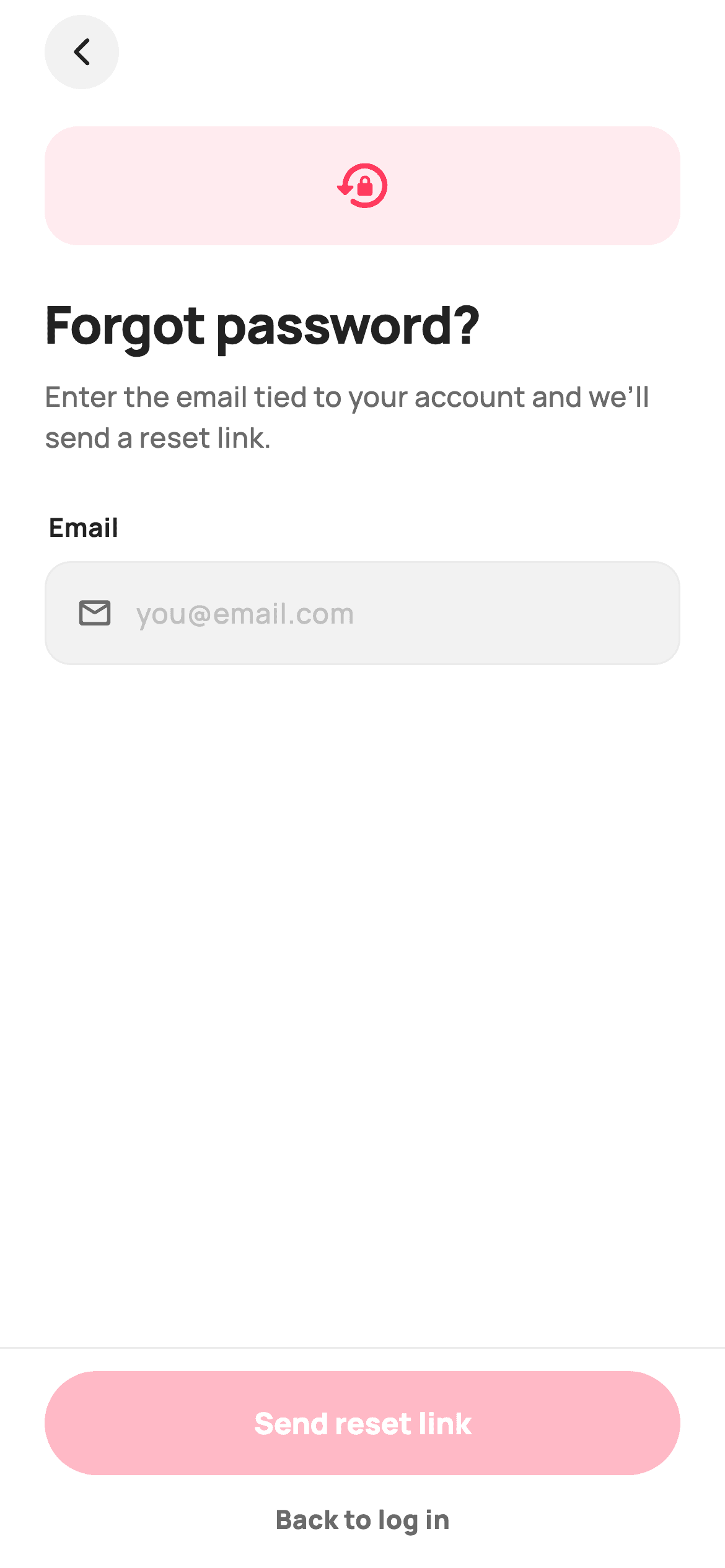
Password recovery is normally two screens: type your email, then a "check your inbox" page. This StyleCart screen does both in one file. A rounded email field with live validation gates a pinned "Send reset link" button; tapping it flips a single `_sent` boolean and swaps the body for a confirmation built around a hand-painted envelope, with the address you typed echoed back in bold. By the end you'll have a self-contained, backend-agnostic Flutter screen — pure Flutter, bundled Manrope, callbacks instead of network code — ready to wire into any account flow.
Watch the Flutter UI walkthrough
A short screen recording of Forgot Password running, if you'd rather see it before you read the code. The written tutorial below covers everything in it.
Can't see the video? Watch it on YouTube.
What you'll build
- ✓One screen with two states — an email form and a sent confirmation — swapped by a single boolean, no second route
- ✓A grey rounded email field with a mail icon and a Send reset link button that stays disabled until the address looks valid
- ✓A 96×96 envelope-with-seal-check mark drawn entirely in CustomPainter, so there's no image asset or emoji to ship
- ✓A confirmation that echoes the typed email back inside a Text.rich sentence, plus a Use a different email escape hatch
- ✓A pinned bottom bar whose button label and action change with the state, wired to onContinue / onBackToLogin callbacks
Step-by-step build
Create the file
Add a new file at lib/ecom_auth_forgot/ecom_auth_forgot_screen.dart in your Flutter project.
Register the bundled fonts
No external packages — this is pure Flutter. It does bundle its design font (Manrope), so drop the font file into fonts/ and declare it in pubspec.yaml:
flutter:
  fonts:
    - family: Manrope
      fonts:
- asset: fonts/Manrope-Regular.ttfBuild it, piece by piece
Here's how the screen goes together. Each block below is a real slice of the code with a plain-English explanation — paste them in order, or grab the whole file from the next section.
The widget, its callbacks, and the colour tokens
import 'package:flutter/material.dart';

/// StyleCart — Forgot Password.
///
/// Email entry that sends a reset link, then flips to an inline "sent"
/// confirmation with a painted envelope mark and an "Open email" continue action.
/// Self-contained per CONVENTIONS.md: pure Flutter, bundled Manrope, inline
/// Airbnb-style tokens, own light theme + SafeArea. The envelope is a
/// CustomPainter (no asset, no emoji glyph). Exposes callbacks only.
class EcomAuthForgotScreen extends StatefulWidget {
  const EcomAuthForgotScreen({
    super.key,
    this.onContinue,
    this.onBackToLogin,
  });

  /// Fired from the sent-state "Open email" CTA (proceeds to reset).
  final VoidCallback? onContinue;

  /// Tapped "Back to log in".
  final VoidCallback? onBackToLogin;

  @override
  State<EcomAuthForgotScreen> createState() => _EcomAuthForgotScreenState();
}

class _EcomAuthForgotScreenState extends State<EcomAuthForgotScreen> {
  static const String _font = 'Manrope';
  static const Color _canvas = Color(0xFFFFFFFF);
  static const Color _ink = Color(0xFF222222);
  static const Color _muted = Color(0xFF6A6A6A);
  static const Color _faint = Color(0xFFC1C1C1);
  static const Color _brand = Color(0xFFFF385C);
  static const Color _surface = Color(0xFFF2F2F2);
  static const Color _hairline = Color(0xFFEBEBEB);

  final TextEditingController _email = TextEditingController();
  bool _sent = false;

  @override
  void dispose() {
    _email.dispose();
    super.dispose();
  }

  bool get _valid => _email.text.contains('@') && _email.text.contains('.');
EcomAuthForgotScreen is a StatefulWidget because the whole screen hinges on one piece of local state. It exposes only two callbacks — onContinue (fired by the sent-state "Open email" button) and onBackToLogin — so the screen never talks to a backend itself; you decide what those do. Inside the State, the design tokens are private statics: _brand (#FF385C, the Airbnb-style coral), _ink (#222222) for headings, _muted (#6A6A6A) for body copy, _faint (#C1C1C1) for the hint text, _surface (#F2F2F2) for filled boxes and _hairline (#EBEBEB) for borders, with _font set to the bundled 'Manrope'. Two mutable fields do the rest: a TextEditingController named _email (disposed in dispose() so it doesn't leak) and the bool _sent. The _valid getter is deliberately naive — it just checks the text contains an '@' and a '.' — which is enough to enable the button without fighting the user over regex edge cases.
Scaffold, back button, and the state switch
  @override
  Widget build(BuildContext context) {
    return Theme(
      data: ThemeData.light(useMaterial3: true),
      child: Scaffold(
        backgroundColor: _canvas,
        body: SafeArea(
          child: Column(
            children: <Widget>[
              Align(
                alignment: Alignment.centerLeft,
                child: Padding(
                  padding: const EdgeInsets.fromLTRB(24, 8, 24, 0),
                  child: GestureDetector(
                    onTap: () => Navigator.maybePop(context),
                    child: Container(
                      width: 40,
                      height: 40,
                      decoration: const BoxDecoration(
                        color: _surface,
                        shape: BoxShape.circle,
                      ),
                      child: const Icon(Icons.arrow_back_ios_new_rounded,
                          size: 18, color: _ink),
                    ),
                  ),
                ),
              ),
              Expanded(
                child: SingleChildScrollView(
                  padding: const EdgeInsets.fromLTRB(24, 20, 24, 24),
                  child: _sent ? _buildSent() : _buildForm(),
                ),
              ),
              _buildBar(),
            ],
          ),
        ),
      ),
    );
  }
build() wraps everything in Theme(data: ThemeData.light(useMaterial3: true)) so the screen keeps its light look even if the host app is dark — a self-contained-screen trick worth stealing. Inside a white Scaffold and a SafeArea, a Column stacks three things. First a 40×40 circular Container filled with _surface, holding Icons.arrow_back_ios_new_rounded at size 18, wrapped in a GestureDetector that calls Navigator.maybePop(context) — maybePop is the safe choice because it does nothing when this screen is the only route. Second, an Expanded SingleChildScrollView whose child is the one-line ternary `_sent ? _buildSent() : _buildForm()` — that expression is the entire two-state flow, and the scroll view keeps either state usable when the keyboard is up. Third, _buildBar() sits outside the scroll view, so the CTA stays pinned to the bottom.
The form state: badge, headings, and the email field
  Widget _buildForm() {
    return Column(
      crossAxisAlignment: CrossAxisAlignment.stretch,
      children: <Widget>[
        Container(
          width: 64,
          height: 64,
          decoration: BoxDecoration(
            color: _brand.withValues(alpha: 0.10),
            borderRadius: BorderRadius.circular(18),
          ),
          child: const Icon(Icons.lock_reset_rounded, size: 32, color: _brand),
        ),
        const SizedBox(height: 22),
        const Text(
          'Forgot password?',
          style: TextStyle(
            fontFamily: _font,
            fontSize: 28,
            fontWeight: FontWeight.w800,
            letterSpacing: -0.6,
            color: _ink,
          ),
        ),
        const SizedBox(height: 8),
        const Text(
          'Enter the email tied to your account and we’ll send a reset link.',
          style: TextStyle(
            fontFamily: _font,
            fontSize: 15,
            height: 1.45,
            fontWeight: FontWeight.w500,
            color: _muted,
          ),
        ),
        const SizedBox(height: 28),
        const Padding(
          padding: EdgeInsets.only(bottom: 8, left: 2),
          child: Text(
            'Email',
            style: TextStyle(
              fontFamily: _font,
              fontSize: 14,
              fontWeight: FontWeight.w700,
              color: _ink,
            ),
          ),
        ),
        Container(
          height: 56,
          padding: const EdgeInsets.symmetric(horizontal: 16),
          decoration: BoxDecoration(
            color: _surface,
            borderRadius: BorderRadius.circular(14),
            border: Border.all(color: _hairline),
          ),
          child: Row(
            children: <Widget>[
              const Icon(Icons.mail_outline_rounded, size: 20, color: _muted),
              const SizedBox(width: 12),
              Expanded(
                child: TextField(
                  controller: _email,
                  keyboardType: TextInputType.emailAddress,
                  onChanged: (_) => setState(() {}),
                  style: const TextStyle(
                    fontFamily: _font,
                    fontSize: 15,
                    fontWeight: FontWeight.w600,
                    color: _ink,
                  ),
                  cursorColor: _brand,
                  decoration: const InputDecoration(
                    isCollapsed: true,
                    border: InputBorder.none,
                    hintText: 'you@email.com',
                    hintStyle: TextStyle(
                      fontFamily: _font,
                      fontSize: 15,
                      fontWeight: FontWeight.w500,
                      color: _faint,
                    ),
                  ),
                ),
              ),
            ],
          ),
        ),
      ],
    );
  }
_buildForm() returns a stretch-aligned Column. It opens with a 64×64 rounded square (radius 18) tinted `_brand.withValues(alpha: 0.10)` around a coral Icons.lock_reset_rounded at size 32 — a tinted-badge pattern that reads as an icon illustration without needing artwork. Then the 28px w800 'Forgot password?' heading with letterSpacing -0.6 to tighten the big type, and a 15px w500 muted subline at height 1.45 for comfortable line spacing. The field itself is not a bordered TextField: it's a 56-high Container painted _surface with a 14px radius and a 1px _hairline border, containing a Row of Icons.mail_outline_rounded, a 12px gap, and an Expanded TextField. That TextField sets isCollapsed: true and border: InputBorder.none so Material's own decoration disappears and the Container becomes the visible input. keyboardType: TextInputType.emailAddress brings up the @ keyboard, cursorColor is the brand coral, and `onChanged: (_) => setState(() {})` is the key line — it rebuilds on every keystroke purely so the bottom button can re-check _valid.
The sent state: painted envelope, echoed email, and undo
  Widget _buildSent() {
    return Column(
      crossAxisAlignment: CrossAxisAlignment.stretch,
      children: <Widget>[
        const SizedBox(height: 8),
        Center(
          child: SizedBox(
            width: 96,
            height: 96,
            child: CustomPaint(painter: _EnvelopePainter()),
          ),
        ),
        const SizedBox(height: 26),
        const Text(
          'Check your inbox',
          textAlign: TextAlign.center,
          style: TextStyle(
            fontFamily: _font,
            fontSize: 26,
            fontWeight: FontWeight.w800,
            letterSpacing: -0.5,
            color: _ink,
          ),
        ),
        const SizedBox(height: 10),
        Text.rich(
          TextSpan(
            text: 'We sent a reset link to\n',
            style: const TextStyle(
              fontFamily: _font,
              fontSize: 15,
              height: 1.45,
              fontWeight: FontWeight.w500,
              color: _muted,
            ),
            children: <InlineSpan>[
              TextSpan(
                text: _email.text.isEmpty ? 'your email' : _email.text.trim(),
                style: const TextStyle(
                  fontWeight: FontWeight.w800,
                  color: _ink,
                ),
              ),
              const TextSpan(text: '. Follow it to set a new password.'),
            ],
          ),
          textAlign: TextAlign.center,
        ),
        const SizedBox(height: 20),
        Center(
          child: TextButton(
            onPressed: () => setState(() => _sent = false),
            style: TextButton.styleFrom(
              foregroundColor: _brand,
              textStyle: const TextStyle(
                fontFamily: _font,
                fontSize: 14,
                fontWeight: FontWeight.w800,
              ),
            ),
            child: const Text('Use a different email'),
          ),
        ),
      ],
    );
  }
_buildSent() replaces the form in place. It centres a 96×96 SizedBox holding `CustomPaint(painter: _EnvelopePainter())` — the illustration is drawn in code, so there's no asset to bundle or scale. Under it sits the 26px w800 'Check your inbox' heading, then a Text.rich that composes one sentence out of three spans: the muted lead 'We sent a reset link to\n', the address in w800 _ink from `_email.text.isEmpty ? 'your email' : _email.text.trim()` (the fallback matters — the confirmation still reads correctly if the field was somehow empty), and the muted tail '. Follow it to set a new password.' Mixing weights inside one paragraph is why Text.rich is used instead of stacked Texts. Finally a coral TextButton labelled 'Use a different email' runs `setState(() => _sent = false)`, flipping straight back to the form with the typed address still in the controller.
The pinned bottom bar that changes with the state
  Widget _buildBar() {
    return Container(
      padding: const EdgeInsets.fromLTRB(24, 12, 24, 16),
      decoration: const BoxDecoration(
        color: _canvas,
        border: Border(top: BorderSide(color: _hairline)),
      ),
      child: Column(
        mainAxisSize: MainAxisSize.min,
        children: <Widget>[
          SizedBox(
            height: 56,
            width: double.infinity,
            child: FilledButton(
              onPressed: _sent
                  ? widget.onContinue
                  : (_valid ? () => setState(() => _sent = true) : null),
              style: FilledButton.styleFrom(
                backgroundColor: _brand,
                foregroundColor: _canvas,
                disabledBackgroundColor: _brand.withValues(alpha: 0.35),
                disabledForegroundColor: _canvas,
                shape: const StadiumBorder(),
                textStyle: const TextStyle(
                  fontFamily: _font,
                  fontSize: 16,
                  fontWeight: FontWeight.w800,
                ),
              ),
              child: Text(_sent ? 'Open email' : 'Send reset link'),
            ),
          ),
          const SizedBox(height: 14),
          GestureDetector(
            onTap: widget.onBackToLogin,
            child: const Text(
              'Back to log in',
              style: TextStyle(
                fontFamily: _font,
                fontSize: 14,
                fontWeight: FontWeight.w800,
                color: _muted,
              ),
            ),
          ),
        ],
      ),
    );
  }
}
_buildBar() is a Container with a top-only BorderSide in _hairline, which separates the action area from the scrolling content without a shadow. Its FilledButton is 56 high, full width, StadiumBorder (fully rounded), brand coral on white text. Two ternaries make it do double duty: onPressed is `_sent ? widget.onContinue : (_valid ? () => setState(() => _sent = true) : null)` — so before sending it's null (disabled) until the email validates, then it flips _sent to true, and after sending it delegates to your onContinue; and the label reads `_sent ? 'Open email' : 'Send reset link'`. Because a null onPressed disables a FilledButton automatically, the disabled look is just disabledBackgroundColor: `_brand.withValues(alpha: 0.35)` — a faded coral rather than Material's grey. Below it, a plain GestureDetector wraps the 14px 'Back to log in' text and fires widget.onBackToLogin.
Drawing the envelope with CustomPainter
/// Paints an open envelope with a brand seal-check — the "sent" confirmation.
class _EnvelopePainter extends CustomPainter {
  @override
  void paint(Canvas c, Size size) {
    const Color brand = Color(0xFFFF385C);
    const Color surface = Color(0xFFF2F2F2);
    const Color ink = Color(0xFF222222);
    final double w = size.width;
    final double h = size.height;

    final RRect body = RRect.fromRectAndRadius(
      Rect.fromLTWH(w * 0.10, h * 0.28, w * 0.80, h * 0.50),
      Radius.circular(w * 0.08),
    );
    c.drawRRect(body, Paint()..color = surface);
    c.drawRRect(
      body,
      Paint()
        ..style = PaintingStyle.stroke
        ..strokeWidth = w * 0.022
        ..color = const Color(0xFFD9D9D9),
    );

    // Open flap (V).
    final Path flap = Path()
      ..moveTo(w * 0.10, h * 0.33)
      ..lineTo(w * 0.50, h * 0.58)
      ..lineTo(w * 0.90, h * 0.33);
    c.drawPath(
      flap,
      Paint()
        ..style = PaintingStyle.stroke
        ..strokeWidth = w * 0.03
        ..strokeJoin = StrokeJoin.round
        ..color = ink.withValues(alpha: 0.55),
    );

    // Brand seal-check badge.
    final Offset badge = Offset(w * 0.74, h * 0.30);
    c.drawCircle(badge, w * 0.16, Paint()..color = brand);
    final Path check = Path()
      ..moveTo(badge.dx - w * 0.07, badge.dy)
      ..lineTo(badge.dx - w * 0.015, badge.dy + w * 0.06)
      ..lineTo(badge.dx + w * 0.085, badge.dy - w * 0.06);
    c.drawPath(
      check,
      Paint()
        ..style = PaintingStyle.stroke
        ..strokeWidth = w * 0.028
        ..strokeCap = StrokeCap.round
        ..strokeJoin = StrokeJoin.round
        ..color = Colors.white,
    );
  }

  @override
  bool shouldRepaint(_EnvelopePainter oldDelegate) => false;
}
_EnvelopePainter draws the confirmation mark from three shapes, all sized in fractions of the incoming Size so it scales to any box. First the body: an RRect from Rect.fromLTWH(w*0.10, h*0.28, w*0.80, h*0.50) with a w*0.08 radius, filled _surface then stroked at w*0.022 in #D9D9D9. Second the open flap: a Path that moves to (w*0.10, h*0.33), lines down to the centre point (w*0.50, h*0.58) and back up to (w*0.90, h*0.33), stroked at w*0.03 with StrokeJoin.round and `ink.withValues(alpha: 0.55)` — a simple V that reads as an opened envelope. Third the badge: a coral circle of radius w*0.16 at (w*0.74, h*0.30) with a white three-point tick path stroked using StrokeCap.round and StrokeJoin.round so the corners look drawn rather than cut. shouldRepaint returns false because nothing here depends on state — the painter has no fields, so Flutter can skip repainting it entirely.
Full code
The complete, ready-to-paste source. Free to use in your projects — one click copies it all.
import 'package:flutter/material.dart';

/// StyleCart — Forgot Password.
///
/// Email entry that sends a reset link, then flips to an inline "sent"
/// confirmation with a painted envelope mark and an "Open email" continue action.
/// Self-contained per CONVENTIONS.md: pure Flutter, bundled Manrope, inline
/// Airbnb-style tokens, own light theme + SafeArea. The envelope is a
/// CustomPainter (no asset, no emoji glyph). Exposes callbacks only.
class EcomAuthForgotScreen extends StatefulWidget {
  const EcomAuthForgotScreen({
    super.key,
    this.onContinue,
    this.onBackToLogin,
  });

  /// Fired from the sent-state "Open email" CTA (proceeds to reset).
  final VoidCallback? onContinue;

  /// Tapped "Back to log in".
  final VoidCallback? onBackToLogin;

  @override
  State<EcomAuthForgotScreen> createState() => _EcomAuthForgotScreenState();
}

class _EcomAuthForgotScreenState extends State<EcomAuthForgotScreen> {
  static const String _font = 'Manrope';
  static const Color _canvas = Color(0xFFFFFFFF);
  static const Color _ink = Color(0xFF222222);
  static const Color _muted = Color(0xFF6A6A6A);
  static const Color _faint = Color(0xFFC1C1C1);
  static const Color _brand = Color(0xFFFF385C);
  static const Color _surface = Color(0xFFF2F2F2);
  static const Color _hairline = Color(0xFFEBEBEB);

  final TextEditingController _email = TextEditingController();
  bool _sent = false;

  @override
  void dispose() {
    _email.dispose();
    super.dispose();
  }

  bool get _valid => _email.text.contains('@') && _email.text.contains('.');

  @override
  Widget build(BuildContext context) {
    return Theme(
      data: ThemeData.light(useMaterial3: true),
      child: Scaffold(
        backgroundColor: _canvas,
        body: SafeArea(
          child: Column(
            children: <Widget>[
              Align(
                alignment: Alignment.centerLeft,
                child: Padding(
                  padding: const EdgeInsets.fromLTRB(24, 8, 24, 0),
                  child: GestureDetector(
                    onTap: () => Navigator.maybePop(context),
                    child: Container(
                      width: 40,
                      height: 40,
                      decoration: const BoxDecoration(
                        color: _surface,
                        shape: BoxShape.circle,
                      ),
                      child: const Icon(Icons.arrow_back_ios_new_rounded,
                          size: 18, color: _ink),
                    ),
                  ),
                ),
              ),
              Expanded(
                child: SingleChildScrollView(
                  padding: const EdgeInsets.fromLTRB(24, 20, 24, 24),
                  child: _sent ? _buildSent() : _buildForm(),
                ),
              ),
              _buildBar(),
            ],
          ),
        ),
      ),
    );
  }

  Widget _buildForm() {
    return Column(
      crossAxisAlignment: CrossAxisAlignment.stretch,
      children: <Widget>[
        Container(
          width: 64,
          height: 64,
          decoration: BoxDecoration(
            color: _brand.withValues(alpha: 0.10),
            borderRadius: BorderRadius.circular(18),
          ),
          child: const Icon(Icons.lock_reset_rounded, size: 32, color: _brand),
        ),
        const SizedBox(height: 22),
        const Text(
          'Forgot password?',
          style: TextStyle(
            fontFamily: _font,
            fontSize: 28,
            fontWeight: FontWeight.w800,
            letterSpacing: -0.6,
            color: _ink,
          ),
        ),
        const SizedBox(height: 8),
        const Text(
          'Enter the email tied to your account and we’ll send a reset link.',
          style: TextStyle(
            fontFamily: _font,
            fontSize: 15,
            height: 1.45,
            fontWeight: FontWeight.w500,
            color: _muted,
          ),
        ),
        const SizedBox(height: 28),
        const Padding(
          padding: EdgeInsets.only(bottom: 8, left: 2),
          child: Text(
            'Email',
            style: TextStyle(
              fontFamily: _font,
              fontSize: 14,
              fontWeight: FontWeight.w700,
              color: _ink,
            ),
          ),
        ),
        Container(
          height: 56,
          padding: const EdgeInsets.symmetric(horizontal: 16),
          decoration: BoxDecoration(
            color: _surface,
            borderRadius: BorderRadius.circular(14),
            border: Border.all(color: _hairline),
          ),
          child: Row(
            children: <Widget>[
              const Icon(Icons.mail_outline_rounded, size: 20, color: _muted),
              const SizedBox(width: 12),
              Expanded(
                child: TextField(
                  controller: _email,
                  keyboardType: TextInputType.emailAddress,
                  onChanged: (_) => setState(() {}),
                  style: const TextStyle(
                    fontFamily: _font,
                    fontSize: 15,
                    fontWeight: FontWeight.w600,
                    color: _ink,
                  ),
                  cursorColor: _brand,
                  decoration: const InputDecoration(
                    isCollapsed: true,
                    border: InputBorder.none,
                    hintText: 'you@email.com',
                    hintStyle: TextStyle(
                      fontFamily: _font,
                      fontSize: 15,
                      fontWeight: FontWeight.w500,
                      color: _faint,
                    ),
                  ),
                ),
              ),
            ],
          ),
        ),
      ],
    );
  }

  Widget _buildSent() {
    return Column(
      crossAxisAlignment: CrossAxisAlignment.stretch,
      children: <Widget>[
        const SizedBox(height: 8),
        Center(
          child: SizedBox(
            width: 96,
            height: 96,
            child: CustomPaint(painter: _EnvelopePainter()),
          ),
        ),
        const SizedBox(height: 26),
        const Text(
          'Check your inbox',
          textAlign: TextAlign.center,
          style: TextStyle(
            fontFamily: _font,
            fontSize: 26,
            fontWeight: FontWeight.w800,
            letterSpacing: -0.5,
            color: _ink,
          ),
        ),
        const SizedBox(height: 10),
        Text.rich(
          TextSpan(
            text: 'We sent a reset link to\n',
            style: const TextStyle(
              fontFamily: _font,
              fontSize: 15,
              height: 1.45,
              fontWeight: FontWeight.w500,
              color: _muted,
            ),
            children: <InlineSpan>[
              TextSpan(
                text: _email.text.isEmpty ? 'your email' : _email.text.trim(),
                style: const TextStyle(
                  fontWeight: FontWeight.w800,
                  color: _ink,
                ),
              ),
              const TextSpan(text: '. Follow it to set a new password.'),
            ],
          ),
          textAlign: TextAlign.center,
        ),
        const SizedBox(height: 20),
        Center(
          child: TextButton(
            onPressed: () => setState(() => _sent = false),
            style: TextButton.styleFrom(
              foregroundColor: _brand,
              textStyle: const TextStyle(
                fontFamily: _font,
                fontSize: 14,
                fontWeight: FontWeight.w800,
              ),
            ),
            child: const Text('Use a different email'),
          ),
        ),
      ],
    );
  }

  Widget _buildBar() {
    return Container(
      padding: const EdgeInsets.fromLTRB(24, 12, 24, 16),
      decoration: const BoxDecoration(
        color: _canvas,
        border: Border(top: BorderSide(color: _hairline)),
      ),
      child: Column(
        mainAxisSize: MainAxisSize.min,
        children: <Widget>[
          SizedBox(
            height: 56,
            width: double.infinity,
            child: FilledButton(
              onPressed: _sent
                  ? widget.onContinue
                  : (_valid ? () => setState(() => _sent = true) : null),
              style: FilledButton.styleFrom(
                backgroundColor: _brand,
                foregroundColor: _canvas,
                disabledBackgroundColor: _brand.withValues(alpha: 0.35),
                disabledForegroundColor: _canvas,
                shape: const StadiumBorder(),
                textStyle: const TextStyle(
                  fontFamily: _font,
                  fontSize: 16,
                  fontWeight: FontWeight.w800,
                ),
              ),
              child: Text(_sent ? 'Open email' : 'Send reset link'),
            ),
          ),
          const SizedBox(height: 14),
          GestureDetector(
            onTap: widget.onBackToLogin,
            child: const Text(
              'Back to log in',
              style: TextStyle(
                fontFamily: _font,
                fontSize: 14,
                fontWeight: FontWeight.w800,
                color: _muted,
              ),
            ),
          ),
        ],
      ),
    );
  }
}

/// Paints an open envelope with a brand seal-check — the "sent" confirmation.
class _EnvelopePainter extends CustomPainter {
  @override
  void paint(Canvas c, Size size) {
    const Color brand = Color(0xFFFF385C);
    const Color surface = Color(0xFFF2F2F2);
    const Color ink = Color(0xFF222222);
    final double w = size.width;
    final double h = size.height;

    final RRect body = RRect.fromRectAndRadius(
      Rect.fromLTWH(w * 0.10, h * 0.28, w * 0.80, h * 0.50),
      Radius.circular(w * 0.08),
    );
    c.drawRRect(body, Paint()..color = surface);
    c.drawRRect(
      body,
      Paint()
        ..style = PaintingStyle.stroke
        ..strokeWidth = w * 0.022
        ..color = const Color(0xFFD9D9D9),
    );

    // Open flap (V).
    final Path flap = Path()
      ..moveTo(w * 0.10, h * 0.33)
      ..lineTo(w * 0.50, h * 0.58)
      ..lineTo(w * 0.90, h * 0.33);
    c.drawPath(
      flap,
      Paint()
        ..style = PaintingStyle.stroke
        ..strokeWidth = w * 0.03
        ..strokeJoin = StrokeJoin.round
        ..color = ink.withValues(alpha: 0.55),
    );

    // Brand seal-check badge.
    final Offset badge = Offset(w * 0.74, h * 0.30);
    c.drawCircle(badge, w * 0.16, Paint()..color = brand);
    final Path check = Path()
      ..moveTo(badge.dx - w * 0.07, badge.dy)
      ..lineTo(badge.dx - w * 0.015, badge.dy + w * 0.06)
      ..lineTo(badge.dx + w * 0.085, badge.dy - w * 0.06);
    c.drawPath(
      check,
      Paint()
        ..style = PaintingStyle.stroke
        ..strokeWidth = w * 0.028
        ..strokeCap = StrokeCap.round
        ..strokeJoin = StrokeJoin.round
        ..color = Colors.white,
    );
  }

  @override
  bool shouldRepaint(_EnvelopePainter oldDelegate) => false;
}
Plus bundled 5 binary assets (fonts/images). The CLI and MCP install those for you automatically.
Two faster ways to add it
Copy-paste works, but you can skip it entirely.
1. FlutterKit CLI
One command drops this screen — and its fonts — straight into your project.
$ flutterkit add ecom-auth-forgot2. AI agent (MCP)
Connect FlutterKit's MCP server in Claude or Cursor and just ask your agent to install ecom-auth-forgot — it fetches and writes the files for you.
FAQ
Can I use this forgot-password screen in a commercial app?
Yes. The full Dart on this page — including the _EnvelopePainter illustration — is free to copy and ship in personal or commercial projects. Paste it in, run `flutterkit add ecom-auth-forgot` with the CLI, or have an AI agent install it for you over MCP.
Does the envelope illustration need an image asset or extra packages?
Neither. The envelope, flap and seal-check are drawn with CustomPainter using Canvas.drawRRect, drawPath and drawCircle, and the lock and mail marks are built-in Material icons, so there's nothing to download and nothing to scale for different densities. The dependency list is empty — it's pure Flutter on the material library. The only bundled assets are the five Manrope weights (Regular through ExtraBold) registered in pubspec.yaml as shown in step 2; the CLI and MCP copy those font files in for you.
What Flutter version does this screen need?
It uses Color.withValues() for the tinted lock badge, the disabled button fill and the envelope flap, plus super parameters in the constructor and Material 3's FilledButton, so target Flutter 3.22+ on Dart 3. On an older SDK, replace the three withValues(alpha: x) calls with withOpacity(x); if you're on something before Flutter 3.7, also swap FilledButton for ElevatedButton with the same styleFrom colours.


