How to Build a Store Locator Screen in Flutter (Full Code + Preview)
Most store-locator tutorials start with a Google Maps API key and a billing account before a single pixel appears. This one skips all of that: the entire city — street grid, park block, curved river — is drawn by one CustomPainter, so the screen runs anywhere with zero setup. You'll build StyleCart's locator: tappable teardrop pins with nearest-pin hit-testing, a floating search bar, and a swipeable carousel of store cards with distance and open-now hours. Tap a pin and the carousel glides to its card; swipe a card and the pin lights up.
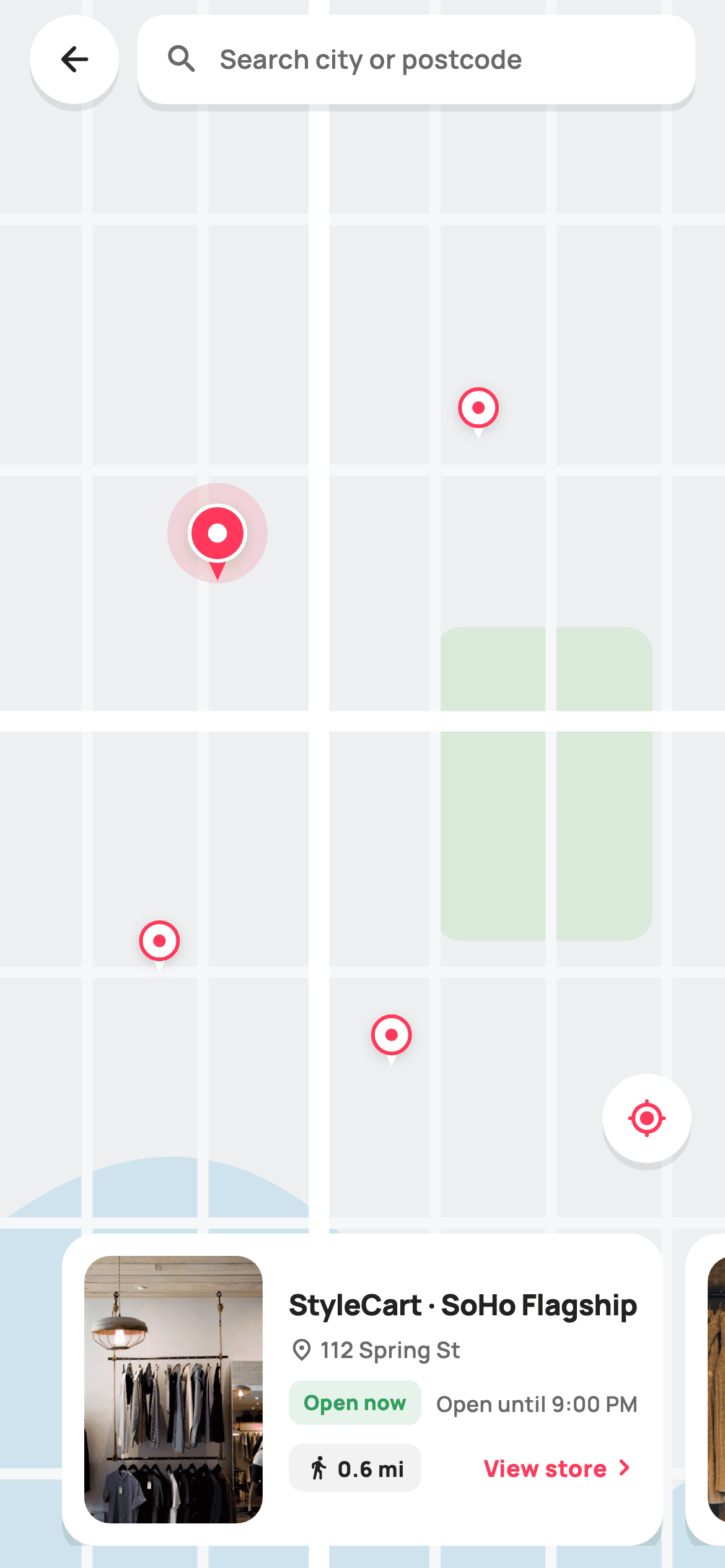
What you'll build
- ✓A painted city map — land, river, park and a two-weight street grid — from a single CustomPainter, no map SDK
- ✓Teardrop store pins with a pulse ring on the selected one, hit-tested by nearest fractional distance
- ✓Two-way selection sync: tapping a pin animates the PageView, swiping a card repaints the map
- ✓A floating search bar and locate-me button that float on identical soft shadows
- ✓Store cards with an Open now / Closed pill, hours, address and a walking-distance chip
Step-by-step build
Create the file
Add a new file at lib/ecom_store_locator/ecom_store_locator_screen.dart in your Flutter project.
Register the bundled fonts
No external packages — this is pure Flutter. It does bundle its design font (Manrope), so drop the font file into fonts/ and declare it in pubspec.yaml:
flutter:
  fonts:
    - family: Manrope
      fonts:
- asset: fonts/Manrope-Regular.ttfBuild it, piece by piece
Here's how the screen goes together. Each block below is a real slice of the code with a plain-English explanation — paste them in order, or grab the whole file from the next section.
One StatefulWidget, three exits
import 'package:flutter/material.dart';

/// StyleCart — Store locator.
///
/// A stylised painted city map (street grid + park + river) carrying tappable
/// store pins, a floating search field + "use my location" chip, and a
/// horizontal bottom carousel of store cards (thumbnail, open-now pill,
/// distance, hours). Selecting a pin highlights it and scrolls the carousel.
///
/// Self-contained per CONVENTIONS.md: pure Flutter, bundled Manrope, inline
/// Airbnb-style tokens, own light theme + SafeArea. Painter-only map (no map
/// package). Reused bundled webp thumbnails. Exposes callbacks only.
class EcomStoreLocatorScreen extends StatefulWidget {
  const EcomStoreLocatorScreen({
    super.key,
    this.onBack,
    this.onStore,
    this.onUseLocation,
  });

  final VoidCallback? onBack;
  final ValueChanged<String>? onStore;
  final VoidCallback? onUseLocation;

  @override
  State<EcomStoreLocatorScreen> createState() => _EcomStoreLocatorScreenState();
}
`EcomStoreLocatorScreen` takes exactly three optional callbacks: `onBack`, `onStore` (a `ValueChanged<String>` handing back the tapped store's name) and `onUseLocation`. Nothing about maps, permissions or geolocation crosses the boundary — the widget owns which pin is selected, and the host app only hears about navigation-worthy events. That is why it needs to be stateful where a detail page would not: selection is genuinely internal UI state, not something the caller should have to manage. `onStore` passing a `String` rather than an index also means the caller never needs to know the internal ordering of the store list.
Tokens, four hardcoded stores, and fractional pin positions
class _EcomStoreLocatorScreenState extends State<EcomStoreLocatorScreen> {
  static const String _font = 'Manrope';
  static const Color _canvas = Color(0xFFFFFFFF);
  static const Color _ink = Color(0xFF222222);
  static const Color _muted = Color(0xFF6A6A6A);
  static const Color _brand = Color(0xFFFF385C);
  static const Color _surface = Color(0xFFF2F2F2);
  static const Color _success = Color(0xFF2E9E5B);

  static const String _dir = 'lib/screens/ecommerce/ecom_store_locator/images';

  static const List<_Store> _stores = <_Store>[
    _Store('StyleCart · SoHo Flagship', '$_dir/p02.webp', Offset(0.30, 0.34),
        '0.6 mi', true, 'Open until 9:00 PM', '112 Spring St'),
    _Store('StyleCart · Midtown', '$_dir/p03.webp', Offset(0.66, 0.26),
        '1.4 mi', true, 'Open until 10:00 PM', '540 5th Ave'),
    _Store('StyleCart · Brooklyn', '$_dir/p02.webp', Offset(0.54, 0.66),
        '2.8 mi', false, 'Opens 10:00 AM', '88 Bedford Ave'),
    _Store('StyleCart · Riverside Outlet', '$_dir/p03.webp', Offset(0.22, 0.60),
        '3.5 mi', true, 'Open until 8:00 PM', '7 Hudson Walk'),
  ];

  int _selected = 0;
  late final PageController _carousel =
      PageController(viewportFraction: 0.86);

  @override
  void dispose() {
    _carousel.dispose();
    super.dispose();
  }

  void _selectPin(int i) {
    setState(() => _selected = i);
    _carousel.animateToPage(
      i,
      duration: const Duration(milliseconds: 320),
      curve: Curves.easeOutCubic,
    );
  }
The palette is Airbnb-flavoured: `#FF385C` brand red, `#222222` ink, `#6A6A6A` muted grey, plus a dedicated `#2E9E5B` success green that exists only for the 'Open now' pill — open/closed status deserves its own colour rather than borrowing the brand's. Each `_Store` carries its pin position as an `Offset(0.30, 0.34)`-style fraction of the map, not pixels, so the same data lands correctly on any screen size. Two pieces of state drive everything: `_selected` and a `PageController` with `viewportFraction: 0.86`, which is what lets the next card peek in from the edge. `_selectPin` couples them — `setState` repaints the map while `animateToPage` glides the carousel over 320ms with `Curves.easeOutCubic` — and `dispose` releases the controller.
The Stack, and tap-the-nearest-pin maths
  @override
  Widget build(BuildContext context) {
    return Theme(
      data: ThemeData.light(useMaterial3: true),
      child: Scaffold(
        backgroundColor: _canvas,
        body: Stack(
          children: <Widget>[
            // Painted map fills the screen behind everything.
            Positioned.fill(
              child: LayoutBuilder(
                builder: (BuildContext _, BoxConstraints c) {
                  return GestureDetector(
                    onTapUp: (TapUpDetails d) {
                      // Tap the nearest pin.
                      final Offset frac = Offset(
                        d.localPosition.dx / c.maxWidth,
                        d.localPosition.dy / c.maxHeight,
                      );
                      int nearest = 0;
                      double best = double.infinity;
                      for (int i = 0; i < _stores.length; i++) {
                        final double dist =
                            (_stores[i].pos - frac).distanceSquared;
                        if (dist < best) {
                          best = dist;
                          nearest = i;
                        }
                      }
                      if (best < 0.02) _selectPin(nearest);
                    },
                    child: CustomPaint(
                      painter: _MapPainter(_stores, _selected),
                      size: Size.infinite,
                    ),
                  );
                },
              ),
            ),
            SafeArea(
              child: Column(
                children: <Widget>[
                  _topBar(),
                  const Spacer(),
                  _storeCarousel(),
                  const SizedBox(height: 12),
                ],
              ),
            ),
            // Locate-me FAB sits above the carousel.
            Positioned(
              right: 18,
              bottom: 218,
              child: _locateButton(),
            ),
          ],
        ),
      ),
    );
  }
The layout is a three-layer `Stack`: a `Positioned.fill` painted map at the bottom, a `SafeArea` column holding the top bar and carousel (with a `Spacer` shoving them apart), and a locate button pinned at `right: 18, bottom: 218` so it hovers just above the 168px carousel. The interesting part is pin tapping. There are no per-pin widgets — pins are paint — so a `GestureDetector` wraps the whole map and its `onTapUp` converts the tap into fractional coordinates via the `LayoutBuilder`'s constraints, then loops the stores comparing `distanceSquared` (cheaper than `distance`, since ranking doesn't need the square root). The `best < 0.02` guard is the forgiveness radius: a tap on empty land selects nothing, but a tap anywhere near a pin snaps to it, which makes 20px pins comfortably tappable.
Floating chrome: search bar, shadow circles, locate button, carousel
  Widget _topBar() {
    return Padding(
      padding: const EdgeInsets.fromLTRB(16, 8, 16, 0),
      child: Row(
        children: <Widget>[
          _shadowCircle(
            child: IconButton(
              onPressed: widget.onBack,
              icon: const Icon(Icons.arrow_back_rounded, size: 22, color: _ink),
            ),
          ),
          const SizedBox(width: 10),
          Expanded(
            child: Container(
              height: 48,
              padding: const EdgeInsets.symmetric(horizontal: 14),
              decoration: BoxDecoration(
                color: _canvas,
                borderRadius: BorderRadius.circular(14),
                boxShadow: <BoxShadow>[
                  BoxShadow(
                    color: Colors.black.withValues(alpha: 0.08),
                    blurRadius: 16,
                    offset: const Offset(0, 4),
                  ),
                ],
              ),
              child: Row(
                children: const <Widget>[
                  Icon(Icons.search_rounded, size: 20, color: _muted),
                  SizedBox(width: 10),
                  Text(
                    'Search city or postcode',
                    style: TextStyle(
                      fontFamily: _font,
                      fontSize: 14,
                      fontWeight: FontWeight.w600,
                      color: _muted,
                    ),
                  ),
                ],
              ),
            ),
          ),
        ],
      ),
    );
  }

  Widget _shadowCircle({required Widget child}) {
    return Container(
      decoration: BoxDecoration(
        color: _canvas,
        shape: BoxShape.circle,
        boxShadow: <BoxShadow>[
          BoxShadow(
            color: Colors.black.withValues(alpha: 0.08),
            blurRadius: 16,
            offset: const Offset(0, 4),
          ),
        ],
      ),
      child: child,
    );
  }

  Widget _locateButton() {
    return GestureDetector(
      onTap: widget.onUseLocation,
      child: _shadowCircle(
        child: const Padding(
          padding: EdgeInsets.all(13),
          child: Icon(Icons.my_location_rounded, size: 22, color: _brand),
        ),
      ),
    );
  }

  Widget _storeCarousel() {
    return SizedBox(
      height: 168,
      child: PageView.builder(
        controller: _carousel,
        onPageChanged: (int i) => setState(() => _selected = i),
        itemCount: _stores.length,
        itemBuilder: (BuildContext _, int i) {
          return Padding(
            padding: const EdgeInsets.symmetric(horizontal: 6),
            child: _storeCard(_stores[i]),
          );
        },
      ),
    );
  }
There is no `AppBar` — a map screen wants the map bleeding to the top edge, so the 'bar' is just a `Row` floating inside the `SafeArea`: a circular back button and a 48px search field, both white on the same `BoxShadow` recipe (black at `alpha: 0.08`, `blurRadius: 16`, offset `(0, 4)`). That recipe is extracted once into `_shadowCircle`, so the back button and the locate-me button are guaranteed to match; the locate icon is `Icons.my_location_rounded` in brand red — the single accent among the neutral chrome. The search field is a static `Text('Search city or postcode')`, a deliberate tap target for the host app rather than a live `TextField`. `_storeCarousel` is a 168px `PageView.builder` whose `onPageChanged` writes `_selected` directly — that is the reverse half of the sync, and note it calls plain `setState`, not `_selectPin`, so a swipe never triggers `animateToPage` and fights the user's own gesture.
The store card
  Widget _storeCard(_Store s) {
    return GestureDetector(
      onTap: () => widget.onStore?.call(s.name),
      child: Container(
        decoration: BoxDecoration(
          color: _canvas,
          borderRadius: BorderRadius.circular(18),
          boxShadow: <BoxShadow>[
            BoxShadow(
              color: Colors.black.withValues(alpha: 0.10),
              blurRadius: 20,
              offset: const Offset(0, 6),
            ),
          ],
        ),
        padding: const EdgeInsets.all(12),
        child: Row(
          children: <Widget>[
            ClipRRect(
              borderRadius: BorderRadius.circular(14),
              child: Image.asset(
                s.thumb,
                width: 96,
                height: 144,
                fit: BoxFit.cover,
              ),
            ),
            const SizedBox(width: 14),
            Expanded(
              child: Column(
                crossAxisAlignment: CrossAxisAlignment.start,
                mainAxisAlignment: MainAxisAlignment.center,
                children: <Widget>[
                  Text(
                    s.name,
                    maxLines: 2,
                    overflow: TextOverflow.ellipsis,
                    style: const TextStyle(
                      fontFamily: _font,
                      fontSize: 15.5,
                      fontWeight: FontWeight.w800,
                      letterSpacing: -0.2,
                      height: 1.2,
                      color: _ink,
                    ),
                  ),
                  const SizedBox(height: 6),
                  Row(
                    children: <Widget>[
                      const Icon(Icons.place_outlined,
                          size: 14, color: _muted),
                      const SizedBox(width: 3),
                      Text(
                        s.address,
                        style: const TextStyle(
                          fontFamily: _font,
                          fontSize: 12,
                          fontWeight: FontWeight.w600,
                          color: _muted,
                        ),
                      ),
                    ],
                  ),
                  const SizedBox(height: 8),
                  Row(
                    children: <Widget>[
                      Container(
                        padding: const EdgeInsets.symmetric(
                            horizontal: 8, vertical: 4),
                        decoration: BoxDecoration(
                          color: (s.open ? _success : _muted)
                              .withValues(alpha: 0.12),
                          borderRadius: BorderRadius.circular(7),
                        ),
                        child: Text(
                          s.open ? 'Open now' : 'Closed',
                          style: TextStyle(
                            fontFamily: _font,
                            fontSize: 11,
                            fontWeight: FontWeight.w800,
                            color: s.open ? _success : _muted,
                          ),
                        ),
                      ),
                      const SizedBox(width: 8),
                      Flexible(
                        child: Text(
                          s.hours,
                          maxLines: 1,
                          overflow: TextOverflow.ellipsis,
                          style: const TextStyle(
                            fontFamily: _font,
                            fontSize: 11.5,
                            fontWeight: FontWeight.w600,
                            color: _muted,
                          ),
                        ),
                      ),
                    ],
                  ),
                  const SizedBox(height: 10),
                  Row(
                    children: <Widget>[
                      Container(
                        padding: const EdgeInsets.symmetric(
                            horizontal: 9, vertical: 5),
                        decoration: BoxDecoration(
                          color: _surface,
                          borderRadius: BorderRadius.circular(8),
                        ),
                        child: Row(
                          children: <Widget>[
                            const Icon(Icons.directions_walk_rounded,
                                size: 14, color: _ink),
                            const SizedBox(width: 3),
                            Text(
                              s.distance,
                              style: const TextStyle(
                                fontFamily: _font,
                                fontSize: 11.5,
                                fontWeight: FontWeight.w800,
                                color: _ink,
                              ),
                            ),
                          ],
                        ),
                      ),
                      const Spacer(),
                      const Text(
                        'View store',
                        style: TextStyle(
                          fontFamily: _font,
                          fontSize: 12.5,
                          fontWeight: FontWeight.w800,
                          color: _brand,
                        ),
                      ),
                      const Icon(Icons.chevron_right_rounded,
                          size: 18, color: _brand),
                    ],
                  ),
                ],
              ),
            ),
          ],
        ),
      ),
    );
  }
}
Each card is a white 18px-radius container with a slightly heavier shadow than the chrome (`alpha: 0.10`, `blurRadius: 20`) because it sits closer to the reader. Inside, a `Row` pairs a 96×144 `ClipRRect`-rounded `Image.asset` thumbnail with a centred column of facts, in scanning order: name at 15.5px `w800` with two-line ellipsis, then address, then status, then actions. The status row is where the data model pays off — the pill derives everything from `s.open`: `_success` green at `alpha: 0.12` behind green 'Open now' text, or muted grey behind 'Closed', with the free-text hours ('Open until 9:00 PM' / 'Opens 10:00 AM') sitting beside it in a `Flexible` so long strings ellipsise instead of overflowing. The bottom row puts the walking distance in a grey `_surface` chip with a `directions_walk_rounded` icon, a `Spacer`, then a brand-red 'View store' label and chevron — the whole card is tappable via the outer `GestureDetector`, so the 'button' is really just an affordance hint.
The _Store model and painting the city
class _Store {
  const _Store(this.name, this.thumb, this.pos, this.distance, this.open,
      this.hours, this.address);
  final String name;
  final String thumb;
  final Offset pos; // fractional position on the map (0..1)
  final String distance;
  final bool open;
  final String hours;
  final String address;
}

/// A stylised painted city map: tinted land, a park block, a curved river,
/// a grid of streets, and store pins (the selected pin enlarged in brand red).
class _MapPainter extends CustomPainter {
  _MapPainter(this.stores, this.selected);
  final List<_Store> stores;
  final int selected;

  static const Color _land = Color(0xFFEDEFF1);
  static const Color _road = Color(0xFFFFFFFF);
  static const Color _roadMinor = Color(0xFFF6F7F8);
  static const Color _park = Color(0xFFD9EAD9);
  static const Color _water = Color(0xFFCFE3EF);
  static const Color _brand = Color(0xFFFF385C);

  @override
  void paint(Canvas canvas, Size size) {
    final Rect rect = Offset.zero & size;
    canvas.drawRect(rect, Paint()..color = _land);

    // River — a soft diagonal band.
    final Path river = Path()
      ..moveTo(size.width * 0.0, size.height * 0.78)
      ..quadraticBezierTo(size.width * 0.35, size.height * 0.66,
          size.width * 0.62, size.height * 0.88)
      ..quadraticBezierTo(size.width * 0.82, size.height * 1.02,
          size.width * 1.0, size.height * 0.92)
      ..lineTo(size.width, size.height)
      ..lineTo(0, size.height)
      ..close();
    canvas.drawPath(river, Paint()..color = _water);

    // Park block.
    final RRect park = RRect.fromRectAndRadius(
      Rect.fromLTWH(size.width * 0.60, size.height * 0.40,
          size.width * 0.30, size.height * 0.20),
      const Radius.circular(14),
    );
    canvas.drawRRect(park, Paint()..color = _park);

    // Minor + major street grid.
    final Paint minor = Paint()
      ..color = _roadMinor
      ..strokeWidth = 6;
    final Paint major = Paint()
      ..color = _road
      ..strokeWidth = 11;

    for (double x = size.width * 0.12; x < size.width; x += size.width * 0.16) {
      canvas.drawLine(Offset(x, 0), Offset(x, size.height), minor);
    }
    for (double y = size.height * 0.14;
        y < size.height;
        y += size.height * 0.16) {
      canvas.drawLine(Offset(0, y), Offset(size.width, y), minor);
    }
    // A couple of avenues.
    canvas.drawLine(Offset(size.width * 0.44, 0),
        Offset(size.width * 0.44, size.height), major);
    canvas.drawLine(Offset(0, size.height * 0.46),
        Offset(size.width, size.height * 0.46), major);

    // Pins (draw unselected first, selected last so it sits on top).
    for (int i = 0; i < stores.length; i++) {
      if (i == selected) continue;
      _drawPin(canvas, size, stores[i].pos, false);
    }
    if (selected >= 0 && selected < stores.length) {
      _drawPin(canvas, size, stores[selected].pos, true);
    }
  }
`_Store` is a seven-field const value class; keeping `pos` on the model means map and carousel read the same source of truth. `_MapPainter` then fakes a believable city in four passes with its own micro-palette: a `#EDEFF1` land fill; a `#CFE3EF` river built from two `quadraticBezierTo` curves and closed down to the bottom edge so it fills as a band rather than stroking as a line; a rounded `#D9EAD9` park block; and a street grid at two weights — 6px `#F6F7F8` minor streets stepped every 16% of the screen in both axes, plus one 11px white vertical avenue at 44% and one horizontal at 46%. The two-weight trick is what sells the illusion: real maps have hierarchy, and a uniform grid reads as graph paper. Pins are drawn last, and the loop deliberately skips the selected index so it can be drawn after all the others — painter's-order z-index, keeping the red pin's pulse ring on top of any neighbour.
Teardrop pins and a precise shouldRepaint
  void _drawPin(Canvas canvas, Size size, Offset frac, bool active) {
    final Offset c = Offset(frac.dx * size.width, frac.dy * size.height);
    final double r = active ? 15 : 10;

    if (active) {
      // Pulse ring.
      canvas.drawCircle(
          c, r + 12, Paint()..color = _brand.withValues(alpha: 0.16));
    }
    // Teardrop pin: circle head + triangle tail.
    final Color fill = active ? _brand : Colors.white;
    final Path tail = Path()
      ..moveTo(c.dx - r * 0.55, c.dy + r * 0.5)
      ..lineTo(c.dx + r * 0.55, c.dy + r * 0.5)
      ..lineTo(c.dx, c.dy + r * 1.7)
      ..close();
    final Paint shadow = Paint()
      ..color = Colors.black.withValues(alpha: 0.18)
      ..maskFilter = const MaskFilter.blur(BlurStyle.normal, 4);
    canvas.drawCircle(c.translate(0, 2), r, shadow);
    canvas.drawPath(tail, Paint()..color = fill);
    canvas.drawCircle(c, r, Paint()..color = fill);
    canvas.drawCircle(
      c,
      r,
      Paint()
        ..style = PaintingStyle.stroke
        ..strokeWidth = 2
        ..color = active ? Colors.white : _brand,
    );
    // Inner dot.
    canvas.drawCircle(c, r * 0.34,
        Paint()..color = active ? Colors.white : _brand);
  }

  @override
  bool shouldRepaint(_MapPainter old) =>
      old.selected != selected || old.stores != stores;
}
`_drawPin` converts the fractional position to pixels, then sizes by state: radius 15 for the active pin, 10 for the rest, with the active one first getting a pulse ring — a circle at `r + 12` in brand red at `alpha: 0.16`. The teardrop shape is cheap geometry: a three-point triangle tail closed under a circle head, with a blurred shadow (`MaskFilter.blur`, black at `alpha: 0.18`) drawn 2px lower first so the pin appears lifted off the map. Colours invert with state — active is red with a white 2px stroke ring and white inner dot; inactive is white with red stroke and red dot — so both variants stay legible on the grey land. `shouldRepaint` compares `selected` and `stores` instead of returning a lazy `true`, so scrolling the carousel repaints the map exactly when the selection changes and never otherwise.
Full code
The complete, ready-to-paste source. Free to use in your projects — one click copies it all.
import 'package:flutter/material.dart';
/// StyleCart — Store locator.
///
/// A stylised painted city map (street grid + park + river) carrying tappable
/// store pins, a floating search field + "use my location" chip, and a
/// horizontal bottom carousel of store cards (thumbnail, open-now pill,
/// distance, hours). Selecting a pin highlights it and scrolls the carousel.
///
/// Self-contained per CONVENTIONS.md: pure Flutter, bundled Manrope, inline
/// Airbnb-style tokens, own light theme + SafeArea. Painter-only map (no map
/// package). Reused bundled webp thumbnails. Exposes callbacks only.
class EcomStoreLocatorScreen extends StatefulWidget {
const EcomStoreLocatorScreen({
super.key,
this.onBack,
this.onStore,
this.onUseLocation,
});
final VoidCallback? onBack;
final ValueChanged<String>? onStore;
final VoidCallback? onUseLocation;
@override
State<EcomStoreLocatorScreen> createState() => _EcomStoreLocatorScreenState();
}
class _EcomStoreLocatorScreenState extends State<EcomStoreLocatorScreen> {
static const String _font = 'Manrope';
static const Color _canvas = Color(0xFFFFFFFF);
static const Color _ink = Color(0xFF222222);
static const Color _muted = Color(0xFF6A6A6A);
static const Color _brand = Color(0xFFFF385C);
static const Color _surface = Color(0xFFF2F2F2);
static const Color _success = Color(0xFF2E9E5B);
static const String _dir = 'lib/screens/ecommerce/ecom_store_locator/images';
static const List<_Store> _stores = <_Store>[
_Store('StyleCart · SoHo Flagship', '$_dir/p02.webp', Offset(0.30, 0.34),
'0.6 mi', true, 'Open until 9:00 PM', '112 Spring St'),
_Store('StyleCart · Midtown', '$_dir/p03.webp', Offset(0.66, 0.26),
'1.4 mi', true, 'Open until 10:00 PM', '540 5th Ave'),
_Store('StyleCart · Brooklyn', '$_dir/p02.webp', Offset(0.54, 0.66),
'2.8 mi', false, 'Opens 10:00 AM', '88 Bedford Ave'),
_Store('StyleCart · Riverside Outlet', '$_dir/p03.webp', Offset(0.22, 0.60),
'3.5 mi', true, 'Open until 8:00 PM', '7 Hudson Walk'),
];
int _selected = 0;
late final PageController _carousel =
PageController(viewportFraction: 0.86);
@override
void dispose() {
_carousel.dispose();
super.dispose();
}
void _selectPin(int i) {
setState(() => _selected = i);
_carousel.animateToPage(
i,
duration: const Duration(milliseconds: 320),
curve: Curves.easeOutCubic,
);
}
@override
Widget build(BuildContext context) {
return Theme(
data: ThemeData.light(useMaterial3: true),
child: Scaffold(
backgroundColor: _canvas,
body: Stack(
children: <Widget>[
// Painted map fills the screen behind everything.
Positioned.fill(
child: LayoutBuilder(
builder: (BuildContext _, BoxConstraints c) {
return GestureDetector(
onTapUp: (TapUpDetails d) {
// Tap the nearest pin.
final Offset frac = Offset(
d.localPosition.dx / c.maxWidth,
d.localPosition.dy / c.maxHeight,
);
int nearest = 0;
double best = double.infinity;
for (int i = 0; i < _stores.length; i++) {
final double dist =
(_stores[i].pos - frac).distanceSquared;
if (dist < best) {
best = dist;
nearest = i;
}
}
if (best < 0.02) _selectPin(nearest);
},
child: CustomPaint(
painter: _MapPainter(_stores, _selected),
size: Size.infinite,
),
);
},
),
),
SafeArea(
child: Column(
children: <Widget>[
_topBar(),
const Spacer(),
_storeCarousel(),
const SizedBox(height: 12),
],
),
),
// Locate-me FAB sits above the carousel.
Positioned(
right: 18,
bottom: 218,
child: _locateButton(),
),
],
),
),
);
}
Widget _topBar() {
return Padding(
padding: const EdgeInsets.fromLTRB(16, 8, 16, 0),
child: Row(
children: <Widget>[
_shadowCircle(
child: IconButton(
onPressed: widget.onBack,
icon: const Icon(Icons.arrow_back_rounded, size: 22, color: _ink),
),
),
const SizedBox(width: 10),
Expanded(
child: Container(
height: 48,
padding: const EdgeInsets.symmetric(horizontal: 14),
decoration: BoxDecoration(
color: _canvas,
borderRadius: BorderRadius.circular(14),
boxShadow: <BoxShadow>[
BoxShadow(
color: Colors.black.withValues(alpha: 0.08),
blurRadius: 16,
offset: const Offset(0, 4),
),
],
),
child: Row(
children: const <Widget>[
Icon(Icons.search_rounded, size: 20, color: _muted),
SizedBox(width: 10),
Text(
'Search city or postcode',
style: TextStyle(
fontFamily: _font,
fontSize: 14,
fontWeight: FontWeight.w600,
color: _muted,
),
),
],
),
),
),
],
),
);
}
Widget _shadowCircle({required Widget child}) {
return Container(
decoration: BoxDecoration(
color: _canvas,
shape: BoxShape.circle,
boxShadow: <BoxShadow>[
BoxShadow(
color: Colors.black.withValues(alpha: 0.08),
blurRadius: 16,
offset: const Offset(0, 4),
),
],
),
child: child,
);
}
Widget _locateButton() {
return GestureDetector(
onTap: widget.onUseLocation,
child: _shadowCircle(
child: const Padding(
padding: EdgeInsets.all(13),
child: Icon(Icons.my_location_rounded, size: 22, color: _brand),
),
),
);
}
Widget _storeCarousel() {
return SizedBox(
height: 168,
child: PageView.builder(
controller: _carousel,
onPageChanged: (int i) => setState(() => _selected = i),
itemCount: _stores.length,
itemBuilder: (BuildContext _, int i) {
return Padding(
padding: const EdgeInsets.symmetric(horizontal: 6),
child: _storeCard(_stores[i]),
);
},
),
);
}
Widget _storeCard(_Store s) {
return GestureDetector(
onTap: () => widget.onStore?.call(s.name),
child: Container(
decoration: BoxDecoration(
color: _canvas,
borderRadius: BorderRadius.circular(18),
boxShadow: <BoxShadow>[
BoxShadow(
color: Colors.black.withValues(alpha: 0.10),
blurRadius: 20,
offset: const Offset(0, 6),
),
],
),
padding: const EdgeInsets.all(12),
child: Row(
children: <Widget>[
ClipRRect(
borderRadius: BorderRadius.circular(14),
child: Image.asset(
s.thumb,
width: 96,
height: 144,
fit: BoxFit.cover,
),
),
const SizedBox(width: 14),
Expanded(
child: Column(
crossAxisAlignment: CrossAxisAlignment.start,
mainAxisAlignment: MainAxisAlignment.center,
children: <Widget>[
Text(
s.name,
maxLines: 2,
overflow: TextOverflow.ellipsis,
style: const TextStyle(
fontFamily: _font,
fontSize: 15.5,
fontWeight: FontWeight.w800,
letterSpacing: -0.2,
height: 1.2,
color: _ink,
),
),
const SizedBox(height: 6),
Row(
children: <Widget>[
const Icon(Icons.place_outlined,
size: 14, color: _muted),
const SizedBox(width: 3),
Text(
s.address,
style: const TextStyle(
fontFamily: _font,
fontSize: 12,
fontWeight: FontWeight.w600,
color: _muted,
),
),
],
),
const SizedBox(height: 8),
Row(
children: <Widget>[
Container(
padding: const EdgeInsets.symmetric(
horizontal: 8, vertical: 4),
decoration: BoxDecoration(
color: (s.open ? _success : _muted)
.withValues(alpha: 0.12),
borderRadius: BorderRadius.circular(7),
),
child: Text(
s.open ? 'Open now' : 'Closed',
style: TextStyle(
fontFamily: _font,
fontSize: 11,
fontWeight: FontWeight.w800,
color: s.open ? _success : _muted,
),
),
),
const SizedBox(width: 8),
Flexible(
child: Text(
s.hours,
maxLines: 1,
overflow: TextOverflow.ellipsis,
style: const TextStyle(
fontFamily: _font,
fontSize: 11.5,
fontWeight: FontWeight.w600,
color: _muted,
),
),
),
],
),
const SizedBox(height: 10),
Row(
children: <Widget>[
Container(
padding: const EdgeInsets.symmetric(
horizontal: 9, vertical: 5),
decoration: BoxDecoration(
color: _surface,
borderRadius: BorderRadius.circular(8),
),
child: Row(
children: <Widget>[
const Icon(Icons.directions_walk_rounded,
size: 14, color: _ink),
const SizedBox(width: 3),
Text(
s.distance,
style: const TextStyle(
fontFamily: _font,
fontSize: 11.5,
fontWeight: FontWeight.w800,
color: _ink,
),
),
],
),
),
const Spacer(),
const Text(
'View store',
style: TextStyle(
fontFamily: _font,
fontSize: 12.5,
fontWeight: FontWeight.w800,
color: _brand,
),
),
const Icon(Icons.chevron_right_rounded,
size: 18, color: _brand),
],
),
],
),
),
],
),
),
);
}
}
class _Store {
const _Store(this.name, this.thumb, this.pos, this.distance, this.open,
this.hours, this.address);
final String name;
final String thumb;
final Offset pos; // fractional position on the map (0..1)
final String distance;
final bool open;
final String hours;
final String address;
}
/// A stylised painted city map: tinted land, a park block, a curved river,
/// a grid of streets, and store pins (the selected pin enlarged in brand red).
class _MapPainter extends CustomPainter {
_MapPainter(this.stores, this.selected);
final List<_Store> stores;
final int selected;
static const Color _land = Color(0xFFEDEFF1);
static const Color _road = Color(0xFFFFFFFF);
static const Color _roadMinor = Color(0xFFF6F7F8);
static const Color _park = Color(0xFFD9EAD9);
static const Color _water = Color(0xFFCFE3EF);
static const Color _brand = Color(0xFFFF385C);
@override
void paint(Canvas canvas, Size size) {
final Rect rect = Offset.zero & size;
canvas.drawRect(rect, Paint()..color = _land);
// River — a soft diagonal band.
final Path river = Path()
..moveTo(size.width * 0.0, size.height * 0.78)
..quadraticBezierTo(size.width * 0.35, size.height * 0.66,
size.width * 0.62, size.height * 0.88)
..quadraticBezierTo(size.width * 0.82, size.height * 1.02,
size.width * 1.0, size.height * 0.92)
..lineTo(size.width, size.height)
..lineTo(0, size.height)
..close();
canvas.drawPath(river, Paint()..color = _water);
// Park block.
final RRect park = RRect.fromRectAndRadius(
Rect.fromLTWH(size.width * 0.60, size.height * 0.40,
size.width * 0.30, size.height * 0.20),
const Radius.circular(14),
);
canvas.drawRRect(park, Paint()..color = _park);
// Minor + major street grid.
final Paint minor = Paint()
..color = _roadMinor
..strokeWidth = 6;
final Paint major = Paint()
..color = _road
..strokeWidth = 11;
for (double x = size.width * 0.12; x < size.width; x += size.width * 0.16) {
canvas.drawLine(Offset(x, 0), Offset(x, size.height), minor);
}
for (double y = size.height * 0.14;
y < size.height;
y += size.height * 0.16) {
canvas.drawLine(Offset(0, y), Offset(size.width, y), minor);
}
// A couple of avenues.
canvas.drawLine(Offset(size.width * 0.44, 0),
Offset(size.width * 0.44, size.height), major);
canvas.drawLine(Offset(0, size.height * 0.46),
Offset(size.width, size.height * 0.46), major);
// Pins (draw unselected first, selected last so it sits on top).
for (int i = 0; i < stores.length; i++) {
if (i == selected) continue;
_drawPin(canvas, size, stores[i].pos, false);
}
if (selected >= 0 && selected < stores.length) {
_drawPin(canvas, size, stores[selected].pos, true);
}
}
void _drawPin(Canvas canvas, Size size, Offset frac, bool active) {
final Offset c = Offset(frac.dx * size.width, frac.dy * size.height);
final double r = active ? 15 : 10;
if (active) {
// Pulse ring.
canvas.drawCircle(
c, r + 12, Paint()..color = _brand.withValues(alpha: 0.16));
}
// Teardrop pin: circle head + triangle tail.
final Color fill = active ? _brand : Colors.white;
final Path tail = Path()
..moveTo(c.dx - r * 0.55, c.dy + r * 0.5)
..lineTo(c.dx + r * 0.55, c.dy + r * 0.5)
..lineTo(c.dx, c.dy + r * 1.7)
..close();
final Paint shadow = Paint()
..color = Colors.black.withValues(alpha: 0.18)
..maskFilter = const MaskFilter.blur(BlurStyle.normal, 4);
canvas.drawCircle(c.translate(0, 2), r, shadow);
canvas.drawPath(tail, Paint()..color = fill);
canvas.drawCircle(c, r, Paint()..color = fill);
canvas.drawCircle(
c,
r,
Paint()
..style = PaintingStyle.stroke
..strokeWidth = 2
..color = active ? Colors.white : _brand,
);
// Inner dot.
canvas.drawCircle(c, r * 0.34,
Paint()..color = active ? Colors.white : _brand);
}
@override
bool shouldRepaint(_MapPainter old) =>
old.selected != selected || old.stores != stores;
}
Plus bundled 7 binary assets (fonts/images). The CLI and MCP install those for you automatically.
Two faster ways to add it
Copy-paste works, but you can skip it entirely.
1. FlutterKit CLI
One command drops this screen — and its fonts — straight into your project.
$ flutterkit add ecom-store-locator2. AI agent (MCP)
Connect FlutterKit's MCP server in Claude or Cursor and just ask your agent to install ecom-store-locator — it fetches and writes the files for you.
FAQ
Can I use this store locator screen in a commercial app?
Yes. FlutterKit screens are free, commercial use included — no licence key, no attribution, no sign-up. Copy the code from this page, install it with the CLI command, or pull it through MCP and ship it.
Does this screen need google_maps_flutter or any other package?
No. It is pure Flutter — the city map is a CustomPainter, the pins are canvas circles and paths, and the only dependencies are the Flutter SDK, two bundled webp thumbnails and the bundled Manrope font family the CLI installs alongside the screen.
How would I swap the painted map for a real one?
Replace the `Positioned.fill` layer — the `LayoutBuilder`/`CustomPaint` block — with a `GoogleMap` widget and turn each `_Store`'s fractional `Offset` into a `LatLng` on a `Marker`. Everything else survives untouched: keep `_selectPin` as your marker `onTap` handler and the carousel's `onPageChanged` sync works exactly as it does now. You also get to delete the nearest-pin tap maths, since real markers handle their own taps.
How do I feed in real stores instead of the four hardcoded ones?
Turn `_stores` from a `static const` into a constructor parameter (`final List<_Store> stores` on the widget, made public) and populate it from your API. Compute `distance` server-side or with `Geolocator.distanceBetween`, and derive `open` and the `hours` string from your opening-hours data at build time — the pill and hours row already switch entirely off those two fields.
Which Flutter version does this require?
Flutter 3.22 or newer — the shadows, pills, pulse ring and pin shadow all use `Color.withValues(alpha: …)`, and the constructor uses `super.key`. On an older SDK, replace each `withValues(alpha: x)` with `withOpacity(x)` and expand the constructor to the `{Key? key} : super(key: key)` form.


