How to Build a Review Submitted Success Screen in Flutter (Full Code + Preview)
Most review flows end with a toast that vanishes before the shopper reads it, wasting the one moment they feel good about your store. This tutorial builds StyleCart's review-submitted screen in Flutter: a painted green check ringed by confetti shards, a thank-you headline, a pill recapping the five stars just given, a reward-points chip that makes the incentive concrete, and two ranked CTAs. Everything is drawn with two CustomPainters — no Lottie, no image assets — so you finish with one self-contained Dart file for any checkout or orders flow.
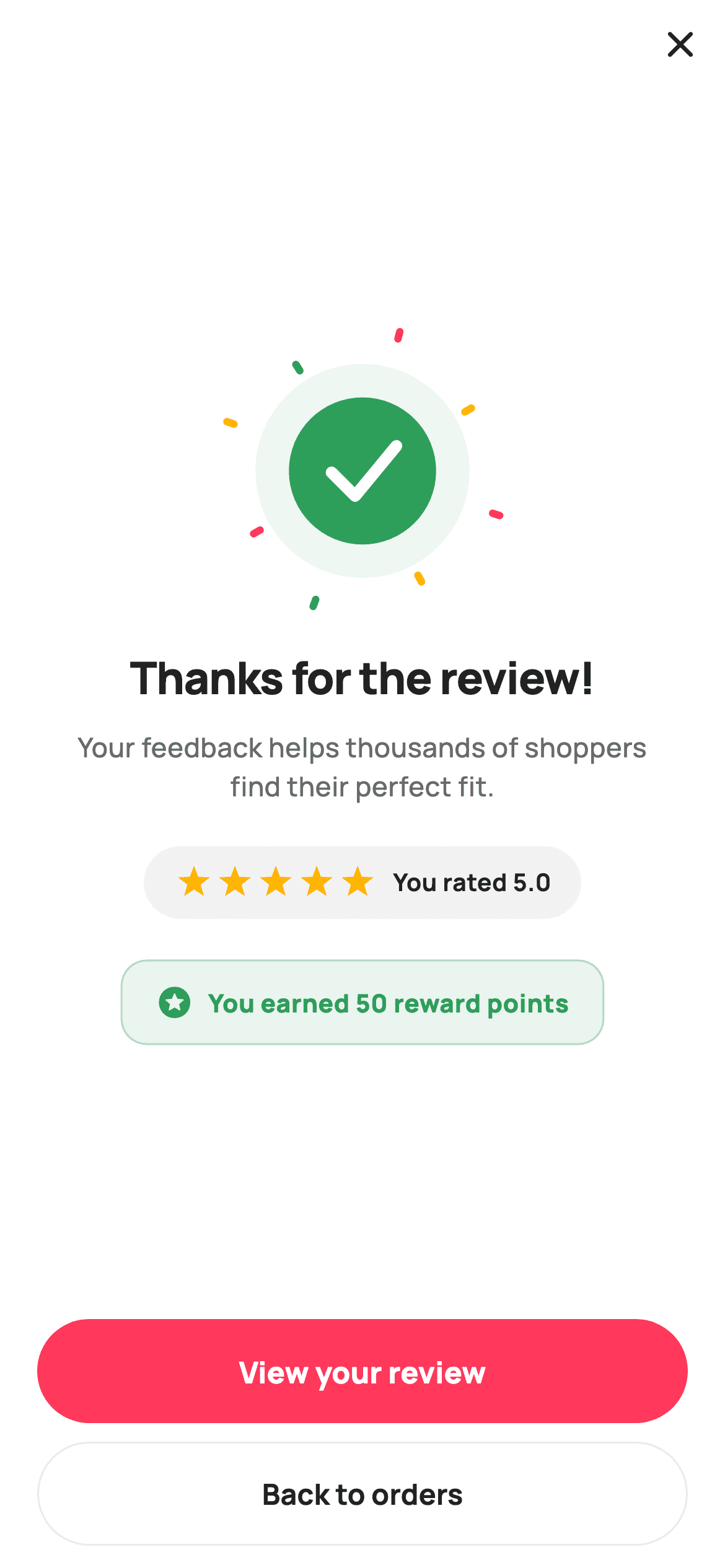
What you'll build
- ✓A success burst painted as a green check in a soft halo, ringed by eight confetti shards at fixed angles
- ✓A grey recap pill that redraws the shopper's five stars with a ten-point star CustomPainter
- ✓A tinted, bordered reward-points chip that turns 'thanks' into '50 points earned'
- ✓A footer that ranks 'View your review' (filled pink) above 'Back to orders' (outlined)
- ✓A stateless screen wired entirely through onViewReview and onDone callbacks
Step-by-step build
Create the file
Add a new file at lib/ecom_rate_success/ecom_rate_success_screen.dart in your Flutter project.
Register the bundled fonts
No external packages — this is pure Flutter. It does bundle its design font (Manrope), so drop the font file into fonts/ and declare it in pubspec.yaml:
flutter:
  fonts:
    - family: Manrope
      fonts:
- asset: fonts/Manrope-Regular.ttfBuild it, piece by piece
Here's how the screen goes together. Each block below is a real slice of the code with a plain-English explanation — paste them in order, or grab the whole file from the next section.
A stateless screen with two exits and a named palette
import 'dart:math' as math;

import 'package:flutter/material.dart';

/// StyleCart — Review Submitted.
///
/// A celebratory confirmation after a review is posted: a painted success burst,
/// a thank-you headline, a points-earned chip, a small star recap, and two
/// CTAs (view your review / back to orders).
///
/// Self-contained per CONVENTIONS.md: pure Flutter, bundled Manrope, inline
/// Airbnb-style tokens, own light theme + SafeArea. Painter-only graphics.
/// Exposes callbacks only.
class EcomRateSuccessScreen extends StatelessWidget {
  const EcomRateSuccessScreen({
    super.key,
    this.onViewReview,
    this.onDone,
  });

  final VoidCallback? onViewReview;
  final VoidCallback? onDone;

  static const String _font = 'Manrope';
  static const Color _canvas = Color(0xFFFFFFFF);
  static const Color _ink = Color(0xFF222222);
  static const Color _muted = Color(0xFF6A6A6A);
  static const Color _brand = Color(0xFFFF385C);
  static const Color _surface = Color(0xFFF2F2F2);
  static const Color _success = Color(0xFF2E9E5B);
  static const Color _hairline = Color(0xFFEBEBEB);
`EcomRateSuccessScreen` is a `StatelessWidget` taking just two nullable callbacks, `onViewReview` and `onDone` — a confirmation page has nothing left to mutate, so there is no controller and no setState anywhere in the file. The `dart:math` import at the top is a hint about how the visuals are made: both the confetti ring and the stars are trigonometry, not assets. The palette is Airbnb-flavoured — `_brand` pink `#FF385C` for the primary action, `_ink` `#222222` and `_muted` `#6A6A6A` for text — but the celebration itself runs on `_success` green `#2E9E5B`. Keeping brand and success as separate constants means the check reads as 'it worked' while the CTA still reads as 'the shop'.
build(): close button, centred column, and the copy
  @override
  Widget build(BuildContext context) {
    return Theme(
      data: ThemeData.light(useMaterial3: true),
      child: Scaffold(
        backgroundColor: _canvas,
        body: SafeArea(
          child: Column(
            children: <Widget>[
              Align(
                alignment: Alignment.centerRight,
                child: IconButton(
                  onPressed: onDone,
                  icon: const Icon(Icons.close_rounded, size: 24, color: _ink),
                ),
              ),
              Expanded(
                child: Center(
                  child: Padding(
                    padding: const EdgeInsets.symmetric(horizontal: 32),
                    child: Column(
                      mainAxisSize: MainAxisSize.min,
                      children: <Widget>[
                        const SizedBox(
                          width: 132,
                          height: 132,
                          child: CustomPaint(painter: _BurstPainter()),
                        ),
                        const SizedBox(height: 28),
                        const Text(
                          'Thanks for the review!',
                          textAlign: TextAlign.center,
                          style: TextStyle(
                            fontFamily: _font,
                            fontSize: 24,
                            fontWeight: FontWeight.w800,
                            letterSpacing: -0.5,
                            color: _ink,
                          ),
                        ),
                        const SizedBox(height: 10),
                        const Text(
                          'Your feedback helps thousands of shoppers '
                          'find their perfect fit.',
                          textAlign: TextAlign.center,
                          style: TextStyle(
                            fontFamily: _font,
                            fontSize: 14.5,
                            fontWeight: FontWeight.w500,
                            height: 1.45,
                            color: _muted,
                          ),
                        ),
                        const SizedBox(height: 22),
                        _starRecap(),
                        const SizedBox(height: 22),
                        _pointsChip(),
                      ],
                    ),
                  ),
                ),
              ),
              _footer(),
            ],
          ),
        ),
      ),
    );
  }
The layout is a `Column` with three bands: an `Align(centerRight)` holding a lone `close_rounded` IconButton wired to `onDone`, an `Expanded > Center` for the celebration, and `_footer()` pinned at the bottom. There is no app bar and no title — the 24px `w800` headline 'Thanks for the review!' with `letterSpacing: -0.5` does that job itself. The burst gets a fixed `SizedBox(width: 132, height: 132)` so `_BurstPainter` always has a square canvas, and the supporting line ('helps thousands of shoppers find their perfect fit') sits at 14.5px `_muted` with `height: 1.45` — it explains why the review mattered, which lands better than a bare confirmation. Note the vertical rhythm: 28px under the burst, then 10, 22, 22 — spacing tightens as content gets less important.
The star recap pill
  Widget _starRecap() {
    return Container(
      padding: const EdgeInsets.symmetric(horizontal: 16, vertical: 10),
      decoration: BoxDecoration(
        color: _surface,
        borderRadius: BorderRadius.circular(9999),
      ),
      child: Row(
        mainAxisSize: MainAxisSize.min,
        children: <Widget>[
          for (int i = 0; i < 5; i++)
            const Padding(
              padding: EdgeInsets.symmetric(horizontal: 2),
              child: CustomPaint(
                size: Size(18, 18),
                painter: _SmallStarPainter(),
              ),
            ),
          const SizedBox(width: 8),
          const Text(
            'You rated 5.0',
            style: TextStyle(
              fontFamily: _font,
              fontSize: 13,
              fontWeight: FontWeight.w700,
              color: _ink,
            ),
          ),
        ],
      ),
    );
  }
`_starRecap()` is a `_surface` grey container with `BorderRadius.circular(9999)` — the oversized radius is the standard trick for a true stadium pill at any height. Inside, a collection-`for` emits five 18×18 `CustomPaint`s using `_SmallStarPainter`, each padded 2px horizontally, followed by 'You rated 5.0' at 13px `w700`. Repeating the stars is a deliberate mirror moment: the shopper just tapped these on the previous screen, and seeing them echoed back confirms the submission recorded what they chose. `mainAxisSize: MainAxisSize.min` on the Row keeps the pill hugging its content instead of stretching to the 32px-padded column width.
The reward-points chip
  Widget _pointsChip() {
    return Container(
      padding: const EdgeInsets.symmetric(horizontal: 18, vertical: 12),
      decoration: BoxDecoration(
        color: _success.withValues(alpha: 0.10),
        borderRadius: BorderRadius.circular(14),
        border: Border.all(color: _success.withValues(alpha: 0.30)),
      ),
      child: const Row(
        mainAxisSize: MainAxisSize.min,
        children: <Widget>[
          Icon(Icons.stars_rounded, size: 20, color: _success),
          SizedBox(width: 8),
          Text(
            'You earned 50 reward points',
            style: TextStyle(
              fontFamily: _font,
              fontSize: 13.5,
              fontWeight: FontWeight.w800,
              color: _success,
            ),
          ),
        ],
      ),
    );
  }
`_pointsChip()` is the screen's incentive payoff: a container filled with `_success.withValues(alpha: 0.10)`, bordered with the same green at `alpha: 0.30`, and a squarer `BorderRadius.circular(14)` than the pill above it — the shape change alone separates 'recap' from 'reward'. An `Icons.stars_rounded` at 20px sits beside 'You earned 50 reward points' in full `_success` at 13.5px `w800`. Because every child is const-able, the whole `Row` is declared `const`, which is why the chip builds for free on every frame. Making the reward concrete — a number, not 'points added' — is what gives shoppers a reason to review again next time.
Two CTAs, ranked by what the shopper wants next
  Widget _footer() {
    return Padding(
      padding: const EdgeInsets.fromLTRB(20, 8, 20, 12),
      child: Column(
        children: <Widget>[
          SizedBox(
            height: 56,
            child: ElevatedButton(
              onPressed: onViewReview,
              style: ElevatedButton.styleFrom(
                backgroundColor: _brand,
                foregroundColor: _canvas,
                elevation: 0,
                minimumSize: const Size.fromHeight(56),
                shape: RoundedRectangleBorder(
                  borderRadius: BorderRadius.circular(9999),
                ),
              ),
              child: const Text(
                'View your review',
                style: TextStyle(
                  fontFamily: _font,
                  fontSize: 16,
                  fontWeight: FontWeight.w800,
                ),
              ),
            ),
          ),
          const SizedBox(height: 10),
          SizedBox(
            height: 56,
            child: OutlinedButton(
              onPressed: onDone,
              style: OutlinedButton.styleFrom(
                foregroundColor: _ink,
                side: const BorderSide(color: _hairline),
                minimumSize: const Size.fromHeight(56),
                shape: RoundedRectangleBorder(
                  borderRadius: BorderRadius.circular(9999),
                ),
              ),
              child: const Text(
                'Back to orders',
                style: TextStyle(
                  fontFamily: _font,
                  fontSize: 15.5,
                  fontWeight: FontWeight.w700,
                ),
              ),
            ),
          ),
        ],
      ),
    );
  }
`_footer()` stacks two 56px-tall stadium buttons with `fromLTRB(20, 8, 20, 12)` padding. 'View your review' is an `ElevatedButton` filled `_brand` pink with `elevation: 0` — flat, but visually dominant — because immediately after posting, the most likely impulse is to see the review live. 'Back to orders' takes an `OutlinedButton` with only a `_hairline` `#EBEBEB` border and `_ink` text, and it shares the same `onDone` callback as the close button: two affordances, one exit path. Both buttons pair a `SizedBox(height: 56)` with `minimumSize: Size.fromHeight(56)`, which guarantees full width and exact height without wrapping anything in `double.infinity`.
_BurstPainter: check, halo, and deterministic confetti
/// Success check inside a soft halo with deterministic celebratory shards.
class _BurstPainter extends CustomPainter {
  const _BurstPainter();

  static const Color _brand = Color(0xFFFF385C);
  static const Color _success = Color(0xFF2E9E5B);
  static const Color _star = Color(0xFFFFB400);

  @override
  void paint(Canvas canvas, Size size) {
    final Offset c = Offset(size.width / 2, size.height / 2);
    final double r = size.width * 0.30;

    // halo
    canvas.drawCircle(c, r + 18, Paint()..color = _success.withValues(alpha: 0.08));
    canvas.drawCircle(c, r, Paint()..color = _success);

    // check
    final Path check = Path()
      ..moveTo(c.dx - r * 0.42, c.dy + r * 0.02)
      ..lineTo(c.dx - r * 0.10, c.dy + r * 0.34)
      ..lineTo(c.dx + r * 0.46, c.dy - r * 0.34);
    canvas.drawPath(
      check,
      Paint()
        ..style = PaintingStyle.stroke
        ..strokeWidth = r * 0.16
        ..strokeCap = StrokeCap.round
        ..strokeJoin = StrokeJoin.round
        ..color = const Color(0xFFFFFFFF),
    );

    // confetti shards — fixed angles/radii so the golden is stable
    const List<double> angs = <double>[
      18, 62, 110, 150, 200, 238, 285, 330,
    ];
    final List<Color> cols = <Color>[_brand, _star, _success];
    for (int i = 0; i < angs.length; i++) {
      final double a = angs[i] * math.pi / 180;
      final double dist = r + 26 + (i.isEven ? 10 : 0);
      final Offset p = c + Offset(math.cos(a) * dist, math.sin(a) * dist);
      final Paint paint = Paint()..color = cols[i % cols.length];
      canvas.save();
      canvas.translate(p.dx, p.dy);
      canvas.rotate(a);
      canvas.drawRRect(
        RRect.fromRectAndRadius(
          Rect.fromCenter(center: Offset.zero, width: 8, height: 4),
          const Radius.circular(2),
        ),
        paint,
      );
      canvas.restore();
    }
  }

  @override
  bool shouldRepaint(_BurstPainter old) => false;
}
The burst layers three passes. First a halo: a circle at `r + 18` in `_success` at 8% alpha, then a solid green disc at `r = size.width * 0.30`. The check is a three-point `Path` whose coordinates are all fractions of `r` (e.g. `c.dx - r * 0.42`), stroked in white at `r * 0.16` with round caps and joins so it scales cleanly with the box. The confetti is the interesting decision: eight shards at hard-coded angles (18°, 62°, 110°…) rather than `Random()`, with the comment explaining why — fixed geometry keeps golden-file screenshots stable across runs. Each shard is an 8×4 `RRect` cycled through pink, amber `#FFB400`, and green via `cols[i % cols.length]`, pushed out to `r + 26` plus a 10px stagger on even indices, and rotated to face outward using `canvas.save()`/`translate`/`rotate`/`restore`. `shouldRepaint` returns `false` because nothing here ever changes.
_SmallStarPainter: a five-point star from ten vertices
class _SmallStarPainter extends CustomPainter {
  const _SmallStarPainter();

  static const Color _star = Color(0xFFFFB400);

  @override
  void paint(Canvas canvas, Size size) {
    final double cx = size.width / 2;
    final double cy = size.height / 2;
    final double rOuter = size.width / 2;
    final double rInner = rOuter * 0.42;
    final Path path = Path();
    for (int i = 0; i < 10; i++) {
      final double r = i.isEven ? rOuter : rInner;
      final double a = -math.pi / 2 + i * math.pi / 5;
      final double x = cx + r * math.cos(a);
      final double y = cy + r * math.sin(a);
      if (i == 0) {
        path.moveTo(x, y);
      } else {
        path.lineTo(x, y);
      }
    }
    path.close();
    canvas.drawPath(path, Paint()..color = _star);
  }

  @override
  bool shouldRepaint(_SmallStarPainter old) => false;
}
The recap stars come from classic polar-coordinate star construction: a loop over ten vertices alternating between `rOuter` (half the widget width) and `rInner = rOuter * 0.42`, each placed at `-math.pi / 2 + i * math.pi / 5` so the star starts pointing straight up. Even indices are tips, odd indices are the valleys between them; `path.close()` seals the shape and it fills flat amber `#FFB400`. The 0.42 inner ratio gives slightly chunky, friendly points — smaller ratios read spiky, larger ones read like a badge. Using a painter instead of `Icons.star` means the glyph is identical across platforms and needs no icon font at 18px.
Full code
The complete, ready-to-paste source. Free to use in your projects — one click copies it all.
import 'dart:math' as math;

import 'package:flutter/material.dart';

/// StyleCart — Review Submitted.
///
/// A celebratory confirmation after a review is posted: a painted success burst,
/// a thank-you headline, a points-earned chip, a small star recap, and two
/// CTAs (view your review / back to orders).
///
/// Self-contained per CONVENTIONS.md: pure Flutter, bundled Manrope, inline
/// Airbnb-style tokens, own light theme + SafeArea. Painter-only graphics.
/// Exposes callbacks only.
class EcomRateSuccessScreen extends StatelessWidget {
  const EcomRateSuccessScreen({
    super.key,
    this.onViewReview,
    this.onDone,
  });

  final VoidCallback? onViewReview;
  final VoidCallback? onDone;

  static const String _font = 'Manrope';
  static const Color _canvas = Color(0xFFFFFFFF);
  static const Color _ink = Color(0xFF222222);
  static const Color _muted = Color(0xFF6A6A6A);
  static const Color _brand = Color(0xFFFF385C);
  static const Color _surface = Color(0xFFF2F2F2);
  static const Color _success = Color(0xFF2E9E5B);
  static const Color _hairline = Color(0xFFEBEBEB);

  @override
  Widget build(BuildContext context) {
    return Theme(
      data: ThemeData.light(useMaterial3: true),
      child: Scaffold(
        backgroundColor: _canvas,
        body: SafeArea(
          child: Column(
            children: <Widget>[
              Align(
                alignment: Alignment.centerRight,
                child: IconButton(
                  onPressed: onDone,
                  icon: const Icon(Icons.close_rounded, size: 24, color: _ink),
                ),
              ),
              Expanded(
                child: Center(
                  child: Padding(
                    padding: const EdgeInsets.symmetric(horizontal: 32),
                    child: Column(
                      mainAxisSize: MainAxisSize.min,
                      children: <Widget>[
                        const SizedBox(
                          width: 132,
                          height: 132,
                          child: CustomPaint(painter: _BurstPainter()),
                        ),
                        const SizedBox(height: 28),
                        const Text(
                          'Thanks for the review!',
                          textAlign: TextAlign.center,
                          style: TextStyle(
                            fontFamily: _font,
                            fontSize: 24,
                            fontWeight: FontWeight.w800,
                            letterSpacing: -0.5,
                            color: _ink,
                          ),
                        ),
                        const SizedBox(height: 10),
                        const Text(
                          'Your feedback helps thousands of shoppers '
                          'find their perfect fit.',
                          textAlign: TextAlign.center,
                          style: TextStyle(
                            fontFamily: _font,
                            fontSize: 14.5,
                            fontWeight: FontWeight.w500,
                            height: 1.45,
                            color: _muted,
                          ),
                        ),
                        const SizedBox(height: 22),
                        _starRecap(),
                        const SizedBox(height: 22),
                        _pointsChip(),
                      ],
                    ),
                  ),
                ),
              ),
              _footer(),
            ],
          ),
        ),
      ),
    );
  }

  Widget _starRecap() {
    return Container(
      padding: const EdgeInsets.symmetric(horizontal: 16, vertical: 10),
      decoration: BoxDecoration(
        color: _surface,
        borderRadius: BorderRadius.circular(9999),
      ),
      child: Row(
        mainAxisSize: MainAxisSize.min,
        children: <Widget>[
          for (int i = 0; i < 5; i++)
            const Padding(
              padding: EdgeInsets.symmetric(horizontal: 2),
              child: CustomPaint(
                size: Size(18, 18),
                painter: _SmallStarPainter(),
              ),
            ),
          const SizedBox(width: 8),
          const Text(
            'You rated 5.0',
            style: TextStyle(
              fontFamily: _font,
              fontSize: 13,
              fontWeight: FontWeight.w700,
              color: _ink,
            ),
          ),
        ],
      ),
    );
  }

  Widget _pointsChip() {
    return Container(
      padding: const EdgeInsets.symmetric(horizontal: 18, vertical: 12),
      decoration: BoxDecoration(
        color: _success.withValues(alpha: 0.10),
        borderRadius: BorderRadius.circular(14),
        border: Border.all(color: _success.withValues(alpha: 0.30)),
      ),
      child: const Row(
        mainAxisSize: MainAxisSize.min,
        children: <Widget>[
          Icon(Icons.stars_rounded, size: 20, color: _success),
          SizedBox(width: 8),
          Text(
            'You earned 50 reward points',
            style: TextStyle(
              fontFamily: _font,
              fontSize: 13.5,
              fontWeight: FontWeight.w800,
              color: _success,
            ),
          ),
        ],
      ),
    );
  }

  Widget _footer() {
    return Padding(
      padding: const EdgeInsets.fromLTRB(20, 8, 20, 12),
      child: Column(
        children: <Widget>[
          SizedBox(
            height: 56,
            child: ElevatedButton(
              onPressed: onViewReview,
              style: ElevatedButton.styleFrom(
                backgroundColor: _brand,
                foregroundColor: _canvas,
                elevation: 0,
                minimumSize: const Size.fromHeight(56),
                shape: RoundedRectangleBorder(
                  borderRadius: BorderRadius.circular(9999),
                ),
              ),
              child: const Text(
                'View your review',
                style: TextStyle(
                  fontFamily: _font,
                  fontSize: 16,
                  fontWeight: FontWeight.w800,
                ),
              ),
            ),
          ),
          const SizedBox(height: 10),
          SizedBox(
            height: 56,
            child: OutlinedButton(
              onPressed: onDone,
              style: OutlinedButton.styleFrom(
                foregroundColor: _ink,
                side: const BorderSide(color: _hairline),
                minimumSize: const Size.fromHeight(56),
                shape: RoundedRectangleBorder(
                  borderRadius: BorderRadius.circular(9999),
                ),
              ),
              child: const Text(
                'Back to orders',
                style: TextStyle(
                  fontFamily: _font,
                  fontSize: 15.5,
                  fontWeight: FontWeight.w700,
                ),
              ),
            ),
          ),
        ],
      ),
    );
  }
}

/// Success check inside a soft halo with deterministic celebratory shards.
class _BurstPainter extends CustomPainter {
  const _BurstPainter();

  static const Color _brand = Color(0xFFFF385C);
  static const Color _success = Color(0xFF2E9E5B);
  static const Color _star = Color(0xFFFFB400);

  @override
  void paint(Canvas canvas, Size size) {
    final Offset c = Offset(size.width / 2, size.height / 2);
    final double r = size.width * 0.30;

    // halo
    canvas.drawCircle(c, r + 18, Paint()..color = _success.withValues(alpha: 0.08));
    canvas.drawCircle(c, r, Paint()..color = _success);

    // check
    final Path check = Path()
      ..moveTo(c.dx - r * 0.42, c.dy + r * 0.02)
      ..lineTo(c.dx - r * 0.10, c.dy + r * 0.34)
      ..lineTo(c.dx + r * 0.46, c.dy - r * 0.34);
    canvas.drawPath(
      check,
      Paint()
        ..style = PaintingStyle.stroke
        ..strokeWidth = r * 0.16
        ..strokeCap = StrokeCap.round
        ..strokeJoin = StrokeJoin.round
        ..color = const Color(0xFFFFFFFF),
    );

    // confetti shards — fixed angles/radii so the golden is stable
    const List<double> angs = <double>[
      18, 62, 110, 150, 200, 238, 285, 330,
    ];
    final List<Color> cols = <Color>[_brand, _star, _success];
    for (int i = 0; i < angs.length; i++) {
      final double a = angs[i] * math.pi / 180;
      final double dist = r + 26 + (i.isEven ? 10 : 0);
      final Offset p = c + Offset(math.cos(a) * dist, math.sin(a) * dist);
      final Paint paint = Paint()..color = cols[i % cols.length];
      canvas.save();
      canvas.translate(p.dx, p.dy);
      canvas.rotate(a);
      canvas.drawRRect(
        RRect.fromRectAndRadius(
          Rect.fromCenter(center: Offset.zero, width: 8, height: 4),
          const Radius.circular(2),
        ),
        paint,
      );
      canvas.restore();
    }
  }

  @override
  bool shouldRepaint(_BurstPainter old) => false;
}

class _SmallStarPainter extends CustomPainter {
  const _SmallStarPainter();

  static const Color _star = Color(0xFFFFB400);

  @override
  void paint(Canvas canvas, Size size) {
    final double cx = size.width / 2;
    final double cy = size.height / 2;
    final double rOuter = size.width / 2;
    final double rInner = rOuter * 0.42;
    final Path path = Path();
    for (int i = 0; i < 10; i++) {
      final double r = i.isEven ? rOuter : rInner;
      final double a = -math.pi / 2 + i * math.pi / 5;
      final double x = cx + r * math.cos(a);
      final double y = cy + r * math.sin(a);
      if (i == 0) {
        path.moveTo(x, y);
      } else {
        path.lineTo(x, y);
      }
    }
    path.close();
    canvas.drawPath(path, Paint()..color = _star);
  }

  @override
  bool shouldRepaint(_SmallStarPainter old) => false;
}
Plus bundled 5 binary assets (fonts/images). The CLI and MCP install those for you automatically.
Two faster ways to add it
Copy-paste works, but you can skip it entirely.
1. FlutterKit CLI
One command drops this screen — and its fonts — straight into your project.
$ flutterkit add ecom-rate-success2. AI agent (MCP)
Connect FlutterKit's MCP server in Claude or Cursor and just ask your agent to install ecom-rate-success — it fetches and writes the files for you.
FAQ
Can I use this review confirmation screen in a commercial app?
Yes. FlutterKit screens are free, commercial use included — no licence key, no attribution line, no paid tier behind them. Copy the code from this page or install it with the CLI command and ship it.
Does this screen depend on any packages or a confetti library?
No third-party packages at all — the confetti, check and stars are plain `CustomPainter` code over `dart:math` and `flutter/material.dart`. The only asset is the bundled Manrope font family (Regular through ExtraBold), referenced via `fontFamily: 'Manrope'` and shipped alongside the screen.
Which Flutter version do I need?
Flutter 3.22 or newer, because the halo, chip fill and chip border all use `Color.withValues(alpha: …)`. On an older SDK, replace each call with `withOpacity` using the same value — e.g. `_success.withOpacity(0.10)` — and everything else compiles as-is.
The stars, rating and points are hard-coded — how do I make them real?
Add `rating`, `starCount` and `points` parameters to the constructor, then swap the literals: drive the `for (int i = 0; i < 5; i++)` loop in `_starRecap()` from `starCount`, interpolate the rating into 'You rated 5.0', and the points into the chip text. The layout already hugs its content, so shorter or longer strings need no other changes.
Why doesn't the confetti animate?
By design. The shard angles are a fixed const list — the code comments that this keeps golden screenshots stable — and a static burst also avoids an `AnimationController` in what is otherwise a fully stateless file. If you want motion, convert the screen to a `StatefulWidget`, pass an animation value into `_BurstPainter`, scale `dist` by it, and return `true` from `shouldRepaint`.


