How to Build a Variant Picker Bottom Sheet in Flutter (Full Code + Preview)
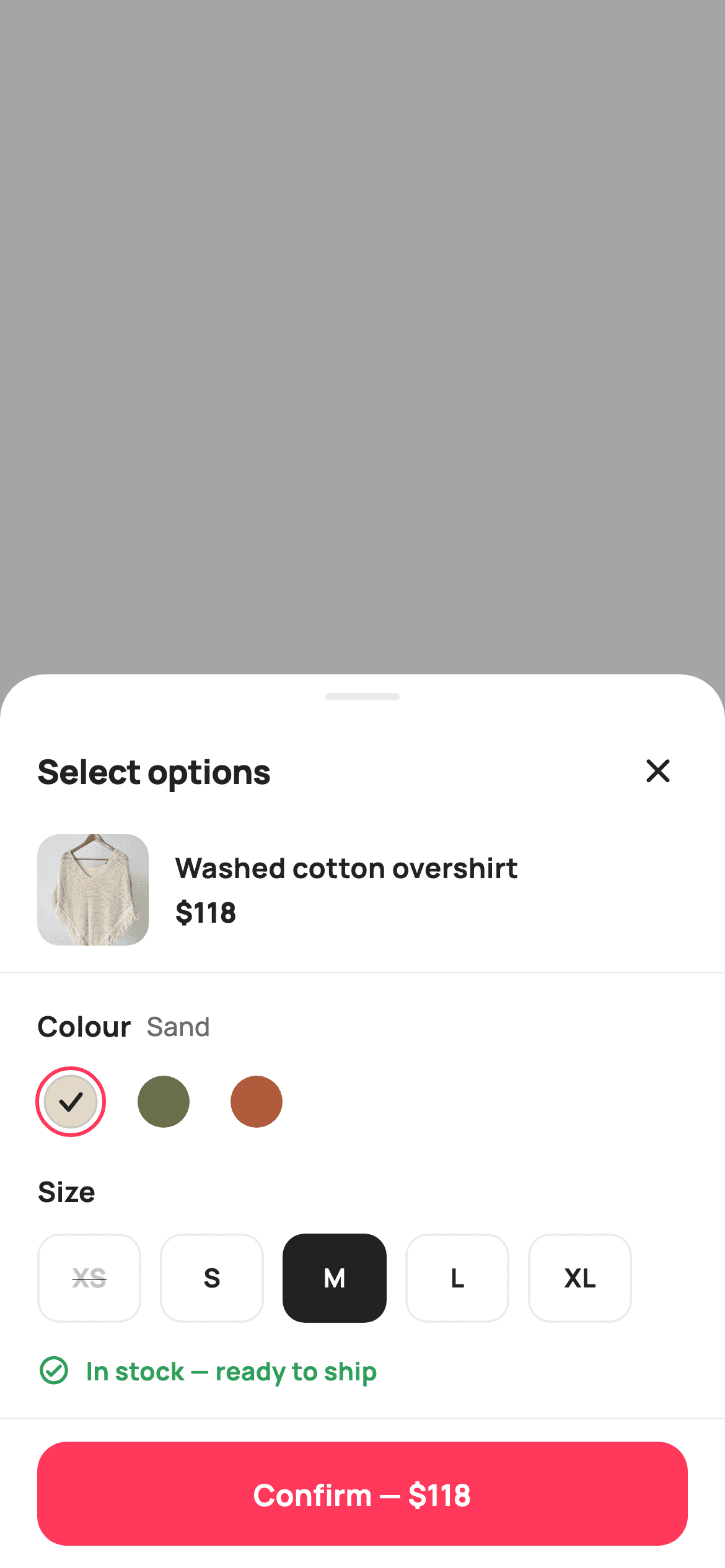
Picking a colour and a size sounds trivial until stock enters the picture: Olive is sold out in M, Rust costs $10 more than Sand, and 'Only 2 left' has to appear the moment you land on that exact combination. This sheet solves it with a 3×5 stock matrix — one small `List<List<int>>` from which the disabled sizes, the availability line, the price, and the CTA's enabled state are all derived. You also get the scrim-plus-sheet pattern for building a modal without `showModalBottomSheet`.
Watch the Flutter UI walkthrough
A short screen recording of Select Variant running, if you'd rather see it before you read the code. The written tutorial below covers everything in it.
Can't see the video? Watch it on YouTube.
What you'll build
- ✓A modal sheet on a 35% black scrim where tapping the empty area above closes it
- ✓A colour × size stock matrix that drives every downstream state from one source
- ✓Size pills that re-evaluate availability whenever the colour changes — sold-out options become struck-through and untappable
- ✓A three-state availability line (in stock / only N left / sold out) sharing one tint, icon, and message ternary
- ✓A confirm bar showing the selected colour's own price, disabling itself and reading 'Sold out' for dead combinations
Step-by-step build
Create the file
Add a new file at lib/ecom_product_variants/ecom_product_variants_screen.dart in your Flutter project.
Register the bundled fonts
No external packages — this is pure Flutter. It does bundle its design font (Manrope), so drop the font file into fonts/ and declare it in pubspec.yaml:
flutter:
  fonts:
    - family: Manrope
      fonts:
- asset: fonts/Manrope-Regular.ttfBuild it, piece by piece
Here's how the screen goes together. Each block below is a real slice of the code with a plain-English explanation — paste them in order, or grab the whole file from the next section.
The stock matrix and derived availability
class EcomProductVariantsScreen extends StatefulWidget {
  const EcomProductVariantsScreen({
    super.key,
    this.onClose,
    this.onConfirm,
  });

  final VoidCallback? onClose;

  /// The chosen "Colour · Size" variant was confirmed.
  final ValueChanged<String>? onConfirm;

  @override
  State<EcomProductVariantsScreen> createState() =>
      _EcomProductVariantsScreenState();
}

class _EcomProductVariantsScreenState extends State<EcomProductVariantsScreen> {
  static const String _font = 'Manrope';
  static const Color _canvas = Color(0xFFFFFFFF);
  static const Color _ink = Color(0xFF222222);
  static const Color _muted = Color(0xFF6A6A6A);
  static const Color _faint = Color(0xFFC1C1C1);
  static const Color _brand = Color(0xFFFF385C);
  static const Color _surface = Color(0xFFF2F2F2);
  static const Color _imageBg = Color(0xFFF5F5F5);
  static const Color _success = Color(0xFF2E9E5B);
  static const Color _warn = Color(0xFFF5A623);
  static const Color _hairline = Color(0xFFEBEBEB);

  static const String _dir =
      'lib/screens/ecommerce/ecom_product_variants/images';

  static const List<_Sw> _colors = <_Sw>[
    _Sw('Sand', Color(0xFFE3D9C6), 118, 'p01.webp'),
    _Sw('Olive', Color(0xFF6B6F4B), 118, 'p02.webp'),
    _Sw('Rust', Color(0xFFB05B3B), 128, 'p03.webp'),
  ];
  static const List<String> _sizes = <String>['XS', 'S', 'M', 'L', 'XL'];

  // stock per [color index][size index]: 0 = sold out, 1-3 = low, >3 = in stock
  static const List<List<int>> _stock = <List<int>>[
    <int>[0, 6, 9, 4, 2],
    <int>[3, 8, 0, 5, 7],
    <int>[2, 4, 6, 1, 0],
  ];

  int _color = 0;
  int _size = 2;

  int get _avail => _stock[_color][_size];
Each `_Sw` colour carries its own `price` and `asset`, which is why picking Rust changes both the thumbnail and the amount on the button — variants aren't just cosmetic. The heart of the screen is `_stock`, a `List<List<int>>` indexed `[colour][size]` and documented inline: 0 means sold out, 1–3 is low, above 3 is in stock. Storing raw counts instead of booleans is what lets one table drive three different states. `_avail` is a getter — `_stock[_color][_size]` — so the current combination's stock is recomputed on every build and can never go stale. The only mutable state on the whole screen is the two indices `_color` and `_size`.
Building a modal without showModalBottomSheet
  @override
  Widget build(BuildContext context) {
    return Theme(
      data: ThemeData.light(useMaterial3: true),
      child: Scaffold(
        backgroundColor: Colors.black.withValues(alpha: 0.35),
        body: Column(
          children: <Widget>[
            Expanded(
              child: GestureDetector(
                onTap: widget.onClose,
                behavior: HitTestBehavior.opaque,
                child: const SizedBox.expand(),
              ),
            ),
            _sheet(),
          ],
        ),
      ),
    );
  }
This screen is a full route that *looks* like a bottom sheet. The `Scaffold`'s background is `Colors.black.withValues(alpha: 0.35)` — the scrim — and the body is a `Column` whose first child is an `Expanded` `GestureDetector` over a `SizedBox.expand()`. That invisible region fills all the space above the sheet, and `HitTestBehavior.opaque` makes it register taps even though it paints nothing, so tapping the dimmed area calls `onClose`. The sheet itself is the second child, sized by its content. Push this with a transparent page route and you get a sheet you fully control, without fighting `showModalBottomSheet`'s constraints.
Sheet chrome and the summary row
  Widget _sheet() {
    return Container(
      decoration: const BoxDecoration(
        color: _canvas,
        borderRadius: BorderRadius.vertical(top: Radius.circular(24)),
      ),
      child: SafeArea(
        top: false,
        child: Column(
          mainAxisSize: MainAxisSize.min,
          children: <Widget>[
            const SizedBox(height: 10),
            Container(
              width: 40,
              height: 4,
              decoration: BoxDecoration(
                color: _hairline,
                borderRadius: BorderRadius.circular(2),
              ),
            ),
            Padding(
              padding: const EdgeInsets.fromLTRB(20, 14, 12, 6),
              child: Row(
                children: <Widget>[
                  const Expanded(
                    child: Text(
                      'Select options',
                      style: TextStyle(
                        fontFamily: _font,
                        fontSize: 18,
                        fontWeight: FontWeight.w800,
                        letterSpacing: -0.3,
                        color: _ink,
                      ),
                    ),
                  ),
                  IconButton(
                    onPressed: widget.onClose,
                    icon: const Icon(Icons.close_rounded, size: 22, color: _ink),
                  ),
                ],
              ),
            ),
            _summary(),
            const Divider(height: 1, color: _hairline),
            Padding(
              padding: const EdgeInsets.fromLTRB(20, 18, 20, 0),
              child: Column(
                crossAxisAlignment: CrossAxisAlignment.start,
                children: <Widget>[
                  _label('Colour', _colors[_color].name),
                  const SizedBox(height: 12),
                  _swatchRow(),
                  const SizedBox(height: 20),
                  _label('Size', null),
                  const SizedBox(height: 12),
                  _sizeGrid(),
                  const SizedBox(height: 16),
                  _availability(),
                  const SizedBox(height: 16),
                ],
              ),
            ),
            _confirmBar(),
          ],
        ),
      ),
    );
  }

  Widget _summary() {
    final _Sw c = _colors[_color];
    return Padding(
      padding: const EdgeInsets.fromLTRB(20, 4, 20, 14),
      child: Row(
        children: <Widget>[
          ClipRRect(
            borderRadius: BorderRadius.circular(12),
            child: Container(
              width: 60,
              height: 60,
              color: _imageBg,
              child: Image.asset('$_dir/${c.asset}', fit: BoxFit.cover),
            ),
          ),
          const SizedBox(width: 14),
          Expanded(
            child: Column(
              crossAxisAlignment: CrossAxisAlignment.start,
              children: <Widget>[
                const Text(
                  'Washed cotton overshirt',
                  maxLines: 1,
                  overflow: TextOverflow.ellipsis,
                  style: TextStyle(
                    fontFamily: _font,
                    fontSize: 15,
                    fontWeight: FontWeight.w700,
                    color: _ink,
                  ),
                ),
                const SizedBox(height: 3),
                Text(
                  '\$${c.price}',
                  style: const TextStyle(
                    fontFamily: _font,
                    fontSize: 15,
                    fontWeight: FontWeight.w800,
                    color: _ink,
                  ),
                ),
              ],
            ),
          ),
        ],
      ),
    );
  }
The sheet `Container` rounds only its top corners with `BorderRadius.vertical(top: Radius.circular(24))`, and wraps `SafeArea(top: false)` so its white background runs under the home indicator while ignoring the status bar. `MainAxisSize.min` on the `Column` is what makes the sheet hug its content instead of stretching. Below the 40×4 grabber and the title row, `_summary()` shows the product thumbnail and price — and because it reads `_colors[_color]`, both swap the instant you pick a different swatch, giving immediate feedback that a variant change is a real change. `_label` takes an optional `value` and spreads it in with collection-if, which is how 'Colour' shows the selected name while 'Size' passes `null` and shows nothing.
Size pills that react to the selected colour
  Widget _sizeGrid() {
    return Wrap(
      spacing: 10,
      runSpacing: 10,
      children: List<Widget>.generate(_sizes.length, (int i) {
        final int stock = _stock[_color][i];
        final bool out = stock == 0;
        final bool on = i == _size && !out;
        return GestureDetector(
          onTap: out ? null : () => setState(() => _size = i),
          child: Container(
            width: 56,
            height: 48,
            alignment: Alignment.center,
            decoration: BoxDecoration(
              color: on ? _ink : _canvas,
              borderRadius: BorderRadius.circular(12),
              border: Border.all(
                color: on ? _ink : _hairline,
                width: 1.2,
              ),
            ),
            child: Text(
              _sizes[i],
              style: TextStyle(
                fontFamily: _font,
                fontSize: 14,
                fontWeight: FontWeight.w700,
                color: out
                    ? _faint
                    : on
                        ? _canvas
                        : _ink,
                decoration:
                    out ? TextDecoration.lineThrough : TextDecoration.none,
              ),
            ),
          ),
        );
      }),
    );
  }
The important line is `final int stock = _stock[_color][i]` — availability is read for the *current colour*, so switching from Sand to Olive re-disables a different set of sizes on the next rebuild with no extra bookkeeping. A sold-out pill gets `onTap: out ? null : ...`, making the `GestureDetector` inert, plus `TextDecoration.lineThrough` and the faint grey text. `on = i == _size && !out` has a subtle consequence worth knowing: if the user has M selected and switches to a colour where M is gone, no pill renders as selected, which is an honest signal that they need to choose again. The selected pill inverts to solid `_ink` with white text, and the border stays 1.2px in both states so nothing shifts on tap.
One ternary chain, three signals
  Widget _availability() {
    final bool out = _avail == 0;
    final bool low = _avail > 0 && _avail <= 3;
    final Color tint = out
        ? _faint
        : low
            ? _warn
            : _success;
    final IconData icon = out
        ? Icons.remove_circle_outline_rounded
        : low
            ? Icons.error_outline_rounded
            : Icons.check_circle_outline_rounded;
    final String text = out
        ? 'This combination is sold out'
        : low
            ? 'Only $_avail left — order soon'
            : 'In stock — ready to ship';
    return Row(
      children: <Widget>[
        Icon(icon, size: 18, color: tint),
        const SizedBox(width: 8),
        Text(
          text,
          style: TextStyle(
            fontFamily: _font,
            fontSize: 13.5,
            fontWeight: FontWeight.w700,
            color: tint,
          ),
        ),
      ],
    );
  }
`_availability` derives `out` and `low` from `_avail`, then runs the same three-way branch across `tint`, `icon`, and `text`. That structure is deliberate: colour, glyph, and wording always agree because they're decided by one condition, and adding a fourth state means editing three parallel ternaries in one place. The low-stock message interpolates the real number — `'Only $_avail left — order soon'` — which is far more persuasive than a generic 'low stock' label. Amber for low, green for available, and grey for sold out follow the usual traffic-light reading.
The confirm bar and its two disabled paths
  Widget _confirmBar() {
    final bool out = _avail == 0;
    return Container(
      decoration: const BoxDecoration(
        color: _canvas,
        border: Border(top: BorderSide(color: _hairline)),
      ),
      child: Padding(
        padding: const EdgeInsets.fromLTRB(20, 12, 20, 12),
        child: SizedBox(
          height: 56,
          width: double.infinity,
          child: FilledButton(
            onPressed: out
                ? null
                : () => widget.onConfirm
                    ?.call('${_colors[_color].name} · ${_sizes[_size]}'),
            style: FilledButton.styleFrom(
              backgroundColor: _brand,
              foregroundColor: _canvas,
              disabledBackgroundColor: _surface,
              disabledForegroundColor: _faint,
              shape: RoundedRectangleBorder(
                borderRadius: BorderRadius.circular(16),
              ),
            ),
            child: Text(
              out ? 'Sold out' : 'Confirm — \$${_colors[_color].price}',
              style: const TextStyle(
                fontFamily: _font,
                fontSize: 16,
                fontWeight: FontWeight.w700,
              ),
            ),
          ),
        ),
      ),
    );
  }
The CTA disables itself the standard Flutter way — `onPressed: out ? null : ...` — and pairs that with `disabledBackgroundColor: _surface` and `disabledForegroundColor: _faint` so a dead combination reads as a flat grey button rather than a faded red one. The label also swaps between `'Sold out'` and `'Confirm — \$${_colors[_color].price}'`, so the price on the button tracks the selected colour. When it fires, `onConfirm` emits a single formatted string — `'${_colors[_color].name} · ${_sizes[_size]}'` — giving the parent the human-readable variant, e.g. 'Rust · L'.
Full code
The complete, ready-to-paste source. Free to use in your projects — one click copies it all.
import 'package:flutter/material.dart';

/// StyleCart — Select Variant.
///
/// A bottom-sheet for choosing a colour × size combination: a product summary
/// row, colour swatches, a size grid where each option shows its own stock
/// state (in stock / low-stock `warn` / sold out), a live availability line and
/// a pinned confirm bar that reflects the picked variant's price.
///
/// Self-contained per CONVENTIONS.md: pure Flutter, bundled Manrope, inline
/// Airbnb-style tokens, own light theme + SafeArea, bundled webp. The swatch is
/// a CustomPainter (no emoji glyph). Exposes callbacks only.
class EcomProductVariantsScreen extends StatefulWidget {
  const EcomProductVariantsScreen({
    super.key,
    this.onClose,
    this.onConfirm,
  });

  final VoidCallback? onClose;

  /// The chosen "Colour · Size" variant was confirmed.
  final ValueChanged<String>? onConfirm;

  @override
  State<EcomProductVariantsScreen> createState() =>
      _EcomProductVariantsScreenState();
}

class _EcomProductVariantsScreenState extends State<EcomProductVariantsScreen> {
  static const String _font = 'Manrope';
  static const Color _canvas = Color(0xFFFFFFFF);
  static const Color _ink = Color(0xFF222222);
  static const Color _muted = Color(0xFF6A6A6A);
  static const Color _faint = Color(0xFFC1C1C1);
  static const Color _brand = Color(0xFFFF385C);
  static const Color _surface = Color(0xFFF2F2F2);
  static const Color _imageBg = Color(0xFFF5F5F5);
  static const Color _success = Color(0xFF2E9E5B);
  static const Color _warn = Color(0xFFF5A623);
  static const Color _hairline = Color(0xFFEBEBEB);

  static const String _dir =
      'lib/screens/ecommerce/ecom_product_variants/images';

  static const List<_Sw> _colors = <_Sw>[
    _Sw('Sand', Color(0xFFE3D9C6), 118, 'p01.webp'),
    _Sw('Olive', Color(0xFF6B6F4B), 118, 'p02.webp'),
    _Sw('Rust', Color(0xFFB05B3B), 128, 'p03.webp'),
  ];
  static const List<String> _sizes = <String>['XS', 'S', 'M', 'L', 'XL'];

  // stock per [color index][size index]: 0 = sold out, 1-3 = low, >3 = in stock
  static const List<List<int>> _stock = <List<int>>[
    <int>[0, 6, 9, 4, 2],
    <int>[3, 8, 0, 5, 7],
    <int>[2, 4, 6, 1, 0],
  ];

  int _color = 0;
  int _size = 2;

  int get _avail => _stock[_color][_size];

  @override
  Widget build(BuildContext context) {
    return Theme(
      data: ThemeData.light(useMaterial3: true),
      child: Scaffold(
        backgroundColor: Colors.black.withValues(alpha: 0.35),
        body: Column(
          children: <Widget>[
            Expanded(
              child: GestureDetector(
                onTap: widget.onClose,
                behavior: HitTestBehavior.opaque,
                child: const SizedBox.expand(),
              ),
            ),
            _sheet(),
          ],
        ),
      ),
    );
  }

  Widget _sheet() {
    return Container(
      decoration: const BoxDecoration(
        color: _canvas,
        borderRadius: BorderRadius.vertical(top: Radius.circular(24)),
      ),
      child: SafeArea(
        top: false,
        child: Column(
          mainAxisSize: MainAxisSize.min,
          children: <Widget>[
            const SizedBox(height: 10),
            Container(
              width: 40,
              height: 4,
              decoration: BoxDecoration(
                color: _hairline,
                borderRadius: BorderRadius.circular(2),
              ),
            ),
            Padding(
              padding: const EdgeInsets.fromLTRB(20, 14, 12, 6),
              child: Row(
                children: <Widget>[
                  const Expanded(
                    child: Text(
                      'Select options',
                      style: TextStyle(
                        fontFamily: _font,
                        fontSize: 18,
                        fontWeight: FontWeight.w800,
                        letterSpacing: -0.3,
                        color: _ink,
                      ),
                    ),
                  ),
                  IconButton(
                    onPressed: widget.onClose,
                    icon: const Icon(Icons.close_rounded, size: 22, color: _ink),
                  ),
                ],
              ),
            ),
            _summary(),
            const Divider(height: 1, color: _hairline),
            Padding(
              padding: const EdgeInsets.fromLTRB(20, 18, 20, 0),
              child: Column(
                crossAxisAlignment: CrossAxisAlignment.start,
                children: <Widget>[
                  _label('Colour', _colors[_color].name),
                  const SizedBox(height: 12),
                  _swatchRow(),
                  const SizedBox(height: 20),
                  _label('Size', null),
                  const SizedBox(height: 12),
                  _sizeGrid(),
                  const SizedBox(height: 16),
                  _availability(),
                  const SizedBox(height: 16),
                ],
              ),
            ),
            _confirmBar(),
          ],
        ),
      ),
    );
  }

  Widget _summary() {
    final _Sw c = _colors[_color];
    return Padding(
      padding: const EdgeInsets.fromLTRB(20, 4, 20, 14),
      child: Row(
        children: <Widget>[
          ClipRRect(
            borderRadius: BorderRadius.circular(12),
            child: Container(
              width: 60,
              height: 60,
              color: _imageBg,
              child: Image.asset('$_dir/${c.asset}', fit: BoxFit.cover),
            ),
          ),
          const SizedBox(width: 14),
          Expanded(
            child: Column(
              crossAxisAlignment: CrossAxisAlignment.start,
              children: <Widget>[
                const Text(
                  'Washed cotton overshirt',
                  maxLines: 1,
                  overflow: TextOverflow.ellipsis,
                  style: TextStyle(
                    fontFamily: _font,
                    fontSize: 15,
                    fontWeight: FontWeight.w700,
                    color: _ink,
                  ),
                ),
                const SizedBox(height: 3),
                Text(
                  '\$${c.price}',
                  style: const TextStyle(
                    fontFamily: _font,
                    fontSize: 15,
                    fontWeight: FontWeight.w800,
                    color: _ink,
                  ),
                ),
              ],
            ),
          ),
        ],
      ),
    );
  }

  Widget _label(String t, String? value) {
    return Row(
      children: <Widget>[
        Text(
          t,
          style: const TextStyle(
            fontFamily: _font,
            fontSize: 15,
            fontWeight: FontWeight.w700,
            color: _ink,
          ),
        ),
        if (value != null) ...<Widget>[
          const SizedBox(width: 8),
          Text(
            value,
            style: const TextStyle(
              fontFamily: _font,
              fontSize: 14,
              fontWeight: FontWeight.w500,
              color: _muted,
            ),
          ),
        ],
      ],
    );
  }

  Widget _swatchRow() {
    return Row(
      children: List<Widget>.generate(_colors.length, (int i) {
        return GestureDetector(
          onTap: () => setState(() => _color = i),
          child: Padding(
            padding: const EdgeInsets.only(right: 14),
            child: SizedBox(
              width: 36,
              height: 36,
              child: CustomPaint(
                painter: _SwatchPainter(
                  color: _colors[i].color,
                  selected: i == _color,
                ),
              ),
            ),
          ),
        );
      }),
    );
  }

  Widget _sizeGrid() {
    return Wrap(
      spacing: 10,
      runSpacing: 10,
      children: List<Widget>.generate(_sizes.length, (int i) {
        final int stock = _stock[_color][i];
        final bool out = stock == 0;
        final bool on = i == _size && !out;
        return GestureDetector(
          onTap: out ? null : () => setState(() => _size = i),
          child: Container(
            width: 56,
            height: 48,
            alignment: Alignment.center,
            decoration: BoxDecoration(
              color: on ? _ink : _canvas,
              borderRadius: BorderRadius.circular(12),
              border: Border.all(
                color: on ? _ink : _hairline,
                width: 1.2,
              ),
            ),
            child: Text(
              _sizes[i],
              style: TextStyle(
                fontFamily: _font,
                fontSize: 14,
                fontWeight: FontWeight.w700,
                color: out
                    ? _faint
                    : on
                        ? _canvas
                        : _ink,
                decoration:
                    out ? TextDecoration.lineThrough : TextDecoration.none,
              ),
            ),
          ),
        );
      }),
    );
  }

  Widget _availability() {
    final bool out = _avail == 0;
    final bool low = _avail > 0 && _avail <= 3;
    final Color tint = out
        ? _faint
        : low
            ? _warn
            : _success;
    final IconData icon = out
        ? Icons.remove_circle_outline_rounded
        : low
            ? Icons.error_outline_rounded
            : Icons.check_circle_outline_rounded;
    final String text = out
        ? 'This combination is sold out'
        : low
            ? 'Only $_avail left — order soon'
            : 'In stock — ready to ship';
    return Row(
      children: <Widget>[
        Icon(icon, size: 18, color: tint),
        const SizedBox(width: 8),
        Text(
          text,
          style: TextStyle(
            fontFamily: _font,
            fontSize: 13.5,
            fontWeight: FontWeight.w700,
            color: tint,
          ),
        ),
      ],
    );
  }

  Widget _confirmBar() {
    final bool out = _avail == 0;
    return Container(
      decoration: const BoxDecoration(
        color: _canvas,
        border: Border(top: BorderSide(color: _hairline)),
      ),
      child: Padding(
        padding: const EdgeInsets.fromLTRB(20, 12, 20, 12),
        child: SizedBox(
          height: 56,
          width: double.infinity,
          child: FilledButton(
            onPressed: out
                ? null
                : () => widget.onConfirm
                    ?.call('${_colors[_color].name} · ${_sizes[_size]}'),
            style: FilledButton.styleFrom(
              backgroundColor: _brand,
              foregroundColor: _canvas,
              disabledBackgroundColor: _surface,
              disabledForegroundColor: _faint,
              shape: RoundedRectangleBorder(
                borderRadius: BorderRadius.circular(16),
              ),
            ),
            child: Text(
              out ? 'Sold out' : 'Confirm — \$${_colors[_color].price}',
              style: const TextStyle(
                fontFamily: _font,
                fontSize: 16,
                fontWeight: FontWeight.w700,
              ),
            ),
          ),
        ),
      ),
    );
  }
}

class _Sw {
  const _Sw(this.name, this.color, this.price, this.asset);
  final String name;
  final Color color;
  final int price;
  final String asset;
}

/// Paints a colour swatch with a selected ring + check; light fills get a
/// hairline edge so they read on white.
class _SwatchPainter extends CustomPainter {
  _SwatchPainter({required this.color, required this.selected});
  final Color color;
  final bool selected;

  @override
  void paint(Canvas canvas, Size size) {
    final Offset c = Offset(size.width / 2, size.height / 2);
    final double r = size.width / 2;

    if (selected) {
      canvas.drawCircle(
        c,
        r,
        Paint()
          ..style = PaintingStyle.stroke
          ..strokeWidth = 2
          ..color = const Color(0xFFFF385C),
      );
    }
    canvas.drawCircle(c, r - 4, Paint()..color = color);

    final double lum = color.computeLuminance();
    if (lum > 0.7) {
      canvas.drawCircle(
        c,
        r - 4,
        Paint()
          ..style = PaintingStyle.stroke
          ..strokeWidth = 1
          ..color = const Color(0xFFC1C1C1),
      );
    }
    if (selected) {
      final Paint check = Paint()
        ..style = PaintingStyle.stroke
        ..strokeWidth = 2.2
        ..strokeCap = StrokeCap.round
        ..strokeJoin = StrokeJoin.round
        ..color = lum > 0.55 ? const Color(0xFF222222) : Colors.white;
      final Path p = Path()
        ..moveTo(c.dx - r * 0.28, c.dy)
        ..lineTo(c.dx - r * 0.06, c.dy + r * 0.24)
        ..lineTo(c.dx + r * 0.30, c.dy - r * 0.22);
      canvas.drawPath(p, check);
    }
  }

  @override
  bool shouldRepaint(_SwatchPainter old) =>
      old.color != color || old.selected != selected;
}
Plus bundled 8 binary assets (fonts/images). The CLI and MCP install those for you automatically.
Two faster ways to add it
Copy-paste works, but you can skip it entirely.
1. FlutterKit CLI
One command drops this screen — and its fonts — straight into your project.
$ flutterkit add ecom-product-variants2. AI agent (MCP)
Connect FlutterKit's MCP server in Claude or Cursor and just ask your agent to install ecom-product-variants — it fetches and writes the files for you.
FAQ
Is this variant picker free to use?
Yes. The complete Dart source on this page is free for personal and commercial projects. Copy it from the code block, install it with the FlutterKit CLI (flutterkit add ecom-product-variants), or add it via an AI agent over MCP.
Does it need any packages?
No — it's pure Flutter. The scrim, the sheet, and the swatch painter are all built from material.dart and CustomPainter. It ships bundled WebP variant photos and the Manrope font family, registered in pubspec.yaml as shown in the dependencies step.
How do I plug in real inventory?
Replace the _stock constant with a List<List<int>> built from your API response, keeping the same [colour][size] indexing and the 0-means-sold-out convention. Everything else — the disabled pills, the availability line, and the CTA state — follows automatically because they all read through the _avail getter.
Can I present this with showModalBottomSheet instead?
Yes. Extract the _sheet() widget and pass it as the builder to showModalBottomSheet(isScrollControlled: true, backgroundColor: Colors.transparent, ...). You can then drop the scrim Scaffold and the tap-to-dismiss Expanded, since the modal route provides both.
Which Flutter version does it target?
It uses Color.withValues(alpha:), FilledButton, and Material 3, so it targets Flutter 3.27+. On an older SDK, replace withValues(alpha: 0.35) with withOpacity(0.35) and it compiles back to Flutter 3.10.


