How to Build a Notifications Permission Screen in Flutter (Full Code + Preview)
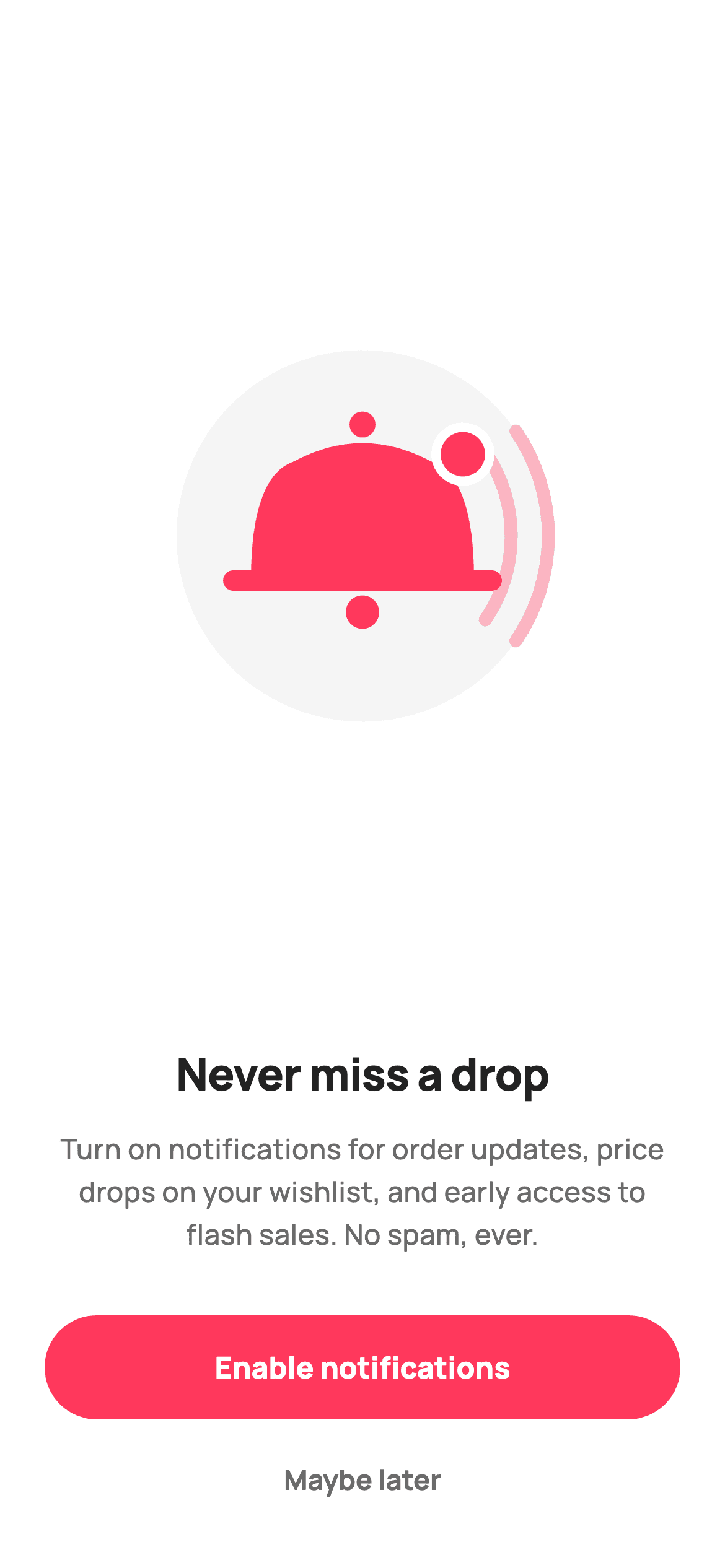
The system permission dialog gives you one shot and no room to explain, so good apps ask for permission to ask. This tutorial builds that pre-permission screen in Flutter: a painted bell illustration with sound waves and a notification badge, a benefit-led headline, three concrete reasons plus a 'No spam, ever' promise, and two buttons of deliberately unequal weight. The bell is a `CustomPainter` built from Bézier curves and arcs — no image asset, no icon font, and it scales to any size.
Watch the Flutter UI walkthrough
A short screen recording of Notifications Permission running, if you'd rather see it before you read the code. The written tutorial below covers everything in it.
Can't see the video? Watch it on YouTube.
What you'll build
- ✓A bell illustration painted with `quadraticBezierTo`, arcs and circles — fully vector
- ✓A painter written in units of `size.shortestSide` so it scales to any box
- ✓A grey circle backdrop via `DecoratedBox` wrapping the `CustomPaint`
- ✓Benefit-led copy that names *what* the notifications are, not that they exist
- ✓A stadium-shaped primary `FilledButton` beside a low-weight 'Maybe later' `TextButton`
- ✓An `Expanded` illustration area that absorbs height differences between devices
Step-by-step build
Create the file
Add a new file at lib/ecom_perm_notifications/ecom_perm_notifications_screen.dart in your Flutter project.
Register the bundled fonts
No external packages — this is pure Flutter. It does bundle its design font (Manrope), so drop the font file into fonts/ and declare it in pubspec.yaml:
flutter:
  fonts:
    - family: Manrope
      fonts:
- asset: fonts/Manrope-Regular.ttfBuild it, piece by piece
Here's how the screen goes together. Each block below is a real slice of the code with a plain-English explanation — paste them in order, or grab the whole file from the next section.
Two callbacks, five tokens, no state
class EcomPermNotificationsScreen extends StatelessWidget {
  const EcomPermNotificationsScreen({super.key, this.onAllow, this.onLater});

  /// Enable notifications.
  final VoidCallback? onAllow;

  /// Skip for now.
  final VoidCallback? onLater;

  static const String _font = 'Manrope';
  static const Color _canvas = Color(0xFFFFFFFF);
  static const Color _ink = Color(0xFF222222);
  static const Color _muted = Color(0xFF6A6A6A);
  static const Color _brand = Color(0xFFFF385C);
  static const Color _imageBg = Color(0xFFF5F5F5);
The screen exposes exactly two callbacks — `onAllow` and `onLater` — and holds no state, because a permission prompt has no intermediate condition: you either continue or you don't. The tokens define an Airbnb-flavoured light palette: `_canvas` white, `_ink` near-black at #222222, `_muted` grey for body copy, `_brand` at #FF385C, and `_imageBg` #F5F5F5 for the illustration backdrop. Naming the light grey `_imageBg` rather than `_surface` is a hint about its single job — it exists to give the painted bell a stage.
Layout: an Expanded illustration over fixed copy
  @override
  Widget build(BuildContext context) {
    return Theme(
      data: ThemeData.light(useMaterial3: true),
      child: Scaffold(
        backgroundColor: _canvas,
        body: SafeArea(
          child: Padding(
            padding: const EdgeInsets.fromLTRB(24, 24, 24, 24),
            child: Column(
              crossAxisAlignment: CrossAxisAlignment.stretch,
              children: <Widget>[
                Expanded(
                  child: Center(
                    child: SizedBox(
                      width: 200,
                      height: 200,
                      child: DecoratedBox(
                        decoration: BoxDecoration(
                          color: _imageBg,
                          shape: BoxShape.circle,
                        ),
                        child: const CustomPaint(
                          painter: _BellPainter(brand: _brand, canvas: _canvas),
                        ),
                      ),
                    ),
                  ),
                ),
                const SizedBox(height: 8),
`Theme(data: ThemeData.light(useMaterial3: true))` forces this screen's own light theme so it renders correctly even inside a dark host app. The `Column` uses `CrossAxisAlignment.stretch`, which is what makes both buttons full-width without any `SizedBox(width: double.infinity)`. The illustration sits in the only `Expanded` region, so it soaks up whatever vertical space is left after the text and buttons — on a tall phone the bell floats in the middle, on a short one the layout compresses around it while the copy and buttons keep their exact sizes. `DecoratedBox` paints the grey circle *behind* the `CustomPaint`, which is cheaper than a `Container` since no padding or constraints are involved.
Copy that earns the tap
                const Text(
                  'Never miss a drop',
                  textAlign: TextAlign.center,
                  style: TextStyle(
                    fontFamily: _font,
                    fontSize: 24,
                    fontWeight: FontWeight.w800,
                    letterSpacing: -0.4,
                    color: _ink,
                  ),
                ),
                const SizedBox(height: 12),
                const Text(
                  'Turn on notifications for order updates, price '
                  'drops on your wishlist, and early access to '
                  'flash sales. No spam, ever.',
                  textAlign: TextAlign.center,
                  style: TextStyle(
                    fontFamily: _font,
                    fontSize: 15,
                    height: 1.5,
                    fontWeight: FontWeight.w500,
                    color: _muted,
                  ),
                ),
                const SizedBox(height: 32),
'Never miss a drop' is 24px at `w800` with `letterSpacing: -0.4` — negative tracking is what stops a heavy weight at display size from looking loose. The body is written as three adjacent string literals, which Dart concatenates at compile time, and it names three specific benefits (order updates, wishlist price drops, flash-sale access) before closing with 'No spam, ever.' That's the whole argument for a pre-permission screen: the OS dialog can't say any of this. `height: 1.5` gives the three lines enough leading to be read rather than skimmed.
Two buttons of unequal weight
                SizedBox(
                  height: 56,
                  child: FilledButton(
                    onPressed: onAllow,
                    style: FilledButton.styleFrom(
                      backgroundColor: _brand,
                      foregroundColor: _canvas,
                      shape: const StadiumBorder(),
                      textStyle: const TextStyle(
                        fontFamily: _font,
                        fontSize: 16,
                        fontWeight: FontWeight.w800,
                      ),
                    ),
                    child: const Text('Enable notifications'),
                  ),
                ),
                const SizedBox(height: 8),
                SizedBox(
                  height: 48,
                  child: TextButton(
                    onPressed: onLater,
                    style: TextButton.styleFrom(
                      foregroundColor: _muted,
                      textStyle: const TextStyle(
                        fontFamily: _font,
                        fontSize: 15,
                        fontWeight: FontWeight.w700,
                      ),
                    ),
                    child: const Text('Maybe later'),
                  ),
                ),
The hierarchy is doing the work. The primary action is a 56px `FilledButton` with `shape: const StadiumBorder()` — the built-in way to get a pill without computing a radius — filled brand pink with `w800` white text. The decline is a 48px `TextButton` in muted grey at `w700`: shorter, unfilled, and lower contrast. It's still a clearly tappable, full-width target, though, which matters — hiding the opt-out is what gets users to deny the permission at the OS level, where you can't ask again.
Painting the bell
/// Painted bell with sound waves and a small brand notification badge. Vector.
class _BellPainter extends CustomPainter {
  const _BellPainter({required this.brand, required this.canvas});

  final Color brand;
  final Color canvas;

  @override
  void paint(Canvas c, Size size) {
    final double s = size.shortestSide;
    final Offset center = Offset(size.width / 2, size.height / 2);
    final Paint fill = Paint()..color = brand;

    // Bell body — a rounded dome over a flared rim.
    final double bw = s * 0.30;
    final double topY = center.dy - s * 0.20;
    final double rimY = center.dy + s * 0.12;
    final Path bell = Path()
      ..moveTo(center.dx - bw, rimY)
      ..quadraticBezierTo(
          center.dx - bw, topY + s * 0.04, center.dx - bw * 0.62, topY)
      ..quadraticBezierTo(center.dx, topY - s * 0.10, center.dx + bw * 0.62, topY)
      ..quadraticBezierTo(center.dx + bw, topY + s * 0.04, center.dx + bw, rimY)
      ..close();
    c.drawPath(bell, fill);

    // Flared rim bar + clapper.
    c.drawRRect(
      RRect.fromRectAndRadius(
        Rect.fromCenter(center: Offset(center.dx, rimY), width: bw * 2.5, height: s * 0.055),
        Radius.circular(s * 0.03),
      ),
      fill,
    );
    c.drawCircle(Offset(center.dx, rimY + s * 0.085), s * 0.045, fill);

    // Top knob.
    c.drawCircle(Offset(center.dx, topY - s * 0.10), s * 0.035, fill);

    // Sound waves on the right.
    final Paint wave = Paint()
      ..style = PaintingStyle.stroke
      ..strokeWidth = s * 0.035
      ..strokeCap = StrokeCap.round
      ..color = brand.withValues(alpha: 0.35);
    for (int i = 1; i <= 2; i++) {
      final double rad = s * (0.30 + i * 0.10);
      c.drawArc(
        Rect.fromCircle(center: center, radius: rad),
        -0.6,
        1.2,
        false,
        wave,
      );
    }

    // Brand notification badge (white ring for contrast).
    final Offset badge = Offset(center.dx + bw * 0.9, topY - s * 0.02);
    c.drawCircle(badge, s * 0.085, Paint()..color = canvas);
    c.drawCircle(badge, s * 0.06, fill);
  }

  @override
  bool shouldRepaint(_BellPainter oldDelegate) => false;
}
Every dimension derives from `final double s = size.shortestSide`, so the illustration scales to whatever box you give it — change the `SizedBox` from 200 to 300 and the whole drawing scales proportionally with no other edits. The dome is one `Path`: `moveTo` the left rim, then three `quadraticBezierTo` calls sweeping up over the top and back down, then `close()` to seal the base. The flared rim is an `RRect` 2.5 bell-widths wide, and the clapper and top knob are plain circles. The sound waves are a two-iteration loop drawing `drawArc` at increasing radii, stroked at 35% alpha so they read as motion rather than as part of the bell. The badge is drawn as two stacked circles — a white one first, then a smaller brand one — which creates a clean ring separating it from the bell beneath. `shouldRepaint` returns `false` because nothing here ever changes.
Full code
The complete, ready-to-paste source. Free to use in your projects — one click copies it all.
import 'package:flutter/material.dart';

/// StyleCart — Notifications Permission.
///
/// Asks to enable push for order updates and drop alerts. Self-contained per
/// CONVENTIONS.md: pure Flutter, bundled Manrope, inline Airbnb-style tokens,
/// own light theme + SafeArea. The illustration is a painted bell with sound
/// waves ([CustomPainter] — no asset, no emoji glyph). Exposes callbacks only.
class EcomPermNotificationsScreen extends StatelessWidget {
  const EcomPermNotificationsScreen({super.key, this.onAllow, this.onLater});

  /// Enable notifications.
  final VoidCallback? onAllow;

  /// Skip for now.
  final VoidCallback? onLater;

  static const String _font = 'Manrope';
  static const Color _canvas = Color(0xFFFFFFFF);
  static const Color _ink = Color(0xFF222222);
  static const Color _muted = Color(0xFF6A6A6A);
  static const Color _brand = Color(0xFFFF385C);
  static const Color _imageBg = Color(0xFFF5F5F5);

  @override
  Widget build(BuildContext context) {
    return Theme(
      data: ThemeData.light(useMaterial3: true),
      child: Scaffold(
        backgroundColor: _canvas,
        body: SafeArea(
          child: Padding(
            padding: const EdgeInsets.fromLTRB(24, 24, 24, 24),
            child: Column(
              crossAxisAlignment: CrossAxisAlignment.stretch,
              children: <Widget>[
                Expanded(
                  child: Center(
                    child: SizedBox(
                      width: 200,
                      height: 200,
                      child: DecoratedBox(
                        decoration: BoxDecoration(
                          color: _imageBg,
                          shape: BoxShape.circle,
                        ),
                        child: const CustomPaint(
                          painter: _BellPainter(brand: _brand, canvas: _canvas),
                        ),
                      ),
                    ),
                  ),
                ),
                const SizedBox(height: 8),
                const Text(
                  'Never miss a drop',
                  textAlign: TextAlign.center,
                  style: TextStyle(
                    fontFamily: _font,
                    fontSize: 24,
                    fontWeight: FontWeight.w800,
                    letterSpacing: -0.4,
                    color: _ink,
                  ),
                ),
                const SizedBox(height: 12),
                const Text(
                  'Turn on notifications for order updates, price '
                  'drops on your wishlist, and early access to '
                  'flash sales. No spam, ever.',
                  textAlign: TextAlign.center,
                  style: TextStyle(
                    fontFamily: _font,
                    fontSize: 15,
                    height: 1.5,
                    fontWeight: FontWeight.w500,
                    color: _muted,
                  ),
                ),
                const SizedBox(height: 32),
                SizedBox(
                  height: 56,
                  child: FilledButton(
                    onPressed: onAllow,
                    style: FilledButton.styleFrom(
                      backgroundColor: _brand,
                      foregroundColor: _canvas,
                      shape: const StadiumBorder(),
                      textStyle: const TextStyle(
                        fontFamily: _font,
                        fontSize: 16,
                        fontWeight: FontWeight.w800,
                      ),
                    ),
                    child: const Text('Enable notifications'),
                  ),
                ),
                const SizedBox(height: 8),
                SizedBox(
                  height: 48,
                  child: TextButton(
                    onPressed: onLater,
                    style: TextButton.styleFrom(
                      foregroundColor: _muted,
                      textStyle: const TextStyle(
                        fontFamily: _font,
                        fontSize: 15,
                        fontWeight: FontWeight.w700,
                      ),
                    ),
                    child: const Text('Maybe later'),
                  ),
                ),
              ],
            ),
          ),
        ),
      ),
    );
  }
}

/// Painted bell with sound waves and a small brand notification badge. Vector.
class _BellPainter extends CustomPainter {
  const _BellPainter({required this.brand, required this.canvas});

  final Color brand;
  final Color canvas;

  @override
  void paint(Canvas c, Size size) {
    final double s = size.shortestSide;
    final Offset center = Offset(size.width / 2, size.height / 2);
    final Paint fill = Paint()..color = brand;

    // Bell body — a rounded dome over a flared rim.
    final double bw = s * 0.30;
    final double topY = center.dy - s * 0.20;
    final double rimY = center.dy + s * 0.12;
    final Path bell = Path()
      ..moveTo(center.dx - bw, rimY)
      ..quadraticBezierTo(
          center.dx - bw, topY + s * 0.04, center.dx - bw * 0.62, topY)
      ..quadraticBezierTo(center.dx, topY - s * 0.10, center.dx + bw * 0.62, topY)
      ..quadraticBezierTo(center.dx + bw, topY + s * 0.04, center.dx + bw, rimY)
      ..close();
    c.drawPath(bell, fill);

    // Flared rim bar + clapper.
    c.drawRRect(
      RRect.fromRectAndRadius(
        Rect.fromCenter(center: Offset(center.dx, rimY), width: bw * 2.5, height: s * 0.055),
        Radius.circular(s * 0.03),
      ),
      fill,
    );
    c.drawCircle(Offset(center.dx, rimY + s * 0.085), s * 0.045, fill);

    // Top knob.
    c.drawCircle(Offset(center.dx, topY - s * 0.10), s * 0.035, fill);

    // Sound waves on the right.
    final Paint wave = Paint()
      ..style = PaintingStyle.stroke
      ..strokeWidth = s * 0.035
      ..strokeCap = StrokeCap.round
      ..color = brand.withValues(alpha: 0.35);
    for (int i = 1; i <= 2; i++) {
      final double rad = s * (0.30 + i * 0.10);
      c.drawArc(
        Rect.fromCircle(center: center, radius: rad),
        -0.6,
        1.2,
        false,
        wave,
      );
    }

    // Brand notification badge (white ring for contrast).
    final Offset badge = Offset(center.dx + bw * 0.9, topY - s * 0.02);
    c.drawCircle(badge, s * 0.085, Paint()..color = canvas);
    c.drawCircle(badge, s * 0.06, fill);
  }

  @override
  bool shouldRepaint(_BellPainter oldDelegate) => false;
}
Plus bundled 5 binary assets (fonts/images). The CLI and MCP install those for you automatically.
Two faster ways to add it
Copy-paste works, but you can skip it entirely.
1. FlutterKit CLI
One command drops this screen — and its fonts — straight into your project.
$ flutterkit add ecom-perm-notifications2. AI agent (MCP)
Connect FlutterKit's MCP server in Claude or Cursor and just ask your agent to install ecom-perm-notifications — it fetches and writes the files for you.
FAQ
Is this permission screen free to use?
Yes. The full Dart source on this page is free for personal and commercial apps. Copy it from the code block, install it with the FlutterKit CLI (flutterkit add ecom-perm-notifications), or add it through an AI agent over MCP.
Does this screen actually request the permission?
No — it's the pre-permission ask. Call your real request inside onAllow (firebase_messaging's requestPermission, or permission_handler), and only then will the OS dialog appear. Showing this screen first is what lets you explain the value before spending your one system prompt.
Does the bell illustration need an asset?
No. _BellPainter draws it with Bézier paths, arcs and circles on a Canvas, so there's no PNG, no SVG package, and no icon font. It stays sharp at any size and any pixel density because it's re-rendered rather than scaled.
How do I resize or recolour the bell?
Change the SizedBox from 200×200 to any size — every measurement inside the painter is a multiple of size.shortestSide, so it scales cleanly. Colours come in through the brand and canvas constructor parameters, so pass different ones rather than editing the paint code.
Which Flutter version does it target?
It uses Color.withValues(alpha:), FilledButton and Material 3, so it targets Flutter 3.27+ (Dart 3). On an older SDK, swap withValues(alpha: 0.35) for withOpacity(0.35); FilledButton itself has been available since Flutter 3.7.


