How to Build a Location Permission Priming Screen in Flutter (Full Code + Preview)
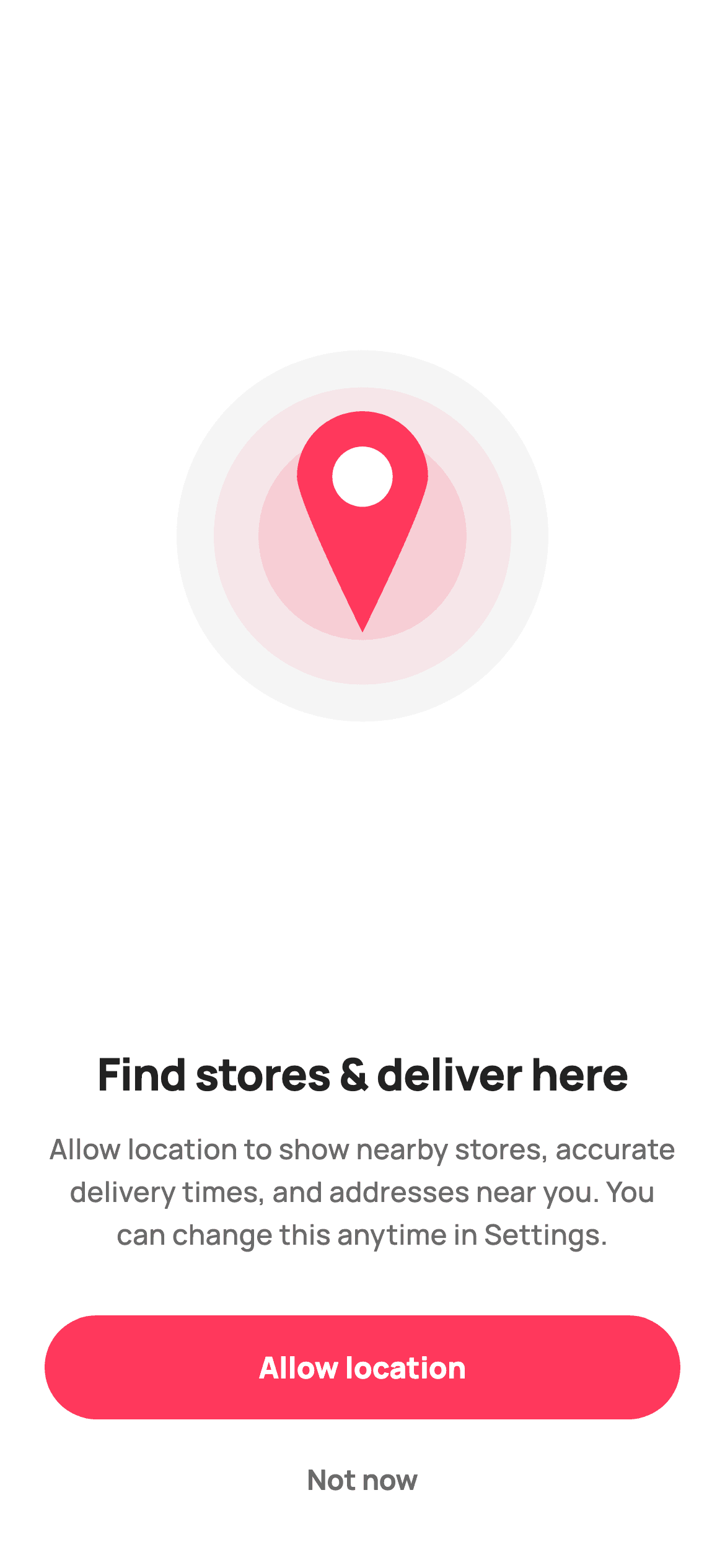
The OS permission dialog gives you one shot and no room to explain, which is why serious apps ask first with a screen of their own. This tutorial builds StyleCart's location priming screen in Flutter: a painted map-pin illustration with pulse rings on a soft circular backdrop, copy that names three concrete benefits and promises reversibility, an Allow button and a quiet Not now. The pin is drawn with a Path using quadratic curves and an arc, so there is no image asset at all.
Watch the Flutter UI walkthrough
A short screen recording of Location Permission running, if you'd rather see it before you read the code. The written tutorial below covers everything in it.
Can't see the video? Watch it on YouTube.
What you'll build
- ✓A teardrop map pin drawn as a Path from two quadratic curves and an arcToPoint
- ✓Pulse rings made from one colour at 8% and 14% alpha behind the pin
- ✓Priming copy that names concrete benefits and says the choice is reversible
- ✓A stretch Column layout where only the illustration flexes
Step-by-step build
Create the file
Add a new file at lib/ecom_perm_location/ecom_perm_location_screen.dart in your Flutter project.
Register the bundled fonts
No external packages — this is pure Flutter. It does bundle its design font (Manrope), so drop the font file into fonts/ and declare it in pubspec.yaml:
flutter:
  fonts:
    - family: Manrope
      fonts:
- asset: fonts/Manrope-Regular.ttfBuild it, piece by piece
Here's how the screen goes together. Each block below is a real slice of the code with a plain-English explanation — paste them in order, or grab the whole file from the next section.
A stateless screen with two exits
import 'package:flutter/material.dart';

/// StyleCart — Location Permission.
///
/// Asks to use location for nearby stores and accurate delivery. Self-contained
/// per CONVENTIONS.md: pure Flutter, bundled Manrope, inline Airbnb-style tokens,
/// own light theme + SafeArea. The illustration is a painted map-pin spot
/// ([CustomPainter] — no asset, no emoji glyph). Exposes callbacks only.
class EcomPermLocationScreen extends StatelessWidget {
  const EcomPermLocationScreen({super.key, this.onAllow, this.onNotNow});

  /// Grant location access.
  final VoidCallback? onAllow;

  /// Dismiss without granting.
  final VoidCallback? onNotNow;

  static const String _font = 'Manrope';
  static const Color _canvas = Color(0xFFFFFFFF);
  static const Color _ink = Color(0xFF222222);
  static const Color _muted = Color(0xFF6A6A6A);
  static const Color _brand = Color(0xFFFF385C);
  static const Color _surface = Color(0xFFF2F2F2);
  static const Color _imageBg = Color(0xFFF5F5F5);

  @override
The screen is a `StatelessWidget` exposing exactly `onAllow` and `onNotNow` — it never calls a permission API itself, which is what keeps it plugin-free and lets you pair it with `permission_handler`, `geolocator` or whatever you already use. The palette adds `_imageBg` (#F5F5F5), a hair lighter than `_surface`, used only for the illustration's circular backdrop so the artwork sits on its own tone rather than borrowing the card grey used elsewhere in StyleCart.
One flexible child and stretched buttons
  Widget build(BuildContext context) {
    return Theme(
      data: ThemeData.light(useMaterial3: true),
      child: Scaffold(
        backgroundColor: _canvas,
        body: SafeArea(
          child: Padding(
            padding: const EdgeInsets.fromLTRB(24, 24, 24, 24),
            child: Column(
              crossAxisAlignment: CrossAxisAlignment.stretch,
              children: <Widget>[
                Expanded(
                  child: Center(
                    child: SizedBox(
                      width: 200,
                      height: 200,
                      child: DecoratedBox(
                        decoration: BoxDecoration(
                          color: _imageBg,
                          shape: BoxShape.circle,
                        ),
                        child: const CustomPaint(
                          painter: _LocationPainter(
                            brand: _brand,
                            canvas: _canvas,
                            ring: _surface,
                          ),
                        ),
                      ),
                    ),
                  ),
                ),
                const SizedBox(height: 8),
                const Text(
                  'Find stores & deliver here',
                  textAlign: TextAlign.center,
                  style: TextStyle(
                    fontFamily: _font,
                    fontSize: 24,
                    fontWeight: FontWeight.w800,
                    letterSpacing: -0.4,
                    color: _ink,
                  ),
                ),
                const SizedBox(height: 12),
                const Text(
                  'Allow location to show nearby stores, accurate '
                  'delivery times, and addresses near you. You can '
                  'change this anytime in Settings.',
                  textAlign: TextAlign.center,
                  style: TextStyle(
                    fontFamily: _font,
                    fontSize: 15,
                    height: 1.5,
                    fontWeight: FontWeight.w500,
                    color: _muted,
                  ),
                ),
                const SizedBox(height: 32),
The Column uses `crossAxisAlignment: CrossAxisAlignment.stretch`, which is why the two buttons below span the full width with no `SizedBox(width: double.infinity)` anywhere. Only the illustration is wrapped in `Expanded`, so on a short device the artwork's surrounding space compresses while the headline, body and both buttons keep their exact sizes — the text never shrinks and the buttons never leave the screen. The illustration is a 200px `SizedBox` holding a `DecoratedBox` circle in `_imageBg` with the `CustomPaint` inside it, so the backdrop is a decoration rather than something the painter has to draw.
Copy that earns the permission
                const SizedBox(height: 8),
                const Text(
                  'Find stores & deliver here',
                  textAlign: TextAlign.center,
                  style: TextStyle(
                    fontFamily: _font,
                    fontSize: 24,
                    fontWeight: FontWeight.w800,
                    letterSpacing: -0.4,
                    color: _ink,
                  ),
                ),
                const SizedBox(height: 12),
                const Text(
                  'Allow location to show nearby stores, accurate '
                  'delivery times, and addresses near you. You can '
                  'change this anytime in Settings.',
                  textAlign: TextAlign.center,
                  style: TextStyle(
                    fontFamily: _font,
                    fontSize: 15,
                    height: 1.5,
                    fontWeight: FontWeight.w500,
                    color: _muted,
                  ),
                ),
                const SizedBox(height: 32),
This is the reason the screen exists. The headline, 'Find stores & deliver here', is phrased as what the shopper gets rather than what the app wants. The body then names three specific benefits — nearby stores, accurate delivery times, addresses near you — and closes with 'You can change this anytime in Settings'. Naming concrete benefits rather than saying 'for a better experience' is what moves acceptance rates, and stating reversibility removes the sense of a one-way door. It is set at 15px with `height: 1.5` and centred, the comfortable setting for a three-line paragraph on a phone.
Ranking Allow above Not now
                SizedBox(
                  height: 56,
                  child: FilledButton(
                    onPressed: onAllow,
                    style: FilledButton.styleFrom(
                      backgroundColor: _brand,
                      foregroundColor: _canvas,
                      shape: const StadiumBorder(),
                      textStyle: const TextStyle(
                        fontFamily: _font,
                        fontSize: 16,
                        fontWeight: FontWeight.w800,
                      ),
                    ),
                    child: const Text('Allow location'),
                  ),
                ),
                const SizedBox(height: 8),
                SizedBox(
                  height: 48,
                  child: TextButton(
                    onPressed: onNotNow,
                    style: TextButton.styleFrom(
                      foregroundColor: _muted,
                      textStyle: const TextStyle(
                        fontFamily: _font,
                        fontSize: 15,
                        fontWeight: FontWeight.w700,
                      ),
                    ),
                    child: const Text('Not now'),
                  ),
                ),
'Allow location' is a 56px `FilledButton` in coral with `shape: const StadiumBorder()` — the pill shape StyleCart uses for primary actions. 'Not now' is a 48px `TextButton` in `_muted`, smaller and unfilled. The declining option must be genuinely present and tappable, because hiding it makes people deny at the OS dialog instead, which is far harder to recover from than a soft 'not now' you can ask again after. Its wording matters too: 'Not now' implies a later, where 'No thanks' or 'Deny' implies a decision you will not revisit.
Drawing the pin with a Path
/// Painted location spot: concentric pulse rings behind a map pin. Pure vector.
class _LocationPainter extends CustomPainter {
  const _LocationPainter({
    required this.brand,
    required this.canvas,
    required this.ring,
  });

  final Color brand;
  final Color canvas;
  final Color ring;

  @override
  void paint(Canvas c, Size size) {
    final double s = size.shortestSide;
    final Offset center = Offset(size.width / 2, size.height / 2);

    // Pulse rings.
    c.drawCircle(center, s * 0.40, Paint()..color = brand.withValues(alpha: 0.08));
    c.drawCircle(center, s * 0.28, Paint()..color = brand.withValues(alpha: 0.14));

    // Map pin (teardrop) with a white centre dot.
    final double pinH = s * 0.42;
    final Offset tip = Offset(center.dx, center.dy + pinH * 0.62);
    final double r = pinH * 0.42;
    final Offset head = Offset(center.dx, tip.dy - pinH);
    final Path p = Path()
      ..moveTo(tip.dx, tip.dy)
      ..quadraticBezierTo(tip.dx - r, tip.dy - pinH * 0.86, head.dx - r, head.dy)
      ..arcToPoint(Offset(head.dx + r, head.dy),
          radius: Radius.circular(r), clockwise: true)
      ..quadraticBezierTo(tip.dx + r, tip.dy - pinH * 0.86, tip.dx, tip.dy)
      ..close();
    c.drawPath(p, Paint()..color = brand);
    c.drawCircle(head, r * 0.46, Paint()..color = canvas);
  }

  @override
  bool shouldRepaint(_LocationPainter oldDelegate) => false;
`_LocationPainter` takes its three colours as constructor arguments — which is what lets the whole class be `const` — and sizes everything from `size.shortestSide`, so it stays circular in a non-square box. Two pulse rings come first, the same brand colour at `alpha: 0.08` and `0.14`, which gives a radar-like glow from one hue and no gradients. The pin is a single `Path`: `moveTo` the tip, a `quadraticBezierTo` sweeping up the left side, an `arcToPoint` across the top of the head, a mirrored quadratic back down the right, then `close()`. Building the teardrop as one closed path rather than a circle plus a triangle is what gives the smooth join between head and tip. A white `drawCircle` at 46% of the head radius punches the hole. `shouldRepaint` returns `false` because nothing here varies.
Full code
The complete, ready-to-paste source. Free to use in your projects — one click copies it all.
import 'package:flutter/material.dart';

/// StyleCart — Location Permission.
///
/// Asks to use location for nearby stores and accurate delivery. Self-contained
/// per CONVENTIONS.md: pure Flutter, bundled Manrope, inline Airbnb-style tokens,
/// own light theme + SafeArea. The illustration is a painted map-pin spot
/// ([CustomPainter] — no asset, no emoji glyph). Exposes callbacks only.
class EcomPermLocationScreen extends StatelessWidget {
  const EcomPermLocationScreen({super.key, this.onAllow, this.onNotNow});

  /// Grant location access.
  final VoidCallback? onAllow;

  /// Dismiss without granting.
  final VoidCallback? onNotNow;

  static const String _font = 'Manrope';
  static const Color _canvas = Color(0xFFFFFFFF);
  static const Color _ink = Color(0xFF222222);
  static const Color _muted = Color(0xFF6A6A6A);
  static const Color _brand = Color(0xFFFF385C);
  static const Color _surface = Color(0xFFF2F2F2);
  static const Color _imageBg = Color(0xFFF5F5F5);

  @override
  Widget build(BuildContext context) {
    return Theme(
      data: ThemeData.light(useMaterial3: true),
      child: Scaffold(
        backgroundColor: _canvas,
        body: SafeArea(
          child: Padding(
            padding: const EdgeInsets.fromLTRB(24, 24, 24, 24),
            child: Column(
              crossAxisAlignment: CrossAxisAlignment.stretch,
              children: <Widget>[
                Expanded(
                  child: Center(
                    child: SizedBox(
                      width: 200,
                      height: 200,
                      child: DecoratedBox(
                        decoration: BoxDecoration(
                          color: _imageBg,
                          shape: BoxShape.circle,
                        ),
                        child: const CustomPaint(
                          painter: _LocationPainter(
                            brand: _brand,
                            canvas: _canvas,
                            ring: _surface,
                          ),
                        ),
                      ),
                    ),
                  ),
                ),
                const SizedBox(height: 8),
                const Text(
                  'Find stores & deliver here',
                  textAlign: TextAlign.center,
                  style: TextStyle(
                    fontFamily: _font,
                    fontSize: 24,
                    fontWeight: FontWeight.w800,
                    letterSpacing: -0.4,
                    color: _ink,
                  ),
                ),
                const SizedBox(height: 12),
                const Text(
                  'Allow location to show nearby stores, accurate '
                  'delivery times, and addresses near you. You can '
                  'change this anytime in Settings.',
                  textAlign: TextAlign.center,
                  style: TextStyle(
                    fontFamily: _font,
                    fontSize: 15,
                    height: 1.5,
                    fontWeight: FontWeight.w500,
                    color: _muted,
                  ),
                ),
                const SizedBox(height: 32),
                SizedBox(
                  height: 56,
                  child: FilledButton(
                    onPressed: onAllow,
                    style: FilledButton.styleFrom(
                      backgroundColor: _brand,
                      foregroundColor: _canvas,
                      shape: const StadiumBorder(),
                      textStyle: const TextStyle(
                        fontFamily: _font,
                        fontSize: 16,
                        fontWeight: FontWeight.w800,
                      ),
                    ),
                    child: const Text('Allow location'),
                  ),
                ),
                const SizedBox(height: 8),
                SizedBox(
                  height: 48,
                  child: TextButton(
                    onPressed: onNotNow,
                    style: TextButton.styleFrom(
                      foregroundColor: _muted,
                      textStyle: const TextStyle(
                        fontFamily: _font,
                        fontSize: 15,
                        fontWeight: FontWeight.w700,
                      ),
                    ),
                    child: const Text('Not now'),
                  ),
                ),
              ],
            ),
          ),
        ),
      ),
    );
  }
}

/// Painted location spot: concentric pulse rings behind a map pin. Pure vector.
class _LocationPainter extends CustomPainter {
  const _LocationPainter({
    required this.brand,
    required this.canvas,
    required this.ring,
  });

  final Color brand;
  final Color canvas;
  final Color ring;

  @override
  void paint(Canvas c, Size size) {
    final double s = size.shortestSide;
    final Offset center = Offset(size.width / 2, size.height / 2);

    // Pulse rings.
    c.drawCircle(center, s * 0.40, Paint()..color = brand.withValues(alpha: 0.08));
    c.drawCircle(center, s * 0.28, Paint()..color = brand.withValues(alpha: 0.14));

    // Map pin (teardrop) with a white centre dot.
    final double pinH = s * 0.42;
    final Offset tip = Offset(center.dx, center.dy + pinH * 0.62);
    final double r = pinH * 0.42;
    final Offset head = Offset(center.dx, tip.dy - pinH);
    final Path p = Path()
      ..moveTo(tip.dx, tip.dy)
      ..quadraticBezierTo(tip.dx - r, tip.dy - pinH * 0.86, head.dx - r, head.dy)
      ..arcToPoint(Offset(head.dx + r, head.dy),
          radius: Radius.circular(r), clockwise: true)
      ..quadraticBezierTo(tip.dx + r, tip.dy - pinH * 0.86, tip.dx, tip.dy)
      ..close();
    c.drawPath(p, Paint()..color = brand);
    c.drawCircle(head, r * 0.46, Paint()..color = canvas);
  }

  @override
  bool shouldRepaint(_LocationPainter oldDelegate) => false;
}
Plus bundled 5 binary assets (fonts/images). The CLI and MCP install those for you automatically.
Two faster ways to add it
Copy-paste works, but you can skip it entirely.
1. FlutterKit CLI
One command drops this screen — and its fonts — straight into your project.
$ flutterkit add ecom-perm-location2. AI agent (MCP)
Connect FlutterKit's MCP server in Claude or Cursor and just ask your agent to install ecom-perm-location — it fetches and writes the files for you.
FAQ
Is this permission screen free for commercial use?
Yes — free with no strings. The priming screen and its pin painter can be copied here, installed with the CLI, or pulled through MCP, then used in a shipping app. No account, no licence key, nothing to credit.
Does this screen actually request location permission?
No, and that is intentional. It is a priming screen that calls `onAllow` or `onNotNow` and nothing else, so it stays free of plugin dependencies. Trigger the real request from `onAllow` using `permission_handler` or `geolocator` — showing this first is what gives you a second chance if the OS dialog is declined.
Why ask before the system dialog appears?
Because the OS prompt is one-shot on iOS and offers no space to explain. A priming screen states the benefit in your own words first, so the system dialog is answered by someone who already knows why. It also lets a 'Not now' remain recoverable, where an OS-level denial is not.
Do I need an SVG or image package for the pin?
No. The pin is a `CustomPainter` building one `Path` from quadratic curves and an arc, plus two translucent circles for the rings. There is no asset file and no `flutter_svg` dependency, and it renders crisply at any size because everything derives from `size.shortestSide`.
Which Flutter version does this need?
Flutter 3.22 or newer, because the pulse rings use `Color.withValues(alpha: ...)`. On an older SDK replace those with `withOpacity(...)` and expand the constructor to `const EcomPermLocationScreen({Key? key, this.onAllow, this.onNotNow}) : super(key: key);`.


