How to Build a Pickup or Drop-off Return Screen in Flutter (Full Code + Preview)
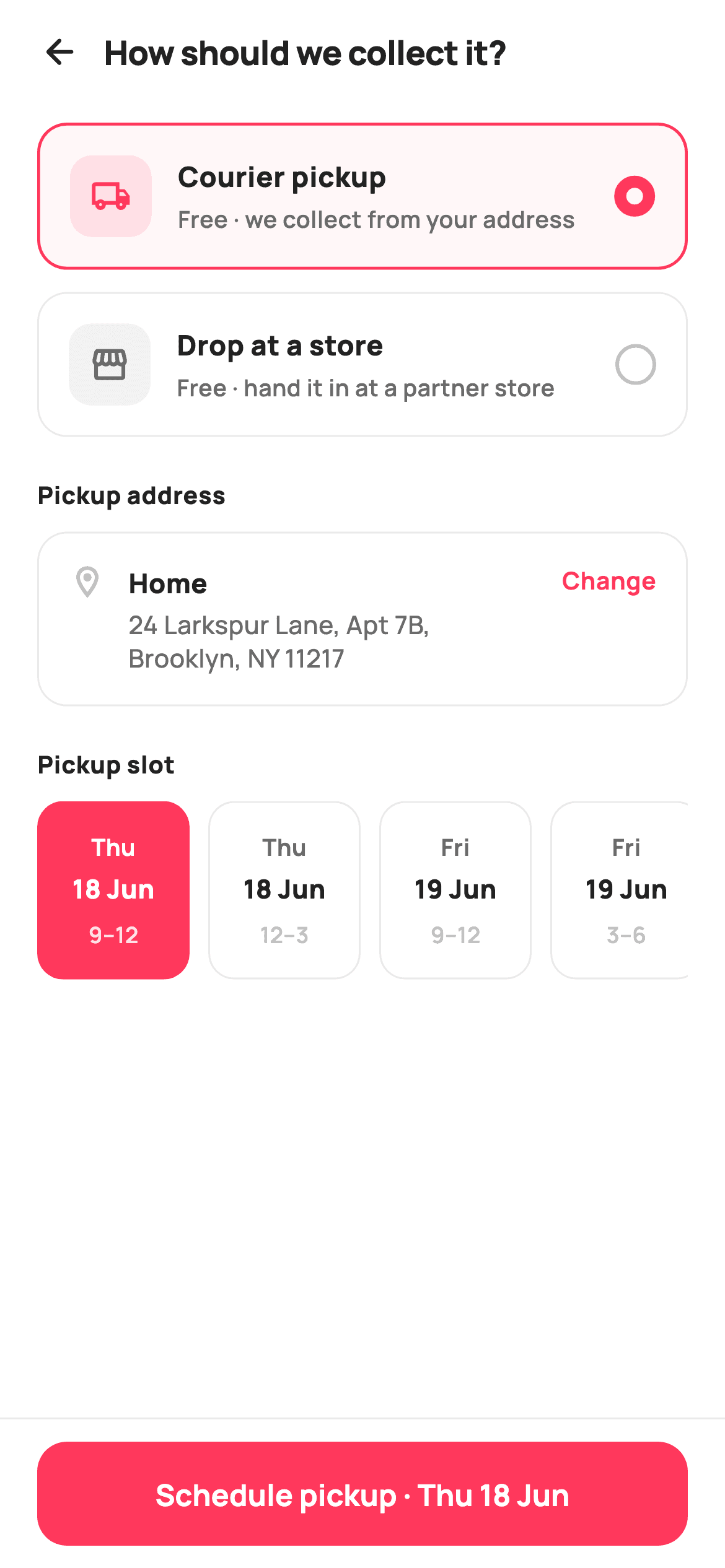
Returns are where shopping apps quietly lose trust: shoppers want to know how the item gets back, and forcing a single courier flow ignores anyone who walks past a store daily. This tutorial builds StyleCart's return-method screen in Flutter — two radio-style cards toggle between courier pickup and store drop-off, the body swaps between an editable address plus a horizontal slot picker and a store card topped by a fully painted mini-map, and a pinned button relabels itself with the chosen slot before firing a single boolean callback.
Watch the Flutter UI walkthrough
A short screen recording of Pickup or Drop-off running, if you'd rather see it before you read the code. The written tutorial below covers everything in it.
Can't see the video? Watch it on YouTube.
What you'll build
- ✓Two selectable method cards whose radio dot is drawn with nothing but a border-width jump
- ✓A conditional body that spreads pickup or drop-off widget lists straight into one ListView
- ✓A horizontal date/time slot picker whose selected chip inverts to a coral fill
- ✓A store card with a CustomPaint mini-map — block grid, roads, park and a teardrop pin, zero assets
- ✓A pinned schedule bar that interpolates the chosen slot into its own label
Step-by-step build
Create the file
Add a new file at lib/ecom_orders_return_method/ecom_orders_return_method_screen.dart in your Flutter project.
Register the bundled fonts
No external packages — this is pure Flutter. It does bundle its design font (Manrope), so drop the font file into fonts/ and declare it in pubspec.yaml:
flutter:
  fonts:
    - family: Manrope
      fonts:
- asset: fonts/Manrope-Regular.ttfBuild it, piece by piece
Here's how the screen goes together. Each block below is a real slice of the code with a plain-English explanation — paste them in order, or grab the whole file from the next section.
Two booleans of state and a slot table
import 'package:flutter/material.dart';

/// StyleCart — Pickup or Drop-off.
///
/// Choose how the return travels back: a courier pickup (reveals a pickup
/// address + a horizontal slot picker) or a drop-off at a partner store
/// (reveals a painted mini-map store card). A pinned bar schedules the return.
///
/// Self-contained per CONVENTIONS.md: pure Flutter, bundled Manrope, inline
/// Airbnb-style tokens, own light theme + SafeArea. Painter-only graphics.
/// Exposes callbacks only.
class EcomOrdersReturnMethodScreen extends StatefulWidget {
  const EcomOrdersReturnMethodScreen({
    super.key,
    this.onBack,
    this.onChangeAddress,
    this.onSchedule,
  });

  final VoidCallback? onBack;
  final VoidCallback? onChangeAddress;

  /// Fires with `true` for courier pickup, `false` for store drop-off.
  final ValueChanged<bool>? onSchedule;

  @override
  State<EcomOrdersReturnMethodScreen> createState() =>
      _EcomOrdersReturnMethodScreenState();
}

class _EcomOrdersReturnMethodScreenState
    extends State<EcomOrdersReturnMethodScreen> {
  static const String _font = 'Manrope';
  static const Color _canvas = Color(0xFFFFFFFF);
  static const Color _ink = Color(0xFF222222);
  static const Color _muted = Color(0xFF6A6A6A);
  static const Color _faint = Color(0xFFC1C1C1);
  static const Color _brand = Color(0xFFFF385C);
  static const Color _surface = Color(0xFFF2F2F2);
  static const Color _success = Color(0xFF2E9E5B);
  static const Color _hairline = Color(0xFFEBEBEB);

  bool _pickup = true;
  int _slot = 0;

  static const List<_Slot> _slots = <_Slot>[
    _Slot('Thu', '18 Jun', '9–12'),
    _Slot('Thu', '18 Jun', '12–3'),
    _Slot('Fri', '19 Jun', '9–12'),
    _Slot('Fri', '19 Jun', '3–6'),
    _Slot('Sat', '20 Jun', '10–1'),
  ];
The widget is stateful but its entire state is `bool _pickup` and `int _slot` — which method is chosen and which slot chip is lit. Three callbacks go out: `onBack`, `onChangeAddress`, and `onSchedule`, which is typed `ValueChanged<bool>` so one handler serves both CTAs — `true` means courier pickup, `false` means drop-off. The palette is Airbnb-flavoured: `_brand` coral `0xFFFF385C` for selection and the CTA, with `_success` green kept aside solely for the store's Open-now badge. The five pickup windows live in `static const List<_Slot> _slots` as `(day, date, window)` value objects, so the chip copy is data, not widget code.
One ListView, two bodies
  @override
  Widget build(BuildContext context) {
    return Theme(
      data: ThemeData.light(useMaterial3: true),
      child: Scaffold(
        backgroundColor: _canvas,
        body: SafeArea(
          child: Column(
            children: <Widget>[
              _header(),
              Expanded(
                child: ListView(
                  padding: const EdgeInsets.fromLTRB(20, 8, 20, 24),
                  children: <Widget>[
                    _methodCard(
                      pickup: true,
                      icon: Icons.local_shipping_outlined,
                      title: 'Courier pickup',
                      subtitle: 'Free · we collect from your address',
                    ),
                    const SizedBox(height: 12),
                    _methodCard(
                      pickup: false,
                      icon: Icons.storefront_outlined,
                      title: 'Drop at a store',
                      subtitle: 'Free · hand it in at a partner store',
                    ),
                    const SizedBox(height: 22),
                    if (_pickup) ..._pickupDetails() else ..._dropDetails(),
                  ],
                ),
              ),
              _scheduleBar(),
            ],
          ),
        ),
      ),
    );
  }

  Widget _header() {
    return Padding(
      padding: const EdgeInsets.fromLTRB(8, 4, 20, 6),
      child: Row(
        children: <Widget>[
          IconButton(
            onPressed: widget.onBack,
            icon: const Icon(Icons.arrow_back_rounded, size: 22, color: _ink),
          ),
          const Text(
            'How should we collect it?',
            style: TextStyle(
              fontFamily: _font,
              fontSize: 18,
              fontWeight: FontWeight.w800,
              letterSpacing: -0.3,
              color: _ink,
            ),
          ),
        ],
      ),
    );
  }
`build` wraps everything in `Theme(data: ThemeData.light(useMaterial3: true))` so the screen keeps its own light look regardless of the host app's theme. The Column stacks the header, an `Expanded` ListView, and `_scheduleBar` as a sibling — outside the scroll view, which is what pins it. The interesting line is 82: `if (_pickup) ..._pickupDetails() else ..._dropDetails()` — both builders return `List<Widget>` and the collection-if spreads whichever applies directly into the ListView's children, so switching method is just a `setState` rebuild, no navigation and no nested scroll view. The header's `fromLTRB(8, 4, 20, 6)` padding is asymmetric because the back `IconButton` brings its own touch padding on the left.
Method cards with a border-trick radio
  Widget _methodCard({
    required bool pickup,
    required IconData icon,
    required String title,
    required String subtitle,
  }) {
    final bool on = _pickup == pickup;
    return GestureDetector(
      onTap: () => setState(() => _pickup = pickup),
      child: Container(
        padding: const EdgeInsets.all(16),
        decoration: BoxDecoration(
          color: on ? _brand.withValues(alpha: 0.04) : _canvas,
          borderRadius: BorderRadius.circular(16),
          border: Border.all(
            color: on ? _brand : _hairline,
            width: on ? 1.6 : 1,
          ),
        ),
        child: Row(
          children: <Widget>[
            Container(
              width: 44,
              height: 44,
              alignment: Alignment.center,
              decoration: BoxDecoration(
                color: on ? _brand.withValues(alpha: 0.12) : _surface,
                borderRadius: BorderRadius.circular(12),
              ),
              child: Icon(icon, size: 22, color: on ? _brand : _muted),
            ),
            const SizedBox(width: 14),
            Expanded(
              child: Column(
                crossAxisAlignment: CrossAxisAlignment.start,
                children: <Widget>[
                  Text(
                    title,
                    style: const TextStyle(
                      fontFamily: _font,
                      fontSize: 15,
                      fontWeight: FontWeight.w800,
                      color: _ink,
                    ),
                  ),
                  const SizedBox(height: 3),
                  Text(
                    subtitle,
                    style: const TextStyle(
                      fontFamily: _font,
                      fontSize: 12.5,
                      fontWeight: FontWeight.w600,
                      color: _muted,
                    ),
                  ),
                ],
              ),
            ),
            const SizedBox(width: 10),
            Container(
              width: 22,
              height: 22,
              decoration: BoxDecoration(
                shape: BoxShape.circle,
                border: Border.all(
                  color: on ? _brand : _faint,
                  width: on ? 6.5 : 2,
                ),
              ),
            ),
          ],
        ),
      ),
    );
  }
Each `_methodCard` carries its own identity as a `pickup` bool and computes `on = _pickup == pickup`, so tapping either card is one `setState(() => _pickup = pickup)` and the pair can never both be selected. Selection is shown three ways at once: the card fills with `_brand.withValues(alpha: 0.04)`, the border swaps from a 1px `_hairline` to a 1.6px coral, and the leading icon tile re-tints from `_surface` grey to 12% coral. The radio itself is the neat part — a bare 22px circle `Container` whose border width jumps from 2 to 6.5 when active; at that diameter the thick coral ring closes in around a small white hole, reading as a filled radio without a `Radio` widget or any inner child.
Pickup details: address row and slot rail
  List<Widget> _pickupDetails() {
    return <Widget>[
      _sectionTitle('Pickup address'),
      const SizedBox(height: 10),
      GestureDetector(
        onTap: widget.onChangeAddress,
        child: Container(
          padding: const EdgeInsets.all(16),
          decoration: BoxDecoration(
            color: _canvas,
            borderRadius: BorderRadius.circular(16),
            border: Border.all(color: _hairline),
          ),
          child: Row(
            crossAxisAlignment: CrossAxisAlignment.start,
            children: <Widget>[
              const Icon(Icons.location_on_outlined, size: 20, color: _faint),
              const SizedBox(width: 12),
              const Expanded(
                child: Column(
                  crossAxisAlignment: CrossAxisAlignment.start,
                  children: <Widget>[
                    Text(
                      'Home',
                      style: TextStyle(
                        fontFamily: _font,
                        fontSize: 14.5,
                        fontWeight: FontWeight.w800,
                        color: _ink,
                      ),
                    ),
                    SizedBox(height: 3),
                    Text(
                      '24 Larkspur Lane, Apt 7B, Brooklyn, NY 11217',
                      style: TextStyle(
                        fontFamily: _font,
                        fontSize: 13.5,
                        fontWeight: FontWeight.w500,
                        height: 1.35,
                        color: _muted,
                      ),
                    ),
                  ],
                ),
              ),
              SizedBox(width: 8),
              Text(
                'Change',
                style: TextStyle(
                  fontFamily: _font,
                  fontSize: 13,
                  fontWeight: FontWeight.w700,
                  color: _brand,
                ),
              ),
            ],
          ),
        ),
      ),
      const SizedBox(height: 22),
      _sectionTitle('Pickup slot'),
      const SizedBox(height: 10),
      SizedBox(
        height: 96,
        child: ListView.separated(
          scrollDirection: Axis.horizontal,
          itemCount: _slots.length,
          separatorBuilder: (BuildContext c, int idx) =>
              const SizedBox(width: 10),
          itemBuilder: (BuildContext c, int i) => _slotCard(i),
        ),
      ),
    ];
  }
`_pickupDetails` returns a plain widget list: a section title, the address card, another title, and the slot rail. The entire address card sits inside a `GestureDetector` wired to `widget.onChangeAddress`, so the tap target is the full card while the coral 'Change' text is only the visual affordance — far easier to hit than a link-sized target. `crossAxisAlignment: CrossAxisAlignment.start` keeps the location pin aligned with the 'Home' line when the two-line Brooklyn address wraps. The slots render inside a fixed `SizedBox(height: 96)` holding a horizontal `ListView.separated` with 10px separators, so five chips scroll off-screen gracefully on narrow phones instead of shrinking.
Slot chips that invert when chosen
  Widget _slotCard(int i) {
    final _Slot s = _slots[i];
    final bool on = _slot == i;
    return GestureDetector(
      onTap: () => setState(() => _slot = i),
      child: Container(
        width: 82,
        padding: const EdgeInsets.symmetric(vertical: 12),
        decoration: BoxDecoration(
          color: on ? _brand : _canvas,
          borderRadius: BorderRadius.circular(14),
          border: Border.all(color: on ? _brand : _hairline),
        ),
        child: Column(
          mainAxisAlignment: MainAxisAlignment.center,
          children: <Widget>[
            Text(
              s.day,
              style: TextStyle(
                fontFamily: _font,
                fontSize: 12.5,
                fontWeight: FontWeight.w700,
                color: on ? _canvas : _muted,
              ),
            ),
            const SizedBox(height: 4),
            Text(
              s.date,
              style: TextStyle(
                fontFamily: _font,
                fontSize: 14,
                fontWeight: FontWeight.w800,
                color: on ? _canvas : _ink,
              ),
            ),
            const SizedBox(height: 6),
            Text(
              s.window,
              style: TextStyle(
                fontFamily: _font,
                fontSize: 12,
                fontWeight: FontWeight.w600,
                color: on ? _canvas.withValues(alpha: 0.85) : _faint,
              ),
            ),
          ],
        ),
      ),
    );
  }
`_slotCard(i)` compares `_slot == i` and inverts the whole chip on selection: the background flips from `_canvas` white to solid `_brand`, and every text colour flips to white so contrast survives the fill. The three lines keep their hierarchy even on the coral chip — day at `w700` muted-or-white, date at 14px `w800` as the anchor, and the time window dimmed to `_canvas.withValues(alpha: 0.85)` so it stays subordinate on both states. A fixed `width: 82` with vertical-only padding gives every chip the same footprint, which is what makes the rail scan like a calendar strip.
Drop-off details: painted map card and QR note
  List<Widget> _dropDetails() {
    return <Widget>[
      _sectionTitle('Nearest drop-off store'),
      const SizedBox(height: 10),
      Container(
        decoration: BoxDecoration(
          color: _canvas,
          borderRadius: BorderRadius.circular(16),
          border: Border.all(color: _hairline),
        ),
        child: Column(
          children: <Widget>[
            ClipRRect(
              borderRadius: const BorderRadius.vertical(
                  top: Radius.circular(16)),
              child: SizedBox(
                height: 120,
                width: double.infinity,
                child: CustomPaint(painter: _MiniMapPainter()),
              ),
            ),
            Padding(
              padding: const EdgeInsets.all(16),
              child: Row(
                crossAxisAlignment: CrossAxisAlignment.start,
                children: <Widget>[
                  const Expanded(
                    child: Column(
                      crossAxisAlignment: CrossAxisAlignment.start,
                      children: <Widget>[
                        Text(
                          'StyleCart · SoHo',
                          style: TextStyle(
                            fontFamily: _font,
                            fontSize: 15,
                            fontWeight: FontWeight.w800,
                            color: _ink,
                          ),
                        ),
                        SizedBox(height: 3),
                        Text(
                          '112 Spring St · 0.6 mi away',
                          style: TextStyle(
                            fontFamily: _font,
                            fontSize: 13,
                            fontWeight: FontWeight.w600,
                            color: _muted,
                          ),
                        ),
                      ],
                    ),
                  ),
                  Container(
                    padding: const EdgeInsets.symmetric(
                        horizontal: 10, vertical: 6),
                    decoration: BoxDecoration(
                      color: _success.withValues(alpha: 0.12),
                      borderRadius: BorderRadius.circular(8),
                    ),
                    child: const Text(
                      'Open now',
                      style: TextStyle(
                        fontFamily: _font,
                        fontSize: 12,
                        fontWeight: FontWeight.w700,
                        color: _success,
                      ),
                    ),
                  ),
                ],
              ),
            ),
          ],
        ),
      ),
      const SizedBox(height: 14),
      Container(
        padding: const EdgeInsets.all(14),
        decoration: BoxDecoration(
          color: _surface,
          borderRadius: BorderRadius.circular(14),
        ),
        child: Row(
          children: const <Widget>[
            Icon(Icons.info_outline_rounded, size: 18, color: _muted),
            SizedBox(width: 10),
            Expanded(
              child: Text(
                'Drop off any time within 7 days. Bring the QR label we’ll '
                'send to your email.',
                style: TextStyle(
                  fontFamily: _font,
                  fontSize: 12.5,
                  fontWeight: FontWeight.w500,
                  height: 1.4,
                  color: _muted,
                ),
              ),
            ),
          ],
        ),
      ),
    ];
  }
The store card is a bordered Column whose top half is a `SizedBox(height: 120)` filled by `CustomPaint(painter: _MiniMapPainter())`; a `ClipRRect` rounds only the top two corners so the map fuses with the card instead of floating inside it. Below, the store row pairs 'StyleCart · SoHo' and its '0.6 mi away' distance with an 'Open now' pill in `_success` green over a 12% tint — the one place the green token appears, so open status pops against an otherwise coral screen. A separate `_surface` note card with an info icon carries the operational fine print: seven days to drop off, bring the emailed QR label.
A schedule bar that says what it will do
  Widget _sectionTitle(String text) {
    return Text(
      text,
      style: const TextStyle(
        fontFamily: _font,
        fontSize: 13,
        fontWeight: FontWeight.w800,
        letterSpacing: 0.3,
        color: _ink,
      ),
    );
  }

  Widget _scheduleBar() {
    return Container(
      decoration: const BoxDecoration(
        color: _canvas,
        border: Border(top: BorderSide(color: _hairline)),
      ),
      child: SafeArea(
        top: false,
        child: Padding(
          padding: const EdgeInsets.fromLTRB(20, 12, 20, 12),
          child: SizedBox(
            height: 56,
            child: FilledButton(
              onPressed: () => widget.onSchedule?.call(_pickup),
              style: FilledButton.styleFrom(
                backgroundColor: _brand,
                foregroundColor: _canvas,
                minimumSize: const Size.fromHeight(56),
                shape: RoundedRectangleBorder(
                  borderRadius: BorderRadius.circular(16),
                ),
              ),
              child: Text(
                _pickup
                    ? 'Schedule pickup · ${_slots[_slot].day} ${_slots[_slot].date}'
                    : 'Confirm drop-off',
                style: const TextStyle(
                  fontFamily: _font,
                  fontSize: 16,
                  fontWeight: FontWeight.w700,
                ),
              ),
            ),
          ),
        ),
      ),
    );
  }
}

class _Slot {
  const _Slot(this.day, this.date, this.window);
  final String day;
  final String date;
  final String window;
}
`_scheduleBar` is a top-hairlined Container wrapping `SafeArea(top: false)`, so the white background extends beneath the home indicator while the 56px `FilledButton` stays above it. The label is the screen's payoff: in pickup mode it interpolates the live selection — `'Schedule pickup · ${_slots[_slot].day} ${_slots[_slot].date}'` renders as 'Schedule pickup · Thu 18 Jun' — and in drop-off mode it reads 'Confirm drop-off', so the button restates the decision before committing it. `onPressed` calls `widget.onSchedule?.call(_pickup)`, handing the backend the single bool it needs. The tiny `_Slot` class at the end is just three final Strings with a const constructor.
Painting the mini-map
/// A lightweight painted map preview: block grid, two roads, a park, and a
/// brand store pin — no tiles, no network.
class _MiniMapPainter extends CustomPainter {
  const _MiniMapPainter();

  @override
  void paint(Canvas canvas, Size size) {
    final Rect r = Offset.zero & size;
    canvas.drawRect(r, Paint()..color = const Color(0xFFEDF0F2));

    final Paint block = Paint()..color = const Color(0xFFE2E7EA);
    const double cell = 34;
    for (double y = -8; y < size.height; y += cell) {
      for (double x = -8; x < size.width; x += cell) {
        canvas.drawRRect(
          RRect.fromRectAndRadius(
            Rect.fromLTWH(x + 4, y + 4, cell - 10, cell - 10),
            const Radius.circular(3),
          ),
          block,
        );
      }
    }

    // Park patch.
    canvas.drawRRect(
      RRect.fromRectAndRadius(
        Rect.fromLTWH(size.width * 0.06, size.height * 0.5,
            size.width * 0.26, size.height * 0.4),
        const Radius.circular(6),
      ),
      Paint()..color = const Color(0xFFCFE6D2),
    );

    // Roads.
    final Paint road = Paint()
      ..color = const Color(0xFFFFFFFF)
      ..strokeWidth = 9
      ..strokeCap = StrokeCap.round;
    canvas.drawLine(
        Offset(0, size.height * 0.62), Offset(size.width, size.height * 0.42),
        road);
    canvas.drawLine(
        Offset(size.width * 0.66, 0), Offset(size.width * 0.78, size.height),
        road);

    // Store pin (teardrop) at the road junction.
    final Offset pin = Offset(size.width * 0.7, size.height * 0.5);
    const double pr = 11;
    final Path tear = Path()
      ..moveTo(pin.dx, pin.dy + pr * 1.7)
      ..quadraticBezierTo(pin.dx - pr, pin.dy + pr * 0.4, pin.dx - pr,
          pin.dy - pr * 0.2)
      ..arcToPoint(Offset(pin.dx + pr, pin.dy - pr * 0.2),
          radius: const Radius.circular(pr))
      ..quadraticBezierTo(
          pin.dx + pr, pin.dy + pr * 0.4, pin.dx, pin.dy + pr * 1.7)
      ..close();
    canvas.drawShadow(tear, const Color(0x55000000), 3, true);
    canvas.drawPath(tear, Paint()..color = const Color(0xFFFF385C));
    canvas.drawCircle(
        Offset(pin.dx, pin.dy - pr * 0.15), 4, Paint()..color = Colors.white);
  }

  @override
  bool shouldRepaint(_MiniMapPainter old) => false;
}
`_MiniMapPainter` fakes a map tile in four layers with no network and no image. It floods the canvas `0xFFEDF0F2`, then loops a 34px grid of small rounded rects starting at `-8` so partial blocks bleed off every edge like real buildings at a viewport boundary. A green `0xFFCFE6D2` RRect sized in fractions of `size` becomes the park, and two 9px white round-cap `drawLine` roads cross the canvas at slight diagonals. The teardrop pin sits at `(0.7w, 0.5h)` — deliberately on the road junction — built as a `Path` of two quadratic béziers meeting an `arcToPoint` for the round head, given depth by `drawShadow`, filled with the same `0xFFFF385C` brand coral, and finished with a 4px white dot. `shouldRepaint` returns `false` since nothing here reads state.
Full code
The complete, ready-to-paste source. Free to use in your projects — one click copies it all.
import 'package:flutter/material.dart';
/// StyleCart — Pickup or Drop-off.
///
/// Choose how the return travels back: a courier pickup (reveals a pickup
/// address + a horizontal slot picker) or a drop-off at a partner store
/// (reveals a painted mini-map store card). A pinned bar schedules the return.
///
/// Self-contained per CONVENTIONS.md: pure Flutter, bundled Manrope, inline
/// Airbnb-style tokens, own light theme + SafeArea. Painter-only graphics.
/// Exposes callbacks only.
class EcomOrdersReturnMethodScreen extends StatefulWidget {
const EcomOrdersReturnMethodScreen({
super.key,
this.onBack,
this.onChangeAddress,
this.onSchedule,
});
final VoidCallback? onBack;
final VoidCallback? onChangeAddress;
/// Fires with `true` for courier pickup, `false` for store drop-off.
final ValueChanged<bool>? onSchedule;
@override
State<EcomOrdersReturnMethodScreen> createState() =>
_EcomOrdersReturnMethodScreenState();
}
class _EcomOrdersReturnMethodScreenState
extends State<EcomOrdersReturnMethodScreen> {
static const String _font = 'Manrope';
static const Color _canvas = Color(0xFFFFFFFF);
static const Color _ink = Color(0xFF222222);
static const Color _muted = Color(0xFF6A6A6A);
static const Color _faint = Color(0xFFC1C1C1);
static const Color _brand = Color(0xFFFF385C);
static const Color _surface = Color(0xFFF2F2F2);
static const Color _success = Color(0xFF2E9E5B);
static const Color _hairline = Color(0xFFEBEBEB);
bool _pickup = true;
int _slot = 0;
static const List<_Slot> _slots = <_Slot>[
_Slot('Thu', '18 Jun', '9–12'),
_Slot('Thu', '18 Jun', '12–3'),
_Slot('Fri', '19 Jun', '9–12'),
_Slot('Fri', '19 Jun', '3–6'),
_Slot('Sat', '20 Jun', '10–1'),
];
@override
Widget build(BuildContext context) {
return Theme(
data: ThemeData.light(useMaterial3: true),
child: Scaffold(
backgroundColor: _canvas,
body: SafeArea(
child: Column(
children: <Widget>[
_header(),
Expanded(
child: ListView(
padding: const EdgeInsets.fromLTRB(20, 8, 20, 24),
children: <Widget>[
_methodCard(
pickup: true,
icon: Icons.local_shipping_outlined,
title: 'Courier pickup',
subtitle: 'Free · we collect from your address',
),
const SizedBox(height: 12),
_methodCard(
pickup: false,
icon: Icons.storefront_outlined,
title: 'Drop at a store',
subtitle: 'Free · hand it in at a partner store',
),
const SizedBox(height: 22),
if (_pickup) ..._pickupDetails() else ..._dropDetails(),
],
),
),
_scheduleBar(),
],
),
),
),
);
}
Widget _header() {
return Padding(
padding: const EdgeInsets.fromLTRB(8, 4, 20, 6),
child: Row(
children: <Widget>[
IconButton(
onPressed: widget.onBack,
icon: const Icon(Icons.arrow_back_rounded, size: 22, color: _ink),
),
const Text(
'How should we collect it?',
style: TextStyle(
fontFamily: _font,
fontSize: 18,
fontWeight: FontWeight.w800,
letterSpacing: -0.3,
color: _ink,
),
),
],
),
);
}
Widget _methodCard({
required bool pickup,
required IconData icon,
required String title,
required String subtitle,
}) {
final bool on = _pickup == pickup;
return GestureDetector(
onTap: () => setState(() => _pickup = pickup),
child: Container(
padding: const EdgeInsets.all(16),
decoration: BoxDecoration(
color: on ? _brand.withValues(alpha: 0.04) : _canvas,
borderRadius: BorderRadius.circular(16),
border: Border.all(
color: on ? _brand : _hairline,
width: on ? 1.6 : 1,
),
),
child: Row(
children: <Widget>[
Container(
width: 44,
height: 44,
alignment: Alignment.center,
decoration: BoxDecoration(
color: on ? _brand.withValues(alpha: 0.12) : _surface,
borderRadius: BorderRadius.circular(12),
),
child: Icon(icon, size: 22, color: on ? _brand : _muted),
),
const SizedBox(width: 14),
Expanded(
child: Column(
crossAxisAlignment: CrossAxisAlignment.start,
children: <Widget>[
Text(
title,
style: const TextStyle(
fontFamily: _font,
fontSize: 15,
fontWeight: FontWeight.w800,
color: _ink,
),
),
const SizedBox(height: 3),
Text(
subtitle,
style: const TextStyle(
fontFamily: _font,
fontSize: 12.5,
fontWeight: FontWeight.w600,
color: _muted,
),
),
],
),
),
const SizedBox(width: 10),
Container(
width: 22,
height: 22,
decoration: BoxDecoration(
shape: BoxShape.circle,
border: Border.all(
color: on ? _brand : _faint,
width: on ? 6.5 : 2,
),
),
),
],
),
),
);
}
List<Widget> _pickupDetails() {
return <Widget>[
_sectionTitle('Pickup address'),
const SizedBox(height: 10),
GestureDetector(
onTap: widget.onChangeAddress,
child: Container(
padding: const EdgeInsets.all(16),
decoration: BoxDecoration(
color: _canvas,
borderRadius: BorderRadius.circular(16),
border: Border.all(color: _hairline),
),
child: Row(
crossAxisAlignment: CrossAxisAlignment.start,
children: <Widget>[
const Icon(Icons.location_on_outlined, size: 20, color: _faint),
const SizedBox(width: 12),
const Expanded(
child: Column(
crossAxisAlignment: CrossAxisAlignment.start,
children: <Widget>[
Text(
'Home',
style: TextStyle(
fontFamily: _font,
fontSize: 14.5,
fontWeight: FontWeight.w800,
color: _ink,
),
),
SizedBox(height: 3),
Text(
'24 Larkspur Lane, Apt 7B, Brooklyn, NY 11217',
style: TextStyle(
fontFamily: _font,
fontSize: 13.5,
fontWeight: FontWeight.w500,
height: 1.35,
color: _muted,
),
),
],
),
),
SizedBox(width: 8),
Text(
'Change',
style: TextStyle(
fontFamily: _font,
fontSize: 13,
fontWeight: FontWeight.w700,
color: _brand,
),
),
],
),
),
),
const SizedBox(height: 22),
_sectionTitle('Pickup slot'),
const SizedBox(height: 10),
SizedBox(
height: 96,
child: ListView.separated(
scrollDirection: Axis.horizontal,
itemCount: _slots.length,
separatorBuilder: (BuildContext c, int idx) =>
const SizedBox(width: 10),
itemBuilder: (BuildContext c, int i) => _slotCard(i),
),
),
];
}
Widget _slotCard(int i) {
final _Slot s = _slots[i];
final bool on = _slot == i;
return GestureDetector(
onTap: () => setState(() => _slot = i),
child: Container(
width: 82,
padding: const EdgeInsets.symmetric(vertical: 12),
decoration: BoxDecoration(
color: on ? _brand : _canvas,
borderRadius: BorderRadius.circular(14),
border: Border.all(color: on ? _brand : _hairline),
),
child: Column(
mainAxisAlignment: MainAxisAlignment.center,
children: <Widget>[
Text(
s.day,
style: TextStyle(
fontFamily: _font,
fontSize: 12.5,
fontWeight: FontWeight.w700,
color: on ? _canvas : _muted,
),
),
const SizedBox(height: 4),
Text(
s.date,
style: TextStyle(
fontFamily: _font,
fontSize: 14,
fontWeight: FontWeight.w800,
color: on ? _canvas : _ink,
),
),
const SizedBox(height: 6),
Text(
s.window,
style: TextStyle(
fontFamily: _font,
fontSize: 12,
fontWeight: FontWeight.w600,
color: on ? _canvas.withValues(alpha: 0.85) : _faint,
),
),
],
),
),
);
}
List<Widget> _dropDetails() {
return <Widget>[
_sectionTitle('Nearest drop-off store'),
const SizedBox(height: 10),
Container(
decoration: BoxDecoration(
color: _canvas,
borderRadius: BorderRadius.circular(16),
border: Border.all(color: _hairline),
),
child: Column(
children: <Widget>[
ClipRRect(
borderRadius: const BorderRadius.vertical(
top: Radius.circular(16)),
child: SizedBox(
height: 120,
width: double.infinity,
child: CustomPaint(painter: _MiniMapPainter()),
),
),
Padding(
padding: const EdgeInsets.all(16),
child: Row(
crossAxisAlignment: CrossAxisAlignment.start,
children: <Widget>[
const Expanded(
child: Column(
crossAxisAlignment: CrossAxisAlignment.start,
children: <Widget>[
Text(
'StyleCart · SoHo',
style: TextStyle(
fontFamily: _font,
fontSize: 15,
fontWeight: FontWeight.w800,
color: _ink,
),
),
SizedBox(height: 3),
Text(
'112 Spring St · 0.6 mi away',
style: TextStyle(
fontFamily: _font,
fontSize: 13,
fontWeight: FontWeight.w600,
color: _muted,
),
),
],
),
),
Container(
padding: const EdgeInsets.symmetric(
horizontal: 10, vertical: 6),
decoration: BoxDecoration(
color: _success.withValues(alpha: 0.12),
borderRadius: BorderRadius.circular(8),
),
child: const Text(
'Open now',
style: TextStyle(
fontFamily: _font,
fontSize: 12,
fontWeight: FontWeight.w700,
color: _success,
),
),
),
],
),
),
],
),
),
const SizedBox(height: 14),
Container(
padding: const EdgeInsets.all(14),
decoration: BoxDecoration(
color: _surface,
borderRadius: BorderRadius.circular(14),
),
child: Row(
children: const <Widget>[
Icon(Icons.info_outline_rounded, size: 18, color: _muted),
SizedBox(width: 10),
Expanded(
child: Text(
'Drop off any time within 7 days. Bring the QR label we’ll '
'send to your email.',
style: TextStyle(
fontFamily: _font,
fontSize: 12.5,
fontWeight: FontWeight.w500,
height: 1.4,
color: _muted,
),
),
),
],
),
),
];
}
Widget _sectionTitle(String text) {
return Text(
text,
style: const TextStyle(
fontFamily: _font,
fontSize: 13,
fontWeight: FontWeight.w800,
letterSpacing: 0.3,
color: _ink,
),
);
}
Widget _scheduleBar() {
return Container(
decoration: const BoxDecoration(
color: _canvas,
border: Border(top: BorderSide(color: _hairline)),
),
child: SafeArea(
top: false,
child: Padding(
padding: const EdgeInsets.fromLTRB(20, 12, 20, 12),
child: SizedBox(
height: 56,
child: FilledButton(
onPressed: () => widget.onSchedule?.call(_pickup),
style: FilledButton.styleFrom(
backgroundColor: _brand,
foregroundColor: _canvas,
minimumSize: const Size.fromHeight(56),
shape: RoundedRectangleBorder(
borderRadius: BorderRadius.circular(16),
),
),
child: Text(
_pickup
? 'Schedule pickup · ${_slots[_slot].day} ${_slots[_slot].date}'
: 'Confirm drop-off',
style: const TextStyle(
fontFamily: _font,
fontSize: 16,
fontWeight: FontWeight.w700,
),
),
),
),
),
),
);
}
}
class _Slot {
const _Slot(this.day, this.date, this.window);
final String day;
final String date;
final String window;
}
/// A lightweight painted map preview: block grid, two roads, a park, and a
/// brand store pin — no tiles, no network.
class _MiniMapPainter extends CustomPainter {
const _MiniMapPainter();
@override
void paint(Canvas canvas, Size size) {
final Rect r = Offset.zero & size;
canvas.drawRect(r, Paint()..color = const Color(0xFFEDF0F2));
final Paint block = Paint()..color = const Color(0xFFE2E7EA);
const double cell = 34;
for (double y = -8; y < size.height; y += cell) {
for (double x = -8; x < size.width; x += cell) {
canvas.drawRRect(
RRect.fromRectAndRadius(
Rect.fromLTWH(x + 4, y + 4, cell - 10, cell - 10),
const Radius.circular(3),
),
block,
);
}
}
// Park patch.
canvas.drawRRect(
RRect.fromRectAndRadius(
Rect.fromLTWH(size.width * 0.06, size.height * 0.5,
size.width * 0.26, size.height * 0.4),
const Radius.circular(6),
),
Paint()..color = const Color(0xFFCFE6D2),
);
// Roads.
final Paint road = Paint()
..color = const Color(0xFFFFFFFF)
..strokeWidth = 9
..strokeCap = StrokeCap.round;
canvas.drawLine(
Offset(0, size.height * 0.62), Offset(size.width, size.height * 0.42),
road);
canvas.drawLine(
Offset(size.width * 0.66, 0), Offset(size.width * 0.78, size.height),
road);
// Store pin (teardrop) at the road junction.
final Offset pin = Offset(size.width * 0.7, size.height * 0.5);
const double pr = 11;
final Path tear = Path()
..moveTo(pin.dx, pin.dy + pr * 1.7)
..quadraticBezierTo(pin.dx - pr, pin.dy + pr * 0.4, pin.dx - pr,
pin.dy - pr * 0.2)
..arcToPoint(Offset(pin.dx + pr, pin.dy - pr * 0.2),
radius: const Radius.circular(pr))
..quadraticBezierTo(
pin.dx + pr, pin.dy + pr * 0.4, pin.dx, pin.dy + pr * 1.7)
..close();
canvas.drawShadow(tear, const Color(0x55000000), 3, true);
canvas.drawPath(tear, Paint()..color = const Color(0xFFFF385C));
canvas.drawCircle(
Offset(pin.dx, pin.dy - pr * 0.15), 4, Paint()..color = Colors.white);
}
@override
bool shouldRepaint(_MiniMapPainter old) => false;
}
Plus bundled 5 binary assets (fonts/images). The CLI and MCP install those for you automatically.
Two faster ways to add it
Copy-paste works, but you can skip it entirely.
1. FlutterKit CLI
One command drops this screen — and its fonts — straight into your project.
$ flutterkit add ecom-orders-return-method2. AI agent (MCP)
Connect FlutterKit's MCP server in Claude or Cursor and just ask your agent to install ecom-orders-return-method — it fetches and writes the files for you.
FAQ
Is this return-method screen free to use in a commercial app?
Yes. FlutterKit screens are free to use, including commercially — drop this pickup/drop-off screen into a client project or a store release as-is or restyled, with no licence fee and no attribution required.
Does it need any packages, plugins, or downloaded fonts?
No packages at all — the code.json lists an empty dependency set. Even the mini-map is a `CustomPainter`, so there is no maps SDK to configure. The only asset is the bundled Manrope font family, referenced through the `_font` constant; register Manrope in your `pubspec.yaml` fonts section (or swap `_font` for a family you already ship) and the screen runs on plain Flutter.
Which Flutter version does this code require?
Flutter 3.27 or newer, because the tints use `Color.withValues(alpha: ...)` in the method cards, the slot chips, and the Open-now badge. On an older SDK, replace each `withValues(alpha: x)` with `withOpacity(x)`; the constructor also uses `super.key`, which needs Dart 2.17 / Flutter 3.0 at minimum.
How do I replace the painted mini-map with a real map?
Swap the `CustomPaint(painter: _MiniMapPainter())` inside the 120px `SizedBox` for a `GoogleMap` or `FlutterMap` widget centred on the store's coordinates — the `ClipRRect` above it already handles the rounded top corners. Keeping the painter as a loading placeholder also works well, since it costs nothing and matches the brand colour of a real pin marker.
How do I load real pickup slots instead of the hard-coded five?
Replace the `static const _slots` list with slots fetched from your API — keep the `_Slot(day, date, window)` shape, or map `DateTime` ranges into it with `intl` formatting. Nothing else changes: the rail's `itemCount`, the chip builder, and even the CTA label all read from `_slots[_slot]`, so the button keeps announcing the newly selected real slot automatically. Just reset `_slot = 0` when a fresh list arrives so the index stays valid.


