How to Build a Delivery Tracking Onboarding Screen with a Dashed Route in Flutter (Full Code + Preview)
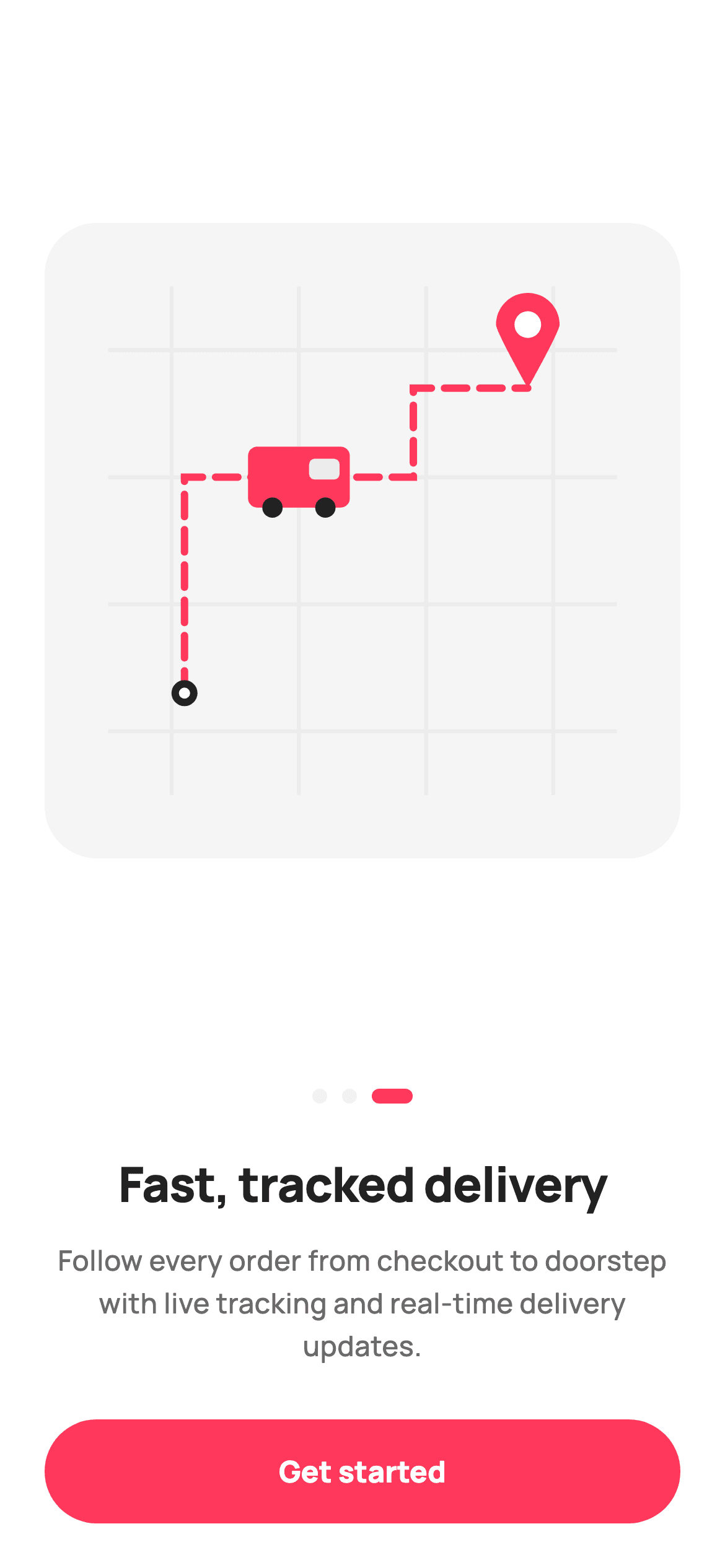
Flutter's Canvas has no dashed-line option, which is why so many apps settle for a solid route. This tutorial builds StyleCart's final onboarding page in Flutter and solves it properly: a delivery map painted from a street grid, a courier van and a destination pin, with the route drawn as real dashes by walking the Path with `computeMetrics` and extracting alternating segments. Being the last page, it also drops the Skip button and commits to a single Get started.
Watch the Flutter UI walkthrough
A short screen recording of Tracked delivery onboarding running, if you'd rather see it before you read the code. The written tutorial below covers everything in it.
Can't see the video? Watch it on YouTube.
What you'll build
- ✓A dashed polyline drawn by walking a Path with computeMetrics and extractPath
- ✓A courier van assembled from a rounded body, a translucent cab window and wheels
- ✓A destination pin built as one closed Path from two quadratics and an arc
- ✓A final onboarding page that removes the escape hatch and offers one action
Step-by-step build
Create the file
Add a new file at lib/ecom_onboarding_3/ecom_onboarding_3_screen.dart in your Flutter project.
Register the bundled fonts
No external packages — this is pure Flutter. It does bundle its design font (Manrope), so drop the font file into fonts/ and declare it in pubspec.yaml:
flutter:
  fonts:
    - family: Manrope
      fonts:
- asset: fonts/Manrope-Regular.ttfBuild it, piece by piece
Here's how the screen goes together. Each block below is a real slice of the code with a plain-English explanation — paste them in order, or grab the whole file from the next section.
A last page with one way out
import 'package:flutter/material.dart';

/// StyleCart — Onboarding 3 of 3 · "Fast, tracked delivery".
///
/// Final onboarding page. Self-contained per CONVENTIONS.md: pure Flutter,
/// bundled Manrope, inline Airbnb-style tokens, own light theme + SafeArea. The
/// hero is a painted delivery map (street grid + dashed route + pin + courier
/// van) — a [CustomPainter], no image asset, no emoji glyph. Exposes callbacks
/// only; the gallery wires nav.
class EcomOnboardingThreeScreen extends StatelessWidget {
  const EcomOnboardingThreeScreen({super.key, this.onGetStarted});

  /// Finish onboarding → Get Started.
  final VoidCallback? onGetStarted;

  static const String _font = 'Manrope';
  static const Color _canvas = Color(0xFFFFFFFF);
  static const Color _ink = Color(0xFF222222);
  static const Color _muted = Color(0xFF6A6A6A);
  static const Color _brand = Color(0xFFFF385C);
  static const Color _surface = Color(0xFFF2F2F2);
  static const Color _imageBg = Color(0xFFF5F5F5);
  static const Color _hairline = Color(0xFFEBEBEB);
Compare the constructor with the earlier onboarding pages: this one exposes only `onGetStarted`. There is no `onSkip`, because skipping the last page and finishing it are the same thing, and offering both would be two buttons for one outcome. The palette adds `_hairline` (#EBEBEB) used solely for the painted street grid — a tone light enough to read as background texture rather than as content the user should be looking at.
The layout, and the painter's const constructor
  @override
  Widget build(BuildContext context) {
    return Theme(
      data: ThemeData.light(useMaterial3: true),
      child: Scaffold(
        backgroundColor: _canvas,
        body: SafeArea(
          child: Padding(
            padding: const EdgeInsets.fromLTRB(24, 24, 24, 24),
            child: Column(
              crossAxisAlignment: CrossAxisAlignment.stretch,
              children: <Widget>[
                Expanded(
                  child: Center(
                    child: AspectRatio(
                      aspectRatio: 1,
                      child: DecoratedBox(
                        decoration: BoxDecoration(
                          color: _imageBg,
                          borderRadius: BorderRadius.circular(28),
                        ),
                        child: const CustomPaint(
                          painter: _DeliveryPainter(
                            brand: _brand,
                            canvas: _canvas,
                            hairline: _hairline,
                            ink: _ink,
                          ),
                        ),
                      ),
                    ),
                  ),
                ),
                const SizedBox(height: 28),
                const _Dots(index: 2, brand: _brand, faint: _surface),
                const SizedBox(height: 24),
                const Text(
                  'Fast, tracked delivery',
                  textAlign: TextAlign.center,
                  style: TextStyle(
                    fontFamily: _font,
                    fontSize: 26,
                    fontWeight: FontWeight.w800,
                    letterSpacing: -0.5,
                    color: _ink,
                  ),
                ),
                const SizedBox(height: 12),
                const Text(
                  'Follow every order from checkout to doorstep with '
                  'live tracking and real-time delivery updates.',
                  textAlign: TextAlign.center,
                  style: TextStyle(
                    fontFamily: _font,
                    fontSize: 15,
                    height: 1.5,
                    fontWeight: FontWeight.w500,
                    color: _muted,
                  ),
                ),
                const SizedBox(height: 28),
                SizedBox(
                  height: 56,
                  child: FilledButton(
                    onPressed: onGetStarted,
                    style: FilledButton.styleFrom(
                      backgroundColor: _brand,
                      foregroundColor: _canvas,
                      shape: const StadiumBorder(),
                      textStyle: const TextStyle(
                        fontFamily: _font,
                        fontSize: 16,
                        fontWeight: FontWeight.w800,
                      ),
                    ),
                    child: const Text('Get started'),
                  ),
                ),
              ],
            ),
          ),
        ),
      ),
    );
  }
The Column stretches its cross axis so the button spans full width, and only the hero is `Expanded` — on a short device the artwork compresses while the 26px headline, the body copy and the 56px button keep their exact sizes. The hero is an `AspectRatio(aspectRatio: 1)` `DecoratedBox` in `_imageBg` with a 28px radius, holding a `const CustomPaint`. That `const` is possible because `_DeliveryPainter` takes its four colours as constructor arguments rather than reaching for statics, which lets Flutter skip rebuilding the painter entirely on any rebuild that does not change them. The button reads 'Get started' rather than 'Next', the wording that signals the flow is over.
The street grid
/// Painted delivery map: faint street grid, a dashed brand route from an origin
/// dot to a destination pin, and a small courier van. Pure vector.
class _DeliveryPainter extends CustomPainter {
  const _DeliveryPainter({
    required this.brand,
    required this.canvas,
    required this.hairline,
    required this.ink,
  });

  final Color brand;
  final Color canvas;
  final Color hairline;
  final Color ink;

  @override
  void paint(Canvas c, Size size) {
    final double w = size.width;
    final double h = size.height;

    // ── Street grid ────────────────────────────────────────────────────────
    final Paint grid = Paint()
      ..style = PaintingStyle.stroke
      ..strokeWidth = 2
      ..color = hairline;
    for (int i = 1; i < 5; i++) {
      final double y = h * i / 5;
      c.drawLine(Offset(w * 0.1, y), Offset(w * 0.9, y), grid);
      final double x = w * i / 5;
      c.drawLine(Offset(x, h * 0.1), Offset(x, h * 0.9), grid);
    }
`paint` opens with a loop from 1 to 4 drawing both a horizontal and a vertical line per iteration at `h * i / 5` and `w * i / 5`, producing a 5x5 block grid from eight `drawLine` calls. The lines are inset to run from 10% to 90% rather than edge to edge, which reads as a map fragment rather than a rectangle of graph paper. Everything is expressed as a fraction of `size`, so the whole illustration scales to whatever box the `AspectRatio` hands it. The grid is painted first, in `hairline`, so every later element sits on top of it.
Drawing dashes with PathMetrics
    // ── Route (dashed brand polyline) ───────────────────────────────────────
    final Path route = Path()
      ..moveTo(w * 0.22, h * 0.74)
      ..lineTo(w * 0.22, h * 0.40)
      ..lineTo(w * 0.58, h * 0.40)
      ..lineTo(w * 0.58, h * 0.26)
      ..lineTo(w * 0.76, h * 0.26);
    final Paint routePaint = Paint()
      ..style = PaintingStyle.stroke
      ..strokeWidth = 4
      ..strokeCap = StrokeCap.round
      ..color = brand;
    for (final metric in route.computeMetrics()) {
      double dist = 0;
      const double dash = 12;
      const double gap = 7;
      while (dist < metric.length) {
        final double end = (dist + dash).clamp(0, metric.length);
        c.drawPath(metric.extractPath(dist, end), routePaint);
        dist += dash + gap;
      }
    }
This is the technique worth taking away. Flutter's `Paint` has no dash pattern, so the route is built as a five-point `Path` and then walked: `route.computeMetrics()` yields a metric per subpath exposing its `length` and an `extractPath(start, end)` method. The loop advances `dist` by `dash + gap` (12 + 7) and draws only the `dash`-long slice each time, producing evenly spaced segments along a polyline that turns corners. `(dist + dash).clamp(0, metric.length)` prevents the final dash overshooting the end of the path. With `strokeCap: StrokeCap.round` each dash gets soft ends. The same loop dashes any Path — curves included — which is why it beats faking dashes with a row of manually placed rectangles.
The courier van
    // ── Origin dot ──────────────────────────────────────────────────────────
    c.drawCircle(Offset(w * 0.22, h * 0.74), 7, Paint()..color = ink);
    c.drawCircle(Offset(w * 0.22, h * 0.74), 3, Paint()..color = canvas);

    // ── Courier van (rounded body + cab + wheels) ──────────────────────────
    _van(c, Offset(w * 0.40, h * 0.40), w * 0.16, brand, canvas, ink);

    // ── Destination pin ────────────────────────────────────────────────────
    _pin(c, Offset(w * 0.76, h * 0.26), w * 0.10, brand, canvas);
  }

  void _van(Canvas c, Offset at, double s, Color body, Color glass, Color ink) {
    final double bw = s;
    final double bh = s * 0.6;
    final Rect bodyRect =
        Rect.fromCenter(center: at, width: bw, height: bh);
    c.drawRRect(
      RRect.fromRectAndRadius(bodyRect, const Radius.circular(5)),
      Paint()..color = body,
    );
    // Cab window.
    c.drawRRect(
      RRect.fromRectAndRadius(
        Rect.fromLTWH(at.dx + bw * 0.10, at.dy - bh * 0.30, bw * 0.30, bh * 0.34),
        const Radius.circular(3),
      ),
      Paint()..color = glass.withValues(alpha: 0.85),
    );
    // Wheels.
    final double wy = at.dy + bh * 0.5;
    c.drawCircle(Offset(at.dx - bw * 0.26, wy), s * 0.10, Paint()..color = ink);
    c.drawCircle(Offset(at.dx + bw * 0.26, wy), s * 0.10, Paint()..color = ink);
  }
`_van` builds a recognisable vehicle from four primitives, sized entirely from one `s` parameter so the whole van scales together. The body is an `RRect` with a 5px radius at a 1:0.6 width-to-height ratio — that proportion alone is most of what makes it read as a van rather than a car. The cab window is a smaller `RRect` offset to the right at `glass.withValues(alpha: 0.85)`, translucent so a hint of the body colour shows through like real glass. Two `drawCircle` wheels sit at `bh * 0.5` below centre, so they straddle the body's lower edge rather than floating beneath it. Placing the van mid-route rather than at either end is what implies the delivery is in progress.
The destination pin
  void _pin(Canvas c, Offset tip, double s, Color fill, Color dot) {
    final double r = s * 0.5;
    final Offset head = Offset(tip.dx, tip.dy - s);
    final Path p = Path()
      ..moveTo(tip.dx, tip.dy)
      ..quadraticBezierTo(tip.dx - r, tip.dy - s * 0.9, head.dx - r, head.dy)
      ..arcToPoint(Offset(head.dx + r, head.dy),
          radius: Radius.circular(r), clockwise: true)
      ..quadraticBezierTo(tip.dx + r, tip.dy - s * 0.9, tip.dx, tip.dy)
      ..close();
    c.drawPath(p, Paint()..color = fill);
    c.drawCircle(head, r * 0.42, Paint()..color = dot);
  }

  @override
  bool shouldRepaint(_DeliveryPainter oldDelegate) => false;
`_pin` builds the teardrop as a single closed `Path` rather than as a circle plus a triangle: `moveTo` the tip, a `quadraticBezierTo` sweeping up the left flank, an `arcToPoint` across the top of the head, a mirrored quadratic down the right, then `close()`. Constructing it as one path is what gives the smooth join where the head meets the tip — two separate shapes would show a seam. A `drawCircle` at 42% of the head radius punches the white centre. Because the pin is positioned by its *tip* rather than its centre, it lands exactly on the route's end point, the same convention real map pins use. `shouldRepaint` returns `false` since nothing in this illustration varies.
Full code
The complete, ready-to-paste source. Free to use in your projects — one click copies it all.
import 'package:flutter/material.dart';

/// StyleCart — Onboarding 3 of 3 · "Fast, tracked delivery".
///
/// Final onboarding page. Self-contained per CONVENTIONS.md: pure Flutter,
/// bundled Manrope, inline Airbnb-style tokens, own light theme + SafeArea. The
/// hero is a painted delivery map (street grid + dashed route + pin + courier
/// van) — a [CustomPainter], no image asset, no emoji glyph. Exposes callbacks
/// only; the gallery wires nav.
class EcomOnboardingThreeScreen extends StatelessWidget {
  const EcomOnboardingThreeScreen({super.key, this.onGetStarted});

  /// Finish onboarding → Get Started.
  final VoidCallback? onGetStarted;

  static const String _font = 'Manrope';
  static const Color _canvas = Color(0xFFFFFFFF);
  static const Color _ink = Color(0xFF222222);
  static const Color _muted = Color(0xFF6A6A6A);
  static const Color _brand = Color(0xFFFF385C);
  static const Color _surface = Color(0xFFF2F2F2);
  static const Color _imageBg = Color(0xFFF5F5F5);
  static const Color _hairline = Color(0xFFEBEBEB);

  @override
  Widget build(BuildContext context) {
    return Theme(
      data: ThemeData.light(useMaterial3: true),
      child: Scaffold(
        backgroundColor: _canvas,
        body: SafeArea(
          child: Padding(
            padding: const EdgeInsets.fromLTRB(24, 24, 24, 24),
            child: Column(
              crossAxisAlignment: CrossAxisAlignment.stretch,
              children: <Widget>[
                Expanded(
                  child: Center(
                    child: AspectRatio(
                      aspectRatio: 1,
                      child: DecoratedBox(
                        decoration: BoxDecoration(
                          color: _imageBg,
                          borderRadius: BorderRadius.circular(28),
                        ),
                        child: const CustomPaint(
                          painter: _DeliveryPainter(
                            brand: _brand,
                            canvas: _canvas,
                            hairline: _hairline,
                            ink: _ink,
                          ),
                        ),
                      ),
                    ),
                  ),
                ),
                const SizedBox(height: 28),
                const _Dots(index: 2, brand: _brand, faint: _surface),
                const SizedBox(height: 24),
                const Text(
                  'Fast, tracked delivery',
                  textAlign: TextAlign.center,
                  style: TextStyle(
                    fontFamily: _font,
                    fontSize: 26,
                    fontWeight: FontWeight.w800,
                    letterSpacing: -0.5,
                    color: _ink,
                  ),
                ),
                const SizedBox(height: 12),
                const Text(
                  'Follow every order from checkout to doorstep with '
                  'live tracking and real-time delivery updates.',
                  textAlign: TextAlign.center,
                  style: TextStyle(
                    fontFamily: _font,
                    fontSize: 15,
                    height: 1.5,
                    fontWeight: FontWeight.w500,
                    color: _muted,
                  ),
                ),
                const SizedBox(height: 28),
                SizedBox(
                  height: 56,
                  child: FilledButton(
                    onPressed: onGetStarted,
                    style: FilledButton.styleFrom(
                      backgroundColor: _brand,
                      foregroundColor: _canvas,
                      shape: const StadiumBorder(),
                      textStyle: const TextStyle(
                        fontFamily: _font,
                        fontSize: 16,
                        fontWeight: FontWeight.w800,
                      ),
                    ),
                    child: const Text('Get started'),
                  ),
                ),
              ],
            ),
          ),
        ),
      ),
    );
  }
}

/// Painted delivery map: faint street grid, a dashed brand route from an origin
/// dot to a destination pin, and a small courier van. Pure vector.
class _DeliveryPainter extends CustomPainter {
  const _DeliveryPainter({
    required this.brand,
    required this.canvas,
    required this.hairline,
    required this.ink,
  });

  final Color brand;
  final Color canvas;
  final Color hairline;
  final Color ink;

  @override
  void paint(Canvas c, Size size) {
    final double w = size.width;
    final double h = size.height;

    // ── Street grid ────────────────────────────────────────────────────────
    final Paint grid = Paint()
      ..style = PaintingStyle.stroke
      ..strokeWidth = 2
      ..color = hairline;
    for (int i = 1; i < 5; i++) {
      final double y = h * i / 5;
      c.drawLine(Offset(w * 0.1, y), Offset(w * 0.9, y), grid);
      final double x = w * i / 5;
      c.drawLine(Offset(x, h * 0.1), Offset(x, h * 0.9), grid);
    }

    // ── Route (dashed brand polyline) ───────────────────────────────────────
    final Path route = Path()
      ..moveTo(w * 0.22, h * 0.74)
      ..lineTo(w * 0.22, h * 0.40)
      ..lineTo(w * 0.58, h * 0.40)
      ..lineTo(w * 0.58, h * 0.26)
      ..lineTo(w * 0.76, h * 0.26);
    final Paint routePaint = Paint()
      ..style = PaintingStyle.stroke
      ..strokeWidth = 4
      ..strokeCap = StrokeCap.round
      ..color = brand;
    for (final metric in route.computeMetrics()) {
      double dist = 0;
      const double dash = 12;
      const double gap = 7;
      while (dist < metric.length) {
        final double end = (dist + dash).clamp(0, metric.length);
        c.drawPath(metric.extractPath(dist, end), routePaint);
        dist += dash + gap;
      }
    }

    // ── Origin dot ──────────────────────────────────────────────────────────
    c.drawCircle(Offset(w * 0.22, h * 0.74), 7, Paint()..color = ink);
    c.drawCircle(Offset(w * 0.22, h * 0.74), 3, Paint()..color = canvas);

    // ── Courier van (rounded body + cab + wheels) ──────────────────────────
    _van(c, Offset(w * 0.40, h * 0.40), w * 0.16, brand, canvas, ink);

    // ── Destination pin ────────────────────────────────────────────────────
    _pin(c, Offset(w * 0.76, h * 0.26), w * 0.10, brand, canvas);
  }

  void _van(Canvas c, Offset at, double s, Color body, Color glass, Color ink) {
    final double bw = s;
    final double bh = s * 0.6;
    final Rect bodyRect =
        Rect.fromCenter(center: at, width: bw, height: bh);
    c.drawRRect(
      RRect.fromRectAndRadius(bodyRect, const Radius.circular(5)),
      Paint()..color = body,
    );
    // Cab window.
    c.drawRRect(
      RRect.fromRectAndRadius(
        Rect.fromLTWH(at.dx + bw * 0.10, at.dy - bh * 0.30, bw * 0.30, bh * 0.34),
        const Radius.circular(3),
      ),
      Paint()..color = glass.withValues(alpha: 0.85),
    );
    // Wheels.
    final double wy = at.dy + bh * 0.5;
    c.drawCircle(Offset(at.dx - bw * 0.26, wy), s * 0.10, Paint()..color = ink);
    c.drawCircle(Offset(at.dx + bw * 0.26, wy), s * 0.10, Paint()..color = ink);
  }

  void _pin(Canvas c, Offset tip, double s, Color fill, Color dot) {
    final double r = s * 0.5;
    final Offset head = Offset(tip.dx, tip.dy - s);
    final Path p = Path()
      ..moveTo(tip.dx, tip.dy)
      ..quadraticBezierTo(tip.dx - r, tip.dy - s * 0.9, head.dx - r, head.dy)
      ..arcToPoint(Offset(head.dx + r, head.dy),
          radius: Radius.circular(r), clockwise: true)
      ..quadraticBezierTo(tip.dx + r, tip.dy - s * 0.9, tip.dx, tip.dy)
      ..close();
    c.drawPath(p, Paint()..color = fill);
    c.drawCircle(head, r * 0.42, Paint()..color = dot);
  }

  @override
  bool shouldRepaint(_DeliveryPainter oldDelegate) => false;
}

/// Painted onboarding page dots — active dot is an elongated brand pill.
class _Dots extends StatelessWidget {
  const _Dots({required this.index, required this.brand, required this.faint});

  final int index;
  final Color brand;
  final Color faint;

  @override
  Widget build(BuildContext context) {
    return Row(
      mainAxisAlignment: MainAxisAlignment.center,
      children: List<Widget>.generate(3, (int i) {
        final bool active = i == index;
        return AnimatedContainer(
          duration: const Duration(milliseconds: 200),
          margin: const EdgeInsets.symmetric(horizontal: 4),
          width: active ? 22 : 8,
          height: 8,
          decoration: BoxDecoration(
            color: active ? brand : faint,
            borderRadius: BorderRadius.circular(4),
          ),
        );
      }),
    );
  }
}
Plus bundled 5 binary assets (fonts/images). The CLI and MCP install those for you automatically.
Two faster ways to add it
Copy-paste works, but you can skip it entirely.
1. FlutterKit CLI
One command drops this screen — and its fonts — straight into your project.
$ flutterkit add ecom-onboarding-32. AI agent (MCP)
Connect FlutterKit's MCP server in Claude or Cursor and just ask your agent to install ecom-onboarding-3 — it fetches and writes the files for you.
FAQ
Is this delivery onboarding screen free for commercial use?
Yes, and it stays free. The final onboarding page, dashed-route painter included, is on this page, in the CLI, and reachable over MCP. Use it commercially without a licence, an account, or any attribution.
How do I draw a dashed line in Flutter?
Build the line as a `Path`, call `computeMetrics()`, and for each metric walk its `length` in steps of dash-plus-gap, drawing `metric.extractPath(dist, dist + dash)` each time. That is exactly what this painter does, and it works for curves and multi-segment polylines, not just straight lines.
Do I need a package like path_drawing for the dashes?
No. `computeMetrics` and `extractPath` are part of `dart:ui` and available through `package:flutter/material.dart`. A package can save you the loop, but the loop is about eight lines and adds no dependency to maintain.
Why does this page have no Skip button?
Because it is the last one. Skipping and finishing lead to the same place, so offering both would be two controls for one outcome. Removing the secondary option is what makes the final page feel like a conclusion rather than another step to get past.
Which Flutter version does this need?
Flutter 3.22 or newer, because the van's cab window uses `Color.withValues(alpha: 0.85)`. On an older SDK replace it with `withOpacity(0.85)` and expand the constructor to `const EcomOnboardingThreeScreen({Key? key, this.onGetStarted}) : super(key: key);`.


