How to Build an Offers & Deals Hub Screen in Flutter (Full Code + Preview)
A deals hub has one job: show a shopper, in a single scroll, every way they can pay less today. This tutorial builds StyleCart's Offers & Deals screen in Flutter: a 16:9 campaign banner under a diagonal scrim, four shortcut tiles, a Today's deals stack whose photo banners each carry a coral discount badge drawn with CustomPainter and TextPainter, and entry rows that route to coupons, bank offers, the flash sale and clearance. You finish with one stateless file wired entirely through callbacks.
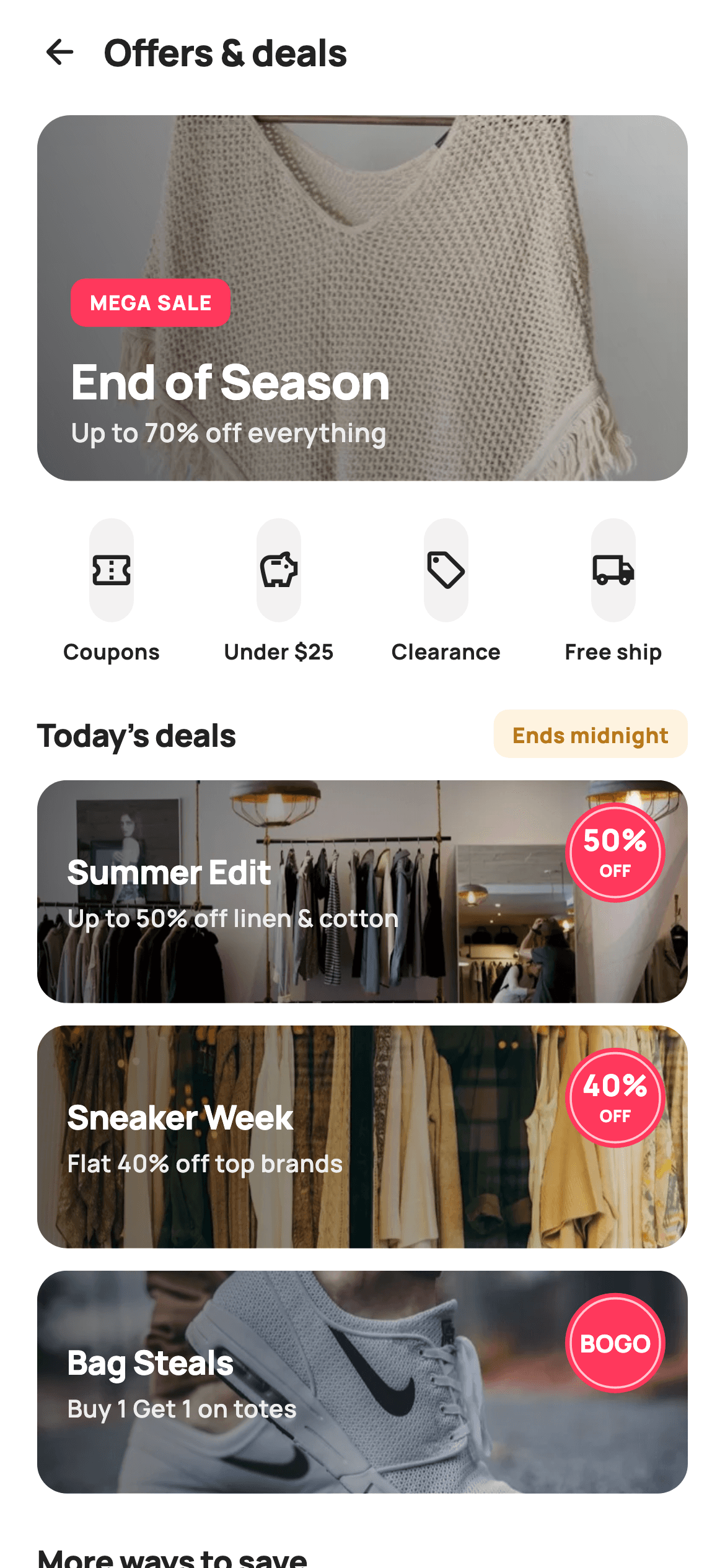
What you'll build
- ✓A 16:9 hero campaign banner with a bottom-left-to-top-right black scrim, a MEGA SALE pill and a 26px headline
- ✓A four-up row of quick deal tiles built from a collection-for with gaps only between tiles
- ✓Three 120px Today's deals banners, each with a left-side scrim and a 54px circular badge that reads '50% / OFF' or a single token like 'BOGO'
- ✓A section header with an amber 'Ends midnight' urgency pill that disappears when no trailing text is passed
- ✓Four 'More ways to save' entry rows where the live Flash sale row alone is tinted coral
Step-by-step build
Create the file
Add a new file at lib/ecom_offers_home/ecom_offers_home_screen.dart in your Flutter project.
Register the bundled fonts
No external packages — this is pure Flutter. It does bundle its design font (Manrope), so drop the font file into fonts/ and declare it in pubspec.yaml:
flutter:
  fonts:
    - family: Manrope
      fonts:
- asset: fonts/Manrope-Regular.ttfBuild it, piece by piece
Here's how the screen goes together. Each block below is a real slice of the code with a plain-English explanation — paste them in order, or grab the whole file from the next section.
Six callbacks, one string-carrying banner hook
import 'package:flutter/material.dart';

/// StyleCart — Offers & Deals.
///
/// The deals hub: a hero campaign banner, quick deal-category tiles, a
/// "Today's deals" banner stack with painted discount badges, and entry rows
/// into Coupons, Bank offers, Flash sale and Clearance.
///
/// Self-contained per CONVENTIONS.md: pure Flutter, bundled Manrope, inline
/// Airbnb-style tokens, own light theme + SafeArea. BadgePainter discount tags,
/// bundled banner webp. Exposes callbacks only.
class EcomOffersHomeScreen extends StatelessWidget {
  const EcomOffersHomeScreen({
    super.key,
    this.onBack,
    this.onCoupons,
    this.onBankOffers,
    this.onFlashSale,
    this.onClearance,
    this.onBanner,
  });

  final VoidCallback? onBack;
  final VoidCallback? onCoupons;
  final VoidCallback? onBankOffers;
  final VoidCallback? onFlashSale;
  final VoidCallback? onClearance;
  final ValueChanged<String>? onBanner;

  static const String _dir = 'lib/screens/ecommerce/ecom_offers_home/images';
  static const String _font = 'Manrope';
  static const Color _canvas = Color(0xFFFFFFFF);
  static const Color _ink = Color(0xFF222222);
  static const Color _muted = Color(0xFF6A6A6A);
  static const Color _brand = Color(0xFFFF385C);
  static const Color _surface = Color(0xFFF2F2F2);
  static const Color _imageBg = Color(0xFFF5F5F5);
  static const Color _warn = Color(0xFFF5A623);
  static const Color _hairline = Color(0xFFEBEBEB);
`EcomOffersHomeScreen` is a `StatelessWidget`: a deals hub displays campaigns and routes away from them, so nothing on it needs to change after build. Five of its callbacks are plain `VoidCallback?` for fixed destinations — back, coupons, bank offers, flash sale, clearance — but `onBanner` is a `ValueChanged<String>?`, because the banners are many and one handler receives an identifier ('hero' or the banner title) instead of the class growing one callback per campaign. `_dir` hard-codes the bundled image folder, `lib/screens/ecommerce/ecom_offers_home/images`, so every `Image.asset` call builds its path from it. Beyond the shared StyleCart coral, two tokens are specific to this screen: `_imageBg` `#F5F5F5`, a placeholder grey behind every photo, and `_warn` `#F5A623`, the amber reserved for the deadline pill.
The page is a single ListView read top to bottom
  @override
  Widget build(BuildContext context) {
    return Theme(
      data: ThemeData.light(useMaterial3: true),
      child: Scaffold(
        backgroundColor: _canvas,
        body: SafeArea(
          child: Column(
            children: <Widget>[
              _header(),
              Expanded(
                child: ListView(
                  padding: const EdgeInsets.fromLTRB(20, 4, 20, 28),
                  children: <Widget>[
                    _heroBanner(),
                    const SizedBox(height: 20),
                    _quickTiles(),
                    const SizedBox(height: 24),
                    _sectionHead("Today's deals", 'Ends midnight'),
                    const SizedBox(height: 12),
                    _dealBanner('p02', 'Summer Edit', 'Up to 50% off linen & cotton', 50),
                    const SizedBox(height: 12),
                    _dealBanner('p03', 'Sneaker Week', 'Flat 40% off top brands', 40),
                    const SizedBox(height: 12),
                    _dealBanner('p04', 'Bag Steals', 'Buy 1 Get 1 on totes', 0,
                        tagText: 'BOGO'),
                    const SizedBox(height: 24),
                    _sectionHead('More ways to save', null),
                    const SizedBox(height: 12),
                    _row(Icons.local_offer_outlined, 'My coupons',
                        '3 ready to use', onCoupons),
                    _row(Icons.account_balance_outlined, 'Bank & card offers',
                        'Instant 10% on HDFC', onBankOffers),
                    _row(Icons.flash_on_rounded, 'Flash sale',
                        'Live now · limited stock', onFlashSale,
                        accent: _brand),
                    _row(Icons.sell_outlined, 'Clearance',
                        'Final markdowns up to 70%', onClearance),
                  ],
                ),
              ),
            ],
          ),
        ),
      ),
    );
  }

  Widget _header() {
    return Padding(
      padding: const EdgeInsets.fromLTRB(8, 4, 20, 6),
      child: Row(
        children: <Widget>[
          IconButton(
            onPressed: onBack,
            icon: const Icon(Icons.arrow_back_rounded, size: 22, color: _ink),
          ),
          const Text(
            'Offers & deals',
            style: TextStyle(
              fontFamily: _font,
              fontSize: 20,
              fontWeight: FontWeight.w800,
              letterSpacing: -0.3,
              color: _ink,
            ),
          ),
        ],
      ),
    );
  }
`build` wraps everything in `Theme(data: ThemeData.light(useMaterial3: true))` and a `SafeArea`, then splits the page into a fixed `_header()` above an `Expanded` `ListView`. Only the content scrolls; the back arrow and 'Offers & deals' title stay pinned. The ListView's children double as the screen's content table: you can read the whole hub straight from lines 55–78, because every banner and row is a helper call with its copy passed inline — `_dealBanner('p03', 'Sneaker Week', 'Flat 40% off top brands', 40)`. Spacing follows a rhythm of 12px inside a section and 20–24px between sections, which is what groups the deals visually without dividers. The `fromLTRB(20, 4, 20, 28)` padding leaves extra room at the bottom so the last row is not flush with the gesture bar. The header is a left-aligned 20px `w800` title beside an `IconButton`, not a centred AppBar.
Hero campaign banner with a diagonal scrim
  Widget _heroBanner() {
    return GestureDetector(
      onTap: () => onBanner?.call('hero'),
      child: ClipRRect(
        borderRadius: BorderRadius.circular(18),
        child: Stack(
          children: <Widget>[
            AspectRatio(
              aspectRatio: 16 / 9,
              child: Container(
                color: _imageBg,
                child: Image.asset('$_dir/p01.webp', fit: BoxFit.cover),
              ),
            ),
            Positioned.fill(
              child: DecoratedBox(
                decoration: BoxDecoration(
                  gradient: LinearGradient(
                    begin: Alignment.bottomLeft,
                    end: Alignment.topRight,
                    colors: <Color>[
                      Colors.black.withValues(alpha: 0.62),
                      Colors.black.withValues(alpha: 0.05),
                    ],
                  ),
                ),
              ),
            ),
            Positioned(
              left: 18,
              right: 18,
              bottom: 16,
              child: Column(
                crossAxisAlignment: CrossAxisAlignment.start,
                children: <Widget>[
                  Container(
                    padding:
                        const EdgeInsets.symmetric(horizontal: 10, vertical: 5),
                    decoration: BoxDecoration(
                      color: _brand,
                      borderRadius: BorderRadius.circular(8),
                    ),
                    child: const Text(
                      'MEGA SALE',
                      style: TextStyle(
                        fontFamily: _font,
                        fontSize: 11,
                        fontWeight: FontWeight.w800,
                        letterSpacing: 0.6,
                        color: _canvas,
                      ),
                    ),
                  ),
                  const SizedBox(height: 10),
                  const Text(
                    'End of Season',
                    style: TextStyle(
                      fontFamily: _font,
                      fontSize: 26,
                      fontWeight: FontWeight.w800,
                      letterSpacing: -0.6,
                      color: _canvas,
                    ),
                  ),
                  const Text(
                    'Up to 70% off everything',
                    style: TextStyle(
                      fontFamily: _font,
                      fontSize: 14,
                      fontWeight: FontWeight.w600,
                      color: Color(0xFFEDEDED),
                    ),
                  ),
                ],
              ),
            ),
          ],
        ),
      ),
    );
  }
`_heroBanner` stacks three layers inside a `ClipRRect` of radius 18. At the bottom is the photo, locked to `AspectRatio(16 / 9)` so its height scales with screen width instead of being a magic number. The image sits inside a `Container(color: _imageBg)`, so a grey card shows while the webp decodes rather than a blank hole. Over it, `Positioned.fill` lays a `LinearGradient` that runs from `bottomLeft` at black 0.62 to `topRight` at 0.05. The diagonal direction matters: the text block is anchored `left: 18, bottom: 16`, so the darkest corner sits exactly behind the copy while the upper right of the photo stays nearly untouched. The text is a coral 'MEGA SALE' pill (11px, `letterSpacing: 0.6` for an all-caps label), the 26px 'End of Season' headline tightened to -0.6, and an `#EDEDED` subline that is a step softer than pure white. The whole stack taps through to `onBanner?.call('hero')`.
Quick tiles and the deadline section header
  Widget _quickTiles() {
    const List<List<dynamic>> items = <List<dynamic>>[
      <dynamic>['Coupons', Icons.confirmation_number_outlined],
      <dynamic>['Under \$25', Icons.savings_outlined],
      <dynamic>['Clearance', Icons.sell_outlined],
      <dynamic>['Free ship', Icons.local_shipping_outlined],
    ];
    return Row(
      children: <Widget>[
        for (int i = 0; i < items.length; i++) ...<Widget>[
          Expanded(
            child: Column(
              children: <Widget>[
                Container(
                  height: 56,
                  decoration: BoxDecoration(
                    color: _surface,
                    borderRadius: BorderRadius.circular(14),
                  ),
                  child: Icon(items[i][1] as IconData, size: 24, color: _ink),
                ),
                const SizedBox(height: 7),
                Text(
                  items[i][0] as String,
                  style: const TextStyle(
                    fontFamily: _font,
                    fontSize: 11.5,
                    fontWeight: FontWeight.w700,
                    color: _ink,
                  ),
                ),
              ],
            ),
          ),
          if (i < items.length - 1) const SizedBox(width: 10),
        ],
      ],
    );
  }

  Widget _sectionHead(String title, String? trailing) {
    return Row(
      children: <Widget>[
        Text(
          title,
          style: const TextStyle(
            fontFamily: _font,
            fontSize: 17,
            fontWeight: FontWeight.w800,
            letterSpacing: -0.3,
            color: _ink,
          ),
        ),
        const Spacer(),
        if (trailing != null)
          Container(
            padding: const EdgeInsets.symmetric(horizontal: 10, vertical: 5),
            decoration: BoxDecoration(
              color: _warn.withValues(alpha: 0.14),
              borderRadius: BorderRadius.circular(8),
            ),
            child: Text(
              trailing,
              style: const TextStyle(
                fontFamily: _font,
                fontSize: 11.5,
                fontWeight: FontWeight.w800,
                color: Color(0xFFB9791A),
              ),
            ),
          ),
      ],
    );
  }
`_quickTiles` keeps its four shortcuts in a `List<List<dynamic>>` of [label, icon] pairs and casts back with `as String` and `as IconData`. That works, but a Dart record such as `(String, IconData)` would give you type checking. The row uses a spread collection-for that emits an `Expanded` tile and then `if (i < items.length - 1) const SizedBox(width: 10)`, so gaps appear only between tiles and the four share width equally. Each tile is a 56px `_surface` block at radius 14 with an 11.5px `w700` label below. Note that the tiles have no `GestureDetector` and no callback: they render, but tapping them does nothing yet. `_sectionHead` takes a nullable `trailing`. When it is present, a `Spacer` pushes an amber pill to the right edge, filled with `_warn` at 14% alpha and lettered in the darker `#B9791A`, because `#F5A623` text on its own tint would fail contrast. 'Ends midnight' is a fixed string, not a running countdown.
Today's deals banners and the badge decision
  Widget _dealBanner(String img, String title, String sub, int pct,
      {String? tagText}) {
    return GestureDetector(
      onTap: () => onBanner?.call(title),
      child: ClipRRect(
        borderRadius: BorderRadius.circular(16),
        child: Stack(
          children: <Widget>[
            SizedBox(
              height: 120,
              width: double.infinity,
              child: Container(
                color: _imageBg,
                child: Image.asset('$_dir/$img.webp', fit: BoxFit.cover),
              ),
            ),
            Positioned.fill(
              child: DecoratedBox(
                decoration: BoxDecoration(
                  gradient: LinearGradient(
                    begin: Alignment.centerLeft,
                    end: Alignment.centerRight,
                    colors: <Color>[
                      Colors.black.withValues(alpha: 0.58),
                      Colors.black.withValues(alpha: 0.0),
                    ],
                  ),
                ),
              ),
            ),
            Positioned(
              left: 16,
              top: 0,
              bottom: 0,
              child: Column(
                mainAxisAlignment: MainAxisAlignment.center,
                crossAxisAlignment: CrossAxisAlignment.start,
                children: <Widget>[
                  Text(
                    title,
                    style: const TextStyle(
                      fontFamily: _font,
                      fontSize: 18,
                      fontWeight: FontWeight.w800,
                      letterSpacing: -0.3,
                      color: _canvas,
                    ),
                  ),
                  const SizedBox(height: 3),
                  Text(
                    sub,
                    style: const TextStyle(
                      fontFamily: _font,
                      fontSize: 13,
                      fontWeight: FontWeight.w600,
                      color: Color(0xFFEDEDED),
                    ),
                  ),
                ],
              ),
            ),
            Positioned(
              right: 12,
              top: 12,
              child: CustomPaint(
                size: const Size(54, 54),
                painter: _BadgePainter(
                  pct > 0 ? '$pct%' : (tagText ?? ''),
                  pct > 0 ? 'OFF' : '',
                ),
              ),
            ),
          ],
        ),
      ),
    );
  }
`_dealBanner(img, title, sub, pct, {tagText})` is the reusable unit behind all three Today's deals cards. It mirrors the hero's layering, but at a fixed 120px height and with the scrim turned sideways: `centerLeft` at black 0.58 to `centerRight` at fully transparent. The title and sub-line sit in a `Positioned(left: 16, top: 0, bottom: 0)` Column with `MainAxisAlignment.center`, so the text stays vertically centred whatever the banner height. The badge goes top-right at 12px insets as a 54×54 `CustomPaint`, and the `pct` integer decides what it says. Any positive value becomes the pair '$pct%' / 'OFF'. Passing `0` with `tagText: 'BOGO'` switches to a single token with an empty second line, which is how 'Bag Steals' shows a buy-one-get-one deal without a fake percentage. Tapping a banner calls `onBanner?.call(title)`, so the display title doubles as the identifier.
Entry rows with one coral exception
  Widget _row(IconData icon, String title, String sub, VoidCallback? onTap,
      {Color accent = _ink}) {
    return GestureDetector(
      onTap: onTap,
      behavior: HitTestBehavior.opaque,
      child: Container(
        margin: const EdgeInsets.only(bottom: 10),
        padding: const EdgeInsets.all(14),
        decoration: BoxDecoration(
          color: _canvas,
          borderRadius: BorderRadius.circular(14),
          border: Border.all(color: _hairline),
        ),
        child: Row(
          children: <Widget>[
            Container(
              width: 42,
              height: 42,
              alignment: Alignment.center,
              decoration: BoxDecoration(
                color: accent == _brand
                    ? _brand.withValues(alpha: 0.10)
                    : _surface,
                borderRadius: BorderRadius.circular(12),
              ),
              child: Icon(icon, size: 21, color: accent),
            ),
            const SizedBox(width: 14),
            Expanded(
              child: Column(
                crossAxisAlignment: CrossAxisAlignment.start,
                children: <Widget>[
                  Text(
                    title,
                    style: const TextStyle(
                      fontFamily: _font,
                      fontSize: 14.5,
                      fontWeight: FontWeight.w700,
                      color: _ink,
                    ),
                  ),
                  const SizedBox(height: 2),
                  Text(
                    sub,
                    style: const TextStyle(
                      fontFamily: _font,
                      fontSize: 12.5,
                      fontWeight: FontWeight.w600,
                      color: _muted,
                    ),
                  ),
                ],
              ),
            ),
            const Icon(Icons.chevron_right_rounded, size: 22, color: _faintC),
          ],
        ),
      ),
    );
  }

  static const Color _faintC = Color(0xFFC1C1C1);
}
`_row` is the 'More ways to save' item: a white card at radius 14 with a `_hairline` border, a 42px icon tile, a 14.5px title over a 12.5px `_muted` sub-line, and a trailing chevron. Its optional `accent` defaults to `_ink`, and the icon tile asks `accent == _brand`. If true, the tile fills with coral at 10% alpha and the icon turns coral. Otherwise it is a neutral `_surface` square. Only 'Flash sale · Live now · limited stock' passes `accent: _brand`, so the one time-sensitive destination stands out among four otherwise identical rows. `HitTestBehavior.opaque` on the `GestureDetector` makes the padding and the gap before the chevron tappable, not just the text and icons. The chevron uses `_faintC` `#C1C1C1`, declared after the method that uses it. Dart resolves static members across the whole class, so the odd placement is harmless.
Painting the discount badge and centring its text
/// Painted circular discount badge ("40% / OFF" or a single token like "BOGO").
class _BadgePainter extends CustomPainter {
  _BadgePainter(this.big, this.small);
  final String big;
  final String small;

  static const Color _brand = Color(0xFFFF385C);

  @override
  void paint(Canvas canvas, Size size) {
    final Offset c = Offset(size.width / 2, size.height / 2);
    final double r = size.width / 2;

    // scalloped-ish badge: a filled circle with a thin white ring
    canvas.drawCircle(c, r, Paint()..color = _brand);
    canvas.drawCircle(
      c,
      r - 3,
      Paint()
        ..style = PaintingStyle.stroke
        ..strokeWidth = 1.2
        ..color = Colors.white.withValues(alpha: 0.7),
    );

    final bool two = small.isNotEmpty;
    _text(canvas, big, c.dx, two ? c.dy - 7 : c.dy, two ? 16 : 13);
    if (two) _text(canvas, small, c.dx, c.dy + 9, 9);
  }

  void _text(Canvas canvas, String s, double cx, double cy, double fs) {
    final TextPainter tp = TextPainter(
      text: TextSpan(
        text: s,
        style: TextStyle(
          fontFamily: 'Manrope',
          fontSize: fs,
          fontWeight: FontWeight.w800,
          letterSpacing: 0.2,
          color: Colors.white,
        ),
      ),
      textDirection: TextDirection.ltr,
    )..layout();
    tp.paint(canvas, Offset(cx - tp.width / 2, cy - tp.height / 2));
  }

  @override
  bool shouldRepaint(_BadgePainter old) =>
      old.big != big || old.small != small;
}
`_BadgePainter` takes two strings, `big` and `small`. It fills a full-radius coral circle, then strokes a 1.2px ring at `r - 3` in white at 70% alpha. That inset ring is what makes it read as a printed sale sticker rather than a flat dot. The code comment says 'scalloped-ish', but the edge is a plain circle. The `two` flag (`small.isNotEmpty`) picks the layout: two lines put `big` at 16px, 7px above centre, and `small` at 9px, 9px below; a single token is drawn at 13px dead centre so 'BOGO' fits inside 54px. `_text` builds a `TextPainter` in `w800` Manrope, calls `layout()`, then paints at `cx - width / 2, cy - height / 2`. Text has to be measured before it can be centred on a canvas. Since `_BadgePainter` lives outside the screen class it keeps its own `_brand` copy, and `shouldRepaint` only returns true when either string changes.
Full code
The complete, ready-to-paste source. Free to use in your projects — one click copies it all.
import 'package:flutter/material.dart';
/// StyleCart — Offers & Deals.
///
/// The deals hub: a hero campaign banner, quick deal-category tiles, a
/// "Today's deals" banner stack with painted discount badges, and entry rows
/// into Coupons, Bank offers, Flash sale and Clearance.
///
/// Self-contained per CONVENTIONS.md: pure Flutter, bundled Manrope, inline
/// Airbnb-style tokens, own light theme + SafeArea. BadgePainter discount tags,
/// bundled banner webp. Exposes callbacks only.
class EcomOffersHomeScreen extends StatelessWidget {
const EcomOffersHomeScreen({
super.key,
this.onBack,
this.onCoupons,
this.onBankOffers,
this.onFlashSale,
this.onClearance,
this.onBanner,
});
final VoidCallback? onBack;
final VoidCallback? onCoupons;
final VoidCallback? onBankOffers;
final VoidCallback? onFlashSale;
final VoidCallback? onClearance;
final ValueChanged<String>? onBanner;
static const String _dir = 'lib/screens/ecommerce/ecom_offers_home/images';
static const String _font = 'Manrope';
static const Color _canvas = Color(0xFFFFFFFF);
static const Color _ink = Color(0xFF222222);
static const Color _muted = Color(0xFF6A6A6A);
static const Color _brand = Color(0xFFFF385C);
static const Color _surface = Color(0xFFF2F2F2);
static const Color _imageBg = Color(0xFFF5F5F5);
static const Color _warn = Color(0xFFF5A623);
static const Color _hairline = Color(0xFFEBEBEB);
@override
Widget build(BuildContext context) {
return Theme(
data: ThemeData.light(useMaterial3: true),
child: Scaffold(
backgroundColor: _canvas,
body: SafeArea(
child: Column(
children: <Widget>[
_header(),
Expanded(
child: ListView(
padding: const EdgeInsets.fromLTRB(20, 4, 20, 28),
children: <Widget>[
_heroBanner(),
const SizedBox(height: 20),
_quickTiles(),
const SizedBox(height: 24),
_sectionHead("Today's deals", 'Ends midnight'),
const SizedBox(height: 12),
_dealBanner('p02', 'Summer Edit', 'Up to 50% off linen & cotton', 50),
const SizedBox(height: 12),
_dealBanner('p03', 'Sneaker Week', 'Flat 40% off top brands', 40),
const SizedBox(height: 12),
_dealBanner('p04', 'Bag Steals', 'Buy 1 Get 1 on totes', 0,
tagText: 'BOGO'),
const SizedBox(height: 24),
_sectionHead('More ways to save', null),
const SizedBox(height: 12),
_row(Icons.local_offer_outlined, 'My coupons',
'3 ready to use', onCoupons),
_row(Icons.account_balance_outlined, 'Bank & card offers',
'Instant 10% on HDFC', onBankOffers),
_row(Icons.flash_on_rounded, 'Flash sale',
'Live now · limited stock', onFlashSale,
accent: _brand),
_row(Icons.sell_outlined, 'Clearance',
'Final markdowns up to 70%', onClearance),
],
),
),
],
),
),
),
);
}
Widget _header() {
return Padding(
padding: const EdgeInsets.fromLTRB(8, 4, 20, 6),
child: Row(
children: <Widget>[
IconButton(
onPressed: onBack,
icon: const Icon(Icons.arrow_back_rounded, size: 22, color: _ink),
),
const Text(
'Offers & deals',
style: TextStyle(
fontFamily: _font,
fontSize: 20,
fontWeight: FontWeight.w800,
letterSpacing: -0.3,
color: _ink,
),
),
],
),
);
}
Widget _heroBanner() {
return GestureDetector(
onTap: () => onBanner?.call('hero'),
child: ClipRRect(
borderRadius: BorderRadius.circular(18),
child: Stack(
children: <Widget>[
AspectRatio(
aspectRatio: 16 / 9,
child: Container(
color: _imageBg,
child: Image.asset('$_dir/p01.webp', fit: BoxFit.cover),
),
),
Positioned.fill(
child: DecoratedBox(
decoration: BoxDecoration(
gradient: LinearGradient(
begin: Alignment.bottomLeft,
end: Alignment.topRight,
colors: <Color>[
Colors.black.withValues(alpha: 0.62),
Colors.black.withValues(alpha: 0.05),
],
),
),
),
),
Positioned(
left: 18,
right: 18,
bottom: 16,
child: Column(
crossAxisAlignment: CrossAxisAlignment.start,
children: <Widget>[
Container(
padding:
const EdgeInsets.symmetric(horizontal: 10, vertical: 5),
decoration: BoxDecoration(
color: _brand,
borderRadius: BorderRadius.circular(8),
),
child: const Text(
'MEGA SALE',
style: TextStyle(
fontFamily: _font,
fontSize: 11,
fontWeight: FontWeight.w800,
letterSpacing: 0.6,
color: _canvas,
),
),
),
const SizedBox(height: 10),
const Text(
'End of Season',
style: TextStyle(
fontFamily: _font,
fontSize: 26,
fontWeight: FontWeight.w800,
letterSpacing: -0.6,
color: _canvas,
),
),
const Text(
'Up to 70% off everything',
style: TextStyle(
fontFamily: _font,
fontSize: 14,
fontWeight: FontWeight.w600,
color: Color(0xFFEDEDED),
),
),
],
),
),
],
),
),
);
}
Widget _quickTiles() {
const List<List<dynamic>> items = <List<dynamic>>[
<dynamic>['Coupons', Icons.confirmation_number_outlined],
<dynamic>['Under \$25', Icons.savings_outlined],
<dynamic>['Clearance', Icons.sell_outlined],
<dynamic>['Free ship', Icons.local_shipping_outlined],
];
return Row(
children: <Widget>[
for (int i = 0; i < items.length; i++) ...<Widget>[
Expanded(
child: Column(
children: <Widget>[
Container(
height: 56,
decoration: BoxDecoration(
color: _surface,
borderRadius: BorderRadius.circular(14),
),
child: Icon(items[i][1] as IconData, size: 24, color: _ink),
),
const SizedBox(height: 7),
Text(
items[i][0] as String,
style: const TextStyle(
fontFamily: _font,
fontSize: 11.5,
fontWeight: FontWeight.w700,
color: _ink,
),
),
],
),
),
if (i < items.length - 1) const SizedBox(width: 10),
],
],
);
}
Widget _sectionHead(String title, String? trailing) {
return Row(
children: <Widget>[
Text(
title,
style: const TextStyle(
fontFamily: _font,
fontSize: 17,
fontWeight: FontWeight.w800,
letterSpacing: -0.3,
color: _ink,
),
),
const Spacer(),
if (trailing != null)
Container(
padding: const EdgeInsets.symmetric(horizontal: 10, vertical: 5),
decoration: BoxDecoration(
color: _warn.withValues(alpha: 0.14),
borderRadius: BorderRadius.circular(8),
),
child: Text(
trailing,
style: const TextStyle(
fontFamily: _font,
fontSize: 11.5,
fontWeight: FontWeight.w800,
color: Color(0xFFB9791A),
),
),
),
],
);
}
Widget _dealBanner(String img, String title, String sub, int pct,
{String? tagText}) {
return GestureDetector(
onTap: () => onBanner?.call(title),
child: ClipRRect(
borderRadius: BorderRadius.circular(16),
child: Stack(
children: <Widget>[
SizedBox(
height: 120,
width: double.infinity,
child: Container(
color: _imageBg,
child: Image.asset('$_dir/$img.webp', fit: BoxFit.cover),
),
),
Positioned.fill(
child: DecoratedBox(
decoration: BoxDecoration(
gradient: LinearGradient(
begin: Alignment.centerLeft,
end: Alignment.centerRight,
colors: <Color>[
Colors.black.withValues(alpha: 0.58),
Colors.black.withValues(alpha: 0.0),
],
),
),
),
),
Positioned(
left: 16,
top: 0,
bottom: 0,
child: Column(
mainAxisAlignment: MainAxisAlignment.center,
crossAxisAlignment: CrossAxisAlignment.start,
children: <Widget>[
Text(
title,
style: const TextStyle(
fontFamily: _font,
fontSize: 18,
fontWeight: FontWeight.w800,
letterSpacing: -0.3,
color: _canvas,
),
),
const SizedBox(height: 3),
Text(
sub,
style: const TextStyle(
fontFamily: _font,
fontSize: 13,
fontWeight: FontWeight.w600,
color: Color(0xFFEDEDED),
),
),
],
),
),
Positioned(
right: 12,
top: 12,
child: CustomPaint(
size: const Size(54, 54),
painter: _BadgePainter(
pct > 0 ? '$pct%' : (tagText ?? ''),
pct > 0 ? 'OFF' : '',
),
),
),
],
),
),
);
}
Widget _row(IconData icon, String title, String sub, VoidCallback? onTap,
{Color accent = _ink}) {
return GestureDetector(
onTap: onTap,
behavior: HitTestBehavior.opaque,
child: Container(
margin: const EdgeInsets.only(bottom: 10),
padding: const EdgeInsets.all(14),
decoration: BoxDecoration(
color: _canvas,
borderRadius: BorderRadius.circular(14),
border: Border.all(color: _hairline),
),
child: Row(
children: <Widget>[
Container(
width: 42,
height: 42,
alignment: Alignment.center,
decoration: BoxDecoration(
color: accent == _brand
? _brand.withValues(alpha: 0.10)
: _surface,
borderRadius: BorderRadius.circular(12),
),
child: Icon(icon, size: 21, color: accent),
),
const SizedBox(width: 14),
Expanded(
child: Column(
crossAxisAlignment: CrossAxisAlignment.start,
children: <Widget>[
Text(
title,
style: const TextStyle(
fontFamily: _font,
fontSize: 14.5,
fontWeight: FontWeight.w700,
color: _ink,
),
),
const SizedBox(height: 2),
Text(
sub,
style: const TextStyle(
fontFamily: _font,
fontSize: 12.5,
fontWeight: FontWeight.w600,
color: _muted,
),
),
],
),
),
const Icon(Icons.chevron_right_rounded, size: 22, color: _faintC),
],
),
),
);
}
static const Color _faintC = Color(0xFFC1C1C1);
}
/// Painted circular discount badge ("40% / OFF" or a single token like "BOGO").
class _BadgePainter extends CustomPainter {
_BadgePainter(this.big, this.small);
final String big;
final String small;
static const Color _brand = Color(0xFFFF385C);
@override
void paint(Canvas canvas, Size size) {
final Offset c = Offset(size.width / 2, size.height / 2);
final double r = size.width / 2;
// scalloped-ish badge: a filled circle with a thin white ring
canvas.drawCircle(c, r, Paint()..color = _brand);
canvas.drawCircle(
c,
r - 3,
Paint()
..style = PaintingStyle.stroke
..strokeWidth = 1.2
..color = Colors.white.withValues(alpha: 0.7),
);
final bool two = small.isNotEmpty;
_text(canvas, big, c.dx, two ? c.dy - 7 : c.dy, two ? 16 : 13);
if (two) _text(canvas, small, c.dx, c.dy + 9, 9);
}
void _text(Canvas canvas, String s, double cx, double cy, double fs) {
final TextPainter tp = TextPainter(
text: TextSpan(
text: s,
style: TextStyle(
fontFamily: 'Manrope',
fontSize: fs,
fontWeight: FontWeight.w800,
letterSpacing: 0.2,
color: Colors.white,
),
),
textDirection: TextDirection.ltr,
)..layout();
tp.paint(canvas, Offset(cx - tp.width / 2, cy - tp.height / 2));
}
@override
bool shouldRepaint(_BadgePainter old) =>
old.big != big || old.small != small;
}
Plus bundled 9 binary assets (fonts/images). The CLI and MCP install those for you automatically.
Two faster ways to add it
Copy-paste works, but you can skip it entirely.
1. FlutterKit CLI
One command drops this screen — and its fonts — straight into your project.
$ flutterkit add ecom-offers-home2. AI agent (MCP)
Connect FlutterKit's MCP server in Claude or Cursor and just ask your agent to install ecom-offers-home — it fetches and writes the files for you.
FAQ
Can I put this offers and deals hub in a commercial app?
Yes. It is free for personal and commercial apps alike. Copy it from this page or install it with the CLI, ship it in a paid product, and you need no licence key and no credit line.
What does the screen depend on besides Flutter?
No third-party packages. Only Material widgets, a CustomPainter and TextPainter are used. It references the bundled Manrope family through `fontFamily: 'Manrope'`, including inside the badge painter, plus four banner photos (`p01`–`p04.webp`) loaded from the `_dir` folder. If you move the images, update `_dir` and your pubspec assets entry together, or the banners will show only their grey `_imageBg` fill.
What Flutter version do I need?
Flutter 3.22 or later. Both scrims, the amber deadline pill, the Flash sale tint and the badge ring call `Color.withValues(alpha: ...)`. On an older SDK, change each one to `withOpacity(...)`. The constructor's `super.key` needs Dart 2.17+, and the older equivalent is `{Key? key, ...} : super(key: key)`.
How do I turn 'Ends midnight' into a real countdown?
It is just the static `trailing` string passed to `_sectionHead`. Make the screen a `StatefulWidget`, start a `Timer.periodic(const Duration(seconds: 1), ...)` in `initState`, work out the `Duration` to the deal's end time, and pass a formatted 'Ends in 04:12:09' string as `trailing`. Cancel the timer in `dispose`. The pill already resizes to fit whatever text it gets.
The quick tiles don't respond to taps, and the deals are hard-coded. How do I wire them up?
The tiles have no gesture handler, so wrap each `Expanded` child in a `GestureDetector` or `InkWell` and add a callback, for example a `ValueChanged<String>? onQuickTile`. For the banners, replace the three literal `_dealBanner` calls with a loop over your campaign models. Then pass a stable campaign ID to `onBanner` instead of `title`, so renaming 'Summer Edit' never breaks your routing.


