How to Build a Membership Active Screen in Flutter (Full Code + Preview)
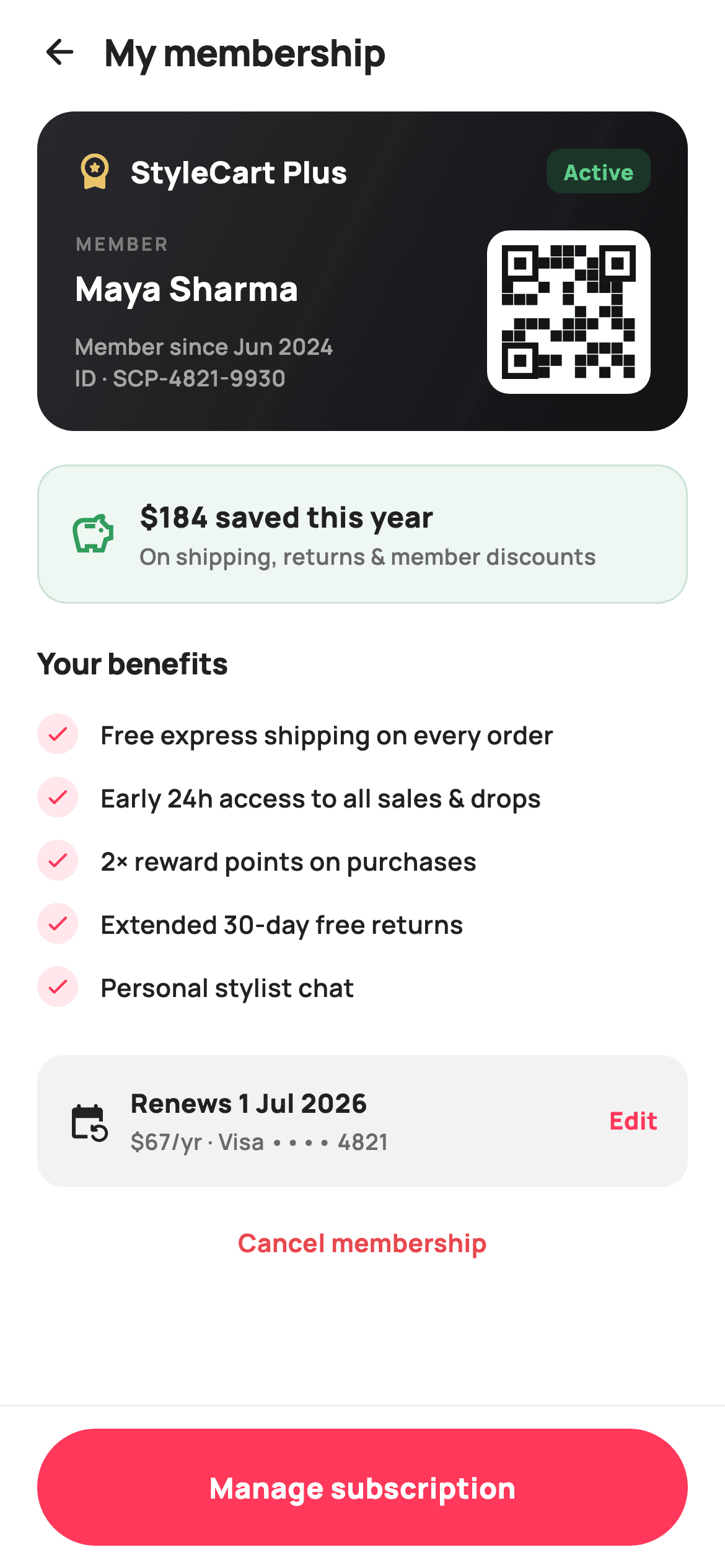
Once someone pays for a membership, the screen they land on has to keep proving the subscription is worth its price. This tutorial builds StyleCart's active-membership home in Flutter: a dark gradient member card with a gold tier badge, an Active pill and a painter-drawn QR seeded from the member ID, a green savings summary that puts a dollar figure on the year, a checked list of unlocked perks, a billing row with the renewal date and masked card, and a pinned Manage button with a quiet Cancel link. One file, no packages, callbacks only.
Watch the Flutter UI walkthrough
A short screen recording of Membership Active running, if you'd rather see it before you read the code. The written tutorial below covers everything in it.
Can't see the video? Watch it on YouTube.
What you'll build
- ✓A dark gradient member card carrying a gold tier icon, a green Active pill, the member identity block and a white QR tile
- ✓A decorative QR painted from the member ID string — hashed cells plus the three classic finder squares, no asset and no QR package
- ✓A green-tinted savings card that leads with "$184 saved this year" and says where the number comes from
- ✓A benefits list generated from a const string list with brand-tinted check circles
- ✓Three deliberately unequal subscription controls: a pinned coral Manage bar, a small Edit link on the billing row, and a red text-only Cancel
Step-by-step build
Create the file
Add a new file at lib/ecom_membership_active/ecom_membership_active_screen.dart in your Flutter project.
Register the bundled fonts
No external packages — this is pure Flutter. It does bundle its design font (Manrope), so drop the font file into fonts/ and declare it in pubspec.yaml:
flutter:
  fonts:
    - family: Manrope
      fonts:
- asset: fonts/Manrope-Regular.ttfBuild it, piece by piece
Here's how the screen goes together. Each block below is a real slice of the code with a plain-English explanation — paste them in order, or grab the whole file from the next section.
Callbacks, tokens, and benefits as data
import 'package:flutter/material.dart';

/// StyleCart — Membership active.
///
/// The member's home for an active StyleCart Plus subscription: a dark
/// membership card with painted member QR + tier + member-since, a savings
/// summary (this year saved), an unlocked-benefits list, a renewal/billing
/// row, and manage / cancel actions. A pinned bar opens billing.
///
/// Self-contained per CONVENTIONS.md: pure Flutter, bundled Manrope, inline
/// Airbnb-style tokens, own light theme + SafeArea. Painter-only graphics
/// (member QR). Exposes callbacks only.
class EcomMembershipActiveScreen extends StatelessWidget {
  const EcomMembershipActiveScreen({
    super.key,
    this.onBack,
    this.onManage,
    this.onCancel,
  });

  final VoidCallback? onBack;
  final VoidCallback? onManage;
  final VoidCallback? onCancel;

  static const String _font = 'Manrope';
  static const Color _canvas = Color(0xFFFFFFFF);
  static const Color _ink = Color(0xFF222222);
  static const Color _muted = Color(0xFF6A6A6A);
  static const Color _brand = Color(0xFFFF385C);
  static const Color _surface = Color(0xFFF2F2F2);
  static const Color _hairline = Color(0xFFEBEBEB);
  static const Color _success = Color(0xFF2E9E5B);
  static const Color _danger = Color(0xFFE5484D);
  static const Color _gold = Color(0xFFE9C46A);

  static const List<String> _benefits = <String>[
    'Free express shipping on every order',
    'Early 24h access to all sales & drops',
    '2× reward points on purchases',
    'Extended 30-day free returns',
    'Personal stylist chat',
  ];
The whole screen is a `StatelessWidget` — an account page shows facts and hands decisions upward, so it exposes exactly three callbacks: `onBack`, `onManage`, `onCancel`. The palette is Airbnb-flavoured: `_brand` coral `0xFFFF385C` for actions, `_success` green for money saved, `_danger` red reserved solely for the cancel link, and `_gold` `0xFFE9C46A` kept for the tier badge so 'premium' has its own colour. The five perks live in a `static const List<String> _benefits` rather than five hand-written rows, which means editing the copy or adding a sixth perk touches one list, not the widget tree.
Scaffold with a pinned bar, and a header that is just a title
  @override
  Widget build(BuildContext context) {
    return Theme(
      data: ThemeData.light(useMaterial3: true),
      child: Scaffold(
        backgroundColor: _canvas,
        body: SafeArea(
          child: Column(
            children: <Widget>[
              _header(),
              Expanded(
                child: ListView(
                  padding: const EdgeInsets.fromLTRB(20, 4, 20, 20),
                  children: <Widget>[
                    _card(),
                    const SizedBox(height: 18),
                    _savings(),
                    const SizedBox(height: 20),
                    _benefitsList(),
                    const SizedBox(height: 20),
                    _billingRow(),
                    const SizedBox(height: 12),
                    _manageRow(),
                  ],
                ),
              ),
              _bottomBar(),
            ],
          ),
        ),
      ),
    );
  }

  Widget _header() {
    return Padding(
      padding: const EdgeInsets.fromLTRB(8, 4, 20, 4),
      child: Row(
        children: <Widget>[
          IconButton(
            onPressed: onBack,
            icon: const Icon(Icons.arrow_back_rounded, size: 22, color: _ink),
          ),
          const Text(
            'My membership',
            style: TextStyle(
              fontFamily: _font,
              fontSize: 20,
              fontWeight: FontWeight.w800,
              letterSpacing: -0.3,
              color: _ink,
            ),
          ),
        ],
      ),
    );
  }
`build` wraps everything in `Theme(data: ThemeData.light(useMaterial3: true))` so the screen carries its own theme into any host app, then lays out a `Column` of header, `Expanded` `ListView`, and `_bottomBar()`. Because the bottom bar sits outside the `Expanded`, the Manage button stays pinned while the card, savings, benefits and billing content scroll behind it. The `ListView` uses `EdgeInsets.fromLTRB(20, 4, 20, 20)` side padding while the header row starts at only 8px left — the `IconButton`'s built-in touch padding makes up the difference so the arrow optically aligns with the content edge. The 'My membership' title is 20px `w800` with `letterSpacing: -0.3`, the same tight display style used across the StyleCart set.
The dark member card
  Widget _card() {
    return Container(
      padding: const EdgeInsets.all(20),
      decoration: BoxDecoration(
        borderRadius: BorderRadius.circular(20),
        gradient: const LinearGradient(
          begin: Alignment.topLeft,
          end: Alignment.bottomRight,
          colors: <Color>[Color(0xFF2A2A2E), Color(0xFF111114)],
        ),
      ),
      child: Column(
        crossAxisAlignment: CrossAxisAlignment.start,
        children: <Widget>[
          Row(
            children: <Widget>[
              const Icon(Icons.workspace_premium_rounded,
                  size: 22, color: _gold),
              const SizedBox(width: 8),
              const Text(
                'StyleCart Plus',
                style: TextStyle(
                  fontFamily: _font,
                  fontSize: 16,
                  fontWeight: FontWeight.w800,
                  color: Colors.white,
                ),
              ),
              const Spacer(),
              Container(
                padding:
                    const EdgeInsets.symmetric(horizontal: 9, vertical: 4),
                decoration: BoxDecoration(
                  color: _success.withValues(alpha: 0.22),
                  borderRadius: BorderRadius.circular(8),
                ),
                child: const Text(
                  'Active',
                  style: TextStyle(
                    fontFamily: _font,
                    fontSize: 11.5,
                    fontWeight: FontWeight.w800,
                    color: Color(0xFF5FD08A),
                  ),
                ),
              ),
            ],
          ),
          const SizedBox(height: 20),
          Row(
            crossAxisAlignment: CrossAxisAlignment.end,
            children: <Widget>[
              Expanded(
                child: Column(
                  crossAxisAlignment: CrossAxisAlignment.start,
                  children: const <Widget>[
                    Text(
                      'MEMBER',
                      style: TextStyle(
                        fontFamily: _font,
                        fontSize: 10,
                        fontWeight: FontWeight.w700,
                        letterSpacing: 1.5,
                        color: Colors.white38,
                      ),
                    ),
                    SizedBox(height: 4),
                    Text(
                      'Maya Sharma',
                      style: TextStyle(
                        fontFamily: _font,
                        fontSize: 18,
                        fontWeight: FontWeight.w800,
                        color: Colors.white,
                      ),
                    ),
                    SizedBox(height: 10),
                    Text(
                      'Member since Jun 2024',
                      style: TextStyle(
                        fontFamily: _font,
                        fontSize: 12,
                        fontWeight: FontWeight.w600,
                        color: Colors.white60,
                      ),
                    ),
                    Text(
                      'ID · SCP-4821-9930',
                      style: TextStyle(
                        fontFamily: _font,
                        fontSize: 12,
                        fontWeight: FontWeight.w600,
                        color: Colors.white60,
                      ),
                    ),
                  ],
                ),
              ),
              Container(
                padding: const EdgeInsets.all(8),
                decoration: BoxDecoration(
                  color: Colors.white,
                  borderRadius: BorderRadius.circular(12),
                ),
                child: CustomPaint(
                  size: const Size(72, 72),
                  painter: _QrPainter('SCP-4821-9930'),
                ),
              ),
            ],
          ),
        ],
      ),
    );
  }
The card gets a top-left-to-bottom-right `LinearGradient` from `0xFF2A2A2E` to `0xFF111114` inside a 20px radius — a near-black wallet-pass look that makes the one dark surface on an otherwise white screen read as a physical card. Its first row spells out status: `Icons.workspace_premium_rounded` in `_gold`, the 'StyleCart Plus' wordmark, then a `Spacer()` pushing an 'Active' pill whose background is `_success.withValues(alpha: 0.22)` with brighter `0xFF5FD08A` text, because full-opacity green text would vanish on translucent green over black. The second row uses `crossAxisAlignment: CrossAxisAlignment.end` so the identity column (a 10px letter-spaced 'MEMBER' eyebrow in `Colors.white38`, the name at 18px, then member-since and `ID · SCP-4821-9930` in `Colors.white60`) bottom-aligns with the QR. The QR itself sits in an 8px-padded white rounded container — the quiet zone a scanner-style motif needs to read against the dark card — as a `CustomPaint` of `Size(72, 72)` seeded with the same member ID shown in text.
Putting a number on the membership
  Widget _savings() {
    return Container(
      padding: const EdgeInsets.all(16),
      decoration: BoxDecoration(
        color: _success.withValues(alpha: 0.08),
        borderRadius: BorderRadius.circular(16),
        border: Border.all(color: _success.withValues(alpha: 0.20)),
      ),
      child: Row(
        children: <Widget>[
          const Icon(Icons.savings_outlined, size: 26, color: _success),
          const SizedBox(width: 12),
          Expanded(
            child: Column(
              crossAxisAlignment: CrossAxisAlignment.start,
              children: const <Widget>[
                Text(
                  '\$184 saved this year',
                  style: TextStyle(
                    fontFamily: _font,
                    fontSize: 15.5,
                    fontWeight: FontWeight.w800,
                    color: _ink,
                  ),
                ),
                SizedBox(height: 2),
                Text(
                  'On shipping, returns & member discounts',
                  style: TextStyle(
                    fontFamily: _font,
                    fontSize: 12,
                    fontWeight: FontWeight.w600,
                    color: _muted,
                  ),
                ),
              ],
            ),
          ),
        ],
      ),
    );
  }
`_savings` is the retention argument: '$184 saved this year' in 15.5px `w800` ink, with the quieter 12px line 'On shipping, returns & member discounts' explaining what the figure counts. The card is tinted `_success.withValues(alpha: 0.08)` with a `Border.all` at alpha `0.20` — the border earns the panel more weight than a flat tint because this is the row that justifies the renewal price. An `Icons.savings_outlined` piggy bank at 26 leads the row, and the text column sits in `Expanded` so a longer localised subtitle wraps instead of overflowing.
Benefits from a collection-for
  Widget _benefitsList() {
    return Column(
      crossAxisAlignment: CrossAxisAlignment.start,
      children: <Widget>[
        const Text(
          'Your benefits',
          style: TextStyle(
            fontFamily: _font,
            fontSize: 16,
            fontWeight: FontWeight.w800,
            letterSpacing: -0.2,
            color: _ink,
          ),
        ),
        const SizedBox(height: 10),
        for (final String b in _benefits)
          Padding(
            padding: const EdgeInsets.symmetric(vertical: 6),
            child: Row(
              children: <Widget>[
                Container(
                  width: 22,
                  height: 22,
                  decoration: BoxDecoration(
                    color: _brand.withValues(alpha: 0.12),
                    shape: BoxShape.circle,
                  ),
                  child: const Icon(Icons.check_rounded,
                      size: 14, color: _brand),
                ),
                const SizedBox(width: 12),
                Expanded(
                  child: Text(
                    b,
                    style: const TextStyle(
                      fontFamily: _font,
                      fontSize: 13.5,
                      fontWeight: FontWeight.w600,
                      color: _ink,
                    ),
                  ),
                ),
              ],
            ),
          ),
      ],
    );
  }
`_benefitsList` renders the perks with `for (final String b in _benefits)` directly inside the children list — no `ListView.builder` needed for five static rows. Each row leads with a 22px circle at `_brand.withValues(alpha: 0.12)` holding a 14px `Icons.check_rounded` in full `_brand`: the tinted-disc-plus-solid-icon pairing is the same two-layer accent treatment as the Active pill, applied in coral. Vertical padding of 6 on each row yields a 12px rhythm between perks, and the label sits in `Expanded` so 'Free express shipping on every order' can wrap on narrow phones without pushing its check circle out of line.
Billing row and a cancel link that whispers
  Widget _billingRow() {
    return Container(
      padding: const EdgeInsets.all(16),
      decoration: BoxDecoration(
        color: _surface,
        borderRadius: BorderRadius.circular(14),
      ),
      child: Row(
        children: <Widget>[
          const Icon(Icons.event_repeat_rounded, size: 22, color: _ink),
          const SizedBox(width: 12),
          const Expanded(
            child: Column(
              crossAxisAlignment: CrossAxisAlignment.start,
              children: <Widget>[
                Text(
                  'Renews 1 Jul 2026',
                  style: TextStyle(
                    fontFamily: _font,
                    fontSize: 14,
                    fontWeight: FontWeight.w800,
                    color: _ink,
                  ),
                ),
                SizedBox(height: 2),
                Text(
                  '\$67/yr · Visa •••• 4821',
                  style: TextStyle(
                    fontFamily: _font,
                    fontSize: 12,
                    fontWeight: FontWeight.w600,
                    color: _muted,
                  ),
                ),
              ],
            ),
          ),
          GestureDetector(
            onTap: onManage,
            child: const Text(
              'Edit',
              style: TextStyle(
                fontFamily: _font,
                fontSize: 13,
                fontWeight: FontWeight.w800,
                color: _brand,
              ),
            ),
          ),
        ],
      ),
    );
  }

  Widget _manageRow() {
    return GestureDetector(
      onTap: onCancel,
      behavior: HitTestBehavior.opaque,
      child: const Padding(
        padding: EdgeInsets.symmetric(vertical: 8),
        child: Center(
          child: Text(
            'Cancel membership',
            style: TextStyle(
              fontFamily: _font,
              fontSize: 13.5,
              fontWeight: FontWeight.w700,
              color: _danger,
            ),
          ),
        ),
      ),
    );
  }
`_billingRow` is a flat `_surface` panel answering the two pre-cancellation questions in one glance: 'Renews 1 Jul 2026' in bold ink, '$67/yr · Visa •••• 4821' in muted 12px underneath, with `Icons.event_repeat_rounded` signalling recurrence. 'Edit' is a bare coral `GestureDetector` text rather than a button — changing a card is a legitimate but secondary action, so it gets colour without chrome. `_manageRow` below it is the cancel affordance: red 13.5px text, centred, with `behavior: HitTestBehavior.opaque` so the taps land across the full padded width even though only the text paints. Cancel is findable but visually the least prominent interactive element on the screen — exactly the ranking an active-membership page wants.
The pinned Manage bar
  Widget _bottomBar() {
    return Container(
      height: 88,
      decoration: const BoxDecoration(
        color: _canvas,
        border: Border(top: BorderSide(color: _hairline)),
      ),
      padding: const EdgeInsets.fromLTRB(20, 12, 20, 12),
      child: GestureDetector(
        onTap: onManage,
        child: Container(
          height: 56,
          alignment: Alignment.center,
          decoration: BoxDecoration(
            color: _brand,
            borderRadius: BorderRadius.circular(9999),
          ),
          child: const Text(
            'Manage subscription',
            style: TextStyle(
              fontFamily: _font,
              fontSize: 15.5,
              fontWeight: FontWeight.w800,
              color: Colors.white,
            ),
          ),
        ),
      ),
    );
  }
}
`_bottomBar` is an 88px `Container` on `_canvas` white with a `_hairline` top border, so the boundary between scrolling content and the fixed action is a single 1px line rather than a shadow. Inside, the button is a hand-rolled `GestureDetector` around a 56px container filled `_brand` with `BorderRadius.circular(9999)` — the effectively-infinite radius produces a true pill at any height without computing height/2. 'Manage subscription' triggers the same `onManage` callback as the billing row's Edit link, so both routes converge on one handler in the host app.
Painting the seeded QR
class _QrPainter extends CustomPainter {
  _QrPainter(this.seed);
  final String seed;

  @override
  void paint(Canvas canvas, Size size) {
    const int n = 11;
    final double cell = size.width / n;
    final Paint dark = Paint()..color = const Color(0xFF111114);

    int h = 0;
    for (int i = 0; i < seed.length; i++) {
      h = (h * 31 + seed.codeUnitAt(i)) & 0x7fffffff;
    }

    bool finder(int r, int col) {
      bool inBox(int br, int bc) =>
          r >= br && r < br + 3 && col >= bc && col < bc + 3;
      return inBox(0, 0) || inBox(0, n - 3) || inBox(n - 3, 0);
    }

    for (int r = 0; r < n; r++) {
      for (int col = 0; col < n; col++) {
        if (finder(r, col)) continue;
        h = (h * 1103515245 + 12345) & 0x7fffffff;
        if ((h >> 8) % 100 < 48) {
          canvas.drawRect(
            Rect.fromLTWH(col * cell, r * cell, cell * 0.92, cell * 0.92),
            dark,
          );
        }
      }
    }

    void drawFinder(int br, int bc) {
      final Rect outer =
          Rect.fromLTWH(bc * cell, br * cell, cell * 3, cell * 3);
      canvas.drawRect(outer, dark);
      canvas.drawRect(outer.deflate(cell * 0.5), Paint()..color = Colors.white);
      canvas.drawRect(
        Rect.fromLTWH((bc + 1) * cell, (br + 1) * cell, cell, cell),
        dark,
      );
    }

    drawFinder(0, 0);
    drawFinder(0, n - 3);
    drawFinder(n - 3, 0);
  }

  @override
  bool shouldRepaint(_QrPainter old) => old.seed != seed;
}
`_QrPainter` fakes a QR convincingly in ~50 lines. It hashes the seed string with the classic `h * 31 + codeUnit` loop, then walks an 11×11 grid advancing `h` through a linear congruential generator (`h * 1103515245 + 12345`) per cell and paints a block when `(h >> 8) % 100 < 48` — a deterministic ~48% fill, so the same member ID always draws the same pattern. The `finder` closure skips the three 3×3 corner zones during the random pass, and `drawFinder` rebuilds them properly: a solid 3-cell square, a white square deflated by half a cell, and a centre cell — the concentric look every eye recognises as QR. Cells draw at `cell * 0.92` to leave hairline gutters, and `shouldRepaint` compares seeds so the canvas only repaints when the member ID changes. The doc comment is honest: this is a visual motif, not a scannable code.
Full code
The complete, ready-to-paste source. Free to use in your projects — one click copies it all.
import 'package:flutter/material.dart';
/// StyleCart — Membership active.
///
/// The member's home for an active StyleCart Plus subscription: a dark
/// membership card with painted member QR + tier + member-since, a savings
/// summary (this year saved), an unlocked-benefits list, a renewal/billing
/// row, and manage / cancel actions. A pinned bar opens billing.
///
/// Self-contained per CONVENTIONS.md: pure Flutter, bundled Manrope, inline
/// Airbnb-style tokens, own light theme + SafeArea. Painter-only graphics
/// (member QR). Exposes callbacks only.
class EcomMembershipActiveScreen extends StatelessWidget {
const EcomMembershipActiveScreen({
super.key,
this.onBack,
this.onManage,
this.onCancel,
});
final VoidCallback? onBack;
final VoidCallback? onManage;
final VoidCallback? onCancel;
static const String _font = 'Manrope';
static const Color _canvas = Color(0xFFFFFFFF);
static const Color _ink = Color(0xFF222222);
static const Color _muted = Color(0xFF6A6A6A);
static const Color _brand = Color(0xFFFF385C);
static const Color _surface = Color(0xFFF2F2F2);
static const Color _hairline = Color(0xFFEBEBEB);
static const Color _success = Color(0xFF2E9E5B);
static const Color _danger = Color(0xFFE5484D);
static const Color _gold = Color(0xFFE9C46A);
static const List<String> _benefits = <String>[
'Free express shipping on every order',
'Early 24h access to all sales & drops',
'2× reward points on purchases',
'Extended 30-day free returns',
'Personal stylist chat',
];
@override
Widget build(BuildContext context) {
return Theme(
data: ThemeData.light(useMaterial3: true),
child: Scaffold(
backgroundColor: _canvas,
body: SafeArea(
child: Column(
children: <Widget>[
_header(),
Expanded(
child: ListView(
padding: const EdgeInsets.fromLTRB(20, 4, 20, 20),
children: <Widget>[
_card(),
const SizedBox(height: 18),
_savings(),
const SizedBox(height: 20),
_benefitsList(),
const SizedBox(height: 20),
_billingRow(),
const SizedBox(height: 12),
_manageRow(),
],
),
),
_bottomBar(),
],
),
),
),
);
}
Widget _header() {
return Padding(
padding: const EdgeInsets.fromLTRB(8, 4, 20, 4),
child: Row(
children: <Widget>[
IconButton(
onPressed: onBack,
icon: const Icon(Icons.arrow_back_rounded, size: 22, color: _ink),
),
const Text(
'My membership',
style: TextStyle(
fontFamily: _font,
fontSize: 20,
fontWeight: FontWeight.w800,
letterSpacing: -0.3,
color: _ink,
),
),
],
),
);
}
Widget _card() {
return Container(
padding: const EdgeInsets.all(20),
decoration: BoxDecoration(
borderRadius: BorderRadius.circular(20),
gradient: const LinearGradient(
begin: Alignment.topLeft,
end: Alignment.bottomRight,
colors: <Color>[Color(0xFF2A2A2E), Color(0xFF111114)],
),
),
child: Column(
crossAxisAlignment: CrossAxisAlignment.start,
children: <Widget>[
Row(
children: <Widget>[
const Icon(Icons.workspace_premium_rounded,
size: 22, color: _gold),
const SizedBox(width: 8),
const Text(
'StyleCart Plus',
style: TextStyle(
fontFamily: _font,
fontSize: 16,
fontWeight: FontWeight.w800,
color: Colors.white,
),
),
const Spacer(),
Container(
padding:
const EdgeInsets.symmetric(horizontal: 9, vertical: 4),
decoration: BoxDecoration(
color: _success.withValues(alpha: 0.22),
borderRadius: BorderRadius.circular(8),
),
child: const Text(
'Active',
style: TextStyle(
fontFamily: _font,
fontSize: 11.5,
fontWeight: FontWeight.w800,
color: Color(0xFF5FD08A),
),
),
),
],
),
const SizedBox(height: 20),
Row(
crossAxisAlignment: CrossAxisAlignment.end,
children: <Widget>[
Expanded(
child: Column(
crossAxisAlignment: CrossAxisAlignment.start,
children: const <Widget>[
Text(
'MEMBER',
style: TextStyle(
fontFamily: _font,
fontSize: 10,
fontWeight: FontWeight.w700,
letterSpacing: 1.5,
color: Colors.white38,
),
),
SizedBox(height: 4),
Text(
'Maya Sharma',
style: TextStyle(
fontFamily: _font,
fontSize: 18,
fontWeight: FontWeight.w800,
color: Colors.white,
),
),
SizedBox(height: 10),
Text(
'Member since Jun 2024',
style: TextStyle(
fontFamily: _font,
fontSize: 12,
fontWeight: FontWeight.w600,
color: Colors.white60,
),
),
Text(
'ID · SCP-4821-9930',
style: TextStyle(
fontFamily: _font,
fontSize: 12,
fontWeight: FontWeight.w600,
color: Colors.white60,
),
),
],
),
),
Container(
padding: const EdgeInsets.all(8),
decoration: BoxDecoration(
color: Colors.white,
borderRadius: BorderRadius.circular(12),
),
child: CustomPaint(
size: const Size(72, 72),
painter: _QrPainter('SCP-4821-9930'),
),
),
],
),
],
),
);
}
Widget _savings() {
return Container(
padding: const EdgeInsets.all(16),
decoration: BoxDecoration(
color: _success.withValues(alpha: 0.08),
borderRadius: BorderRadius.circular(16),
border: Border.all(color: _success.withValues(alpha: 0.20)),
),
child: Row(
children: <Widget>[
const Icon(Icons.savings_outlined, size: 26, color: _success),
const SizedBox(width: 12),
Expanded(
child: Column(
crossAxisAlignment: CrossAxisAlignment.start,
children: const <Widget>[
Text(
'\$184 saved this year',
style: TextStyle(
fontFamily: _font,
fontSize: 15.5,
fontWeight: FontWeight.w800,
color: _ink,
),
),
SizedBox(height: 2),
Text(
'On shipping, returns & member discounts',
style: TextStyle(
fontFamily: _font,
fontSize: 12,
fontWeight: FontWeight.w600,
color: _muted,
),
),
],
),
),
],
),
);
}
Widget _benefitsList() {
return Column(
crossAxisAlignment: CrossAxisAlignment.start,
children: <Widget>[
const Text(
'Your benefits',
style: TextStyle(
fontFamily: _font,
fontSize: 16,
fontWeight: FontWeight.w800,
letterSpacing: -0.2,
color: _ink,
),
),
const SizedBox(height: 10),
for (final String b in _benefits)
Padding(
padding: const EdgeInsets.symmetric(vertical: 6),
child: Row(
children: <Widget>[
Container(
width: 22,
height: 22,
decoration: BoxDecoration(
color: _brand.withValues(alpha: 0.12),
shape: BoxShape.circle,
),
child: const Icon(Icons.check_rounded,
size: 14, color: _brand),
),
const SizedBox(width: 12),
Expanded(
child: Text(
b,
style: const TextStyle(
fontFamily: _font,
fontSize: 13.5,
fontWeight: FontWeight.w600,
color: _ink,
),
),
),
],
),
),
],
);
}
Widget _billingRow() {
return Container(
padding: const EdgeInsets.all(16),
decoration: BoxDecoration(
color: _surface,
borderRadius: BorderRadius.circular(14),
),
child: Row(
children: <Widget>[
const Icon(Icons.event_repeat_rounded, size: 22, color: _ink),
const SizedBox(width: 12),
const Expanded(
child: Column(
crossAxisAlignment: CrossAxisAlignment.start,
children: <Widget>[
Text(
'Renews 1 Jul 2026',
style: TextStyle(
fontFamily: _font,
fontSize: 14,
fontWeight: FontWeight.w800,
color: _ink,
),
),
SizedBox(height: 2),
Text(
'\$67/yr · Visa •••• 4821',
style: TextStyle(
fontFamily: _font,
fontSize: 12,
fontWeight: FontWeight.w600,
color: _muted,
),
),
],
),
),
GestureDetector(
onTap: onManage,
child: const Text(
'Edit',
style: TextStyle(
fontFamily: _font,
fontSize: 13,
fontWeight: FontWeight.w800,
color: _brand,
),
),
),
],
),
);
}
Widget _manageRow() {
return GestureDetector(
onTap: onCancel,
behavior: HitTestBehavior.opaque,
child: const Padding(
padding: EdgeInsets.symmetric(vertical: 8),
child: Center(
child: Text(
'Cancel membership',
style: TextStyle(
fontFamily: _font,
fontSize: 13.5,
fontWeight: FontWeight.w700,
color: _danger,
),
),
),
),
);
}
Widget _bottomBar() {
return Container(
height: 88,
decoration: const BoxDecoration(
color: _canvas,
border: Border(top: BorderSide(color: _hairline)),
),
padding: const EdgeInsets.fromLTRB(20, 12, 20, 12),
child: GestureDetector(
onTap: onManage,
child: Container(
height: 56,
alignment: Alignment.center,
decoration: BoxDecoration(
color: _brand,
borderRadius: BorderRadius.circular(9999),
),
child: const Text(
'Manage subscription',
style: TextStyle(
fontFamily: _font,
fontSize: 15.5,
fontWeight: FontWeight.w800,
color: Colors.white,
),
),
),
),
);
}
}
/// A decorative seeded QR — painted blocks derived from the member code plus
/// the three finder squares. Not scannable; purely a visual motif.
class _QrPainter extends CustomPainter {
_QrPainter(this.seed);
final String seed;
@override
void paint(Canvas canvas, Size size) {
const int n = 11;
final double cell = size.width / n;
final Paint dark = Paint()..color = const Color(0xFF111114);
int h = 0;
for (int i = 0; i < seed.length; i++) {
h = (h * 31 + seed.codeUnitAt(i)) & 0x7fffffff;
}
bool finder(int r, int col) {
bool inBox(int br, int bc) =>
r >= br && r < br + 3 && col >= bc && col < bc + 3;
return inBox(0, 0) || inBox(0, n - 3) || inBox(n - 3, 0);
}
for (int r = 0; r < n; r++) {
for (int col = 0; col < n; col++) {
if (finder(r, col)) continue;
h = (h * 1103515245 + 12345) & 0x7fffffff;
if ((h >> 8) % 100 < 48) {
canvas.drawRect(
Rect.fromLTWH(col * cell, r * cell, cell * 0.92, cell * 0.92),
dark,
);
}
}
}
void drawFinder(int br, int bc) {
final Rect outer =
Rect.fromLTWH(bc * cell, br * cell, cell * 3, cell * 3);
canvas.drawRect(outer, dark);
canvas.drawRect(outer.deflate(cell * 0.5), Paint()..color = Colors.white);
canvas.drawRect(
Rect.fromLTWH((bc + 1) * cell, (br + 1) * cell, cell, cell),
dark,
);
}
drawFinder(0, 0);
drawFinder(0, n - 3);
drawFinder(n - 3, 0);
}
@override
bool shouldRepaint(_QrPainter old) => old.seed != seed;
}
Plus bundled 5 binary assets (fonts/images). The CLI and MCP install those for you automatically.
Two faster ways to add it
Copy-paste works, but you can skip it entirely.
1. FlutterKit CLI
One command drops this screen — and its fonts — straight into your project.
$ flutterkit add ecom-membership-active2. AI agent (MCP)
Connect FlutterKit's MCP server in Claude or Cursor and just ask your agent to install ecom-membership-active — it fetches and writes the files for you.
FAQ
Is this membership screen free to use in a commercial app?
Yes. FlutterKit screens are free, commercial use included — copy the code from this page or install it with the CLI command and ship it in your subscription or loyalty app. No attribution and no sign-up required.
Does this screen need any packages, or a QR library?
No pub packages at all — the only import is `package:flutter/material.dart`, and the QR is drawn by the included `_QrPainter`, so you don't need `qr_flutter` for the visual. The only asset is the Manrope font family, bundled and referenced via `fontFamily: 'Manrope'`; declare it in your `pubspec.yaml` fonts section.
Which Flutter version does this code require?
Flutter 3.27 or newer, because the pills and tints use `Color.withValues(alpha: ...)` in several places. On an older SDK, replace each `withValues(alpha: x)` with `withOpacity(x)`; the constructor also uses `super.key`, which needs Dart 2.17+ (Flutter 3.0+).
Can I make the member QR actually scannable?
The painted QR is deliberately decorative — its blocks come from a hash of the ID, not QR encoding, so no scanner will read it. For a real code, swap the `CustomPaint` inside the white tile for a `QrImageView` from the `qr_flutter` package with the member ID as data; the 8px white padding around it already gives the quiet zone scanners want.
How do I show real member data instead of Maya Sharma?
Promote the literals to constructor parameters — `memberName`, `memberId`, `memberSince`, `renewalLine`, `savedThisYear` — and pass `memberId` into `_QrPainter(...)` so the card pattern stays tied to the ID it displays. The `_benefits` list can likewise become a `List<String>` parameter defaulting to the current five perks if tiers unlock different sets.


