How to Build a Trending Products Screen in Flutter (Full Code + Preview)
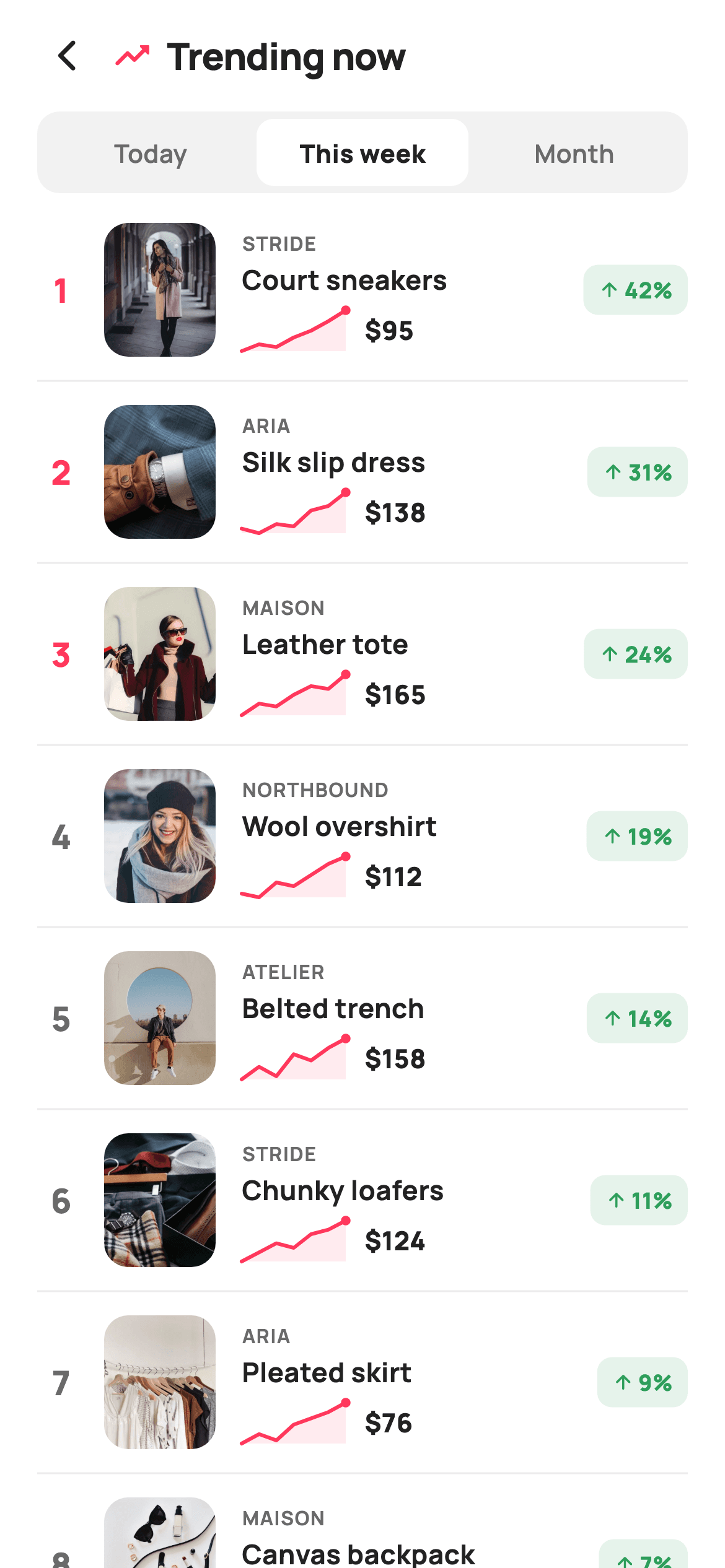
A trending list is a leaderboard, and leaderboards live or die on the little signals: the rank number, the direction of travel, and a shape you can read at a glance. This screen builds all three — a numbered countdown where the top three ranks turn brand-red, a 56×22 sparkline painted from seven raw data points per row, and a green '+42%' pill. It also includes the segmented Today / This week / Month selector, the sliding-pill pattern you'll reuse in a dozen other screens. Pure Flutter, one CustomPainter, no chart package.
Watch the Flutter UI walkthrough
A short screen recording of Trending Now running, if you'd rather see it before you read the code. The written tutorial below covers everything in it.
Can't see the video? Watch it on YouTube.
What you'll build
- ✓A segmented timeframe control where the active pill animates into place inside a grey track
- ✓Ranked rows whose number turns brand-red for the top three and grey below
- ✓A hand-painted sparkline — filled area, 2px rounded stroke, and an end dot — that auto-scales to each row's own data
- ✓A green trend pill built from a 12% tint of the success colour with an upward arrow
- ✓Divider-separated rows built with `ListView.separated`, each reporting its product title through one callback
Step-by-step build
Create the file
Add a new file at lib/ecom_home_trending/ecom_home_trending_screen.dart in your Flutter project.
Register the bundled fonts
No external packages — this is pure Flutter. It does bundle its design font (Manrope), so drop the font file into fonts/ and declare it in pubspec.yaml:
flutter:
  fonts:
    - family: Manrope
      fonts:
- asset: fonts/Manrope-Regular.ttfBuild it, piece by piece
Here's how the screen goes together. Each block below is a real slice of the code with a plain-English explanation — paste them in order, or grab the whole file from the next section.
The row model and the sparkline data
class EcomHomeTrendingScreen extends StatefulWidget {
  const EcomHomeTrendingScreen({
    super.key,
    this.onBack,
    this.onProduct,
  });

  final VoidCallback? onBack;
  final ValueChanged<String>? onProduct;

  @override
  State<EcomHomeTrendingScreen> createState() => _EcomHomeTrendingScreenState();
}

class _EcomHomeTrendingScreenState extends State<EcomHomeTrendingScreen> {
  static const String _font = 'Manrope';
  static const Color _canvas = Color(0xFFFFFFFF);
  static const Color _ink = Color(0xFF222222);
  static const Color _muted = Color(0xFF6A6A6A);
  static const Color _brand = Color(0xFFFF385C);
  static const Color _surface = Color(0xFFF2F2F2);
  static const Color _imageBg = Color(0xFFF5F5F5);
  static const Color _hairline = Color(0xFFEBEBEB);
  static const Color _success = Color(0xFF2E9E5B);

  static const String _dir = 'lib/screens/ecommerce/ecom_home_trending/images';

  static const List<String> _ranges = <String>['Today', 'This week', 'Month'];
  int _range = 1;

  static const List<_T> _items = <_T>[
    _T('Court sneakers', 'Stride', 95, 42, 'p08.webp',
        <double>[2, 3, 2.6, 4, 5, 6.4, 8]),
    _T('Silk slip dress', 'Aria', 138, 31, 'p06.webp',
        <double>[3, 2.6, 3.4, 3.2, 4.6, 5, 6.2]),
    _T('Leather tote', 'Maison', 165, 24, 'p07.webp',
        <double>[1.6, 2.4, 2.2, 3, 3.6, 3.4, 4.4]),
    _T('Wool overshirt', 'Northbound', 112, 19, 'p09.webp',
        <double>[2.2, 2, 2.8, 2.6, 3.2, 3.8, 4.2]),
    _T('Belted trench', 'Atelier', 158, 14, 'p10.webp',
        <double>[3, 3.4, 3.1, 3.8, 3.6, 4, 4.3]),
    _T('Chunky loafers', 'Stride', 124, 11, 'p11.webp',
        <double>[1.8, 2.2, 2.6, 2.4, 3, 3.2, 3.6]),
    _T('Pleated skirt', 'Aria', 76, 9, 'p12.webp',
        <double>[2, 2.3, 2.1, 2.6, 2.8, 3, 3.3]),
    _T('Canvas backpack', 'Maison', 88, 7, 'p13.webp',
        <double>[1.4, 1.8, 2, 2.2, 2.4, 2.7, 3]),
  ];
The widget takes just `onBack` and a `ValueChanged<String> onProduct`. What's interesting is the `_T` model at the bottom of the file, used here: alongside title, brand, price, and asset it carries `trend` (an integer percent) and `spark` — a `List<double>` of seven popularity readings. Those numbers are unitless on purpose; the painter normalises whatever range you give it, so you can drop in real view counts without rescaling them first. `_ranges` holds the three timeframe labels and `_range = 1` starts the screen on 'This week'. The eight `_T` entries are ordered by descending trend, which is what makes the list read as a ranking.
Header and the divider-separated list
  @override
  Widget build(BuildContext context) {
    return Theme(
      data: ThemeData.light(useMaterial3: true),
      child: Scaffold(
        backgroundColor: _canvas,
        body: SafeArea(
          child: Column(
            children: <Widget>[
              _header(),
              _rangeSelector(),
              Expanded(
                child: ListView.separated(
                  padding: const EdgeInsets.fromLTRB(20, 16, 20, 24),
                  itemCount: _items.length,
                  separatorBuilder: (_, _) =>
                      const Divider(height: 26, color: _hairline),
                  itemBuilder: (BuildContext context, int i) =>
                      _row(i + 1, _items[i]),
                ),
              ),
            ],
          ),
        ),
      ),
    );
  }

  Widget _header() {
    return Padding(
      padding: const EdgeInsets.fromLTRB(12, 6, 20, 6),
      child: Row(
        children: <Widget>[
          IconButton(
            onPressed: widget.onBack,
            icon: const Icon(Icons.arrow_back_ios_new_rounded,
                size: 20, color: _ink),
          ),
          const Icon(Icons.trending_up_rounded, color: _brand, size: 22),
          const SizedBox(width: 8),
          const Text(
            'Trending now',
            style: TextStyle(
              fontFamily: _font,
              fontSize: 20,
              fontWeight: FontWeight.w800,
              letterSpacing: -0.3,
              color: _ink,
            ),
          ),
        ],
      ),
    );
  }
The body is a `Column` of three parts: a fixed header, the range selector, and `Expanded(child: ListView.separated(...))` taking the rest. The `separatorBuilder` returns a `Divider(height: 26, color: _hairline)` — on a `Divider`, `height` is the total vertical space it occupies, not the line thickness, so this single widget provides both the hairline and the 26px rhythm between rows. The `itemBuilder` passes `i + 1` as the rank, so ranking is derived from list position rather than stored on each item. The header pairs a brand-red `trending_up_rounded` icon with the title, the same icon-plus-heading convention used across these screens.
The segmented timeframe selector
  Widget _rangeSelector() {
    return Padding(
      padding: const EdgeInsets.symmetric(horizontal: 20),
      child: Container(
        padding: const EdgeInsets.all(4),
        decoration: BoxDecoration(
          color: _surface,
          borderRadius: BorderRadius.circular(12),
        ),
        child: Row(
          children: List<Widget>.generate(_ranges.length, (int i) {
            final bool on = i == _range;
            return Expanded(
              child: GestureDetector(
                onTap: () => setState(() => _range = i),
                child: AnimatedContainer(
                  duration: const Duration(milliseconds: 160),
                  height: 36,
                  alignment: Alignment.center,
                  decoration: BoxDecoration(
                    color: on ? _canvas : Colors.transparent,
                    borderRadius: BorderRadius.circular(9),
                  ),
                  child: Text(
                    _ranges[i],
                    style: TextStyle(
                      fontFamily: _font,
                      fontSize: 13.5,
                      fontWeight: on ? FontWeight.w800 : FontWeight.w600,
                      color: on ? _ink : _muted,
                    ),
                  ),
                ),
              ),
            );
          }),
        ),
      ),
    );
  }
This is a compact iOS-style segmented control built from scratch. The outer `Container` is the track: `_surface` grey, 12px radius, and `padding: EdgeInsets.all(4)` — that 4px inset is what leaves room for the selected pill to sit inside the track rather than covering it. Each segment is `Expanded`, so all three share the width evenly. The selected one is an `AnimatedContainer` that tweens its background from `Colors.transparent` to white over 160ms, with a slightly tighter 9px radius so its corners nest neatly inside the track's 12px. The label also shifts from `w600` grey to `w800` ink, giving the selection a weight change as well as a background.
Building a ranked row
  Widget _row(int rank, _T t) {
    return GestureDetector(
      onTap: () => widget.onProduct?.call(t.title),
      child: Row(
        children: <Widget>[
          SizedBox(
            width: 26,
            child: Text(
              '$rank',
              textAlign: TextAlign.center,
              style: TextStyle(
                fontFamily: _font,
                fontSize: 18,
                fontWeight: FontWeight.w800,
                color: rank <= 3 ? _brand : _muted,
              ),
            ),
          ),
          const SizedBox(width: 10),
          ClipRRect(
            borderRadius: BorderRadius.circular(13),
            child: Container(
              width: 60,
              height: 72,
              color: _imageBg,
              child: Image.asset('$_dir/${t.asset}', fit: BoxFit.cover),
            ),
          ),
          const SizedBox(width: 14),
          Expanded(
            child: Column(
              crossAxisAlignment: CrossAxisAlignment.start,
              children: <Widget>[
                Text(
                  t.brand.toUpperCase(),
                  style: const TextStyle(
                    fontFamily: _font,
                    fontSize: 10.5,
                    fontWeight: FontWeight.w700,
                    letterSpacing: 0.6,
                    color: _muted,
                  ),
                ),
                const SizedBox(height: 2),
                Text(
                  t.title,
                  maxLines: 1,
                  overflow: TextOverflow.ellipsis,
                  style: const TextStyle(
                    fontFamily: _font,
                    fontSize: 14.5,
                    fontWeight: FontWeight.w700,
                    color: _ink,
                  ),
                ),
                const SizedBox(height: 6),
                Row(
                  children: <Widget>[
                    SizedBox(
                      width: 56,
                      height: 22,
                      child: CustomPaint(
                        painter: _SparklinePainter(t.spark),
                      ),
                    ),
                    const SizedBox(width: 10),
                    Text(
                      '\$${t.price}',
                      style: const TextStyle(
                        fontFamily: _font,
                        fontSize: 14,
                        fontWeight: FontWeight.w800,
                        color: _ink,
                      ),
                    ),
                  ],
                ),
              ],
            ),
          ),
          const SizedBox(width: 8),
          Container(
            padding: const EdgeInsets.symmetric(horizontal: 8, vertical: 5),
            decoration: BoxDecoration(
              color: _success.withValues(alpha: 0.12),
              borderRadius: BorderRadius.circular(8),
            ),
            child: Row(
              children: <Widget>[
                const Icon(Icons.arrow_upward_rounded,
                    size: 12, color: _success),
                const SizedBox(width: 2),
                Text(
                  '${t.trend}%',
                  style: const TextStyle(
                    fontFamily: _font,
                    fontSize: 12,
                    fontWeight: FontWeight.w800,
                    color: _success,
                  ),
                ),
              ],
            ),
          ),
        ],
      ),
    );
  }
The row is one `Row` of five parts. The rank sits in a fixed `SizedBox(width: 26)` with `textAlign: TextAlign.center` — fixing the width is what keeps single- and double-digit ranks from shifting the thumbnails out of alignment — and `rank <= 3 ? _brand : _muted` highlights the podium. The 60×72 thumbnail is a `ClipRRect` over a `Container` pre-filled with `_imageBg`, so there's a neutral tile behind the photo while it decodes. The text block is wrapped in `Expanded` and holds the uppercase brand label, an ellipsised title, then a row pairing the 56×22 `CustomPaint` sparkline with the price. The trailing pill uses `_success.withValues(alpha: 0.12)` for its background against the full-strength `_success` arrow and text — a tint-plus-solid pairing that reads as positive without shouting.
Painting the sparkline
class _SparklinePainter extends CustomPainter {
  const _SparklinePainter(this.points);
  final List<double> points;

  @override
  void paint(Canvas canvas, Size size) {
    if (points.length < 2) return;
    double lo = points.first;
    double hi = points.first;
    for (final double v in points) {
      if (v < lo) lo = v;
      if (v > hi) hi = v;
    }
    final double span = (hi - lo).abs() < 0.001 ? 1 : hi - lo;
    final double dx = size.width / (points.length - 1);

    Offset at(int i) {
      final double x = dx * i;
      final double y = size.height - ((points[i] - lo) / span) * size.height;
      return Offset(x, y);
    }

    final Path line = Path()..moveTo(at(0).dx, at(0).dy);
    for (int i = 1; i < points.length; i++) {
      line.lineTo(at(i).dx, at(i).dy);
    }

    final Path fill = Path.from(line)
      ..lineTo(size.width, size.height)
      ..lineTo(0, size.height)
      ..close();

    canvas.drawPath(
      fill,
      Paint()..color = const Color(0xFFFF385C).withValues(alpha: 0.10),
    );
    canvas.drawPath(
      line,
      Paint()
        ..style = PaintingStyle.stroke
        ..strokeWidth = 2
        ..strokeCap = StrokeCap.round
        ..strokeJoin = StrokeJoin.round
        ..color = const Color(0xFFFF385C),
    );
    final Offset end = at(points.length - 1);
    canvas.drawCircle(end, 2.6, Paint()..color = const Color(0xFFFF385C));
  }

  @override
  bool shouldRepaint(_SparklinePainter oldDelegate) =>
      oldDelegate.points != points;
}
`_SparklinePainter` is a complete mini chart in about forty lines. It bails out under two points, then finds `lo` and `hi` in one pass and guards a flat series with `span = (hi - lo).abs() < 0.001 ? 1 : hi - lo` — without that guard, identical values would divide by zero. The local `at(i)` function maps an index to a pixel offset: `x` is a fixed `dx` step, and `y` inverts the normalised value with `size.height - (...) * size.height` because canvas Y grows downward while a rising chart should climb. The stroke path is built with `lineTo` calls, then `Path.from(line)` clones it and closes it down to the bottom corners to make the fill region — building the fill from the line guarantees the two can never disagree. Three draws finish it: the fill at 10% brand alpha, the 2px stroke with rounded cap and join, and a 2.6px dot marking the latest reading.
Full code
The complete, ready-to-paste source. Free to use in your projects — one click copies it all.
import 'package:flutter/material.dart';

/// StyleCart — Trending Now.
///
/// A ranked countdown of what's surging right now: each row pairs a rank badge
/// and product thumbnail with a painted popularity sparkline and a rising-percent
/// trend pill. A segmented timeframe selector tops the list.
///
/// Self-contained per CONVENTIONS.md: pure Flutter, bundled Manrope, inline
/// Airbnb-style tokens, own light theme + SafeArea, bundled webp photos. The
/// sparkline is a CustomPainter (no emoji glyph). Exposes callbacks only.
class EcomHomeTrendingScreen extends StatefulWidget {
  const EcomHomeTrendingScreen({
    super.key,
    this.onBack,
    this.onProduct,
  });

  final VoidCallback? onBack;
  final ValueChanged<String>? onProduct;

  @override
  State<EcomHomeTrendingScreen> createState() => _EcomHomeTrendingScreenState();
}

class _EcomHomeTrendingScreenState extends State<EcomHomeTrendingScreen> {
  static const String _font = 'Manrope';
  static const Color _canvas = Color(0xFFFFFFFF);
  static const Color _ink = Color(0xFF222222);
  static const Color _muted = Color(0xFF6A6A6A);
  static const Color _brand = Color(0xFFFF385C);
  static const Color _surface = Color(0xFFF2F2F2);
  static const Color _imageBg = Color(0xFFF5F5F5);
  static const Color _hairline = Color(0xFFEBEBEB);
  static const Color _success = Color(0xFF2E9E5B);

  static const String _dir = 'lib/screens/ecommerce/ecom_home_trending/images';

  static const List<String> _ranges = <String>['Today', 'This week', 'Month'];
  int _range = 1;

  static const List<_T> _items = <_T>[
    _T('Court sneakers', 'Stride', 95, 42, 'p08.webp',
        <double>[2, 3, 2.6, 4, 5, 6.4, 8]),
    _T('Silk slip dress', 'Aria', 138, 31, 'p06.webp',
        <double>[3, 2.6, 3.4, 3.2, 4.6, 5, 6.2]),
    _T('Leather tote', 'Maison', 165, 24, 'p07.webp',
        <double>[1.6, 2.4, 2.2, 3, 3.6, 3.4, 4.4]),
    _T('Wool overshirt', 'Northbound', 112, 19, 'p09.webp',
        <double>[2.2, 2, 2.8, 2.6, 3.2, 3.8, 4.2]),
    _T('Belted trench', 'Atelier', 158, 14, 'p10.webp',
        <double>[3, 3.4, 3.1, 3.8, 3.6, 4, 4.3]),
    _T('Chunky loafers', 'Stride', 124, 11, 'p11.webp',
        <double>[1.8, 2.2, 2.6, 2.4, 3, 3.2, 3.6]),
    _T('Pleated skirt', 'Aria', 76, 9, 'p12.webp',
        <double>[2, 2.3, 2.1, 2.6, 2.8, 3, 3.3]),
    _T('Canvas backpack', 'Maison', 88, 7, 'p13.webp',
        <double>[1.4, 1.8, 2, 2.2, 2.4, 2.7, 3]),
  ];

  @override
  Widget build(BuildContext context) {
    return Theme(
      data: ThemeData.light(useMaterial3: true),
      child: Scaffold(
        backgroundColor: _canvas,
        body: SafeArea(
          child: Column(
            children: <Widget>[
              _header(),
              _rangeSelector(),
              Expanded(
                child: ListView.separated(
                  padding: const EdgeInsets.fromLTRB(20, 16, 20, 24),
                  itemCount: _items.length,
                  separatorBuilder: (_, _) =>
                      const Divider(height: 26, color: _hairline),
                  itemBuilder: (BuildContext context, int i) =>
                      _row(i + 1, _items[i]),
                ),
              ),
            ],
          ),
        ),
      ),
    );
  }

  Widget _header() {
    return Padding(
      padding: const EdgeInsets.fromLTRB(12, 6, 20, 6),
      child: Row(
        children: <Widget>[
          IconButton(
            onPressed: widget.onBack,
            icon: const Icon(Icons.arrow_back_ios_new_rounded,
                size: 20, color: _ink),
          ),
          const Icon(Icons.trending_up_rounded, color: _brand, size: 22),
          const SizedBox(width: 8),
          const Text(
            'Trending now',
            style: TextStyle(
              fontFamily: _font,
              fontSize: 20,
              fontWeight: FontWeight.w800,
              letterSpacing: -0.3,
              color: _ink,
            ),
          ),
        ],
      ),
    );
  }

  Widget _rangeSelector() {
    return Padding(
      padding: const EdgeInsets.symmetric(horizontal: 20),
      child: Container(
        padding: const EdgeInsets.all(4),
        decoration: BoxDecoration(
          color: _surface,
          borderRadius: BorderRadius.circular(12),
        ),
        child: Row(
          children: List<Widget>.generate(_ranges.length, (int i) {
            final bool on = i == _range;
            return Expanded(
              child: GestureDetector(
                onTap: () => setState(() => _range = i),
                child: AnimatedContainer(
                  duration: const Duration(milliseconds: 160),
                  height: 36,
                  alignment: Alignment.center,
                  decoration: BoxDecoration(
                    color: on ? _canvas : Colors.transparent,
                    borderRadius: BorderRadius.circular(9),
                  ),
                  child: Text(
                    _ranges[i],
                    style: TextStyle(
                      fontFamily: _font,
                      fontSize: 13.5,
                      fontWeight: on ? FontWeight.w800 : FontWeight.w600,
                      color: on ? _ink : _muted,
                    ),
                  ),
                ),
              ),
            );
          }),
        ),
      ),
    );
  }

  Widget _row(int rank, _T t) {
    return GestureDetector(
      onTap: () => widget.onProduct?.call(t.title),
      child: Row(
        children: <Widget>[
          SizedBox(
            width: 26,
            child: Text(
              '$rank',
              textAlign: TextAlign.center,
              style: TextStyle(
                fontFamily: _font,
                fontSize: 18,
                fontWeight: FontWeight.w800,
                color: rank <= 3 ? _brand : _muted,
              ),
            ),
          ),
          const SizedBox(width: 10),
          ClipRRect(
            borderRadius: BorderRadius.circular(13),
            child: Container(
              width: 60,
              height: 72,
              color: _imageBg,
              child: Image.asset('$_dir/${t.asset}', fit: BoxFit.cover),
            ),
          ),
          const SizedBox(width: 14),
          Expanded(
            child: Column(
              crossAxisAlignment: CrossAxisAlignment.start,
              children: <Widget>[
                Text(
                  t.brand.toUpperCase(),
                  style: const TextStyle(
                    fontFamily: _font,
                    fontSize: 10.5,
                    fontWeight: FontWeight.w700,
                    letterSpacing: 0.6,
                    color: _muted,
                  ),
                ),
                const SizedBox(height: 2),
                Text(
                  t.title,
                  maxLines: 1,
                  overflow: TextOverflow.ellipsis,
                  style: const TextStyle(
                    fontFamily: _font,
                    fontSize: 14.5,
                    fontWeight: FontWeight.w700,
                    color: _ink,
                  ),
                ),
                const SizedBox(height: 6),
                Row(
                  children: <Widget>[
                    SizedBox(
                      width: 56,
                      height: 22,
                      child: CustomPaint(
                        painter: _SparklinePainter(t.spark),
                      ),
                    ),
                    const SizedBox(width: 10),
                    Text(
                      '\$${t.price}',
                      style: const TextStyle(
                        fontFamily: _font,
                        fontSize: 14,
                        fontWeight: FontWeight.w800,
                        color: _ink,
                      ),
                    ),
                  ],
                ),
              ],
            ),
          ),
          const SizedBox(width: 8),
          Container(
            padding: const EdgeInsets.symmetric(horizontal: 8, vertical: 5),
            decoration: BoxDecoration(
              color: _success.withValues(alpha: 0.12),
              borderRadius: BorderRadius.circular(8),
            ),
            child: Row(
              children: <Widget>[
                const Icon(Icons.arrow_upward_rounded,
                    size: 12, color: _success),
                const SizedBox(width: 2),
                Text(
                  '${t.trend}%',
                  style: const TextStyle(
                    fontFamily: _font,
                    fontSize: 12,
                    fontWeight: FontWeight.w800,
                    color: _success,
                  ),
                ),
              ],
            ),
          ),
        ],
      ),
    );
  }
}

class _T {
  const _T(this.title, this.brand, this.price, this.trend, this.asset,
      this.spark);
  final String title;
  final String brand;
  final int price;
  final int trend;
  final String asset;
  final List<double> spark;
}

/// Paints an upward popularity sparkline — filled area + line + end dot.
class _SparklinePainter extends CustomPainter {
  const _SparklinePainter(this.points);
  final List<double> points;

  @override
  void paint(Canvas canvas, Size size) {
    if (points.length < 2) return;
    double lo = points.first;
    double hi = points.first;
    for (final double v in points) {
      if (v < lo) lo = v;
      if (v > hi) hi = v;
    }
    final double span = (hi - lo).abs() < 0.001 ? 1 : hi - lo;
    final double dx = size.width / (points.length - 1);

    Offset at(int i) {
      final double x = dx * i;
      final double y = size.height - ((points[i] - lo) / span) * size.height;
      return Offset(x, y);
    }

    final Path line = Path()..moveTo(at(0).dx, at(0).dy);
    for (int i = 1; i < points.length; i++) {
      line.lineTo(at(i).dx, at(i).dy);
    }

    final Path fill = Path.from(line)
      ..lineTo(size.width, size.height)
      ..lineTo(0, size.height)
      ..close();

    canvas.drawPath(
      fill,
      Paint()..color = const Color(0xFFFF385C).withValues(alpha: 0.10),
    );
    canvas.drawPath(
      line,
      Paint()
        ..style = PaintingStyle.stroke
        ..strokeWidth = 2
        ..strokeCap = StrokeCap.round
        ..strokeJoin = StrokeJoin.round
        ..color = const Color(0xFFFF385C),
    );
    final Offset end = at(points.length - 1);
    canvas.drawCircle(end, 2.6, Paint()..color = const Color(0xFFFF385C));
  }

  @override
  bool shouldRepaint(_SparklinePainter oldDelegate) =>
      oldDelegate.points != points;
}
Plus bundled 13 binary assets (fonts/images). The CLI and MCP install those for you automatically.
Two faster ways to add it
Copy-paste works, but you can skip it entirely.
1. FlutterKit CLI
One command drops this screen — and its fonts — straight into your project.
$ flutterkit add ecom-home-trending2. AI agent (MCP)
Connect FlutterKit's MCP server in Claude or Cursor and just ask your agent to install ecom-home-trending — it fetches and writes the files for you.
FAQ
Is this trending screen free to use?
Yes. The full Dart source on this page is free for personal and commercial projects. Copy it directly, install it with the FlutterKit CLI (flutterkit add ecom-home-trending), or add it through an AI agent over MCP.
Does the sparkline need a charting package?
No. It's a CustomPainter in the same file — around forty lines using only Canvas, Path, and Paint. There's no fl_chart, syncfusion, or any other dependency. The screen is pure Flutter plus the bundled Manrope font and WebP product photos.
Can I feed the sparkline real analytics data?
Yes, directly. The painter normalises whatever List<double> you hand it between its own min and max, so raw view counts, orders per day, or search volume all work without rescaling. More or fewer than seven points is fine too — dx is computed from points.length.
Which Flutter version does it target?
It uses Color.withValues(alpha:) and wildcard lambda parameters (_, _) in the separatorBuilder, so it targets Flutter 3.27+ with Dart 3.7+. On an older SDK, replace withValues(alpha: 0.12) with withOpacity(0.12) and write the separator lambda as (_, __).


