How to Build a Personalised Recommendations Feed in Flutter (Full Code + Preview)
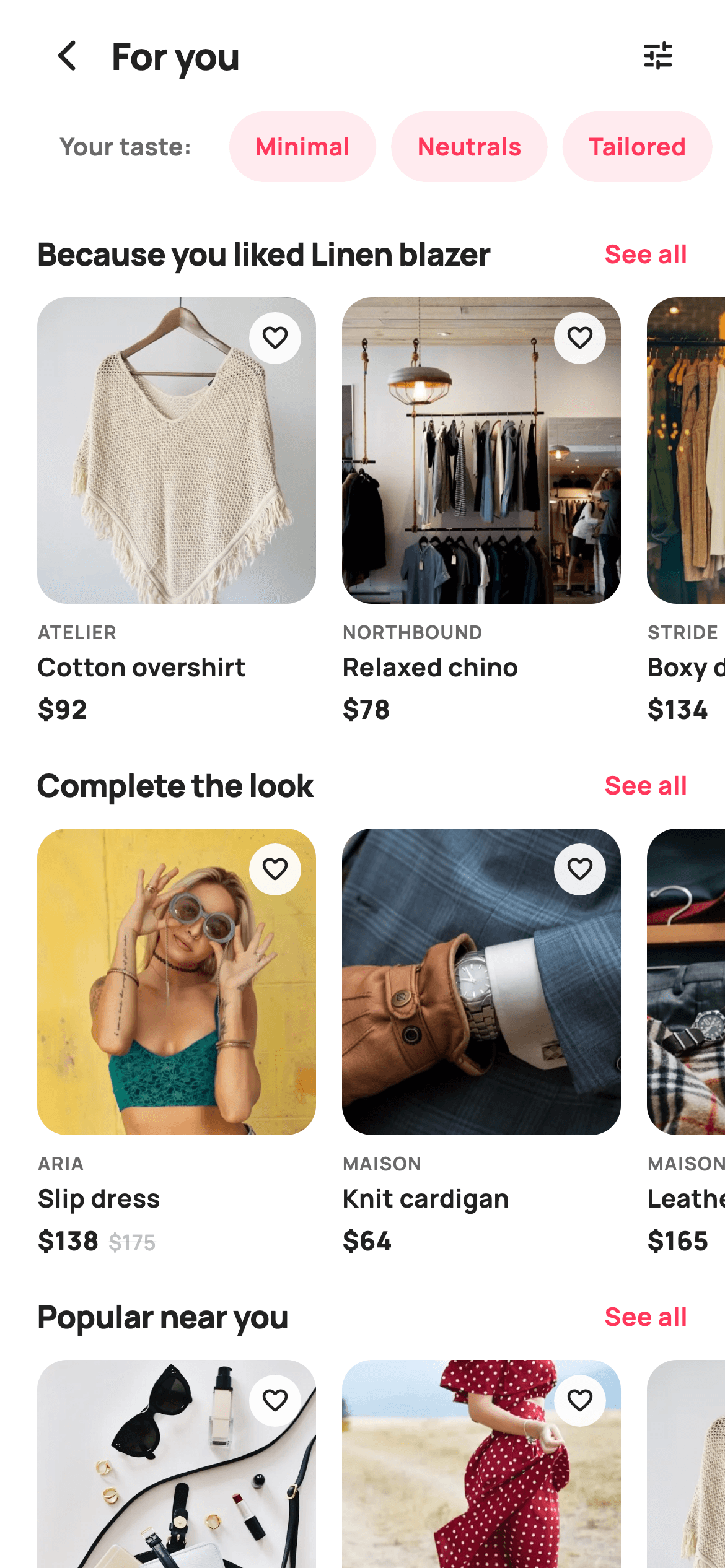
Recommendation feeds work when they explain themselves — 'Because you liked Linen blazer' beats a wall of unlabelled products. This tutorial builds StyleCart's For You screen in Flutter — a scrollable taste-chip row summarising the user's inferred style, then three titled rails each scrolling horizontally through 150px product cards with a See all action. It's a vertical ListView containing horizontal ListViews, and the section title travels with the callback so the parent knows which rail was tapped.
Watch the Flutter UI walkthrough
A short screen recording of For You running, if you'd rather see it before you read the code. The written tutorial below covers everything in it.
Can't see the video? Watch it on YouTube.
What you'll build
- ✓Nested scrolling — a vertical feed whose rows each scroll horizontally on their own axis
- ✓A taste-chip rail with an inline leading label baked into the list rather than sitting beside it
- ✓Titled sections whose 'See all' passes its own title back, so one callback serves every rail
- ✓Fixed-height rails with 150px cards, so the images size themselves from the leftover space
Step-by-step build
Create the file
Add a new file at lib/ecom_home_recommended/ecom_home_recommended_screen.dart in your Flutter project.
Register the bundled fonts
No external packages — this is pure Flutter. It does bundle its design font (Manrope), so drop the font file into fonts/ and declare it in pubspec.yaml:
flutter:
  fonts:
    - family: Manrope
      fonts:
- asset: fonts/Manrope-Regular.ttfBuild it, piece by piece
Here's how the screen goes together. Each block below is a real slice of the code with a plain-English explanation — paste them in order, or grab the whole file from the next section.
Taste tags and three titled sections
import 'package:flutter/material.dart';

/// StyleCart — Recommended For You.
///
/// A personalised feed of themed rails ("Because you liked…", "Complete the
/// look", "In your size", "Popular near you"), each a horizontal run of photo
/// product cards, fronted by a taste-summary chip row.
///
/// Self-contained per CONVENTIONS.md: pure Flutter, bundled Manrope, inline
/// Airbnb-style tokens, own light theme + SafeArea, bundled webp photos. No
/// emoji glyphs. Exposes callbacks only.
class EcomHomeRecommendedScreen extends StatelessWidget {
  const EcomHomeRecommendedScreen({
    super.key,
    this.onBack,
    this.onProduct,
    this.onSeeAll,
    this.onTuneTaste,
  });

  final VoidCallback? onBack;
  final ValueChanged<String>? onProduct;

  /// "See all" on a section (passes section title).
  final ValueChanged<String>? onSeeAll;
  final VoidCallback? onTuneTaste;

  static const String _font = 'Manrope';
  static const Color _canvas = Color(0xFFFFFFFF);
  static const Color _ink = Color(0xFF222222);
  static const Color _muted = Color(0xFF6A6A6A);
  static const Color _faint = Color(0xFFC1C1C1);
  static const Color _brand = Color(0xFFFF385C);
  static const Color _imageBg = Color(0xFFF5F5F5);

  static const String _dir =
      'lib/screens/ecommerce/ecom_home_recommended/images';

  static const List<String> _taste = <String>[
    'Minimal', 'Neutrals', 'Tailored', 'Streetwear', 'Linen'
  ];

  static const List<_Section> _sections = <_Section>[
    _Section('Because you liked Linen blazer', <_R>[
      _R('Cotton overshirt', 'Atelier', 92, 0, 'p01.webp'),
      _R('Relaxed chino', 'Northbound', 78, 0, 'p02.webp'),
      _R('Boxy denim', 'Stride', 134, 0, 'p03.webp'),
      _R('Belted coat', 'Atelier', 198, 0, 'p04.webp'),
    ]),
    _Section('Complete the look', <_R>[
      _R('Slip dress', 'Aria', 138, 175, 'p05.webp'),
      _R('Knit cardigan', 'Maison', 64, 0, 'p06.webp'),
      _R('Leather tote', 'Maison', 165, 0, 'p11.webp'),
      _R('Court sneakers', 'Stride', 95, 0, 'p12.webp'),
    ]),
    _Section('Popular near you', <_R>[
      _R('Pleated skirt', 'Aria', 76, 0, 'p13.webp'),
      _R('Wool overshirt', 'Northbound', 112, 0, 'p14.webp'),
      _R('Cropped trench', 'Atelier', 158, 0, 'p01.webp'),
      _R('Structured satchel', 'Maison', 142, 0, 'p11.webp'),
    ]),
  ];
The screen is stateless with four callbacks, including `onSeeAll` as a `ValueChanged<String>` that reports which section was tapped. The data is nested: `_Section` holds a title and a `List<_R>`, and each `_R` is a product with a `was` price that's 0 when there's no discount. Three sections are declared — 'Because you liked Linen blazer', 'Complete the look' and 'Popular near you' — and the titles are the real payload here, since a recommendation people can't explain is one they don't trust. `_taste` is a flat list of five style words shown as chips above everything.
A vertical list of horizontal rails
  @override
  Widget build(BuildContext context) {
    return Theme(
      data: ThemeData.light(useMaterial3: true),
      child: Scaffold(
        backgroundColor: _canvas,
        body: SafeArea(
          child: Column(
            children: <Widget>[
              _header(),
              Expanded(
                child: ListView(
                  padding: const EdgeInsets.only(bottom: 24),
                  children: <Widget>[
                    _tasteRow(),
                    const SizedBox(height: 8),
                    for (final _Section s in _sections) _sectionWidget(s),
                  ],
                ),
              ),
            ],
          ),
        ),
      ),
    );
  }

  Widget _header() {
    return Padding(
      padding: const EdgeInsets.fromLTRB(12, 6, 12, 6),
      child: Row(
        children: <Widget>[
          IconButton(
            onPressed: onBack,
            icon: const Icon(Icons.arrow_back_ios_new_rounded,
                size: 20, color: _ink),
          ),
          const Expanded(
            child: Text(
              'For you',
              style: TextStyle(
                fontFamily: _font,
                fontSize: 20,
                fontWeight: FontWeight.w800,
                letterSpacing: -0.3,
                color: _ink,
              ),
            ),
          ),
          IconButton(
            onPressed: onTuneTaste,
            icon: const Icon(Icons.tune_rounded, size: 20, color: _ink),
          ),
        ],
      ),
    );
  }
The body is a header above an `Expanded` ListView whose children are the taste row and then `for (final _Section s in _sections) _sectionWidget(s)`. This is the nested-scrolling pattern: the outer ListView scrolls vertically, and each rail inside it is its own horizontal ListView with a fixed height. Because every horizontal list is wrapped in a `SizedBox` with a concrete height, the outer list can measure them without conflict — an unbounded horizontal list inside a vertical one is the usual cause of a layout exception here. The header pairs a back button with a tune icon wired to `onTuneTaste`, giving people a way to correct a feed that's guessing wrong.
The taste chips and their inline label
  Widget _tasteRow() {
    return SizedBox(
      height: 38,
      child: ListView.separated(
        scrollDirection: Axis.horizontal,
        padding: const EdgeInsets.symmetric(horizontal: 20),
        itemCount: _taste.length + 1,
        separatorBuilder: (_, _) => const SizedBox(width: 8),
        itemBuilder: (BuildContext context, int i) {
          if (i == 0) {
            return Container(
              padding: const EdgeInsets.symmetric(horizontal: 12),
              alignment: Alignment.center,
              child: const Text(
                'Your taste:',
                style: TextStyle(
                  fontFamily: _font,
                  fontSize: 13,
                  fontWeight: FontWeight.w700,
                  color: _muted,
                ),
              ),
            );
          }
          return Container(
            padding: const EdgeInsets.symmetric(horizontal: 14),
            alignment: Alignment.center,
            decoration: BoxDecoration(
              color: _brand.withValues(alpha: 0.10),
              borderRadius: BorderRadius.circular(99),
            ),
            child: Text(
              _taste[i - 1],
              style: const TextStyle(
                fontFamily: _font,
                fontSize: 13,
                fontWeight: FontWeight.w700,
                color: _brand,
              ),
            ),
          );
        },
      ),
    );
  }
The chip row is a 38px-tall horizontal `ListView.separated` with `itemCount: _taste.length + 1`, where index 0 returns the plain 'Your taste:' text and everything after indexes `_taste[i - 1]`. Putting the label inside the list rather than in a Row beside it means the label scrolls away with the chips, which is what you want when there are more tags than fit — a pinned label would eat width permanently. Each chip is filled `_brand.withValues(alpha: 0.10)` with the label in full brand coral, and `BorderRadius.circular(99)` gives the fully-rounded pill regardless of height.
One titled rail
  Widget _sectionWidget(_Section s) {
    return Column(
      crossAxisAlignment: CrossAxisAlignment.start,
      children: <Widget>[
        const SizedBox(height: 18),
        Padding(
          padding: const EdgeInsets.symmetric(horizontal: 20),
          child: Row(
            children: <Widget>[
              Expanded(
                child: Text(
                  s.title,
                  maxLines: 1,
                  overflow: TextOverflow.ellipsis,
                  style: const TextStyle(
                    fontFamily: _font,
                    fontSize: 17,
                    fontWeight: FontWeight.w800,
                    letterSpacing: -0.3,
                    color: _ink,
                  ),
                ),
              ),
              GestureDetector(
                onTap: () => onSeeAll?.call(s.title),
                child: const Text(
                  'See all',
                  style: TextStyle(
                    fontFamily: _font,
                    fontSize: 13.5,
                    fontWeight: FontWeight.w700,
                    color: _brand,
                  ),
                ),
              ),
            ],
          ),
        ),
        const SizedBox(height: 12),
        SizedBox(
          height: 232,
          child: ListView.separated(
            scrollDirection: Axis.horizontal,
            padding: const EdgeInsets.symmetric(horizontal: 20),
            itemCount: s.items.length,
            separatorBuilder: (_, _) => const SizedBox(width: 14),
            itemBuilder: (BuildContext context, int i) => _card(s.items[i]),
          ),
        ),
      ],
    );
  }
`_sectionWidget` builds a heading Row and a 232px-tall horizontal rail. The heading puts the title in an `Expanded` with `maxLines: 1` and an ellipsis — necessary, because 'Because you liked Linen blazer' is long enough to collide with 'See all' on a narrow phone, and the Expanded guarantees the action stays visible. That action calls `onSeeAll?.call(s.title)`, passing the section's own title, so one callback serves all three rails and the parent knows which to expand. Note the padding lives on the inner ListView rather than the outer Column, so cards can scroll right up to the screen edge instead of being cut off by a parent margin.
The product card
  Widget _card(_R r) {
    final bool sale = r.was > r.price && r.was > 0;
    return GestureDetector(
      onTap: () => onProduct?.call(r.title),
      child: SizedBox(
        width: 150,
        child: Column(
          crossAxisAlignment: CrossAxisAlignment.start,
          children: <Widget>[
            Expanded(
              child: ClipRRect(
                borderRadius: BorderRadius.circular(16),
                child: Stack(
                  fit: StackFit.expand,
                  children: <Widget>[
                    Container(color: _imageBg),
                    Image.asset('$_dir/${r.asset}', fit: BoxFit.cover),
                    Positioned(
                      right: 8,
                      top: 8,
                      child: Container(
                        width: 28,
                        height: 28,
                        decoration: BoxDecoration(
                          color: _canvas.withValues(alpha: 0.92),
                          shape: BoxShape.circle,
                        ),
                        child: const Icon(Icons.favorite_border_rounded,
                            size: 16, color: _ink),
                      ),
                    ),
                  ],
                ),
              ),
            ),
            const SizedBox(height: 8),
            Text(
              r.brand.toUpperCase(),
              style: const TextStyle(
                fontFamily: _font,
                fontSize: 10,
                fontWeight: FontWeight.w700,
                letterSpacing: 0.6,
                color: _muted,
              ),
            ),
            const SizedBox(height: 2),
            Text(
              r.title,
              maxLines: 1,
              overflow: TextOverflow.ellipsis,
              style: const TextStyle(
                fontFamily: _font,
                fontSize: 13.5,
                fontWeight: FontWeight.w700,
                color: _ink,
              ),
            ),
            const SizedBox(height: 4),
            Row(
              children: <Widget>[
                Text(
                  '\$${r.price}',
                  style: const TextStyle(
                    fontFamily: _font,
                    fontSize: 14,
                    fontWeight: FontWeight.w800,
                    color: _ink,
                  ),
                ),
                if (sale) ...<Widget>[
                  const SizedBox(width: 5),
                  Text(
                    '\$${r.was}',
                    style: const TextStyle(
                      fontFamily: _font,
                      fontSize: 11.5,
                      fontWeight: FontWeight.w600,
                      color: _faint,
                      decoration: TextDecoration.lineThrough,
                    ),
                  ),
                ],
              ],
            ),
          ],
        ),
      ),
    );
  }
Each card is a fixed `SizedBox(width: 150)` whose Column starts with an `Expanded` image — so the photo claims whatever height is left after the three fixed text lines, which is how every card in the rail ends up perfectly aligned. Inside the ClipRRect, a Stack in `StackFit.expand` layers an `_imageBg` placeholder under the WebP so there's neutral grey rather than a white flash while it decodes, plus a 28px wishlist circle on white at 92% opacity. Below, `sale` is computed once at the top of the method and drives a conditional spread that contributes both the gap and the struck-through original price — so a full-price item gets neither. The title is clamped to one line with an ellipsis.
The section and product records
class _Section {
  const _Section(this.title, this.items);
  final String title;
  final List<_R> items;
}

class _R {
  const _R(this.title, this.brand, this.price, this.was, this.asset);
  final String title;
  final String brand;
  final int price;
  final int was;
  final String asset;
}
Two small immutable classes close the file. `_Section` pairs a title with its items, which is what lets the feed be described as a single nested const literal and iterated with one loop. `_R` holds the five fields a card needs. Using typed records rather than nested Maps means a mistyped field is a compile error instead of a runtime null, and it's also why the whole `_sections` structure can be `static const` — built once at compile time and shared across every rebuild rather than reallocated.
Full code
The complete, ready-to-paste source. Free to use in your projects — one click copies it all.
import 'package:flutter/material.dart';

/// StyleCart — Recommended For You.
///
/// A personalised feed of themed rails ("Because you liked…", "Complete the
/// look", "In your size", "Popular near you"), each a horizontal run of photo
/// product cards, fronted by a taste-summary chip row.
///
/// Self-contained per CONVENTIONS.md: pure Flutter, bundled Manrope, inline
/// Airbnb-style tokens, own light theme + SafeArea, bundled webp photos. No
/// emoji glyphs. Exposes callbacks only.
class EcomHomeRecommendedScreen extends StatelessWidget {
  const EcomHomeRecommendedScreen({
    super.key,
    this.onBack,
    this.onProduct,
    this.onSeeAll,
    this.onTuneTaste,
  });

  final VoidCallback? onBack;
  final ValueChanged<String>? onProduct;

  /// "See all" on a section (passes section title).
  final ValueChanged<String>? onSeeAll;
  final VoidCallback? onTuneTaste;

  static const String _font = 'Manrope';
  static const Color _canvas = Color(0xFFFFFFFF);
  static const Color _ink = Color(0xFF222222);
  static const Color _muted = Color(0xFF6A6A6A);
  static const Color _faint = Color(0xFFC1C1C1);
  static const Color _brand = Color(0xFFFF385C);
  static const Color _imageBg = Color(0xFFF5F5F5);

  static const String _dir =
      'lib/screens/ecommerce/ecom_home_recommended/images';

  static const List<String> _taste = <String>[
    'Minimal', 'Neutrals', 'Tailored', 'Streetwear', 'Linen'
  ];

  static const List<_Section> _sections = <_Section>[
    _Section('Because you liked Linen blazer', <_R>[
      _R('Cotton overshirt', 'Atelier', 92, 0, 'p01.webp'),
      _R('Relaxed chino', 'Northbound', 78, 0, 'p02.webp'),
      _R('Boxy denim', 'Stride', 134, 0, 'p03.webp'),
      _R('Belted coat', 'Atelier', 198, 0, 'p04.webp'),
    ]),
    _Section('Complete the look', <_R>[
      _R('Slip dress', 'Aria', 138, 175, 'p05.webp'),
      _R('Knit cardigan', 'Maison', 64, 0, 'p06.webp'),
      _R('Leather tote', 'Maison', 165, 0, 'p11.webp'),
      _R('Court sneakers', 'Stride', 95, 0, 'p12.webp'),
    ]),
    _Section('Popular near you', <_R>[
      _R('Pleated skirt', 'Aria', 76, 0, 'p13.webp'),
      _R('Wool overshirt', 'Northbound', 112, 0, 'p14.webp'),
      _R('Cropped trench', 'Atelier', 158, 0, 'p01.webp'),
      _R('Structured satchel', 'Maison', 142, 0, 'p11.webp'),
    ]),
  ];

  @override
  Widget build(BuildContext context) {
    return Theme(
      data: ThemeData.light(useMaterial3: true),
      child: Scaffold(
        backgroundColor: _canvas,
        body: SafeArea(
          child: Column(
            children: <Widget>[
              _header(),
              Expanded(
                child: ListView(
                  padding: const EdgeInsets.only(bottom: 24),
                  children: <Widget>[
                    _tasteRow(),
                    const SizedBox(height: 8),
                    for (final _Section s in _sections) _sectionWidget(s),
                  ],
                ),
              ),
            ],
          ),
        ),
      ),
    );
  }

  Widget _header() {
    return Padding(
      padding: const EdgeInsets.fromLTRB(12, 6, 12, 6),
      child: Row(
        children: <Widget>[
          IconButton(
            onPressed: onBack,
            icon: const Icon(Icons.arrow_back_ios_new_rounded,
                size: 20, color: _ink),
          ),
          const Expanded(
            child: Text(
              'For you',
              style: TextStyle(
                fontFamily: _font,
                fontSize: 20,
                fontWeight: FontWeight.w800,
                letterSpacing: -0.3,
                color: _ink,
              ),
            ),
          ),
          IconButton(
            onPressed: onTuneTaste,
            icon: const Icon(Icons.tune_rounded, size: 20, color: _ink),
          ),
        ],
      ),
    );
  }

  Widget _tasteRow() {
    return SizedBox(
      height: 38,
      child: ListView.separated(
        scrollDirection: Axis.horizontal,
        padding: const EdgeInsets.symmetric(horizontal: 20),
        itemCount: _taste.length + 1,
        separatorBuilder: (_, _) => const SizedBox(width: 8),
        itemBuilder: (BuildContext context, int i) {
          if (i == 0) {
            return Container(
              padding: const EdgeInsets.symmetric(horizontal: 12),
              alignment: Alignment.center,
              child: const Text(
                'Your taste:',
                style: TextStyle(
                  fontFamily: _font,
                  fontSize: 13,
                  fontWeight: FontWeight.w700,
                  color: _muted,
                ),
              ),
            );
          }
          return Container(
            padding: const EdgeInsets.symmetric(horizontal: 14),
            alignment: Alignment.center,
            decoration: BoxDecoration(
              color: _brand.withValues(alpha: 0.10),
              borderRadius: BorderRadius.circular(99),
            ),
            child: Text(
              _taste[i - 1],
              style: const TextStyle(
                fontFamily: _font,
                fontSize: 13,
                fontWeight: FontWeight.w700,
                color: _brand,
              ),
            ),
          );
        },
      ),
    );
  }

  Widget _sectionWidget(_Section s) {
    return Column(
      crossAxisAlignment: CrossAxisAlignment.start,
      children: <Widget>[
        const SizedBox(height: 18),
        Padding(
          padding: const EdgeInsets.symmetric(horizontal: 20),
          child: Row(
            children: <Widget>[
              Expanded(
                child: Text(
                  s.title,
                  maxLines: 1,
                  overflow: TextOverflow.ellipsis,
                  style: const TextStyle(
                    fontFamily: _font,
                    fontSize: 17,
                    fontWeight: FontWeight.w800,
                    letterSpacing: -0.3,
                    color: _ink,
                  ),
                ),
              ),
              GestureDetector(
                onTap: () => onSeeAll?.call(s.title),
                child: const Text(
                  'See all',
                  style: TextStyle(
                    fontFamily: _font,
                    fontSize: 13.5,
                    fontWeight: FontWeight.w700,
                    color: _brand,
                  ),
                ),
              ),
            ],
          ),
        ),
        const SizedBox(height: 12),
        SizedBox(
          height: 232,
          child: ListView.separated(
            scrollDirection: Axis.horizontal,
            padding: const EdgeInsets.symmetric(horizontal: 20),
            itemCount: s.items.length,
            separatorBuilder: (_, _) => const SizedBox(width: 14),
            itemBuilder: (BuildContext context, int i) => _card(s.items[i]),
          ),
        ),
      ],
    );
  }

  Widget _card(_R r) {
    final bool sale = r.was > r.price && r.was > 0;
    return GestureDetector(
      onTap: () => onProduct?.call(r.title),
      child: SizedBox(
        width: 150,
        child: Column(
          crossAxisAlignment: CrossAxisAlignment.start,
          children: <Widget>[
            Expanded(
              child: ClipRRect(
                borderRadius: BorderRadius.circular(16),
                child: Stack(
                  fit: StackFit.expand,
                  children: <Widget>[
                    Container(color: _imageBg),
                    Image.asset('$_dir/${r.asset}', fit: BoxFit.cover),
                    Positioned(
                      right: 8,
                      top: 8,
                      child: Container(
                        width: 28,
                        height: 28,
                        decoration: BoxDecoration(
                          color: _canvas.withValues(alpha: 0.92),
                          shape: BoxShape.circle,
                        ),
                        child: const Icon(Icons.favorite_border_rounded,
                            size: 16, color: _ink),
                      ),
                    ),
                  ],
                ),
              ),
            ),
            const SizedBox(height: 8),
            Text(
              r.brand.toUpperCase(),
              style: const TextStyle(
                fontFamily: _font,
                fontSize: 10,
                fontWeight: FontWeight.w700,
                letterSpacing: 0.6,
                color: _muted,
              ),
            ),
            const SizedBox(height: 2),
            Text(
              r.title,
              maxLines: 1,
              overflow: TextOverflow.ellipsis,
              style: const TextStyle(
                fontFamily: _font,
                fontSize: 13.5,
                fontWeight: FontWeight.w700,
                color: _ink,
              ),
            ),
            const SizedBox(height: 4),
            Row(
              children: <Widget>[
                Text(
                  '\$${r.price}',
                  style: const TextStyle(
                    fontFamily: _font,
                    fontSize: 14,
                    fontWeight: FontWeight.w800,
                    color: _ink,
                  ),
                ),
                if (sale) ...<Widget>[
                  const SizedBox(width: 5),
                  Text(
                    '\$${r.was}',
                    style: const TextStyle(
                      fontFamily: _font,
                      fontSize: 11.5,
                      fontWeight: FontWeight.w600,
                      color: _faint,
                      decoration: TextDecoration.lineThrough,
                    ),
                  ),
                ],
              ],
            ),
          ],
        ),
      ),
    );
  }
}

class _Section {
  const _Section(this.title, this.items);
  final String title;
  final List<_R> items;
}

class _R {
  const _R(this.title, this.brand, this.price, this.was, this.asset);
  final String title;
  final String brand;
  final int price;
  final int was;
  final String asset;
}
Plus bundled 15 binary assets (fonts/images). The CLI and MCP install those for you automatically.
Two faster ways to add it
Copy-paste works, but you can skip it entirely.
1. FlutterKit CLI
One command drops this screen — and its fonts — straight into your project.
$ flutterkit add ecom-home-recommended2. AI agent (MCP)
Connect FlutterKit's MCP server in Claude or Cursor and just ask your agent to install ecom-home-recommended — it fetches and writes the files for you.
FAQ
Is this Flutter recommendations feed free to use?
Yes. The complete Dart source on this page is free for personal and commercial projects. Copy it directly, install it with the FlutterKit CLI (flutterkit add ecom-home-recommended), or have an AI agent add it for you over MCP.
Why doesn't the nested horizontal list throw a layout error?
Because each rail is wrapped in a `SizedBox` with an explicit height — 38px for the chips, 232px for the products. A ListView wants unbounded space on its scroll axis, so a horizontal one inside a vertical parent is fine, but it still needs a bounded cross-axis height. Remove those SizedBoxes and you get the classic 'RenderBox was not laid out' failure.
How do I add a fourth rail?
Add another `_Section` to the `_sections` list with its own title and items — the `for` loop in build() picks it up with no other changes, and `onSeeAll` will report the new title automatically. If your rails come from an API, drop the `const` and map your response into `_Section` and `_R` objects in the same shape.
Does it need any external packages?
No — it's pure Flutter on the material library. It bundles the Manrope font plus the WebP product photos referenced through the `_dir` constant, all registered in pubspec.yaml as shown in step 2. It targets Flutter 3.27+ / Dart 3.7+ because of the wildcard `_` parameters in the separatorBuilders; give those real names to compile on an older SDK, and swap the two withValues(alpha: ...) calls for withOpacity(...) below 3.22.


