How to Build a Recently Viewed Products Screen in Flutter (Full Code + Preview)
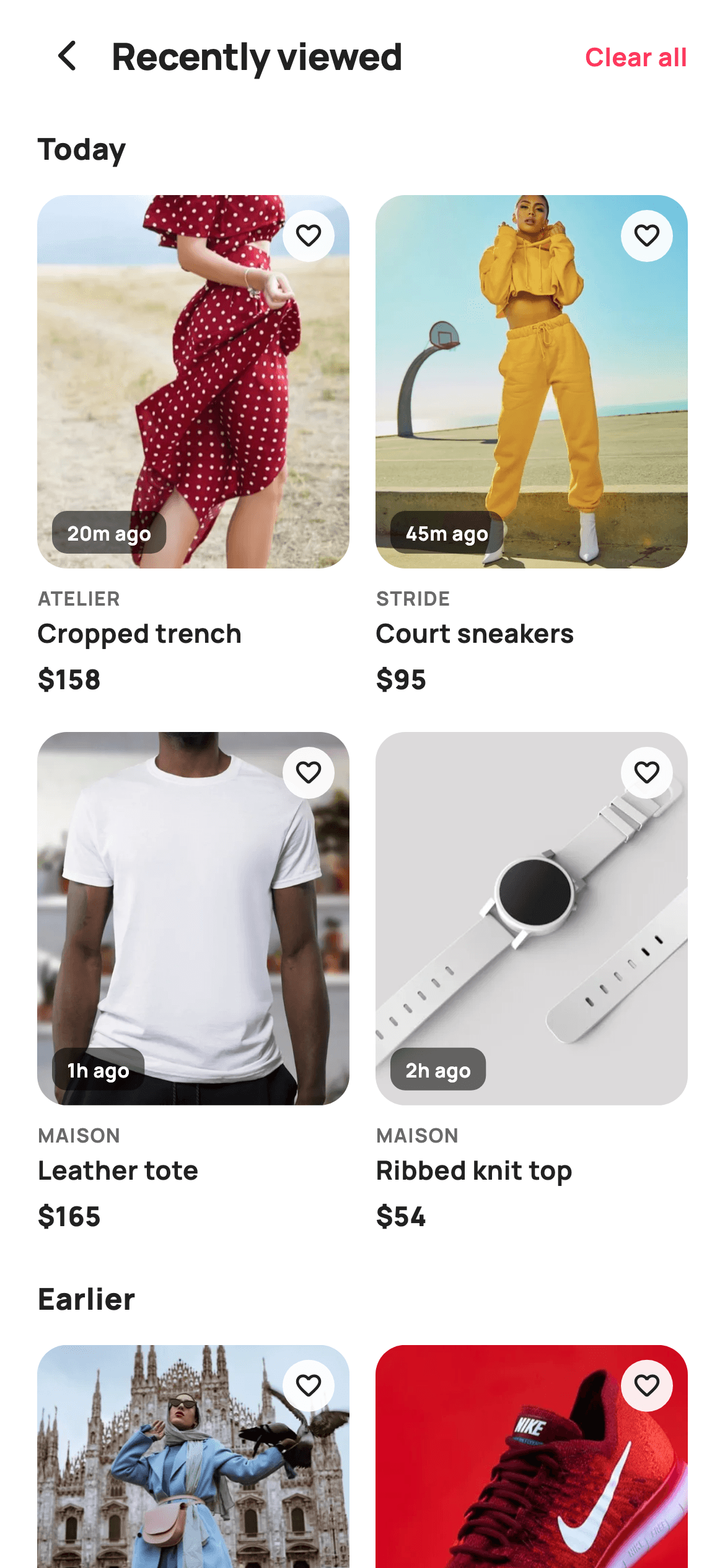
Shoppers rarely buy the first time they see something. This tutorial builds StyleCart's Recently Viewed screen in Flutter — a two-column product grid split into 'Today' and 'Earlier' groups, where every tile carries a timestamp pill, a wishlist button and a real photo. A 'Clear all' action wipes the history and swaps the whole body for a painted clock empty state. You'll see how nested grids stay scrollable inside a ListView, and how a single boolean getter drives the empty-versus-filled switch.
Watch the Flutter UI walkthrough
A short screen recording of Recently Viewed running, if you'd rather see it before you read the code. The written tutorial below covers everything in it.
Can't see the video? Watch it on YouTube.
What you'll build
- ✓A browsing-history grid grouped by recency, where empty groups disappear instead of showing a bare heading
- ✓Product tiles with a translucent 'viewed 20m ago' pill and a floating wishlist button over the photo
- ✓A working 'Clear all' action that empties the history and reveals a painted empty state in one setState
- ✓A vector clock-with-rewind-arrow empty mark drawn with CustomPainter, so there's no illustration asset to ship
Step-by-step build
Create the file
Add a new file at lib/ecom_home_recently_viewed/ecom_home_recently_viewed_screen.dart in your Flutter project.
Register the bundled fonts
No external packages — this is pure Flutter. It does bundle its design font (Manrope), so drop the font file into fonts/ and declare it in pubspec.yaml:
flutter:
  fonts:
    - family: Manrope
      fonts:
- asset: fonts/Manrope-Regular.ttfBuild it, piece by piece
Here's how the screen goes together. Each block below is a real slice of the code with a plain-English explanation — paste them in order, or grab the whole file from the next section.
A stateful screen, its callbacks, and the design tokens
import 'package:flutter/material.dart';

/// StyleCart — Recently Viewed.
///
/// The pieces a shopper just browsed, grouped by "Today" / "Earlier" in a
/// two-column grid with per-item viewed-time captions and quick remove. A
/// clear-all action wipes history to a painted empty state.
///
/// Self-contained per CONVENTIONS.md: pure Flutter, bundled Manrope, inline
/// Airbnb-style tokens, own light theme + SafeArea, bundled webp photos. The
/// empty-state mark is a CustomPainter (no emoji glyph). Exposes callbacks only.
class EcomHomeRecentlyViewedScreen extends StatefulWidget {
  const EcomHomeRecentlyViewedScreen({
    super.key,
    this.onBack,
    this.onProduct,
    this.onKeepShopping,
  });

  final VoidCallback? onBack;
  final ValueChanged<String>? onProduct;
  final VoidCallback? onKeepShopping;

  @override
  State<EcomHomeRecentlyViewedScreen> createState() =>
      _EcomHomeRecentlyViewedScreenState();
}

class _EcomHomeRecentlyViewedScreenState
    extends State<EcomHomeRecentlyViewedScreen> {
  static const String _font = 'Manrope';
  static const Color _canvas = Color(0xFFFFFFFF);
  static const Color _ink = Color(0xFF222222);
  static const Color _muted = Color(0xFF6A6A6A);
  static const Color _brand = Color(0xFFFF385C);
  static const Color _imageBg = Color(0xFFF5F5F5);

  static const String _dir =
      'lib/screens/ecommerce/ecom_home_recently_viewed/images';
Unlike a purely presentational screen, this one is a StatefulWidget because 'Clear all' mutates the list in place. The constructor exposes three callbacks — `onBack`, `onKeepShopping`, and `onProduct`, which is a `ValueChanged<String>` so a tapped tile can report which product it was. Inside the State class sit the design tokens: `_brand` (#FF385C) for the coral accents, `_ink` (#222222) for titles, `_muted` (#6A6A6A) for captions, and `_imageBg` (#F5F5F5) as a placeholder colour that shows while a photo decodes. `_dir` holds the image folder path once, so the asset strings later in the file stay short.
The history data, the empty check, and the build method
  final List<_V> _today = <_V>[
    const _V('Cropped trench', 'Atelier', 158, 'p14.webp', '20m ago'),
    const _V('Court sneakers', 'Stride', 95, 'p15.webp', '45m ago'),
    const _V('Leather tote', 'Maison', 165, 'p16.webp', '1h ago'),
    const _V('Ribbed knit top', 'Maison', 54, 'p17.webp', '2h ago'),
  ];
  final List<_V> _earlier = <_V>[
    const _V('Silk slip dress', 'Aria', 138, 'p18.webp', 'Yesterday'),
    const _V('Wool overshirt', 'Northbound', 112, 'p19.webp', 'Yesterday'),
    const _V('Pleated skirt', 'Aria', 76, 'p20.webp', '2 days ago'),
    const _V('Structured satchel', 'Maison', 142, 'p21.webp', '3 days ago'),
  ];

  bool get _empty => _today.isEmpty && _earlier.isEmpty;

  void _clearAll() => setState(() {
        _today.clear();
        _earlier.clear();
      });

  @override
  Widget build(BuildContext context) {
    return Theme(
      data: ThemeData.light(useMaterial3: true),
      child: Scaffold(
        backgroundColor: _canvas,
        body: SafeArea(
          child: Column(
            children: <Widget>[
              _header(),
              Expanded(child: _empty ? _emptyState() : _list()),
            ],
          ),
        ),
      ),
    );
  }
Two lists hold the history: `_today` with four items and `_earlier` with four more. Each entry is a `_V` record carrying title, brand, price, image filename and a human 'when' string like '20m ago' or 'Yesterday' — pre-formatted rather than computed, which keeps the screen free of date maths. The `_empty` getter is the key line: it returns true only when both lists are empty, and `_clearAll()` clears both inside a setState so a single tap flips it. build() then reads it once — `Expanded(child: _empty ? _emptyState() : _list())` — meaning the entire body swaps with no extra flags to keep in sync.
A header where 'Clear all' hides itself
  Widget _header() {
    return Padding(
      padding: const EdgeInsets.fromLTRB(12, 6, 20, 6),
      child: Row(
        children: <Widget>[
          IconButton(
            onPressed: widget.onBack,
            icon: const Icon(Icons.arrow_back_ios_new_rounded,
                size: 20, color: _ink),
          ),
          const Expanded(
            child: Text(
              'Recently viewed',
              style: TextStyle(
                fontFamily: _font,
                fontSize: 20,
                fontWeight: FontWeight.w800,
                letterSpacing: -0.3,
                color: _ink,
              ),
            ),
          ),
          if (!_empty)
            GestureDetector(
              onTap: _clearAll,
              child: const Text(
                'Clear all',
                style: TextStyle(
                  fontFamily: _font,
                  fontSize: 13.5,
                  fontWeight: FontWeight.w700,
                  color: _brand,
                ),
              ),
            ),
        ],
      ),
    );
  }

  Widget _list() {
    return ListView(
      padding: const EdgeInsets.fromLTRB(20, 8, 20, 24),
      children: <Widget>[
        if (_today.isNotEmpty) ...<Widget>[
          _groupLabel('Today'),
          _grid(_today),
        ],
        if (_earlier.isNotEmpty) ...<Widget>[
          const SizedBox(height: 22),
          _groupLabel('Earlier'),
          _grid(_earlier),
        ],
      ],
    );
  }
_header() is a Row with a back IconButton, an Expanded title so it takes all the middle space, and a conditional `if (!_empty)` guarding the 'Clear all' text button. That collection-if is a small but important detail: once the history is cleared there is nothing left to clear, so the action removes itself rather than sitting there doing nothing. _list() below it is a ListView whose children use spread-ifs — `if (_today.isNotEmpty) ...<Widget>[_groupLabel('Today'), _grid(_today)]` — so an empty group contributes no heading and no whitespace at all.
Nesting a grid inside a scrolling list
  Widget _groupLabel(String t) {
    return Padding(
      padding: const EdgeInsets.only(bottom: 14),
      child: Text(
        t,
        style: const TextStyle(
          fontFamily: _font,
          fontSize: 16,
          fontWeight: FontWeight.w800,
          color: _ink,
        ),
      ),
    );
  }

  Widget _grid(List<_V> items) {
    return GridView.builder(
      shrinkWrap: true,
      physics: const NeverScrollableScrollPhysics(),
      gridDelegate: const SliverGridDelegateWithFixedCrossAxisCount(
        crossAxisCount: 2,
        mainAxisSpacing: 18,
        crossAxisSpacing: 14,
        childAspectRatio: 0.62,
      ),
      itemCount: items.length,
      itemBuilder: (BuildContext context, int i) => _card(items[i]),
    );
  }
This is the pattern that makes two stacked grids work. A GridView normally wants infinite height and its own scrolling, which would conflict with the parent ListView. The fix is the two properties at the top of _grid(): `shrinkWrap: true` makes the grid size itself to its content instead of expanding forever, and `NeverScrollableScrollPhysics()` hands scrolling entirely to the outer ListView so you never get two competing scroll gestures. The `SliverGridDelegateWithFixedCrossAxisCount` sets two columns with an 0.62 childAspectRatio — taller than wide, which is the right shape for a fashion photo plus three lines of text.
The product tile with its overlay chips
  Widget _card(_V v) {
    return GestureDetector(
      onTap: () => widget.onProduct?.call(v.title),
      child: Column(
        crossAxisAlignment: CrossAxisAlignment.start,
        children: <Widget>[
          Expanded(
            child: ClipRRect(
              borderRadius: BorderRadius.circular(16),
              child: Stack(
                fit: StackFit.expand,
                children: <Widget>[
                  Container(color: _imageBg),
                  Image.asset('$_dir/${v.asset}', fit: BoxFit.cover),
                  Positioned(
                    left: 8,
                    bottom: 8,
                    child: Container(
                      padding: const EdgeInsets.symmetric(
                          horizontal: 8, vertical: 4),
                      decoration: BoxDecoration(
                        color: Colors.black.withValues(alpha: 0.55),
                        borderRadius: BorderRadius.circular(8),
                      ),
                      child: Text(
                        v.when,
                        style: const TextStyle(
                          fontFamily: _font,
                          fontSize: 10.5,
                          fontWeight: FontWeight.w700,
                          color: _canvas,
                        ),
                      ),
                    ),
                  ),
                  Positioned(
                    right: 8,
                    top: 8,
                    child: Container(
                      width: 28,
                      height: 28,
                      decoration: BoxDecoration(
                        color: _canvas.withValues(alpha: 0.92),
                        shape: BoxShape.circle,
                      ),
                      child: const Icon(Icons.favorite_border_rounded,
                          size: 16, color: _ink),
                    ),
                  ),
                ],
              ),
            ),
          ),
          const SizedBox(height: 8),
          Text(
            v.brand.toUpperCase(),
            style: const TextStyle(
              fontFamily: _font,
              fontSize: 10.5,
              fontWeight: FontWeight.w700,
              letterSpacing: 0.6,
              color: _muted,
            ),
          ),
          const SizedBox(height: 2),
          Text(
            v.title,
            maxLines: 1,
            overflow: TextOverflow.ellipsis,
            style: const TextStyle(
              fontFamily: _font,
              fontSize: 14,
              fontWeight: FontWeight.w700,
              color: _ink,
            ),
          ),
          const SizedBox(height: 4),
          Text(
            '\$${v.price}',
            style: const TextStyle(
              fontFamily: _font,
              fontSize: 14.5,
              fontWeight: FontWeight.w800,
              color: _ink,
            ),
          ),
        ],
      ),
    );
  }
Each card is a Column whose first child is `Expanded` — that lets the photo claim all leftover height after the fixed-size text below, so every tile in a row lines up. The image area is a ClipRRect with a 16px radius wrapping a Stack in `StackFit.expand` mode: a `_imageBg` Container underneath, then `Image.asset` on top, then two Positioned overlays. Bottom-left is the timestamp pill on black at 55% opacity; top-right is a 28px circular wishlist button on white at 92% opacity — translucency here means both chips stay readable over light and dark photos. The text stack uses an upper-cased brand with 0.6 letterSpacing, then the title with `maxLines: 1` and `TextOverflow.ellipsis` so a long name truncates instead of breaking the grid.
The cleared-history empty state
  Widget _emptyState() {
    return Center(
      child: Padding(
        padding: const EdgeInsets.all(40),
        child: Column(
          mainAxisSize: MainAxisSize.min,
          children: <Widget>[
            SizedBox(
              width: 96,
              height: 96,
              child: CustomPaint(painter: _ClockEmptyPainter()),
            ),
            const SizedBox(height: 22),
            const Text(
              'No history yet',
              style: TextStyle(
                fontFamily: _font,
                fontSize: 19,
                fontWeight: FontWeight.w800,
                color: _ink,
              ),
            ),
            const SizedBox(height: 8),
            const Text(
              'Items you view will show up here so you can\npick up right where you left off.',
              textAlign: TextAlign.center,
              style: TextStyle(
                fontFamily: _font,
                fontSize: 14,
                fontWeight: FontWeight.w500,
                height: 1.4,
                color: _muted,
              ),
            ),
            const SizedBox(height: 26),
            SizedBox(
              height: 52,
              child: FilledButton(
                onPressed: widget.onKeepShopping,
                style: FilledButton.styleFrom(
                  backgroundColor: _brand,
                  foregroundColor: _canvas,
                  shape: const StadiumBorder(),
                  padding: const EdgeInsets.symmetric(horizontal: 32),
                  textStyle: const TextStyle(
                    fontFamily: _font,
                    fontSize: 15,
                    fontWeight: FontWeight.w800,
                  ),
                ),
                child: const Text('Keep shopping'),
              ),
            ),
          ],
        ),
      ),
    );
  }
}
_emptyState() is a centred Column with `mainAxisSize: MainAxisSize.min` so it hugs its content rather than stretching. It stacks a 96×96 CustomPaint mark, a 19px 'No history yet' headline, an explanatory line with a manual `\n` break and 1.4 line height, and a coral 'Keep shopping' pill. Note the button is wrapped in a `SizedBox(height: 52)` with horizontal padding rather than `width: double.infinity` — an empty state reads better with a button sized to its label than one stretched edge to edge.
The item record and the painted clock mark
class _V {
  const _V(this.title, this.brand, this.price, this.asset, this.when);
  final String title;
  final String brand;
  final int price;
  final String asset;
  final String when;
}

/// Paints a soft clock-with-arrow empty mark for the cleared-history state.
class _ClockEmptyPainter extends CustomPainter {
  @override
  void paint(Canvas canvas, Size size) {
    const Color brand = Color(0xFFFF385C);
    final Offset c = Offset(size.width / 2, size.height / 2);
    final double r = size.width / 2;

    canvas.drawCircle(c, r, Paint()..color = brand.withValues(alpha: 0.10));
    canvas.drawCircle(
      c,
      r * 0.66,
      Paint()
        ..style = PaintingStyle.stroke
        ..strokeWidth = 3
        ..color = brand.withValues(alpha: 0.55),
    );
    // Clock hands.
    final Paint hand = Paint()
      ..style = PaintingStyle.stroke
      ..strokeCap = StrokeCap.round
      ..strokeWidth = 3
      ..color = brand;
    canvas.drawLine(c, c + Offset(0, -r * 0.36), hand);
    canvas.drawLine(c, c + Offset(r * 0.26, r * 0.06), hand);

    // Counter-clockwise arrow tick at top-left.
    final Path arrow = Path()
      ..moveTo(c.dx - r * 0.66, c.dy - r * 0.12)
      ..lineTo(c.dx - r * 0.66, c.dy - r * 0.40)
      ..lineTo(c.dx - r * 0.40, c.dy - r * 0.40);
    canvas.drawPath(
      arrow,
      Paint()
        ..style = PaintingStyle.stroke
        ..strokeWidth = 3
        ..strokeCap = StrokeCap.round
        ..strokeJoin = StrokeJoin.round
        ..color = brand,
    );
  }

  @override
  bool shouldRepaint(_ClockEmptyPainter oldDelegate) => false;
}
_V is a small immutable class holding the five fields each tile needs — using a typed record instead of a Map means a typo in a field name is a compile error, not a runtime null. _ClockEmptyPainter then draws the empty mark from primitives: a full-size circle at 10% brand opacity as the halo, a stroked circle at 66% radius as the clock face, two `drawLine` calls from the centre for the hands, and a three-point Path in the top-left corner forming the rewind arrow's elbow. Every offset is expressed as a fraction of the radius, so the whole mark scales cleanly if you change the 96×96 box. `shouldRepaint` returns false because nothing it draws depends on changing input.
Full code
The complete, ready-to-paste source. Free to use in your projects — one click copies it all.
import 'package:flutter/material.dart';

/// StyleCart — Recently Viewed.
///
/// The pieces a shopper just browsed, grouped by "Today" / "Earlier" in a
/// two-column grid with per-item viewed-time captions and quick remove. A
/// clear-all action wipes history to a painted empty state.
///
/// Self-contained per CONVENTIONS.md: pure Flutter, bundled Manrope, inline
/// Airbnb-style tokens, own light theme + SafeArea, bundled webp photos. The
/// empty-state mark is a CustomPainter (no emoji glyph). Exposes callbacks only.
class EcomHomeRecentlyViewedScreen extends StatefulWidget {
  const EcomHomeRecentlyViewedScreen({
    super.key,
    this.onBack,
    this.onProduct,
    this.onKeepShopping,
  });

  final VoidCallback? onBack;
  final ValueChanged<String>? onProduct;
  final VoidCallback? onKeepShopping;

  @override
  State<EcomHomeRecentlyViewedScreen> createState() =>
      _EcomHomeRecentlyViewedScreenState();
}

class _EcomHomeRecentlyViewedScreenState
    extends State<EcomHomeRecentlyViewedScreen> {
  static const String _font = 'Manrope';
  static const Color _canvas = Color(0xFFFFFFFF);
  static const Color _ink = Color(0xFF222222);
  static const Color _muted = Color(0xFF6A6A6A);
  static const Color _brand = Color(0xFFFF385C);
  static const Color _imageBg = Color(0xFFF5F5F5);

  static const String _dir =
      'lib/screens/ecommerce/ecom_home_recently_viewed/images';

  final List<_V> _today = <_V>[
    const _V('Cropped trench', 'Atelier', 158, 'p14.webp', '20m ago'),
    const _V('Court sneakers', 'Stride', 95, 'p15.webp', '45m ago'),
    const _V('Leather tote', 'Maison', 165, 'p16.webp', '1h ago'),
    const _V('Ribbed knit top', 'Maison', 54, 'p17.webp', '2h ago'),
  ];
  final List<_V> _earlier = <_V>[
    const _V('Silk slip dress', 'Aria', 138, 'p18.webp', 'Yesterday'),
    const _V('Wool overshirt', 'Northbound', 112, 'p19.webp', 'Yesterday'),
    const _V('Pleated skirt', 'Aria', 76, 'p20.webp', '2 days ago'),
    const _V('Structured satchel', 'Maison', 142, 'p21.webp', '3 days ago'),
  ];

  bool get _empty => _today.isEmpty && _earlier.isEmpty;

  void _clearAll() => setState(() {
        _today.clear();
        _earlier.clear();
      });

  @override
  Widget build(BuildContext context) {
    return Theme(
      data: ThemeData.light(useMaterial3: true),
      child: Scaffold(
        backgroundColor: _canvas,
        body: SafeArea(
          child: Column(
            children: <Widget>[
              _header(),
              Expanded(child: _empty ? _emptyState() : _list()),
            ],
          ),
        ),
      ),
    );
  }

  Widget _header() {
    return Padding(
      padding: const EdgeInsets.fromLTRB(12, 6, 20, 6),
      child: Row(
        children: <Widget>[
          IconButton(
            onPressed: widget.onBack,
            icon: const Icon(Icons.arrow_back_ios_new_rounded,
                size: 20, color: _ink),
          ),
          const Expanded(
            child: Text(
              'Recently viewed',
              style: TextStyle(
                fontFamily: _font,
                fontSize: 20,
                fontWeight: FontWeight.w800,
                letterSpacing: -0.3,
                color: _ink,
              ),
            ),
          ),
          if (!_empty)
            GestureDetector(
              onTap: _clearAll,
              child: const Text(
                'Clear all',
                style: TextStyle(
                  fontFamily: _font,
                  fontSize: 13.5,
                  fontWeight: FontWeight.w700,
                  color: _brand,
                ),
              ),
            ),
        ],
      ),
    );
  }

  Widget _list() {
    return ListView(
      padding: const EdgeInsets.fromLTRB(20, 8, 20, 24),
      children: <Widget>[
        if (_today.isNotEmpty) ...<Widget>[
          _groupLabel('Today'),
          _grid(_today),
        ],
        if (_earlier.isNotEmpty) ...<Widget>[
          const SizedBox(height: 22),
          _groupLabel('Earlier'),
          _grid(_earlier),
        ],
      ],
    );
  }

  Widget _groupLabel(String t) {
    return Padding(
      padding: const EdgeInsets.only(bottom: 14),
      child: Text(
        t,
        style: const TextStyle(
          fontFamily: _font,
          fontSize: 16,
          fontWeight: FontWeight.w800,
          color: _ink,
        ),
      ),
    );
  }

  Widget _grid(List<_V> items) {
    return GridView.builder(
      shrinkWrap: true,
      physics: const NeverScrollableScrollPhysics(),
      gridDelegate: const SliverGridDelegateWithFixedCrossAxisCount(
        crossAxisCount: 2,
        mainAxisSpacing: 18,
        crossAxisSpacing: 14,
        childAspectRatio: 0.62,
      ),
      itemCount: items.length,
      itemBuilder: (BuildContext context, int i) => _card(items[i]),
    );
  }

  Widget _card(_V v) {
    return GestureDetector(
      onTap: () => widget.onProduct?.call(v.title),
      child: Column(
        crossAxisAlignment: CrossAxisAlignment.start,
        children: <Widget>[
          Expanded(
            child: ClipRRect(
              borderRadius: BorderRadius.circular(16),
              child: Stack(
                fit: StackFit.expand,
                children: <Widget>[
                  Container(color: _imageBg),
                  Image.asset('$_dir/${v.asset}', fit: BoxFit.cover),
                  Positioned(
                    left: 8,
                    bottom: 8,
                    child: Container(
                      padding: const EdgeInsets.symmetric(
                          horizontal: 8, vertical: 4),
                      decoration: BoxDecoration(
                        color: Colors.black.withValues(alpha: 0.55),
                        borderRadius: BorderRadius.circular(8),
                      ),
                      child: Text(
                        v.when,
                        style: const TextStyle(
                          fontFamily: _font,
                          fontSize: 10.5,
                          fontWeight: FontWeight.w700,
                          color: _canvas,
                        ),
                      ),
                    ),
                  ),
                  Positioned(
                    right: 8,
                    top: 8,
                    child: Container(
                      width: 28,
                      height: 28,
                      decoration: BoxDecoration(
                        color: _canvas.withValues(alpha: 0.92),
                        shape: BoxShape.circle,
                      ),
                      child: const Icon(Icons.favorite_border_rounded,
                          size: 16, color: _ink),
                    ),
                  ),
                ],
              ),
            ),
          ),
          const SizedBox(height: 8),
          Text(
            v.brand.toUpperCase(),
            style: const TextStyle(
              fontFamily: _font,
              fontSize: 10.5,
              fontWeight: FontWeight.w700,
              letterSpacing: 0.6,
              color: _muted,
            ),
          ),
          const SizedBox(height: 2),
          Text(
            v.title,
            maxLines: 1,
            overflow: TextOverflow.ellipsis,
            style: const TextStyle(
              fontFamily: _font,
              fontSize: 14,
              fontWeight: FontWeight.w700,
              color: _ink,
            ),
          ),
          const SizedBox(height: 4),
          Text(
            '\$${v.price}',
            style: const TextStyle(
              fontFamily: _font,
              fontSize: 14.5,
              fontWeight: FontWeight.w800,
              color: _ink,
            ),
          ),
        ],
      ),
    );
  }

  Widget _emptyState() {
    return Center(
      child: Padding(
        padding: const EdgeInsets.all(40),
        child: Column(
          mainAxisSize: MainAxisSize.min,
          children: <Widget>[
            SizedBox(
              width: 96,
              height: 96,
              child: CustomPaint(painter: _ClockEmptyPainter()),
            ),
            const SizedBox(height: 22),
            const Text(
              'No history yet',
              style: TextStyle(
                fontFamily: _font,
                fontSize: 19,
                fontWeight: FontWeight.w800,
                color: _ink,
              ),
            ),
            const SizedBox(height: 8),
            const Text(
              'Items you view will show up here so you can\npick up right where you left off.',
              textAlign: TextAlign.center,
              style: TextStyle(
                fontFamily: _font,
                fontSize: 14,
                fontWeight: FontWeight.w500,
                height: 1.4,
                color: _muted,
              ),
            ),
            const SizedBox(height: 26),
            SizedBox(
              height: 52,
              child: FilledButton(
                onPressed: widget.onKeepShopping,
                style: FilledButton.styleFrom(
                  backgroundColor: _brand,
                  foregroundColor: _canvas,
                  shape: const StadiumBorder(),
                  padding: const EdgeInsets.symmetric(horizontal: 32),
                  textStyle: const TextStyle(
                    fontFamily: _font,
                    fontSize: 15,
                    fontWeight: FontWeight.w800,
                  ),
                ),
                child: const Text('Keep shopping'),
              ),
            ),
          ],
        ),
      ),
    );
  }
}

class _V {
  const _V(this.title, this.brand, this.price, this.asset, this.when);
  final String title;
  final String brand;
  final int price;
  final String asset;
  final String when;
}

/// Paints a soft clock-with-arrow empty mark for the cleared-history state.
class _ClockEmptyPainter extends CustomPainter {
  @override
  void paint(Canvas canvas, Size size) {
    const Color brand = Color(0xFFFF385C);
    final Offset c = Offset(size.width / 2, size.height / 2);
    final double r = size.width / 2;

    canvas.drawCircle(c, r, Paint()..color = brand.withValues(alpha: 0.10));
    canvas.drawCircle(
      c,
      r * 0.66,
      Paint()
        ..style = PaintingStyle.stroke
        ..strokeWidth = 3
        ..color = brand.withValues(alpha: 0.55),
    );
    // Clock hands.
    final Paint hand = Paint()
      ..style = PaintingStyle.stroke
      ..strokeCap = StrokeCap.round
      ..strokeWidth = 3
      ..color = brand;
    canvas.drawLine(c, c + Offset(0, -r * 0.36), hand);
    canvas.drawLine(c, c + Offset(r * 0.26, r * 0.06), hand);

    // Counter-clockwise arrow tick at top-left.
    final Path arrow = Path()
      ..moveTo(c.dx - r * 0.66, c.dy - r * 0.12)
      ..lineTo(c.dx - r * 0.66, c.dy - r * 0.40)
      ..lineTo(c.dx - r * 0.40, c.dy - r * 0.40);
    canvas.drawPath(
      arrow,
      Paint()
        ..style = PaintingStyle.stroke
        ..strokeWidth = 3
        ..strokeCap = StrokeCap.round
        ..strokeJoin = StrokeJoin.round
        ..color = brand,
    );
  }

  @override
  bool shouldRepaint(_ClockEmptyPainter oldDelegate) => false;
}
Plus bundled 13 binary assets (fonts/images). The CLI and MCP install those for you automatically.
Two faster ways to add it
Copy-paste works, but you can skip it entirely.
1. FlutterKit CLI
One command drops this screen — and its fonts — straight into your project.
$ flutterkit add ecom-home-recently-viewed2. AI agent (MCP)
Connect FlutterKit's MCP server in Claude or Cursor and just ask your agent to install ecom-home-recently-viewed — it fetches and writes the files for you.
FAQ
Is this Flutter recently viewed screen free to use?
Yes. The full Dart source on this page is free to copy into your own projects, personal or commercial. Paste it in directly, install it with the FlutterKit CLI (flutterkit add ecom-home-recently-viewed), or have an AI agent add it for you over MCP.
How do I wire it to real browsing history?
Replace the hard-coded `_today` and `_earlier` lists with data from your own store. The cleanest split is to bucket your history entries by whether their timestamp falls on the current calendar day, then format the `when` field once when you build each `_V` — the screen itself does no date maths, it just renders the string you give it. Everything else, including the empty state, already reacts through the `_empty` getter.
Does it need any external packages?
No — it's pure Flutter on the material library. It does ship the bundled Manrope font plus eight WebP product photos referenced through the `_dir` constant, all registered in pubspec.yaml as shown in step 2. The CLI and MCP copy those files in for you; if you'd rather use your own catalogue images, point `_dir` at your folder and change the filenames in the two lists.
Which Flutter version does it target?
It uses Color.withValues() and super parameters, so it targets Flutter 3.22+ (Dart 3). On an older SDK, replace the withValues(alpha: 0.55) calls with withOpacity(0.55) and the rest compiles as-is.


