How to Build a Shop the Look Screen with Tappable Hotspots in Flutter (Full Code + Preview)
'Shop the look' puts pins on an outfit photo and a swipeable card deck underneath, and the whole experience hinges on keeping the two in sync. This tutorial builds it in Flutter: each product stores fractional x/y coordinates, a `LayoutBuilder` converts those to pixels so pins land correctly on any screen, and a shared `_active` index means tapping a pin scrolls the deck while swiping the deck lights the matching pin. The pins are painted three-circle `CustomPainter`s.
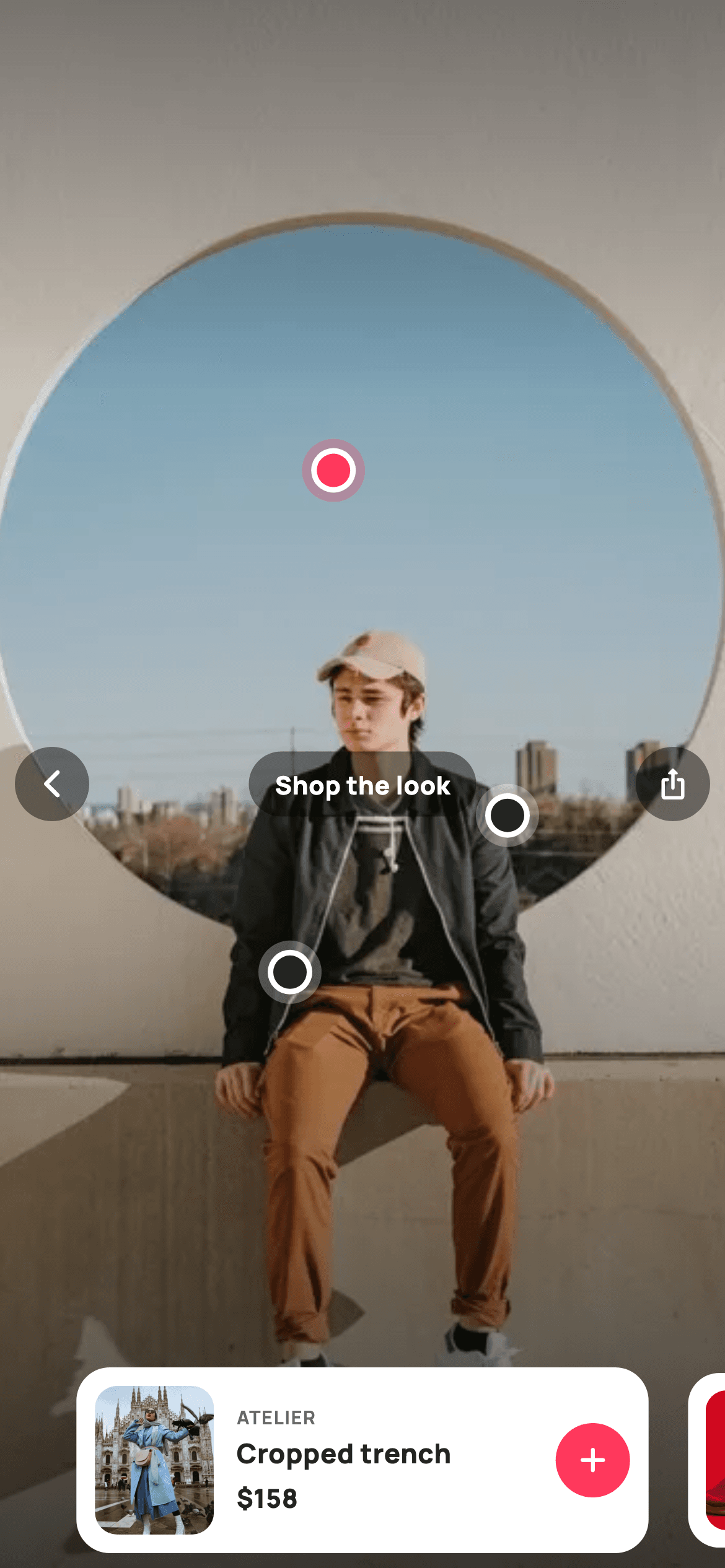
Watch the Flutter UI walkthrough
A short screen recording of Shop the Look running, if you'd rather see it before you read the code. The written tutorial below covers everything in it.
Can't see the video? Watch it on YouTube.
What you'll build
- ✓Hotspot pins positioned by *fractional* coordinates, so they hold on any screen size
- ✓Two-way sync: tapping a pin animates the deck, swiping the deck activates the pin
- ✓A peeking card deck built with `PageController(viewportFraction: 0.82)`
- ✓A four-stop gradient scrim that darkens only the top and bottom of the photo
- ✓Painted pins with a translucent halo, white ring and coloured core
- ✓An `AnimatedScale` that gently shrinks the inactive deck cards
Step-by-step build
Create the file
Add a new file at lib/ecom_home_lookbook/ecom_home_lookbook_screen.dart in your Flutter project.
Register the bundled fonts
No external packages — this is pure Flutter. It does bundle its design font (Manrope), so drop the font file into fonts/ and declare it in pubspec.yaml:
flutter:
  fonts:
    - family: Manrope
      fonts:
- asset: fonts/Manrope-Regular.ttfBuild it, piece by piece
Here's how the screen goes together. Each block below is a real slice of the code with a plain-English explanation — paste them in order, or grab the whole file from the next section.
Fractional pin coordinates on the model
class _EcomHomeLookbookScreenState extends State<EcomHomeLookbookScreen> {
  static const String _font = 'Manrope';
  static const Color _canvas = Color(0xFFFFFFFF);
  static const Color _ink = Color(0xFF222222);
  static const Color _muted = Color(0xFF6A6A6A);
  static const Color _brand = Color(0xFFFF385C);
  static const Color _imageBg = Color(0xFFF5F5F5);

  static const String _dir = 'lib/screens/ecommerce/ecom_home_lookbook/images';

  // Pins carry fractional positions over the hero photo.
  static const List<_Look> _looks = <_Look>[
    _Look('Cropped trench', 'Atelier', 158, 'p18.webp', 0.46, 0.30),
    _Look('Wide-leg trouser', 'Northbound', 96, 'p19.webp', 0.40, 0.62),
    _Look('Leather tote', 'Maison', 165, 'p20.webp', 0.70, 0.52),
  ];

  final PageController _deck = PageController(viewportFraction: 0.82);
  int _active = 0;
Each `_Look` ends with `fx` and `fy` — fractions of the photo's width and height, not pixels. Storing 0.46/0.30 instead of 180/240 is what makes the pins survive every screen size, orientation and aspect ratio: the same fraction always lands on the same part of the garment. Below the list, `PageController(viewportFraction: 0.82)` means each deck card occupies 82% of the width, so the neighbouring cards peek in at both edges and advertise that the deck is swipeable. `_active` is the single index shared by pins and deck.
Keeping pins and deck in sync
  @override
  void dispose() {
    _deck.dispose();
    super.dispose();
  }

  void _select(int i) {
    setState(() => _active = i);
    _deck.animateToPage(
      i,
      duration: const Duration(milliseconds: 280),
      curve: Curves.easeOutCubic,
    );
  }
`dispose()` releases the `PageController` — a `StatefulWidget` that creates a controller must dispose it or it leaks its animation ticker. `_select(i)` is the pin→deck direction: it sets `_active` and then calls `_deck.animateToPage` with a 280ms `easeOutCubic`, so tapping a pin glides the deck to the matching card rather than jumping. The deck→pin direction is the `onPageChanged` callback further down, which sets `_active` directly. Two entry points, one piece of state — which is why they can never disagree.
Layering photo, scrim, pins and chrome
  @override
  Widget build(BuildContext context) {
    return Theme(
      data: ThemeData.light(useMaterial3: true),
      child: Scaffold(
        backgroundColor: const Color(0xFF111111),
        body: Stack(
          fit: StackFit.expand,
          children: <Widget>[
            Container(color: _imageBg),
            Image.asset('$_dir/p10.webp', fit: BoxFit.cover),
            const DecoratedBox(
              decoration: BoxDecoration(
                gradient: LinearGradient(
                  begin: Alignment.topCenter,
                  end: Alignment.bottomCenter,
                  colors: <Color>[Color(0x66000000), Color(0x00000000),
                      Color(0x00000000), Color(0xAA000000)],
                  stops: <double>[0.0, 0.25, 0.55, 1.0],
                ),
              ),
            ),
            // Hotspot pins.
            LayoutBuilder(
              builder: (BuildContext context, BoxConstraints box) {
                return Stack(
                  children: List<Widget>.generate(_looks.length, (int i) {
                    final _Look l = _looks[i];
                    return Positioned(
                      left: l.fx * box.maxWidth - 17,
                      top: l.fy * box.maxHeight - 17,
                      child: GestureDetector(
                        onTap: () => _select(i),
                        child: SizedBox(
                          width: 34,
                          height: 34,
                          child: CustomPaint(
                            painter: _PinPainter(active: i == _active),
                          ),
                        ),
                      ),
                    );
                  }),
                );
              },
            ),
A full-bleed `Stack` with `fit: StackFit.expand` stacks the placeholder colour, the hero photo at `BoxFit.cover`, and then a scrim. That scrim is the detail: a four-colour, four-stop `LinearGradient` running `0x66000000 → transparent → transparent → 0xAA000000`, which darkens only the top 25% and bottom 45% of the frame — exactly where the app bar and deck sit — while leaving the middle of the outfit untouched. The pins live inside a `LayoutBuilder`, which is what gives them real pixel dimensions: `l.fx * box.maxWidth - 17` converts the fraction to a left offset and subtracts half the 34px pin so the *centre*, not the corner, lands on the coordinate.
Glass chrome over the photo
            // Top bar.
            SafeArea(
              child: Padding(
                padding:
                    const EdgeInsets.symmetric(horizontal: 8, vertical: 4),
                child: Row(
                  mainAxisAlignment: MainAxisAlignment.spaceBetween,
                  children: <Widget>[
                    _circleButton(Icons.arrow_back_ios_new_rounded,
                        widget.onBack),
                    Container(
                      padding: const EdgeInsets.symmetric(
                          horizontal: 14, vertical: 8),
                      decoration: BoxDecoration(
                        color: Colors.black.withValues(alpha: 0.45),
                        borderRadius: BorderRadius.circular(99),
                      ),
                      child: const Text(
                        'Shop the look',
                        style: TextStyle(
                          fontFamily: _font,
                          fontSize: 13.5,
                          fontWeight: FontWeight.w800,
                          color: _canvas,
                        ),
                      ),
                    ),
                    _circleButton(Icons.ios_share_rounded, widget.onShare),
                  ],
                ),
              ),
            ),
The top bar sits inside its own `SafeArea` *within* the `Stack`, rather than wrapping the whole screen — that's what lets the photo run edge to edge under the status bar while the controls stay clear of it. Its `Row` uses `MainAxisAlignment.spaceBetween` to push back, title and share to the thirds. Every chrome element is `Colors.black.withValues(alpha: 0.45)`: a translucent black that guarantees white icons stay legible whether the photo behind is bright sky or dark fabric. A solid fill would look like a UI panel pasted on top; 45% reads as glass.
The peeking product deck
            // Bottom product deck.
            Align(
              alignment: Alignment.bottomCenter,
              child: SafeArea(
                child: SizedBox(
                  height: 116,
                  child: PageView.builder(
                    controller: _deck,
                    itemCount: _looks.length,
                    onPageChanged: (int i) => setState(() => _active = i),
                    itemBuilder: (BuildContext context, int i) =>
                        _deckCard(_looks[i], i == _active),
                  ),
                ),
              ),
            ),
`Align(alignment: Alignment.bottomCenter)` pins the deck to the bottom of the `Stack`, with a second `SafeArea` keeping it above the home indicator. The `PageView.builder` is height-capped at 116px by a `SizedBox` — a `PageView` inside a `Stack` has no natural height and would otherwise expand to fill everything. `onPageChanged` writes `_active` on every swipe, which is what repaints the pins: because `_PinPainter.shouldRepaint` compares `active`, only the two pins whose state actually changed get redrawn.
Deck cards and the three-circle pin
  Widget _deckCard(_Look l, bool active) {
    return AnimatedScale(
      scale: active ? 1.0 : 0.94,
      duration: const Duration(milliseconds: 200),
      child: GestureDetector(
        onTap: () => widget.onProduct?.call(l.title),
        child: Container(
          margin: const EdgeInsets.symmetric(horizontal: 6, vertical: 8),
          padding: const EdgeInsets.all(10),
          decoration: BoxDecoration(
            color: _canvas,
            borderRadius: BorderRadius.circular(18),
          ),
          child: Row(
            children: <Widget>[
              ClipRRect(
                borderRadius: BorderRadius.circular(12),
                child: Container(
                  width: 64,
                  height: 80,
                  color: _imageBg,
                  child: Image.asset('$_dir/${l.asset}', fit: BoxFit.cover),
                ),
              ),
              const SizedBox(width: 12),
              Expanded(
                child: Column(
                  mainAxisAlignment: MainAxisAlignment.center,
                  crossAxisAlignment: CrossAxisAlignment.start,
                  children: <Widget>[
                    Text(
                      l.brand.toUpperCase(),
                      style: const TextStyle(
                        fontFamily: _font,
                        fontSize: 10,
                        fontWeight: FontWeight.w700,
                        letterSpacing: 0.6,
                        color: _muted,
                      ),
                    ),
                    const SizedBox(height: 2),
                    Text(
                      l.title,
                      maxLines: 1,
                      overflow: TextOverflow.ellipsis,
                      style: const TextStyle(
                        fontFamily: _font,
                        fontSize: 14.5,
                        fontWeight: FontWeight.w800,
                        color: _ink,
                      ),
                    ),
                    const SizedBox(height: 4),
                    Text(
                      '\$${l.price}',
                      style: const TextStyle(
                        fontFamily: _font,
                        fontSize: 14,
                        fontWeight: FontWeight.w800,
                        color: _ink,
                      ),
                    ),
                  ],
                ),
              ),
              GestureDetector(
                onTap: () => widget.onAdd?.call(l.title),
                child: Container(
                  width: 40,
                  height: 40,
                  decoration: const BoxDecoration(
                    color: _brand,
                    shape: BoxShape.circle,
                  ),
                  child: const Icon(Icons.add_rounded,
                      size: 22, color: _canvas),
                ),
              ),
            ],
          ),
        ),
      ),
    );
  }
}

class _Look {
  const _Look(this.title, this.brand, this.price, this.asset, this.fx, this.fy);
  final String title;
  final String brand;
  final int price;
  final String asset;
  final double fx;
  final double fy;
}

/// Paints a hotspot pin — translucent halo ring + solid centre dot. Active pins
/// fill brand-red; idle pins read white-on-glass.
class _PinPainter extends CustomPainter {
  const _PinPainter({required this.active});
  final bool active;

  @override
  void paint(Canvas canvas, Size size) {
    final Offset c = Offset(size.width / 2, size.height / 2);
    final Color fill =
        active ? const Color(0xFFFF385C) : Colors.white;
    canvas.drawCircle(
      c,
      size.width / 2,
      Paint()..color = fill.withValues(alpha: 0.28),
    );
    canvas.drawCircle(
      c,
      size.width / 2 - 5,
      Paint()..color = Colors.white,
    );
    canvas.drawCircle(
      c,
      size.width / 2 - 8,
      Paint()..color = active ? const Color(0xFFFF385C) : const Color(0xFF222222),
    );
  }

  @override
  bool shouldRepaint(_PinPainter oldDelegate) => oldDelegate.active != active;
}
`_deckCard` wraps everything in `AnimatedScale(scale: active ? 1.0 : 0.94)` over 200ms, so neighbouring cards sit slightly back and the focused one steps forward. Two separate tap targets share the card: the body calls `onProduct`, while the 40px brand-red circle calls `onAdd` — quick-add without leaving the look. `_PinPainter` draws three concentric circles at decreasing radii: a 28%-alpha halo at full width, a solid white ring 5px in, and a 3px-smaller core in brand red when active or near-black when not. Layering opaque over translucent is what makes the pin readable against both a white shirt and a dark coat.
Full code
The complete, ready-to-paste source. Free to use in your projects — one click copies it all.
import 'package:flutter/material.dart';

/// StyleCart — Lookbook / Shop the Look.
///
/// A full-bleed styled outfit photo overlaid with painted hotspot pins; tapping a
/// pin (or swiping the bottom card deck) reveals the matching product with a
/// thumbnail, price and quick-add. Pins and the active deck card stay in sync.
///
/// Self-contained per CONVENTIONS.md: pure Flutter, bundled Manrope, inline
/// Airbnb-style tokens, own light theme + SafeArea, bundled webp photos. Pins are
/// CustomPainters (no emoji glyph). Exposes callbacks only.
class EcomHomeLookbookScreen extends StatefulWidget {
  const EcomHomeLookbookScreen({
    super.key,
    this.onBack,
    this.onShare,
    this.onProduct,
    this.onAdd,
  });

  final VoidCallback? onBack;
  final VoidCallback? onShare;
  final ValueChanged<String>? onProduct;
  final ValueChanged<String>? onAdd;

  @override
  State<EcomHomeLookbookScreen> createState() => _EcomHomeLookbookScreenState();
}

class _EcomHomeLookbookScreenState extends State<EcomHomeLookbookScreen> {
  static const String _font = 'Manrope';
  static const Color _canvas = Color(0xFFFFFFFF);
  static const Color _ink = Color(0xFF222222);
  static const Color _muted = Color(0xFF6A6A6A);
  static const Color _brand = Color(0xFFFF385C);
  static const Color _imageBg = Color(0xFFF5F5F5);

  static const String _dir = 'lib/screens/ecommerce/ecom_home_lookbook/images';

  // Pins carry fractional positions over the hero photo.
  static const List<_Look> _looks = <_Look>[
    _Look('Cropped trench', 'Atelier', 158, 'p18.webp', 0.46, 0.30),
    _Look('Wide-leg trouser', 'Northbound', 96, 'p19.webp', 0.40, 0.62),
    _Look('Leather tote', 'Maison', 165, 'p20.webp', 0.70, 0.52),
  ];

  final PageController _deck = PageController(viewportFraction: 0.82);
  int _active = 0;

  @override
  void dispose() {
    _deck.dispose();
    super.dispose();
  }

  void _select(int i) {
    setState(() => _active = i);
    _deck.animateToPage(
      i,
      duration: const Duration(milliseconds: 280),
      curve: Curves.easeOutCubic,
    );
  }

  @override
  Widget build(BuildContext context) {
    return Theme(
      data: ThemeData.light(useMaterial3: true),
      child: Scaffold(
        backgroundColor: const Color(0xFF111111),
        body: Stack(
          fit: StackFit.expand,
          children: <Widget>[
            Container(color: _imageBg),
            Image.asset('$_dir/p10.webp', fit: BoxFit.cover),
            const DecoratedBox(
              decoration: BoxDecoration(
                gradient: LinearGradient(
                  begin: Alignment.topCenter,
                  end: Alignment.bottomCenter,
                  colors: <Color>[Color(0x66000000), Color(0x00000000),
                      Color(0x00000000), Color(0xAA000000)],
                  stops: <double>[0.0, 0.25, 0.55, 1.0],
                ),
              ),
            ),
            // Hotspot pins.
            LayoutBuilder(
              builder: (BuildContext context, BoxConstraints box) {
                return Stack(
                  children: List<Widget>.generate(_looks.length, (int i) {
                    final _Look l = _looks[i];
                    return Positioned(
                      left: l.fx * box.maxWidth - 17,
                      top: l.fy * box.maxHeight - 17,
                      child: GestureDetector(
                        onTap: () => _select(i),
                        child: SizedBox(
                          width: 34,
                          height: 34,
                          child: CustomPaint(
                            painter: _PinPainter(active: i == _active),
                          ),
                        ),
                      ),
                    );
                  }),
                );
              },
            ),
            // Top bar.
            SafeArea(
              child: Padding(
                padding:
                    const EdgeInsets.symmetric(horizontal: 8, vertical: 4),
                child: Row(
                  mainAxisAlignment: MainAxisAlignment.spaceBetween,
                  children: <Widget>[
                    _circleButton(Icons.arrow_back_ios_new_rounded,
                        widget.onBack),
                    Container(
                      padding: const EdgeInsets.symmetric(
                          horizontal: 14, vertical: 8),
                      decoration: BoxDecoration(
                        color: Colors.black.withValues(alpha: 0.45),
                        borderRadius: BorderRadius.circular(99),
                      ),
                      child: const Text(
                        'Shop the look',
                        style: TextStyle(
                          fontFamily: _font,
                          fontSize: 13.5,
                          fontWeight: FontWeight.w800,
                          color: _canvas,
                        ),
                      ),
                    ),
                    _circleButton(Icons.ios_share_rounded, widget.onShare),
                  ],
                ),
              ),
            ),
            // Bottom product deck.
            Align(
              alignment: Alignment.bottomCenter,
              child: SafeArea(
                child: SizedBox(
                  height: 116,
                  child: PageView.builder(
                    controller: _deck,
                    itemCount: _looks.length,
                    onPageChanged: (int i) => setState(() => _active = i),
                    itemBuilder: (BuildContext context, int i) =>
                        _deckCard(_looks[i], i == _active),
                  ),
                ),
              ),
            ),
          ],
        ),
      ),
    );
  }

  Widget _circleButton(IconData icon, VoidCallback? onTap) {
    return GestureDetector(
      onTap: onTap,
      child: Container(
        width: 40,
        height: 40,
        decoration: BoxDecoration(
          color: Colors.black.withValues(alpha: 0.45),
          shape: BoxShape.circle,
        ),
        child: Icon(icon, size: 18, color: _canvas),
      ),
    );
  }

  Widget _deckCard(_Look l, bool active) {
    return AnimatedScale(
      scale: active ? 1.0 : 0.94,
      duration: const Duration(milliseconds: 200),
      child: GestureDetector(
        onTap: () => widget.onProduct?.call(l.title),
        child: Container(
          margin: const EdgeInsets.symmetric(horizontal: 6, vertical: 8),
          padding: const EdgeInsets.all(10),
          decoration: BoxDecoration(
            color: _canvas,
            borderRadius: BorderRadius.circular(18),
          ),
          child: Row(
            children: <Widget>[
              ClipRRect(
                borderRadius: BorderRadius.circular(12),
                child: Container(
                  width: 64,
                  height: 80,
                  color: _imageBg,
                  child: Image.asset('$_dir/${l.asset}', fit: BoxFit.cover),
                ),
              ),
              const SizedBox(width: 12),
              Expanded(
                child: Column(
                  mainAxisAlignment: MainAxisAlignment.center,
                  crossAxisAlignment: CrossAxisAlignment.start,
                  children: <Widget>[
                    Text(
                      l.brand.toUpperCase(),
                      style: const TextStyle(
                        fontFamily: _font,
                        fontSize: 10,
                        fontWeight: FontWeight.w700,
                        letterSpacing: 0.6,
                        color: _muted,
                      ),
                    ),
                    const SizedBox(height: 2),
                    Text(
                      l.title,
                      maxLines: 1,
                      overflow: TextOverflow.ellipsis,
                      style: const TextStyle(
                        fontFamily: _font,
                        fontSize: 14.5,
                        fontWeight: FontWeight.w800,
                        color: _ink,
                      ),
                    ),
                    const SizedBox(height: 4),
                    Text(
                      '\$${l.price}',
                      style: const TextStyle(
                        fontFamily: _font,
                        fontSize: 14,
                        fontWeight: FontWeight.w800,
                        color: _ink,
                      ),
                    ),
                  ],
                ),
              ),
              GestureDetector(
                onTap: () => widget.onAdd?.call(l.title),
                child: Container(
                  width: 40,
                  height: 40,
                  decoration: const BoxDecoration(
                    color: _brand,
                    shape: BoxShape.circle,
                  ),
                  child: const Icon(Icons.add_rounded,
                      size: 22, color: _canvas),
                ),
              ),
            ],
          ),
        ),
      ),
    );
  }
}

class _Look {
  const _Look(this.title, this.brand, this.price, this.asset, this.fx, this.fy);
  final String title;
  final String brand;
  final int price;
  final String asset;
  final double fx;
  final double fy;
}

/// Paints a hotspot pin — translucent halo ring + solid centre dot. Active pins
/// fill brand-red; idle pins read white-on-glass.
class _PinPainter extends CustomPainter {
  const _PinPainter({required this.active});
  final bool active;

  @override
  void paint(Canvas canvas, Size size) {
    final Offset c = Offset(size.width / 2, size.height / 2);
    final Color fill =
        active ? const Color(0xFFFF385C) : Colors.white;
    canvas.drawCircle(
      c,
      size.width / 2,
      Paint()..color = fill.withValues(alpha: 0.28),
    );
    canvas.drawCircle(
      c,
      size.width / 2 - 5,
      Paint()..color = Colors.white,
    );
    canvas.drawCircle(
      c,
      size.width / 2 - 8,
      Paint()..color = active ? const Color(0xFFFF385C) : const Color(0xFF222222),
    );
  }

  @override
  bool shouldRepaint(_PinPainter oldDelegate) => oldDelegate.active != active;
}
Plus bundled 9 binary assets (fonts/images). The CLI and MCP install those for you automatically.
Two faster ways to add it
Copy-paste works, but you can skip it entirely.
1. FlutterKit CLI
One command drops this screen — and its fonts — straight into your project.
$ flutterkit add ecom-home-lookbook2. AI agent (MCP)
Connect FlutterKit's MCP server in Claude or Cursor and just ask your agent to install ecom-home-lookbook — it fetches and writes the files for you.
FAQ
Is this shop-the-look screen free to use?
Yes. The full Dart source on this page is free for personal and commercial apps. Copy it from the code block, install it with the FlutterKit CLI (flutterkit add ecom-home-lookbook), or add it through an AI agent over MCP.
How do I place pins on my own photo?
Set fx and fy as fractions of the image: 0.5/0.5 is dead centre, 0.7/0.3 is right-of-centre near the top. Because they're fractions rather than pixels, the same values work on every device — no per-screen tuning.
Why does tapping a pin move the deck?
Both the pins and the deck read the same _active index. _select sets it and calls _deck.animateToPage, and the PageView's onPageChanged sets it back when you swipe. One source of truth in two directions, so they can't fall out of step.
Does it need any packages?
No. The pins are a CustomPainter, the deck is a stock PageView, and the scrim is a LinearGradient — all pure Flutter. The only assets are the bundled Manrope font and the outfit photos, which the CLI and MCP install for you.
Which Flutter version does it target?
It uses Color.withValues(alpha:), super parameters and Material 3, so it targets Flutter 3.27+ (Dart 3). On an older SDK, replace each withValues(alpha: x) call with withOpacity(x).


