How to Build an FAQ Accordion Screen in Flutter (Full Code + Preview)
An FAQ page that prints every answer at once makes shoppers scroll past four irrelevant paragraphs to reach theirs. This tutorial builds StyleCart's Orders & Delivery topic in Flutter: a single-open accordion where tapping a question closes the previous one, an accent border and plus-to-minus icon marking the active tile, a Was this helpful? row whose Yes and No chips swap to a thank-you banner, and a Still need help? card with a Chat button. The whole thing runs on two integers of state in one file.
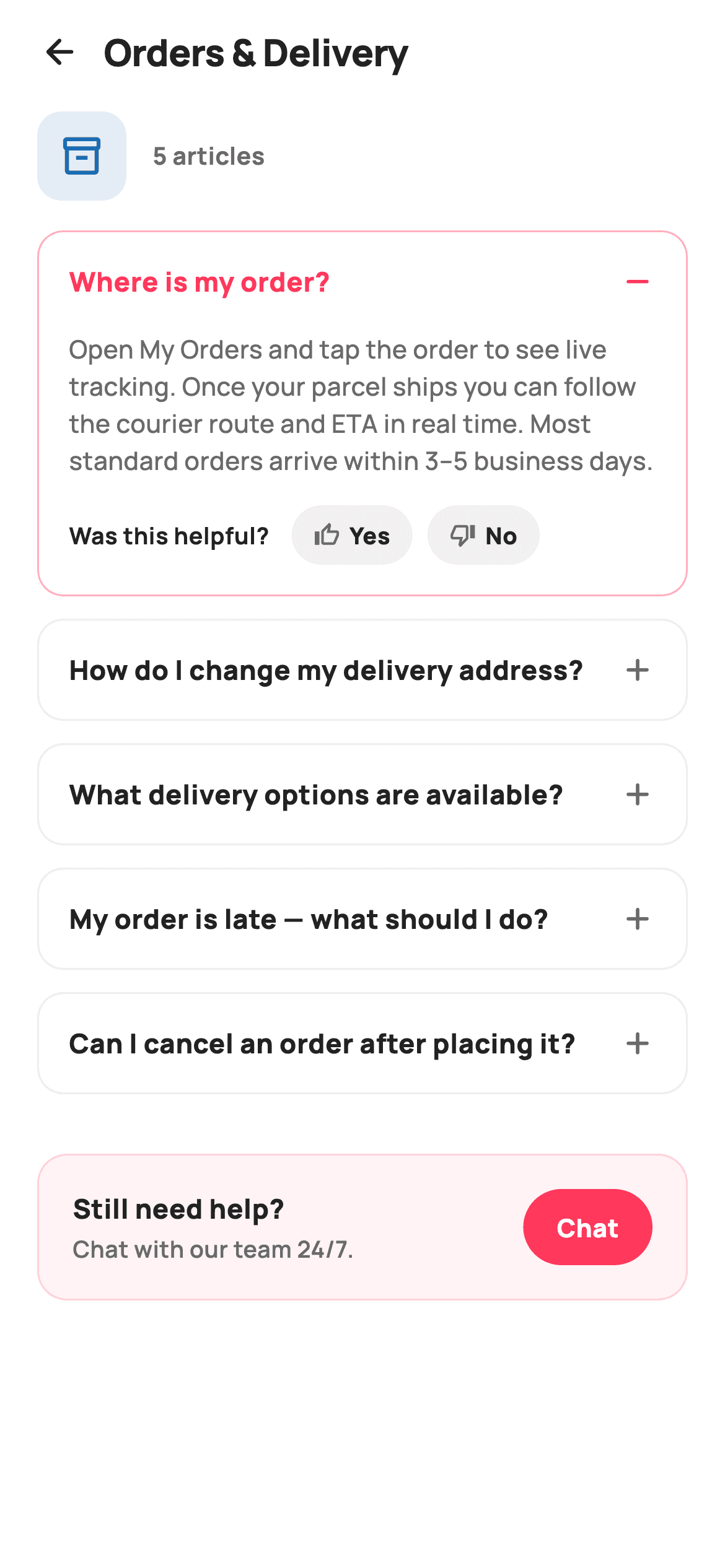
What you'll build
- ✓A single-open accordion driven by one `_open` index, with -1 meaning every tile is collapsed
- ✓An active-tile treatment that recolours the border, question text and add/remove icon together
- ✓A Was this helpful? row with Yes/No pill chips that collapses into a green thank-you banner
- ✓An article count derived from the FAQ list itself, so the header never drifts out of sync
- ✓A tinted Still need help? card that hands the Chat tap to an `onChat` callback
Step-by-step build
Create the file
Add a new file at lib/ecom_help_faq/ecom_help_faq_screen.dart in your Flutter project.
Register the bundled fonts
No external packages — this is pure Flutter. It does bundle its design font (Manrope), so drop the font file into fonts/ and declare it in pubspec.yaml:
flutter:
  fonts:
    - family: Manrope
      fonts:
- asset: fonts/Manrope-Regular.ttfBuild it, piece by piece
Here's how the screen goes together. Each block below is a real slice of the code with a plain-English explanation — paste them in order, or grab the whole file from the next section.
Q&A pairs as const data and two integers of state
import 'package:flutter/material.dart';

/// StyleCart — FAQ topic.
///
/// A single help topic (Orders & Delivery): a topic header with article count,
/// an accordion list of Q&A entries that expand to reveal the answer, a
/// "was this helpful?" yes/no row on the open item, and a "still need help?"
/// footer with a Chat CTA.
///
/// Self-contained per CONVENTIONS.md: pure Flutter, bundled Manrope, inline
/// Airbnb-style tokens, own light theme + SafeArea. Painter-free. Exposes
/// callbacks only.
class EcomHelpFaqScreen extends StatefulWidget {
  const EcomHelpFaqScreen({super.key, this.onBack, this.onChat});

  final VoidCallback? onBack;
  final VoidCallback? onChat;

  @override
  State<EcomHelpFaqScreen> createState() => _EcomHelpFaqScreenState();
}

class _EcomHelpFaqScreenState extends State<EcomHelpFaqScreen> {
  static const String _font = 'Manrope';
  static const Color _canvas = Color(0xFFFFFFFF);
  static const Color _ink = Color(0xFF222222);
  static const Color _muted = Color(0xFF6A6A6A);
  static const Color _brand = Color(0xFFFF385C);
  static const Color _surface = Color(0xFFF2F2F2);
  static const Color _hairline = Color(0xFFEBEBEB);
  static const Color _success = Color(0xFF2E9E5B);

  static const List<_Faq> _faqs = <_Faq>[
    _Faq('Where is my order?',
        'Open My Orders and tap the order to see live tracking. Once your '
        'parcel ships you can follow the courier route and ETA in real time. '
        'Most standard orders arrive within 3–5 business days.'),
    _Faq('How do I change my delivery address?',
        'You can edit the address before an order is dispatched from Order '
        'Detail → Modify. After dispatch, the address is locked, but you can '
        'redirect the parcel by chatting with support.'),
    _Faq('What delivery options are available?',
        'We offer Standard (free), Express (next-day), Scheduled-slot, and '
        'Store pickup. Available options and fees are shown at checkout based '
        'on your address. StyleCart Plus members get free Express.'),
    _Faq('My order is late — what should I do?',
        'If your order has passed its estimated delivery window, give it 24 '
        'hours as couriers sometimes update late. If it still has not arrived, '
        'raise a request and we will investigate or reship at no cost.'),
    _Faq('Can I cancel an order after placing it?',
        'Orders can be cancelled for a full refund any time before they are '
        'packed. Go to Order Detail → Cancel. Once packed, you can instead '
        'refuse delivery or start a return when it arrives.'),
  ];

  int _open = 0;
  int _helpful = 0; // 0 = none, 1 = yes, -1 = no
`EcomHelpFaqScreen` is a `StatefulWidget` exposing only `onBack` and `onChat` — opening, closing and voting are all handled inside, so the host app wires two taps and nothing else. The five questions live in `static const List<_Faq> _faqs`, each a question/answer pair written in support-desk voice with concrete paths like 'Order Detail → Modify', which is the content you will replace with CMS data. The entire interaction model is two `int`s. `_open` holds the index of the expanded tile and starts at `0`, so the first answer is visible on arrival and the screen never opens as a wall of collapsed headings; `-1` is the sentinel for 'all closed'. `_helpful` is a tri-state vote — 0 none, 1 yes, -1 no — which is cheaper than a nullable bool and reads clearly at the call sites. Alongside the usual StyleCart tokens, a `_success` green `#2E9E5B` is declared purely for the thank-you banner.
A pinned header over one scrolling ListView
  @override
  Widget build(BuildContext context) {
    return Theme(
      data: ThemeData.light(useMaterial3: true),
      child: Scaffold(
        backgroundColor: _canvas,
        body: SafeArea(
          child: Column(
            children: <Widget>[
              _header(),
              Expanded(
                child: ListView(
                  padding: const EdgeInsets.fromLTRB(20, 4, 20, 24),
                  children: <Widget>[
                    _topicHeader(),
                    const SizedBox(height: 16),
                    for (int i = 0; i < _faqs.length; i++) _faqTile(i),
                    const SizedBox(height: 20),
                    _footer(),
                  ],
                ),
              ),
            ],
          ),
        ),
      ),
    );
  }

  Widget _header() {
    return Padding(
      padding: const EdgeInsets.fromLTRB(8, 4, 20, 4),
      child: Row(
        children: <Widget>[
          IconButton(
            onPressed: widget.onBack,
            icon: const Icon(Icons.arrow_back_rounded, size: 22, color: _ink),
          ),
          const Text(
            'Orders & Delivery',
            style: TextStyle(
              fontFamily: _font,
              fontSize: 20,
              fontWeight: FontWeight.w800,
              letterSpacing: -0.3,
              color: _ink,
            ),
          ),
        ],
      ),
    );
  }
`build` wraps the screen in its own light `Theme` and splits the body into a fixed `_header()` and an `Expanded` `ListView`. The list holds the topic row, the tiles and the footer in sequence, with the tiles emitted by a collection-for — `for (int i = 0; i < _faqs.length; i++) _faqTile(i)` — passing the index rather than the `_Faq` because the tile needs `i` to compare against `_open`. Using a plain `ListView` instead of a builder is fine here: five tiles plus a footer is far below the point where lazy building pays off, and it lets the footer sit naturally after the last tile. The header pairs an `arrow_back_rounded` `IconButton` with a 20px `w800` 'Orders & Delivery' title; note that this topic name is a hard-coded literal, so a reusable version should take it as a constructor parameter.
Topic badge with a derived article count
  Widget _topicHeader() {
    return Row(
      children: <Widget>[
        Container(
          width: 48,
          height: 48,
          decoration: BoxDecoration(
            color: const Color(0xFF1A6DB5).withValues(alpha: 0.12),
            borderRadius: BorderRadius.circular(13),
          ),
          child: const Icon(Icons.inventory_2_outlined,
              size: 24, color: Color(0xFF1A6DB5)),
        ),
        const SizedBox(width: 14),
        Text(
          '${_faqs.length} articles',
          style: const TextStyle(
            fontFamily: _font,
            fontSize: 13,
            fontWeight: FontWeight.w700,
            color: _muted,
          ),
        ),
      ],
    );
  }
`_topicHeader` is a 48×48 rounded square at radius 13 filled with `Color(0xFF1A6DB5).withValues(alpha: 0.12)` and an `inventory_2_outlined` box icon in the same blue at full strength. That blue is not one of the token constants — it is a per-topic tint written inline, which is a hint that in a real app it should arrive with the topic (a Returns topic would carry a different colour and icon). Beside it, the label reads `'${_faqs.length} articles'` rather than a typed '5 articles'. Deriving the count from the list means adding or removing an entry can never leave the badge lying, and it is the one piece of the header that already behaves like live data.
The accordion tile: one comparison drives every visual change
  Widget _faqTile(int i) {
    final _Faq f = _faqs[i];
    final bool open = _open == i;
    return Container(
      margin: const EdgeInsets.only(bottom: 12),
      decoration: BoxDecoration(
        color: _canvas,
        borderRadius: BorderRadius.circular(14),
        border: Border.all(color: open ? _brand.withValues(alpha: 0.4) : _hairline),
      ),
      child: Column(
        children: <Widget>[
          InkWell(
            onTap: () => setState(() {
              _open = open ? -1 : i;
              _helpful = 0;
            }),
            borderRadius: BorderRadius.circular(14),
            child: Padding(
              padding: const EdgeInsets.all(16),
              child: Row(
                children: <Widget>[
                  Expanded(
                    child: Text(
                      f.q,
                      style: TextStyle(
                        fontFamily: _font,
                        fontSize: 14.5,
                        fontWeight: FontWeight.w800,
                        color: open ? _brand : _ink,
                      ),
                    ),
                  ),
                  const SizedBox(width: 10),
                  Icon(
                    open
                        ? Icons.remove_rounded
                        : Icons.add_rounded,
                    size: 20,
                    color: open ? _brand : _muted,
                  ),
                ],
              ),
            ),
          ),
          if (open)
            Padding(
              padding: const EdgeInsets.fromLTRB(16, 0, 16, 16),
              child: Column(
                crossAxisAlignment: CrossAxisAlignment.start,
                children: <Widget>[
                  Text(
                    f.a,
                    style: const TextStyle(
                      fontFamily: _font,
                      fontSize: 13.5,
                      fontWeight: FontWeight.w500,
                      height: 1.5,
                      color: _muted,
                    ),
                  ),
                  const SizedBox(height: 14),
                  _helpfulRow(),
                ],
              ),
            ),
        ],
      ),
    );
  }
Each tile computes `final bool open = _open == i` once and lets that single bool steer four things: the border (`_brand` at 0.4 alpha versus `_hairline`), the question colour (`_brand` versus `_ink`), the trailing icon (`remove_rounded` versus `add_rounded`) and whether the answer renders at all. The tap handler is the whole accordion logic in one line, `_open = open ? -1 : i`: tapping the open tile collapses it, tapping any other replaces it, so two answers can never be open together. The same `setState` also resets `_helpful` to 0, so a vote cast on one answer does not appear as already given on the next. The answer uses `if (open)` inside the Column, which means it appears instantly with no height animation. One gotcha: the `InkWell` sits inside a white-filled `Container`, and since ink is painted on the Scaffold's Material underneath, that opaque fill hides the ripple — wrap the tile in a transparent `Material` if you want visible tap feedback.
The helpful vote: chips that become a confirmation
  Widget _helpfulRow() {
    if (_helpful != 0) {
      return Container(
        padding: const EdgeInsets.symmetric(horizontal: 12, vertical: 8),
        decoration: BoxDecoration(
          color: _success.withValues(alpha: 0.10),
          borderRadius: BorderRadius.circular(9),
        ),
        child: const Text(
          'Thanks for your feedback!',
          style: TextStyle(
            fontFamily: _font,
            fontSize: 12.5,
            fontWeight: FontWeight.w700,
            color: _success,
          ),
        ),
      );
    }
    return Row(
      children: <Widget>[
        const Text(
          'Was this helpful?',
          style: TextStyle(
            fontFamily: _font,
            fontSize: 12.5,
            fontWeight: FontWeight.w700,
            color: _ink,
          ),
        ),
        const SizedBox(width: 12),
        _voteChip(Icons.thumb_up_outlined, 'Yes', 1),
        const SizedBox(width: 8),
        _voteChip(Icons.thumb_down_outlined, 'No', -1),
      ],
    );
  }

  Widget _voteChip(IconData icon, String label, int value) {
    return GestureDetector(
      onTap: () => setState(() => _helpful = value),
      child: Container(
        padding: const EdgeInsets.symmetric(horizontal: 12, vertical: 7),
        decoration: BoxDecoration(
          color: _surface,
          borderRadius: BorderRadius.circular(9999),
        ),
        child: Row(
          children: <Widget>[
            Icon(icon, size: 14, color: _muted),
            const SizedBox(width: 5),
            Text(
              label,
              style: const TextStyle(
                fontFamily: _font,
                fontSize: 12.5,
                fontWeight: FontWeight.w800,
                color: _ink,
              ),
            ),
          ],
        ),
      ),
    );
  }
`_helpfulRow` branches on `_helpful` before building anything. While it is 0, it returns the 12.5px 'Was this helpful?' prompt followed by two `_voteChip`s; once either is tapped, the whole row is replaced by a `_success` banner at 0.10 alpha reading 'Thanks for your feedback!'. Swapping the controls out, rather than highlighting the chosen chip, stops a shopper from voting twice and closes the loop in one step. Both chips are visually identical grey `_surface` stadium pills with outlined thumb icons at 14px, so neither answer looks like the expected one. Be aware of what the code does not do: Yes and No produce exactly the same banner, the value never leaves the widget through a callback, and because toggling a tile resets `_helpful`, reopening an answer forgets the earlier vote. It is a working UI stub for feedback, not a recorder of it.
The Still need help? card and the _Faq model
  Widget _footer() {
    return Container(
      padding: const EdgeInsets.all(18),
      decoration: BoxDecoration(
        borderRadius: BorderRadius.circular(16),
        color: _brand.withValues(alpha: 0.06),
        border: Border.all(color: _brand.withValues(alpha: 0.18)),
      ),
      child: Row(
        children: <Widget>[
          const Expanded(
            child: Column(
              crossAxisAlignment: CrossAxisAlignment.start,
              children: <Widget>[
                Text(
                  'Still need help?',
                  style: TextStyle(
                    fontFamily: _font,
                    fontSize: 14.5,
                    fontWeight: FontWeight.w800,
                    color: _ink,
                  ),
                ),
                SizedBox(height: 2),
                Text(
                  'Chat with our team 24/7.',
                  style: TextStyle(
                    fontFamily: _font,
                    fontSize: 12.5,
                    fontWeight: FontWeight.w600,
                    color: _muted,
                  ),
                ),
              ],
            ),
          ),
          GestureDetector(
            onTap: widget.onChat,
            child: Container(
              padding: const EdgeInsets.symmetric(horizontal: 18, vertical: 11),
              decoration: BoxDecoration(
                color: _brand,
                borderRadius: BorderRadius.circular(9999),
              ),
              child: const Text(
                'Chat',
                style: TextStyle(
                  fontFamily: _font,
                  fontSize: 13.5,
                  fontWeight: FontWeight.w800,
                  color: Colors.white,
                ),
              ),
            ),
          ),
        ],
      ),
    );
  }
}

class _Faq {
  const _Faq(this.q, this.a);
  final String q;
  final String a;
}
The footer is the escape hatch for anyone the five answers did not help. It is a `_brand`-tinted panel — fill at 0.06 alpha, border at 0.18 — so it reads as part of the StyleCart family while staying quieter than the active tile's 0.4 border above it. An `Expanded` Column carries 'Still need help?' and the expectation-setting 'Chat with our team 24/7.', and the right side is a solid coral stadium labelled 'Chat' wired straight to `widget.onChat`. The `Expanded` is what lets the copy wrap on narrow phones without pushing the button off-screen. Only one contact route is offered here, unlike a hub-level help page, because a shopper already inside a topic wants the fastest human, not a ticket form. `_Faq` closes the file as a two-field const class, which is why the whole `_faqs` list can be a compile-time constant.
Full code
The complete, ready-to-paste source. Free to use in your projects — one click copies it all.
import 'package:flutter/material.dart';

/// StyleCart — FAQ topic.
///
/// A single help topic (Orders & Delivery): a topic header with article count,
/// an accordion list of Q&A entries that expand to reveal the answer, a
/// "was this helpful?" yes/no row on the open item, and a "still need help?"
/// footer with a Chat CTA.
///
/// Self-contained per CONVENTIONS.md: pure Flutter, bundled Manrope, inline
/// Airbnb-style tokens, own light theme + SafeArea. Painter-free. Exposes
/// callbacks only.
class EcomHelpFaqScreen extends StatefulWidget {
  const EcomHelpFaqScreen({super.key, this.onBack, this.onChat});

  final VoidCallback? onBack;
  final VoidCallback? onChat;

  @override
  State<EcomHelpFaqScreen> createState() => _EcomHelpFaqScreenState();
}

class _EcomHelpFaqScreenState extends State<EcomHelpFaqScreen> {
  static const String _font = 'Manrope';
  static const Color _canvas = Color(0xFFFFFFFF);
  static const Color _ink = Color(0xFF222222);
  static const Color _muted = Color(0xFF6A6A6A);
  static const Color _brand = Color(0xFFFF385C);
  static const Color _surface = Color(0xFFF2F2F2);
  static const Color _hairline = Color(0xFFEBEBEB);
  static const Color _success = Color(0xFF2E9E5B);

  static const List<_Faq> _faqs = <_Faq>[
    _Faq('Where is my order?',
        'Open My Orders and tap the order to see live tracking. Once your '
        'parcel ships you can follow the courier route and ETA in real time. '
        'Most standard orders arrive within 3–5 business days.'),
    _Faq('How do I change my delivery address?',
        'You can edit the address before an order is dispatched from Order '
        'Detail → Modify. After dispatch, the address is locked, but you can '
        'redirect the parcel by chatting with support.'),
    _Faq('What delivery options are available?',
        'We offer Standard (free), Express (next-day), Scheduled-slot, and '
        'Store pickup. Available options and fees are shown at checkout based '
        'on your address. StyleCart Plus members get free Express.'),
    _Faq('My order is late — what should I do?',
        'If your order has passed its estimated delivery window, give it 24 '
        'hours as couriers sometimes update late. If it still has not arrived, '
        'raise a request and we will investigate or reship at no cost.'),
    _Faq('Can I cancel an order after placing it?',
        'Orders can be cancelled for a full refund any time before they are '
        'packed. Go to Order Detail → Cancel. Once packed, you can instead '
        'refuse delivery or start a return when it arrives.'),
  ];

  int _open = 0;
  int _helpful = 0; // 0 = none, 1 = yes, -1 = no

  @override
  Widget build(BuildContext context) {
    return Theme(
      data: ThemeData.light(useMaterial3: true),
      child: Scaffold(
        backgroundColor: _canvas,
        body: SafeArea(
          child: Column(
            children: <Widget>[
              _header(),
              Expanded(
                child: ListView(
                  padding: const EdgeInsets.fromLTRB(20, 4, 20, 24),
                  children: <Widget>[
                    _topicHeader(),
                    const SizedBox(height: 16),
                    for (int i = 0; i < _faqs.length; i++) _faqTile(i),
                    const SizedBox(height: 20),
                    _footer(),
                  ],
                ),
              ),
            ],
          ),
        ),
      ),
    );
  }

  Widget _header() {
    return Padding(
      padding: const EdgeInsets.fromLTRB(8, 4, 20, 4),
      child: Row(
        children: <Widget>[
          IconButton(
            onPressed: widget.onBack,
            icon: const Icon(Icons.arrow_back_rounded, size: 22, color: _ink),
          ),
          const Text(
            'Orders & Delivery',
            style: TextStyle(
              fontFamily: _font,
              fontSize: 20,
              fontWeight: FontWeight.w800,
              letterSpacing: -0.3,
              color: _ink,
            ),
          ),
        ],
      ),
    );
  }

  Widget _topicHeader() {
    return Row(
      children: <Widget>[
        Container(
          width: 48,
          height: 48,
          decoration: BoxDecoration(
            color: const Color(0xFF1A6DB5).withValues(alpha: 0.12),
            borderRadius: BorderRadius.circular(13),
          ),
          child: const Icon(Icons.inventory_2_outlined,
              size: 24, color: Color(0xFF1A6DB5)),
        ),
        const SizedBox(width: 14),
        Text(
          '${_faqs.length} articles',
          style: const TextStyle(
            fontFamily: _font,
            fontSize: 13,
            fontWeight: FontWeight.w700,
            color: _muted,
          ),
        ),
      ],
    );
  }

  Widget _faqTile(int i) {
    final _Faq f = _faqs[i];
    final bool open = _open == i;
    return Container(
      margin: const EdgeInsets.only(bottom: 12),
      decoration: BoxDecoration(
        color: _canvas,
        borderRadius: BorderRadius.circular(14),
        border: Border.all(color: open ? _brand.withValues(alpha: 0.4) : _hairline),
      ),
      child: Column(
        children: <Widget>[
          InkWell(
            onTap: () => setState(() {
              _open = open ? -1 : i;
              _helpful = 0;
            }),
            borderRadius: BorderRadius.circular(14),
            child: Padding(
              padding: const EdgeInsets.all(16),
              child: Row(
                children: <Widget>[
                  Expanded(
                    child: Text(
                      f.q,
                      style: TextStyle(
                        fontFamily: _font,
                        fontSize: 14.5,
                        fontWeight: FontWeight.w800,
                        color: open ? _brand : _ink,
                      ),
                    ),
                  ),
                  const SizedBox(width: 10),
                  Icon(
                    open
                        ? Icons.remove_rounded
                        : Icons.add_rounded,
                    size: 20,
                    color: open ? _brand : _muted,
                  ),
                ],
              ),
            ),
          ),
          if (open)
            Padding(
              padding: const EdgeInsets.fromLTRB(16, 0, 16, 16),
              child: Column(
                crossAxisAlignment: CrossAxisAlignment.start,
                children: <Widget>[
                  Text(
                    f.a,
                    style: const TextStyle(
                      fontFamily: _font,
                      fontSize: 13.5,
                      fontWeight: FontWeight.w500,
                      height: 1.5,
                      color: _muted,
                    ),
                  ),
                  const SizedBox(height: 14),
                  _helpfulRow(),
                ],
              ),
            ),
        ],
      ),
    );
  }

  Widget _helpfulRow() {
    if (_helpful != 0) {
      return Container(
        padding: const EdgeInsets.symmetric(horizontal: 12, vertical: 8),
        decoration: BoxDecoration(
          color: _success.withValues(alpha: 0.10),
          borderRadius: BorderRadius.circular(9),
        ),
        child: const Text(
          'Thanks for your feedback!',
          style: TextStyle(
            fontFamily: _font,
            fontSize: 12.5,
            fontWeight: FontWeight.w700,
            color: _success,
          ),
        ),
      );
    }
    return Row(
      children: <Widget>[
        const Text(
          'Was this helpful?',
          style: TextStyle(
            fontFamily: _font,
            fontSize: 12.5,
            fontWeight: FontWeight.w700,
            color: _ink,
          ),
        ),
        const SizedBox(width: 12),
        _voteChip(Icons.thumb_up_outlined, 'Yes', 1),
        const SizedBox(width: 8),
        _voteChip(Icons.thumb_down_outlined, 'No', -1),
      ],
    );
  }

  Widget _voteChip(IconData icon, String label, int value) {
    return GestureDetector(
      onTap: () => setState(() => _helpful = value),
      child: Container(
        padding: const EdgeInsets.symmetric(horizontal: 12, vertical: 7),
        decoration: BoxDecoration(
          color: _surface,
          borderRadius: BorderRadius.circular(9999),
        ),
        child: Row(
          children: <Widget>[
            Icon(icon, size: 14, color: _muted),
            const SizedBox(width: 5),
            Text(
              label,
              style: const TextStyle(
                fontFamily: _font,
                fontSize: 12.5,
                fontWeight: FontWeight.w800,
                color: _ink,
              ),
            ),
          ],
        ),
      ),
    );
  }

  Widget _footer() {
    return Container(
      padding: const EdgeInsets.all(18),
      decoration: BoxDecoration(
        borderRadius: BorderRadius.circular(16),
        color: _brand.withValues(alpha: 0.06),
        border: Border.all(color: _brand.withValues(alpha: 0.18)),
      ),
      child: Row(
        children: <Widget>[
          const Expanded(
            child: Column(
              crossAxisAlignment: CrossAxisAlignment.start,
              children: <Widget>[
                Text(
                  'Still need help?',
                  style: TextStyle(
                    fontFamily: _font,
                    fontSize: 14.5,
                    fontWeight: FontWeight.w800,
                    color: _ink,
                  ),
                ),
                SizedBox(height: 2),
                Text(
                  'Chat with our team 24/7.',
                  style: TextStyle(
                    fontFamily: _font,
                    fontSize: 12.5,
                    fontWeight: FontWeight.w600,
                    color: _muted,
                  ),
                ),
              ],
            ),
          ),
          GestureDetector(
            onTap: widget.onChat,
            child: Container(
              padding: const EdgeInsets.symmetric(horizontal: 18, vertical: 11),
              decoration: BoxDecoration(
                color: _brand,
                borderRadius: BorderRadius.circular(9999),
              ),
              child: const Text(
                'Chat',
                style: TextStyle(
                  fontFamily: _font,
                  fontSize: 13.5,
                  fontWeight: FontWeight.w800,
                  color: Colors.white,
                ),
              ),
            ),
          ),
        ],
      ),
    );
  }
}

class _Faq {
  const _Faq(this.q, this.a);
  final String q;
  final String a;
}
Plus bundled 5 binary assets (fonts/images). The CLI and MCP install those for you automatically.
Two faster ways to add it
Copy-paste works, but you can skip it entirely.
1. FlutterKit CLI
One command drops this screen — and its fonts — straight into your project.
$ flutterkit add ecom-help-faq2. AI agent (MCP)
Connect FlutterKit's MCP server in Claude or Cursor and just ask your agent to install ecom-help-faq — it fetches and writes the files for you.
FAQ
Can I ship this FAQ accordion in a commercial app?
Yes. It is free to use in personal, client and commercial apps alike. Copy the file from this page or add it with the CLI command, and there is no licence key to configure and no attribution line to include.
Does the screen depend on any packages or fonts?
No third-party packages — it imports only `package:flutter/material.dart`, and every icon (thumbs, plus/minus, the parcel box) is a built-in Material icon. The one asset is the Manrope font family referenced through the `_font` constant; the install bundles it, or you can register Manrope in `pubspec.yaml` yourself.
What Flutter version is required?
Flutter 3.22 or newer, because the topic badge, active border, footer tint and thank-you banner all use `Color.withValues(alpha: ...)`. On an older SDK replace each with `withOpacity` and the same number, e.g. `_brand.withOpacity(0.4)`. The constructor uses the `super.key` super-parameter syntax, which needs Dart 2.17 or later.
How do I send the Yes/No votes to my analytics or backend?
Add a callback such as `final void Function(int faqIndex, bool helpful)? onVote;` to the widget, then call `widget.onVote?.call(_open, value == 1)` inside `_voteChip`'s `onTap` next to the `setState`. If you also want a vote to survive closing and reopening a tile, replace the single `_helpful` int with a `Map<int, int>` keyed by FAQ index and stop resetting it in the tile's tap handler.
The answers snap open instantly — how do I animate the accordion?
The answer is inserted with `if (open)`, so there is nothing to tween. Wrap the tile's inner `Column` in `AnimatedSize(duration: const Duration(milliseconds: 200), curve: Curves.easeOut, alignment: Alignment.topCenter, child: ...)` and the height change will ease in and out. If you prefer motion on the icon too, keep a single `add_rounded` inside an `AnimatedRotation` with `turns: open ? 0.125 : 0` so the plus rotates into a close cross.


