How to Build a Store Support Chat Screen in Flutter (Full Code + Preview)
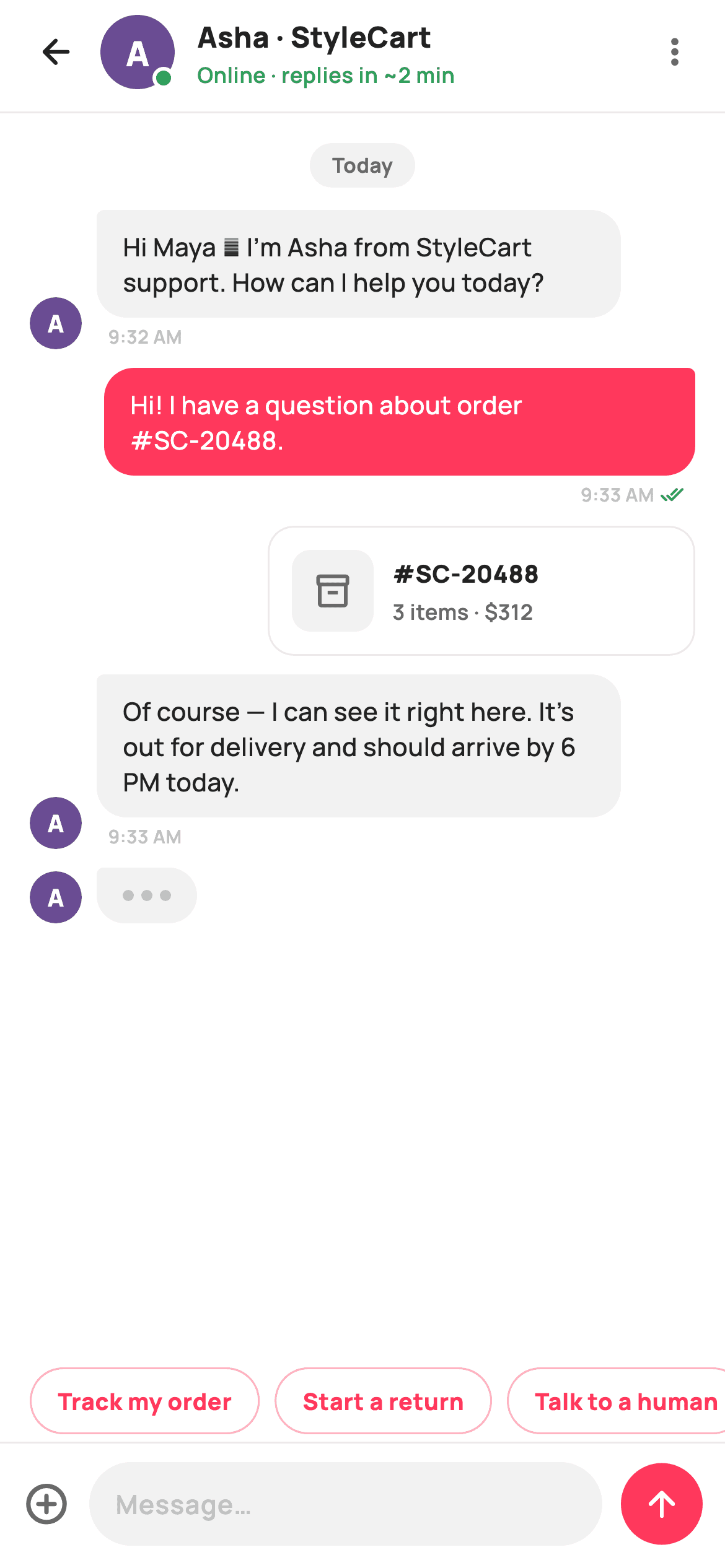
Support chat is where an order problem either gets resolved or turns into a refund, and shoppers judge the whole store by how that thread feels. This tutorial walks through StyleCart's support-chat screen in Flutter: an agent header with a painted monogram avatar and live status, asymmetric agent and user bubbles with timestamps and read ticks, an inline order card, a three-dot typing row, tappable quick replies, and a composer that appends messages and auto-scrolls to the newest one. Everything is pure Flutter — one file, no chat SDK.
What you'll build
- ✓An agent header with a painted monogram avatar, a white-ringed green online dot, and a 'replies in ~2 min' promise
- ✓Asymmetric chat bubbles — grey agent bubbles with a 4px tail corner on the left, coral #FF385C user bubbles mirrored on the right, each with a timestamp and green read ticks
- ✓An inline order-attachment card showing #SC-20488 with its item count and total, sitting on the user's side of the thread
- ✓A working send flow: quick-reply chips and the composer both append a real bubble and animate the thread to the bottom
- ✓A three-dot typing indicator that borrows the agent bubble's exact shape
Step-by-step build
Create the file
Add a new file at lib/ecom_help_chat/ecom_help_chat_screen.dart in your Flutter project.
Register the bundled fonts
No external packages — this is pure Flutter. It does bundle its design font (Manrope), so drop the font file into fonts/ and declare it in pubspec.yaml:
flutter:
  fonts:
    - family: Manrope
      fonts:
- asset: fonts/Manrope-Regular.ttfBuild it, piece by piece
Here's how the screen goes together. Each block below is a real slice of the code with a plain-English explanation — paste them in order, or grab the whole file from the next section.
State, tokens, and a send that scrolls
class EcomHelpChatScreen extends StatefulWidget {
  const EcomHelpChatScreen({super.key, this.onBack});

  final VoidCallback? onBack;

  @override
  State<EcomHelpChatScreen> createState() => _EcomHelpChatScreenState();
}

class _EcomHelpChatScreenState extends State<EcomHelpChatScreen> {
  static const String _font = 'Manrope';
  static const Color _canvas = Color(0xFFFFFFFF);
  static const Color _ink = Color(0xFF222222);
  static const Color _muted = Color(0xFF6A6A6A);
  static const Color _faint = Color(0xFFC1C1C1);
  static const Color _brand = Color(0xFFFF385C);
  static const Color _surface = Color(0xFFF2F2F2);
  static const Color _hairline = Color(0xFFEBEBEB);
  static const Color _success = Color(0xFF2E9E5B);

  static const List<String> _quickReplies = <String>[
    'Track my order',
    'Start a return',
    'Talk to a human',
  ];

  final List<_Msg> _messages = <_Msg>[
    const _Msg('Hi Maya 👋 I’m Asha from StyleCart support. How can I help '
        'you today?', false, '9:32 AM'),
    const _Msg('Hi! I have a question about order #SC-20488.', true, '9:33 AM'),
    const _Msg('Of course — I can see it right here. It’s out for delivery and '
        'should arrive by 6 PM today.', false, '9:33 AM'),
  ];

  final TextEditingController _controller = TextEditingController();
  final ScrollController _scroll = ScrollController();

  @override
  void dispose() {
    _controller.dispose();
    _scroll.dispose();
    super.dispose();
  }

  void _send(String text) {
    final String t = text.trim();
    if (t.isEmpty) return;
    setState(() {
      _messages.add(_Msg(t, true, 'Now'));
      _controller.clear();
    });
    WidgetsBinding.instance.addPostFrameCallback((_) {
      if (_scroll.hasClients) {
        _scroll.animateTo(
          _scroll.position.maxScrollExtent,
          duration: const Duration(milliseconds: 280),
          curve: Curves.easeOut,
        );
      }
    });
  }
Unlike a static screen, chat has to mutate, so `EcomHelpChatScreen` is a `StatefulWidget` holding a `List<_Msg> _messages` seeded with three turns of a real conversation, a `TextEditingController` for the composer, and a `ScrollController` for the thread — both disposed properly. The palette is Airbnb-flavoured: `_brand` is the coral `#FF385C`, `_success` green `#2E9E5B` does double duty for the online dot and read ticks, and four greys (`_ink`, `_muted`, `_faint`, `_surface`) carry everything else. The interesting method is `_send`: it trims, bails on empty input, appends a `_Msg` stamped 'Now' inside `setState`, then scrolls to `maxScrollExtent` inside `addPostFrameCallback`. That post-frame hop matters — at the moment `setState` runs, the new bubble has not been laid out yet, so scrolling immediately would stop one message short. The 280ms `easeOut` animation makes the arrival feel like a message landing rather than a jump cut.
The build: a Column where only the thread flexes
  @override
  Widget build(BuildContext context) {
    return Theme(
      data: ThemeData.light(useMaterial3: true),
      child: Scaffold(
        backgroundColor: _canvas,
        body: SafeArea(
          child: Column(
            children: <Widget>[
              _header(),
              const Divider(height: 1, color: _hairline),
              Expanded(
                child: ListView(
                  controller: _scroll,
                  padding: const EdgeInsets.fromLTRB(16, 16, 16, 8),
                  children: <Widget>[
                    _dayDivider('Today'),
                    _agentRow(_messages[0]),
                    _userBubble(_messages[1]),
                    _orderAttachment(),
                    for (int i = 2; i < _messages.length; i++)
                      _messages[i].fromUser
                          ? _userBubble(_messages[i])
                          : _agentRow(_messages[i]),
                    _typingRow(),
                  ],
                ),
              ),
              _quickReplyRow(),
              _composer(),
            ],
          ),
        ),
      ),
    );
  }
The scaffold is a `Column` with exactly one `Expanded` child — the message `ListView` — so the header, quick-reply row, and composer keep their natural heights while the thread absorbs whatever is left. The list's children mix hardcoded openers (`_dayDivider('Today')`, the first agent message, the first user message, then `_orderAttachment()`) with a collection-for that renders `_messages[2]` onward, branching on `fromUser` to pick `_userBubble` or `_agentRow`. That split is why the order card can sit mid-conversation at a fixed spot while every newly sent message still appears dynamically below it. `_typingRow()` is always the last child, so the agent perpetually appears mid-reply. The `ListView` owns `_scroll`, which is what lets `_send` drive it to the bottom.
A header that earns trust before the first message
  Widget _header() {
    return Padding(
      padding: const EdgeInsets.fromLTRB(6, 4, 16, 8),
      child: Row(
        children: <Widget>[
          IconButton(
            onPressed: widget.onBack,
            icon: const Icon(Icons.arrow_back_rounded, size: 22, color: _ink),
          ),
          Stack(
            children: <Widget>[
              CustomPaint(
                size: const Size(40, 40),
                painter: _MonogramPainter('A', Color(0xFF6A4C93)),
              ),
              Positioned(
                right: 0,
                bottom: 0,
                child: Container(
                  width: 12,
                  height: 12,
                  decoration: BoxDecoration(
                    color: _success,
                    shape: BoxShape.circle,
                    border: Border.all(color: _canvas, width: 2),
                  ),
                ),
              ),
            ],
          ),
          const SizedBox(width: 12),
          const Expanded(
            child: Column(
              crossAxisAlignment: CrossAxisAlignment.start,
              children: <Widget>[
                Text(
                  'Asha · StyleCart',
                  style: TextStyle(
                    fontFamily: _font,
                    fontSize: 15.5,
                    fontWeight: FontWeight.w800,
                    color: _ink,
                  ),
                ),
                SizedBox(height: 1),
                Text(
                  'Online · replies in ~2 min',
                  style: TextStyle(
                    fontFamily: _font,
                    fontSize: 11.5,
                    fontWeight: FontWeight.w600,
                    color: _success,
                  ),
                ),
              ],
            ),
          ),
          const Icon(Icons.more_vert_rounded, size: 22, color: _muted),
        ],
      ),
    );
  }
The header answers 'is anyone actually there?' three ways at once. A `Stack` layers a 40px `CustomPaint` monogram avatar with a `Positioned` 12px `_success` circle at bottom-right, ringed by a 2px `_canvas`-white border so the dot reads as sitting on top of the avatar rather than merging into it. The name line 'Asha · StyleCart' is 15.5px `w800`, and directly under it 'Online · replies in ~2 min' renders at 11.5px in the same green as the dot — a concrete expectation, not just a status. Naming a wait time is what stops a shopper from firing off three duplicate messages. The row's padding starts at 6 on the left because the `IconButton`'s own touch target supplies the rest, and a `more_vert` icon in `_muted` closes the row without pretending to be a primary action.
The day divider and the agent's side of the thread
  Widget _dayDivider(String label) {
    return Padding(
      padding: const EdgeInsets.only(bottom: 12),
      child: Center(
        child: Container(
          padding: const EdgeInsets.symmetric(horizontal: 12, vertical: 4),
          decoration: BoxDecoration(
            color: _surface,
            borderRadius: BorderRadius.circular(9999),
          ),
          child: Text(
            label,
            style: const TextStyle(
              fontFamily: _font,
              fontSize: 11,
              fontWeight: FontWeight.w700,
              color: _muted,
            ),
          ),
        ),
      ),
    );
  }

  Widget _agentRow(_Msg m) {
    return Padding(
      padding: const EdgeInsets.only(bottom: 10),
      child: Row(
        crossAxisAlignment: CrossAxisAlignment.end,
        children: <Widget>[
          CustomPaint(
            size: const Size(28, 28),
            painter: _MonogramPainter('A', Color(0xFF6A4C93)),
          ),
          const SizedBox(width: 8),
          Flexible(
            child: Column(
              crossAxisAlignment: CrossAxisAlignment.start,
              children: <Widget>[
                Container(
                  padding: const EdgeInsets.symmetric(
                      horizontal: 14, vertical: 10),
                  decoration: const BoxDecoration(
                    color: _surface,
                    borderRadius: BorderRadius.only(
                      topLeft: Radius.circular(4),
                      topRight: Radius.circular(16),
                      bottomLeft: Radius.circular(16),
                      bottomRight: Radius.circular(16),
                    ),
                  ),
                  child: Text(
                    m.text,
                    style: const TextStyle(
                      fontFamily: _font,
                      fontSize: 13.5,
                      fontWeight: FontWeight.w500,
                      height: 1.4,
                      color: _ink,
                    ),
                  ),
                ),
                Padding(
                  padding: const EdgeInsets.only(left: 6, top: 3),
                  child: Text(
                    m.time,
                    style: const TextStyle(
                      fontFamily: _font,
                      fontSize: 10,
                      fontWeight: FontWeight.w600,
                      color: _faint,
                    ),
                  ),
                ),
              ],
            ),
          ),
          const SizedBox(width: 40),
        ],
      ),
    );
  }
`_dayDivider` is a centred `_surface` pill with `BorderRadius.circular(9999)` and 11px `w700` `_muted` text — the classic messenger 'Today' marker, parameterised so a longer thread can insert 'Yesterday' the same way. `_agentRow` sets the pattern for the left side: a 28px monogram avatar, then the bubble in a `Flexible` so long text wraps instead of overflowing, then a trailing `const SizedBox(width: 40)` that stops agent bubbles from ever spanning the full width — the empty 40px is what visually reserves the right edge for the user. The bubble itself is `_surface` grey with `BorderRadius.only`: 4px at topLeft, 16px everywhere else. That one squared-off corner points back toward the avatar and is the entire 'speech tail' — no painter, no clip path. `crossAxisAlignment: CrossAxisAlignment.end` on the row bottom-aligns the avatar with the bubble, and the 10px `_faint` timestamp hangs below with a 6px left inset so it lines up with the bubble's text, not its edge.
User bubbles: the same shape, mirrored
  Widget _userBubble(_Msg m) {
    return Padding(
      padding: const EdgeInsets.only(bottom: 10, left: 40),
      child: Column(
        crossAxisAlignment: CrossAxisAlignment.end,
        children: <Widget>[
          Container(
            padding: const EdgeInsets.symmetric(horizontal: 14, vertical: 10),
            decoration: const BoxDecoration(
              color: _brand,
              borderRadius: BorderRadius.only(
                topLeft: Radius.circular(16),
                topRight: Radius.circular(4),
                bottomLeft: Radius.circular(16),
                bottomRight: Radius.circular(16),
              ),
            ),
            child: Text(
              m.text,
              style: const TextStyle(
                fontFamily: _font,
                fontSize: 13.5,
                fontWeight: FontWeight.w500,
                height: 1.4,
                color: Colors.white,
              ),
            ),
          ),
          Padding(
            padding: const EdgeInsets.only(right: 6, top: 3),
            child: Row(
              mainAxisSize: MainAxisSize.min,
              children: <Widget>[
                Text(
                  m.time,
                  style: const TextStyle(
                    fontFamily: _font,
                    fontSize: 10,
                    fontWeight: FontWeight.w600,
                    color: _faint,
                  ),
                ),
                const SizedBox(width: 3),
                const Icon(Icons.done_all_rounded, size: 13, color: _success),
              ],
            ),
          ),
        ],
      ),
    );
  }
`_userBubble` is `_agentRow` reflected. The 40px reservation swaps sides — here it is `padding: EdgeInsets.only(left: 40)` on the whole column — and the squared 4px corner moves to topRight, pointing at the sender. The fill flips from `_surface` grey to full `_brand` coral with white text, which is the strongest cue in the thread: you never need to read a name to know who said what, because colour and alignment both say it. There is no avatar on this side — you know who you are — so the bubble hangs directly from `CrossAxisAlignment.end`. Below it, a `mainAxisSize: MainAxisSize.min` Row pairs the 10px timestamp with a 13px `done_all_rounded` icon in `_success`, the WhatsApp-style double tick that tells the shopper support has actually seen the message — which is half the reason people open a chat instead of sending an email.
Attaching the order to the conversation
  Widget _orderAttachment() {
    return Padding(
      padding: const EdgeInsets.only(bottom: 10, left: 40),
      child: Align(
        alignment: Alignment.centerRight,
        child: Container(
          width: 230,
          padding: const EdgeInsets.all(12),
          decoration: BoxDecoration(
            color: _canvas,
            borderRadius: BorderRadius.circular(14),
            border: Border.all(color: _hairline),
          ),
          child: Row(
            children: <Widget>[
              Container(
                width: 44,
                height: 44,
                decoration: BoxDecoration(
                  color: _surface,
                  borderRadius: BorderRadius.circular(10),
                ),
                child: const Icon(Icons.inventory_2_outlined,
                    size: 21, color: _muted),
              ),
              const SizedBox(width: 10),
              const Expanded(
                child: Column(
                  crossAxisAlignment: CrossAxisAlignment.start,
                  children: <Widget>[
                    Text(
                      '#SC-20488',
                      style: TextStyle(
                        fontFamily: _font,
                        fontSize: 13,
                        fontWeight: FontWeight.w800,
                        color: _ink,
                      ),
                    ),
                    SizedBox(height: 2),
                    Text(
                      '3 items · \$312',
                      style: TextStyle(
                        fontFamily: _font,
                        fontSize: 11.5,
                        fontWeight: FontWeight.w600,
                        color: _muted,
                      ),
                    ),
                  ],
                ),
              ),
            ],
          ),
        ),
      ),
    );
  }
`_orderAttachment` puts the order being discussed into the thread as a card instead of making the agent retype details. It reuses the user side's `left: 40` inset plus `Align(alignment: Alignment.centerRight)`, so it reads as something the shopper shared. Where the bubbles are filled, the card is deliberately quiet: `_canvas` white with a `_hairline` border and a softer 14px radius, because it is a document, not speech. Inside, a 44px `_surface` square holds an `inventory_2_outlined` icon, and the text column pairs the order number `#SC-20488` at 13px `w800` with '3 items · $312' at 11.5px `_muted`. The fixed `width: 230` keeps the card bubble-sized rather than letting the Row stretch it wall-to-wall, and the order number matching the one typed in the seeded message ties the card to the conversation.
Typing dots and quick replies
  Widget _typingRow() {
    return Padding(
      padding: const EdgeInsets.only(bottom: 6),
      child: Row(
        crossAxisAlignment: CrossAxisAlignment.end,
        children: <Widget>[
          CustomPaint(
            size: const Size(28, 28),
            painter: _MonogramPainter('A', Color(0xFF6A4C93)),
          ),
          const SizedBox(width: 8),
          Container(
            padding: const EdgeInsets.symmetric(horizontal: 14, vertical: 12),
            decoration: const BoxDecoration(
              color: _surface,
              borderRadius: BorderRadius.only(
                topLeft: Radius.circular(4),
                topRight: Radius.circular(16),
                bottomLeft: Radius.circular(16),
                bottomRight: Radius.circular(16),
              ),
            ),
            child: Row(
              mainAxisSize: MainAxisSize.min,
              children: <Widget>[
                _dot(),
                const SizedBox(width: 4),
                _dot(),
                const SizedBox(width: 4),
                _dot(),
              ],
            ),
          ),
        ],
      ),
    );
  }

  Widget _dot() => Container(
        width: 6,
        height: 6,
        decoration: const BoxDecoration(color: _faint, shape: BoxShape.circle),
      );

  Widget _quickReplyRow() {
    return SizedBox(
      height: 44,
      child: ListView.separated(
        scrollDirection: Axis.horizontal,
        padding: const EdgeInsets.symmetric(horizontal: 16, vertical: 4),
        itemCount: _quickReplies.length,
        separatorBuilder: (BuildContext _, int i) => const SizedBox(width: 8),
        itemBuilder: (BuildContext _, int i) {
          return GestureDetector(
            onTap: () => _send(_quickReplies[i]),
            child: Container(
              padding: const EdgeInsets.symmetric(horizontal: 14),
              alignment: Alignment.center,
              decoration: BoxDecoration(
                borderRadius: BorderRadius.circular(9999),
                border: Border.all(color: _brand.withValues(alpha: 0.4)),
              ),
              child: Text(
                _quickReplies[i],
                style: const TextStyle(
                  fontFamily: _font,
                  fontSize: 12.5,
                  fontWeight: FontWeight.w800,
                  color: _brand,
                ),
              ),
            ),
          );
        },
      ),
    );
  }
`_typingRow` reuses the agent bubble's exact `BorderRadius.only` shape and 28px avatar, but swaps the text for three 6px `_faint` circles from the `_dot()` helper, each separated by 4px. Keeping the identical bubble geometry is the trick: the indicator reads as 'a message forming' rather than a separate UI element. Below the thread, `_quickReplyRow` is a 44px-tall horizontal `ListView.separated` of the three `_quickReplies` — 'Track my order', 'Start a return', 'Talk to a human' — the three things e-commerce support actually gets asked. Each chip is an outlined pill: `_brand.withValues(alpha: 0.4)` border, full-coral 12.5px `w800` text, no fill, so they present as suggestions rather than committed messages. Because each `GestureDetector` calls `_send(_quickReplies[i])`, tapping one goes through the exact same append-and-scroll path as typing — one code path for every way a message enters the thread.
The composer, and painting the avatar
  Widget _composer() {
    return Container(
      decoration: const BoxDecoration(
        color: _canvas,
        border: Border(top: BorderSide(color: _hairline)),
      ),
      padding: const EdgeInsets.fromLTRB(12, 10, 12, 12),
      child: Row(
        children: <Widget>[
          const Icon(Icons.add_circle_outline_rounded,
              size: 26, color: _muted),
          const SizedBox(width: 10),
          Expanded(
            child: Container(
              padding: const EdgeInsets.symmetric(horizontal: 14),
              decoration: BoxDecoration(
                color: _surface,
                borderRadius: BorderRadius.circular(9999),
              ),
              child: TextField(
                controller: _controller,
                textInputAction: TextInputAction.send,
                onSubmitted: _send,
                style: const TextStyle(
                  fontFamily: _font,
                  fontSize: 14,
                  fontWeight: FontWeight.w600,
                  color: _ink,
                ),
                decoration: const InputDecoration(
                  isDense: true,
                  border: InputBorder.none,
                  hintText: 'Message…',
                  hintStyle: TextStyle(
                    fontFamily: _font,
                    fontSize: 14,
                    fontWeight: FontWeight.w600,
                    color: _faint,
                  ),
                  contentPadding: EdgeInsets.symmetric(vertical: 12),
                ),
              ),
            ),
          ),
          const SizedBox(width: 10),
          GestureDetector(
            onTap: () => _send(_controller.text),
            child: Container(
              width: 44,
              height: 44,
              decoration: const BoxDecoration(
                color: _brand,
                shape: BoxShape.circle,
              ),
              child: const Icon(Icons.arrow_upward_rounded,
                  size: 22, color: Colors.white),
            ),
          ),
        ],
      ),
    );
  }
}

class _Msg {
  const _Msg(this.text, this.fromUser, this.time);
  final String text;
  final bool fromUser;
  final String time;
}

/// A painted circular monogram avatar (tinted disc + white initial).
class _MonogramPainter extends CustomPainter {
  _MonogramPainter(this.initial, this.tint);
  final String initial;
  final Color tint;

  @override
  void paint(Canvas canvas, Size size) {
    final Offset c = size.center(Offset.zero);
    canvas.drawCircle(c, size.width / 2, Paint()..color = tint);
    final TextPainter tp = TextPainter(
      text: TextSpan(
        text: initial,
        style: TextStyle(
          fontFamily: 'Manrope',
          fontSize: size.width * 0.46,
          fontWeight: FontWeight.w800,
          color: Colors.white,
        ),
      ),
      textDirection: TextDirection.ltr,
    )..layout();
    tp.paint(canvas,
        Offset((size.width - tp.width) / 2, (size.height - tp.height) / 2));
  }

  @override
  bool shouldRepaint(_MonogramPainter old) =>
      old.initial != initial || old.tint != tint;
}
`_composer` sits in a `_canvas` Container with a `_hairline` top border, holding an attach icon, a pill-shaped `_surface` field, and a 44px coral send circle. The `TextField` strips all Material chrome — `isDense`, `InputBorder.none` — because the pill Container is the visual boundary; `textInputAction: TextInputAction.send` turns the keyboard's return key into a send button, and `onSubmitted: _send` means keyboard-send and the coral button (`_send(_controller.text)`) converge on the same method. Then two supporting classes: `_Msg` is a three-field const value type — `text`, `fromUser`, `time` — which is all a demo thread needs. `_MonogramPainter` draws the avatar with no image asset: a `drawCircle` disc in the agent's tint (`#6A4C93` purple here), then a `TextPainter` laying out the initial in white Manrope `w800` at `size.width * 0.46`, centred by subtracting the painter's measured width and height. Because it takes `initial` and `tint` as parameters, `shouldRepaint` compares both — a different agent gets a different avatar for free.
Full code
The complete, ready-to-paste source. Free to use in your projects — one click copies it all.
import 'package:flutter/material.dart';
/// StyleCart — Support chat.
///
/// A live support conversation: an agent header (painted monogram avatar +
/// online status), a scrollable thread of agent/user bubbles with a day
/// divider and an attached-order card, a "typing…" indicator, quick-reply
/// chips, and a composer row with attach + send. Tapping a quick reply or send
/// appends a user bubble locally.
///
/// Self-contained per CONVENTIONS.md: pure Flutter, bundled Manrope, inline
/// Airbnb-style tokens, own light theme + SafeArea. Painter-only graphics
/// (monogram avatar). Exposes callbacks only.
class EcomHelpChatScreen extends StatefulWidget {
const EcomHelpChatScreen({super.key, this.onBack});
final VoidCallback? onBack;
@override
State<EcomHelpChatScreen> createState() => _EcomHelpChatScreenState();
}
class _EcomHelpChatScreenState extends State<EcomHelpChatScreen> {
static const String _font = 'Manrope';
static const Color _canvas = Color(0xFFFFFFFF);
static const Color _ink = Color(0xFF222222);
static const Color _muted = Color(0xFF6A6A6A);
static const Color _faint = Color(0xFFC1C1C1);
static const Color _brand = Color(0xFFFF385C);
static const Color _surface = Color(0xFFF2F2F2);
static const Color _hairline = Color(0xFFEBEBEB);
static const Color _success = Color(0xFF2E9E5B);
static const List<String> _quickReplies = <String>[
'Track my order',
'Start a return',
'Talk to a human',
];
final List<_Msg> _messages = <_Msg>[
const _Msg('Hi Maya 👋 I’m Asha from StyleCart support. How can I help '
'you today?', false, '9:32 AM'),
const _Msg('Hi! I have a question about order #SC-20488.', true, '9:33 AM'),
const _Msg('Of course — I can see it right here. It’s out for delivery and '
'should arrive by 6 PM today.', false, '9:33 AM'),
];
final TextEditingController _controller = TextEditingController();
final ScrollController _scroll = ScrollController();
@override
void dispose() {
_controller.dispose();
_scroll.dispose();
super.dispose();
}
void _send(String text) {
final String t = text.trim();
if (t.isEmpty) return;
setState(() {
_messages.add(_Msg(t, true, 'Now'));
_controller.clear();
});
WidgetsBinding.instance.addPostFrameCallback((_) {
if (_scroll.hasClients) {
_scroll.animateTo(
_scroll.position.maxScrollExtent,
duration: const Duration(milliseconds: 280),
curve: Curves.easeOut,
);
}
});
}
@override
Widget build(BuildContext context) {
return Theme(
data: ThemeData.light(useMaterial3: true),
child: Scaffold(
backgroundColor: _canvas,
body: SafeArea(
child: Column(
children: <Widget>[
_header(),
const Divider(height: 1, color: _hairline),
Expanded(
child: ListView(
controller: _scroll,
padding: const EdgeInsets.fromLTRB(16, 16, 16, 8),
children: <Widget>[
_dayDivider('Today'),
_agentRow(_messages[0]),
_userBubble(_messages[1]),
_orderAttachment(),
for (int i = 2; i < _messages.length; i++)
_messages[i].fromUser
? _userBubble(_messages[i])
: _agentRow(_messages[i]),
_typingRow(),
],
),
),
_quickReplyRow(),
_composer(),
],
),
),
),
);
}
Widget _header() {
return Padding(
padding: const EdgeInsets.fromLTRB(6, 4, 16, 8),
child: Row(
children: <Widget>[
IconButton(
onPressed: widget.onBack,
icon: const Icon(Icons.arrow_back_rounded, size: 22, color: _ink),
),
Stack(
children: <Widget>[
CustomPaint(
size: const Size(40, 40),
painter: _MonogramPainter('A', Color(0xFF6A4C93)),
),
Positioned(
right: 0,
bottom: 0,
child: Container(
width: 12,
height: 12,
decoration: BoxDecoration(
color: _success,
shape: BoxShape.circle,
border: Border.all(color: _canvas, width: 2),
),
),
),
],
),
const SizedBox(width: 12),
const Expanded(
child: Column(
crossAxisAlignment: CrossAxisAlignment.start,
children: <Widget>[
Text(
'Asha · StyleCart',
style: TextStyle(
fontFamily: _font,
fontSize: 15.5,
fontWeight: FontWeight.w800,
color: _ink,
),
),
SizedBox(height: 1),
Text(
'Online · replies in ~2 min',
style: TextStyle(
fontFamily: _font,
fontSize: 11.5,
fontWeight: FontWeight.w600,
color: _success,
),
),
],
),
),
const Icon(Icons.more_vert_rounded, size: 22, color: _muted),
],
),
);
}
Widget _dayDivider(String label) {
return Padding(
padding: const EdgeInsets.only(bottom: 12),
child: Center(
child: Container(
padding: const EdgeInsets.symmetric(horizontal: 12, vertical: 4),
decoration: BoxDecoration(
color: _surface,
borderRadius: BorderRadius.circular(9999),
),
child: Text(
label,
style: const TextStyle(
fontFamily: _font,
fontSize: 11,
fontWeight: FontWeight.w700,
color: _muted,
),
),
),
),
);
}
Widget _agentRow(_Msg m) {
return Padding(
padding: const EdgeInsets.only(bottom: 10),
child: Row(
crossAxisAlignment: CrossAxisAlignment.end,
children: <Widget>[
CustomPaint(
size: const Size(28, 28),
painter: _MonogramPainter('A', Color(0xFF6A4C93)),
),
const SizedBox(width: 8),
Flexible(
child: Column(
crossAxisAlignment: CrossAxisAlignment.start,
children: <Widget>[
Container(
padding: const EdgeInsets.symmetric(
horizontal: 14, vertical: 10),
decoration: const BoxDecoration(
color: _surface,
borderRadius: BorderRadius.only(
topLeft: Radius.circular(4),
topRight: Radius.circular(16),
bottomLeft: Radius.circular(16),
bottomRight: Radius.circular(16),
),
),
child: Text(
m.text,
style: const TextStyle(
fontFamily: _font,
fontSize: 13.5,
fontWeight: FontWeight.w500,
height: 1.4,
color: _ink,
),
),
),
Padding(
padding: const EdgeInsets.only(left: 6, top: 3),
child: Text(
m.time,
style: const TextStyle(
fontFamily: _font,
fontSize: 10,
fontWeight: FontWeight.w600,
color: _faint,
),
),
),
],
),
),
const SizedBox(width: 40),
],
),
);
}
Widget _userBubble(_Msg m) {
return Padding(
padding: const EdgeInsets.only(bottom: 10, left: 40),
child: Column(
crossAxisAlignment: CrossAxisAlignment.end,
children: <Widget>[
Container(
padding: const EdgeInsets.symmetric(horizontal: 14, vertical: 10),
decoration: const BoxDecoration(
color: _brand,
borderRadius: BorderRadius.only(
topLeft: Radius.circular(16),
topRight: Radius.circular(4),
bottomLeft: Radius.circular(16),
bottomRight: Radius.circular(16),
),
),
child: Text(
m.text,
style: const TextStyle(
fontFamily: _font,
fontSize: 13.5,
fontWeight: FontWeight.w500,
height: 1.4,
color: Colors.white,
),
),
),
Padding(
padding: const EdgeInsets.only(right: 6, top: 3),
child: Row(
mainAxisSize: MainAxisSize.min,
children: <Widget>[
Text(
m.time,
style: const TextStyle(
fontFamily: _font,
fontSize: 10,
fontWeight: FontWeight.w600,
color: _faint,
),
),
const SizedBox(width: 3),
const Icon(Icons.done_all_rounded, size: 13, color: _success),
],
),
),
],
),
);
}
Widget _orderAttachment() {
return Padding(
padding: const EdgeInsets.only(bottom: 10, left: 40),
child: Align(
alignment: Alignment.centerRight,
child: Container(
width: 230,
padding: const EdgeInsets.all(12),
decoration: BoxDecoration(
color: _canvas,
borderRadius: BorderRadius.circular(14),
border: Border.all(color: _hairline),
),
child: Row(
children: <Widget>[
Container(
width: 44,
height: 44,
decoration: BoxDecoration(
color: _surface,
borderRadius: BorderRadius.circular(10),
),
child: const Icon(Icons.inventory_2_outlined,
size: 21, color: _muted),
),
const SizedBox(width: 10),
const Expanded(
child: Column(
crossAxisAlignment: CrossAxisAlignment.start,
children: <Widget>[
Text(
'#SC-20488',
style: TextStyle(
fontFamily: _font,
fontSize: 13,
fontWeight: FontWeight.w800,
color: _ink,
),
),
SizedBox(height: 2),
Text(
'3 items · \$312',
style: TextStyle(
fontFamily: _font,
fontSize: 11.5,
fontWeight: FontWeight.w600,
color: _muted,
),
),
],
),
),
],
),
),
),
);
}
Widget _typingRow() {
return Padding(
padding: const EdgeInsets.only(bottom: 6),
child: Row(
crossAxisAlignment: CrossAxisAlignment.end,
children: <Widget>[
CustomPaint(
size: const Size(28, 28),
painter: _MonogramPainter('A', Color(0xFF6A4C93)),
),
const SizedBox(width: 8),
Container(
padding: const EdgeInsets.symmetric(horizontal: 14, vertical: 12),
decoration: const BoxDecoration(
color: _surface,
borderRadius: BorderRadius.only(
topLeft: Radius.circular(4),
topRight: Radius.circular(16),
bottomLeft: Radius.circular(16),
bottomRight: Radius.circular(16),
),
),
child: Row(
mainAxisSize: MainAxisSize.min,
children: <Widget>[
_dot(),
const SizedBox(width: 4),
_dot(),
const SizedBox(width: 4),
_dot(),
],
),
),
],
),
);
}
Widget _dot() => Container(
width: 6,
height: 6,
decoration: const BoxDecoration(color: _faint, shape: BoxShape.circle),
);
Widget _quickReplyRow() {
return SizedBox(
height: 44,
child: ListView.separated(
scrollDirection: Axis.horizontal,
padding: const EdgeInsets.symmetric(horizontal: 16, vertical: 4),
itemCount: _quickReplies.length,
separatorBuilder: (BuildContext _, int i) => const SizedBox(width: 8),
itemBuilder: (BuildContext _, int i) {
return GestureDetector(
onTap: () => _send(_quickReplies[i]),
child: Container(
padding: const EdgeInsets.symmetric(horizontal: 14),
alignment: Alignment.center,
decoration: BoxDecoration(
borderRadius: BorderRadius.circular(9999),
border: Border.all(color: _brand.withValues(alpha: 0.4)),
),
child: Text(
_quickReplies[i],
style: const TextStyle(
fontFamily: _font,
fontSize: 12.5,
fontWeight: FontWeight.w800,
color: _brand,
),
),
),
);
},
),
);
}
Widget _composer() {
return Container(
decoration: const BoxDecoration(
color: _canvas,
border: Border(top: BorderSide(color: _hairline)),
),
padding: const EdgeInsets.fromLTRB(12, 10, 12, 12),
child: Row(
children: <Widget>[
const Icon(Icons.add_circle_outline_rounded,
size: 26, color: _muted),
const SizedBox(width: 10),
Expanded(
child: Container(
padding: const EdgeInsets.symmetric(horizontal: 14),
decoration: BoxDecoration(
color: _surface,
borderRadius: BorderRadius.circular(9999),
),
child: TextField(
controller: _controller,
textInputAction: TextInputAction.send,
onSubmitted: _send,
style: const TextStyle(
fontFamily: _font,
fontSize: 14,
fontWeight: FontWeight.w600,
color: _ink,
),
decoration: const InputDecoration(
isDense: true,
border: InputBorder.none,
hintText: 'Message…',
hintStyle: TextStyle(
fontFamily: _font,
fontSize: 14,
fontWeight: FontWeight.w600,
color: _faint,
),
contentPadding: EdgeInsets.symmetric(vertical: 12),
),
),
),
),
const SizedBox(width: 10),
GestureDetector(
onTap: () => _send(_controller.text),
child: Container(
width: 44,
height: 44,
decoration: const BoxDecoration(
color: _brand,
shape: BoxShape.circle,
),
child: const Icon(Icons.arrow_upward_rounded,
size: 22, color: Colors.white),
),
),
],
),
);
}
}
class _Msg {
const _Msg(this.text, this.fromUser, this.time);
final String text;
final bool fromUser;
final String time;
}
/// A painted circular monogram avatar (tinted disc + white initial).
class _MonogramPainter extends CustomPainter {
_MonogramPainter(this.initial, this.tint);
final String initial;
final Color tint;
@override
void paint(Canvas canvas, Size size) {
final Offset c = size.center(Offset.zero);
canvas.drawCircle(c, size.width / 2, Paint()..color = tint);
final TextPainter tp = TextPainter(
text: TextSpan(
text: initial,
style: TextStyle(
fontFamily: 'Manrope',
fontSize: size.width * 0.46,
fontWeight: FontWeight.w800,
color: Colors.white,
),
),
textDirection: TextDirection.ltr,
)..layout();
tp.paint(canvas,
Offset((size.width - tp.width) / 2, (size.height - tp.height) / 2));
}
@override
bool shouldRepaint(_MonogramPainter old) =>
old.initial != initial || old.tint != tint;
}
Plus bundled 5 binary assets (fonts/images). The CLI and MCP install those for you automatically.
Two faster ways to add it
Copy-paste works, but you can skip it entirely.
1. FlutterKit CLI
One command drops this screen — and its fonts — straight into your project.
$ flutterkit add ecom-help-chat2. AI agent (MCP)
Connect FlutterKit's MCP server in Claude or Cursor and just ask your agent to install ecom-help-chat — it fetches and writes the files for you.
FAQ
Can I use this support chat screen in a commercial app?
Yes. FlutterKit screens are free, including commercial use — copy the code from this page, install it with the CLI command, or pull it via MCP, and ship it. No licence key, no attribution, no sign-up.
Does this screen need a chat SDK or any packages?
No. It is pure Flutter — the thread, bubbles, typing dots, and composer are all built from Column, ListView, Container, and one small CustomPainter. The only asset is the bundled Manrope font family, referenced as `fontFamily: 'Manrope'` throughout, which ships with the screen's install.
Why does _send scroll inside addPostFrameCallback instead of right after setState?
Because when `setState` returns, the new bubble exists in the message list but has not been laid out, so `maxScrollExtent` still describes the old, shorter thread — scrolling immediately would land one message short. The post-frame callback runs after layout, when the extent includes the new bubble, and `hasClients` guards the edge case where the list is not attached yet.
The first two messages and the order card are placed by hand in the ListView — how do I make the thread fully dynamic?
The build hardcodes `_messages[0]`, `_messages[1]`, and `_orderAttachment()` so the demo card sits at a fixed point, then a collection-for renders index 2 onward. For a real backend, add a kind field to `_Msg` (text vs order attachment), render the entire list from one loop over `_messages`, and replace the seeded list with your stream's data — `_send` and the bubble builders need no changes.
Which Flutter version does this require?
Flutter 3.22 or newer: the quick-reply chip borders use `_brand.withValues(alpha: 0.4)`, and the constructor uses the `super.key` shorthand. On an older SDK, swap `withValues(alpha: 0.4)` for `withOpacity(0.4)` and expand the constructor to `{Key? key} : super(key: key)`.


