How to Build a Clearance Sale Screen in Flutter (Full Code + Preview)
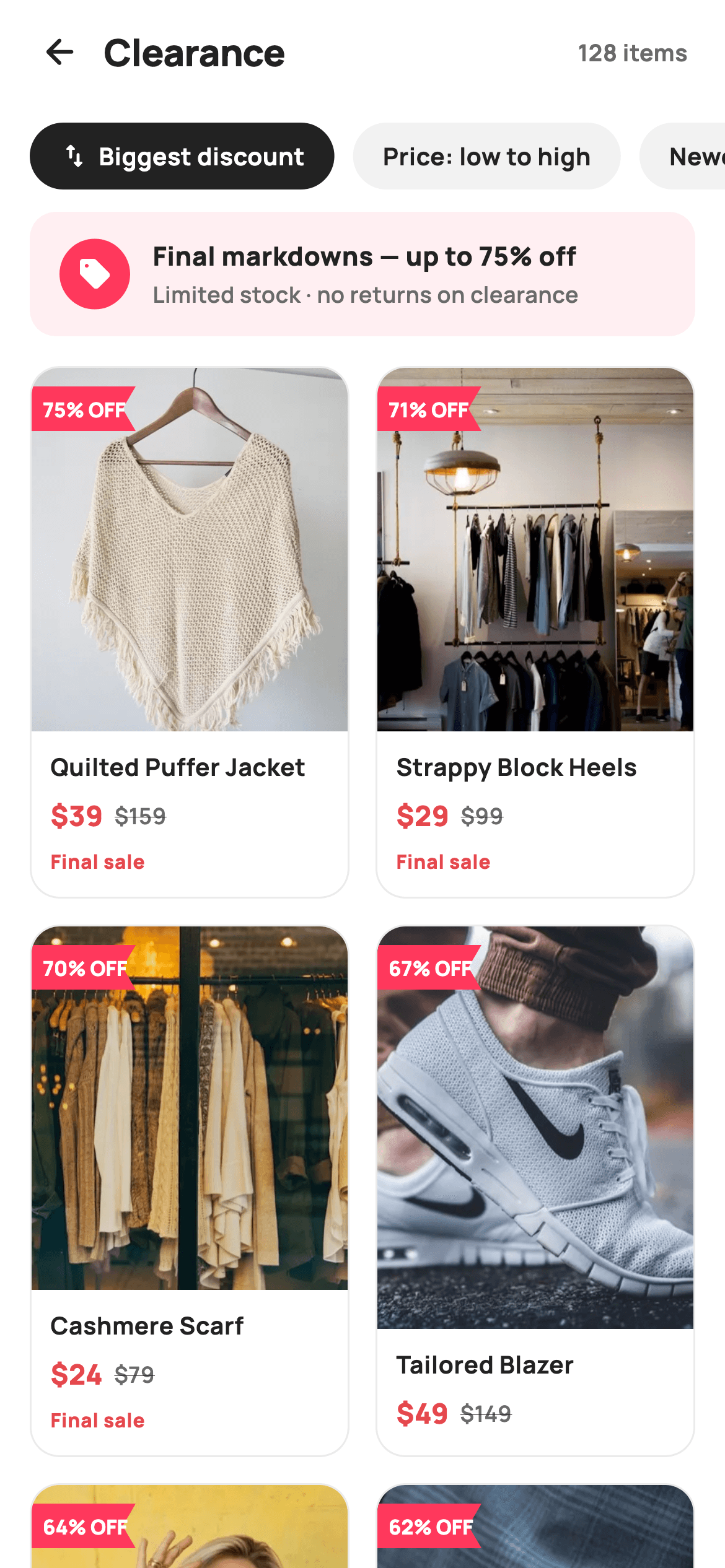
Clearance pages earn their keep by making the discount the hero, not the product photo. This tutorial builds StyleCart's clearance screen in Flutter: a header with a live item count, a horizontal pill bar for three sort options, a tinted savings banner announcing up to 75% off, and a two-column sliver grid of product cards — each with a custom-painted pointed '% OFF' corner flag, a red sale price beside the struck original, and a 'Final sale' warning on cuts of 70% or more.
Watch the Flutter UI walkthrough
A short screen recording of Clearance running, if you'd rather see it before you read the code. The written tutorial below covers everything in it.
Can't see the video? Watch it on YouTube.
What you'll build
- ✓A pinned header and horizontal pill sort bar that stay put while only the grid scrolls
- ✓A savings banner tinted with the brand coral at 8% alpha, with a solid circular sell-icon badge
- ✓A two-column SliverGrid of clearance cards at a 0.60 aspect ratio, built lazily from an item list
- ✓A CustomPainter corner flag with a notched tail that draws its own '% OFF' text
- ✓Pricing rows that pair a red sale price with a struck-through original, plus a conditional 'Final sale' badge at 70%+ discounts
Step-by-step build
Create the file
Add a new file at lib/ecom_deals_clearance/ecom_deals_clearance_screen.dart in your Flutter project.
Register the bundled fonts
No external packages — this is pure Flutter. It does bundle its design font (Manrope), so drop the font file into fonts/ and declare it in pubspec.yaml:
flutter:
  fonts:
    - family: Manrope
      fonts:
- asset: fonts/Manrope-Regular.ttfBuild it, piece by piece
Here's how the screen goes together. Each block below is a real slice of the code with a plain-English explanation — paste them in order, or grab the whole file from the next section.
Tokens, sort labels and the markdown data
import 'package:flutter/material.dart';

/// StyleCart — Clearance / Sale.
///
/// Final-markdown grid sorted by biggest discount: a sticky sort/chip bar, a
/// savings banner, then two-column cards with a painted "% OFF" corner flag,
/// struck original pricing and a "Final sale" hint on the deepest cuts.
///
/// Self-contained per CONVENTIONS.md: pure Flutter, bundled Manrope, inline
/// Airbnb-style tokens, own light theme + SafeArea. Painter flag tags; bundled
/// product webp. Expanded-image grid cards (web-overflow-proof). Callbacks only.
class EcomDealsClearanceScreen extends StatefulWidget {
  const EcomDealsClearanceScreen({
    super.key,
    this.onBack,
    this.onProduct,
  });

  final VoidCallback? onBack;
  final ValueChanged<int>? onProduct;

  @override
  State<EcomDealsClearanceScreen> createState() =>
      _EcomDealsClearanceScreenState();
}

class _EcomDealsClearanceScreenState extends State<EcomDealsClearanceScreen> {
  static const String _dir =
      'lib/screens/ecommerce/ecom_deals_clearance/images';
  static const String _font = 'Manrope';
  static const Color _canvas = Color(0xFFFFFFFF);
  static const Color _ink = Color(0xFF222222);
  static const Color _muted = Color(0xFF6A6A6A);
  static const Color _brand = Color(0xFFFF385C);
  static const Color _surface = Color(0xFFF2F2F2);
  static const Color _imageBg = Color(0xFFF5F5F5);
  static const Color _danger = Color(0xFFE5484D);
  static const Color _hairline = Color(0xFFEBEBEB);

  static const List<String> _sorts = <String>[
    'Biggest discount',
    'Price: low to high',
    'Newest',
  ];

  // pre-sorted by biggest discount
  static const List<_Item> _items = <_Item>[
    _Item('p01', 'Quilted Puffer Jacket', 39, 159, 75),
    _Item('p02', 'Strappy Block Heels', 29, 99, 71),
    _Item('p03', 'Cashmere Scarf', 24, 79, 70),
    _Item('p04', 'Tailored Blazer', 49, 149, 67),
    _Item('p05', 'Pleated Trousers', 27, 75, 64),
    _Item('p06', 'Canvas Sneakers', 25, 65, 62),
    _Item('p07', 'Floral Wrap Dress', 35, 89, 61),
    _Item('p08', 'Structured Handbag', 59, 145, 59),
  ];

  int _sort = 0;
The widget takes only two callbacks — `onBack` and `onProduct` (a `ValueChanged<int>` carrying the tapped index) — so the screen plugs into any backend or router without edits. The palette keeps two reds on purpose: `_brand` `#FF385C` is the promotional coral used for the banner and flags, while `_danger` `#E5484D` is reserved for prices, so 'this is a deal' and 'this price dropped' read as different signals. The eight `_Item` entries are declared already sorted by `pct` descending — the comment says so — which matches the default sort chip, and `int _sort = 0` is the only piece of mutable state on the screen.
Fixed chrome above a sliver scroll region
  @override
  Widget build(BuildContext context) {
    return Theme(
      data: ThemeData.light(useMaterial3: true),
      child: Scaffold(
        backgroundColor: _canvas,
        body: SafeArea(
          child: Column(
            children: <Widget>[
              _header(),
              _sortBar(),
              Expanded(
                child: CustomScrollView(
                  slivers: <Widget>[
                    SliverToBoxAdapter(child: _savingsBanner()),
                    SliverPadding(
                      padding: const EdgeInsets.fromLTRB(16, 4, 16, 28),
                      sliver: SliverGrid(
                        gridDelegate:
                            const SliverGridDelegateWithFixedCrossAxisCount(
                          crossAxisCount: 2,
                          mainAxisSpacing: 14,
                          crossAxisSpacing: 14,
                          childAspectRatio: 0.60,
                        ),
                        delegate: SliverChildBuilderDelegate(
                          (BuildContext _, int i) => _card(_items[i], i),
                          childCount: _items.length,
                        ),
                      ),
                    ),
                  ],
                ),
              ),
            ],
          ),
        ),
      ),
    );
  }
`build` wraps everything in `Theme(data: ThemeData.light(useMaterial3: true))` so the screen carries its own light theme regardless of the host app. The layout is a `Column` where `_header()` and `_sortBar()` sit as plain children — effectively sticky, since only the `Expanded` `CustomScrollView` below them scrolls. Inside it, the savings banner rides in a `SliverToBoxAdapter` so it scrolls away with the grid, and the grid itself is a `SliverGrid` with `crossAxisCount: 2`, 14px gaps and `childAspectRatio: 0.60` — tall cells that leave the image most of the card. `SliverChildBuilderDelegate` builds cards lazily by index, which is the pattern you keep when the list grows past eight items.
A header with a live item count
  Widget _header() {
    return Padding(
      padding: const EdgeInsets.fromLTRB(8, 4, 20, 6),
      child: Row(
        children: <Widget>[
          IconButton(
            onPressed: widget.onBack,
            icon: const Icon(Icons.arrow_back_rounded, size: 22, color: _ink),
          ),
          const Expanded(
            child: Text(
              'Clearance',
              style: TextStyle(
                fontFamily: _font,
                fontSize: 20,
                fontWeight: FontWeight.w800,
                letterSpacing: -0.3,
                color: _ink,
              ),
            ),
          ),
          const Text(
            '128 items',
            style: TextStyle(
              fontFamily: _font,
              fontSize: 12.5,
              fontWeight: FontWeight.w700,
              color: _muted,
            ),
          ),
        ],
      ),
    );
  }
The header row is asymmetric padding — `fromLTRB(8, 4, 20, 6)` — because the `IconButton` brings its own touch-target whitespace on the left while the '128 items' label needs a real 20px inset on the right. The 'Clearance' title takes 20px `w800` Manrope with `letterSpacing: -0.3` inside an `Expanded`, which shoves the count to the trailing edge. Putting the count in the header rather than above the grid means it stays visible while scrolling, and at 12.5px `_muted` it reads as metadata rather than competing with the title.
The pill sort bar
  Widget _sortBar() {
    return SizedBox(
      height: 52,
      child: ListView(
        scrollDirection: Axis.horizontal,
        padding: const EdgeInsets.fromLTRB(16, 8, 16, 8),
        children: <Widget>[
          for (int i = 0; i < _sorts.length; i++)
            Padding(
              padding: const EdgeInsets.only(right: 10),
              child: GestureDetector(
                onTap: () => setState(() => _sort = i),
                child: Container(
                  padding:
                      const EdgeInsets.symmetric(horizontal: 16, vertical: 9),
                  decoration: BoxDecoration(
                    color: _sort == i ? _ink : _surface,
                    borderRadius: BorderRadius.circular(9999),
                  ),
                  child: Row(
                    children: <Widget>[
                      if (i == 0)
                        Padding(
                          padding: const EdgeInsets.only(right: 5),
                          child: Icon(
                            Icons.swap_vert_rounded,
                            size: 16,
                            color: _sort == i ? _canvas : _ink,
                          ),
                        ),
                      Text(
                        _sorts[i],
                        style: TextStyle(
                          fontFamily: _font,
                          fontSize: 13,
                          fontWeight: FontWeight.w700,
                          color: _sort == i ? _canvas : _ink,
                        ),
                      ),
                    ],
                  ),
                ),
              ),
            ),
        ],
      ),
    );
  }
The bar is a fixed 52px `SizedBox` holding a horizontal `ListView`, so extra sort options overflow into a scroll instead of wrapping. A collection-for builds one `GestureDetector` pill per label; tapping runs `setState(() => _sort = i)`, and the selected pill flips from `_surface` grey to solid `_ink` with its text inverting to `_canvas` white — a stronger active state than a border or underline. `BorderRadius.circular(9999)` is the lazy-but-safe way to guarantee a full pill at any height, and only the first chip ('Biggest discount') gets the `Icons.swap_vert_rounded` glyph, marking it as the sort axis rather than a filter.
The savings banner
  Widget _savingsBanner() {
    return Container(
      margin: const EdgeInsets.fromLTRB(16, 4, 16, 12),
      padding: const EdgeInsets.symmetric(horizontal: 16, vertical: 14),
      decoration: BoxDecoration(
        color: _brand.withValues(alpha: 0.08),
        borderRadius: BorderRadius.circular(14),
      ),
      child: Row(
        children: <Widget>[
          Container(
            width: 38,
            height: 38,
            alignment: Alignment.center,
            decoration: const BoxDecoration(
              color: _brand,
              shape: BoxShape.circle,
            ),
            child: const Icon(Icons.sell_rounded, size: 19, color: _canvas),
          ),
          const SizedBox(width: 12),
          const Expanded(
            child: Column(
              crossAxisAlignment: CrossAxisAlignment.start,
              children: <Widget>[
                Text(
                  'Final markdowns — up to 75% off',
                  style: TextStyle(
                    fontFamily: _font,
                    fontSize: 14,
                    fontWeight: FontWeight.w800,
                    color: _ink,
                  ),
                ),
                SizedBox(height: 2),
                Text(
                  'Limited stock · no returns on clearance',
                  style: TextStyle(
                    fontFamily: _font,
                    fontSize: 12,
                    fontWeight: FontWeight.w600,
                    color: _muted,
                  ),
                ),
              ],
            ),
          ),
        ],
      ),
    );
  }
The banner's ground is `_brand.withValues(alpha: 0.08)` — the coral knocked back to a wash — while the 38px circular badge holding `Icons.sell_rounded` uses the coral at full strength, so one hue does both the container and its focal point. The copy is two stacked lines inside an `Expanded` column: the headline 'Final markdowns — up to 75% off' at 14px `w800` in `_ink`, and a 12px `_muted` subline carrying the urgency terms ('Limited stock · no returns on clearance'). Selling the ceiling discount here, before any card is seen, frames every price below it.
Product cards: image stack, flag, pricing
  Widget _card(_Item it, int i) {
    return GestureDetector(
      onTap: () => widget.onProduct?.call(i),
      child: Container(
        decoration: BoxDecoration(
          color: _canvas,
          borderRadius: BorderRadius.circular(16),
          border: Border.all(color: _hairline),
        ),
        child: Column(
          crossAxisAlignment: CrossAxisAlignment.start,
          children: <Widget>[
            Expanded(
              child: ClipRRect(
                borderRadius:
                    const BorderRadius.vertical(top: Radius.circular(15)),
                child: Stack(
                  fit: StackFit.expand,
                  children: <Widget>[
                    Container(
                      color: _imageBg,
                      child: Image.asset('$_dir/${it.img}.webp',
                          fit: BoxFit.cover),
                    ),
                    Positioned(
                      left: 0,
                      top: 10,
                      child: CustomPaint(
                        size: const Size(56, 24),
                        painter: _FlagPainter('${it.pct}% OFF'),
                      ),
                    ),
                  ],
                ),
              ),
            ),
            Padding(
              padding: const EdgeInsets.fromLTRB(10, 10, 10, 12),
              child: Column(
                crossAxisAlignment: CrossAxisAlignment.start,
                children: <Widget>[
                  Text(
                    it.title,
                    maxLines: 1,
                    overflow: TextOverflow.ellipsis,
                    style: const TextStyle(
                      fontFamily: _font,
                      fontSize: 13,
                      fontWeight: FontWeight.w700,
                      color: _ink,
                    ),
                  ),
                  const SizedBox(height: 6),
                  Row(
                    children: <Widget>[
                      Text(
                        '\$${it.price}',
                        style: const TextStyle(
                          fontFamily: _font,
                          fontSize: 15,
                          fontWeight: FontWeight.w800,
                          color: _danger,
                        ),
                      ),
                      const SizedBox(width: 6),
                      Text(
                        '\$${it.was}',
                        style: const TextStyle(
                          fontFamily: _font,
                          fontSize: 12,
                          fontWeight: FontWeight.w600,
                          decoration: TextDecoration.lineThrough,
                          color: _muted,
                        ),
                      ),
                    ],
                  ),
                  if (it.pct >= 70) ...<Widget>[
                    const SizedBox(height: 6),
                    const Text(
                      'Final sale',
                      style: TextStyle(
                        fontFamily: _font,
                        fontSize: 10.5,
                        fontWeight: FontWeight.w800,
                        letterSpacing: 0.3,
                        color: _danger,
                      ),
                    ),
                  ],
                ],
              ),
            ),
          ],
        ),
      ),
    );
  }
Each card is a hairline-bordered 16px-radius `Container` whose image area is `Expanded` — it absorbs whatever height the 0.60 aspect ratio leaves after the text block, which is what makes the grid web-overflow-proof. The image sits in a `Stack` under a `ClipRRect` rounded to 15 (one less than the card, so the border stays visible), with the `CustomPaint` flag `Positioned` at `left: 0, top: 10` in a fixed 56×24 box. The pricing row leads with the sale price at 15px `w800` in `_danger`, then the original at only 12px with `TextDecoration.lineThrough` in `_muted` — size, weight and colour all rank the two numbers, not just the strike. The kicker is `if (it.pct >= 70) ...[...]`: a spread-in 'Final sale' label in 10.5px `_danger` caps that appears only on the three deepest cuts, echoing the banner's no-returns warning exactly where it applies.
The item model and the flag painter
class _Item {
  const _Item(this.img, this.title, this.price, this.was, this.pct);
  final String img;
  final String title;
  final int price;
  final int was;
  final int pct;
}

/// A pointed corner flag (banner with a notched tail) carrying the discount %.
class _FlagPainter extends CustomPainter {
  _FlagPainter(this.label);
  final String label;

  static const Color _brand = Color(0xFFFF385C);

  @override
  void paint(Canvas canvas, Size size) {
    final Path flag = Path()
      ..moveTo(0, 0)
      ..lineTo(size.width, 0)
      ..lineTo(size.width - 7, size.height / 2)
      ..lineTo(size.width, size.height)
      ..lineTo(0, size.height)
      ..close();
    canvas.drawPath(flag, Paint()..color = _brand);

    final TextPainter tp = TextPainter(
      text: TextSpan(
        text: label,
        style: const TextStyle(
          fontFamily: 'Manrope',
          fontSize: 11,
          fontWeight: FontWeight.w800,
          color: Colors.white,
        ),
      ),
      textDirection: TextDirection.ltr,
    )..layout(maxWidth: size.width - 8);
    tp.paint(
      canvas,
      Offset(6, (size.height - tp.height) / 2),
    );
  }

  @override
  bool shouldRepaint(_FlagPainter old) => old.label != label;
}
`_Item` is a five-field const value class — image key, title, sale price, original price and discount percentage — with prices as `int`s since clearance tags round to whole dollars. `_FlagPainter` draws the banner as a single closed `Path`: across the top, then `lineTo(size.width - 7, size.height / 2)` cuts 7px inward at mid-height before returning to the bottom-right corner, which is what produces the notched swallow-tail on the right edge. The label is rendered by the painter itself via `TextPainter` at 11px `w800` white Manrope, laid out with `maxWidth: size.width - 8` and painted at `Offset(6, ...)` to centre vertically — no child widget needed. `shouldRepaint` compares labels, so the eight flags never repaint unless their text changes.
Full code
The complete, ready-to-paste source. Free to use in your projects — one click copies it all.
import 'package:flutter/material.dart';

/// StyleCart — Clearance / Sale.
///
/// Final-markdown grid sorted by biggest discount: a sticky sort/chip bar, a
/// savings banner, then two-column cards with a painted "% OFF" corner flag,
/// struck original pricing and a "Final sale" hint on the deepest cuts.
///
/// Self-contained per CONVENTIONS.md: pure Flutter, bundled Manrope, inline
/// Airbnb-style tokens, own light theme + SafeArea. Painter flag tags; bundled
/// product webp. Expanded-image grid cards (web-overflow-proof). Callbacks only.
class EcomDealsClearanceScreen extends StatefulWidget {
  const EcomDealsClearanceScreen({
    super.key,
    this.onBack,
    this.onProduct,
  });

  final VoidCallback? onBack;
  final ValueChanged<int>? onProduct;

  @override
  State<EcomDealsClearanceScreen> createState() =>
      _EcomDealsClearanceScreenState();
}

class _EcomDealsClearanceScreenState extends State<EcomDealsClearanceScreen> {
  static const String _dir =
      'lib/screens/ecommerce/ecom_deals_clearance/images';
  static const String _font = 'Manrope';
  static const Color _canvas = Color(0xFFFFFFFF);
  static const Color _ink = Color(0xFF222222);
  static const Color _muted = Color(0xFF6A6A6A);
  static const Color _brand = Color(0xFFFF385C);
  static const Color _surface = Color(0xFFF2F2F2);
  static const Color _imageBg = Color(0xFFF5F5F5);
  static const Color _danger = Color(0xFFE5484D);
  static const Color _hairline = Color(0xFFEBEBEB);

  static const List<String> _sorts = <String>[
    'Biggest discount',
    'Price: low to high',
    'Newest',
  ];

  // pre-sorted by biggest discount
  static const List<_Item> _items = <_Item>[
    _Item('p01', 'Quilted Puffer Jacket', 39, 159, 75),
    _Item('p02', 'Strappy Block Heels', 29, 99, 71),
    _Item('p03', 'Cashmere Scarf', 24, 79, 70),
    _Item('p04', 'Tailored Blazer', 49, 149, 67),
    _Item('p05', 'Pleated Trousers', 27, 75, 64),
    _Item('p06', 'Canvas Sneakers', 25, 65, 62),
    _Item('p07', 'Floral Wrap Dress', 35, 89, 61),
    _Item('p08', 'Structured Handbag', 59, 145, 59),
  ];

  int _sort = 0;

  @override
  Widget build(BuildContext context) {
    return Theme(
      data: ThemeData.light(useMaterial3: true),
      child: Scaffold(
        backgroundColor: _canvas,
        body: SafeArea(
          child: Column(
            children: <Widget>[
              _header(),
              _sortBar(),
              Expanded(
                child: CustomScrollView(
                  slivers: <Widget>[
                    SliverToBoxAdapter(child: _savingsBanner()),
                    SliverPadding(
                      padding: const EdgeInsets.fromLTRB(16, 4, 16, 28),
                      sliver: SliverGrid(
                        gridDelegate:
                            const SliverGridDelegateWithFixedCrossAxisCount(
                          crossAxisCount: 2,
                          mainAxisSpacing: 14,
                          crossAxisSpacing: 14,
                          childAspectRatio: 0.60,
                        ),
                        delegate: SliverChildBuilderDelegate(
                          (BuildContext _, int i) => _card(_items[i], i),
                          childCount: _items.length,
                        ),
                      ),
                    ),
                  ],
                ),
              ),
            ],
          ),
        ),
      ),
    );
  }

  Widget _header() {
    return Padding(
      padding: const EdgeInsets.fromLTRB(8, 4, 20, 6),
      child: Row(
        children: <Widget>[
          IconButton(
            onPressed: widget.onBack,
            icon: const Icon(Icons.arrow_back_rounded, size: 22, color: _ink),
          ),
          const Expanded(
            child: Text(
              'Clearance',
              style: TextStyle(
                fontFamily: _font,
                fontSize: 20,
                fontWeight: FontWeight.w800,
                letterSpacing: -0.3,
                color: _ink,
              ),
            ),
          ),
          const Text(
            '128 items',
            style: TextStyle(
              fontFamily: _font,
              fontSize: 12.5,
              fontWeight: FontWeight.w700,
              color: _muted,
            ),
          ),
        ],
      ),
    );
  }

  Widget _sortBar() {
    return SizedBox(
      height: 52,
      child: ListView(
        scrollDirection: Axis.horizontal,
        padding: const EdgeInsets.fromLTRB(16, 8, 16, 8),
        children: <Widget>[
          for (int i = 0; i < _sorts.length; i++)
            Padding(
              padding: const EdgeInsets.only(right: 10),
              child: GestureDetector(
                onTap: () => setState(() => _sort = i),
                child: Container(
                  padding:
                      const EdgeInsets.symmetric(horizontal: 16, vertical: 9),
                  decoration: BoxDecoration(
                    color: _sort == i ? _ink : _surface,
                    borderRadius: BorderRadius.circular(9999),
                  ),
                  child: Row(
                    children: <Widget>[
                      if (i == 0)
                        Padding(
                          padding: const EdgeInsets.only(right: 5),
                          child: Icon(
                            Icons.swap_vert_rounded,
                            size: 16,
                            color: _sort == i ? _canvas : _ink,
                          ),
                        ),
                      Text(
                        _sorts[i],
                        style: TextStyle(
                          fontFamily: _font,
                          fontSize: 13,
                          fontWeight: FontWeight.w700,
                          color: _sort == i ? _canvas : _ink,
                        ),
                      ),
                    ],
                  ),
                ),
              ),
            ),
        ],
      ),
    );
  }

  Widget _savingsBanner() {
    return Container(
      margin: const EdgeInsets.fromLTRB(16, 4, 16, 12),
      padding: const EdgeInsets.symmetric(horizontal: 16, vertical: 14),
      decoration: BoxDecoration(
        color: _brand.withValues(alpha: 0.08),
        borderRadius: BorderRadius.circular(14),
      ),
      child: Row(
        children: <Widget>[
          Container(
            width: 38,
            height: 38,
            alignment: Alignment.center,
            decoration: const BoxDecoration(
              color: _brand,
              shape: BoxShape.circle,
            ),
            child: const Icon(Icons.sell_rounded, size: 19, color: _canvas),
          ),
          const SizedBox(width: 12),
          const Expanded(
            child: Column(
              crossAxisAlignment: CrossAxisAlignment.start,
              children: <Widget>[
                Text(
                  'Final markdowns — up to 75% off',
                  style: TextStyle(
                    fontFamily: _font,
                    fontSize: 14,
                    fontWeight: FontWeight.w800,
                    color: _ink,
                  ),
                ),
                SizedBox(height: 2),
                Text(
                  'Limited stock · no returns on clearance',
                  style: TextStyle(
                    fontFamily: _font,
                    fontSize: 12,
                    fontWeight: FontWeight.w600,
                    color: _muted,
                  ),
                ),
              ],
            ),
          ),
        ],
      ),
    );
  }

  Widget _card(_Item it, int i) {
    return GestureDetector(
      onTap: () => widget.onProduct?.call(i),
      child: Container(
        decoration: BoxDecoration(
          color: _canvas,
          borderRadius: BorderRadius.circular(16),
          border: Border.all(color: _hairline),
        ),
        child: Column(
          crossAxisAlignment: CrossAxisAlignment.start,
          children: <Widget>[
            Expanded(
              child: ClipRRect(
                borderRadius:
                    const BorderRadius.vertical(top: Radius.circular(15)),
                child: Stack(
                  fit: StackFit.expand,
                  children: <Widget>[
                    Container(
                      color: _imageBg,
                      child: Image.asset('$_dir/${it.img}.webp',
                          fit: BoxFit.cover),
                    ),
                    Positioned(
                      left: 0,
                      top: 10,
                      child: CustomPaint(
                        size: const Size(56, 24),
                        painter: _FlagPainter('${it.pct}% OFF'),
                      ),
                    ),
                  ],
                ),
              ),
            ),
            Padding(
              padding: const EdgeInsets.fromLTRB(10, 10, 10, 12),
              child: Column(
                crossAxisAlignment: CrossAxisAlignment.start,
                children: <Widget>[
                  Text(
                    it.title,
                    maxLines: 1,
                    overflow: TextOverflow.ellipsis,
                    style: const TextStyle(
                      fontFamily: _font,
                      fontSize: 13,
                      fontWeight: FontWeight.w700,
                      color: _ink,
                    ),
                  ),
                  const SizedBox(height: 6),
                  Row(
                    children: <Widget>[
                      Text(
                        '\$${it.price}',
                        style: const TextStyle(
                          fontFamily: _font,
                          fontSize: 15,
                          fontWeight: FontWeight.w800,
                          color: _danger,
                        ),
                      ),
                      const SizedBox(width: 6),
                      Text(
                        '\$${it.was}',
                        style: const TextStyle(
                          fontFamily: _font,
                          fontSize: 12,
                          fontWeight: FontWeight.w600,
                          decoration: TextDecoration.lineThrough,
                          color: _muted,
                        ),
                      ),
                    ],
                  ),
                  if (it.pct >= 70) ...<Widget>[
                    const SizedBox(height: 6),
                    const Text(
                      'Final sale',
                      style: TextStyle(
                        fontFamily: _font,
                        fontSize: 10.5,
                        fontWeight: FontWeight.w800,
                        letterSpacing: 0.3,
                        color: _danger,
                      ),
                    ),
                  ],
                ],
              ),
            ),
          ],
        ),
      ),
    );
  }
}

class _Item {
  const _Item(this.img, this.title, this.price, this.was, this.pct);
  final String img;
  final String title;
  final int price;
  final int was;
  final int pct;
}

/// A pointed corner flag (banner with a notched tail) carrying the discount %.
class _FlagPainter extends CustomPainter {
  _FlagPainter(this.label);
  final String label;

  static const Color _brand = Color(0xFFFF385C);

  @override
  void paint(Canvas canvas, Size size) {
    final Path flag = Path()
      ..moveTo(0, 0)
      ..lineTo(size.width, 0)
      ..lineTo(size.width - 7, size.height / 2)
      ..lineTo(size.width, size.height)
      ..lineTo(0, size.height)
      ..close();
    canvas.drawPath(flag, Paint()..color = _brand);

    final TextPainter tp = TextPainter(
      text: TextSpan(
        text: label,
        style: const TextStyle(
          fontFamily: 'Manrope',
          fontSize: 11,
          fontWeight: FontWeight.w800,
          color: Colors.white,
        ),
      ),
      textDirection: TextDirection.ltr,
    )..layout(maxWidth: size.width - 8);
    tp.paint(
      canvas,
      Offset(6, (size.height - tp.height) / 2),
    );
  }

  @override
  bool shouldRepaint(_FlagPainter old) => old.label != label;
}
Plus bundled 13 binary assets (fonts/images). The CLI and MCP install those for you automatically.
Two faster ways to add it
Copy-paste works, but you can skip it entirely.
1. FlutterKit CLI
One command drops this screen — and its fonts — straight into your project.
$ flutterkit add ecom-deals-clearance2. AI agent (MCP)
Connect FlutterKit's MCP server in Claude or Cursor and just ask your agent to install ecom-deals-clearance — it fetches and writes the files for you.
FAQ
Is this clearance screen free to use in a commercial app?
Yes. FlutterKit screens are free to use, commercially included — ship this grid in a paid retail or marketplace app as-is or restyled. No attribution or sign-up is required.
What packages or fonts does this screen depend on?
No pub packages at all — the imports stop at `package:flutter/material.dart`, and the corner flag is a hand-rolled `CustomPainter` rather than an SVG library. The only assets are the bundled Manrope font (referenced by `fontFamily: 'Manrope'`, so declare it in `pubspec.yaml`) and the product `.webp` images loaded from the `_dir` path.
Which Flutter version does this need?
Flutter 3.27 or newer, because the savings banner tints its background with `_brand.withValues(alpha: 0.08)`. On an older SDK, replace that call with `withOpacity(0.08)`; the constructor also uses `super.key`, which needs Dart 2.17+ (Flutter 3.0+).
The sort pills change state — why doesn't the grid re-order?
The demo data is a `static const` list pre-sorted by biggest discount, so `_sort` only drives the chip styling. To make it real, keep `_items` as the source, derive a sorted copy in `build` — switch on `_sort` and compare `pct` descending, `price` ascending, or your added date field — and hand that list to the `SliverChildBuilderDelegate`. `setState` in the pill's `onTap` already triggers the rebuild.
How do I plug in real products instead of the eight sample items?
Replace the `_Item` list with your API models — you need a title, sale price, original price, discount percent and an image reference. Swap `Image.asset('$_dir/${it.img}.webp')` for `Image.network` (keep the `_imageBg` container behind it as a loading ground), and compute `pct` from the two prices so the flag and the 70% 'Final sale' threshold stay honest.


