How to Build a Review Order Screen in Flutter (Full Code + Preview)
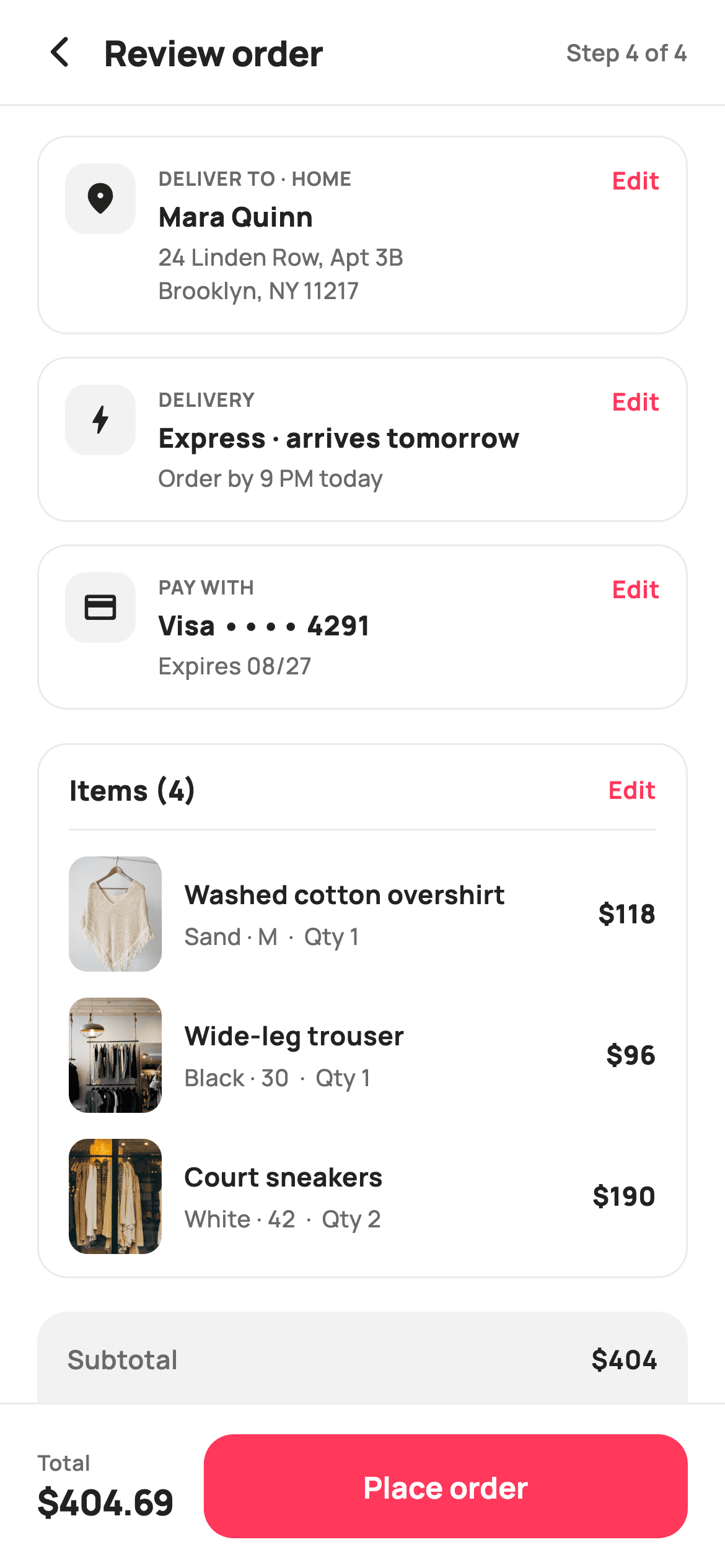
Review Order is the last screen before money moves, so it has to show everything and hide nothing. This one stacks address, delivery and payment as compact cards each with its own Edit link, lists the items with line totals, then prices the order in a receipt panel torn in half by a painted perforation. You'll compute the whole breakdown in build with two folds, see why tax is charged on the discounted subtotal, and pin a bar that repeats the grand total beside Place order.
Watch the Flutter UI walkthrough
A short screen recording of Review Order running, if you'd rather see it before you read the code. The written tutorial below covers everything in it.
Can't see the video? Watch it on YouTube.
What you'll build
- ✓A price breakdown computed from the cart with folds — no hard-coded totals
- ✓A painted receipt rule with tear notches punched into both edges of the panel
- ✓Reusable summary cards that take an icon, a label, two lines of copy and an Edit callback
- ✓An item list showing line totals rather than unit prices
- ✓A pinned bar that repeats the total next to the irreversible action
Step-by-step build
Create the file
Add a new file at lib/ecom_checkout_review/ecom_checkout_review_screen.dart in your Flutter project.
Register the bundled fonts
No external packages — this is pure Flutter. It does bundle its design font (Manrope), so drop the font file into fonts/ and declare it in pubspec.yaml:
flutter:
  fonts:
    - family: Manrope
      fonts:
- asset: fonts/Manrope-Regular.ttfBuild it, piece by piece
Here's how the screen goes together. Each block below is a real slice of the code with a plain-English explanation — paste them in order, or grab the whole file from the next section.
Five edit callbacks and the cart
import 'package:flutter/material.dart';

/// StyleCart — Review Order (checkout step 4).
///
/// The final confirm: delivery address, delivery method, payment method and the
/// item list as compact summary cards (each with an Edit link), then an
/// itemised price breakdown split by a painted perforated rule, and a pinned
/// "Place order" bar carrying the grand total.
///
/// Self-contained per CONVENTIONS.md: pure Flutter, bundled Manrope, inline
/// Airbnb-style tokens, own light theme + SafeArea, bundled webp. The receipt
/// rule is a CustomPainter (no emoji glyph). Exposes callbacks only.
class EcomCheckoutReviewScreen extends StatelessWidget {
  const EcomCheckoutReviewScreen({
    super.key,
    this.onBack,
    this.onEditAddress,
    this.onEditDelivery,
    this.onEditPayment,
    this.onEditItems,
    this.onPlaceOrder,
  });

  final VoidCallback? onBack;
  final VoidCallback? onEditAddress;
  final VoidCallback? onEditDelivery;
  final VoidCallback? onEditPayment;
  final VoidCallback? onEditItems;
  final VoidCallback? onPlaceOrder;

  static const String _font = 'Manrope';
  static const Color _canvas = Color(0xFFFFFFFF);
  static const Color _ink = Color(0xFF222222);
  static const Color _muted = Color(0xFF6A6A6A);
  static const Color _brand = Color(0xFFFF385C);
  static const Color _surface = Color(0xFFF2F2F2);
  static const Color _imageBg = Color(0xFFF5F5F5);
  static const Color _success = Color(0xFF2E9E5B);
  static const Color _hairline = Color(0xFFEBEBEB);

  static const String _dir = 'lib/screens/ecommerce/ecom_checkout_review/images';

  static const List<_Line> _items = <_Line>[
    _Line('Washed cotton overshirt', 'Sand · M', 118, 1, 'p01.webp'),
    _Line('Wide-leg trouser', 'Black · 30', 96, 1, 'p02.webp'),
    _Line('Court sneakers', 'White · 42', 95, 2, 'p03.webp'),
  ];
The widget is stateless and exposes six callbacks — one for back, one for Place order, and separate `onEditAddress`, `onEditDelivery`, `onEditPayment` and `onEditItems`. Separate hooks matter on a review screen: every Edit link goes back to a *different* step, and a single generic callback would force the host to guess which. The cart is three `_Line` records carrying title, variant, unit price, quantity and an image filename; `_dir` holds the asset folder once so the rows can build their paths by name.
Pricing the order in build
  @override
  Widget build(BuildContext context) {
    final int subtotal =
        _items.fold(0, (int s, _Line l) => s + l.price * l.qty);
    final double discount = subtotal * 0.1; // STYLE10
    const double shipping = 12; // express
    final double tax = (subtotal - discount) * 0.08;
    final double total = subtotal - discount + shipping + tax;
    final int units = _items.fold(0, (int s, _Line l) => s + l.qty);

    return Theme(
      data: ThemeData.light(useMaterial3: true),
      child: Scaffold(
        backgroundColor: _canvas,
        body: SafeArea(
          child: Column(
            children: <Widget>[
              _header(),
              const Divider(height: 1, color: _hairline),
              Expanded(
                child: ListView(
                  padding: const EdgeInsets.fromLTRB(20, 16, 20, 16),
                  children: <Widget>[
                    _summaryCard(
                      icon: Icons.location_on_rounded,
                      tag: 'Deliver to · Home',
                      title: 'Mara Quinn',
                      body: '24 Linden Row, Apt 3B\nBrooklyn, NY 11217',
                      onEdit: onEditAddress,
                    ),
                    const SizedBox(height: 12),
                    _summaryCard(
                      icon: Icons.bolt_rounded,
                      tag: 'Delivery',
                      title: 'Express · arrives tomorrow',
                      body: 'Order by 9 PM today',
                      onEdit: onEditDelivery,
                    ),
                    const SizedBox(height: 12),
                    _summaryCard(
                      icon: Icons.credit_card_rounded,
                      tag: 'Pay with',
                      title: 'Visa •••• 4291',
                      body: 'Expires 08/27',
                      onEdit: onEditPayment,
                    ),
                    const SizedBox(height: 18),
                    _itemsCard(units),
                    const SizedBox(height: 18),
                    _breakdown(subtotal, discount, shipping, tax, total),
                    const SizedBox(height: 12),
                    _policyNote(),
                  ],
                ),
              ),
              _placeBar(total),
            ],
          ),
        ),
      ),
    );
  }
Every number on the screen is derived at the top of `build`. `subtotal` comes from `_items.fold(0, (s, l) => s + l.price * l.qty)`, and `units` from a second fold over quantities. Then the order of operations: a 10% discount is taken off the subtotal, and `tax` is `(subtotal - discount) * 0.08` — charged on what the shopper actually pays, not the pre-discount figure, which is how a coupon is normally taxed. Shipping is added after tax. Because `total` is a local computed once, the breakdown panel and the pinned bar below cannot show two different grand totals.
One summary card, three uses
  Widget _summaryCard({
    required IconData icon,
    required String tag,
    required String title,
    required String body,
    VoidCallback? onEdit,
  }) {
    return Container(
      padding: const EdgeInsets.all(14),
      decoration: BoxDecoration(
        color: _canvas,
        borderRadius: BorderRadius.circular(16),
        border: Border.all(color: _hairline),
      ),
      child: Row(
        crossAxisAlignment: CrossAxisAlignment.start,
        children: <Widget>[
          Container(
            width: 38,
            height: 38,
            decoration: BoxDecoration(
              color: _surface,
              borderRadius: BorderRadius.circular(11),
            ),
            child: Icon(icon, size: 20, color: _ink),
          ),
          const SizedBox(width: 12),
          Expanded(
            child: Column(
              crossAxisAlignment: CrossAxisAlignment.start,
              children: <Widget>[
                Text(
                  tag.toUpperCase(),
                  style: const TextStyle(
                    fontFamily: _font,
                    fontSize: 10.5,
                    fontWeight: FontWeight.w700,
                    letterSpacing: 0.5,
                    color: _muted,
                  ),
                ),
                const SizedBox(height: 3),
                Text(
                  title,
                  style: const TextStyle(
                    fontFamily: _font,
                    fontSize: 14.5,
                    fontWeight: FontWeight.w800,
                    color: _ink,
                  ),
                ),
                const SizedBox(height: 2),
                Text(
                  body,
                  style: const TextStyle(
                    fontFamily: _font,
                    fontSize: 12.5,
                    height: 1.4,
                    fontWeight: FontWeight.w500,
                    color: _muted,
                  ),
                ),
              ],
            ),
          ),
          GestureDetector(
            onTap: onEdit,
            child: const Padding(
              padding: EdgeInsets.only(left: 8),
              child: Text(
                'Edit',
                style: TextStyle(
                  fontFamily: _font,
                  fontSize: 13,
                  fontWeight: FontWeight.w700,
                  color: _brand,
                ),
              ),
            ),
          ),
        ],
      ),
    );
  }
`_summaryCard` is a named-parameter builder taking an icon, a `tag`, a `title`, a `body` and an `onEdit`. It renders a 38px rounded tile, an uppercased tag at 10.5px, the headline at 14.5px `w800` and supporting detail at 12.5px with `height: 1.4` — the address relies on that line height because its `body` contains a `\n` and wraps to two lines. `crossAxisAlignment: CrossAxisAlignment.start` keeps the icon and the Edit link pinned to the top as the middle column grows. Three calls with different arguments produce the address, delivery and payment cards, so their spacing and type scale can never drift apart.
The items card header
  Widget _itemsCard(int units) {
    return Container(
      decoration: BoxDecoration(
        color: _canvas,
        borderRadius: BorderRadius.circular(16),
        border: Border.all(color: _hairline),
      ),
      child: Column(
        children: <Widget>[
          Padding(
            padding: const EdgeInsets.fromLTRB(16, 14, 16, 10),
            child: Row(
              children: <Widget>[
                Expanded(
                  child: Text(
                    'Items ($units)',
                    style: const TextStyle(
                      fontFamily: _font,
                      fontSize: 15,
                      fontWeight: FontWeight.w800,
                      color: _ink,
                    ),
                  ),
                ),
                GestureDetector(
                  onTap: onEditItems,
                  child: const Text(
                    'Edit',
                    style: TextStyle(
                      fontFamily: _font,
                      fontSize: 13,
                      fontWeight: FontWeight.w700,
                      color: _brand,
                    ),
                  ),
                ),
              ],
            ),
          ),
          const Divider(height: 1, color: _hairline, indent: 16, endIndent: 16),
          for (int i = 0; i < _items.length; i++) _itemRow(_items[i], i),
          const SizedBox(height: 8),
        ],
      ),
    );
  }
The items card carries its own header row: `'Items ($units)'` interpolating the summed quantity — five units across three lines, not three — with an Edit link back to the cart. Below it a `Divider` with `indent: 16` and `endIndent: 16` stops short of both edges so it reads as an internal rule rather than cutting the card in two. The rows themselves come from a plain collection-for, and a trailing `SizedBox(height: 8)` closes the card, because the rows carry their own bottom padding and a symmetric container padding would double it.
An item row that shows line totals
  Widget _itemRow(_Line l, int i) {
    return Padding(
      padding: EdgeInsets.fromLTRB(16, i == 0 ? 14 : 10, 16, 4),
      child: Row(
        children: <Widget>[
          ClipRRect(
            borderRadius: BorderRadius.circular(10),
            child: Container(
              width: 50,
              height: 62,
              color: _imageBg,
              child: Image.asset('$_dir/${l.asset}', fit: BoxFit.cover),
            ),
          ),
          const SizedBox(width: 12),
          Expanded(
            child: Column(
              crossAxisAlignment: CrossAxisAlignment.start,
              children: <Widget>[
                Text(
                  l.title,
                  maxLines: 1,
                  overflow: TextOverflow.ellipsis,
                  style: const TextStyle(
                    fontFamily: _font,
                    fontSize: 14,
                    fontWeight: FontWeight.w700,
                    color: _ink,
                  ),
                ),
                const SizedBox(height: 3),
                Text(
                  '${l.variant}  ·  Qty ${l.qty}',
                  style: const TextStyle(
                    fontFamily: _font,
                    fontSize: 12.5,
                    fontWeight: FontWeight.w500,
                    color: _muted,
                  ),
                ),
              ],
            ),
          ),
          const SizedBox(width: 10),
          Text(
            '\$${l.price * l.qty}',
            style: const TextStyle(
              fontFamily: _font,
              fontSize: 14,
              fontWeight: FontWeight.w800,
              color: _ink,
            ),
          ),
        ],
      ),
    );
  }
Each row is a 50×62 `ClipRRect` thumbnail over `_imageBg`, so a slow-loading asset shows a neutral placeholder rather than a flash of white. The padding uses `i == 0 ? 14 : 10` for the top inset, giving the first row a little more air under the divider than the rows have between themselves. The title is capped with `maxLines: 1` and `TextOverflow.ellipsis`, and the price on the right is `'\$${l.price * l.qty}'` — the *line* total. The sneakers at 95 with a quantity of two show as \$190, which is what a shopper reconciles against the subtotal; showing the unit price here is a common cause of 'the maths is wrong' support mail.
The receipt breakdown
  Widget _breakdown(
      int subtotal, double discount, double shipping, double tax, double total) {
    return Container(
      padding: const EdgeInsets.fromLTRB(16, 16, 16, 16),
      decoration: BoxDecoration(
        color: _surface,
        borderRadius: BorderRadius.circular(16),
      ),
      child: Column(
        children: <Widget>[
          _money('Subtotal', '\$$subtotal'),
          const SizedBox(height: 11),
          _money('Coupon · STYLE10', '−\$${discount.toStringAsFixed(0)}',
              tint: _success),
          const SizedBox(height: 11),
          _money('Express delivery', '\$${shipping.toStringAsFixed(0)}'),
          const SizedBox(height: 11),
          _money('Estimated tax', '\$${tax.toStringAsFixed(2)}'),
          const SizedBox(height: 14),
          SizedBox(
            height: 12,
            width: double.infinity,
            child: CustomPaint(painter: _ReceiptDividerPainter()),
          ),
          const SizedBox(height: 14),
          Row(
            mainAxisAlignment: MainAxisAlignment.spaceBetween,
            children: <Widget>[
              const Text(
                'Total',
                style: TextStyle(
                  fontFamily: _font,
                  fontSize: 17,
                  fontWeight: FontWeight.w800,
                  color: _ink,
                ),
              ),
              Text(
                '\$${total.toStringAsFixed(2)}',
                style: const TextStyle(
                  fontFamily: _font,
                  fontSize: 20,
                  fontWeight: FontWeight.w800,
                  letterSpacing: -0.5,
                  color: _ink,
                ),
              ),
            ],
          ),
        ],
      ),
    );
  }

  Widget _money(String label, String value, {Color tint = _ink}) {
    return Row(
      mainAxisAlignment: MainAxisAlignment.spaceBetween,
      children: <Widget>[
        Text(
          label,
          style: const TextStyle(
            fontFamily: _font,
            fontSize: 14,
            fontWeight: FontWeight.w600,
            color: _muted,
          ),
        ),
        Text(
          value,
          style: TextStyle(
            fontFamily: _font,
            fontSize: 14,
            fontWeight: FontWeight.w700,
            color: tint,
          ),
        ),
      ],
    );
  }
The breakdown is a `_surface` panel of `_money` rows, each a `spaceBetween` `Row` of label and value. The coupon line passes `tint: _success` and prints `'−\$${discount.toStringAsFixed(0)}'` using a true minus sign (U+2212) rather than a hyphen — it is wider and sits at digit height, so the negative amount lines up with the numbers above it. Rounding is chosen per line: whole dollars for the discount and shipping, two decimals for tax and the total. Between the lines and the grand total sits a 12px-tall `CustomPaint`, and the total itself is 20px `w800` at `letterSpacing: -0.5`, the largest thing on the screen.
The policy note and the pinned bar
  Widget _policyNote() {
    return const Row(
      children: <Widget>[
        Icon(Icons.verified_user_rounded, size: 15, color: _muted),
        SizedBox(width: 6),
        Expanded(
          child: Text(
            'Free 30-day returns. By placing this order you agree to our Terms.',
            style: TextStyle(
              fontFamily: _font,
              fontSize: 11.5,
              height: 1.4,
              fontWeight: FontWeight.w500,
              color: _muted,
            ),
          ),
        ),
      ],
    );
  }

  Widget _placeBar(double total) {
    return Container(
      decoration: const BoxDecoration(
        color: _canvas,
        border: Border(top: BorderSide(color: _hairline)),
      ),
      child: SafeArea(
        top: false,
        child: SizedBox(
          height: 88,
          child: Padding(
            padding: const EdgeInsets.fromLTRB(20, 14, 20, 14),
            child: Row(
              children: <Widget>[
                Column(
                  mainAxisAlignment: MainAxisAlignment.center,
                  crossAxisAlignment: CrossAxisAlignment.start,
                  children: <Widget>[
                    const Text(
                      'Total',
                      style: TextStyle(
                        fontFamily: _font,
                        fontSize: 11.5,
                        fontWeight: FontWeight.w600,
                        color: _muted,
                      ),
                    ),
                    Text(
                      '\$${total.toStringAsFixed(2)}',
                      style: const TextStyle(
                        fontFamily: _font,
                        fontSize: 19,
                        fontWeight: FontWeight.w800,
                        letterSpacing: -0.5,
                        color: _ink,
                      ),
                    ),
                  ],
                ),
                const SizedBox(width: 16),
                Expanded(
                  child: SizedBox(
                    height: 56,
                    child: FilledButton(
                      onPressed: onPlaceOrder,
                      style: FilledButton.styleFrom(
                        backgroundColor: _brand,
                        foregroundColor: _canvas,
                        shape: RoundedRectangleBorder(
                          borderRadius: BorderRadius.circular(16),
                        ),
                      ),
                      child: const Text(
                        'Place order',
                        style: TextStyle(
                          fontFamily: _font,
                          fontSize: 16,
                          fontWeight: FontWeight.w700,
                        ),
                      ),
                    ),
                  ),
                ),
              ],
            ),
          ),
        ),
      ),
    );
  }
`_policyNote` is a `const Row` — the whole subtree is compile-time constant, so it is built once and reused on every rebuild — pairing a shield icon with the returns window and the terms sentence. The bar below is 88px tall, wrapped in `SafeArea(top: false)` inside a `Container` with a top hairline, so the white extends under the home indicator. It repeats the total on the left at 19px and gives the rest of the width to a coral `Place order` button via `Expanded`. Restating the amount next to the button is the point: the last irreversible tap should never require scrolling up to check what it costs.
Painting the tear line
class _Line {
  const _Line(this.title, this.variant, this.price, this.qty, this.asset);
  final String title;
  final String variant;
  final int price;
  final int qty;
  final String asset;
}

/// Paints a perforated receipt rule: side tear-notches and a dashed line,
/// separating the breakdown from the grand total.
class _ReceiptDividerPainter extends CustomPainter {
  @override
  void paint(Canvas canvas, Size size) {
    final double cy = size.height / 2;

    final Paint notch = Paint()..color = const Color(0xFFFFFFFF);
    canvas.drawCircle(Offset(0, cy), 6, notch);
    canvas.drawCircle(Offset(size.width, cy), 6, notch);

    final Paint dash = Paint()
      ..color = const Color(0xFFC1C1C1)
      ..strokeWidth = 1.4
      ..strokeCap = StrokeCap.round;
    const double dashW = 6;
    const double gap = 5;
    double x = 8;
    while (x < size.width - 8) {
      canvas.drawLine(Offset(x, cy), Offset(x + dashW, cy), dash);
      x += dashW + gap;
    }
  }

  @override
  bool shouldRepaint(_ReceiptDividerPainter oldDelegate) => false;
}
`_ReceiptDividerPainter` draws two 6px white circles at `Offset(0, cy)` and `Offset(size.width, cy)` — exactly on the panel's left and right edges, so half of each circle lands outside and the visible halves read as notches punched into the grey card. Between them a `while` loop steps `x += dashW + gap` drawing 6px dashes with 5px gaps and `StrokeCap.round`, starting 8px in so the dashes never collide with the notches. `shouldRepaint` returns `false` since the painter holds no state. Note the notches are painted white to match the page behind the card — on a coloured background, paint them in that colour instead.
Full code
The complete, ready-to-paste source. Free to use in your projects — one click copies it all.
import 'package:flutter/material.dart';
/// StyleCart — Review Order (checkout step 4).
///
/// The final confirm: delivery address, delivery method, payment method and the
/// item list as compact summary cards (each with an Edit link), then an
/// itemised price breakdown split by a painted perforated rule, and a pinned
/// "Place order" bar carrying the grand total.
///
/// Self-contained per CONVENTIONS.md: pure Flutter, bundled Manrope, inline
/// Airbnb-style tokens, own light theme + SafeArea, bundled webp. The receipt
/// rule is a CustomPainter (no emoji glyph). Exposes callbacks only.
class EcomCheckoutReviewScreen extends StatelessWidget {
const EcomCheckoutReviewScreen({
super.key,
this.onBack,
this.onEditAddress,
this.onEditDelivery,
this.onEditPayment,
this.onEditItems,
this.onPlaceOrder,
});
final VoidCallback? onBack;
final VoidCallback? onEditAddress;
final VoidCallback? onEditDelivery;
final VoidCallback? onEditPayment;
final VoidCallback? onEditItems;
final VoidCallback? onPlaceOrder;
static const String _font = 'Manrope';
static const Color _canvas = Color(0xFFFFFFFF);
static const Color _ink = Color(0xFF222222);
static const Color _muted = Color(0xFF6A6A6A);
static const Color _brand = Color(0xFFFF385C);
static const Color _surface = Color(0xFFF2F2F2);
static const Color _imageBg = Color(0xFFF5F5F5);
static const Color _success = Color(0xFF2E9E5B);
static const Color _hairline = Color(0xFFEBEBEB);
static const String _dir = 'lib/screens/ecommerce/ecom_checkout_review/images';
static const List<_Line> _items = <_Line>[
_Line('Washed cotton overshirt', 'Sand · M', 118, 1, 'p01.webp'),
_Line('Wide-leg trouser', 'Black · 30', 96, 1, 'p02.webp'),
_Line('Court sneakers', 'White · 42', 95, 2, 'p03.webp'),
];
@override
Widget build(BuildContext context) {
final int subtotal =
_items.fold(0, (int s, _Line l) => s + l.price * l.qty);
final double discount = subtotal * 0.1; // STYLE10
const double shipping = 12; // express
final double tax = (subtotal - discount) * 0.08;
final double total = subtotal - discount + shipping + tax;
final int units = _items.fold(0, (int s, _Line l) => s + l.qty);
return Theme(
data: ThemeData.light(useMaterial3: true),
child: Scaffold(
backgroundColor: _canvas,
body: SafeArea(
child: Column(
children: <Widget>[
_header(),
const Divider(height: 1, color: _hairline),
Expanded(
child: ListView(
padding: const EdgeInsets.fromLTRB(20, 16, 20, 16),
children: <Widget>[
_summaryCard(
icon: Icons.location_on_rounded,
tag: 'Deliver to · Home',
title: 'Mara Quinn',
body: '24 Linden Row, Apt 3B\nBrooklyn, NY 11217',
onEdit: onEditAddress,
),
const SizedBox(height: 12),
_summaryCard(
icon: Icons.bolt_rounded,
tag: 'Delivery',
title: 'Express · arrives tomorrow',
body: 'Order by 9 PM today',
onEdit: onEditDelivery,
),
const SizedBox(height: 12),
_summaryCard(
icon: Icons.credit_card_rounded,
tag: 'Pay with',
title: 'Visa •••• 4291',
body: 'Expires 08/27',
onEdit: onEditPayment,
),
const SizedBox(height: 18),
_itemsCard(units),
const SizedBox(height: 18),
_breakdown(subtotal, discount, shipping, tax, total),
const SizedBox(height: 12),
_policyNote(),
],
),
),
_placeBar(total),
],
),
),
),
);
}
Widget _header() {
return Padding(
padding: const EdgeInsets.fromLTRB(8, 4, 20, 4),
child: Row(
children: <Widget>[
IconButton(
onPressed: onBack,
icon: const Icon(Icons.arrow_back_ios_new_rounded,
size: 20, color: _ink),
),
const Expanded(
child: Text(
'Review order',
style: TextStyle(
fontFamily: _font,
fontSize: 19,
fontWeight: FontWeight.w800,
letterSpacing: -0.3,
color: _ink,
),
),
),
const Text(
'Step 4 of 4',
style: TextStyle(
fontFamily: _font,
fontSize: 12.5,
fontWeight: FontWeight.w600,
color: _muted,
),
),
],
),
);
}
Widget _summaryCard({
required IconData icon,
required String tag,
required String title,
required String body,
VoidCallback? onEdit,
}) {
return Container(
padding: const EdgeInsets.all(14),
decoration: BoxDecoration(
color: _canvas,
borderRadius: BorderRadius.circular(16),
border: Border.all(color: _hairline),
),
child: Row(
crossAxisAlignment: CrossAxisAlignment.start,
children: <Widget>[
Container(
width: 38,
height: 38,
decoration: BoxDecoration(
color: _surface,
borderRadius: BorderRadius.circular(11),
),
child: Icon(icon, size: 20, color: _ink),
),
const SizedBox(width: 12),
Expanded(
child: Column(
crossAxisAlignment: CrossAxisAlignment.start,
children: <Widget>[
Text(
tag.toUpperCase(),
style: const TextStyle(
fontFamily: _font,
fontSize: 10.5,
fontWeight: FontWeight.w700,
letterSpacing: 0.5,
color: _muted,
),
),
const SizedBox(height: 3),
Text(
title,
style: const TextStyle(
fontFamily: _font,
fontSize: 14.5,
fontWeight: FontWeight.w800,
color: _ink,
),
),
const SizedBox(height: 2),
Text(
body,
style: const TextStyle(
fontFamily: _font,
fontSize: 12.5,
height: 1.4,
fontWeight: FontWeight.w500,
color: _muted,
),
),
],
),
),
GestureDetector(
onTap: onEdit,
child: const Padding(
padding: EdgeInsets.only(left: 8),
child: Text(
'Edit',
style: TextStyle(
fontFamily: _font,
fontSize: 13,
fontWeight: FontWeight.w700,
color: _brand,
),
),
),
),
],
),
);
}
Widget _itemsCard(int units) {
return Container(
decoration: BoxDecoration(
color: _canvas,
borderRadius: BorderRadius.circular(16),
border: Border.all(color: _hairline),
),
child: Column(
children: <Widget>[
Padding(
padding: const EdgeInsets.fromLTRB(16, 14, 16, 10),
child: Row(
children: <Widget>[
Expanded(
child: Text(
'Items ($units)',
style: const TextStyle(
fontFamily: _font,
fontSize: 15,
fontWeight: FontWeight.w800,
color: _ink,
),
),
),
GestureDetector(
onTap: onEditItems,
child: const Text(
'Edit',
style: TextStyle(
fontFamily: _font,
fontSize: 13,
fontWeight: FontWeight.w700,
color: _brand,
),
),
),
],
),
),
const Divider(height: 1, color: _hairline, indent: 16, endIndent: 16),
for (int i = 0; i < _items.length; i++) _itemRow(_items[i], i),
const SizedBox(height: 8),
],
),
);
}
Widget _itemRow(_Line l, int i) {
return Padding(
padding: EdgeInsets.fromLTRB(16, i == 0 ? 14 : 10, 16, 4),
child: Row(
children: <Widget>[
ClipRRect(
borderRadius: BorderRadius.circular(10),
child: Container(
width: 50,
height: 62,
color: _imageBg,
child: Image.asset('$_dir/${l.asset}', fit: BoxFit.cover),
),
),
const SizedBox(width: 12),
Expanded(
child: Column(
crossAxisAlignment: CrossAxisAlignment.start,
children: <Widget>[
Text(
l.title,
maxLines: 1,
overflow: TextOverflow.ellipsis,
style: const TextStyle(
fontFamily: _font,
fontSize: 14,
fontWeight: FontWeight.w700,
color: _ink,
),
),
const SizedBox(height: 3),
Text(
'${l.variant} · Qty ${l.qty}',
style: const TextStyle(
fontFamily: _font,
fontSize: 12.5,
fontWeight: FontWeight.w500,
color: _muted,
),
),
],
),
),
const SizedBox(width: 10),
Text(
'\$${l.price * l.qty}',
style: const TextStyle(
fontFamily: _font,
fontSize: 14,
fontWeight: FontWeight.w800,
color: _ink,
),
),
],
),
);
}
Widget _breakdown(
int subtotal, double discount, double shipping, double tax, double total) {
return Container(
padding: const EdgeInsets.fromLTRB(16, 16, 16, 16),
decoration: BoxDecoration(
color: _surface,
borderRadius: BorderRadius.circular(16),
),
child: Column(
children: <Widget>[
_money('Subtotal', '\$$subtotal'),
const SizedBox(height: 11),
_money('Coupon · STYLE10', '−\$${discount.toStringAsFixed(0)}',
tint: _success),
const SizedBox(height: 11),
_money('Express delivery', '\$${shipping.toStringAsFixed(0)}'),
const SizedBox(height: 11),
_money('Estimated tax', '\$${tax.toStringAsFixed(2)}'),
const SizedBox(height: 14),
SizedBox(
height: 12,
width: double.infinity,
child: CustomPaint(painter: _ReceiptDividerPainter()),
),
const SizedBox(height: 14),
Row(
mainAxisAlignment: MainAxisAlignment.spaceBetween,
children: <Widget>[
const Text(
'Total',
style: TextStyle(
fontFamily: _font,
fontSize: 17,
fontWeight: FontWeight.w800,
color: _ink,
),
),
Text(
'\$${total.toStringAsFixed(2)}',
style: const TextStyle(
fontFamily: _font,
fontSize: 20,
fontWeight: FontWeight.w800,
letterSpacing: -0.5,
color: _ink,
),
),
],
),
],
),
);
}
Widget _money(String label, String value, {Color tint = _ink}) {
return Row(
mainAxisAlignment: MainAxisAlignment.spaceBetween,
children: <Widget>[
Text(
label,
style: const TextStyle(
fontFamily: _font,
fontSize: 14,
fontWeight: FontWeight.w600,
color: _muted,
),
),
Text(
value,
style: TextStyle(
fontFamily: _font,
fontSize: 14,
fontWeight: FontWeight.w700,
color: tint,
),
),
],
);
}
Widget _policyNote() {
return const Row(
children: <Widget>[
Icon(Icons.verified_user_rounded, size: 15, color: _muted),
SizedBox(width: 6),
Expanded(
child: Text(
'Free 30-day returns. By placing this order you agree to our Terms.',
style: TextStyle(
fontFamily: _font,
fontSize: 11.5,
height: 1.4,
fontWeight: FontWeight.w500,
color: _muted,
),
),
),
],
);
}
Widget _placeBar(double total) {
return Container(
decoration: const BoxDecoration(
color: _canvas,
border: Border(top: BorderSide(color: _hairline)),
),
child: SafeArea(
top: false,
child: SizedBox(
height: 88,
child: Padding(
padding: const EdgeInsets.fromLTRB(20, 14, 20, 14),
child: Row(
children: <Widget>[
Column(
mainAxisAlignment: MainAxisAlignment.center,
crossAxisAlignment: CrossAxisAlignment.start,
children: <Widget>[
const Text(
'Total',
style: TextStyle(
fontFamily: _font,
fontSize: 11.5,
fontWeight: FontWeight.w600,
color: _muted,
),
),
Text(
'\$${total.toStringAsFixed(2)}',
style: const TextStyle(
fontFamily: _font,
fontSize: 19,
fontWeight: FontWeight.w800,
letterSpacing: -0.5,
color: _ink,
),
),
],
),
const SizedBox(width: 16),
Expanded(
child: SizedBox(
height: 56,
child: FilledButton(
onPressed: onPlaceOrder,
style: FilledButton.styleFrom(
backgroundColor: _brand,
foregroundColor: _canvas,
shape: RoundedRectangleBorder(
borderRadius: BorderRadius.circular(16),
),
),
child: const Text(
'Place order',
style: TextStyle(
fontFamily: _font,
fontSize: 16,
fontWeight: FontWeight.w700,
),
),
),
),
),
],
),
),
),
),
);
}
}
class _Line {
const _Line(this.title, this.variant, this.price, this.qty, this.asset);
final String title;
final String variant;
final int price;
final int qty;
final String asset;
}
/// Paints a perforated receipt rule: side tear-notches and a dashed line,
/// separating the breakdown from the grand total.
class _ReceiptDividerPainter extends CustomPainter {
@override
void paint(Canvas canvas, Size size) {
final double cy = size.height / 2;
final Paint notch = Paint()..color = const Color(0xFFFFFFFF);
canvas.drawCircle(Offset(0, cy), 6, notch);
canvas.drawCircle(Offset(size.width, cy), 6, notch);
final Paint dash = Paint()
..color = const Color(0xFFC1C1C1)
..strokeWidth = 1.4
..strokeCap = StrokeCap.round;
const double dashW = 6;
const double gap = 5;
double x = 8;
while (x < size.width - 8) {
canvas.drawLine(Offset(x, cy), Offset(x + dashW, cy), dash);
x += dashW + gap;
}
}
@override
bool shouldRepaint(_ReceiptDividerPainter oldDelegate) => false;
}
Plus bundled 8 binary assets (fonts/images). The CLI and MCP install those for you automatically.
Two faster ways to add it
Copy-paste works, but you can skip it entirely.
1. FlutterKit CLI
One command drops this screen — and its fonts — straight into your project.
$ flutterkit add ecom-checkout-review2. AI agent (MCP)
Connect FlutterKit's MCP server in Claude or Cursor and just ask your agent to install ecom-checkout-review — it fetches and writes the files for you.
FAQ
How do I plug in a real cart and real prices?
Pass your cart into the widget instead of the `_items` constant and keep the folds — they work on any list length. The discount, shipping and tax rates are locals at the top of `build`; move them into parameters so the screen prices whatever the server quoted rather than recomputing rates on the device.
Why is tax calculated after the discount?
Because tax normally applies to the amount actually charged. The code reads `(subtotal - discount) * 0.08`, so a coupon reduces the tax as well as the goods. If your jurisdiction taxes the pre-discount figure, change that one expression — nothing else depends on it.
Do the Edit links need to be separate callbacks?
They are separate because each one returns to a different checkout step — address, delivery, payment or the cart. One shared callback would leave the host guessing which card was tapped, and getting it wrong sends the shopper to the wrong screen at the least forgiving moment.
Does it need any packages, fonts or images?
No packages. It does ship three product images, which the CLI and MCP install alongside the Dart, and the Manrope family, which you register under `fonts:` in your pubspec. The receipt rule is painted, not an asset.
Which Flutter version does this need?
Flutter 3.22 or newer for `super.key` and Material 3 defaults; the `const Row` in `_policyNote` also relies on const constructors for the icon and text. There are no `withValues` calls, so an older SDK only needs the constructor rewritten as `{Key? key, ...}) : super(key: key)`.


