How to Build a Coupon and Promo Code Screen in Flutter (Full Code + Preview)
Coupon screens fail in a specific way: the shopper pastes a code, taps apply, and cannot tell whether anything happened. This one keeps a single nullable index as its entire state, and that one field drives the enabled button, the green ticket, the running savings line and the label on the pinned apply bar. You'll build painted coupon tickets with real perforations and side notches, a code field that enables its button as you type, and a sentinel value that lets a typed code and a listed coupon share one slot.
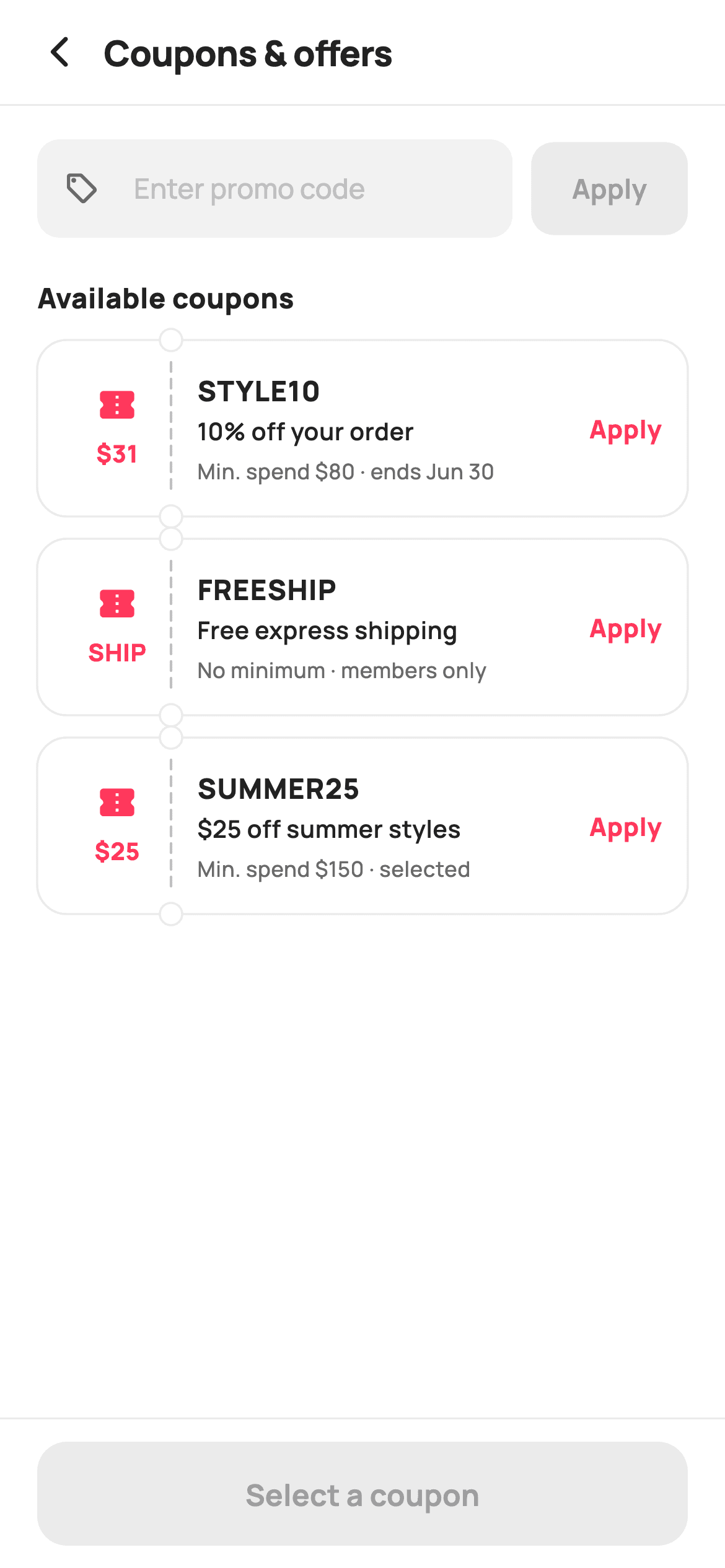
Watch the Flutter UI walkthrough
A short screen recording of Apply Coupon running, if you'd rather see it before you read the code. The written tutorial below covers everything in it.
Can't see the video? Watch it on YouTube.
What you'll build
- ✓Coupon tickets painted with a dashed perforation and two punched side notches
- ✓A single `int?` state field that encodes none, typed-code and picked-coupon
- ✓A promo field that force-uppercases input and enables Apply the moment it is non-empty
- ✓A pinned bar whose button label names the code it is about to apply
- ✓A savings line written per coupon type, including a free-shipping special case
Step-by-step build
Create the file
Add a new file at lib/ecom_checkout_promo/ecom_checkout_promo_screen.dart in your Flutter project.
Register the bundled fonts
No external packages — this is pure Flutter. It does bundle its design font (Manrope), so drop the font file into fonts/ and declare it in pubspec.yaml:
flutter:
  fonts:
    - family: Manrope
      fonts:
- asset: fonts/Manrope-Regular.ttfBuild it, piece by piece
Here's how the screen goes together. Each block below is a real slice of the code with a plain-English explanation — paste them in order, or grab the whole file from the next section.
Three coupons and one nullable index
import 'package:flutter/material.dart';

/// StyleCart — Apply Coupon.
///
/// A code entry field with an apply button, then a list of available coupons —
/// each a painted ticket (`_BadgePainter`) carrying its code, terms and an
/// apply / applied state — plus a running savings line and a pinned apply bar.
///
/// Self-contained per CONVENTIONS.md: pure Flutter, bundled Manrope, inline
/// Airbnb-style tokens, own light theme + SafeArea. The coupon ticket is a
/// CustomPainter (no emoji glyph, no network). Exposes callbacks only.
class EcomCheckoutPromoScreen extends StatefulWidget {
  const EcomCheckoutPromoScreen({
    super.key,
    this.onBack,
    this.onApply,
  });

  final VoidCallback? onBack;
  final ValueChanged<String>? onApply;

  @override
  State<EcomCheckoutPromoScreen> createState() =>
      _EcomCheckoutPromoScreenState();
}

class _EcomCheckoutPromoScreenState extends State<EcomCheckoutPromoScreen> {
  static const String _font = 'Manrope';
  static const Color _canvas = Color(0xFFFFFFFF);
  static const Color _ink = Color(0xFF222222);
  static const Color _muted = Color(0xFF6A6A6A);
  static const Color _faint = Color(0xFFC1C1C1);
  static const Color _brand = Color(0xFFFF385C);
  static const Color _surface = Color(0xFFF2F2F2);
  static const Color _success = Color(0xFF2E9E5B);
  static const Color _hairline = Color(0xFFEBEBEB);

  late final TextEditingController _code;

  static const List<_Coupon> _coupons = <_Coupon>[
    _Coupon('STYLE10', '10% off your order', 'Min. spend \$80 · ends Jun 30', 31),
    _Coupon('FREESHIP', 'Free express shipping', 'No minimum · members only', 12),
    _Coupon('SUMMER25', '\$25 off summer styles', 'Min. spend \$150 · selected', 25),
  ];

  int? _applied;
Each `_Coupon` carries a code, a title, a terms line and an `off` amount, and the three samples cover the shapes real catalogues use: a percentage with a minimum spend, a free-shipping perk, and a flat dollar discount on a collection. The state is one field: `int? _applied`. It has three meanings — `null` for nothing applied, a valid index for a coupon from the list, and `-1` for a code the shopper typed by hand. Every conditional further down reads that single field, which is why the screen never shows two coupons applied at once.
A listener that turns text into a button state
  @override
  void initState() {
    super.initState();
    _code = TextEditingController();
    _code.addListener(() => setState(() {}));
  }

  @override
  void dispose() {
    _code.dispose();
    super.dispose();
  }
`initState` creates the `TextEditingController` and attaches `_code.addListener(() => setState(() {}))` — an empty `setState` whose only job is to schedule a rebuild on every keystroke. That is what lets the Apply button beside the field flip from disabled to enabled as soon as the first character lands, without an `onChanged` handler or a second copy of the text in state. The matching `_code.dispose()` is mandatory: a controller that outlives its widget keeps its listener list alive.
Scrolling coupons, pinned action
  @override
  Widget build(BuildContext context) {
    return Theme(
      data: ThemeData.light(useMaterial3: true),
      child: Scaffold(
        backgroundColor: _canvas,
        body: SafeArea(
          child: Column(
            children: <Widget>[
              _header(),
              const Divider(height: 1, color: _hairline),
              Expanded(
                child: ListView(
                  padding: const EdgeInsets.fromLTRB(20, 18, 20, 20),
                  children: <Widget>[
                    _entry(),
                    const SizedBox(height: 22),
                    const Text(
                      'Available coupons',
                      style: TextStyle(
                        fontFamily: _font,
                        fontSize: 15,
                        fontWeight: FontWeight.w800,
                        color: _ink,
                      ),
                    ),
                    const SizedBox(height: 12),
                    for (int i = 0; i < _coupons.length; i++) ...<Widget>[
                      _couponTicket(_coupons[i], i),
                      const SizedBox(height: 12),
                    ],
                  ],
                ),
              ),
              _applyBar(),
            ],
          ),
        ),
      ),
    );
  }
The `Column` puts the header and a 1px `Divider` at the top, the scrollable content in an `Expanded` `ListView`, and `_applyBar()` outside it so the primary action is always on screen. The tickets are emitted by a collection-for that spreads the ticket and a trailing `SizedBox(height: 12)` — unlike a divider between rows, a trailing gap is harmless here because the list already carries 20px of bottom padding. The section heading 'Available coupons' sits between the manual entry and the list, separating 'I already have a code' from 'show me what's on offer'.
The promo field
  Widget _entry() {
    final bool hasText = _code.text.trim().isNotEmpty;
    return Row(
      children: <Widget>[
        Expanded(
          child: TextField(
            controller: _code,
            textCapitalization: TextCapitalization.characters,
            style: const TextStyle(
              fontFamily: _font,
              fontSize: 15,
              fontWeight: FontWeight.w700,
              letterSpacing: 1.0,
              color: _ink,
            ),
            decoration: InputDecoration(
              isDense: true,
              hintText: 'Enter promo code',
              prefixIcon: const Icon(Icons.local_offer_outlined,
                  size: 19, color: _muted),
              hintStyle: const TextStyle(
                fontFamily: _font,
                fontSize: 15,
                fontWeight: FontWeight.w500,
                letterSpacing: 0,
                color: _faint,
              ),
              filled: true,
              fillColor: _surface,
              contentPadding:
                  const EdgeInsets.symmetric(horizontal: 14, vertical: 15),
              border: OutlineInputBorder(
                borderRadius: BorderRadius.circular(12),
                borderSide: BorderSide.none,
              ),
              enabledBorder: OutlineInputBorder(
                borderRadius: BorderRadius.circular(12),
                borderSide: BorderSide.none,
              ),
              focusedBorder: OutlineInputBorder(
                borderRadius: BorderRadius.circular(12),
                borderSide: const BorderSide(color: _brand, width: 1.4),
              ),
            ),
          ),
        ),
        const SizedBox(width: 10),
        SizedBox(
          height: 50,
          child: FilledButton(
            onPressed: hasText
                ? () {
                    setState(() => _applied = -1); // typed-code applied
                    widget.onApply?.call(_code.text.trim());
                  }
                : null,
            style: FilledButton.styleFrom(
              backgroundColor: _ink,
              foregroundColor: _canvas,
              disabledBackgroundColor: _hairline,
              padding: const EdgeInsets.symmetric(horizontal: 22),
              shape: RoundedRectangleBorder(
                borderRadius: BorderRadius.circular(12),
              ),
            ),
            child: const Text(
              'Apply',
              style: TextStyle(
                fontFamily: _font,
                fontSize: 14.5,
                fontWeight: FontWeight.w700,
              ),
            ),
          ),
        ),
      ],
    );
  }
`hasText` is computed at the top from `_code.text.trim()`, so whitespace alone never counts as a code. The field sets `textCapitalization: TextCapitalization.characters` and `letterSpacing: 1.0`, because promo codes are read character by character and tracking makes them legible — but the hint style resets `letterSpacing: 0`, so 'Enter promo code' reads as a normal sentence rather than stretched. The three border slots are configured separately: `border` and `enabledBorder` are `BorderSide.none` over a filled `_surface`, while `focusedBorder` draws a 1.4px brand outline. Tapping Apply sets `_applied = -1` — the typed-code sentinel — and forwards the trimmed text through `onApply`.
The ticket, and tapping it twice
  Widget _couponTicket(_Coupon c, int i) {
    final bool applied = _applied == i;
    return CustomPaint(
      painter: _BadgePainter(applied: applied),
      child: Padding(
        padding: const EdgeInsets.fromLTRB(14, 14, 14, 14),
        child: Row(
          children: <Widget>[
            // Perforated code stub.
            Container(
              width: 58,
              padding: const EdgeInsets.symmetric(vertical: 10),
              child: Column(
                children: <Widget>[
                  Icon(Icons.confirmation_number_rounded,
                      size: 22, color: applied ? _success : _brand),
                  const SizedBox(height: 6),
                  Text(
                    c.off >= 0 && c.code == 'FREESHIP' ? 'SHIP' : '\$${c.off}',
                    style: TextStyle(
                      fontFamily: _font,
                      fontSize: 13,
                      fontWeight: FontWeight.w800,
                      color: applied ? _success : _brand,
                    ),
                  ),
                ],
              ),
            ),
            const SizedBox(width: 14),
            Expanded(
              child: Column(
                crossAxisAlignment: CrossAxisAlignment.start,
                children: <Widget>[
                  Text(
                    c.code,
                    style: const TextStyle(
                      fontFamily: _font,
                      fontSize: 15,
                      fontWeight: FontWeight.w800,
                      letterSpacing: 0.5,
                      color: _ink,
                    ),
                  ),
                  const SizedBox(height: 2),
                  Text(
                    c.title,
                    style: const TextStyle(
                      fontFamily: _font,
                      fontSize: 13,
                      fontWeight: FontWeight.w600,
                      color: _ink,
                    ),
                  ),
                  const SizedBox(height: 3),
                  Text(
                    c.terms,
                    style: const TextStyle(
                      fontFamily: _font,
                      fontSize: 11.5,
                      fontWeight: FontWeight.w500,
                      color: _muted,
                    ),
                  ),
                ],
              ),
            ),
            const SizedBox(width: 10),
            GestureDetector(
              onTap: () => setState(() => _applied = applied ? null : i),
              child: Text(
                applied ? 'Applied' : 'Apply',
                style: TextStyle(
                  fontFamily: _font,
                  fontSize: 13.5,
                  fontWeight: FontWeight.w800,
                  color: applied ? _success : _brand,
                ),
              ),
            ),
          ],
        ),
      ),
    );
  }
Each ticket is a `CustomPaint` with the content as its `child`, so the painter draws the ticket shape behind a normal `Row`. The 58px stub shows a ticket glyph over a short value — `c.code == 'FREESHIP' ? 'SHIP' : '\$${c.off}'`, which is why the free-shipping entry's `off` value of 12 never appears on screen. The middle column stacks code, title and terms at 15/13/11.5px. The trailing `GestureDetector` is the toggle: `_applied = applied ? null : i` means tapping an applied coupon *removes* it, so a shopper who picks the wrong one is not stuck. Three things flip to `_success` green together — the stub icon, its value and the action label.
The apply bar and its two string helpers
  Widget _applyBar() {
    final bool any = _applied != null;
    return Container(
      decoration: const BoxDecoration(
        color: _canvas,
        border: Border(top: BorderSide(color: _hairline)),
      ),
      child: SafeArea(
        top: false,
        child: Padding(
          padding: const EdgeInsets.fromLTRB(20, 12, 20, 12),
          child: Column(
            mainAxisSize: MainAxisSize.min,
            children: <Widget>[
              if (any)
                Padding(
                  padding: const EdgeInsets.only(bottom: 10),
                  child: Row(
                    children: <Widget>[
                      const Icon(Icons.check_circle_rounded,
                          size: 16, color: _success),
                      const SizedBox(width: 6),
                      Text(
                        _savingsText(),
                        style: const TextStyle(
                          fontFamily: _font,
                          fontSize: 13,
                          fontWeight: FontWeight.w700,
                          color: _success,
                        ),
                      ),
                    ],
                  ),
                ),
              SizedBox(
                height: 56,
                child: FilledButton(
                  onPressed: any
                      ? () => widget.onApply?.call(_appliedCode())
                      : null,
                  style: FilledButton.styleFrom(
                    backgroundColor: _brand,
                    foregroundColor: _canvas,
                    disabledBackgroundColor: _hairline,
                    minimumSize: const Size.fromHeight(56),
                    shape: RoundedRectangleBorder(
                      borderRadius: BorderRadius.circular(16),
                    ),
                  ),
                  child: Text(
                    any ? 'Apply ${_appliedCode()}' : 'Select a coupon',
                    style: const TextStyle(
                      fontFamily: _font,
                      fontSize: 16,
                      fontWeight: FontWeight.w700,
                    ),
                  ),
                ),
              ),
            ],
          ),
        ),
      ),
    );
  }

  String _appliedCode() {
    if (_applied == null) return '';
    if (_applied == -1) return _code.text.trim();
    return _coupons[_applied!].code;
  }

  String _savingsText() {
    if (_applied == -1) return 'Code applied — savings shown at review';
    final _Coupon c = _coupons[_applied!];
    if (c.code == 'FREESHIP') return 'Free shipping unlocked';
    return 'You save \$${c.off} with ${c.code}';
  }
`_applyBar` computes `final bool any = _applied != null` and uses it twice: to conditionally show the savings row, and to enable the button. The bar is a `Container` with a top hairline wrapping `SafeArea(top: false)`, so its white background extends under the home indicator while the content stays above it. The two helpers below resolve the sentinel: `_appliedCode()` returns the typed text for `-1` and the coupon's code otherwise, and `_savingsText()` branches three ways — a vague 'savings shown at review' for a typed code the app cannot price yet, 'Free shipping unlocked' for FREESHIP, and a concrete 'You save \$25 with SUMMER25' for the rest. The button label follows suit, reading `Apply SUMMER25` rather than a generic 'Apply'.
Painting a ticket with notches and perforations
class _Coupon {
  const _Coupon(this.code, this.title, this.terms, this.off);
  final String code;
  final String title;
  final String terms;
  final int off;
}

/// Paints a coupon ticket: a rounded card with a vertical dashed perforation
/// and two side notches separating the code stub from the body. Turns green
/// when applied.
class _BadgePainter extends CustomPainter {
  _BadgePainter({required this.applied});
  final bool applied;

  @override
  void paint(Canvas canvas, Size size) {
    final RRect body = RRect.fromRectAndRadius(
      Offset.zero & size,
      const Radius.circular(16),
    );
    canvas.drawRRect(
      body,
      Paint()
        ..color = applied
            ? const Color(0xFF2E9E5B).withValues(alpha: 0.06)
            : const Color(0xFFFFFFFF),
    );
    canvas.drawRRect(
      body,
      Paint()
        ..style = PaintingStyle.stroke
        ..strokeWidth = 1.2
        ..color = applied ? const Color(0xFF2E9E5B) : const Color(0xFFEBEBEB),
    );

    // Perforation x position (after the 58px stub + padding).
    final double px = 72;

    // Side notches.
    final Paint notch = Paint()..color = const Color(0xFFFFFFFF);
    canvas.drawCircle(Offset(px, 0), 6, notch);
    canvas.drawCircle(Offset(px, size.height), 6, notch);
    final Paint notchEdge = Paint()
      ..style = PaintingStyle.stroke
      ..strokeWidth = 1.2
      ..color = applied ? const Color(0xFF2E9E5B) : const Color(0xFFEBEBEB);
    canvas.drawCircle(Offset(px, 0), 6, notchEdge);
    canvas.drawCircle(Offset(px, size.height), 6, notchEdge);

    // Dashed perforation.
    final Paint dash = Paint()
      ..color = const Color(0xFFC1C1C1)
      ..strokeWidth = 1.4
      ..strokeCap = StrokeCap.round;
    double y = 12;
    while (y < size.height - 12) {
      canvas.drawLine(Offset(px, y), Offset(px, y + 5), dash);
      y += 9;
    }
  }

  @override
  bool shouldRepaint(_BadgePainter old) => old.applied != applied;
}
`_BadgePainter` fills a 16px-radius `RRect` — white normally, or green at `alpha: 0.06` when applied — then strokes the same shape at 1.2px in `_hairline` or green. The ticket illusion comes next: two 6px circles painted in white at `Offset(px, 0)` and `Offset(px, size.height)`, each restroked in the border colour, so the card looks punched at top and bottom. Between them a `while` loop steps `y += 9` drawing 5px segments, producing a dashed tear line. `px` is hard-coded to 72 to match the 58px stub plus padding — the one number to change if you resize the stub. Because the notches are painted white rather than cut out, this ticket expects a white page behind it.
Full code
The complete, ready-to-paste source. Free to use in your projects — one click copies it all.
import 'package:flutter/material.dart';

/// StyleCart — Apply Coupon.
///
/// A code entry field with an apply button, then a list of available coupons —
/// each a painted ticket (`_BadgePainter`) carrying its code, terms and an
/// apply / applied state — plus a running savings line and a pinned apply bar.
///
/// Self-contained per CONVENTIONS.md: pure Flutter, bundled Manrope, inline
/// Airbnb-style tokens, own light theme + SafeArea. The coupon ticket is a
/// CustomPainter (no emoji glyph, no network). Exposes callbacks only.
class EcomCheckoutPromoScreen extends StatefulWidget {
  const EcomCheckoutPromoScreen({
    super.key,
    this.onBack,
    this.onApply,
  });

  final VoidCallback? onBack;
  final ValueChanged<String>? onApply;

  @override
  State<EcomCheckoutPromoScreen> createState() =>
      _EcomCheckoutPromoScreenState();
}

class _EcomCheckoutPromoScreenState extends State<EcomCheckoutPromoScreen> {
  static const String _font = 'Manrope';
  static const Color _canvas = Color(0xFFFFFFFF);
  static const Color _ink = Color(0xFF222222);
  static const Color _muted = Color(0xFF6A6A6A);
  static const Color _faint = Color(0xFFC1C1C1);
  static const Color _brand = Color(0xFFFF385C);
  static const Color _surface = Color(0xFFF2F2F2);
  static const Color _success = Color(0xFF2E9E5B);
  static const Color _hairline = Color(0xFFEBEBEB);

  late final TextEditingController _code;

  static const List<_Coupon> _coupons = <_Coupon>[
    _Coupon('STYLE10', '10% off your order', 'Min. spend \$80 · ends Jun 30', 31),
    _Coupon('FREESHIP', 'Free express shipping', 'No minimum · members only', 12),
    _Coupon('SUMMER25', '\$25 off summer styles', 'Min. spend \$150 · selected', 25),
  ];

  int? _applied;

  @override
  void initState() {
    super.initState();
    _code = TextEditingController();
    _code.addListener(() => setState(() {}));
  }

  @override
  void dispose() {
    _code.dispose();
    super.dispose();
  }

  @override
  Widget build(BuildContext context) {
    return Theme(
      data: ThemeData.light(useMaterial3: true),
      child: Scaffold(
        backgroundColor: _canvas,
        body: SafeArea(
          child: Column(
            children: <Widget>[
              _header(),
              const Divider(height: 1, color: _hairline),
              Expanded(
                child: ListView(
                  padding: const EdgeInsets.fromLTRB(20, 18, 20, 20),
                  children: <Widget>[
                    _entry(),
                    const SizedBox(height: 22),
                    const Text(
                      'Available coupons',
                      style: TextStyle(
                        fontFamily: _font,
                        fontSize: 15,
                        fontWeight: FontWeight.w800,
                        color: _ink,
                      ),
                    ),
                    const SizedBox(height: 12),
                    for (int i = 0; i < _coupons.length; i++) ...<Widget>[
                      _couponTicket(_coupons[i], i),
                      const SizedBox(height: 12),
                    ],
                  ],
                ),
              ),
              _applyBar(),
            ],
          ),
        ),
      ),
    );
  }

  Widget _header() {
    return Padding(
      padding: const EdgeInsets.fromLTRB(8, 4, 20, 4),
      child: Row(
        children: <Widget>[
          IconButton(
            onPressed: widget.onBack,
            icon: const Icon(Icons.arrow_back_ios_new_rounded,
                size: 20, color: _ink),
          ),
          const Expanded(
            child: Text(
              'Coupons & offers',
              style: TextStyle(
                fontFamily: _font,
                fontSize: 19,
                fontWeight: FontWeight.w800,
                letterSpacing: -0.3,
                color: _ink,
              ),
            ),
          ),
        ],
      ),
    );
  }

  Widget _entry() {
    final bool hasText = _code.text.trim().isNotEmpty;
    return Row(
      children: <Widget>[
        Expanded(
          child: TextField(
            controller: _code,
            textCapitalization: TextCapitalization.characters,
            style: const TextStyle(
              fontFamily: _font,
              fontSize: 15,
              fontWeight: FontWeight.w700,
              letterSpacing: 1.0,
              color: _ink,
            ),
            decoration: InputDecoration(
              isDense: true,
              hintText: 'Enter promo code',
              prefixIcon: const Icon(Icons.local_offer_outlined,
                  size: 19, color: _muted),
              hintStyle: const TextStyle(
                fontFamily: _font,
                fontSize: 15,
                fontWeight: FontWeight.w500,
                letterSpacing: 0,
                color: _faint,
              ),
              filled: true,
              fillColor: _surface,
              contentPadding:
                  const EdgeInsets.symmetric(horizontal: 14, vertical: 15),
              border: OutlineInputBorder(
                borderRadius: BorderRadius.circular(12),
                borderSide: BorderSide.none,
              ),
              enabledBorder: OutlineInputBorder(
                borderRadius: BorderRadius.circular(12),
                borderSide: BorderSide.none,
              ),
              focusedBorder: OutlineInputBorder(
                borderRadius: BorderRadius.circular(12),
                borderSide: const BorderSide(color: _brand, width: 1.4),
              ),
            ),
          ),
        ),
        const SizedBox(width: 10),
        SizedBox(
          height: 50,
          child: FilledButton(
            onPressed: hasText
                ? () {
                    setState(() => _applied = -1); // typed-code applied
                    widget.onApply?.call(_code.text.trim());
                  }
                : null,
            style: FilledButton.styleFrom(
              backgroundColor: _ink,
              foregroundColor: _canvas,
              disabledBackgroundColor: _hairline,
              padding: const EdgeInsets.symmetric(horizontal: 22),
              shape: RoundedRectangleBorder(
                borderRadius: BorderRadius.circular(12),
              ),
            ),
            child: const Text(
              'Apply',
              style: TextStyle(
                fontFamily: _font,
                fontSize: 14.5,
                fontWeight: FontWeight.w700,
              ),
            ),
          ),
        ),
      ],
    );
  }

  Widget _couponTicket(_Coupon c, int i) {
    final bool applied = _applied == i;
    return CustomPaint(
      painter: _BadgePainter(applied: applied),
      child: Padding(
        padding: const EdgeInsets.fromLTRB(14, 14, 14, 14),
        child: Row(
          children: <Widget>[
            // Perforated code stub.
            Container(
              width: 58,
              padding: const EdgeInsets.symmetric(vertical: 10),
              child: Column(
                children: <Widget>[
                  Icon(Icons.confirmation_number_rounded,
                      size: 22, color: applied ? _success : _brand),
                  const SizedBox(height: 6),
                  Text(
                    c.off >= 0 && c.code == 'FREESHIP' ? 'SHIP' : '\$${c.off}',
                    style: TextStyle(
                      fontFamily: _font,
                      fontSize: 13,
                      fontWeight: FontWeight.w800,
                      color: applied ? _success : _brand,
                    ),
                  ),
                ],
              ),
            ),
            const SizedBox(width: 14),
            Expanded(
              child: Column(
                crossAxisAlignment: CrossAxisAlignment.start,
                children: <Widget>[
                  Text(
                    c.code,
                    style: const TextStyle(
                      fontFamily: _font,
                      fontSize: 15,
                      fontWeight: FontWeight.w800,
                      letterSpacing: 0.5,
                      color: _ink,
                    ),
                  ),
                  const SizedBox(height: 2),
                  Text(
                    c.title,
                    style: const TextStyle(
                      fontFamily: _font,
                      fontSize: 13,
                      fontWeight: FontWeight.w600,
                      color: _ink,
                    ),
                  ),
                  const SizedBox(height: 3),
                  Text(
                    c.terms,
                    style: const TextStyle(
                      fontFamily: _font,
                      fontSize: 11.5,
                      fontWeight: FontWeight.w500,
                      color: _muted,
                    ),
                  ),
                ],
              ),
            ),
            const SizedBox(width: 10),
            GestureDetector(
              onTap: () => setState(() => _applied = applied ? null : i),
              child: Text(
                applied ? 'Applied' : 'Apply',
                style: TextStyle(
                  fontFamily: _font,
                  fontSize: 13.5,
                  fontWeight: FontWeight.w800,
                  color: applied ? _success : _brand,
                ),
              ),
            ),
          ],
        ),
      ),
    );
  }

  Widget _applyBar() {
    final bool any = _applied != null;
    return Container(
      decoration: const BoxDecoration(
        color: _canvas,
        border: Border(top: BorderSide(color: _hairline)),
      ),
      child: SafeArea(
        top: false,
        child: Padding(
          padding: const EdgeInsets.fromLTRB(20, 12, 20, 12),
          child: Column(
            mainAxisSize: MainAxisSize.min,
            children: <Widget>[
              if (any)
                Padding(
                  padding: const EdgeInsets.only(bottom: 10),
                  child: Row(
                    children: <Widget>[
                      const Icon(Icons.check_circle_rounded,
                          size: 16, color: _success),
                      const SizedBox(width: 6),
                      Text(
                        _savingsText(),
                        style: const TextStyle(
                          fontFamily: _font,
                          fontSize: 13,
                          fontWeight: FontWeight.w700,
                          color: _success,
                        ),
                      ),
                    ],
                  ),
                ),
              SizedBox(
                height: 56,
                child: FilledButton(
                  onPressed: any
                      ? () => widget.onApply?.call(_appliedCode())
                      : null,
                  style: FilledButton.styleFrom(
                    backgroundColor: _brand,
                    foregroundColor: _canvas,
                    disabledBackgroundColor: _hairline,
                    minimumSize: const Size.fromHeight(56),
                    shape: RoundedRectangleBorder(
                      borderRadius: BorderRadius.circular(16),
                    ),
                  ),
                  child: Text(
                    any ? 'Apply ${_appliedCode()}' : 'Select a coupon',
                    style: const TextStyle(
                      fontFamily: _font,
                      fontSize: 16,
                      fontWeight: FontWeight.w700,
                    ),
                  ),
                ),
              ),
            ],
          ),
        ),
      ),
    );
  }

  String _appliedCode() {
    if (_applied == null) return '';
    if (_applied == -1) return _code.text.trim();
    return _coupons[_applied!].code;
  }

  String _savingsText() {
    if (_applied == -1) return 'Code applied — savings shown at review';
    final _Coupon c = _coupons[_applied!];
    if (c.code == 'FREESHIP') return 'Free shipping unlocked';
    return 'You save \$${c.off} with ${c.code}';
  }
}

class _Coupon {
  const _Coupon(this.code, this.title, this.terms, this.off);
  final String code;
  final String title;
  final String terms;
  final int off;
}

/// Paints a coupon ticket: a rounded card with a vertical dashed perforation
/// and two side notches separating the code stub from the body. Turns green
/// when applied.
class _BadgePainter extends CustomPainter {
  _BadgePainter({required this.applied});
  final bool applied;

  @override
  void paint(Canvas canvas, Size size) {
    final RRect body = RRect.fromRectAndRadius(
      Offset.zero & size,
      const Radius.circular(16),
    );
    canvas.drawRRect(
      body,
      Paint()
        ..color = applied
            ? const Color(0xFF2E9E5B).withValues(alpha: 0.06)
            : const Color(0xFFFFFFFF),
    );
    canvas.drawRRect(
      body,
      Paint()
        ..style = PaintingStyle.stroke
        ..strokeWidth = 1.2
        ..color = applied ? const Color(0xFF2E9E5B) : const Color(0xFFEBEBEB),
    );

    // Perforation x position (after the 58px stub + padding).
    final double px = 72;

    // Side notches.
    final Paint notch = Paint()..color = const Color(0xFFFFFFFF);
    canvas.drawCircle(Offset(px, 0), 6, notch);
    canvas.drawCircle(Offset(px, size.height), 6, notch);
    final Paint notchEdge = Paint()
      ..style = PaintingStyle.stroke
      ..strokeWidth = 1.2
      ..color = applied ? const Color(0xFF2E9E5B) : const Color(0xFFEBEBEB);
    canvas.drawCircle(Offset(px, 0), 6, notchEdge);
    canvas.drawCircle(Offset(px, size.height), 6, notchEdge);

    // Dashed perforation.
    final Paint dash = Paint()
      ..color = const Color(0xFFC1C1C1)
      ..strokeWidth = 1.4
      ..strokeCap = StrokeCap.round;
    double y = 12;
    while (y < size.height - 12) {
      canvas.drawLine(Offset(px, y), Offset(px, y + 5), dash);
      y += 9;
    }
  }

  @override
  bool shouldRepaint(_BadgePainter old) => old.applied != applied;
}
Plus bundled 5 binary assets (fonts/images). The CLI and MCP install those for you automatically.
Two faster ways to add it
Copy-paste works, but you can skip it entirely.
1. FlutterKit CLI
One command drops this screen — and its fonts — straight into your project.
$ flutterkit add ecom-checkout-promo2. AI agent (MCP)
Connect FlutterKit's MCP server in Claude or Cursor and just ask your agent to install ecom-checkout-promo — it fetches and writes the files for you.
FAQ
How do I validate a typed code against my backend?
The Apply button beside the field already forwards the trimmed text through `onApply`. Do the lookup in the parent, and on failure pass an error back into the widget to render under the field. The screen optimistically sets the `-1` sentinel on tap, so on a rejected code you also want to reset `_applied` to null.
What do the three values of `_applied` mean?
`null` means nothing is applied, `-1` means the shopper typed their own code, and any value of 0 or above is an index into `_coupons`. Both helpers at the bottom of the state class branch on exactly those three cases, which is what lets a typed code and a picked coupon occupy the same slot.
Can more than one coupon be applied at once?
Not as written — a single index can only point at one entry, which matches how most stores actually work. If you need stacking, swap the field for a `Set<int>` and change the ticket's toggle to add or remove from it; the savings line then needs to sum the selected coupons instead of reading one.
Does it need any packages or fonts?
No packages — the ticket, its notches and the dashed tear line are all drawn by a `CustomPainter` using `material.dart` alone, so there is no nine-patch image to ship. Manrope is bundled with the screen and registered under `fonts:` in your pubspec.
Which Flutter version does this need?
Flutter 3.22 or newer, because the applied-ticket tint uses `Color.withValues(alpha: 0.06)`. On an older SDK replace it with `withOpacity(0.06)` and expand the `super.key` constructor into the `{Key? key, ...}) : super(key: key)` form.


