How to Build a Drag-to-Pin Delivery Location Map in Flutter (Full Code + Preview)
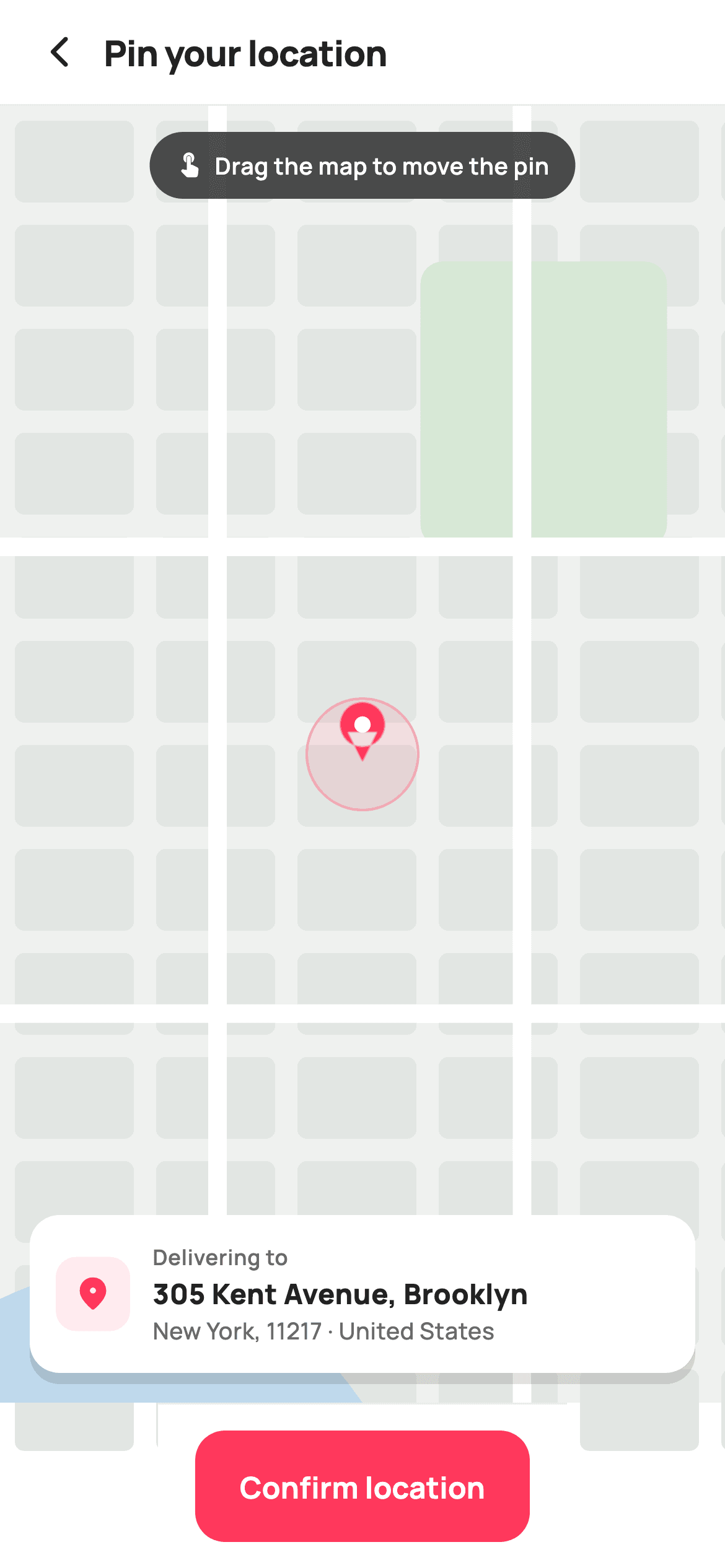
You can build a convincing map-pin screen without a maps SDK, an API key or a network call. This tutorial builds StyleCart's pin-your-location screen in Flutter with a street map painted onto a Canvas — block grid, roads, a park and a river ribbon — plus a teardrop pin the shopper drags around, and a floating address card that updates as the pin crosses quadrants. The drag maths is the part worth learning: the pin is stored as a 0-to-1 fraction, so it survives any screen size.
Watch the Flutter UI walkthrough
A short screen recording of Pin your location running, if you'd rather see it before you read the code. The written tutorial below covers everything in it.
Can't see the video? Watch it on YouTube.
What you'll build
- ✓A street map painted from Canvas primitives with no maps SDK or API key
- ✓A pin position stored as fractional coordinates and clamped inside the viewport
- ✓Drag handling that converts pixel deltas into fractions via LayoutBuilder constraints
- ✓A floating address card with a shadow that reacts as the pin moves
Step-by-step build
Create the file
Add a new file at lib/ecom_checkout_address_map/ecom_checkout_address_map_screen.dart in your Flutter project.
Register the bundled fonts
No external packages — this is pure Flutter. It does bundle its design font (Manrope), so drop the font file into fonts/ and declare it in pubspec.yaml:
flutter:
  fonts:
    - family: Manrope
      fonts:
- asset: fonts/Manrope-Regular.ttfBuild it, piece by piece
Here's how the screen goes together. Each block below is a real slice of the code with a plain-English explanation — paste them in order, or grab the whole file from the next section.
Storing the pin as a fraction, not as pixels
import 'package:flutter/material.dart';

/// StyleCart — Pin Location.
///
/// A full-bleed painted street map with a centre pin the shopper drags to
/// place the delivery point; a floating card shows the (mock) reverse-geocoded
/// address that updates as the pin moves, over a confirm-location bar.
///
/// Self-contained per CONVENTIONS.md: pure Flutter, bundled Manrope, inline
/// Airbnb-style tokens, own light theme + SafeArea. The map is a CustomPainter
/// (no emoji glyph, no network). Exposes callbacks only.
class EcomCheckoutAddressMapScreen extends StatefulWidget {
  const EcomCheckoutAddressMapScreen({
    super.key,
    this.onBack,
    this.onConfirm,
  });

  final VoidCallback? onBack;
  final VoidCallback? onConfirm;

  @override
  State<EcomCheckoutAddressMapScreen> createState() =>
      _EcomCheckoutAddressMapScreenState();
}

class _EcomCheckoutAddressMapScreenState
    extends State<EcomCheckoutAddressMapScreen> {
  static const String _font = 'Manrope';
  static const Color _canvas = Color(0xFFFFFFFF);
  static const Color _ink = Color(0xFF222222);
  static const Color _muted = Color(0xFF6A6A6A);
  static const Color _brand = Color(0xFFFF385C);
  static const Color _hairline = Color(0xFFEBEBEB);

  // Pin position as a 0..1 fraction of the map box; starts centred.
  Offset _pin = const Offset(0.5, 0.5);

  static const List<String> _streets = <String>[
    '24 Linden Row, Brooklyn',
    '120 Berry Street, Brooklyn',
    '9 Wythe Avenue, Brooklyn',
    '305 Kent Avenue, Brooklyn',
  ];

  String get _street {
    // Map the pin's quadrant to a stable street so the card reacts to drags.
    final int q = (_pin.dx < 0.5 ? 0 : 1) + (_pin.dy < 0.5 ? 0 : 2);
    return _streets[q];
  }
`Offset _pin = const Offset(0.5, 0.5)` holds the pin as a 0-to-1 fraction of the map box rather than in pixels. That single decision means the pin lands in the same *place* on a phone and a tablet, and survives a rotation without recalculation. `_street` is a getter that maps the pin to one of four addresses by quadrant: `(_pin.dx < 0.5 ? 0 : 1) + (_pin.dy < 0.5 ? 0 : 2)` yields 0 to 3 for top-left, top-right, bottom-left and bottom-right. It is a stand-in for reverse geocoding, but it behaves like one — the card changes when the pin moves meaningfully and stays put during small adjustments, which is exactly how a real lookup feels.
Turning a drag into a fractional move
  @override
  Widget build(BuildContext context) {
    return Theme(
      data: ThemeData.light(useMaterial3: true),
      child: Scaffold(
        backgroundColor: _canvas,
        body: SafeArea(
          child: Column(
            children: <Widget>[
              _header(),
              const Divider(height: 1, color: _hairline),
              Expanded(
                child: LayoutBuilder(
                  builder: (BuildContext context, BoxConstraints c) {
                    return GestureDetector(
                      onPanUpdate: (DragUpdateDetails d) {
                        setState(() {
                          final double nx =
                              (_pin.dx + d.delta.dx / c.maxWidth).clamp(0.08, 0.92);
                          final double ny =
                              (_pin.dy + d.delta.dy / c.maxHeight)
                                  .clamp(0.08, 0.86);
                          _pin = Offset(nx, ny);
                        });
                      },
                      child: Stack(
                        children: <Widget>[
                          Positioned.fill(
                            child: CustomPaint(painter: _MapPainter(_pin)),
                          ),
                          Positioned(
                            left: 16,
                            right: 16,
                            top: 14,
                            child: _hintPill(),
                          ),
                          Positioned(
                            left: 16,
                            right: 16,
                            bottom: 16,
                            child: _addressCard(),
                          ),
                        ],
                      ),
                    );
                  },
                ),
              ),
              _confirmBar(),
            ],
          ),
        ),
      ),
    );
  }
This is the mechanical core. `LayoutBuilder` hands over the map's real `BoxConstraints`, and `onPanUpdate` converts each frame's pixel delta into the same fractional space: `_pin.dx + d.delta.dx / c.maxWidth`. Dividing by the measured width is what makes a one-inch drag move the pin the same proportion of the map on any device. Both axes are then clamped — `(0.08, 0.92)` horizontally and `(0.08, 0.86)` vertically — keeping the pin off the edges, with the tighter bottom bound reserving room for the floating address card. Inside, a `Stack` layers `Positioned.fill` for the painter, a hint pill at the top and the address card at the bottom, all inside the `GestureDetector` so the whole area is draggable.
The header and the instruction pill
  Widget _header() {
    return Padding(
      padding: const EdgeInsets.fromLTRB(8, 4, 20, 4),
      child: Row(
        children: <Widget>[
          IconButton(
            onPressed: widget.onBack,
            icon: const Icon(Icons.arrow_back_ios_new_rounded,
                size: 20, color: _ink),
          ),
          const Expanded(
            child: Text(
              'Pin your location',
              style: TextStyle(
                fontFamily: _font,
                fontSize: 19,
                fontWeight: FontWeight.w800,
                letterSpacing: -0.3,
                color: _ink,
              ),
            ),
          ),
        ],
      ),
    );
  }

  Widget _hintPill() {
    return Center(
      child: Container(
        padding: const EdgeInsets.symmetric(horizontal: 14, vertical: 9),
        decoration: BoxDecoration(
          color: const Color(0xCC222222),
          borderRadius: BorderRadius.circular(30),
        ),
        child: const Row(
          mainAxisSize: MainAxisSize.min,
          children: <Widget>[
            Icon(Icons.touch_app_rounded, size: 15, color: _canvas),
            SizedBox(width: 6),
            Text(
              'Drag the map to move the pin',
              style: TextStyle(
                fontFamily: _font,
                fontSize: 12.5,
                fontWeight: FontWeight.w600,
                color: _canvas,
              ),
            ),
          ],
        ),
      ),
    );
  }
The header is a back button and a left-aligned 19px `w800` title with `letterSpacing: -0.3`, the negative tracking StyleCart applies to all its bold headings. `_hintPill` is the more interesting piece: a dark pill at `Color(0xCC222222)` — 80% opaque near-black — floating over the map with a touch icon and the words 'Drag the map to move the pin'. A drag affordance is invisible by nature, so an explicit instruction is not clutter here; it is the only thing telling the reader the screen is interactive at all. Using a translucent scrim colour rather than a solid one keeps the map legible underneath while the text stays readable.
The floating address card
  Widget _addressCard() {
    return Container(
      padding: const EdgeInsets.all(14),
      decoration: BoxDecoration(
        color: _canvas,
        borderRadius: BorderRadius.circular(16),
        boxShadow: const <BoxShadow>[
          BoxShadow(
            color: Color(0x1F000000),
            blurRadius: 16,
            offset: Offset(0, 6),
          ),
        ],
      ),
      child: Row(
        children: <Widget>[
          Container(
            width: 40,
            height: 40,
            decoration: BoxDecoration(
              color: _brand.withValues(alpha: 0.10),
              borderRadius: BorderRadius.circular(11),
            ),
            child: const Icon(Icons.location_on_rounded,
                size: 21, color: _brand),
          ),
          const SizedBox(width: 12),
          Expanded(
            child: Column(
              crossAxisAlignment: CrossAxisAlignment.start,
              children: <Widget>[
                const Text(
                  'Delivering to',
                  style: TextStyle(
                    fontFamily: _font,
                    fontSize: 11.5,
                    fontWeight: FontWeight.w600,
                    letterSpacing: 0.3,
                    color: _muted,
                  ),
                ),
                const SizedBox(height: 2),
                Text(
                  _street,
                  maxLines: 1,
                  overflow: TextOverflow.ellipsis,
                  style: const TextStyle(
                    fontFamily: _font,
                    fontSize: 15,
                    fontWeight: FontWeight.w800,
                    color: _ink,
                  ),
                ),
                const Text(
                  'New York, 11217 · United States',
                  style: TextStyle(
                    fontFamily: _font,
                    fontSize: 12.5,
                    fontWeight: FontWeight.w500,
                    color: _muted,
                  ),
                ),
              ],
            ),
          ),
        ],
      ),
    );
  }
The card is `Positioned` 16px from the left, right and bottom edges of the map — floating over it rather than sitting below it, so the map keeps its full height. Its `BoxShadow` at `Color(0x1F000000)` with `blurRadius: 16` and a `+6` y-offset is what lifts it off the map; on a busy painted background a border alone would not separate it. The street line uses `maxLines: 1` with `overflow: TextOverflow.ellipsis`, essential because reverse-geocoded addresses vary wildly in length and one long result would otherwise reflow the card and shift the layout. Reading `_street` here is what connects the card to the drag — the getter recomputes on every `setState`, so the address follows the pin.
Painting a street map
/// Paints a street map — block grid, a few roads, a river ribbon and the
/// delivery pin (with a soft accuracy halo) at the given fractional position.
class _MapPainter extends CustomPainter {
  _MapPainter(this.pin);
  final Offset pin;

  @override
  void paint(Canvas canvas, Size size) {
    final double w = size.width;
    final double h = size.height;

    canvas.drawRect(Offset.zero & size, Paint()..color = const Color(0xFFEFF1EF));

    // Block grid.
    final Paint block = Paint()..color = const Color(0xFFE2E6E3);
    for (double y = 8; y < h; y += 56) {
      for (double x = 8; x < w; x += 76) {
        canvas.drawRRect(
          RRect.fromRectAndRadius(
            Rect.fromLTWH(x, y, 64, 44),
            const Radius.circular(5),
          ),
          block,
        );
      }
    }

    // Park patch.
    canvas.drawRRect(
      RRect.fromRectAndRadius(
        Rect.fromLTWH(w * 0.58, h * 0.12, w * 0.34, h * 0.22),
        const Radius.circular(12),
      ),
      Paint()..color = const Color(0xFFD7E8D6),
    );

    // Roads.
    final Paint road = Paint()
      ..color = const Color(0xFFFFFFFF)
      ..strokeWidth = 10;
    canvas.drawLine(Offset(0, h * 0.34), Offset(w, h * 0.34), road);
    canvas.drawLine(Offset(0, h * 0.70), Offset(w, h * 0.70), road);
    canvas.drawLine(Offset(w * 0.30, 0), Offset(w * 0.30, h), road);
    canvas.drawLine(Offset(w * 0.72, 0), Offset(w * 0.72, h), road);

    // River ribbon along the bottom-left.
    final Path river = Path()
      ..moveTo(0, h * 0.92)
      ..quadraticBezierTo(w * 0.3, h * 0.84, w * 0.5, h)
      ..lineTo(0, h);
    canvas.drawPath(river, Paint()..color = const Color(0xFFBFD9EC));
`_MapPainter` builds the map in believable order — the same order a real cartographic renderer uses. A flat `#EFF1EF` base, then the city blocks from a nested loop stepping 76px across and 56px down drawing 64x44 rounded rects, which leaves natural-looking street gaps between them. A green park patch is placed proportionally at `w * 0.58, h * 0.12`. Then the roads: four `drawLine` calls in white at `strokeWidth: 10`, drawn *over* the blocks so they read as gaps cut through the grid. Finally a river built with `quadraticBezierTo` — one control point is enough to make a curve that reads as natural rather than drawn with a ruler. None of this needs an asset, a tile server or an API key.
The teardrop pin and its accuracy halo
    // Pin + accuracy halo.
    final Offset p = Offset(pin.dx * w, pin.dy * h);
    canvas.drawCircle(
        p, 30, Paint()..color = const Color(0x1AFF385C));
    canvas.drawCircle(
        p, 30, Paint()
      ..style = PaintingStyle.stroke
      ..strokeWidth = 1.4
      ..color = const Color(0x55FF385C));

    // Teardrop pin.
    final Path pinPath = Path()
      ..addOval(Rect.fromCircle(center: p.translate(0, -16), radius: 12))
      ..moveTo(p.dx - 8, p.dy - 12)
      ..lineTo(p.dx, p.dy + 4)
      ..lineTo(p.dx + 8, p.dy - 12)
      ..close();
    canvas.drawPath(
      pinPath,
      Paint()
        ..color = const Color(0xFFFF385C)
        ..maskFilter = const MaskFilter.blur(BlurStyle.normal, 0.4),
    );
    canvas.drawCircle(
        p.translate(0, -16), 4.4, Paint()..color = const Color(0xFFFFFFFF));
  }

  @override
  bool shouldRepaint(_MapPainter oldDelegate) => oldDelegate.pin != pin;
The pin's pixel position is recovered by multiplying the fraction back out: `Offset(pin.dx * w, pin.dy * h)`. Around it go two 30px circles — a fill at `0x1AFF385C` and a 1.4px stroke at `0x55FF385C` — the familiar GPS accuracy halo, built from one colour at two alpha levels. The pin itself is a `Path` combining `addOval` for the head with a three-point triangle for the tip, closed into one shape so it fills as a single teardrop. A `MaskFilter.blur` of just 0.4 softens the edge enough to stop the diagonals looking jagged without visibly blurring anything. A small white circle on the head finishes it. `shouldRepaint` compares only `pin`, so the map repaints on drag and is skipped otherwise.
Full code
The complete, ready-to-paste source. Free to use in your projects — one click copies it all.
import 'package:flutter/material.dart';

/// StyleCart — Pin Location.
///
/// A full-bleed painted street map with a centre pin the shopper drags to
/// place the delivery point; a floating card shows the (mock) reverse-geocoded
/// address that updates as the pin moves, over a confirm-location bar.
///
/// Self-contained per CONVENTIONS.md: pure Flutter, bundled Manrope, inline
/// Airbnb-style tokens, own light theme + SafeArea. The map is a CustomPainter
/// (no emoji glyph, no network). Exposes callbacks only.
class EcomCheckoutAddressMapScreen extends StatefulWidget {
  const EcomCheckoutAddressMapScreen({
    super.key,
    this.onBack,
    this.onConfirm,
  });

  final VoidCallback? onBack;
  final VoidCallback? onConfirm;

  @override
  State<EcomCheckoutAddressMapScreen> createState() =>
      _EcomCheckoutAddressMapScreenState();
}

class _EcomCheckoutAddressMapScreenState
    extends State<EcomCheckoutAddressMapScreen> {
  static const String _font = 'Manrope';
  static const Color _canvas = Color(0xFFFFFFFF);
  static const Color _ink = Color(0xFF222222);
  static const Color _muted = Color(0xFF6A6A6A);
  static const Color _brand = Color(0xFFFF385C);
  static const Color _hairline = Color(0xFFEBEBEB);

  // Pin position as a 0..1 fraction of the map box; starts centred.
  Offset _pin = const Offset(0.5, 0.5);

  static const List<String> _streets = <String>[
    '24 Linden Row, Brooklyn',
    '120 Berry Street, Brooklyn',
    '9 Wythe Avenue, Brooklyn',
    '305 Kent Avenue, Brooklyn',
  ];

  String get _street {
    // Map the pin's quadrant to a stable street so the card reacts to drags.
    final int q = (_pin.dx < 0.5 ? 0 : 1) + (_pin.dy < 0.5 ? 0 : 2);
    return _streets[q];
  }

  @override
  Widget build(BuildContext context) {
    return Theme(
      data: ThemeData.light(useMaterial3: true),
      child: Scaffold(
        backgroundColor: _canvas,
        body: SafeArea(
          child: Column(
            children: <Widget>[
              _header(),
              const Divider(height: 1, color: _hairline),
              Expanded(
                child: LayoutBuilder(
                  builder: (BuildContext context, BoxConstraints c) {
                    return GestureDetector(
                      onPanUpdate: (DragUpdateDetails d) {
                        setState(() {
                          final double nx =
                              (_pin.dx + d.delta.dx / c.maxWidth).clamp(0.08, 0.92);
                          final double ny =
                              (_pin.dy + d.delta.dy / c.maxHeight)
                                  .clamp(0.08, 0.86);
                          _pin = Offset(nx, ny);
                        });
                      },
                      child: Stack(
                        children: <Widget>[
                          Positioned.fill(
                            child: CustomPaint(painter: _MapPainter(_pin)),
                          ),
                          Positioned(
                            left: 16,
                            right: 16,
                            top: 14,
                            child: _hintPill(),
                          ),
                          Positioned(
                            left: 16,
                            right: 16,
                            bottom: 16,
                            child: _addressCard(),
                          ),
                        ],
                      ),
                    );
                  },
                ),
              ),
              _confirmBar(),
            ],
          ),
        ),
      ),
    );
  }

  Widget _header() {
    return Padding(
      padding: const EdgeInsets.fromLTRB(8, 4, 20, 4),
      child: Row(
        children: <Widget>[
          IconButton(
            onPressed: widget.onBack,
            icon: const Icon(Icons.arrow_back_ios_new_rounded,
                size: 20, color: _ink),
          ),
          const Expanded(
            child: Text(
              'Pin your location',
              style: TextStyle(
                fontFamily: _font,
                fontSize: 19,
                fontWeight: FontWeight.w800,
                letterSpacing: -0.3,
                color: _ink,
              ),
            ),
          ),
        ],
      ),
    );
  }

  Widget _hintPill() {
    return Center(
      child: Container(
        padding: const EdgeInsets.symmetric(horizontal: 14, vertical: 9),
        decoration: BoxDecoration(
          color: const Color(0xCC222222),
          borderRadius: BorderRadius.circular(30),
        ),
        child: const Row(
          mainAxisSize: MainAxisSize.min,
          children: <Widget>[
            Icon(Icons.touch_app_rounded, size: 15, color: _canvas),
            SizedBox(width: 6),
            Text(
              'Drag the map to move the pin',
              style: TextStyle(
                fontFamily: _font,
                fontSize: 12.5,
                fontWeight: FontWeight.w600,
                color: _canvas,
              ),
            ),
          ],
        ),
      ),
    );
  }

  Widget _addressCard() {
    return Container(
      padding: const EdgeInsets.all(14),
      decoration: BoxDecoration(
        color: _canvas,
        borderRadius: BorderRadius.circular(16),
        boxShadow: const <BoxShadow>[
          BoxShadow(
            color: Color(0x1F000000),
            blurRadius: 16,
            offset: Offset(0, 6),
          ),
        ],
      ),
      child: Row(
        children: <Widget>[
          Container(
            width: 40,
            height: 40,
            decoration: BoxDecoration(
              color: _brand.withValues(alpha: 0.10),
              borderRadius: BorderRadius.circular(11),
            ),
            child: const Icon(Icons.location_on_rounded,
                size: 21, color: _brand),
          ),
          const SizedBox(width: 12),
          Expanded(
            child: Column(
              crossAxisAlignment: CrossAxisAlignment.start,
              children: <Widget>[
                const Text(
                  'Delivering to',
                  style: TextStyle(
                    fontFamily: _font,
                    fontSize: 11.5,
                    fontWeight: FontWeight.w600,
                    letterSpacing: 0.3,
                    color: _muted,
                  ),
                ),
                const SizedBox(height: 2),
                Text(
                  _street,
                  maxLines: 1,
                  overflow: TextOverflow.ellipsis,
                  style: const TextStyle(
                    fontFamily: _font,
                    fontSize: 15,
                    fontWeight: FontWeight.w800,
                    color: _ink,
                  ),
                ),
                const Text(
                  'New York, 11217 · United States',
                  style: TextStyle(
                    fontFamily: _font,
                    fontSize: 12.5,
                    fontWeight: FontWeight.w500,
                    color: _muted,
                  ),
                ),
              ],
            ),
          ),
        ],
      ),
    );
  }

  Widget _confirmBar() {
    return Container(
      decoration: const BoxDecoration(
        color: _canvas,
        border: Border(top: BorderSide(color: _hairline)),
      ),
      child: SafeArea(
        top: false,
        child: SizedBox(
          height: 88,
          child: Padding(
            padding: const EdgeInsets.fromLTRB(20, 14, 20, 14),
            child: SizedBox(
              height: 56,
              child: FilledButton(
                onPressed: widget.onConfirm,
                style: FilledButton.styleFrom(
                  backgroundColor: _brand,
                  foregroundColor: _canvas,
                  shape: RoundedRectangleBorder(
                    borderRadius: BorderRadius.circular(16),
                  ),
                ),
                child: const Text(
                  'Confirm location',
                  style: TextStyle(
                    fontFamily: _font,
                    fontSize: 16,
                    fontWeight: FontWeight.w700,
                  ),
                ),
              ),
            ),
          ),
        ),
      ),
    );
  }
}

/// Paints a street map — block grid, a few roads, a river ribbon and the
/// delivery pin (with a soft accuracy halo) at the given fractional position.
class _MapPainter extends CustomPainter {
  _MapPainter(this.pin);
  final Offset pin;

  @override
  void paint(Canvas canvas, Size size) {
    final double w = size.width;
    final double h = size.height;

    canvas.drawRect(Offset.zero & size, Paint()..color = const Color(0xFFEFF1EF));

    // Block grid.
    final Paint block = Paint()..color = const Color(0xFFE2E6E3);
    for (double y = 8; y < h; y += 56) {
      for (double x = 8; x < w; x += 76) {
        canvas.drawRRect(
          RRect.fromRectAndRadius(
            Rect.fromLTWH(x, y, 64, 44),
            const Radius.circular(5),
          ),
          block,
        );
      }
    }

    // Park patch.
    canvas.drawRRect(
      RRect.fromRectAndRadius(
        Rect.fromLTWH(w * 0.58, h * 0.12, w * 0.34, h * 0.22),
        const Radius.circular(12),
      ),
      Paint()..color = const Color(0xFFD7E8D6),
    );

    // Roads.
    final Paint road = Paint()
      ..color = const Color(0xFFFFFFFF)
      ..strokeWidth = 10;
    canvas.drawLine(Offset(0, h * 0.34), Offset(w, h * 0.34), road);
    canvas.drawLine(Offset(0, h * 0.70), Offset(w, h * 0.70), road);
    canvas.drawLine(Offset(w * 0.30, 0), Offset(w * 0.30, h), road);
    canvas.drawLine(Offset(w * 0.72, 0), Offset(w * 0.72, h), road);

    // River ribbon along the bottom-left.
    final Path river = Path()
      ..moveTo(0, h * 0.92)
      ..quadraticBezierTo(w * 0.3, h * 0.84, w * 0.5, h)
      ..lineTo(0, h);
    canvas.drawPath(river, Paint()..color = const Color(0xFFBFD9EC));

    // Pin + accuracy halo.
    final Offset p = Offset(pin.dx * w, pin.dy * h);
    canvas.drawCircle(
        p, 30, Paint()..color = const Color(0x1AFF385C));
    canvas.drawCircle(
        p, 30, Paint()
      ..style = PaintingStyle.stroke
      ..strokeWidth = 1.4
      ..color = const Color(0x55FF385C));

    // Teardrop pin.
    final Path pinPath = Path()
      ..addOval(Rect.fromCircle(center: p.translate(0, -16), radius: 12))
      ..moveTo(p.dx - 8, p.dy - 12)
      ..lineTo(p.dx, p.dy + 4)
      ..lineTo(p.dx + 8, p.dy - 12)
      ..close();
    canvas.drawPath(
      pinPath,
      Paint()
        ..color = const Color(0xFFFF385C)
        ..maskFilter = const MaskFilter.blur(BlurStyle.normal, 0.4),
    );
    canvas.drawCircle(
        p.translate(0, -16), 4.4, Paint()..color = const Color(0xFFFFFFFF));
  }

  @override
  bool shouldRepaint(_MapPainter oldDelegate) => oldDelegate.pin != pin;
}
Plus bundled 5 binary assets (fonts/images). The CLI and MCP install those for you automatically.
Two faster ways to add it
Copy-paste works, but you can skip it entirely.
1. FlutterKit CLI
One command drops this screen — and its fonts — straight into your project.
$ flutterkit add ecom-checkout-address-map2. AI agent (MCP)
Connect FlutterKit's MCP server in Claude or Cursor and just ask your agent to install ecom-checkout-address-map — it fetches and writes the files for you.
FAQ
Is this map screen free to use in a commercial app?
Yes. FlutterKit is free permanently — copy the Dart from this page, install it with the CLI, or pull it over MCP in your AI editor, then ship it in client work or a paid product. No sign-up, no licence, no attribution.
Does it use Google Maps or any maps package?
No. The map is a `CustomPainter` drawing rectangles, lines and Paths onto a Canvas — no `google_maps_flutter`, no API key, no billing account and no network call. That makes it ideal for prototypes, demos and screenshots; swap in a real map widget when you need actual geography.
Why store the pin as a fraction instead of pixel coordinates?
Because pixels are meaningless across devices. A pin at (180, 240) sits in a different place on every screen, and rotating the device breaks it. Storing 0-to-1 fractions and multiplying by the measured size in the painter means the pin holds its position everywhere.
How do I connect this to real reverse geocoding?
Replace the `_street` getter with a call to your geocoding service, converting the fractional pin into a lat/lng against your map's bounds. Debounce it — `onPanUpdate` fires on every frame, and one request per frame will exhaust an API quota in seconds.
Which Flutter version does this need?
Flutter 3.22 or newer, because the address card icon uses `Color.withValues(alpha: 0.10)`. On an older SDK swap that for `withOpacity(0.10)` and expand the constructor to `const EcomCheckoutAddressMapScreen({Key? key, this.onBack, this.onConfirm}) : super(key: key);`.


