How to Build a Category Drill-Down Screen in Flutter (Full Code + Preview)
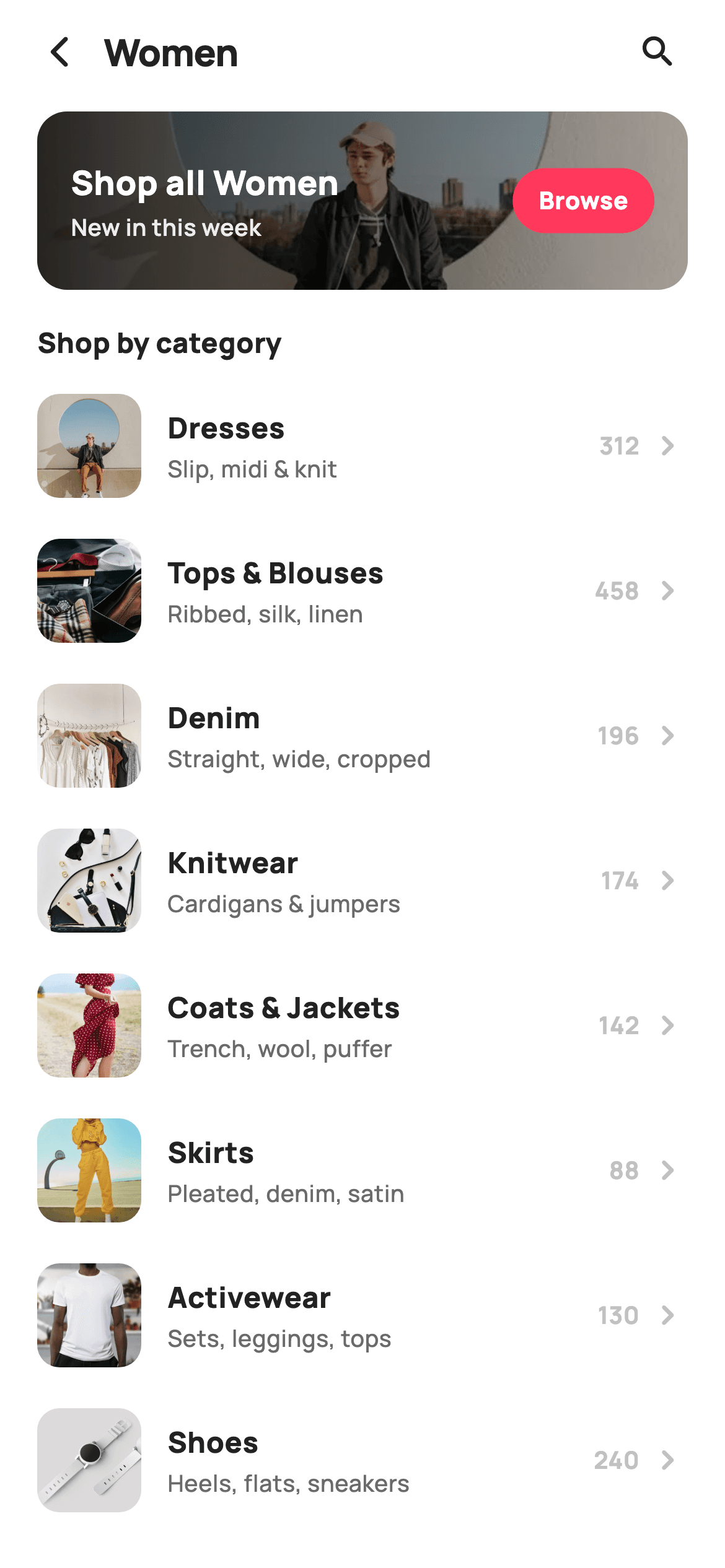
Department screens are pure navigation, and the fastest ones tell you how much is behind each door. This tutorial builds StyleCart's subcategory drill-down in Flutter — a 96px 'Shop all' banner with a left-to-right scrim so white text stays readable over a photo, then eight thumbnailed rows each carrying a descriptive blurb, an item count and a chevron. The department name arrives as a constructor argument and threads through the title and the banner copy.
Watch the Flutter UI walkthrough
A short screen recording of Subcategories running, if you'd rather see it before you read the code. The written tutorial below covers everything in it.
Can't see the video? Watch it on YouTube.
What you'll build
- ✓A photo banner with a horizontal gradient scrim, so overlay text survives any cover image
- ✓Eight subcategory rows with 56px thumbnails, a blurb and an item count
- ✓A parameterised screen where one `category` argument drives the title and the banner label
- ✓Rows that report their own label through a callback, so one handler serves every subcategory
Step-by-step build
Create the file
Add a new file at lib/ecom_cat_subcategories/ecom_cat_subcategories_screen.dart in your Flutter project.
Register the bundled fonts
No external packages — this is pure Flutter. It does bundle its design font (Manrope), so drop the font file into fonts/ and declare it in pubspec.yaml:
flutter:
  fonts:
    - family: Manrope
      fonts:
- asset: fonts/Manrope-Regular.ttfBuild it, piece by piece
Here's how the screen goes together. Each block below is a real slice of the code with a plain-English explanation — paste them in order, or grab the whole file from the next section.
The category parameter and the subcategory data
import 'package:flutter/material.dart';

/// StyleCart — Subcategories (department drill-down).
///
/// Opened from a top-level department (default "Women"): a "Shop all" banner
/// row followed by a thumbnailed list of every subcategory with its item count.
///
/// Self-contained per CONVENTIONS.md: pure Flutter, bundled Manrope, inline
/// Airbnb-style tokens, own light theme + SafeArea, bundled webp thumbnails. No
/// emoji glyphs. Exposes callbacks only.
class EcomCatSubcategoriesScreen extends StatelessWidget {
  const EcomCatSubcategoriesScreen({
    super.key,
    this.category = 'Women',
    this.onBack,
    this.onSearch,
    this.onShopAll,
    this.onSubcategory,
  });

  final String category;
  final VoidCallback? onBack;
  final VoidCallback? onSearch;
  final VoidCallback? onShopAll;

  /// A subcategory was opened (passes its label).
  final ValueChanged<String>? onSubcategory;

  static const String _font = 'Manrope';
  static const Color _canvas = Color(0xFFFFFFFF);
  static const Color _ink = Color(0xFF222222);
  static const Color _muted = Color(0xFF6A6A6A);
  static const Color _faint = Color(0xFFC1C1C1);
  static const Color _brand = Color(0xFFFF385C);
  static const Color _imageBg = Color(0xFFF5F5F5);

  static const String _dir =
      'lib/screens/ecommerce/ecom_cat_subcategories/images';

  static const List<_Sub> _subs = <_Sub>[
    _Sub('Dresses', 'Slip, midi & knit', 312, 'p10.webp'),
    _Sub('Tops & Blouses', 'Ribbed, silk, linen', 458, 'p11.webp'),
    _Sub('Denim', 'Straight, wide, cropped', 196, 'p12.webp'),
    _Sub('Knitwear', 'Cardigans & jumpers', 174, 'p13.webp'),
    _Sub('Coats & Jackets', 'Trench, wool, puffer', 142, 'p14.webp'),
    _Sub('Skirts', 'Pleated, denim, satin', 88, 'p15.webp'),
    _Sub('Activewear', 'Sets, leggings, tops', 130, 'p16.webp'),
    _Sub('Shoes', 'Heels, flats, sneakers', 240, 'p17.webp'),
  ];
The screen is stateless, and its most important field is `category`, a String defaulting to 'Women'. Because the department is a parameter rather than a hard-coded string, the same widget serves Women, Men and Kids — you push it with a different value and the title and banner copy follow. `onSubcategory` is a `ValueChanged<String>` so a tapped row reports its own label. `_subs` is a static const list of eight `_Sub` records, each with a label, a short blurb like 'Slip, midi & knit', an item count and a thumbnail filename. The blurb is the detail that makes this screen useful — 'Denim' alone doesn't tell you whether cropped styles are in there.
Banner, heading, and the row loop
  @override
  Widget build(BuildContext context) {
    return Theme(
      data: ThemeData.light(useMaterial3: true),
      child: Scaffold(
        backgroundColor: _canvas,
        body: SafeArea(
          child: Column(
            children: <Widget>[
              _header(),
              Expanded(
                child: ListView(
                  padding: const EdgeInsets.fromLTRB(20, 4, 20, 24),
                  children: <Widget>[
                    _shopAll(),
                    const SizedBox(height: 18),
                    const Text(
                      'Shop by category',
                      style: TextStyle(
                        fontFamily: _font,
                        fontSize: 15,
                        fontWeight: FontWeight.w800,
                        color: _ink,
                      ),
                    ),
                    const SizedBox(height: 6),
                    for (final _Sub s in _subs) _row(s),
                  ],
                ),
              ),
            ],
          ),
        ),
      ),
    );
  }
The body is a header above an `Expanded` ListView holding the banner, an 18px gap, a 'Shop by category' heading and then `for (final _Sub s in _subs) _row(s)`. A collection-for directly inside the children list is the cleanest way to expand a fixed list into widgets — no `.map().toList()`, no builder indirection — and it works here because eight rows is a small enough set that lazy building buys nothing. Note the list's padding supplies the 20px screen margins, so each row doesn't have to inset itself.
A header that names the department
  Widget _header() {
    return Padding(
      padding: const EdgeInsets.fromLTRB(8, 4, 12, 4),
      child: Row(
        children: <Widget>[
          IconButton(
            onPressed: onBack,
            icon: const Icon(Icons.arrow_back_ios_new_rounded,
                size: 20, color: _ink),
          ),
          Expanded(
            child: Text(
              category,
              style: const TextStyle(
                fontFamily: _font,
                fontSize: 20,
                fontWeight: FontWeight.w800,
                letterSpacing: -0.3,
                color: _ink,
              ),
            ),
          ),
          IconButton(
            onPressed: onSearch,
            icon: const Icon(Icons.search_rounded, size: 22, color: _ink),
          ),
        ],
      ),
    );
  }
A compact Row of a back button, an `Expanded` title and a search button. The title renders `category` directly, so it reads 'Women' or 'Men' depending on what was pushed — it's not a const Text, which is exactly why the whole widget is reusable. It's set at 20px w800 with `-0.3` letterSpacing, the tightened tracking that keeps large bold type from looking loose. The Expanded in the middle means a long department name pushes against the search icon rather than overlapping it.
The Shop all banner and its scrim
  Widget _shopAll() {
    return GestureDetector(
      onTap: onShopAll,
      child: ClipRRect(
        borderRadius: BorderRadius.circular(16),
        child: SizedBox(
          height: 96,
          child: Stack(
            fit: StackFit.expand,
            children: <Widget>[
              Container(color: _imageBg),
              Image.asset('$_dir/p10.webp', fit: BoxFit.cover),
              const DecoratedBox(
                decoration: BoxDecoration(
                  gradient: LinearGradient(
                    begin: Alignment.centerLeft,
                    end: Alignment.centerRight,
                    colors: <Color>[Color(0xCC000000), Color(0x22000000)],
                  ),
                ),
              ),
              Padding(
                padding: const EdgeInsets.symmetric(horizontal: 18),
                child: Row(
                  children: <Widget>[
                    Expanded(
                      child: Column(
                        mainAxisAlignment: MainAxisAlignment.center,
                        crossAxisAlignment: CrossAxisAlignment.start,
                        children: <Widget>[
                          Text(
                            'Shop all $category',
                            style: const TextStyle(
                              fontFamily: _font,
                              fontSize: 18,
                              fontWeight: FontWeight.w800,
                              color: _canvas,
                            ),
                          ),
                          const SizedBox(height: 2),
                          const Text(
                            'New in this week',
                            style: TextStyle(
                              fontFamily: _font,
                              fontSize: 12.5,
                              fontWeight: FontWeight.w600,
                              color: Color(0xFFEDEDED),
                            ),
                          ),
                        ],
                      ),
                    ),
                    Container(
                      padding: const EdgeInsets.symmetric(
                          horizontal: 14, vertical: 8),
                      decoration: BoxDecoration(
                        color: _brand,
                        borderRadius: BorderRadius.circular(99),
                      ),
                      child: const Text(
                        'Browse',
                        style: TextStyle(
                          fontFamily: _font,
                          fontSize: 13,
                          fontWeight: FontWeight.w800,
                          color: _canvas,
                        ),
                      ),
                    ),
                  ],
                ),
              ),
            ],
          ),
        ),
      ),
    );
  }
The banner is a 96px ClipRRect wrapping a Stack in `StackFit.expand`: an `_imageBg` placeholder, the photo, a scrim, then the content. The scrim is the piece worth copying — a `LinearGradient` running `centerLeft` to `centerRight` from `0xCC000000` (black at 80%) to `0x22000000` (black at 13%). Because it darkens the left side where the text sits and fades out toward the right, the headline stays legible over any cover photo without dimming the whole image. The label interpolates the parameter as `'Shop all $category'`, and a coral 'Browse' pill sits at the trailing edge with `BorderRadius.circular(99)` for fully-rounded ends.
One subcategory row
  Widget _row(_Sub s) {
    return InkWell(
      onTap: () => onSubcategory?.call(s.label),
      child: Padding(
        padding: const EdgeInsets.symmetric(vertical: 11),
        child: Row(
          children: <Widget>[
            ClipRRect(
              borderRadius: BorderRadius.circular(12),
              child: SizedBox(
                width: 56,
                height: 56,
                child: Stack(
                  fit: StackFit.expand,
                  children: <Widget>[
                    Container(color: _imageBg),
                    Image.asset('$_dir/${s.asset}', fit: BoxFit.cover),
                  ],
                ),
              ),
            ),
            const SizedBox(width: 14),
            Expanded(
              child: Column(
                crossAxisAlignment: CrossAxisAlignment.start,
                children: <Widget>[
                  Text(
                    s.label,
                    maxLines: 1,
                    overflow: TextOverflow.ellipsis,
                    style: const TextStyle(
                      fontFamily: _font,
                      fontSize: 15.5,
                      fontWeight: FontWeight.w800,
                      color: _ink,
                    ),
                  ),
                  const SizedBox(height: 2),
                  Text(
                    s.blurb,
                    maxLines: 1,
                    overflow: TextOverflow.ellipsis,
                    style: const TextStyle(
                      fontFamily: _font,
                      fontSize: 12.5,
                      fontWeight: FontWeight.w500,
                      color: _muted,
                    ),
                  ),
                ],
              ),
            ),
            const SizedBox(width: 8),
            Text(
              '${s.count}',
              style: const TextStyle(
                fontFamily: _font,
                fontSize: 13,
                fontWeight: FontWeight.w700,
                color: _faint,
              ),
            ),
            const SizedBox(width: 4),
            const Icon(Icons.chevron_right_rounded, size: 22, color: _faint),
          ],
        ),
      ),
    );
  }
Each row is an InkWell — the only ripple on this screen, which is appropriate since these rows are the primary action. It calls `onSubcategory?.call(s.label)`, passing the label so one handler covers all eight. The thumbnail is a 56px ClipRRect with a 12px radius wrapping a Stack that layers the photo over an `_imageBg` fill, so there's neutral grey rather than a white flash while the WebP decodes. Both text lines are clamped with `maxLines: 1` and an ellipsis, which matters because the blurbs are comma lists that would otherwise wrap and make the rows uneven. The count and chevron are both `_faint` grey — quiet by design, since they're reference information rather than the thing you tap.
The subcategory record
class _Sub {
  const _Sub(this.label, this.blurb, this.count, this.asset);
  final String label;
  final String blurb;
  final int count;
  final String asset;
}
`_Sub` is a four-field immutable class with a positional constructor: label, blurb, count and asset. Keeping it a typed record rather than a `Map<String, dynamic>` means a mistyped field name fails at compile time instead of returning null at runtime, and it's what allows `_subs` to be `static const` — constructed once when the program is compiled and shared by every rebuild, rather than reallocated each time the screen paints.
Full code
The complete, ready-to-paste source. Free to use in your projects — one click copies it all.
import 'package:flutter/material.dart';

/// StyleCart — Subcategories (department drill-down).
///
/// Opened from a top-level department (default "Women"): a "Shop all" banner
/// row followed by a thumbnailed list of every subcategory with its item count.
///
/// Self-contained per CONVENTIONS.md: pure Flutter, bundled Manrope, inline
/// Airbnb-style tokens, own light theme + SafeArea, bundled webp thumbnails. No
/// emoji glyphs. Exposes callbacks only.
class EcomCatSubcategoriesScreen extends StatelessWidget {
  const EcomCatSubcategoriesScreen({
    super.key,
    this.category = 'Women',
    this.onBack,
    this.onSearch,
    this.onShopAll,
    this.onSubcategory,
  });

  final String category;
  final VoidCallback? onBack;
  final VoidCallback? onSearch;
  final VoidCallback? onShopAll;

  /// A subcategory was opened (passes its label).
  final ValueChanged<String>? onSubcategory;

  static const String _font = 'Manrope';
  static const Color _canvas = Color(0xFFFFFFFF);
  static const Color _ink = Color(0xFF222222);
  static const Color _muted = Color(0xFF6A6A6A);
  static const Color _faint = Color(0xFFC1C1C1);
  static const Color _brand = Color(0xFFFF385C);
  static const Color _imageBg = Color(0xFFF5F5F5);

  static const String _dir =
      'lib/screens/ecommerce/ecom_cat_subcategories/images';

  static const List<_Sub> _subs = <_Sub>[
    _Sub('Dresses', 'Slip, midi & knit', 312, 'p10.webp'),
    _Sub('Tops & Blouses', 'Ribbed, silk, linen', 458, 'p11.webp'),
    _Sub('Denim', 'Straight, wide, cropped', 196, 'p12.webp'),
    _Sub('Knitwear', 'Cardigans & jumpers', 174, 'p13.webp'),
    _Sub('Coats & Jackets', 'Trench, wool, puffer', 142, 'p14.webp'),
    _Sub('Skirts', 'Pleated, denim, satin', 88, 'p15.webp'),
    _Sub('Activewear', 'Sets, leggings, tops', 130, 'p16.webp'),
    _Sub('Shoes', 'Heels, flats, sneakers', 240, 'p17.webp'),
  ];

  @override
  Widget build(BuildContext context) {
    return Theme(
      data: ThemeData.light(useMaterial3: true),
      child: Scaffold(
        backgroundColor: _canvas,
        body: SafeArea(
          child: Column(
            children: <Widget>[
              _header(),
              Expanded(
                child: ListView(
                  padding: const EdgeInsets.fromLTRB(20, 4, 20, 24),
                  children: <Widget>[
                    _shopAll(),
                    const SizedBox(height: 18),
                    const Text(
                      'Shop by category',
                      style: TextStyle(
                        fontFamily: _font,
                        fontSize: 15,
                        fontWeight: FontWeight.w800,
                        color: _ink,
                      ),
                    ),
                    const SizedBox(height: 6),
                    for (final _Sub s in _subs) _row(s),
                  ],
                ),
              ),
            ],
          ),
        ),
      ),
    );
  }

  Widget _header() {
    return Padding(
      padding: const EdgeInsets.fromLTRB(8, 4, 12, 4),
      child: Row(
        children: <Widget>[
          IconButton(
            onPressed: onBack,
            icon: const Icon(Icons.arrow_back_ios_new_rounded,
                size: 20, color: _ink),
          ),
          Expanded(
            child: Text(
              category,
              style: const TextStyle(
                fontFamily: _font,
                fontSize: 20,
                fontWeight: FontWeight.w800,
                letterSpacing: -0.3,
                color: _ink,
              ),
            ),
          ),
          IconButton(
            onPressed: onSearch,
            icon: const Icon(Icons.search_rounded, size: 22, color: _ink),
          ),
        ],
      ),
    );
  }

  Widget _shopAll() {
    return GestureDetector(
      onTap: onShopAll,
      child: ClipRRect(
        borderRadius: BorderRadius.circular(16),
        child: SizedBox(
          height: 96,
          child: Stack(
            fit: StackFit.expand,
            children: <Widget>[
              Container(color: _imageBg),
              Image.asset('$_dir/p10.webp', fit: BoxFit.cover),
              const DecoratedBox(
                decoration: BoxDecoration(
                  gradient: LinearGradient(
                    begin: Alignment.centerLeft,
                    end: Alignment.centerRight,
                    colors: <Color>[Color(0xCC000000), Color(0x22000000)],
                  ),
                ),
              ),
              Padding(
                padding: const EdgeInsets.symmetric(horizontal: 18),
                child: Row(
                  children: <Widget>[
                    Expanded(
                      child: Column(
                        mainAxisAlignment: MainAxisAlignment.center,
                        crossAxisAlignment: CrossAxisAlignment.start,
                        children: <Widget>[
                          Text(
                            'Shop all $category',
                            style: const TextStyle(
                              fontFamily: _font,
                              fontSize: 18,
                              fontWeight: FontWeight.w800,
                              color: _canvas,
                            ),
                          ),
                          const SizedBox(height: 2),
                          const Text(
                            'New in this week',
                            style: TextStyle(
                              fontFamily: _font,
                              fontSize: 12.5,
                              fontWeight: FontWeight.w600,
                              color: Color(0xFFEDEDED),
                            ),
                          ),
                        ],
                      ),
                    ),
                    Container(
                      padding: const EdgeInsets.symmetric(
                          horizontal: 14, vertical: 8),
                      decoration: BoxDecoration(
                        color: _brand,
                        borderRadius: BorderRadius.circular(99),
                      ),
                      child: const Text(
                        'Browse',
                        style: TextStyle(
                          fontFamily: _font,
                          fontSize: 13,
                          fontWeight: FontWeight.w800,
                          color: _canvas,
                        ),
                      ),
                    ),
                  ],
                ),
              ),
            ],
          ),
        ),
      ),
    );
  }

  Widget _row(_Sub s) {
    return InkWell(
      onTap: () => onSubcategory?.call(s.label),
      child: Padding(
        padding: const EdgeInsets.symmetric(vertical: 11),
        child: Row(
          children: <Widget>[
            ClipRRect(
              borderRadius: BorderRadius.circular(12),
              child: SizedBox(
                width: 56,
                height: 56,
                child: Stack(
                  fit: StackFit.expand,
                  children: <Widget>[
                    Container(color: _imageBg),
                    Image.asset('$_dir/${s.asset}', fit: BoxFit.cover),
                  ],
                ),
              ),
            ),
            const SizedBox(width: 14),
            Expanded(
              child: Column(
                crossAxisAlignment: CrossAxisAlignment.start,
                children: <Widget>[
                  Text(
                    s.label,
                    maxLines: 1,
                    overflow: TextOverflow.ellipsis,
                    style: const TextStyle(
                      fontFamily: _font,
                      fontSize: 15.5,
                      fontWeight: FontWeight.w800,
                      color: _ink,
                    ),
                  ),
                  const SizedBox(height: 2),
                  Text(
                    s.blurb,
                    maxLines: 1,
                    overflow: TextOverflow.ellipsis,
                    style: const TextStyle(
                      fontFamily: _font,
                      fontSize: 12.5,
                      fontWeight: FontWeight.w500,
                      color: _muted,
                    ),
                  ),
                ],
              ),
            ),
            const SizedBox(width: 8),
            Text(
              '${s.count}',
              style: const TextStyle(
                fontFamily: _font,
                fontSize: 13,
                fontWeight: FontWeight.w700,
                color: _faint,
              ),
            ),
            const SizedBox(width: 4),
            const Icon(Icons.chevron_right_rounded, size: 22, color: _faint),
          ],
        ),
      ),
    );
  }
}

class _Sub {
  const _Sub(this.label, this.blurb, this.count, this.asset);
  final String label;
  final String blurb;
  final int count;
  final String asset;
}
Plus bundled 13 binary assets (fonts/images). The CLI and MCP install those for you automatically.
Two faster ways to add it
Copy-paste works, but you can skip it entirely.
1. FlutterKit CLI
One command drops this screen — and its fonts — straight into your project.
$ flutterkit add ecom-cat-subcategories2. AI agent (MCP)
Connect FlutterKit's MCP server in Claude or Cursor and just ask your agent to install ecom-cat-subcategories — it fetches and writes the files for you.
FAQ
Is this Flutter category drill-down screen free to use?
Yes. The complete Dart source on this page is free for personal and commercial projects. Copy it directly, install it with the FlutterKit CLI (flutterkit add ecom-cat-subcategories), or have an AI agent add it for you over MCP.
How do I reuse this for Men or Kids?
Push it with a different `category` argument — the title and the 'Shop all' banner both interpolate it. The `_subs` list is still a static const shared by every department though, so to make it truly reusable move that list into a constructor field too, or key a map of lists by department and look it up. The row widget and the banner need no changes either way.
Why does the banner use a horizontal gradient instead of a bottom-up one?
Because the text sits on the left, not the bottom. A bottom-up scrim is right for a card whose caption is along its lower edge; here the headline and subtitle are vertically centred at the leading edge, so darkening left-to-right puts the contrast exactly where the type is and leaves the right side of the photo bright behind the Browse pill.
Does it need any external packages?
No — it's pure Flutter on the material library. It bundles the Manrope font plus the WebP thumbnails referenced through the `_dir` constant, all registered in pubspec.yaml as shown in step 2. It uses Color-literal ARGB values rather than withValues, and super parameters, so any Flutter 3.10+ / Dart 3 SDK compiles it; this kit targets 3.22+.


