How to Build a Product Filter Sheet in Flutter (Full Code + Preview)
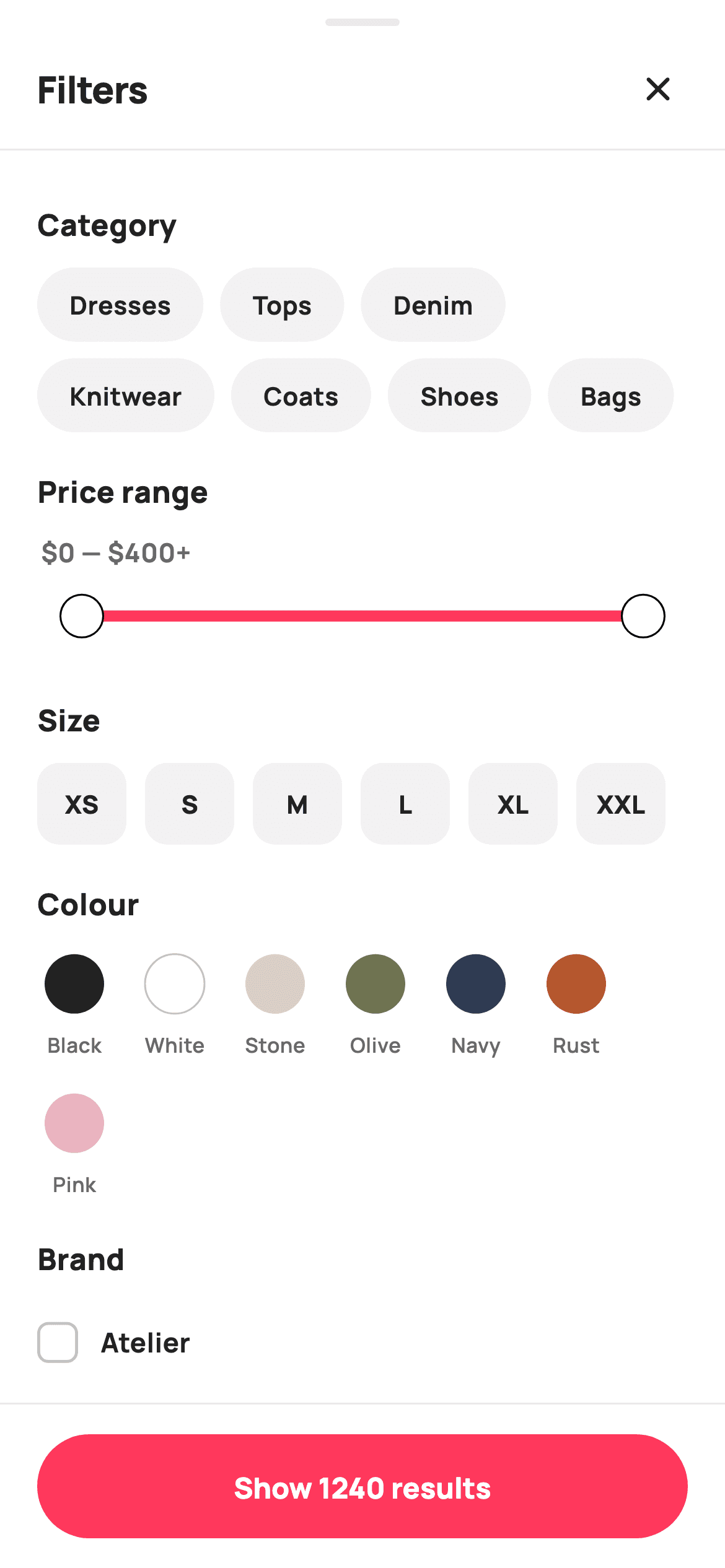
A filter sheet is where a shopping app's state management gets real: seven independent filter groups, some multi-select, some single-select, one price range, plus a live result count and a reset that has to clear everything at once. This screen builds all of it with plain `Set`s and `setState` — no provider, no bloc. You'll also get a colour-swatch painter that solves a genuine problem: a white swatch on a white sheet, and a checkmark that has to flip from white to black depending on how light the swatch underneath it is.
Watch the Flutter UI walkthrough
A short screen recording of Filters running, if you'd rather see it before you read the code. The written tutorial below covers everything in it.
Can't see the video? Watch it on YouTube.
What you'll build
- ✓Seven filter groups backed by four `Set`s and three scalars, with a derived `_activeCount` badge in the header
- ✓A `RangeSlider` restyled through `SliderTheme` with a brand-red track and 11px white thumbs
- ✓Multi-select chips, square size pills, and single-select rating/discount chips that untoggle when re-tapped
- ✓Colour swatches painted with a selection ring, a luminance-based hairline for light fills, and a checkmark that inverts on pale colours
- ✓A pinned bottom bar whose Reset button only appears when something is active, and whose CTA reads 'Show 1240 results' live
Step-by-step build
Create the file
Add a new file at lib/ecom_cat_filters/ecom_cat_filters_screen.dart in your Flutter project.
Register the bundled fonts
No external packages — this is pure Flutter. It does bundle its design font (Manrope), so drop the font file into fonts/ and declare it in pubspec.yaml:
flutter:
  fonts:
    - family: Manrope
      fonts:
- asset: fonts/Manrope-Regular.ttfBuild it, piece by piece
Here's how the screen goes together. Each block below is a real slice of the code with a plain-English explanation — paste them in order, or grab the whole file from the next section.
Filter state, the active count, and the live estimate
class EcomCatFiltersScreen extends StatefulWidget {
  const EcomCatFiltersScreen({
    super.key,
    this.onClose,
    this.onApply,
  });

  final VoidCallback? onClose;

  /// Apply pressed — emits the rough number of matching products.
  final ValueChanged<int>? onApply;

  @override
  State<EcomCatFiltersScreen> createState() => _EcomCatFiltersScreenState();
}

class _EcomCatFiltersScreenState extends State<EcomCatFiltersScreen> {
  static const String _font = 'Manrope';
  static const Color _canvas = Color(0xFFFFFFFF);
  static const Color _ink = Color(0xFF222222);
  static const Color _muted = Color(0xFF6A6A6A);
  static const Color _faint = Color(0xFFC1C1C1);
  static const Color _brand = Color(0xFFFF385C);
  static const Color _surface = Color(0xFFF2F2F2);
  static const Color _hairline = Color(0xFFEBEBEB);

  static const List<String> _categories = <String>[
    'Dresses', 'Tops', 'Denim', 'Knitwear', 'Coats', 'Shoes', 'Bags'
  ];
  static const List<String> _sizes = <String>[
    'XS', 'S', 'M', 'L', 'XL', 'XXL'
  ];
  static const List<_Swatch> _colors = <_Swatch>[
    _Swatch('Black', Color(0xFF222222)),
    _Swatch('White', Color(0xFFFFFFFF)),
    _Swatch('Stone', Color(0xFFD9CFC2)),
    _Swatch('Olive', Color(0xFF6F7351)),
    _Swatch('Navy', Color(0xFF2B3A55)),
    _Swatch('Rust', Color(0xFFB5572E)),
    _Swatch('Pink', Color(0xFFE8B4C0)),
  ];
  static const List<String> _brands = <String>[
    'Atelier', 'Aria', 'Maison', 'Northbound', 'Stride'
  ];
  static const List<int> _discounts = <int>[10, 20, 30, 50];

  final Set<String> _selCats = <String>{};
  final Set<String> _selSizes = <String>{};
  final Set<int> _selColors = <int>{};
  final Set<String> _selBrands = <String>{};
  RangeValues _price = const RangeValues(_priceMin, _priceMax);
  int _minRating = 0;
  int _minDiscount = 0;

  static const double _priceMin = 0;
  static const double _priceMax = 400;

  int get _activeCount =>
      _selCats.length +
      _selSizes.length +
      _selColors.length +
      _selBrands.length +
      (_minRating > 0 ? 1 : 0) +
      (_minDiscount > 0 ? 1 : 0) +
      ((_price.start > _priceMin || _price.end < _priceMax) ? 1 : 0);

  /// Cheap deterministic "result count" so the Apply button feels live.
  int get _estResults {
    int n = 1240;
    n -= _selCats.length * 90;
    n -= _selSizes.length * 40;
    n -= _selColors.length * 55;
    n -= _selBrands.length * 70;
    n -= _minRating * 60;
    n -= _minDiscount * 4;
    n -= ((_price.end - _price.start) < 200) ? 180 : 0;
    return n < 12 ? 12 : n;
  }

  void _reset() => setState(() {
        _selCats.clear();
        _selSizes.clear();
        _selColors.clear();
        _selBrands.clear();
        _price = const RangeValues(_priceMin, _priceMax);
        _minRating = 0;
        _minDiscount = 0;
      });
Selection state is deliberately split by cardinality. Multi-select groups use `Set`s — `_selCats`, `_selSizes`, `_selBrands` hold strings, `_selColors` holds indices — because a `Set` gives you contains/add/remove and free de-duplication. Single-select groups are scalars: `_minRating` and `_minDiscount` use `0` as 'nothing selected', and `_price` is a `RangeValues`. `_activeCount` is a getter, never a stored field, so the header badge can't drift: it sums the set lengths and adds one each for a non-zero rating, a non-zero discount, and a price range that's been narrowed from its full span. `_estResults` is a deliberately fake but deterministic model — start at 1240, subtract a weight per filter, clamp at 12 — so the Apply button reacts instantly instead of waiting on a server.
Sheet chrome and the section list
  @override
  Widget build(BuildContext context) {
    return Theme(
      data: ThemeData.light(useMaterial3: true),
      child: Scaffold(
        backgroundColor: _canvas,
        body: SafeArea(
          bottom: false,
          child: Column(
            children: <Widget>[
              _grabber(),
              _header(),
              const Divider(height: 1, color: _hairline),
              Expanded(
                child: ListView(
                  padding: const EdgeInsets.fromLTRB(20, 8, 20, 20),
                  children: <Widget>[
                    _section('Category'),
                    _wrapChips(
                      _categories,
                      (String c) => _selCats.contains(c),
                      (String c) => setState(() => _selCats.contains(c)
                          ? _selCats.remove(c)
                          : _selCats.add(c)),
                    ),
                    _priceSection(),
                    _section('Size'),
                    _sizeRow(),
                    _section('Colour'),
                    _colorRow(),
                    _section('Brand'),
                    ..._brands.map(_brandTile),
                    _section('Minimum rating'),
                    _ratingRow(),
                    _section('Discount'),
                    _discountRow(),
                  ],
                ),
              ),
              _applyBar(),
            ],
          ),
        ),
      ),
    );
  }

  Widget _grabber() {
    return Container(
      width: 40,
      height: 4,
      margin: const EdgeInsets.only(top: 10, bottom: 6),
      decoration: BoxDecoration(
        color: _hairline,
        borderRadius: BorderRadius.circular(99),
      ),
    );
  }

  Widget _header() {
    return Padding(
      padding: const EdgeInsets.fromLTRB(20, 4, 12, 8),
      child: Row(
        children: <Widget>[
          Expanded(
            child: Row(
              children: <Widget>[
                const Text(
                  'Filters',
                  style: TextStyle(
                    fontFamily: _font,
                    fontSize: 20,
                    fontWeight: FontWeight.w800,
                    letterSpacing: -0.3,
                    color: _ink,
                  ),
                ),
                if (_activeCount > 0) ...<Widget>[
                  const SizedBox(width: 8),
                  Container(
                    padding:
                        const EdgeInsets.symmetric(horizontal: 8, vertical: 2),
                    decoration: BoxDecoration(
                      color: _brand,
                      borderRadius: BorderRadius.circular(99),
                    ),
                    child: Text(
                      '$_activeCount',
                      style: const TextStyle(
                        fontFamily: _font,
                        fontSize: 12,
                        fontWeight: FontWeight.w800,
                        color: _canvas,
                      ),
                    ),
                  ),
                ],
              ],
            ),
          ),
          IconButton(
            onPressed: widget.onClose,
            icon: const Icon(Icons.close_rounded, size: 22, color: _ink),
          ),
        ],
      ),
    );
  }
`SafeArea(bottom: false)` lets `_applyBar` handle the bottom inset itself. `_grabber()` is the 40×4 rounded pill that signals 'drag me' on a bottom sheet, and the header pairs the title with a count badge spread in via `if (_activeCount > 0) ...<Widget>[...]` — the badge simply doesn't exist in the tree when nothing is selected. The body is one `ListView` where each group is a `_section` label followed by its control, and the brand group uses `..._brands.map(_brandTile)` to splat five tiles inline. Note `_wrapChips` takes a predicate and a toggle callback rather than the state itself, which is what lets one helper serve any string-set group.
The price range slider
  Widget _priceSection() {
    return Column(
      crossAxisAlignment: CrossAxisAlignment.start,
      children: <Widget>[
        _section('Price range'),
        Padding(
          padding: const EdgeInsets.symmetric(horizontal: 2),
          child: Text(
            '\$${_price.start.round()} — \$${_price.end.round()}'
            '${_price.end >= _priceMax ? '+' : ''}',
            style: const TextStyle(
              fontFamily: _font,
              fontSize: 14,
              fontWeight: FontWeight.w700,
              color: _muted,
            ),
          ),
        ),
        SliderTheme(
          data: SliderThemeData(
            activeTrackColor: _brand,
            inactiveTrackColor: _surface,
            thumbColor: _canvas,
            overlayColor: _brand.withValues(alpha: 0.12),
            rangeThumbShape:
                const RoundRangeSliderThumbShape(enabledThumbRadius: 11),
            trackHeight: 4,
          ),
          child: RangeSlider(
            values: _price,
            min: _priceMin,
            max: _priceMax,
            onChanged: (RangeValues v) => setState(() => _price = v),
          ),
        ),
      ],
    );
  }
The label above the slider is built from the live values: `'\$${_price.start.round()} — \$${_price.end.round()}'` with a `+` appended only when the upper handle is parked at `_priceMax`, which is the standard way to communicate '400 and above'. The slider itself is Flutter's `RangeSlider` wrapped in a `SliderTheme` — that wrapper is how you restyle a Material slider without subclassing anything. `activeTrackColor` paints the selected span brand red, `inactiveTrackColor` uses the grey `_surface`, `thumbColor` is white so the handles read as physical knobs, and `RoundRangeSliderThumbShape(enabledThumbRadius: 11)` enlarges them from the default. `overlayColor` at 12% alpha is the ripple that appears under your finger while dragging.
Three toggle patterns: multi-select, square pills, single-select
  Widget _sizeRow() {
    return Wrap(
      spacing: 10,
      runSpacing: 10,
      children: _sizes.map((String s) {
        final bool on = _selSizes.contains(s);
        return GestureDetector(
          onTap: () => setState(() =>
              on ? _selSizes.remove(s) : _selSizes.add(s)),
          child: Container(
            width: 48,
            height: 44,
            alignment: Alignment.center,
            decoration: BoxDecoration(
              color: on ? _brand : _surface,
              borderRadius: BorderRadius.circular(12),
            ),
            child: Text(
              s,
              style: TextStyle(
                fontFamily: _font,
                fontSize: 13.5,
                fontWeight: FontWeight.w800,
                color: on ? _canvas : _ink,
              ),
            ),
          ),
        );
      }).toList(),
    );
  }

  Widget _colorRow() {
    return Wrap(
      spacing: 14,
      runSpacing: 14,
      children: List<Widget>.generate(_colors.length, (int i) {
        final _Swatch sw = _colors[i];
        final bool on = _selColors.contains(i);
        return GestureDetector(
          onTap: () => setState(
              () => on ? _selColors.remove(i) : _selColors.add(i)),
          child: Column(
            mainAxisSize: MainAxisSize.min,
            children: <Widget>[
              SizedBox(
                width: 40,
                height: 40,
                child: CustomPaint(
                  painter: _SwatchPainter(color: sw.color, selected: on),
                ),
              ),
              const SizedBox(height: 5),
              Text(
                sw.name,
                style: const TextStyle(
                  fontFamily: _font,
                  fontSize: 11,
                  fontWeight: FontWeight.w600,
                  color: _muted,
                ),
              ),
            ],
          ),
        );
      }),
    );
  }

  Widget _brandTile(String b) {
    final bool on = _selBrands.contains(b);
    return InkWell(
      onTap: () =>
          setState(() => on ? _selBrands.remove(b) : _selBrands.add(b)),
      child: Padding(
        padding: const EdgeInsets.symmetric(vertical: 11),
        child: Row(
          children: <Widget>[
            Container(
              width: 22,
              height: 22,
              decoration: BoxDecoration(
                color: on ? _brand : _canvas,
                borderRadius: BorderRadius.circular(6),
                border: Border.all(color: on ? _brand : _faint, width: 1.6),
              ),
              child: on
                  ? const Icon(Icons.check_rounded, size: 16, color: _canvas)
                  : null,
            ),
            const SizedBox(width: 12),
            Expanded(
              child: Text(
                b,
                style: const TextStyle(
                  fontFamily: _font,
                  fontSize: 14.5,
                  fontWeight: FontWeight.w700,
                  color: _ink,
                ),
              ),
            ),
          ],
        ),
      ),
    );
  }

  Widget _ratingRow() {
    return Row(
      children: List<Widget>.generate(4, (int i) {
        final int stars = 4 - i; // 4+, 3+, 2+, 1+
        final bool on = _minRating == stars;
        return Padding(
          padding: const EdgeInsets.only(right: 9),
          child: GestureDetector(
            onTap: () =>
                setState(() => _minRating = on ? 0 : stars),
            child: Container(
              padding:
                  const EdgeInsets.symmetric(horizontal: 12, vertical: 9),
              decoration: BoxDecoration(
                color: on ? _brand.withValues(alpha: 0.10) : _surface,
                borderRadius: BorderRadius.circular(99),
                border: Border.all(
                  color: on ? _brand : Colors.transparent,
                  width: 1.4,
                ),
              ),
              child: Row(
                children: <Widget>[
                  Icon(Icons.star_rounded,
                      size: 16,
                      color: on ? _brand : const Color(0xFFF5A623)),
                  const SizedBox(width: 4),
                  Text(
                    '$stars+',
                    style: TextStyle(
                      fontFamily: _font,
                      fontSize: 13,
                      fontWeight: FontWeight.w700,
                      color: on ? _brand : _ink,
                    ),
                  ),
                ],
              ),
            ),
          ),
        );
      }),
    );
  }

  Widget _discountRow() {
    return Wrap(
      spacing: 9,
      runSpacing: 9,
      children: _discounts.map((int d) {
        final bool on = _minDiscount == d;
        return GestureDetector(
          onTap: () => setState(() => _minDiscount = on ? 0 : d),
          child: Container(
            padding: const EdgeInsets.symmetric(horizontal: 16, vertical: 9),
            decoration: BoxDecoration(
              color: on ? _brand.withValues(alpha: 0.10) : _surface,
              borderRadius: BorderRadius.circular(99),
              border: Border.all(
                color: on ? _brand : Colors.transparent,
                width: 1.4,
              ),
            ),
            child: Text(
              '$d% off or more',
              style: TextStyle(
                fontFamily: _font,
                fontSize: 13.5,
                fontWeight: FontWeight.w700,
                color: on ? _brand : _ink,
              ),
            ),
          ),
        );
      }).toList(),
    );
  }
Compare the toggles carefully — they encode different rules. `_sizeRow` is multi-select: `on ? _selSizes.remove(s) : _selSizes.add(s)`, and its 48×44 pills go solid brand-red with white text when chosen, since size labels are short enough to invert cleanly. `_ratingRow` and `_discountRow` are single-select with untoggle: `_minRating = on ? 0 : stars` means tapping the active chip clears it back to zero rather than leaving the user stuck. The rating row also builds descending with `final int stars = 4 - i`, so it renders 4+, 3+, 2+, 1+. All the pill-shaped chips share one selected treatment — a 10% brand tint fill plus a 1.4px brand border — and use `Colors.transparent` for the unselected border so the chip's size never changes when you toggle it. `_brandTile` is the fourth pattern: a checkbox row with a 22×22 rounded box whose `child` is the check icon or `null`.
The apply bar with a conditional Reset
  Widget _applyBar() {
    return Container(
      decoration: const BoxDecoration(
        color: _canvas,
        border: Border(top: BorderSide(color: _hairline)),
      ),
      child: SafeArea(
        top: false,
        child: SizedBox(
          height: 88,
          child: Padding(
            padding: const EdgeInsets.symmetric(horizontal: 20),
            child: Row(
              children: <Widget>[
                if (_activeCount > 0) ...<Widget>[
                  GestureDetector(
                    onTap: _reset,
                    child: Container(
                      height: 56,
                      padding: const EdgeInsets.symmetric(horizontal: 22),
                      alignment: Alignment.center,
                      decoration: BoxDecoration(
                        borderRadius: BorderRadius.circular(99),
                        border: Border.all(color: _hairline),
                      ),
                      child: const Text(
                        'Reset',
                        style: TextStyle(
                          fontFamily: _font,
                          fontSize: 15,
                          fontWeight: FontWeight.w800,
                          color: _ink,
                        ),
                      ),
                    ),
                  ),
                  const SizedBox(width: 12),
                ],
                Expanded(
                  child: SizedBox(
                    height: 56,
                    child: FilledButton(
                      onPressed: () => widget.onApply?.call(_estResults),
                      style: FilledButton.styleFrom(
                        backgroundColor: _brand,
                        foregroundColor: _canvas,
                        shape: const StadiumBorder(),
                        textStyle: const TextStyle(
                          fontFamily: _font,
                          fontSize: 15.5,
                          fontWeight: FontWeight.w800,
                        ),
                      ),
                      child: Text('Show $_estResults results'),
                    ),
                  ),
                ),
              ],
            ),
          ),
        ),
      ),
    );
  }
The bar is a `Container` with a hairline top border wrapping `SafeArea(top: false)`, so its white background extends under the home indicator. The Reset button is spread in with the same `if (_activeCount > 0)` guard used by the header badge — when nothing is selected there's no dead control on screen, and the `Expanded` CTA simply takes the full width. Reset calls `_reset()`, which clears all four sets, restores the full `RangeValues`, and zeroes both scalars in one `setState`. The CTA label is `'Show $_estResults results'`, so it re-renders on every single filter change — that live number is the whole reason the fake estimator exists.
Painting a swatch that works on any colour
class _SwatchPainter extends CustomPainter {
  _SwatchPainter({required this.color, required this.selected});
  final Color color;
  final bool selected;

  @override
  void paint(Canvas canvas, Size size) {
    final Offset c = Offset(size.width / 2, size.height / 2);
    final double r = size.width / 2;

    if (selected) {
      canvas.drawCircle(
        c,
        r,
        Paint()
          ..style = PaintingStyle.stroke
          ..strokeWidth = 2
          ..color = const Color(0xFFFF385C),
      );
    }
    canvas.drawCircle(c, r - 4, Paint()..color = color);

    // Light fills need a subtle edge to read on white.
    final double lum = color.computeLuminance();
    if (lum > 0.7) {
      canvas.drawCircle(
        c,
        r - 4,
        Paint()
          ..style = PaintingStyle.stroke
          ..strokeWidth = 1
          ..color = const Color(0xFFC1C1C1),
      );
    }
    if (selected) {
      final Paint check = Paint()
        ..style = PaintingStyle.stroke
        ..strokeWidth = 2.2
        ..strokeCap = StrokeCap.round
        ..strokeJoin = StrokeJoin.round
        ..color = lum > 0.55 ? const Color(0xFF222222) : Colors.white;
      final Path p = Path()
        ..moveTo(c.dx - r * 0.28, c.dy)
        ..lineTo(c.dx - r * 0.06, c.dy + r * 0.24)
        ..lineTo(c.dx + r * 0.30, c.dy - r * 0.22);
      canvas.drawPath(p, check);
    }
  }

  @override
  bool shouldRepaint(_SwatchPainter old) =>
      old.color != color || old.selected != selected;
`_SwatchPainter` solves two problems Material's `CircleAvatar` can't. First, it draws the selection ring at full radius `r` and the colour fill at `r - 4`, leaving a clean 4px gap between them — a ring drawn on the fill itself would look cramped. Second, it branches on `color.computeLuminance()`, Flutter's built-in 0-to-1 perceived-brightness measure. Above 0.7 the fill gets a 1px grey outline, which is what stops the White and Stone swatches from vanishing into the white sheet. Then the checkmark is stroked in `lum > 0.55 ? Color(0xFF222222) : Colors.white`, so a dark navy swatch gets a white tick and a pale pink one gets a black tick — automatic contrast with no per-colour configuration. The tick itself is three points through `moveTo`/`lineTo` with rounded caps and joins, all positioned as fractions of `r` so it scales with the swatch.
Full code
The complete, ready-to-paste source. Free to use in your projects — one click copies it all.
import 'package:flutter/material.dart';
/// StyleCart — Filters (bottom sheet).
///
/// A live filter sheet: category chips, a price range slider, painted size
/// pills, painted colour swatches, a brand checklist, a minimum-rating row and
/// discount chips, with a pinned Reset / Apply bar that reflects the live count.
///
/// Self-contained per CONVENTIONS.md: pure Flutter, bundled Manrope, inline
/// Airbnb-style tokens, own light theme + SafeArea. Colour swatches are a
/// CustomPainter (selected ring + light-fill check); no emoji glyphs. Exposes
/// callbacks only — all selection state is internal.
class EcomCatFiltersScreen extends StatefulWidget {
const EcomCatFiltersScreen({
super.key,
this.onClose,
this.onApply,
});
final VoidCallback? onClose;
/// Apply pressed — emits the rough number of matching products.
final ValueChanged<int>? onApply;
@override
State<EcomCatFiltersScreen> createState() => _EcomCatFiltersScreenState();
}
class _EcomCatFiltersScreenState extends State<EcomCatFiltersScreen> {
static const String _font = 'Manrope';
static const Color _canvas = Color(0xFFFFFFFF);
static const Color _ink = Color(0xFF222222);
static const Color _muted = Color(0xFF6A6A6A);
static const Color _faint = Color(0xFFC1C1C1);
static const Color _brand = Color(0xFFFF385C);
static const Color _surface = Color(0xFFF2F2F2);
static const Color _hairline = Color(0xFFEBEBEB);
static const List<String> _categories = <String>[
'Dresses', 'Tops', 'Denim', 'Knitwear', 'Coats', 'Shoes', 'Bags'
];
static const List<String> _sizes = <String>[
'XS', 'S', 'M', 'L', 'XL', 'XXL'
];
static const List<_Swatch> _colors = <_Swatch>[
_Swatch('Black', Color(0xFF222222)),
_Swatch('White', Color(0xFFFFFFFF)),
_Swatch('Stone', Color(0xFFD9CFC2)),
_Swatch('Olive', Color(0xFF6F7351)),
_Swatch('Navy', Color(0xFF2B3A55)),
_Swatch('Rust', Color(0xFFB5572E)),
_Swatch('Pink', Color(0xFFE8B4C0)),
];
static const List<String> _brands = <String>[
'Atelier', 'Aria', 'Maison', 'Northbound', 'Stride'
];
static const List<int> _discounts = <int>[10, 20, 30, 50];
final Set<String> _selCats = <String>{};
final Set<String> _selSizes = <String>{};
final Set<int> _selColors = <int>{};
final Set<String> _selBrands = <String>{};
RangeValues _price = const RangeValues(_priceMin, _priceMax);
int _minRating = 0;
int _minDiscount = 0;
static const double _priceMin = 0;
static const double _priceMax = 400;
int get _activeCount =>
_selCats.length +
_selSizes.length +
_selColors.length +
_selBrands.length +
(_minRating > 0 ? 1 : 0) +
(_minDiscount > 0 ? 1 : 0) +
((_price.start > _priceMin || _price.end < _priceMax) ? 1 : 0);
/// Cheap deterministic "result count" so the Apply button feels live.
int get _estResults {
int n = 1240;
n -= _selCats.length * 90;
n -= _selSizes.length * 40;
n -= _selColors.length * 55;
n -= _selBrands.length * 70;
n -= _minRating * 60;
n -= _minDiscount * 4;
n -= ((_price.end - _price.start) < 200) ? 180 : 0;
return n < 12 ? 12 : n;
}
void _reset() => setState(() {
_selCats.clear();
_selSizes.clear();
_selColors.clear();
_selBrands.clear();
_price = const RangeValues(_priceMin, _priceMax);
_minRating = 0;
_minDiscount = 0;
});
@override
Widget build(BuildContext context) {
return Theme(
data: ThemeData.light(useMaterial3: true),
child: Scaffold(
backgroundColor: _canvas,
body: SafeArea(
bottom: false,
child: Column(
children: <Widget>[
_grabber(),
_header(),
const Divider(height: 1, color: _hairline),
Expanded(
child: ListView(
padding: const EdgeInsets.fromLTRB(20, 8, 20, 20),
children: <Widget>[
_section('Category'),
_wrapChips(
_categories,
(String c) => _selCats.contains(c),
(String c) => setState(() => _selCats.contains(c)
? _selCats.remove(c)
: _selCats.add(c)),
),
_priceSection(),
_section('Size'),
_sizeRow(),
_section('Colour'),
_colorRow(),
_section('Brand'),
..._brands.map(_brandTile),
_section('Minimum rating'),
_ratingRow(),
_section('Discount'),
_discountRow(),
],
),
),
_applyBar(),
],
),
),
),
);
}
Widget _grabber() {
return Container(
width: 40,
height: 4,
margin: const EdgeInsets.only(top: 10, bottom: 6),
decoration: BoxDecoration(
color: _hairline,
borderRadius: BorderRadius.circular(99),
),
);
}
Widget _header() {
return Padding(
padding: const EdgeInsets.fromLTRB(20, 4, 12, 8),
child: Row(
children: <Widget>[
Expanded(
child: Row(
children: <Widget>[
const Text(
'Filters',
style: TextStyle(
fontFamily: _font,
fontSize: 20,
fontWeight: FontWeight.w800,
letterSpacing: -0.3,
color: _ink,
),
),
if (_activeCount > 0) ...<Widget>[
const SizedBox(width: 8),
Container(
padding:
const EdgeInsets.symmetric(horizontal: 8, vertical: 2),
decoration: BoxDecoration(
color: _brand,
borderRadius: BorderRadius.circular(99),
),
child: Text(
'$_activeCount',
style: const TextStyle(
fontFamily: _font,
fontSize: 12,
fontWeight: FontWeight.w800,
color: _canvas,
),
),
),
],
],
),
),
IconButton(
onPressed: widget.onClose,
icon: const Icon(Icons.close_rounded, size: 22, color: _ink),
),
],
),
);
}
Widget _section(String t) {
return Padding(
padding: const EdgeInsets.only(top: 20, bottom: 12),
child: Text(
t,
style: const TextStyle(
fontFamily: _font,
fontSize: 16,
fontWeight: FontWeight.w800,
color: _ink,
),
),
);
}
Widget _wrapChips(
List<String> items,
bool Function(String) selected,
void Function(String) toggle,
) {
return Wrap(
spacing: 9,
runSpacing: 9,
children: items.map((String c) {
final bool on = selected(c);
return GestureDetector(
onTap: () => toggle(c),
child: Container(
padding: const EdgeInsets.symmetric(horizontal: 16, vertical: 9),
decoration: BoxDecoration(
color: on ? _brand.withValues(alpha: 0.10) : _surface,
borderRadius: BorderRadius.circular(99),
border: Border.all(
color: on ? _brand : Colors.transparent,
width: 1.4,
),
),
child: Text(
c,
style: TextStyle(
fontFamily: _font,
fontSize: 13.5,
fontWeight: FontWeight.w700,
color: on ? _brand : _ink,
),
),
),
);
}).toList(),
);
}
Widget _priceSection() {
return Column(
crossAxisAlignment: CrossAxisAlignment.start,
children: <Widget>[
_section('Price range'),
Padding(
padding: const EdgeInsets.symmetric(horizontal: 2),
child: Text(
'\$${_price.start.round()} — \$${_price.end.round()}'
'${_price.end >= _priceMax ? '+' : ''}',
style: const TextStyle(
fontFamily: _font,
fontSize: 14,
fontWeight: FontWeight.w700,
color: _muted,
),
),
),
SliderTheme(
data: SliderThemeData(
activeTrackColor: _brand,
inactiveTrackColor: _surface,
thumbColor: _canvas,
overlayColor: _brand.withValues(alpha: 0.12),
rangeThumbShape:
const RoundRangeSliderThumbShape(enabledThumbRadius: 11),
trackHeight: 4,
),
child: RangeSlider(
values: _price,
min: _priceMin,
max: _priceMax,
onChanged: (RangeValues v) => setState(() => _price = v),
),
),
],
);
}
Widget _sizeRow() {
return Wrap(
spacing: 10,
runSpacing: 10,
children: _sizes.map((String s) {
final bool on = _selSizes.contains(s);
return GestureDetector(
onTap: () => setState(() =>
on ? _selSizes.remove(s) : _selSizes.add(s)),
child: Container(
width: 48,
height: 44,
alignment: Alignment.center,
decoration: BoxDecoration(
color: on ? _brand : _surface,
borderRadius: BorderRadius.circular(12),
),
child: Text(
s,
style: TextStyle(
fontFamily: _font,
fontSize: 13.5,
fontWeight: FontWeight.w800,
color: on ? _canvas : _ink,
),
),
),
);
}).toList(),
);
}
Widget _colorRow() {
return Wrap(
spacing: 14,
runSpacing: 14,
children: List<Widget>.generate(_colors.length, (int i) {
final _Swatch sw = _colors[i];
final bool on = _selColors.contains(i);
return GestureDetector(
onTap: () => setState(
() => on ? _selColors.remove(i) : _selColors.add(i)),
child: Column(
mainAxisSize: MainAxisSize.min,
children: <Widget>[
SizedBox(
width: 40,
height: 40,
child: CustomPaint(
painter: _SwatchPainter(color: sw.color, selected: on),
),
),
const SizedBox(height: 5),
Text(
sw.name,
style: const TextStyle(
fontFamily: _font,
fontSize: 11,
fontWeight: FontWeight.w600,
color: _muted,
),
),
],
),
);
}),
);
}
Widget _brandTile(String b) {
final bool on = _selBrands.contains(b);
return InkWell(
onTap: () =>
setState(() => on ? _selBrands.remove(b) : _selBrands.add(b)),
child: Padding(
padding: const EdgeInsets.symmetric(vertical: 11),
child: Row(
children: <Widget>[
Container(
width: 22,
height: 22,
decoration: BoxDecoration(
color: on ? _brand : _canvas,
borderRadius: BorderRadius.circular(6),
border: Border.all(color: on ? _brand : _faint, width: 1.6),
),
child: on
? const Icon(Icons.check_rounded, size: 16, color: _canvas)
: null,
),
const SizedBox(width: 12),
Expanded(
child: Text(
b,
style: const TextStyle(
fontFamily: _font,
fontSize: 14.5,
fontWeight: FontWeight.w700,
color: _ink,
),
),
),
],
),
),
);
}
Widget _ratingRow() {
return Row(
children: List<Widget>.generate(4, (int i) {
final int stars = 4 - i; // 4+, 3+, 2+, 1+
final bool on = _minRating == stars;
return Padding(
padding: const EdgeInsets.only(right: 9),
child: GestureDetector(
onTap: () =>
setState(() => _minRating = on ? 0 : stars),
child: Container(
padding:
const EdgeInsets.symmetric(horizontal: 12, vertical: 9),
decoration: BoxDecoration(
color: on ? _brand.withValues(alpha: 0.10) : _surface,
borderRadius: BorderRadius.circular(99),
border: Border.all(
color: on ? _brand : Colors.transparent,
width: 1.4,
),
),
child: Row(
children: <Widget>[
Icon(Icons.star_rounded,
size: 16,
color: on ? _brand : const Color(0xFFF5A623)),
const SizedBox(width: 4),
Text(
'$stars+',
style: TextStyle(
fontFamily: _font,
fontSize: 13,
fontWeight: FontWeight.w700,
color: on ? _brand : _ink,
),
),
],
),
),
),
);
}),
);
}
Widget _discountRow() {
return Wrap(
spacing: 9,
runSpacing: 9,
children: _discounts.map((int d) {
final bool on = _minDiscount == d;
return GestureDetector(
onTap: () => setState(() => _minDiscount = on ? 0 : d),
child: Container(
padding: const EdgeInsets.symmetric(horizontal: 16, vertical: 9),
decoration: BoxDecoration(
color: on ? _brand.withValues(alpha: 0.10) : _surface,
borderRadius: BorderRadius.circular(99),
border: Border.all(
color: on ? _brand : Colors.transparent,
width: 1.4,
),
),
child: Text(
'$d% off or more',
style: TextStyle(
fontFamily: _font,
fontSize: 13.5,
fontWeight: FontWeight.w700,
color: on ? _brand : _ink,
),
),
),
);
}).toList(),
);
}
Widget _applyBar() {
return Container(
decoration: const BoxDecoration(
color: _canvas,
border: Border(top: BorderSide(color: _hairline)),
),
child: SafeArea(
top: false,
child: SizedBox(
height: 88,
child: Padding(
padding: const EdgeInsets.symmetric(horizontal: 20),
child: Row(
children: <Widget>[
if (_activeCount > 0) ...<Widget>[
GestureDetector(
onTap: _reset,
child: Container(
height: 56,
padding: const EdgeInsets.symmetric(horizontal: 22),
alignment: Alignment.center,
decoration: BoxDecoration(
borderRadius: BorderRadius.circular(99),
border: Border.all(color: _hairline),
),
child: const Text(
'Reset',
style: TextStyle(
fontFamily: _font,
fontSize: 15,
fontWeight: FontWeight.w800,
color: _ink,
),
),
),
),
const SizedBox(width: 12),
],
Expanded(
child: SizedBox(
height: 56,
child: FilledButton(
onPressed: () => widget.onApply?.call(_estResults),
style: FilledButton.styleFrom(
backgroundColor: _brand,
foregroundColor: _canvas,
shape: const StadiumBorder(),
textStyle: const TextStyle(
fontFamily: _font,
fontSize: 15.5,
fontWeight: FontWeight.w800,
),
),
child: Text('Show $_estResults results'),
),
),
),
],
),
),
),
),
);
}
}
class _Swatch {
const _Swatch(this.name, this.color);
final String name;
final Color color;
}
/// Paints a colour swatch with a selected ring; light fills get a hairline edge
/// so white/stone stay visible on the white sheet.
class _SwatchPainter extends CustomPainter {
_SwatchPainter({required this.color, required this.selected});
final Color color;
final bool selected;
@override
void paint(Canvas canvas, Size size) {
final Offset c = Offset(size.width / 2, size.height / 2);
final double r = size.width / 2;
if (selected) {
canvas.drawCircle(
c,
r,
Paint()
..style = PaintingStyle.stroke
..strokeWidth = 2
..color = const Color(0xFFFF385C),
);
}
canvas.drawCircle(c, r - 4, Paint()..color = color);
// Light fills need a subtle edge to read on white.
final double lum = color.computeLuminance();
if (lum > 0.7) {
canvas.drawCircle(
c,
r - 4,
Paint()
..style = PaintingStyle.stroke
..strokeWidth = 1
..color = const Color(0xFFC1C1C1),
);
}
if (selected) {
final Paint check = Paint()
..style = PaintingStyle.stroke
..strokeWidth = 2.2
..strokeCap = StrokeCap.round
..strokeJoin = StrokeJoin.round
..color = lum > 0.55 ? const Color(0xFF222222) : Colors.white;
final Path p = Path()
..moveTo(c.dx - r * 0.28, c.dy)
..lineTo(c.dx - r * 0.06, c.dy + r * 0.24)
..lineTo(c.dx + r * 0.30, c.dy - r * 0.22);
canvas.drawPath(p, check);
}
}
@override
bool shouldRepaint(_SwatchPainter old) =>
old.color != color || old.selected != selected;
}
Plus bundled 5 binary assets (fonts/images). The CLI and MCP install those for you automatically.
Two faster ways to add it
Copy-paste works, but you can skip it entirely.
1. FlutterKit CLI
One command drops this screen — and its fonts — straight into your project.
$ flutterkit add ecom-cat-filters2. AI agent (MCP)
Connect FlutterKit's MCP server in Claude or Cursor and just ask your agent to install ecom-cat-filters — it fetches and writes the files for you.
FAQ
Is this Flutter filter sheet free to use?
Yes. The full Dart source on this page is free for personal and commercial projects. Copy it from the code block, install it with the FlutterKit CLI (flutterkit add ecom-cat-filters), or add it via an AI agent over MCP.
Does it need any packages?
No — it's pure Flutter. RangeSlider and SliderTheme are both in material.dart, and the colour swatches are a CustomPainter rather than a swatch package. The only thing to register in pubspec.yaml is the bundled Manrope font family.
How do I actually apply these filters to a product list?
Change the onApply signature to emit the selections instead of the estimate — pass _selCats, _selSizes, _selColors, _selBrands, _price, _minRating and _minDiscount back in a small result class, then filter or query with them on the previous screen. Replace the _estResults getter with your real count once you have a live source.
Can I show this as an actual bottom sheet?
Yes — that's what the grabber and the bottom: false SafeArea are designed for. Push it with showModalBottomSheet(isScrollControlled: true, ...) and it will size to the sheet rather than a full route; the internal ListView keeps scrolling correctly either way.
Which Flutter version does it target?
It uses Color.withValues(alpha:) and Material 3, so it targets Flutter 3.27+. On an older SDK, replace each withValues(alpha: x) call with withOpacity(x) and it compiles back to Flutter 3.10.


