How to Build a No Products Found Empty State in Flutter (Full Code + Preview)
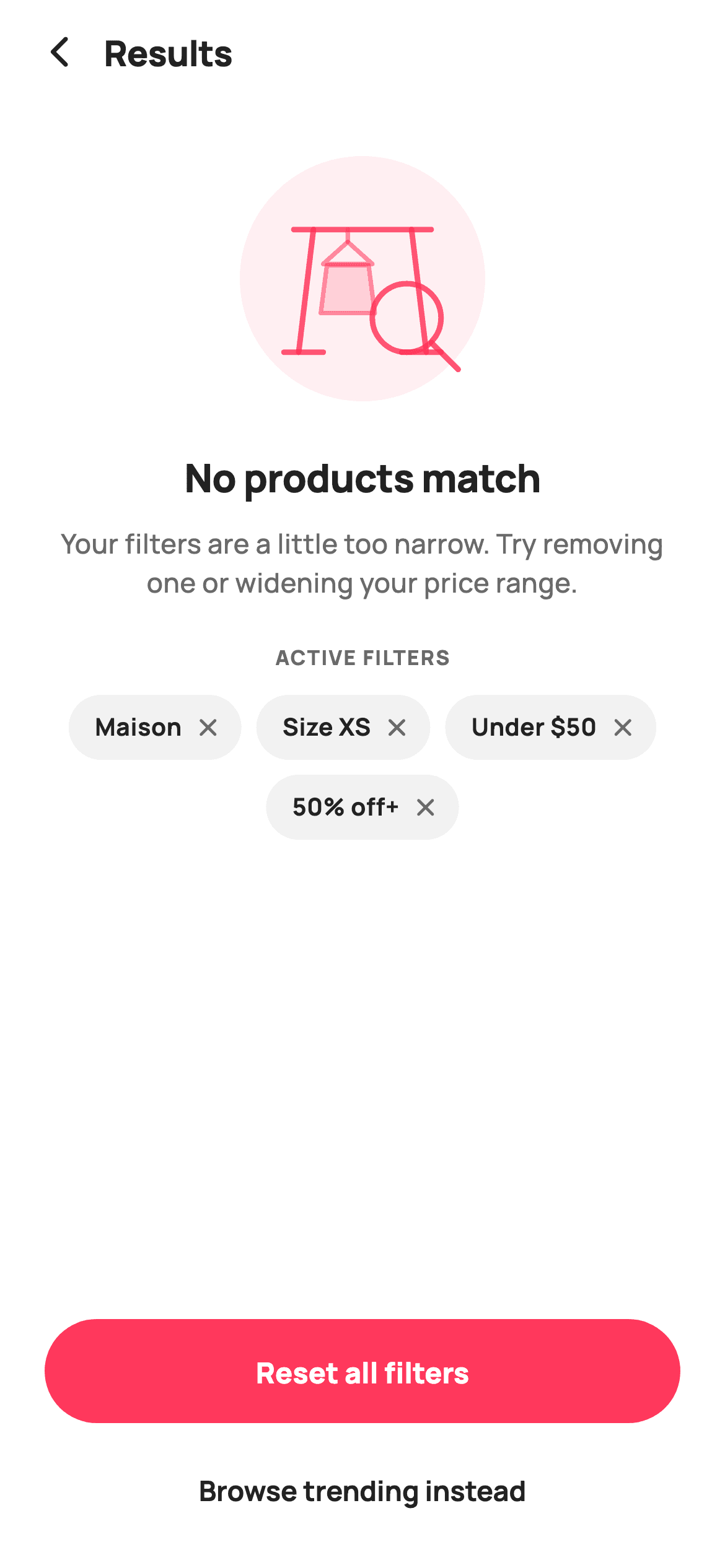
An empty results page is a diagnosis, not an apology. This tutorial builds StyleCart's no-products screen in Flutter, which shows the reader exactly which filters excluded everything and lets them drop one right there — plus a hand-painted empty clothing rack drawn with a CustomPainter, a Reset all primary button and a browse-trending escape hatch. You will write the illustration from Canvas primitives: lines, Paths and a magnifier ring, all sized in fractions of the widget so it scales cleanly.
Watch the Flutter UI walkthrough
A short screen recording of No products match running, if you'd rather see it before you read the code. The written tutorial below covers everything in it.
Can't see the video? Watch it on YouTube.
What you'll build
- ✓A vector empty-state illustration painted with drawLine, Path and drawCircle
- ✓Removable filter chips that show the reader why nothing matched
- ✓A local mutable copy of the filters list seeded from an immutable default
- ✓A two-tier CTA pairing a filled Reset with a quiet text-button alternative
Step-by-step build
Create the file
Add a new file at lib/ecom_cat_empty/ecom_cat_empty_screen.dart in your Flutter project.
Register the bundled fonts
No external packages — this is pure Flutter. It does bundle its design font (Manrope), so drop the font file into fonts/ and declare it in pubspec.yaml:
flutter:
  fonts:
    - family: Manrope
      fonts:
- asset: fonts/Manrope-Regular.ttfBuild it, piece by piece
Here's how the screen goes together. Each block below is a real slice of the code with a plain-English explanation — paste them in order, or grab the whole file from the next section.
A default filter list and the copy that makes it editable
import 'package:flutter/material.dart';

/// StyleCart — No Products (empty results).
///
/// The state a too-narrow filter set lands on: a painted empty-rack mark, the
/// active filters that excluded everything (each removable), a "widen your
/// filters" hint, a Reset-all primary CTA and a browse-trending escape hatch.
///
/// Self-contained per CONVENTIONS.md: pure Flutter, bundled Manrope, inline
/// Airbnb-style tokens, own light theme + SafeArea. The empty mark is a
/// CustomPainter (no emoji glyph). Exposes callbacks only.
class EcomCatEmptyScreen extends StatefulWidget {
  const EcomCatEmptyScreen({
    super.key,
    this.onBack,
    this.onReset,
    this.onBrowseTrending,
    this.appliedFilters = const <String>[
      'Maison',
      'Size XS',
      'Under \$50',
      '50% off+'
    ],
  });

  final VoidCallback? onBack;
  final VoidCallback? onReset;
  final VoidCallback? onBrowseTrending;
  final List<String> appliedFilters;

  @override
  State<EcomCatEmptyScreen> createState() => _EcomCatEmptyScreenState();
}

class _EcomCatEmptyScreenState extends State<EcomCatEmptyScreen> {
  static const String _font = 'Manrope';
  static const Color _canvas = Color(0xFFFFFFFF);
  static const Color _ink = Color(0xFF222222);
  static const Color _muted = Color(0xFF6A6A6A);
  static const Color _brand = Color(0xFFFF385C);
  static const Color _surface = Color(0xFFF2F2F2);

  late final List<String> _filters = List<String>.of(widget.appliedFilters);
The widget accepts `appliedFilters` with a `const` default list so the screen renders sensibly with no arguments. The critical line is in the State: `late final List<String> _filters = List<String>.of(widget.appliedFilters)`. That makes a mutable copy — the incoming list is `const` and calling `remove` on it would throw an unsupported-operation error at runtime. `late final` means the copy is created on first access, after `widget` is available, without needing an `initState` override. Note the default entry `'Under \$50'` escapes its dollar sign, since the list is not a raw string.
The page structure, and why it scrolls
  @override
  Widget build(BuildContext context) {
    return Theme(
      data: ThemeData.light(useMaterial3: true),
      child: Scaffold(
        backgroundColor: _canvas,
        body: SafeArea(
          child: Column(
            children: <Widget>[
              _header(),
              Expanded(
                child: SingleChildScrollView(
                  padding: const EdgeInsets.symmetric(horizontal: 32),
                  child: Column(
                    children: <Widget>[
                      const SizedBox(height: 28),
                      SizedBox(
                        width: 132,
                        height: 132,
                        child: CustomPaint(painter: _EmptyArtPainter()),
                      ),
                      const SizedBox(height: 26),
                      const Text(
                        'No products match',
                        textAlign: TextAlign.center,
                        style: TextStyle(
                          fontFamily: _font,
                          fontSize: 21,
                          fontWeight: FontWeight.w800,
                          letterSpacing: -0.3,
                          color: _ink,
                        ),
                      ),
                      const SizedBox(height: 10),
                      const Text(
                        'Your filters are a little too narrow. Try '
                        'removing one or widening your price range.',
                        textAlign: TextAlign.center,
                        style: TextStyle(
                          fontFamily: _font,
                          fontSize: 14.5,
                          fontWeight: FontWeight.w500,
                          height: 1.45,
                          color: _muted,
                        ),
                      ),
                      if (_filters.isNotEmpty) ...<Widget>[
                        const SizedBox(height: 22),
                        _filterChips(),
                      ],
                    ],
                  ),
                ),
              ),
              _ctaBar(),
            ],
          ),
        ),
      ),
    );
  }
Header, a `SingleChildScrollView` body, and a CTA bar pinned outside it. Scrolling matters here specifically because the filter chips are variable in number — six or seven filters plus the illustration and copy will exceed a short phone, and an empty state that overflows looks broken in exactly the moment the user is already frustrated. The headline names the problem ('No products match') and the 14.5px `_muted` paragraph at `height: 1.45` names the cause and the fix — narrow filters, try removing one. The chips are wrapped in `if (_filters.isNotEmpty) ...<Widget>[...]` so the spacer and the section vanish together once every filter has been dismissed.
The header
  Widget _header() {
    return Padding(
      padding: const EdgeInsets.fromLTRB(8, 4, 20, 4),
      child: Row(
        children: <Widget>[
          IconButton(
            onPressed: widget.onBack,
            icon: const Icon(Icons.arrow_back_ios_new_rounded,
                size: 20, color: _ink),
          ),
          const Expanded(
            child: Text(
              'Results',
              style: TextStyle(
                fontFamily: _font,
                fontSize: 19,
                fontWeight: FontWeight.w800,
                letterSpacing: -0.3,
                color: _ink,
              ),
            ),
          ),
        ],
      ),
    );
  }
A back `IconButton` and a left-aligned 'Results' title in an `Expanded` — no centring and no counterweight `SizedBox`, because this screen is a destination inside the browse flow rather than a modal. The title is 19px `w800` with `letterSpacing: -0.3`; negative tracking on a heavy weight is a small typographic move that stops bold display text looking loose, and it is applied consistently across StyleCart's headings.
Filter chips that explain the emptiness
  Widget _filterChips() {
    return Column(
      children: <Widget>[
        const Text(
          'ACTIVE FILTERS',
          style: TextStyle(
            fontFamily: _font,
            fontSize: 11,
            fontWeight: FontWeight.w800,
            letterSpacing: 0.8,
            color: _muted,
          ),
        ),
        const SizedBox(height: 12),
        Wrap(
          alignment: WrapAlignment.center,
          spacing: 8,
          runSpacing: 8,
          children: _filters.map((String f) {
            return Container(
              padding: const EdgeInsets.fromLTRB(14, 8, 10, 8),
              decoration: BoxDecoration(
                color: _surface,
                borderRadius: BorderRadius.circular(99),
              ),
              child: Row(
                mainAxisSize: MainAxisSize.min,
                children: <Widget>[
                  Text(
                    f,
                    style: const TextStyle(
                      fontFamily: _font,
                      fontSize: 13,
                      fontWeight: FontWeight.w700,
                      color: _ink,
                    ),
                  ),
                  const SizedBox(width: 6),
                  GestureDetector(
                    onTap: () => setState(() => _filters.remove(f)),
                    child: const Icon(Icons.close_rounded,
                        size: 16, color: _muted),
                  ),
                ],
              ),
            );
          }).toList(),
        ),
      ],
    );
  }
This section is what turns a dead end into a fixable state. Above the chips sits an 'ACTIVE FILTERS' eyebrow at 11px `w800` with `letterSpacing: 0.8` — tracked-out caps that label the group without competing with the headline. The chips live in a `Wrap` with `alignment: WrapAlignment.center`, so however many there are they stay centred under the illustration rather than left-ragged. Each is a neutral `_surface` pill with its own close icon calling `_filters.remove(f)` inside `setState`. Removing a filter here does not re-run the search in this file — it hands the reader the control and leaves the wiring to the host app.
Two exits, weighted differently
  Widget _ctaBar() {
    return Padding(
      padding: const EdgeInsets.fromLTRB(24, 8, 24, 16),
      child: Column(
        mainAxisSize: MainAxisSize.min,
        children: <Widget>[
          SizedBox(
            height: 56,
            width: double.infinity,
            child: FilledButton(
              onPressed: widget.onReset,
              style: FilledButton.styleFrom(
                backgroundColor: _brand,
                foregroundColor: _canvas,
                shape: const StadiumBorder(),
                textStyle: const TextStyle(
                  fontFamily: _font,
                  fontSize: 15.5,
                  fontWeight: FontWeight.w800,
                ),
              ),
              child: const Text('Reset all filters'),
            ),
          ),
          const SizedBox(height: 10),
          SizedBox(
            height: 52,
            width: double.infinity,
            child: TextButton(
              onPressed: widget.onBrowseTrending,
              style: TextButton.styleFrom(
                foregroundColor: _ink,
                textStyle: const TextStyle(
                  fontFamily: _font,
                  fontSize: 15,
                  fontWeight: FontWeight.w700,
                ),
              ),
              child: const Text('Browse trending instead'),
            ),
          ),
        ],
      ),
    );
  }
The bar stacks a `FilledButton` and a `TextButton`. 'Reset all filters' gets the coral fill and `StadiumBorder` because it is the fastest route back to results, while 'Browse trending instead' is a plain text button — a real alternative for someone whose filters were not the problem, but visually subordinate so it does not split attention. Giving an empty state two exits of clearly different weight is the pattern worth copying; two equal buttons make the user choose, and a single button leaves anyone the primary path does not suit with nowhere to go.
Painting the empty rack
/// Paints an empty clothing rack with a hanging garment and a soft search ring —
/// the "nothing here" spot illustration.
class _EmptyArtPainter extends CustomPainter {
  @override
  void paint(Canvas canvas, Size size) {
    const Color brand = Color(0xFFFF385C);
    final double w = size.width;
    final double h = size.height;

    // Soft backdrop.
    canvas.drawCircle(
      Offset(w / 2, h / 2),
      w / 2,
      Paint()..color = brand.withValues(alpha: 0.08),
    );

    final Paint line = Paint()
      ..style = PaintingStyle.stroke
      ..strokeWidth = 3
      ..strokeCap = StrokeCap.round
      ..strokeJoin = StrokeJoin.round
      ..color = brand.withValues(alpha: 0.85);

    // Rack rail.
    final double railY = h * 0.30;
    canvas.drawLine(
        Offset(w * 0.22, railY), Offset(w * 0.78, railY), line);
    // Rail legs.
    canvas.drawLine(Offset(w * 0.30, railY),
        Offset(w * 0.24, h * 0.80), line);
    canvas.drawLine(Offset(w * 0.70, railY),
        Offset(w * 0.76, h * 0.80), line);
    // Feet.
    canvas.drawLine(Offset(w * 0.18, h * 0.80),
        Offset(w * 0.34, h * 0.80), line);
    canvas.drawLine(Offset(w * 0.66, h * 0.80),
        Offset(w * 0.82, h * 0.80), line);

    // A single hanger + simple garment hint.
    final Paint thin = Paint()
      ..style = PaintingStyle.stroke
      ..strokeWidth = 2.4
      ..strokeCap = StrokeCap.round
      ..strokeJoin = StrokeJoin.round
      ..color = brand.withValues(alpha: 0.55);
    final double hx = w * 0.44;
    // Hanger hook.
    final Path hook = Path()
      ..moveTo(hx, railY)
      ..lineTo(hx, railY + h * 0.05);
    canvas.drawPath(hook, thin);
    // Hanger triangle.
    final Path hanger = Path()
      ..moveTo(hx, railY + h * 0.05)
      ..lineTo(hx - w * 0.10, railY + h * 0.14)
      ..lineTo(hx + w * 0.10, railY + h * 0.14)
      ..close();
    canvas.drawPath(hanger, thin);
    // Garment body.
    final Path shirt = Path()
      ..moveTo(hx - w * 0.085, railY + h * 0.145)
      ..lineTo(hx - w * 0.11, railY + h * 0.34)
      ..lineTo(hx + w * 0.11, railY + h * 0.34)
      ..lineTo(hx + w * 0.085, railY + h * 0.145);
    canvas.drawPath(
      shirt,
      Paint()..color = brand.withValues(alpha: 0.16),
    );
    canvas.drawPath(shirt..close(), thin);

    // Search ring lower-right.
    final Offset sc = Offset(w * 0.68, h * 0.66);
    final double sr = w * 0.14;
    canvas.drawCircle(sc, sr, line);
    canvas.drawLine(
      Offset(sc.dx + sr * 0.72, sc.dy + sr * 0.72),
      Offset(sc.dx + sr * 1.5, sc.dy + sr * 1.5),
      line,
    );
  }

  @override
  bool shouldRepaint(_EmptyArtPainter oldDelegate) => false;
}
`_EmptyArtPainter` draws the whole illustration from primitives, and every coordinate is a fraction of `size.width` or `size.height` — `w * 0.22`, `h * 0.30` — so the art scales to any box without re-measuring. It builds in layers: a `brand.withValues(alpha: 0.08)` backdrop circle, then the rack from four `drawLine` calls at `strokeWidth: 3` with `StrokeCap.round` for soft ends, then the hanger and garment as `Path` objects at a thinner 2.4px and lower alpha so they recede behind the rack. The shirt is drawn twice — once filled at `alpha: 0.16`, then `shirt..close()` re-drawn as a stroke, which is how you get a filled shape with a crisp outline from one Path. The magnifier is a `drawCircle` plus a `drawLine` whose endpoints are computed from the circle's own centre and radius, so the handle always meets the ring at the right angle. `shouldRepaint` returns `false` because nothing here depends on state.
Full code
The complete, ready-to-paste source. Free to use in your projects — one click copies it all.
import 'package:flutter/material.dart';

/// StyleCart — No Products (empty results).
///
/// The state a too-narrow filter set lands on: a painted empty-rack mark, the
/// active filters that excluded everything (each removable), a "widen your
/// filters" hint, a Reset-all primary CTA and a browse-trending escape hatch.
///
/// Self-contained per CONVENTIONS.md: pure Flutter, bundled Manrope, inline
/// Airbnb-style tokens, own light theme + SafeArea. The empty mark is a
/// CustomPainter (no emoji glyph). Exposes callbacks only.
class EcomCatEmptyScreen extends StatefulWidget {
  const EcomCatEmptyScreen({
    super.key,
    this.onBack,
    this.onReset,
    this.onBrowseTrending,
    this.appliedFilters = const <String>[
      'Maison',
      'Size XS',
      'Under \$50',
      '50% off+'
    ],
  });

  final VoidCallback? onBack;
  final VoidCallback? onReset;
  final VoidCallback? onBrowseTrending;
  final List<String> appliedFilters;

  @override
  State<EcomCatEmptyScreen> createState() => _EcomCatEmptyScreenState();
}

class _EcomCatEmptyScreenState extends State<EcomCatEmptyScreen> {
  static const String _font = 'Manrope';
  static const Color _canvas = Color(0xFFFFFFFF);
  static const Color _ink = Color(0xFF222222);
  static const Color _muted = Color(0xFF6A6A6A);
  static const Color _brand = Color(0xFFFF385C);
  static const Color _surface = Color(0xFFF2F2F2);

  late final List<String> _filters = List<String>.of(widget.appliedFilters);

  @override
  Widget build(BuildContext context) {
    return Theme(
      data: ThemeData.light(useMaterial3: true),
      child: Scaffold(
        backgroundColor: _canvas,
        body: SafeArea(
          child: Column(
            children: <Widget>[
              _header(),
              Expanded(
                child: SingleChildScrollView(
                  padding: const EdgeInsets.symmetric(horizontal: 32),
                  child: Column(
                    children: <Widget>[
                      const SizedBox(height: 28),
                      SizedBox(
                        width: 132,
                        height: 132,
                        child: CustomPaint(painter: _EmptyArtPainter()),
                      ),
                      const SizedBox(height: 26),
                      const Text(
                        'No products match',
                        textAlign: TextAlign.center,
                        style: TextStyle(
                          fontFamily: _font,
                          fontSize: 21,
                          fontWeight: FontWeight.w800,
                          letterSpacing: -0.3,
                          color: _ink,
                        ),
                      ),
                      const SizedBox(height: 10),
                      const Text(
                        'Your filters are a little too narrow. Try '
                        'removing one or widening your price range.',
                        textAlign: TextAlign.center,
                        style: TextStyle(
                          fontFamily: _font,
                          fontSize: 14.5,
                          fontWeight: FontWeight.w500,
                          height: 1.45,
                          color: _muted,
                        ),
                      ),
                      if (_filters.isNotEmpty) ...<Widget>[
                        const SizedBox(height: 22),
                        _filterChips(),
                      ],
                    ],
                  ),
                ),
              ),
              _ctaBar(),
            ],
          ),
        ),
      ),
    );
  }

  Widget _header() {
    return Padding(
      padding: const EdgeInsets.fromLTRB(8, 4, 20, 4),
      child: Row(
        children: <Widget>[
          IconButton(
            onPressed: widget.onBack,
            icon: const Icon(Icons.arrow_back_ios_new_rounded,
                size: 20, color: _ink),
          ),
          const Expanded(
            child: Text(
              'Results',
              style: TextStyle(
                fontFamily: _font,
                fontSize: 19,
                fontWeight: FontWeight.w800,
                letterSpacing: -0.3,
                color: _ink,
              ),
            ),
          ),
        ],
      ),
    );
  }

  Widget _filterChips() {
    return Column(
      children: <Widget>[
        const Text(
          'ACTIVE FILTERS',
          style: TextStyle(
            fontFamily: _font,
            fontSize: 11,
            fontWeight: FontWeight.w800,
            letterSpacing: 0.8,
            color: _muted,
          ),
        ),
        const SizedBox(height: 12),
        Wrap(
          alignment: WrapAlignment.center,
          spacing: 8,
          runSpacing: 8,
          children: _filters.map((String f) {
            return Container(
              padding: const EdgeInsets.fromLTRB(14, 8, 10, 8),
              decoration: BoxDecoration(
                color: _surface,
                borderRadius: BorderRadius.circular(99),
              ),
              child: Row(
                mainAxisSize: MainAxisSize.min,
                children: <Widget>[
                  Text(
                    f,
                    style: const TextStyle(
                      fontFamily: _font,
                      fontSize: 13,
                      fontWeight: FontWeight.w700,
                      color: _ink,
                    ),
                  ),
                  const SizedBox(width: 6),
                  GestureDetector(
                    onTap: () => setState(() => _filters.remove(f)),
                    child: const Icon(Icons.close_rounded,
                        size: 16, color: _muted),
                  ),
                ],
              ),
            );
          }).toList(),
        ),
      ],
    );
  }

  Widget _ctaBar() {
    return Padding(
      padding: const EdgeInsets.fromLTRB(24, 8, 24, 16),
      child: Column(
        mainAxisSize: MainAxisSize.min,
        children: <Widget>[
          SizedBox(
            height: 56,
            width: double.infinity,
            child: FilledButton(
              onPressed: widget.onReset,
              style: FilledButton.styleFrom(
                backgroundColor: _brand,
                foregroundColor: _canvas,
                shape: const StadiumBorder(),
                textStyle: const TextStyle(
                  fontFamily: _font,
                  fontSize: 15.5,
                  fontWeight: FontWeight.w800,
                ),
              ),
              child: const Text('Reset all filters'),
            ),
          ),
          const SizedBox(height: 10),
          SizedBox(
            height: 52,
            width: double.infinity,
            child: TextButton(
              onPressed: widget.onBrowseTrending,
              style: TextButton.styleFrom(
                foregroundColor: _ink,
                textStyle: const TextStyle(
                  fontFamily: _font,
                  fontSize: 15,
                  fontWeight: FontWeight.w700,
                ),
              ),
              child: const Text('Browse trending instead'),
            ),
          ),
        ],
      ),
    );
  }
}

/// Paints an empty clothing rack with a hanging garment and a soft search ring —
/// the "nothing here" spot illustration.
class _EmptyArtPainter extends CustomPainter {
  @override
  void paint(Canvas canvas, Size size) {
    const Color brand = Color(0xFFFF385C);
    final double w = size.width;
    final double h = size.height;

    // Soft backdrop.
    canvas.drawCircle(
      Offset(w / 2, h / 2),
      w / 2,
      Paint()..color = brand.withValues(alpha: 0.08),
    );

    final Paint line = Paint()
      ..style = PaintingStyle.stroke
      ..strokeWidth = 3
      ..strokeCap = StrokeCap.round
      ..strokeJoin = StrokeJoin.round
      ..color = brand.withValues(alpha: 0.85);

    // Rack rail.
    final double railY = h * 0.30;
    canvas.drawLine(
        Offset(w * 0.22, railY), Offset(w * 0.78, railY), line);
    // Rail legs.
    canvas.drawLine(Offset(w * 0.30, railY),
        Offset(w * 0.24, h * 0.80), line);
    canvas.drawLine(Offset(w * 0.70, railY),
        Offset(w * 0.76, h * 0.80), line);
    // Feet.
    canvas.drawLine(Offset(w * 0.18, h * 0.80),
        Offset(w * 0.34, h * 0.80), line);
    canvas.drawLine(Offset(w * 0.66, h * 0.80),
        Offset(w * 0.82, h * 0.80), line);

    // A single hanger + simple garment hint.
    final Paint thin = Paint()
      ..style = PaintingStyle.stroke
      ..strokeWidth = 2.4
      ..strokeCap = StrokeCap.round
      ..strokeJoin = StrokeJoin.round
      ..color = brand.withValues(alpha: 0.55);
    final double hx = w * 0.44;
    // Hanger hook.
    final Path hook = Path()
      ..moveTo(hx, railY)
      ..lineTo(hx, railY + h * 0.05);
    canvas.drawPath(hook, thin);
    // Hanger triangle.
    final Path hanger = Path()
      ..moveTo(hx, railY + h * 0.05)
      ..lineTo(hx - w * 0.10, railY + h * 0.14)
      ..lineTo(hx + w * 0.10, railY + h * 0.14)
      ..close();
    canvas.drawPath(hanger, thin);
    // Garment body.
    final Path shirt = Path()
      ..moveTo(hx - w * 0.085, railY + h * 0.145)
      ..lineTo(hx - w * 0.11, railY + h * 0.34)
      ..lineTo(hx + w * 0.11, railY + h * 0.34)
      ..lineTo(hx + w * 0.085, railY + h * 0.145);
    canvas.drawPath(
      shirt,
      Paint()..color = brand.withValues(alpha: 0.16),
    );
    canvas.drawPath(shirt..close(), thin);

    // Search ring lower-right.
    final Offset sc = Offset(w * 0.68, h * 0.66);
    final double sr = w * 0.14;
    canvas.drawCircle(sc, sr, line);
    canvas.drawLine(
      Offset(sc.dx + sr * 0.72, sc.dy + sr * 0.72),
      Offset(sc.dx + sr * 1.5, sc.dy + sr * 1.5),
      line,
    );
  }

  @override
  bool shouldRepaint(_EmptyArtPainter oldDelegate) => false;
}
Plus bundled 5 binary assets (fonts/images). The CLI and MCP install those for you automatically.
Two faster ways to add it
Copy-paste works, but you can skip it entirely.
1. FlutterKit CLI
One command drops this screen — and its fonts — straight into your project.
$ flutterkit add ecom-cat-empty2. AI agent (MCP)
Connect FlutterKit's MCP server in Claude or Cursor and just ask your agent to install ecom-cat-empty — it fetches and writes the files for you.
FAQ
Is this empty state screen free for commercial use?
Yes. FlutterKit is free and costs nothing, now or later. The empty state and its painter are yours to copy from this page, fetch with the CLI, or install through MCP, then use in a commercial product with no licence and no credit required.
Why copy the filters list instead of using it directly?
Because the default is a `const` list, and calling `remove` on a const collection throws at runtime. `List<String>.of(widget.appliedFilters)` makes a mutable copy, and `late final` defers that until `widget` is available so no `initState` override is needed.
Do I need an image or SVG package for the illustration?
No. It is a `CustomPainter` drawing lines, Paths and circles onto the Canvas — no asset file, no `flutter_svg`, and nothing to export from a design tool. Every coordinate is a fraction of the widget size, so it renders sharp at any resolution and scales with the box you give it.
How do I re-run the search when a chip is removed?
Add a callback such as `onFiltersChanged` to the widget and call it from the chip's `setState`, passing `_filters`. The screen deliberately does not own the search — it manages the visible chip list and reports changes, leaving the query to your existing results logic.
Which Flutter version does this need?
Flutter 3.22 or newer, because the painter uses `Color.withValues(alpha: ...)` in several places. On an older SDK swap those for `withOpacity(...)` and expand the constructor to the `{Key? key, ...} : super(key: key)` form.


