How to Build a Multi-Select Brand Filter Screen in Flutter (Full Code + Preview)
Multi-select filters break in a predictable way: you tick three brands, type in the search box, and the ticks land on the wrong rows. This tutorial builds StyleCart's brand filter in Flutter using a `Set<String>` of names rather than indices, which makes that class of bug impossible. Along the way you get tinted monogram logos generated from each brand's first letter, removable recap chips that appear only when something is selected, and an Apply bar that counts and pluralises its own label.
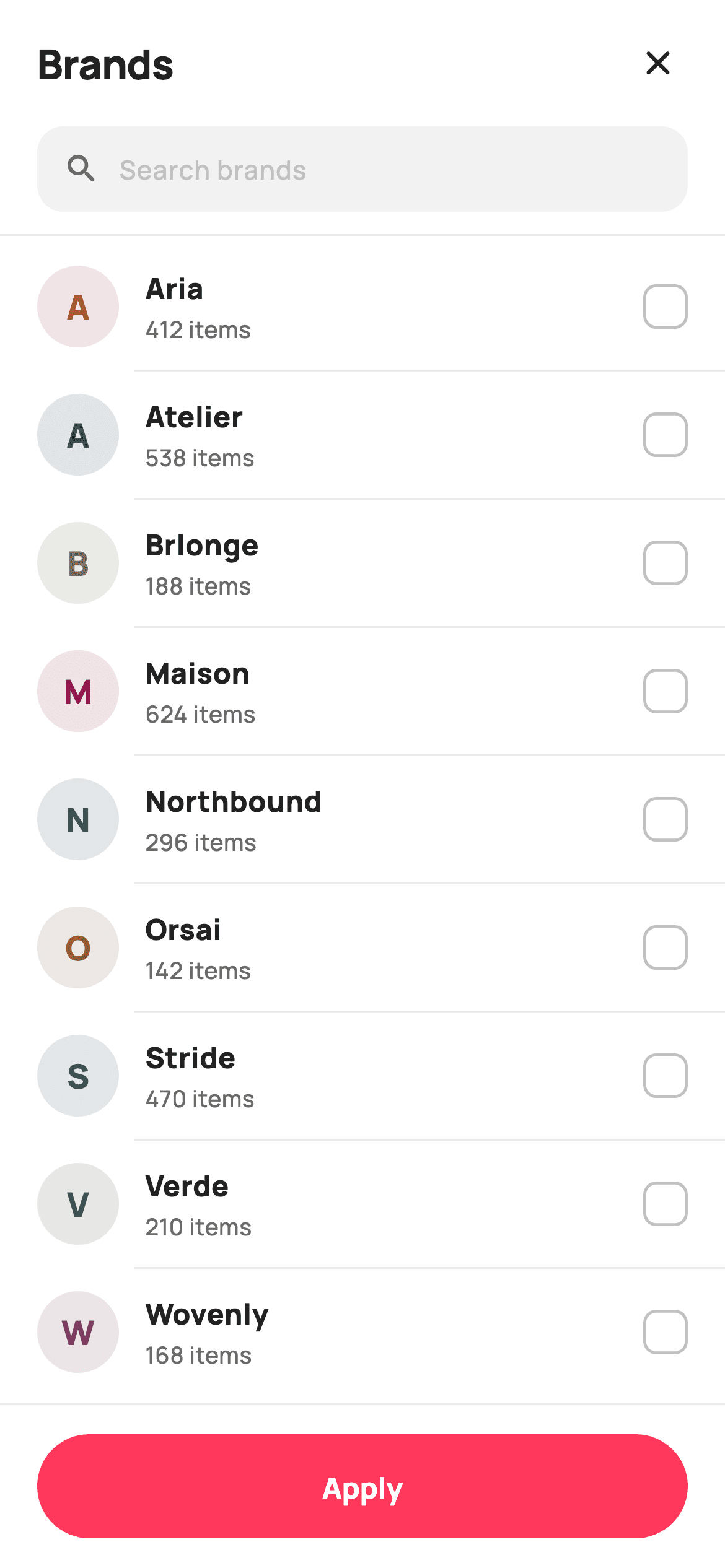
Watch the Flutter UI walkthrough
A short screen recording of Filter by Brand running, if you'd rather see it before you read the code. The written tutorial below covers everything in it.
Can't see the video? Watch it on YouTube.
What you'll build
- ✓Selection stored as a Set of names, so filtering the list can never move a tick
- ✓Monogram brand logos generated from the first letter on a 14%-alpha tint
- ✓Recap chips above the list, each removing its own brand on tap
- ✓An Apply button that counts the selection and pluralises brand versus brands
Step-by-step build
Create the file
Add a new file at lib/ecom_cat_brands_filter/ecom_cat_brands_filter_screen.dart in your Flutter project.
Register the bundled fonts
No external packages — this is pure Flutter. It does bundle its design font (Manrope), so drop the font file into fonts/ and declare it in pubspec.yaml:
flutter:
  fonts:
    - family: Manrope
      fonts:
- asset: fonts/Manrope-Regular.ttfBuild it, piece by piece
Here's how the screen goes together. Each block below is a real slice of the code with a plain-English explanation — paste them in order, or grab the whole file from the next section.
A private model class and a Set for selection
import 'package:flutter/material.dart';

/// StyleCart — Filter by Brand.
///
/// A searchable brand checklist: a live filter field, a "Selected" recap, and an
/// A–Z list of brands each with a tinted monogram logo, product count and a
/// checkbox. A pinned Apply bar carries the live selection count.
///
/// Self-contained per CONVENTIONS.md: pure Flutter, bundled Manrope, inline
/// Airbnb-style tokens, own light theme + SafeArea. Monogram logos are tinted
/// initials (letters render in goldens; no emoji). Exposes callbacks only.
class EcomCatBrandsFilterScreen extends StatefulWidget {
  const EcomCatBrandsFilterScreen({
    super.key,
    this.onClose,
    this.onApply,
  });

  final VoidCallback? onClose;

  /// Apply pressed — emits the chosen brand names.
  final ValueChanged<List<String>>? onApply;

  @override
  State<EcomCatBrandsFilterScreen> createState() =>
      _EcomCatBrandsFilterScreenState();
}

class _EcomCatBrandsFilterScreenState extends State<EcomCatBrandsFilterScreen> {
  static const String _font = 'Manrope';
  static const Color _canvas = Color(0xFFFFFFFF);
  static const Color _ink = Color(0xFF222222);
  static const Color _muted = Color(0xFF6A6A6A);
  static const Color _faint = Color(0xFFC1C1C1);
  static const Color _brand = Color(0xFFFF385C);
  static const Color _surface = Color(0xFFF2F2F2);
  static const Color _hairline = Color(0xFFEBEBEB);

  static const List<_Brand> _all = <_Brand>[
    _Brand('Aria', 412, Color(0xFFB5572E)),
    _Brand('Atelier', 538, Color(0xFF2B3A55)),
    _Brand('Brlonge', 188, Color(0xFF6F7351)),
    _Brand('Maison', 624, Color(0xFF92174D)),
    _Brand('Northbound', 296, Color(0xFF345E54)),
    _Brand('Orsai', 142, Color(0xFF8A5A2B)),
    _Brand('Stride', 470, Color(0xFF3B4A6B)),
    _Brand('Verde', 210, Color(0xFF4A6B3B)),
    _Brand('Wovenly', 168, Color(0xFF7A3B5E)),
  ];

  final TextEditingController _ctl = TextEditingController();
  final Set<String> _sel = <String>{};
  String _q = '';

  @override
  void dispose() {
    _ctl.dispose();
    super.dispose();
  }

  List<_Brand> get _filtered {
    if (_q.isEmpty) return _all;
    final String q = _q.toLowerCase();
    return _all
        .where((_Brand b) => b.name.toLowerCase().contains(q))
        .toList();
  }
`_Brand` is a tiny const class at the bottom of the file pairing a name, a product count and a tint colour — enough structure to justify a class over a record because the tint is used to derive the logo. The important choice is `final Set<String> _sel = <String>{}`: selection is stored by brand *name*, not by list index. Because names are stable and indices are not, filtering the list cannot disturb what is already ticked. `_filtered` is a getter that returns `_all` untouched when the query is empty and otherwise does a lowercased `contains` — returning the original list rather than a copy avoids an allocation on every keystroke. The controller is disposed properly in `dispose()`.
Conditional sections and an empty state inside the list
  @override
  Widget build(BuildContext context) {
    final List<_Brand> list = _filtered;
    return Theme(
      data: ThemeData.light(useMaterial3: true),
      child: Scaffold(
        backgroundColor: _canvas,
        body: SafeArea(
          bottom: false,
          child: Column(
            children: <Widget>[
              _header(),
              _searchField(),
              if (_sel.isNotEmpty) _selectedRecap(),
              const Divider(height: 1, color: _hairline),
              Expanded(
                child: list.isEmpty
                    ? _noMatch()
                    : ListView.separated(
                        padding: const EdgeInsets.symmetric(vertical: 4),
                        itemCount: list.length,
                        separatorBuilder: (_, _) => const Divider(
                            height: 1, color: _hairline, indent: 72),
                        itemBuilder: (BuildContext context, int i) =>
                            _row(list[i]),
                      ),
              ),
              _applyBar(),
            ],
          ),
        ),
      ),
    );
  }
The Column shows the structure at a glance: header, search, recap, divider, list, apply bar. Two conditionals do real work. `if (_sel.isNotEmpty) _selectedRecap()` means the recap strip does not reserve space until there is something to recap — a `Visibility` or an empty Container would leave a gap. And `list.isEmpty ? _noMatch() : ListView.separated(...)` handles a search that matches nothing, which is a state most filter screens forget. Note `SafeArea(bottom: false)` on the body: the apply bar applies its own bottom SafeArea, so insetting twice would leave a white strip under the button. The separator uses `indent: 72` to start past the 20px padding, 44px monogram and 14px gap, so the hairline aligns with the brand names.
A header whose Clear button appears on demand
  Widget _header() {
    return Padding(
      padding: const EdgeInsets.fromLTRB(20, 10, 12, 6),
      child: Row(
        children: <Widget>[
          const Expanded(
            child: Text(
              'Brands',
              style: TextStyle(
                fontFamily: _font,
                fontSize: 22,
                fontWeight: FontWeight.w800,
                letterSpacing: -0.3,
                color: _ink,
              ),
            ),
          ),
          if (_sel.isNotEmpty)
            GestureDetector(
              onTap: () => setState(_sel.clear),
              child: const Text(
                'Clear',
                style: TextStyle(
                  fontFamily: _font,
                  fontSize: 14,
                  fontWeight: FontWeight.w700,
                  color: _brand,
                ),
              ),
            ),
          IconButton(
            onPressed: widget.onClose,
            icon: const Icon(Icons.close_rounded, size: 22, color: _ink),
          ),
        ],
      ),
    );
  }
The header is a Row with the title in an `Expanded`, a conditional Clear action, and a close `IconButton`. `if (_sel.isNotEmpty)` keeps Clear hidden until there is something to clear — showing a permanently visible but meaningless action trains people to ignore it. The tap handler is `setState(_sel.clear)`, passing the method itself as a tear-off rather than wrapping it in a closure, which works because `Set.clear` matches the `VoidCallback` signature `setState` expects. The Clear text is `_brand` coral at `w700` while the title is `_ink` at `w800`, so the action reads as secondary to the heading despite being the more saturated colour.
A search field with its own clear affordance
  Widget _searchField() {
    return Padding(
      padding: const EdgeInsets.fromLTRB(20, 4, 20, 12),
      child: Container(
        height: 46,
        padding: const EdgeInsets.symmetric(horizontal: 14),
        decoration: BoxDecoration(
          color: _surface,
          borderRadius: BorderRadius.circular(14),
        ),
        child: Row(
          children: <Widget>[
            const Icon(Icons.search_rounded, size: 20, color: _muted),
            const SizedBox(width: 10),
            Expanded(
              child: TextField(
                controller: _ctl,
                onChanged: (String v) => setState(() => _q = v),
                cursorColor: _brand,
                style: const TextStyle(
                  fontFamily: _font,
                  fontSize: 14,
                  fontWeight: FontWeight.w600,
                  color: _ink,
                ),
                decoration: const InputDecoration(
                  isDense: true,
                  border: InputBorder.none,
                  hintText: 'Search brands',
                  hintStyle: TextStyle(
                    fontFamily: _font,
                    fontSize: 14,
                    fontWeight: FontWeight.w500,
                    color: _faint,
                  ),
                ),
              ),
            ),
            if (_q.isNotEmpty)
              GestureDetector(
                onTap: () => setState(() {
                  _q = '';
                  _ctl.clear();
                }),
                child: const Icon(Icons.cancel_rounded,
                    size: 18, color: _faint),
              ),
          ],
        ),
      ),
    );
  }
The field is a 46px `_surface` Container with a stripped-down `TextField` inside — `isDense: true` and `border: InputBorder.none` remove Material's padding and underline so the text aligns with the search icon. Unlike a simpler search box, this one keeps a `TextEditingController`, and the reason is the trailing clear button: `_ctl.clear()` needs a controller to reset the visible text, while `_q = ''` resets the filter. Both must happen together in one `setState`, and forgetting either leaves the field and the results disagreeing. The `if (_q.isNotEmpty)` guard means the clear icon appears only once there is text to remove.
Recap chips built from the Set
  Widget _selectedRecap() {
    return Container(
      width: double.infinity,
      padding: const EdgeInsets.fromLTRB(20, 0, 20, 12),
      child: Wrap(
        spacing: 8,
        runSpacing: 8,
        children: _sel.map((String s) {
          return Container(
            padding: const EdgeInsets.fromLTRB(12, 6, 8, 6),
            decoration: BoxDecoration(
              color: _brand.withValues(alpha: 0.10),
              borderRadius: BorderRadius.circular(99),
            ),
            child: Row(
              mainAxisSize: MainAxisSize.min,
              children: <Widget>[
                Text(
                  s,
                  style: const TextStyle(
                    fontFamily: _font,
                    fontSize: 12.5,
                    fontWeight: FontWeight.w700,
                    color: _brand,
                  ),
                ),
                const SizedBox(width: 4),
                GestureDetector(
                  onTap: () => setState(() => _sel.remove(s)),
                  child: const Icon(Icons.close_rounded,
                      size: 15, color: _brand),
                ),
              ],
            ),
          );
        }).toList(),
      ),
    );
  }
`_selectedRecap` maps the `Set` straight into chips inside a `Wrap` with 8px `spacing` and `runSpacing`, so any number of selections flow onto as many lines as needed rather than overflowing a Row. Each chip is a pill at `_brand.withValues(alpha: 0.10)` with the name and its own close icon in full `_brand`, and `mainAxisSize: MainAxisSize.min` on the inner Row keeps it hugging its content. Tapping the icon calls `_sel.remove(s)` inside `setState`. The value of the recap is that a selected brand may be scrolled out of view or filtered out entirely by the search — without it, there would be no way to see or undo those choices.
Rows, monograms and a hand-built checkbox
  Widget _row(_Brand b) {
    final bool on = _sel.contains(b.name);
    return InkWell(
      onTap: () => setState(
          () => on ? _sel.remove(b.name) : _sel.add(b.name)),
      child: Padding(
        padding: const EdgeInsets.symmetric(horizontal: 20, vertical: 12),
        child: Row(
          children: <Widget>[
            _monogram(b),
            const SizedBox(width: 14),
            Expanded(
              child: Column(
                crossAxisAlignment: CrossAxisAlignment.start,
                children: <Widget>[
                  Text(
                    b.name,
                    style: const TextStyle(
                      fontFamily: _font,
                      fontSize: 15.5,
                      fontWeight: FontWeight.w800,
                      color: _ink,
                    ),
                  ),
                  const SizedBox(height: 2),
                  Text(
                    '${b.count} items',
                    style: const TextStyle(
                      fontFamily: _font,
                      fontSize: 12.5,
                      fontWeight: FontWeight.w500,
                      color: _muted,
                    ),
                  ),
                ],
              ),
            ),
            Container(
              width: 24,
              height: 24,
              decoration: BoxDecoration(
                color: on ? _brand : _canvas,
                borderRadius: BorderRadius.circular(7),
                border: Border.all(color: on ? _brand : _faint, width: 1.6),
              ),
              child: on
                  ? const Icon(Icons.check_rounded, size: 17, color: _canvas)
                  : null,
            ),
          ],
        ),
      ),
    );
  }

  Widget _monogram(_Brand b) {
    return Container(
      width: 44,
      height: 44,
      alignment: Alignment.center,
      decoration: BoxDecoration(
        color: b.tint.withValues(alpha: 0.14),
        shape: BoxShape.circle,
      ),
      child: Text(
        b.name.substring(0, 1),
        style: TextStyle(
          fontFamily: _font,
          fontSize: 18,
          fontWeight: FontWeight.w800,
          color: b.tint,
        ),
      ),
    );
  }

  Widget _noMatch() {
    return Center(
      child: Column(
        mainAxisSize: MainAxisSize.min,
        children: <Widget>[
          const Icon(Icons.search_off_rounded, size: 40, color: _faint),
          const SizedBox(height: 12),
          Text(
            'No brands match "$_q"',
            style: const TextStyle(
              fontFamily: _font,
              fontSize: 14.5,
              fontWeight: FontWeight.w700,
              color: _muted,
            ),
          ),
        ],
      ),
    );
  }
`_row` derives `on` from `_sel.contains(b.name)` and toggles with a ternary inside `setState`. The checkbox is a hand-built 24px Container rather than Material's `Checkbox`, giving a 7px radius and a 1.6px border that no theming of the stock widget offers; when off it renders `null` as its child, which costs nothing. `_monogram` is the reusable idea — a 44px circle filled `b.tint.withValues(alpha: 0.14)` with `b.name.substring(0, 1)` in the full tint. The logo is generated from the data, so a new brand needs a name and a colour and no image asset at all. `_noMatch` closes the loop by interpolating the query back into its message, so the user sees exactly what failed to match.
An Apply bar that counts and pluralises
  Widget _applyBar() {
    return Container(
      decoration: const BoxDecoration(
        color: _canvas,
        border: Border(top: BorderSide(color: _hairline)),
      ),
      child: SafeArea(
        top: false,
        child: SizedBox(
          height: 88,
          child: Padding(
            padding: const EdgeInsets.symmetric(horizontal: 20),
            child: Center(
              child: SizedBox(
                height: 56,
                width: double.infinity,
                child: FilledButton(
                  onPressed: () => widget.onApply?.call(_sel.toList()),
                  style: FilledButton.styleFrom(
                    backgroundColor: _brand,
                    foregroundColor: _canvas,
                    shape: const StadiumBorder(),
                    textStyle: const TextStyle(
                      fontFamily: _font,
                      fontSize: 15.5,
                      fontWeight: FontWeight.w800,
                    ),
                  ),
                  child: Text(
                    _sel.isEmpty
                        ? 'Apply'
                        : 'Apply ${_sel.length} '
                            '${_sel.length == 1 ? 'brand' : 'brands'}',
                  ),
                ),
              ),
            ),
          ),
        ),
      ),
    );
  }
The bar is a Container painting `_canvas` with a top hairline, wrapping `SafeArea(top: false)` — inside, not outside, so the bar's white background extends under the home indicator while the button stays above it. The button is a Material 3 `FilledButton` with `shape: const StadiumBorder()` for the pill, and its label is computed: empty selection reads 'Apply', otherwise `'Apply ${_sel.length} ${_sel.length == 1 ? 'brand' : 'brands'}'`. Handling the singular is a two-word change that stops the button ever saying '1 brands'. On press, `widget.onApply?.call(_sel.toList())` converts the Set to a List and hands it out — this screen never decides what happens next.
Full code
The complete, ready-to-paste source. Free to use in your projects — one click copies it all.
import 'package:flutter/material.dart';

/// StyleCart — Filter by Brand.
///
/// A searchable brand checklist: a live filter field, a "Selected" recap, and an
/// A–Z list of brands each with a tinted monogram logo, product count and a
/// checkbox. A pinned Apply bar carries the live selection count.
///
/// Self-contained per CONVENTIONS.md: pure Flutter, bundled Manrope, inline
/// Airbnb-style tokens, own light theme + SafeArea. Monogram logos are tinted
/// initials (letters render in goldens; no emoji). Exposes callbacks only.
class EcomCatBrandsFilterScreen extends StatefulWidget {
  const EcomCatBrandsFilterScreen({
    super.key,
    this.onClose,
    this.onApply,
  });

  final VoidCallback? onClose;

  /// Apply pressed — emits the chosen brand names.
  final ValueChanged<List<String>>? onApply;

  @override
  State<EcomCatBrandsFilterScreen> createState() =>
      _EcomCatBrandsFilterScreenState();
}

class _EcomCatBrandsFilterScreenState extends State<EcomCatBrandsFilterScreen> {
  static const String _font = 'Manrope';
  static const Color _canvas = Color(0xFFFFFFFF);
  static const Color _ink = Color(0xFF222222);
  static const Color _muted = Color(0xFF6A6A6A);
  static const Color _faint = Color(0xFFC1C1C1);
  static const Color _brand = Color(0xFFFF385C);
  static const Color _surface = Color(0xFFF2F2F2);
  static const Color _hairline = Color(0xFFEBEBEB);

  static const List<_Brand> _all = <_Brand>[
    _Brand('Aria', 412, Color(0xFFB5572E)),
    _Brand('Atelier', 538, Color(0xFF2B3A55)),
    _Brand('Brlonge', 188, Color(0xFF6F7351)),
    _Brand('Maison', 624, Color(0xFF92174D)),
    _Brand('Northbound', 296, Color(0xFF345E54)),
    _Brand('Orsai', 142, Color(0xFF8A5A2B)),
    _Brand('Stride', 470, Color(0xFF3B4A6B)),
    _Brand('Verde', 210, Color(0xFF4A6B3B)),
    _Brand('Wovenly', 168, Color(0xFF7A3B5E)),
  ];

  final TextEditingController _ctl = TextEditingController();
  final Set<String> _sel = <String>{};
  String _q = '';

  @override
  void dispose() {
    _ctl.dispose();
    super.dispose();
  }

  List<_Brand> get _filtered {
    if (_q.isEmpty) return _all;
    final String q = _q.toLowerCase();
    return _all
        .where((_Brand b) => b.name.toLowerCase().contains(q))
        .toList();
  }

  @override
  Widget build(BuildContext context) {
    final List<_Brand> list = _filtered;
    return Theme(
      data: ThemeData.light(useMaterial3: true),
      child: Scaffold(
        backgroundColor: _canvas,
        body: SafeArea(
          bottom: false,
          child: Column(
            children: <Widget>[
              _header(),
              _searchField(),
              if (_sel.isNotEmpty) _selectedRecap(),
              const Divider(height: 1, color: _hairline),
              Expanded(
                child: list.isEmpty
                    ? _noMatch()
                    : ListView.separated(
                        padding: const EdgeInsets.symmetric(vertical: 4),
                        itemCount: list.length,
                        separatorBuilder: (_, _) => const Divider(
                            height: 1, color: _hairline, indent: 72),
                        itemBuilder: (BuildContext context, int i) =>
                            _row(list[i]),
                      ),
              ),
              _applyBar(),
            ],
          ),
        ),
      ),
    );
  }

  Widget _header() {
    return Padding(
      padding: const EdgeInsets.fromLTRB(20, 10, 12, 6),
      child: Row(
        children: <Widget>[
          const Expanded(
            child: Text(
              'Brands',
              style: TextStyle(
                fontFamily: _font,
                fontSize: 22,
                fontWeight: FontWeight.w800,
                letterSpacing: -0.3,
                color: _ink,
              ),
            ),
          ),
          if (_sel.isNotEmpty)
            GestureDetector(
              onTap: () => setState(_sel.clear),
              child: const Text(
                'Clear',
                style: TextStyle(
                  fontFamily: _font,
                  fontSize: 14,
                  fontWeight: FontWeight.w700,
                  color: _brand,
                ),
              ),
            ),
          IconButton(
            onPressed: widget.onClose,
            icon: const Icon(Icons.close_rounded, size: 22, color: _ink),
          ),
        ],
      ),
    );
  }

  Widget _searchField() {
    return Padding(
      padding: const EdgeInsets.fromLTRB(20, 4, 20, 12),
      child: Container(
        height: 46,
        padding: const EdgeInsets.symmetric(horizontal: 14),
        decoration: BoxDecoration(
          color: _surface,
          borderRadius: BorderRadius.circular(14),
        ),
        child: Row(
          children: <Widget>[
            const Icon(Icons.search_rounded, size: 20, color: _muted),
            const SizedBox(width: 10),
            Expanded(
              child: TextField(
                controller: _ctl,
                onChanged: (String v) => setState(() => _q = v),
                cursorColor: _brand,
                style: const TextStyle(
                  fontFamily: _font,
                  fontSize: 14,
                  fontWeight: FontWeight.w600,
                  color: _ink,
                ),
                decoration: const InputDecoration(
                  isDense: true,
                  border: InputBorder.none,
                  hintText: 'Search brands',
                  hintStyle: TextStyle(
                    fontFamily: _font,
                    fontSize: 14,
                    fontWeight: FontWeight.w500,
                    color: _faint,
                  ),
                ),
              ),
            ),
            if (_q.isNotEmpty)
              GestureDetector(
                onTap: () => setState(() {
                  _q = '';
                  _ctl.clear();
                }),
                child: const Icon(Icons.cancel_rounded,
                    size: 18, color: _faint),
              ),
          ],
        ),
      ),
    );
  }

  Widget _selectedRecap() {
    return Container(
      width: double.infinity,
      padding: const EdgeInsets.fromLTRB(20, 0, 20, 12),
      child: Wrap(
        spacing: 8,
        runSpacing: 8,
        children: _sel.map((String s) {
          return Container(
            padding: const EdgeInsets.fromLTRB(12, 6, 8, 6),
            decoration: BoxDecoration(
              color: _brand.withValues(alpha: 0.10),
              borderRadius: BorderRadius.circular(99),
            ),
            child: Row(
              mainAxisSize: MainAxisSize.min,
              children: <Widget>[
                Text(
                  s,
                  style: const TextStyle(
                    fontFamily: _font,
                    fontSize: 12.5,
                    fontWeight: FontWeight.w700,
                    color: _brand,
                  ),
                ),
                const SizedBox(width: 4),
                GestureDetector(
                  onTap: () => setState(() => _sel.remove(s)),
                  child: const Icon(Icons.close_rounded,
                      size: 15, color: _brand),
                ),
              ],
            ),
          );
        }).toList(),
      ),
    );
  }

  Widget _row(_Brand b) {
    final bool on = _sel.contains(b.name);
    return InkWell(
      onTap: () => setState(
          () => on ? _sel.remove(b.name) : _sel.add(b.name)),
      child: Padding(
        padding: const EdgeInsets.symmetric(horizontal: 20, vertical: 12),
        child: Row(
          children: <Widget>[
            _monogram(b),
            const SizedBox(width: 14),
            Expanded(
              child: Column(
                crossAxisAlignment: CrossAxisAlignment.start,
                children: <Widget>[
                  Text(
                    b.name,
                    style: const TextStyle(
                      fontFamily: _font,
                      fontSize: 15.5,
                      fontWeight: FontWeight.w800,
                      color: _ink,
                    ),
                  ),
                  const SizedBox(height: 2),
                  Text(
                    '${b.count} items',
                    style: const TextStyle(
                      fontFamily: _font,
                      fontSize: 12.5,
                      fontWeight: FontWeight.w500,
                      color: _muted,
                    ),
                  ),
                ],
              ),
            ),
            Container(
              width: 24,
              height: 24,
              decoration: BoxDecoration(
                color: on ? _brand : _canvas,
                borderRadius: BorderRadius.circular(7),
                border: Border.all(color: on ? _brand : _faint, width: 1.6),
              ),
              child: on
                  ? const Icon(Icons.check_rounded, size: 17, color: _canvas)
                  : null,
            ),
          ],
        ),
      ),
    );
  }

  Widget _monogram(_Brand b) {
    return Container(
      width: 44,
      height: 44,
      alignment: Alignment.center,
      decoration: BoxDecoration(
        color: b.tint.withValues(alpha: 0.14),
        shape: BoxShape.circle,
      ),
      child: Text(
        b.name.substring(0, 1),
        style: TextStyle(
          fontFamily: _font,
          fontSize: 18,
          fontWeight: FontWeight.w800,
          color: b.tint,
        ),
      ),
    );
  }

  Widget _noMatch() {
    return Center(
      child: Column(
        mainAxisSize: MainAxisSize.min,
        children: <Widget>[
          const Icon(Icons.search_off_rounded, size: 40, color: _faint),
          const SizedBox(height: 12),
          Text(
            'No brands match "$_q"',
            style: const TextStyle(
              fontFamily: _font,
              fontSize: 14.5,
              fontWeight: FontWeight.w700,
              color: _muted,
            ),
          ),
        ],
      ),
    );
  }

  Widget _applyBar() {
    return Container(
      decoration: const BoxDecoration(
        color: _canvas,
        border: Border(top: BorderSide(color: _hairline)),
      ),
      child: SafeArea(
        top: false,
        child: SizedBox(
          height: 88,
          child: Padding(
            padding: const EdgeInsets.symmetric(horizontal: 20),
            child: Center(
              child: SizedBox(
                height: 56,
                width: double.infinity,
                child: FilledButton(
                  onPressed: () => widget.onApply?.call(_sel.toList()),
                  style: FilledButton.styleFrom(
                    backgroundColor: _brand,
                    foregroundColor: _canvas,
                    shape: const StadiumBorder(),
                    textStyle: const TextStyle(
                      fontFamily: _font,
                      fontSize: 15.5,
                      fontWeight: FontWeight.w800,
                    ),
                  ),
                  child: Text(
                    _sel.isEmpty
                        ? 'Apply'
                        : 'Apply ${_sel.length} '
                            '${_sel.length == 1 ? 'brand' : 'brands'}',
                  ),
                ),
              ),
            ),
          ),
        ),
      ),
    );
  }
}

class _Brand {
  const _Brand(this.name, this.count, this.tint);
  final String name;
  final int count;
  final Color tint;
}
Plus bundled 5 binary assets (fonts/images). The CLI and MCP install those for you automatically.
Two faster ways to add it
Copy-paste works, but you can skip it entirely.
1. FlutterKit CLI
One command drops this screen — and its fonts — straight into your project.
$ flutterkit add ecom-cat-brands-filter2. AI agent (MCP)
Connect FlutterKit's MCP server in Claude or Cursor and just ask your agent to install ecom-cat-brands-filter — it fetches and writes the files for you.
FAQ
Is this brand filter screen free to use commercially?
Yes, and there is nothing to unlock. FlutterKit is free forever — the full brand-filter source is on this page, or run the CLI command, or install it over MCP from your AI editor. Use it in client work or a commercial app without a licence key or attribution.
Why store selection in a Set of names instead of a List of indices?
Because indices shift when the list is filtered. Searching 'ma' reorders and shortens the visible list, so index 2 no longer means the same brand — the classic wrong-row-ticked bug. Names are stable, and a `Set` also gives O(1) `contains` for the row check and free deduplication.
Where do the brand logos come from?
They are generated, not loaded. `_monogram` takes the first character of the brand name and draws it on a circle tinted from that brand's own colour at 14% alpha. No image assets, no network requests, and a new brand needs only a name and a hex value.
Does it need any packages?
No — the only import is `package:flutter/material.dart`. The bundled Manrope font is the sole asset; register it in your pubspec's `fonts:` block, or remove the `fontFamily` lines to fall back to the system typeface.
Which Flutter version does this need?
Flutter 3.22 or newer, because the chips and monograms use `Color.withValues(alpha: ...)`. The `separatorBuilder: (_, _)` wildcard parameters also need Dart 3.7+. On an older SDK use `withOpacity(...)` and name the unused parameters `(_, __)`.


