How to Build an Order Summary Receipt Screen in Flutter (Full Code + Preview)
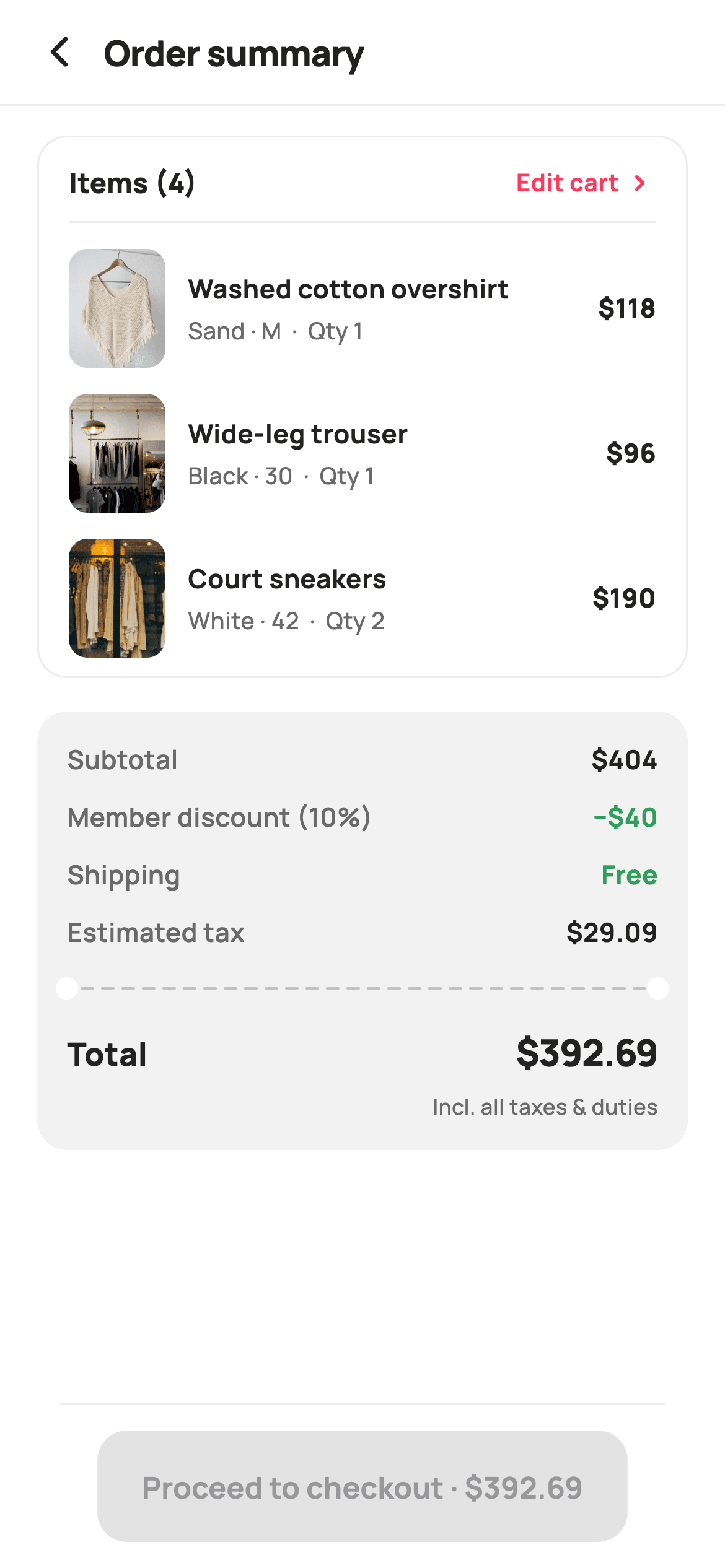
The pre-checkout screen is where a shopper decides whether to trust your maths. This tutorial builds one in Flutter that computes every figure from the line items — subtotal via `fold`, a 10% member discount, tax on the discounted amount, then the total — and separates the breakdown from the grand total with a painted perforated rule, complete with tear notches scooped out of both edges. The proceed button restates the total, so the number the user taps is the number they just read.
Watch the Flutter UI walkthrough
A short screen recording of Order Summary running, if you'd rather see it before you read the code. The written tutorial below covers everything in it.
Can't see the video? Watch it on YouTube.
What you'll build
- ✓A money breakdown computed with `fold` — no hard-coded subtotal to fall out of sync
- ✓Tax calculated on the *discounted* amount, in the correct order
- ✓A painted perforated receipt rule with half-circle tear notches at both ends
- ✓A `_money` row helper with an optional tint, so 'Free' and discounts turn green
- ✓Line items with a photo, variant, quantity and per-line total
- ✓A pinned checkout button whose label carries the exact total
Step-by-step build
Create the file
Add a new file at lib/ecom_cart_summary/ecom_cart_summary_screen.dart in your Flutter project.
Register the bundled fonts
No external packages — this is pure Flutter. It does bundle its design font (Manrope), so drop the font file into fonts/ and declare it in pubspec.yaml:
flutter:
  fonts:
    - family: Manrope
      fonts:
- asset: fonts/Manrope-Regular.ttfBuild it, piece by piece
Here's how the screen goes together. Each block below is a real slice of the code with a plain-English explanation — paste them in order, or grab the whole file from the next section.
Line items, and every figure derived from them
class EcomCartSummaryScreen extends StatelessWidget {
  const EcomCartSummaryScreen({
    super.key,
    this.onBack,
    this.onEditCart,
    this.onCheckout,
  });

  final VoidCallback? onBack;
  final VoidCallback? onEditCart;
  final VoidCallback? onCheckout;

  static const String _font = 'Manrope';
  static const Color _canvas = Color(0xFFFFFFFF);
  static const Color _ink = Color(0xFF222222);
  static const Color _muted = Color(0xFF6A6A6A);
  static const Color _brand = Color(0xFFFF385C);
  static const Color _surface = Color(0xFFF2F2F2);
  static const Color _imageBg = Color(0xFFF5F5F5);
  static const Color _success = Color(0xFF2E9E5B);
  static const Color _hairline = Color(0xFFEBEBEB);

  static const String _dir = 'lib/screens/ecommerce/ecom_cart_summary/images';

  static const List<_Line> _items = <_Line>[
    _Line('Washed cotton overshirt', 'Sand · M', 118, 1, 'p01.webp'),
    _Line('Wide-leg trouser', 'Black · 30', 96, 1, 'p02.webp'),
    _Line('Court sneakers', 'White · 42', 95, 2, 'p03.webp'),
  ];

  @override
  Widget build(BuildContext context) {
    final int subtotal =
        _items.fold(0, (int s, _Line l) => s + l.price * l.qty);
    final double discount = subtotal * 0.1;
    const double shipping = 0;
    final double tax = (subtotal - discount) * 0.08;
    final double total = subtotal - discount + shipping + tax;
    final int units = _items.fold(0, (int s, _Line l) => s + l.qty);
`_Line` carries title, variant, unit price, quantity and asset. Lines 45–51 are where the screen earns its trust: `subtotal` comes from `_items.fold(0, (s, l) => s + l.price * l.qty)`, `discount` is 10% of that, `tax` is 8% of `(subtotal - discount)` — the ordering matters, since taxing before the discount would overcharge — and `total` sums them. `units` is a second `fold` over quantities, so the 'Items (4)' heading counts *units*, not lines. Nothing here is hard-coded, so editing a quantity updates every number on the screen.
Items card with a first-row padding tweak
  Widget _itemsCard(int units) {
    return Container(
      decoration: BoxDecoration(
        color: _canvas,
        borderRadius: BorderRadius.circular(16),
        border: Border.all(color: _hairline),
      ),
      child: Column(
        children: <Widget>[
          Padding(
            padding: const EdgeInsets.fromLTRB(16, 14, 16, 10),
            child: Row(
              children: <Widget>[
                Expanded(
                  child: Text(
                    'Items ($units)',
                    style: const TextStyle(
                      fontFamily: _font,
                      fontSize: 15,
                      fontWeight: FontWeight.w800,
                      color: _ink,
                    ),
                  ),
                ),
                GestureDetector(
                  onTap: onEditCart,
                  child: const Row(
                    children: <Widget>[
                      Text(
                        'Edit cart',
                        style: TextStyle(
                          fontFamily: _font,
                          fontSize: 13,
                          fontWeight: FontWeight.w700,
                          color: _brand,
                        ),
                      ),
                      SizedBox(width: 2),
                      Icon(Icons.chevron_right_rounded, size: 18, color: _brand),
                    ],
                  ),
                ),
              ],
            ),
          ),
          const Divider(height: 1, color: _hairline, indent: 16, endIndent: 16),
          for (int i = 0; i < _items.length; i++) _itemRow(_items[i], i),
          const SizedBox(height: 6),
        ],
      ),
    );
  }

  Widget _itemRow(_Line l, int i) {
    return Padding(
      padding: EdgeInsets.fromLTRB(16, i == 0 ? 14 : 10, 16, 4),
      child: Row(
        children: <Widget>[
          ClipRRect(
            borderRadius: BorderRadius.circular(10),
            child: Container(
              width: 52,
              height: 64,
              color: _imageBg,
              child: Image.asset('$_dir/${l.asset}', fit: BoxFit.cover),
            ),
          ),
          const SizedBox(width: 12),
          Expanded(
            child: Column(
              crossAxisAlignment: CrossAxisAlignment.start,
              children: <Widget>[
                Text(
                  l.title,
                  maxLines: 1,
                  overflow: TextOverflow.ellipsis,
                  style: const TextStyle(
                    fontFamily: _font,
                    fontSize: 14,
                    fontWeight: FontWeight.w700,
                    color: _ink,
                  ),
                ),
                const SizedBox(height: 3),
                Text(
                  '${l.variant}  ·  Qty ${l.qty}',
                  style: const TextStyle(
                    fontFamily: _font,
                    fontSize: 12.5,
                    fontWeight: FontWeight.w500,
                    color: _muted,
                  ),
                ),
              ],
            ),
          ),
          const SizedBox(width: 10),
          Text(
            '\$${l.price * l.qty}',
            style: const TextStyle(
              fontFamily: _font,
              fontSize: 14,
              fontWeight: FontWeight.w800,
              color: _ink,
            ),
          ),
        ],
      ),
    );
  }
The card is a white `Container` with a `_hairline` border, holding a header row (the unit count plus an 'Edit cart' link) above the items. Its divider uses `indent: 16, endIndent: 16` so the rule stops short of both rounded corners instead of colliding with them. In `_itemRow`, the padding is `EdgeInsets.fromLTRB(16, i == 0 ? 14 : 10, 16, 4)` — the first row gets 4 extra pixels of top padding because it sits directly under the divider, while later rows already have the previous row's bottom padding above them. The per-line price is `l.price * l.qty`, so the two-pack of sneakers correctly shows $190 rather than $95.
The money breakdown
  Widget _breakdown(
      int subtotal, double discount, double shipping, double tax, double total) {
    return Container(
      padding: const EdgeInsets.fromLTRB(16, 16, 16, 16),
      decoration: BoxDecoration(
        color: _surface,
        borderRadius: BorderRadius.circular(16),
      ),
      child: Column(
        children: <Widget>[
          _money('Subtotal', '\$$subtotal'),
          const SizedBox(height: 11),
          _money('Member discount (10%)', '−\$${discount.toStringAsFixed(0)}',
              tint: _success),
          const SizedBox(height: 11),
          _money('Shipping', shipping == 0 ? 'Free' : '\$$shipping',
              tint: shipping == 0 ? _success : _ink),
          const SizedBox(height: 11),
          _money('Estimated tax', '\$${tax.toStringAsFixed(2)}'),
          const SizedBox(height: 14),
          SizedBox(
            height: 12,
            width: double.infinity,
            child: CustomPaint(painter: _ReceiptDividerPainter()),
          ),
          const SizedBox(height: 14),
          Row(
            mainAxisAlignment: MainAxisAlignment.spaceBetween,
            children: <Widget>[
              const Text(
                'Total',
                style: TextStyle(
                  fontFamily: _font,
                  fontSize: 17,
                  fontWeight: FontWeight.w800,
                  color: _ink,
                ),
              ),
              Text(
                '\$${total.toStringAsFixed(2)}',
                style: const TextStyle(
                  fontFamily: _font,
                  fontSize: 20,
                  fontWeight: FontWeight.w800,
                  letterSpacing: -0.5,
                  color: _ink,
                ),
              ),
            ],
          ),
          const SizedBox(height: 6),
          const Align(
            alignment: Alignment.centerRight,
            child: Text(
              'Incl. all taxes & duties',
              style: TextStyle(
                fontFamily: _font,
                fontSize: 11.5,
                fontWeight: FontWeight.w500,
                color: _muted,
              ),
            ),
          ),
        ],
      ),
    );
  }
Four `_money` rows on a `_surface` panel, each separated by an 11px gap. Two use the optional `tint` parameter to turn green: the member discount (rendered with a real minus sign, '−$43', not a hyphen) and shipping when it's zero, where the value string itself switches to 'Free'. Formatting differs deliberately by row — the discount is `toStringAsFixed(0)` because a round number reads as a bigger saving, while tax and total keep two decimals for precision. Below the rule, the total row uses `MainAxisAlignment.spaceBetween` at 20px `w800`, with an 'Incl. all taxes & duties' note right-aligned beneath it.
A checkout button that restates the total
  Widget _proceedBar(double total) {
    return Container(
      decoration: const BoxDecoration(
        color: _canvas,
        border: Border(top: BorderSide(color: _hairline)),
      ),
      child: SafeArea(
        top: false,
        child: SizedBox(
          height: 88,
          child: Padding(
            padding: const EdgeInsets.fromLTRB(20, 14, 20, 14),
            child: SizedBox(
              height: 56,
              child: FilledButton(
                onPressed: onCheckout,
                style: FilledButton.styleFrom(
                  backgroundColor: _brand,
                  foregroundColor: _canvas,
                  shape: RoundedRectangleBorder(
                    borderRadius: BorderRadius.circular(16),
                  ),
                ),
                child: Text(
                  'Proceed to checkout · \$${total.toStringAsFixed(2)}',
                  style: const TextStyle(
                    fontFamily: _font,
                    fontSize: 16,
                    fontWeight: FontWeight.w700,
                  ),
                ),
              ),
            ),
          ),
        ),
      ),
    );
  }
The bar is a `Container` with a top `BorderSide` hairline, using `SafeArea(top: false)` so it claims only the bottom inset and its white fill paints down behind the home indicator. The `FilledButton` uses a `RoundedRectangleBorder` at 16px rather than a `StadiumBorder`, matching the 16px radius of the cards above it. Its label is `'Proceed to checkout · \$${total.toStringAsFixed(2)}'` — built from the same computed `total` shown in the breakdown, so the two can never disagree, and the shopper commits to a figure they've just seen.
The perforated receipt rule
/// Paints a perforated receipt rule: a dashed horizontal line with a notch
/// scooped out of each side, separating the breakdown from the total.
class _ReceiptDividerPainter extends CustomPainter {
  @override
  void paint(Canvas canvas, Size size) {
    final double cy = size.height / 2;

    // Side notches (the receipt "tear" half-circles), matching the card fill.
    final Paint notch = Paint()..color = const Color(0xFFFFFFFF);
    canvas.drawCircle(Offset(0, cy), 6, notch);
    canvas.drawCircle(Offset(size.width, cy), 6, notch);

    // Dashed line between the notches.
    final Paint dash = Paint()
      ..color = const Color(0xFFC1C1C1)
      ..strokeWidth = 1.4
      ..strokeCap = StrokeCap.round;
    const double dashW = 6;
    const double gap = 5;
    double x = 8;
    while (x < size.width - 8) {
      canvas.drawLine(Offset(x, cy), Offset(x + dashW, cy), dash);
      x += dashW + gap;
    }
  }

  @override
  bool shouldRepaint(_ReceiptDividerPainter oldDelegate) => false;
}
This is the flourish that makes the panel read as a receipt. Two white circles of radius 6 are drawn *centred on* `x = 0` and `x = size.width`, so only their inner halves are visible — and because they're painted in the canvas colour, they punch semicircular bites out of the grey panel at both edges. Then a `while` loop strokes 6px dashes with 5px gaps between x = 8 and `width - 8`, stopping short of the notches. Round stroke caps keep the dashes soft. `shouldRepaint` returns `false` since nothing about the rule ever changes.
Full code
The complete, ready-to-paste source. Free to use in your projects — one click copies it all.
import 'package:flutter/material.dart';

/// StyleCart — Order Summary.
///
/// The pre-checkout receipt: the bag's line items, then an itemised money
/// breakdown (subtotal, member discount, shipping, estimated tax) split from
/// the grand total by a painted perforated rule, with an edit-cart link and a
/// pinned proceed bar.
///
/// Self-contained per CONVENTIONS.md: pure Flutter, bundled Manrope, inline
/// Airbnb-style tokens, own light theme + SafeArea, bundled webp. The receipt
/// rule is a CustomPainter (no emoji glyph). Exposes callbacks only.
class EcomCartSummaryScreen extends StatelessWidget {
  const EcomCartSummaryScreen({
    super.key,
    this.onBack,
    this.onEditCart,
    this.onCheckout,
  });

  final VoidCallback? onBack;
  final VoidCallback? onEditCart;
  final VoidCallback? onCheckout;

  static const String _font = 'Manrope';
  static const Color _canvas = Color(0xFFFFFFFF);
  static const Color _ink = Color(0xFF222222);
  static const Color _muted = Color(0xFF6A6A6A);
  static const Color _brand = Color(0xFFFF385C);
  static const Color _surface = Color(0xFFF2F2F2);
  static const Color _imageBg = Color(0xFFF5F5F5);
  static const Color _success = Color(0xFF2E9E5B);
  static const Color _hairline = Color(0xFFEBEBEB);

  static const String _dir = 'lib/screens/ecommerce/ecom_cart_summary/images';

  static const List<_Line> _items = <_Line>[
    _Line('Washed cotton overshirt', 'Sand · M', 118, 1, 'p01.webp'),
    _Line('Wide-leg trouser', 'Black · 30', 96, 1, 'p02.webp'),
    _Line('Court sneakers', 'White · 42', 95, 2, 'p03.webp'),
  ];

  @override
  Widget build(BuildContext context) {
    final int subtotal =
        _items.fold(0, (int s, _Line l) => s + l.price * l.qty);
    final double discount = subtotal * 0.1;
    const double shipping = 0;
    final double tax = (subtotal - discount) * 0.08;
    final double total = subtotal - discount + shipping + tax;
    final int units = _items.fold(0, (int s, _Line l) => s + l.qty);

    return Theme(
      data: ThemeData.light(useMaterial3: true),
      child: Scaffold(
        backgroundColor: _canvas,
        body: SafeArea(
          child: Column(
            children: <Widget>[
              _header(),
              const Divider(height: 1, color: _hairline),
              Expanded(
                child: ListView(
                  padding: const EdgeInsets.fromLTRB(20, 16, 20, 16),
                  children: <Widget>[
                    _itemsCard(units),
                    const SizedBox(height: 18),
                    _breakdown(subtotal, discount, shipping, tax, total),
                  ],
                ),
              ),
              _proceedBar(total),
            ],
          ),
        ),
      ),
    );
  }

  Widget _header() {
    return Padding(
      padding: const EdgeInsets.fromLTRB(8, 4, 20, 4),
      child: Row(
        children: <Widget>[
          IconButton(
            onPressed: onBack,
            icon: const Icon(Icons.arrow_back_ios_new_rounded,
                size: 20, color: _ink),
          ),
          const Expanded(
            child: Text(
              'Order summary',
              style: TextStyle(
                fontFamily: _font,
                fontSize: 19,
                fontWeight: FontWeight.w800,
                letterSpacing: -0.3,
                color: _ink,
              ),
            ),
          ),
        ],
      ),
    );
  }

  Widget _itemsCard(int units) {
    return Container(
      decoration: BoxDecoration(
        color: _canvas,
        borderRadius: BorderRadius.circular(16),
        border: Border.all(color: _hairline),
      ),
      child: Column(
        children: <Widget>[
          Padding(
            padding: const EdgeInsets.fromLTRB(16, 14, 16, 10),
            child: Row(
              children: <Widget>[
                Expanded(
                  child: Text(
                    'Items ($units)',
                    style: const TextStyle(
                      fontFamily: _font,
                      fontSize: 15,
                      fontWeight: FontWeight.w800,
                      color: _ink,
                    ),
                  ),
                ),
                GestureDetector(
                  onTap: onEditCart,
                  child: const Row(
                    children: <Widget>[
                      Text(
                        'Edit cart',
                        style: TextStyle(
                          fontFamily: _font,
                          fontSize: 13,
                          fontWeight: FontWeight.w700,
                          color: _brand,
                        ),
                      ),
                      SizedBox(width: 2),
                      Icon(Icons.chevron_right_rounded, size: 18, color: _brand),
                    ],
                  ),
                ),
              ],
            ),
          ),
          const Divider(height: 1, color: _hairline, indent: 16, endIndent: 16),
          for (int i = 0; i < _items.length; i++) _itemRow(_items[i], i),
          const SizedBox(height: 6),
        ],
      ),
    );
  }

  Widget _itemRow(_Line l, int i) {
    return Padding(
      padding: EdgeInsets.fromLTRB(16, i == 0 ? 14 : 10, 16, 4),
      child: Row(
        children: <Widget>[
          ClipRRect(
            borderRadius: BorderRadius.circular(10),
            child: Container(
              width: 52,
              height: 64,
              color: _imageBg,
              child: Image.asset('$_dir/${l.asset}', fit: BoxFit.cover),
            ),
          ),
          const SizedBox(width: 12),
          Expanded(
            child: Column(
              crossAxisAlignment: CrossAxisAlignment.start,
              children: <Widget>[
                Text(
                  l.title,
                  maxLines: 1,
                  overflow: TextOverflow.ellipsis,
                  style: const TextStyle(
                    fontFamily: _font,
                    fontSize: 14,
                    fontWeight: FontWeight.w700,
                    color: _ink,
                  ),
                ),
                const SizedBox(height: 3),
                Text(
                  '${l.variant}  ·  Qty ${l.qty}',
                  style: const TextStyle(
                    fontFamily: _font,
                    fontSize: 12.5,
                    fontWeight: FontWeight.w500,
                    color: _muted,
                  ),
                ),
              ],
            ),
          ),
          const SizedBox(width: 10),
          Text(
            '\$${l.price * l.qty}',
            style: const TextStyle(
              fontFamily: _font,
              fontSize: 14,
              fontWeight: FontWeight.w800,
              color: _ink,
            ),
          ),
        ],
      ),
    );
  }

  Widget _breakdown(
      int subtotal, double discount, double shipping, double tax, double total) {
    return Container(
      padding: const EdgeInsets.fromLTRB(16, 16, 16, 16),
      decoration: BoxDecoration(
        color: _surface,
        borderRadius: BorderRadius.circular(16),
      ),
      child: Column(
        children: <Widget>[
          _money('Subtotal', '\$$subtotal'),
          const SizedBox(height: 11),
          _money('Member discount (10%)', '−\$${discount.toStringAsFixed(0)}',
              tint: _success),
          const SizedBox(height: 11),
          _money('Shipping', shipping == 0 ? 'Free' : '\$$shipping',
              tint: shipping == 0 ? _success : _ink),
          const SizedBox(height: 11),
          _money('Estimated tax', '\$${tax.toStringAsFixed(2)}'),
          const SizedBox(height: 14),
          SizedBox(
            height: 12,
            width: double.infinity,
            child: CustomPaint(painter: _ReceiptDividerPainter()),
          ),
          const SizedBox(height: 14),
          Row(
            mainAxisAlignment: MainAxisAlignment.spaceBetween,
            children: <Widget>[
              const Text(
                'Total',
                style: TextStyle(
                  fontFamily: _font,
                  fontSize: 17,
                  fontWeight: FontWeight.w800,
                  color: _ink,
                ),
              ),
              Text(
                '\$${total.toStringAsFixed(2)}',
                style: const TextStyle(
                  fontFamily: _font,
                  fontSize: 20,
                  fontWeight: FontWeight.w800,
                  letterSpacing: -0.5,
                  color: _ink,
                ),
              ),
            ],
          ),
          const SizedBox(height: 6),
          const Align(
            alignment: Alignment.centerRight,
            child: Text(
              'Incl. all taxes & duties',
              style: TextStyle(
                fontFamily: _font,
                fontSize: 11.5,
                fontWeight: FontWeight.w500,
                color: _muted,
              ),
            ),
          ),
        ],
      ),
    );
  }

  Widget _money(String label, String value, {Color tint = _ink}) {
    return Row(
      mainAxisAlignment: MainAxisAlignment.spaceBetween,
      children: <Widget>[
        Text(
          label,
          style: const TextStyle(
            fontFamily: _font,
            fontSize: 14,
            fontWeight: FontWeight.w600,
            color: _muted,
          ),
        ),
        Text(
          value,
          style: TextStyle(
            fontFamily: _font,
            fontSize: 14,
            fontWeight: FontWeight.w700,
            color: tint,
          ),
        ),
      ],
    );
  }

  Widget _proceedBar(double total) {
    return Container(
      decoration: const BoxDecoration(
        color: _canvas,
        border: Border(top: BorderSide(color: _hairline)),
      ),
      child: SafeArea(
        top: false,
        child: SizedBox(
          height: 88,
          child: Padding(
            padding: const EdgeInsets.fromLTRB(20, 14, 20, 14),
            child: SizedBox(
              height: 56,
              child: FilledButton(
                onPressed: onCheckout,
                style: FilledButton.styleFrom(
                  backgroundColor: _brand,
                  foregroundColor: _canvas,
                  shape: RoundedRectangleBorder(
                    borderRadius: BorderRadius.circular(16),
                  ),
                ),
                child: Text(
                  'Proceed to checkout · \$${total.toStringAsFixed(2)}',
                  style: const TextStyle(
                    fontFamily: _font,
                    fontSize: 16,
                    fontWeight: FontWeight.w700,
                  ),
                ),
              ),
            ),
          ),
        ),
      ),
    );
  }
}

class _Line {
  const _Line(this.title, this.variant, this.price, this.qty, this.asset);
  final String title;
  final String variant;
  final int price;
  final int qty;
  final String asset;
}

/// Paints a perforated receipt rule: a dashed horizontal line with a notch
/// scooped out of each side, separating the breakdown from the total.
class _ReceiptDividerPainter extends CustomPainter {
  @override
  void paint(Canvas canvas, Size size) {
    final double cy = size.height / 2;

    // Side notches (the receipt "tear" half-circles), matching the card fill.
    final Paint notch = Paint()..color = const Color(0xFFFFFFFF);
    canvas.drawCircle(Offset(0, cy), 6, notch);
    canvas.drawCircle(Offset(size.width, cy), 6, notch);

    // Dashed line between the notches.
    final Paint dash = Paint()
      ..color = const Color(0xFFC1C1C1)
      ..strokeWidth = 1.4
      ..strokeCap = StrokeCap.round;
    const double dashW = 6;
    const double gap = 5;
    double x = 8;
    while (x < size.width - 8) {
      canvas.drawLine(Offset(x, cy), Offset(x + dashW, cy), dash);
      x += dashW + gap;
    }
  }

  @override
  bool shouldRepaint(_ReceiptDividerPainter oldDelegate) => false;
}
Plus bundled 8 binary assets (fonts/images). The CLI and MCP install those for you automatically.
Two faster ways to add it
Copy-paste works, but you can skip it entirely.
1. FlutterKit CLI
One command drops this screen — and its fonts — straight into your project.
$ flutterkit add ecom-cart-summary2. AI agent (MCP)
Connect FlutterKit's MCP server in Claude or Cursor and just ask your agent to install ecom-cart-summary — it fetches and writes the files for you.
FAQ
Is this order summary screen free to use?
Yes. The complete Dart source on this page is free for personal and commercial apps. Copy it from the code block, install it with the FlutterKit CLI (flutterkit add ecom-cart-summary), or add it through an AI agent over MCP.
Why is tax calculated after the discount?
Because that's the order most jurisdictions require — tax applies to the amount actually paid. The code does (subtotal - discount) * 0.08. Swapping the order would overcharge the shopper, which is exactly the kind of bug a summary screen exists to prevent.
How do I move the totals into my cart state?
Lift the five lines at the top of build into your cart model or provider and pass total in. The widgets already take their figures as parameters (_breakdown and _proceedBar both receive them), so nothing below needs to change.
Does the receipt divider need a package?
No. _ReceiptDividerPainter is about 20 lines of CustomPainter — two circles in the canvas colour to punch the notches, plus a dashed line loop. The whole screen is pure Flutter; the only assets are the bundled Manrope font and the product photos.
Which Flutter version does it target?
It uses const Row children, FilledButton and Material 3, so target Flutter 3.16+ with Dart 3. There are no withValues calls here, so no colour-API changes are needed on slightly older SDKs.


