How to Build a Saved For Later Screen in Flutter (Full Code + Preview)
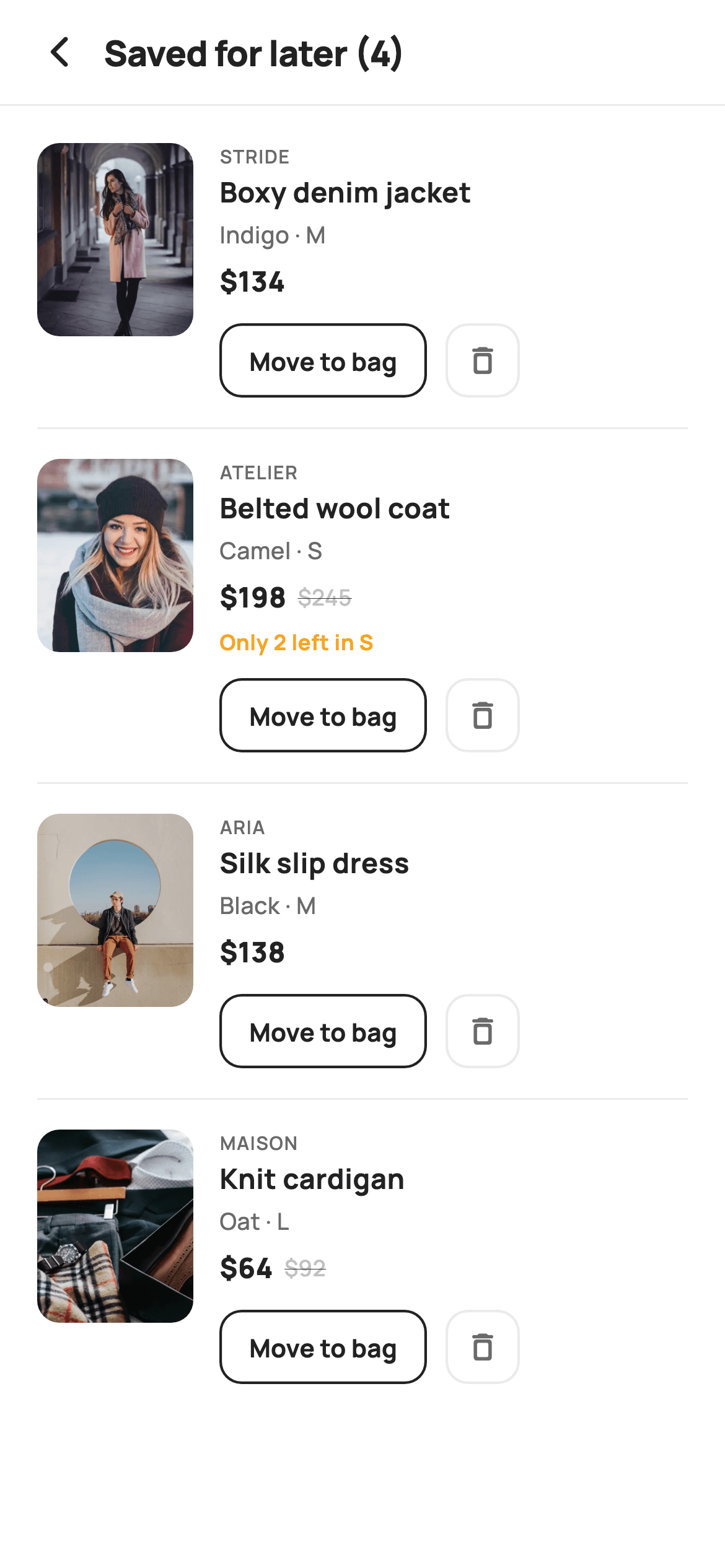
"Save for later" is where hesitant carts go to survive. This tutorial builds StyleCart's Saved For Later screen in Flutter — a divided list where every row shows an 84×104 product thumbnail, the brand, the chosen variant, a strike-through sale price, an amber low-stock warning, plus 'Move to bag' and delete controls. The item count lives in the header title and updates itself. You'll learn how conditional list spreads keep rows tidy, and how a single setState removal keeps the header honest.
Watch the Flutter UI walkthrough
A short screen recording of Saved For Later running, if you'd rather see it before you read the code. The written tutorial below covers everything in it.
Can't see the video? Watch it on YouTube.
What you'll build
- ✓A separated list of parked cart items, each with its product photo, brand and selected variant
- ✓Price rows that only render the strike-through original when the item is genuinely discounted
- ✓An amber 'Only 2 left in S' note derived from the variant string, shown only for low-stock items
- ✓A working delete control whose removal instantly re-counts the header title
Step-by-step build
Create the file
Add a new file at lib/ecom_cart_saved/ecom_cart_saved_screen.dart in your Flutter project.
Register the bundled fonts
No external packages — this is pure Flutter. It does bundle its design font (Manrope), so drop the font file into fonts/ and declare it in pubspec.yaml:
flutter:
  fonts:
    - family: Manrope
      fonts:
- asset: fonts/Manrope-Regular.ttfBuild it, piece by piece
Here's how the screen goes together. Each block below is a real slice of the code with a plain-English explanation — paste them in order, or grab the whole file from the next section.
The screen, its callbacks, and the palette
import 'package:flutter/material.dart';

/// StyleCart — Saved For Later.
///
/// Items the shopper parked out of the active bag: each row shows the product,
/// its variant and price with a low-stock note, a "Move to bag" action and a
/// remove control. A header counts the saved items.
///
/// Self-contained per CONVENTIONS.md: pure Flutter, bundled Manrope, inline
/// Airbnb-style tokens, own light theme + SafeArea, bundled webp. Exposes
/// callbacks only; the registry wires navigation.
class EcomCartSavedScreen extends StatefulWidget {
  const EcomCartSavedScreen({
    super.key,
    this.onBack,
    this.onMoveToCart,
    this.onProduct,
  });

  final VoidCallback? onBack;
  final ValueChanged<String>? onMoveToCart;
  final ValueChanged<String>? onProduct;

  @override
  State<EcomCartSavedScreen> createState() => _EcomCartSavedScreenState();
}

class _EcomCartSavedScreenState extends State<EcomCartSavedScreen> {
  static const String _font = 'Manrope';
  static const Color _canvas = Color(0xFFFFFFFF);
  static const Color _ink = Color(0xFF222222);
  static const Color _muted = Color(0xFF6A6A6A);
  static const Color _faint = Color(0xFFC1C1C1);
  static const Color _imageBg = Color(0xFFF5F5F5);
  static const Color _warn = Color(0xFFF5A623);
  static const Color _hairline = Color(0xFFEBEBEB);

  static const String _dir = 'lib/screens/ecommerce/ecom_cart_saved/images';
EcomCartSavedScreen is a StatefulWidget because deleting a row mutates its list. It exposes `onBack` plus two `ValueChanged<String>` callbacks — `onMoveToCart` and `onProduct` — so the host app learns which item was acted on without this screen knowing anything about the cart. The palette adds two tokens beyond the usual set: `_faint` (#C1C1C1) is the grey used for the struck-through old price, and `_warn` (#F5A623) is the amber reserved for the low-stock line. Keeping those as named constants means the 'warning' colour is stated once instead of being an anonymous hex buried in a TextStyle.
The saved items and the divided list
  final List<_Saved> _items = <_Saved>[
    _Saved('Boxy denim jacket', 'Stride', 'Indigo · M', 134, 0, 'p08.webp', 0),
    _Saved('Belted wool coat', 'Atelier', 'Camel · S', 198, 245, 'p09.webp', 2),
    _Saved('Silk slip dress', 'Aria', 'Black · M', 138, 0, 'p10.webp', 0),
    _Saved('Knit cardigan', 'Maison', 'Oat · L', 64, 92, 'p11.webp', 0),
  ];

  void _remove(int i) => setState(() => _items.removeAt(i));

  @override
  Widget build(BuildContext context) {
    return Theme(
      data: ThemeData.light(useMaterial3: true),
      child: Scaffold(
        backgroundColor: _canvas,
        body: SafeArea(
          child: Column(
            children: <Widget>[
              _header(),
              const Divider(height: 1, color: _hairline),
              Expanded(
                child: ListView.separated(
                  padding: const EdgeInsets.symmetric(vertical: 4),
                  itemCount: _items.length,
                  separatorBuilder: (_, _) => const Divider(
                      height: 1, color: _hairline, indent: 20, endIndent: 20),
                  itemBuilder: (BuildContext context, int i) =>
                      _row(_items[i], i),
                ),
              ),
            ],
          ),
        ),
      ),
    );
  }
`_items` holds four `_Saved` records, each carrying seven fields including two numbers that drive conditional UI: `was` is the pre-sale price (0 when the item isn't discounted) and `stock` is the remaining count (0 when stock is fine). Encoding 'no sale' and 'plenty in stock' as zero keeps the record flat and the render checks trivial. `_remove(i)` calls `removeAt` inside setState. The body is a `ListView.separated` whose `separatorBuilder` returns a 1px Divider with 20px `indent` and `endIndent` — that inset is what makes the hairlines stop short of the screen edge, aligning them with the content rather than running edge to edge like the one under the header.
A header that counts itself
  Widget _header() {
    return Padding(
      padding: const EdgeInsets.fromLTRB(8, 4, 20, 4),
      child: Row(
        children: <Widget>[
          IconButton(
            onPressed: widget.onBack,
            icon: const Icon(Icons.arrow_back_ios_new_rounded,
                size: 20, color: _ink),
          ),
          Expanded(
            child: Text(
              'Saved for later (${_items.length})',
              style: const TextStyle(
                fontFamily: _font,
                fontSize: 19,
                fontWeight: FontWeight.w800,
                letterSpacing: -0.3,
                color: _ink,
              ),
            ),
          ),
        ],
      ),
    );
  }
The header is deliberately tiny: a back IconButton and an Expanded Text reading `'Saved for later (${_items.length})'`. Because the count is interpolated from the same list the ListView renders, there is no separate counter variable to forget to update — deleting a row triggers a rebuild and the title drops from (4) to (3) for free. The title is 19px w800 with `-0.3` letterSpacing, and the whole row uses asymmetric padding (8 left, 20 right) so the icon button's own internal padding doesn't push the title off the standard 20px content margin.
The row layout and conditional pricing
  Widget _row(_Saved s, int i) {
    final bool sale = s.was > s.price && s.was > 0;
    return Padding(
      padding: const EdgeInsets.fromLTRB(20, 16, 20, 16),
      child: Row(
        crossAxisAlignment: CrossAxisAlignment.start,
        children: <Widget>[
          GestureDetector(
            onTap: () => widget.onProduct?.call(s.title),
            child: ClipRRect(
              borderRadius: BorderRadius.circular(12),
              child: Container(
                width: 84,
                height: 104,
                color: _imageBg,
                child: Image.asset('$_dir/${s.asset}', fit: BoxFit.cover),
              ),
            ),
          ),
          const SizedBox(width: 14),
          Expanded(
            child: Column(
              crossAxisAlignment: CrossAxisAlignment.start,
              children: <Widget>[
                Text(
                  s.brand.toUpperCase(),
                  style: const TextStyle(
                    fontFamily: _font,
                    fontSize: 10,
                    fontWeight: FontWeight.w600,
                    letterSpacing: 0.6,
                    color: _muted,
                  ),
                ),
                const SizedBox(height: 2),
                Text(
                  s.title,
                  maxLines: 1,
                  overflow: TextOverflow.ellipsis,
                  style: const TextStyle(
                    fontFamily: _font,
                    fontSize: 15,
                    fontWeight: FontWeight.w700,
                    color: _ink,
                  ),
                ),
                const SizedBox(height: 3),
                Text(
                  s.variant,
                  style: const TextStyle(
                    fontFamily: _font,
                    fontSize: 12.5,
                    fontWeight: FontWeight.w500,
                    color: _muted,
                  ),
                ),
                const SizedBox(height: 6),
                Row(
                  children: <Widget>[
                    Text(
                      '\$${s.price}',
                      style: const TextStyle(
                        fontFamily: _font,
                        fontSize: 15,
                        fontWeight: FontWeight.w800,
                        color: _ink,
                      ),
                    ),
                    if (sale) ...<Widget>[
                      const SizedBox(width: 6),
                      Text(
                        '\$${s.was}',
                        style: const TextStyle(
                          fontFamily: _font,
                          fontSize: 12,
                          fontWeight: FontWeight.w500,
                          color: _faint,
                          decoration: TextDecoration.lineThrough,
                        ),
                      ),
                    ],
                  ],
                ),
_row() opens by computing `sale = s.was > s.price && s.was > 0` once, so the render logic below just reads a boolean. The row is a top-aligned Row: a tappable ClipRRect thumbnail fixed at 84×104 with a 12px radius, and an Expanded text column beside it. Note the thumbnail's Container is filled with `_imageBg` *behind* the Image.asset, so there is a neutral grey placeholder rather than a flash of white while the WebP decodes. In the price Row, `if (sale) ...<Widget>[...]` is a collection-if with a spread — it lets one condition contribute both the 6px gap and the struck-through old price, so a full-price item gets neither the text nor a stray gap.
The low-stock note and the row actions
                if (s.stock > 0) ...<Widget>[
                  const SizedBox(height: 5),
                  Text(
                    'Only ${s.stock} left in ${s.variant.split(' · ').last}',
                    style: const TextStyle(
                      fontFamily: _font,
                      fontSize: 11.5,
                      fontWeight: FontWeight.w700,
                      color: _warn,
                    ),
                  ),
                ],
                const SizedBox(height: 12),
                Row(
                  children: <Widget>[
                    SizedBox(
                      height: 40,
                      child: OutlinedButton(
                        onPressed: () => widget.onMoveToCart?.call(s.title),
                        style: OutlinedButton.styleFrom(
                          foregroundColor: _ink,
                          side: const BorderSide(color: _ink, width: 1.4),
                          shape: RoundedRectangleBorder(
                            borderRadius: BorderRadius.circular(12),
                          ),
                          padding: const EdgeInsets.symmetric(horizontal: 16),
                        ),
                        child: const Text(
                          'Move to bag',
                          style: TextStyle(
                            fontFamily: _font,
                            fontSize: 13.5,
                            fontWeight: FontWeight.w700,
                          ),
                        ),
                      ),
                    ),
                    const SizedBox(width: 10),
                    GestureDetector(
                      onTap: () => _remove(i),
                      child: Container(
                        width: 40,
                        height: 40,
                        alignment: Alignment.center,
                        decoration: BoxDecoration(
                          border: Border.all(color: _hairline, width: 1.4),
                          borderRadius: BorderRadius.circular(12),
                        ),
                        child: const Icon(Icons.delete_outline_rounded,
                            size: 19, color: _muted),
                      ),
                    ),
                  ],
                ),
              ],
            ),
          ),
        ],
      ),
    );
  }
The urgency line uses the same conditional-spread trick, guarded by `if (s.stock > 0)`. The message itself is built by splitting the variant: `s.variant.split(' · ').last` turns 'Camel · S' into 'S', so the note reads 'Only 2 left in S' — it warns about the size the shopper actually picked, not the product in general. Below it, the action Row pairs a 40px-tall OutlinedButton with a 1.4px ink border for 'Move to bag' with a matching 40×40 square delete button built from a plain Container plus GestureDetector. Making both 40px tall and both 12px-rounded is what makes a text button and an icon button read as one control group.
The saved-item record
class _Saved {
  _Saved(this.title, this.brand, this.variant, this.price, this.was, this.asset,
      this.stock);
  final String title;
  final String brand;
  final String variant;
  final int price;
  final int was;
  final String asset;
  final int stock;
}
_Saved is a plain immutable class with seven final fields and a positional constructor. Two of them, `was` and `stock`, are the flags the row logic reads to decide whether to draw the sale price and the low-stock note. Unlike the other data classes in this kit it isn't marked `const`, which is what allows `_items` to be a growable `final List` that `removeAt` can mutate. Using a typed record rather than a `Map<String, dynamic>` means a mistyped field is caught by the compiler instead of returning null at runtime.
Full code
The complete, ready-to-paste source. Free to use in your projects — one click copies it all.
import 'package:flutter/material.dart';

/// StyleCart — Saved For Later.
///
/// Items the shopper parked out of the active bag: each row shows the product,
/// its variant and price with a low-stock note, a "Move to bag" action and a
/// remove control. A header counts the saved items.
///
/// Self-contained per CONVENTIONS.md: pure Flutter, bundled Manrope, inline
/// Airbnb-style tokens, own light theme + SafeArea, bundled webp. Exposes
/// callbacks only; the registry wires navigation.
class EcomCartSavedScreen extends StatefulWidget {
  const EcomCartSavedScreen({
    super.key,
    this.onBack,
    this.onMoveToCart,
    this.onProduct,
  });

  final VoidCallback? onBack;
  final ValueChanged<String>? onMoveToCart;
  final ValueChanged<String>? onProduct;

  @override
  State<EcomCartSavedScreen> createState() => _EcomCartSavedScreenState();
}

class _EcomCartSavedScreenState extends State<EcomCartSavedScreen> {
  static const String _font = 'Manrope';
  static const Color _canvas = Color(0xFFFFFFFF);
  static const Color _ink = Color(0xFF222222);
  static const Color _muted = Color(0xFF6A6A6A);
  static const Color _faint = Color(0xFFC1C1C1);
  static const Color _imageBg = Color(0xFFF5F5F5);
  static const Color _warn = Color(0xFFF5A623);
  static const Color _hairline = Color(0xFFEBEBEB);

  static const String _dir = 'lib/screens/ecommerce/ecom_cart_saved/images';

  final List<_Saved> _items = <_Saved>[
    _Saved('Boxy denim jacket', 'Stride', 'Indigo · M', 134, 0, 'p08.webp', 0),
    _Saved('Belted wool coat', 'Atelier', 'Camel · S', 198, 245, 'p09.webp', 2),
    _Saved('Silk slip dress', 'Aria', 'Black · M', 138, 0, 'p10.webp', 0),
    _Saved('Knit cardigan', 'Maison', 'Oat · L', 64, 92, 'p11.webp', 0),
  ];

  void _remove(int i) => setState(() => _items.removeAt(i));

  @override
  Widget build(BuildContext context) {
    return Theme(
      data: ThemeData.light(useMaterial3: true),
      child: Scaffold(
        backgroundColor: _canvas,
        body: SafeArea(
          child: Column(
            children: <Widget>[
              _header(),
              const Divider(height: 1, color: _hairline),
              Expanded(
                child: ListView.separated(
                  padding: const EdgeInsets.symmetric(vertical: 4),
                  itemCount: _items.length,
                  separatorBuilder: (_, _) => const Divider(
                      height: 1, color: _hairline, indent: 20, endIndent: 20),
                  itemBuilder: (BuildContext context, int i) =>
                      _row(_items[i], i),
                ),
              ),
            ],
          ),
        ),
      ),
    );
  }

  Widget _header() {
    return Padding(
      padding: const EdgeInsets.fromLTRB(8, 4, 20, 4),
      child: Row(
        children: <Widget>[
          IconButton(
            onPressed: widget.onBack,
            icon: const Icon(Icons.arrow_back_ios_new_rounded,
                size: 20, color: _ink),
          ),
          Expanded(
            child: Text(
              'Saved for later (${_items.length})',
              style: const TextStyle(
                fontFamily: _font,
                fontSize: 19,
                fontWeight: FontWeight.w800,
                letterSpacing: -0.3,
                color: _ink,
              ),
            ),
          ),
        ],
      ),
    );
  }

  Widget _row(_Saved s, int i) {
    final bool sale = s.was > s.price && s.was > 0;
    return Padding(
      padding: const EdgeInsets.fromLTRB(20, 16, 20, 16),
      child: Row(
        crossAxisAlignment: CrossAxisAlignment.start,
        children: <Widget>[
          GestureDetector(
            onTap: () => widget.onProduct?.call(s.title),
            child: ClipRRect(
              borderRadius: BorderRadius.circular(12),
              child: Container(
                width: 84,
                height: 104,
                color: _imageBg,
                child: Image.asset('$_dir/${s.asset}', fit: BoxFit.cover),
              ),
            ),
          ),
          const SizedBox(width: 14),
          Expanded(
            child: Column(
              crossAxisAlignment: CrossAxisAlignment.start,
              children: <Widget>[
                Text(
                  s.brand.toUpperCase(),
                  style: const TextStyle(
                    fontFamily: _font,
                    fontSize: 10,
                    fontWeight: FontWeight.w600,
                    letterSpacing: 0.6,
                    color: _muted,
                  ),
                ),
                const SizedBox(height: 2),
                Text(
                  s.title,
                  maxLines: 1,
                  overflow: TextOverflow.ellipsis,
                  style: const TextStyle(
                    fontFamily: _font,
                    fontSize: 15,
                    fontWeight: FontWeight.w700,
                    color: _ink,
                  ),
                ),
                const SizedBox(height: 3),
                Text(
                  s.variant,
                  style: const TextStyle(
                    fontFamily: _font,
                    fontSize: 12.5,
                    fontWeight: FontWeight.w500,
                    color: _muted,
                  ),
                ),
                const SizedBox(height: 6),
                Row(
                  children: <Widget>[
                    Text(
                      '\$${s.price}',
                      style: const TextStyle(
                        fontFamily: _font,
                        fontSize: 15,
                        fontWeight: FontWeight.w800,
                        color: _ink,
                      ),
                    ),
                    if (sale) ...<Widget>[
                      const SizedBox(width: 6),
                      Text(
                        '\$${s.was}',
                        style: const TextStyle(
                          fontFamily: _font,
                          fontSize: 12,
                          fontWeight: FontWeight.w500,
                          color: _faint,
                          decoration: TextDecoration.lineThrough,
                        ),
                      ),
                    ],
                  ],
                ),
                if (s.stock > 0) ...<Widget>[
                  const SizedBox(height: 5),
                  Text(
                    'Only ${s.stock} left in ${s.variant.split(' · ').last}',
                    style: const TextStyle(
                      fontFamily: _font,
                      fontSize: 11.5,
                      fontWeight: FontWeight.w700,
                      color: _warn,
                    ),
                  ),
                ],
                const SizedBox(height: 12),
                Row(
                  children: <Widget>[
                    SizedBox(
                      height: 40,
                      child: OutlinedButton(
                        onPressed: () => widget.onMoveToCart?.call(s.title),
                        style: OutlinedButton.styleFrom(
                          foregroundColor: _ink,
                          side: const BorderSide(color: _ink, width: 1.4),
                          shape: RoundedRectangleBorder(
                            borderRadius: BorderRadius.circular(12),
                          ),
                          padding: const EdgeInsets.symmetric(horizontal: 16),
                        ),
                        child: const Text(
                          'Move to bag',
                          style: TextStyle(
                            fontFamily: _font,
                            fontSize: 13.5,
                            fontWeight: FontWeight.w700,
                          ),
                        ),
                      ),
                    ),
                    const SizedBox(width: 10),
                    GestureDetector(
                      onTap: () => _remove(i),
                      child: Container(
                        width: 40,
                        height: 40,
                        alignment: Alignment.center,
                        decoration: BoxDecoration(
                          border: Border.all(color: _hairline, width: 1.4),
                          borderRadius: BorderRadius.circular(12),
                        ),
                        child: const Icon(Icons.delete_outline_rounded,
                            size: 19, color: _muted),
                      ),
                    ),
                  ],
                ),
              ],
            ),
          ),
        ],
      ),
    );
  }
}

class _Saved {
  _Saved(this.title, this.brand, this.variant, this.price, this.was, this.asset,
      this.stock);
  final String title;
  final String brand;
  final String variant;
  final int price;
  final int was;
  final String asset;
  final int stock;
}
Plus bundled 9 binary assets (fonts/images). The CLI and MCP install those for you automatically.
Two faster ways to add it
Copy-paste works, but you can skip it entirely.
1. FlutterKit CLI
One command drops this screen — and its fonts — straight into your project.
$ flutterkit add ecom-cart-saved2. AI agent (MCP)
Connect FlutterKit's MCP server in Claude or Cursor and just ask your agent to install ecom-cart-saved — it fetches and writes the files for you.
FAQ
Is this Flutter saved-for-later screen free to use?
Yes. The complete Dart source on this page is free for personal and commercial projects. Copy it from the page, install it with the FlutterKit CLI (flutterkit add ecom-cart-saved), or have an AI agent add it for you over MCP.
How do I make 'Move to bag' actually move the item?
The screen deliberately only reports the action: `onMoveToCart` fires with the product title so your cart layer can add it. If you also want the row to disappear on move, call the same `_remove(i)` used by the delete button right after invoking the callback — the header count and the list will both update from that one setState.
Does it need any external packages?
No — it's pure Flutter on the material library. It bundles the Manrope font plus four WebP product photos referenced through the `_dir` constant, all registered in pubspec.yaml as shown in step 2. The CLI and MCP copy those files in automatically; to use your own catalogue, repoint `_dir` and change the asset names in `_items`.
Which Flutter version does it target?
It uses super parameters and wildcard `_` arguments in the separatorBuilder, so it targets Flutter 3.27+ / Dart 3.7+. On an older SDK, rename those two wildcards to distinct names such as `(BuildContext c, int i)` and it compiles fine.


