How to Build a Shopping Cart Screen in Flutter (Full Code + Preview)
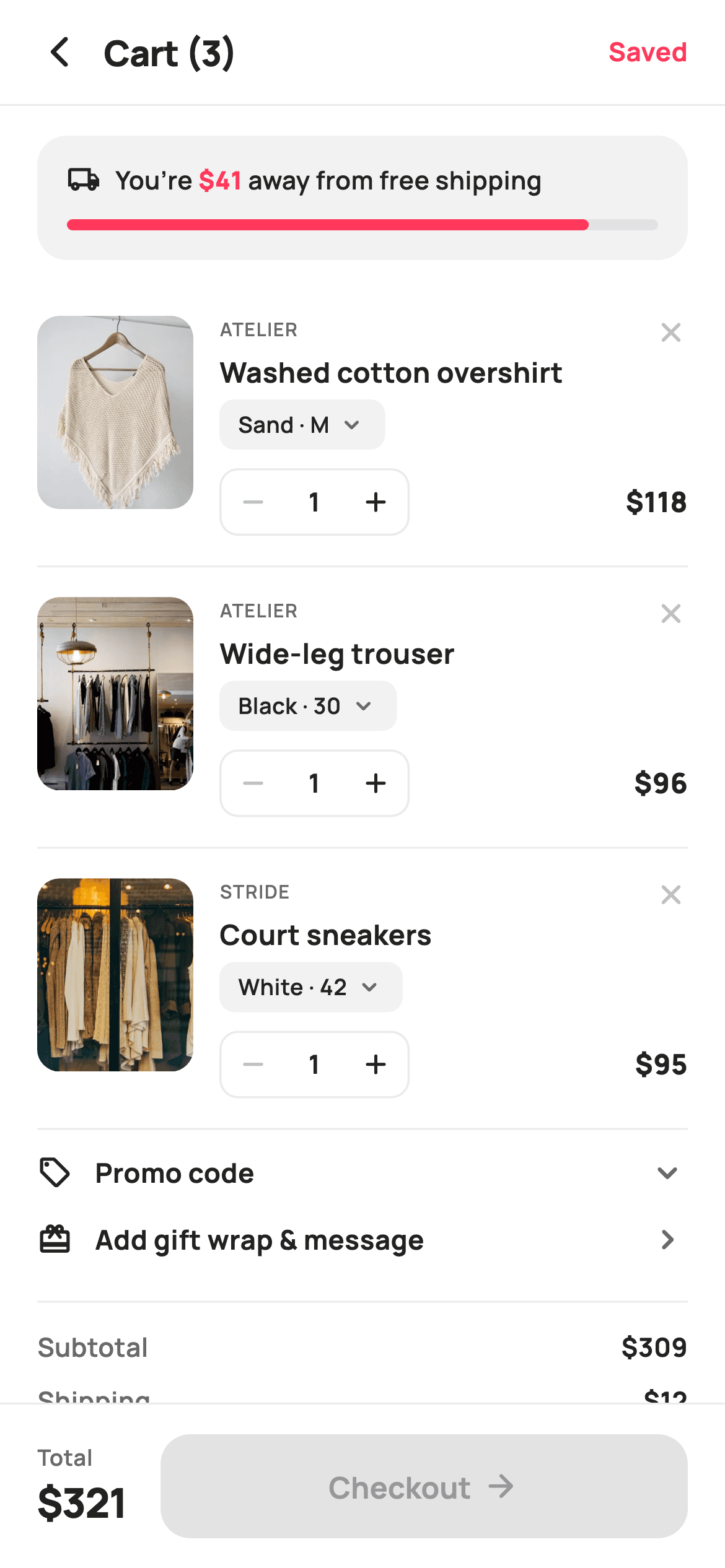
A cart screen is a live calculator with pictures. Change a quantity, remove a line, apply a promo code — and the subtotal, the discount row, the shipping cost, the free-shipping meter, the header count and both totals all have to move together. This build gets that for free by computing every number from the item list at build time instead of storing it. You'll also get an expanding promo row, a painted progress meter, and a pinned checkout bar showing the total next to the CTA.
Watch the Flutter UI walkthrough
A short screen recording of Shopping Cart running, if you'd rather see it before you read the code. The written tutorial below covers everything in it.
Can't see the video? Watch it on YouTube.
What you'll build
- ✓A free-shipping meter with a painted progress bar and a rich-text '$41 away' line that turns green on unlock
- ✓Editable line items with a bordered quantity stepper, a variant chip, and a remove button
- ✓A promo row that expands with `AnimatedCrossFade` and rotates its chevron with `AnimatedRotation`
- ✓A price summary where the discount row only exists when a code is applied and shipping flips to 'Free' at the threshold
- ✓A pinned 88px bar pairing the live total with a Checkout CTA
Step-by-step build
Create the file
Add a new file at lib/ecom_cart_main/ecom_cart_main_screen.dart in your Flutter project.
Register the bundled fonts
No external packages — this is pure Flutter. It does bundle its design font (Manrope), so drop the font file into fonts/ and declare it in pubspec.yaml:
flutter:
  fonts:
    - family: Manrope
      fonts:
- asset: fonts/Manrope-Regular.ttfBuild it, piece by piece
Here's how the screen goes together. Each block below is a real slice of the code with a plain-English explanation — paste them in order, or grab the whole file from the next section.
Mutable lines and three derived totals
class EcomCartMainScreen extends StatefulWidget {
  const EcomCartMainScreen({
    super.key,
    this.onBack,
    this.onEditItem,
    this.onSaved,
    this.onSummary,
    this.onGift,
    this.onCheckout,
  });

  final VoidCallback? onBack;

  /// A line item was tapped — open its edit (size/colour/qty) sheet.
  final ValueChanged<String>? onEditItem;
  final VoidCallback? onSaved;
  final VoidCallback? onSummary;
  final VoidCallback? onGift;
  final VoidCallback? onCheckout;

  @override
  State<EcomCartMainScreen> createState() => _EcomCartMainScreenState();
}

class _EcomCartMainScreenState extends State<EcomCartMainScreen> {
  static const String _font = 'Manrope';
  static const Color _canvas = Color(0xFFFFFFFF);
  static const Color _ink = Color(0xFF222222);
  static const Color _muted = Color(0xFF6A6A6A);
  static const Color _faint = Color(0xFFC1C1C1);
  static const Color _brand = Color(0xFFFF385C);
  static const Color _surface = Color(0xFFF2F2F2);
  static const Color _imageBg = Color(0xFFF5F5F5);
  static const Color _success = Color(0xFF2E9E5B);
  static const Color _hairline = Color(0xFFEBEBEB);

  static const String _dir = 'lib/screens/ecommerce/ecom_cart_main/images';
  static const double _freeAt = 350;

  final List<_Line> _items = <_Line>[
    _Line('Washed cotton overshirt', 'Atelier', 'Sand · M', 118, 'p01.webp', 1),
    _Line('Wide-leg trouser', 'Atelier', 'Black · 30', 96, 'p02.webp', 1),
    _Line('Court sneakers', 'Stride', 'White · 42', 95, 'p03.webp', 1),
  ];

  bool _promoOpen = false;
  bool _promoApplied = false;
  final TextEditingController _promo = TextEditingController();

  @override
  void dispose() {
    _promo.dispose();
    super.dispose();
  }

  double get _subtotal =>
      _items.fold(0, (double s, _Line l) => s + l.price * l.qty);
  double get _discount => _promoApplied ? _subtotal * 0.1 : 0;
  int get _count => _items.fold(0, (int s, _Line l) => s + l.qty);

  void _setQty(int i, int delta) {
    setState(() {
      final int next = _items[i].qty + delta;
      if (next >= 1) {
        _items[i].qty = next;
      }
    });
  }

  void _remove(int i) => setState(() => _items.removeAt(i));
Notice `_Line` at the bottom of the file has one non-final field, `int qty` — everything else is immutable, and quantity is the only thing a cart row can change in place. The `_items` list is a plain instance field (not `static const`) precisely because it's mutated. The three getters are the heart of the screen: `_subtotal` folds price × qty across the list, `_count` folds the quantities for the header, and `_discount` is 10% of the subtotal when a promo is applied. Because they're getters recomputed on every build, there's no way for a displayed total to lag behind the list. `_setQty` guards the lower bound with `if (next >= 1)`, so decrementing can never take a line to zero — removal is a separate, explicit action.
The page shell and a for-loop inside a widget list
  @override
  Widget build(BuildContext context) {
    return Theme(
      data: ThemeData.light(useMaterial3: true),
      child: Scaffold(
        backgroundColor: _canvas,
        body: SafeArea(
          child: Column(
            children: <Widget>[
              _header(),
              const Divider(height: 1, color: _hairline),
              Expanded(
                child: ListView(
                  padding: const EdgeInsets.only(bottom: 16),
                  children: <Widget>[
                    _shipMeter(),
                    for (int i = 0; i < _items.length; i++) ...<Widget>[
                      _lineItem(i),
                      const Divider(
                          height: 1, color: _hairline, indent: 20, endIndent: 20),
                    ],
                    _promoRow(),
                    _giftRow(),
                    const SizedBox(height: 6),
                    _summary(),
                  ],
                ),
              ),
              _checkoutBar(),
            ],
          ),
        ),
      ),
    );
  }

  Widget _header() {
    return Padding(
      padding: const EdgeInsets.fromLTRB(8, 4, 20, 4),
      child: Row(
        children: <Widget>[
          IconButton(
            onPressed: widget.onBack,
            icon: const Icon(Icons.arrow_back_ios_new_rounded,
                size: 20, color: _ink),
          ),
          Expanded(
            child: Text(
              'Cart ($_count)',
              style: const TextStyle(
                fontFamily: _font,
                fontSize: 19,
                fontWeight: FontWeight.w800,
                letterSpacing: -0.3,
                color: _ink,
              ),
            ),
          ),
          GestureDetector(
            onTap: widget.onSaved,
            child: const Text(
              'Saved',
              style: TextStyle(
                fontFamily: _font,
                fontSize: 14,
                fontWeight: FontWeight.w700,
                color: _brand,
              ),
            ),
          ),
        ],
      ),
    );
  }
The body is the standard scroll-plus-pinned-bar layout, but look at how the line items are built: `for (int i = 0; i < _items.length; i++) ...<Widget>[ _lineItem(i), Divider(...) ]` — a collection-for with a spread, inside a plain `ListView`'s children. That's how you emit two widgets per item without a `ListView.builder`, and passing the index rather than the item is what lets `_lineItem` call `_remove(i)` and `_setQty(i, ...)`. The dividers use `indent: 20, endIndent: 20` so the hairlines stop short of the screen edge, matching the content padding. The header title interpolates `_count`, so it reads 'Cart (3)' and updates as quantities change.
The free-shipping meter
  Widget _shipMeter() {
    final double remain = (_freeAt - _subtotal).clamp(0, _freeAt);
    final double pct = (_subtotal / _freeAt).clamp(0, 1);
    final bool unlocked = remain <= 0;
    return Container(
      margin: const EdgeInsets.fromLTRB(20, 16, 20, 14),
      padding: const EdgeInsets.fromLTRB(16, 14, 16, 16),
      decoration: BoxDecoration(
        color: _surface,
        borderRadius: BorderRadius.circular(16),
      ),
      child: Column(
        crossAxisAlignment: CrossAxisAlignment.start,
        children: <Widget>[
          Row(
            children: <Widget>[
              Icon(
                unlocked
                    ? Icons.check_circle_rounded
                    : Icons.local_shipping_outlined,
                size: 18,
                color: unlocked ? _success : _ink,
              ),
              const SizedBox(width: 8),
              Expanded(
                child: Text.rich(
                  unlocked
                      ? const TextSpan(
                          text: 'You’ve unlocked free shipping',
                          style: TextStyle(
                            fontFamily: _font,
                            fontSize: 13.5,
                            fontWeight: FontWeight.w700,
                            color: _ink,
                          ),
                        )
                      : TextSpan(
                          children: <TextSpan>[
                            const TextSpan(text: 'You’re '),
                            TextSpan(
                              text: '\$${remain.toStringAsFixed(0)}',
                              style: const TextStyle(
                                fontWeight: FontWeight.w800,
                                color: _brand,
                              ),
                            ),
                            const TextSpan(text: ' away from free shipping'),
                          ],
                          style: const TextStyle(
                            fontFamily: _font,
                            fontSize: 13.5,
                            fontWeight: FontWeight.w600,
                            color: _ink,
                          ),
                        ),
                ),
              ),
            ],
          ),
          const SizedBox(height: 12),
          SizedBox(
            height: 6,
            width: double.infinity,
            child: CustomPaint(
              painter: _ShipBarPainter(pct: pct, unlocked: unlocked),
            ),
          ),
        ],
      ),
    );
  }
Three values are derived up front: `remain` is `(_freeAt - _subtotal).clamp(0, _freeAt)`, `pct` is the same ratio clamped to 0–1 for the bar, and `unlocked` is simply `remain <= 0`. The message is a `Text.rich` with the dollar amount in its own `TextSpan` at `w800` brand-red — highlighting just the number inside a sentence is what makes the gap feel concrete. When unlocked, the whole span swaps to a single congratulatory line and the icon changes from `local_shipping_outlined` to a green `check_circle_rounded`. The bar itself is a 6px-tall `CustomPaint`; `_ShipBarPainter` draws a grey track and then a fill whose width is `(size.width * pct).clamp(size.height, size.width)` — clamping the minimum to the bar's own height means a tiny percentage still renders as a visible rounded dot instead of a sliver.
A line item and its stepper
  Widget _lineItem(int i) {
    final _Line l = _items[i];
    return Padding(
      padding: const EdgeInsets.fromLTRB(20, 16, 20, 16),
      child: Row(
        crossAxisAlignment: CrossAxisAlignment.start,
        children: <Widget>[
          GestureDetector(
            onTap: () => widget.onEditItem?.call(l.title),
            child: ClipRRect(
              borderRadius: BorderRadius.circular(12),
              child: Container(
                width: 84,
                height: 104,
                color: _imageBg,
                child: Image.asset('$_dir/${l.asset}', fit: BoxFit.cover),
              ),
            ),
          ),
          const SizedBox(width: 14),
          Expanded(
            child: Column(
              crossAxisAlignment: CrossAxisAlignment.start,
              children: <Widget>[
                Row(
                  crossAxisAlignment: CrossAxisAlignment.start,
                  children: <Widget>[
                    Expanded(
                      child: Text(
                        l.brand.toUpperCase(),
                        style: const TextStyle(
                          fontFamily: _font,
                          fontSize: 10,
                          fontWeight: FontWeight.w600,
                          letterSpacing: 0.6,
                          color: _muted,
                        ),
                      ),
                    ),
                    GestureDetector(
                      onTap: () => _remove(i),
                      child: const Icon(Icons.close_rounded,
                          size: 18, color: _faint),
                    ),
                  ],
                ),
                const SizedBox(height: 2),
                Text(
                  l.title,
                  maxLines: 1,
                  overflow: TextOverflow.ellipsis,
                  style: const TextStyle(
                    fontFamily: _font,
                    fontSize: 15,
                    fontWeight: FontWeight.w700,
                    color: _ink,
                  ),
                ),
                const SizedBox(height: 4),
                GestureDetector(
                  onTap: () => widget.onEditItem?.call(l.title),
                  child: Container(
                    padding: const EdgeInsets.symmetric(
                        horizontal: 10, vertical: 5),
                    decoration: BoxDecoration(
                      color: _surface,
                      borderRadius: BorderRadius.circular(8),
                    ),
                    child: Row(
                      mainAxisSize: MainAxisSize.min,
                      children: <Widget>[
                        Text(
                          l.variant,
                          style: const TextStyle(
                            fontFamily: _font,
                            fontSize: 12,
                            fontWeight: FontWeight.w600,
                            color: _ink,
                          ),
                        ),
                        const SizedBox(width: 4),
                        const Icon(Icons.keyboard_arrow_down_rounded,
                            size: 16, color: _muted),
                      ],
                    ),
                  ),
                ),
                const SizedBox(height: 10),
                Row(
                  children: <Widget>[
                    _qtyStepper(i, l),
                    const Spacer(),
                    Text(
                      '\$${(l.price * l.qty)}',
                      style: const TextStyle(
                        fontFamily: _font,
                        fontSize: 15,
                        fontWeight: FontWeight.w800,
                        color: _ink,
                      ),
                    ),
                  ],
                ),
              ],
            ),
          ),
        ],
      ),
    );
  }

  Widget _qtyStepper(int i, _Line l) {
    return Container(
      decoration: BoxDecoration(
        border: Border.all(color: _hairline, width: 1.2),
        borderRadius: BorderRadius.circular(10),
      ),
      child: Row(
        mainAxisSize: MainAxisSize.min,
        children: <Widget>[
          _stepBtn(Icons.remove_rounded, l.qty > 1, () => _setQty(i, -1)),
          SizedBox(
            width: 32,
            child: Text(
              '${l.qty}',
              textAlign: TextAlign.center,
              style: const TextStyle(
                fontFamily: _font,
                fontSize: 14,
                fontWeight: FontWeight.w700,
                color: _ink,
              ),
            ),
          ),
          _stepBtn(Icons.add_rounded, true, () => _setQty(i, 1)),
        ],
      ),
    );
  }

  Widget _stepBtn(IconData icon, bool on, VoidCallback tap) {
    return GestureDetector(
      onTap: on ? tap : null,
      child: SizedBox(
        width: 34,
        height: 34,
        child: Icon(icon, size: 18, color: on ? _ink : _faint),
      ),
    );
  }
Each row is an 84×104 thumbnail beside an `Expanded` text column. The variant is rendered as a tappable grey chip with a chevron — `'Sand · M'` plus a caret — which signals it's editable and reuses `onEditItem`, the same callback the thumbnail fires. The remove control is a small `close_rounded` in `_faint` at the top-right of the text block, deliberately low-contrast so it isn't hit by accident. The line total is computed inline as `l.price * l.qty`. In `_stepBtn`, the enabled flag drives both behaviour and appearance: `onTap: on ? tap : null` plus `color: on ? _ink : _faint`, so at qty 1 the minus button visibly greys out. The plus button passes `true` unconditionally — there's no upper cap on this screen.
The expanding promo row
  Widget _promoRow() {
    return Padding(
      padding: const EdgeInsets.fromLTRB(20, 12, 20, 4),
      child: Column(
        children: <Widget>[
          GestureDetector(
            onTap: () => setState(() => _promoOpen = !_promoOpen),
            behavior: HitTestBehavior.opaque,
            child: Row(
              children: <Widget>[
                const Icon(Icons.local_offer_outlined, size: 19, color: _ink),
                const SizedBox(width: 12),
                const Expanded(
                  child: Text(
                    'Promo code',
                    style: TextStyle(
                      fontFamily: _font,
                      fontSize: 14.5,
                      fontWeight: FontWeight.w700,
                      color: _ink,
                    ),
                  ),
                ),
                if (_promoApplied)
                  Container(
                    padding:
                        const EdgeInsets.symmetric(horizontal: 8, vertical: 3),
                    decoration: BoxDecoration(
                      color: _success.withValues(alpha: 0.12),
                      borderRadius: BorderRadius.circular(6),
                    ),
                    child: const Text(
                      'STYLE10',
                      style: TextStyle(
                        fontFamily: _font,
                        fontSize: 11,
                        fontWeight: FontWeight.w800,
                        color: _success,
                      ),
                    ),
                  ),
                AnimatedRotation(
                  turns: _promoOpen ? 0.5 : 0,
                  duration: const Duration(milliseconds: 160),
                  child: const Icon(Icons.keyboard_arrow_down_rounded,
                      size: 22, color: _muted),
                ),
              ],
            ),
          ),
          AnimatedCrossFade(
            firstChild: const SizedBox(width: double.infinity),
            secondChild: Padding(
              padding: const EdgeInsets.only(top: 12),
              child: Row(
                children: <Widget>[
                  Expanded(
                    child: Container(
                      height: 46,
                      padding: const EdgeInsets.symmetric(horizontal: 14),
                      decoration: BoxDecoration(
                        color: _surface,
                        borderRadius: BorderRadius.circular(12),
                      ),
                      alignment: Alignment.centerLeft,
                      child: TextField(
                        controller: _promo,
                        cursorColor: _brand,
                        textCapitalization: TextCapitalization.characters,
                        style: const TextStyle(
                          fontFamily: _font,
                          fontSize: 14,
                          fontWeight: FontWeight.w700,
                          letterSpacing: 0.5,
                          color: _ink,
                        ),
                        decoration: const InputDecoration(
                          isDense: true,
                          border: InputBorder.none,
                          hintText: 'Enter code',
                          hintStyle: TextStyle(
                            fontFamily: _font,
                            fontSize: 14,
                            fontWeight: FontWeight.w500,
                            letterSpacing: 0,
                            color: _faint,
                          ),
                        ),
                      ),
                    ),
                  ),
                  const SizedBox(width: 10),
                  SizedBox(
                    height: 46,
                    child: FilledButton(
                      onPressed: () =>
                          setState(() => _promoApplied = !_promoApplied),
                      style: FilledButton.styleFrom(
                        backgroundColor: _ink,
                        foregroundColor: _canvas,
                        shape: RoundedRectangleBorder(
                          borderRadius: BorderRadius.circular(12),
                        ),
                      ),
                      child: Text(
                        _promoApplied ? 'Remove' : 'Apply',
                        style: const TextStyle(
                          fontFamily: _font,
                          fontSize: 14,
                          fontWeight: FontWeight.w700,
                        ),
                      ),
                    ),
                  ),
                ],
              ),
            ),
            crossFadeState: _promoOpen
                ? CrossFadeState.showSecond
                : CrossFadeState.showFirst,
            duration: const Duration(milliseconds: 160),
          ),
        ],
      ),
    );
  }
Two animations do the disclosure work. `AnimatedRotation(turns: _promoOpen ? 0.5 : 0)` spins the chevron half a turn — `turns` is measured in full rotations, so 0.5 is 180°. `AnimatedCrossFade` swaps between a zero-height `SizedBox(width: double.infinity)` and the input row over 160ms, animating the height as well as the opacity, which is why the content below slides rather than jumps. The code field sets `textCapitalization: TextCapitalization.characters` and `letterSpacing: 0.5` so typed codes look like codes, while the hint style resets `letterSpacing: 0` to keep 'Enter code' reading normally. The Apply button toggles `_promoApplied` and relabels itself 'Remove', and once applied a green `STYLE10` chip appears in the collapsed header — so the state is visible without expanding the row.
The summary block
  Widget _summary() {
    final double ship = _subtotal >= _freeAt ? 0 : 12;
    final double total = _subtotal - _discount + ship;
    return Padding(
      padding: const EdgeInsets.fromLTRB(20, 12, 20, 4),
      child: Column(
        children: <Widget>[
          const Divider(height: 1, color: _hairline),
          const SizedBox(height: 14),
          _row('Subtotal', '\$${_subtotal.toStringAsFixed(0)}'),
          if (_discount > 0) ...<Widget>[
            const SizedBox(height: 9),
            _row('Discount (STYLE10)', '−\$${_discount.toStringAsFixed(0)}',
                tint: _success),
          ],
          const SizedBox(height: 9),
          _row('Shipping', ship == 0 ? 'Free' : '\$${ship.toStringAsFixed(0)}',
              tint: ship == 0 ? _success : _ink),
          const SizedBox(height: 12),
          GestureDetector(
            onTap: widget.onSummary,
            child: const Row(
              children: <Widget>[
                Text(
                  'View full order summary',
                  style: TextStyle(
                    fontFamily: _font,
                    fontSize: 13,
                    fontWeight: FontWeight.w700,
                    color: _brand,
                  ),
                ),
                SizedBox(width: 2),
                Icon(Icons.chevron_right_rounded, size: 18, color: _brand),
              ],
            ),
          ),
          const SizedBox(height: 6),
          const Divider(height: 1, color: _hairline),
          const SizedBox(height: 14),
          _row('Total', '\$${total.toStringAsFixed(0)}', bold: true),
        ],
      ),
    );
  }

  Widget _row(String label, String value,
      {Color tint = _ink, bool bold = false}) {
    return Row(
      mainAxisAlignment: MainAxisAlignment.spaceBetween,
      children: <Widget>[
        Text(
          label,
          style: TextStyle(
            fontFamily: _font,
            fontSize: bold ? 16 : 14,
            fontWeight: bold ? FontWeight.w800 : FontWeight.w600,
            color: bold ? _ink : _muted,
          ),
        ),
        Text(
          value,
          style: TextStyle(
            fontFamily: _font,
            fontSize: bold ? 18 : 14,
            fontWeight: bold ? FontWeight.w800 : FontWeight.w700,
            color: tint,
          ),
        ),
      ],
    );
  }
`ship` is derived from the same `_freeAt` threshold as the meter — `_subtotal >= _freeAt ? 0 : 12` — so the two can never disagree, and `total` is subtotal minus discount plus shipping. The discount row is spread in with `if (_discount > 0)`, so it's absent rather than showing a zero, and it's tinted `_success` with a proper minus sign (−) in the string. Shipping tints green and reads 'Free' at the threshold. All rows go through one `_row` helper taking a `tint` and a `bold` flag; `bold` scales the label from 14 to 16, the value from 14 to 18, and darkens the label from `_muted` to `_ink`, which is how the Total line gets its emphasis without a second widget.
The pinned checkout bar
  Widget _checkoutBar() {
    final double ship = _subtotal >= _freeAt ? 0 : 12;
    final double total = _subtotal - _discount + ship;
    return Container(
      decoration: const BoxDecoration(
        color: _canvas,
        border: Border(top: BorderSide(color: _hairline)),
      ),
      child: SafeArea(
        top: false,
        child: SizedBox(
          height: 88,
          child: Padding(
            padding: const EdgeInsets.fromLTRB(20, 14, 20, 14),
            child: Row(
              children: <Widget>[
                Column(
                  mainAxisAlignment: MainAxisAlignment.center,
                  crossAxisAlignment: CrossAxisAlignment.start,
                  children: <Widget>[
                    const Text(
                      'Total',
                      style: TextStyle(
                        fontFamily: _font,
                        fontSize: 12,
                        fontWeight: FontWeight.w600,
                        color: _muted,
                      ),
                    ),
                    Text(
                      '\$${total.toStringAsFixed(0)}',
                      style: const TextStyle(
                        fontFamily: _font,
                        fontSize: 22,
                        fontWeight: FontWeight.w800,
                        letterSpacing: -0.5,
                        color: _ink,
                      ),
                    ),
                  ],
                ),
                const SizedBox(width: 18),
                Expanded(
                  child: SizedBox(
                    height: 56,
                    child: FilledButton(
                      onPressed: widget.onCheckout,
                      style: FilledButton.styleFrom(
                        backgroundColor: _brand,
                        foregroundColor: _canvas,
                        shape: RoundedRectangleBorder(
                          borderRadius: BorderRadius.circular(16),
                        ),
                      ),
                      child: const Row(
                        mainAxisAlignment: MainAxisAlignment.center,
                        children: <Widget>[
                          Text(
                            'Checkout',
                            style: TextStyle(
                              fontFamily: _font,
                              fontSize: 16,
                              fontWeight: FontWeight.w700,
                            ),
                          ),
                          SizedBox(width: 6),
                          Icon(Icons.arrow_forward_rounded, size: 20),
                        ],
                      ),
                    ),
                  ),
                ),
              ],
            ),
          ),
        ),
      ),
    );
  }
The bar recomputes `ship` and `total` with the same two lines used in `_summary` — a deliberate duplication that keeps each builder self-contained (in a larger app you'd lift these into getters beside `_subtotal`). The layout pairs an intrinsically-sized `Column` showing a small 'Total' label above a 22px `w800` amount, with an `Expanded` CTA that takes all remaining width. Inside the `FilledButton`, a `Row` with `MainAxisSize` defaults and `mainAxisAlignment: MainAxisAlignment.center` puts the label next to an arrow icon — a compound label that reads as forward motion. The whole bar sits in `SafeArea(top: false)` under a hairline top border.
Full code
The complete, ready-to-paste source. Free to use in your projects — one click copies it all.
import 'package:flutter/material.dart';
/// StyleCart — Cart.
///
/// The shopping bag (Cart tab): a free-shipping threshold meter, editable line
/// items (thumbnail, brand, variant, qty stepper, remove / save-for-later), a
/// promo entry row, a live price summary and a pinned 88px checkout bar.
///
/// Self-contained per CONVENTIONS.md: pure Flutter, bundled Manrope, inline
/// Airbnb-style tokens, own light theme + SafeArea, bundled webp. The shipping
/// meter is a CustomPainter (no emoji glyph). Exposes callbacks only.
class EcomCartMainScreen extends StatefulWidget {
const EcomCartMainScreen({
super.key,
this.onBack,
this.onEditItem,
this.onSaved,
this.onSummary,
this.onGift,
this.onCheckout,
});
final VoidCallback? onBack;
/// A line item was tapped — open its edit (size/colour/qty) sheet.
final ValueChanged<String>? onEditItem;
final VoidCallback? onSaved;
final VoidCallback? onSummary;
final VoidCallback? onGift;
final VoidCallback? onCheckout;
@override
State<EcomCartMainScreen> createState() => _EcomCartMainScreenState();
}
class _EcomCartMainScreenState extends State<EcomCartMainScreen> {
static const String _font = 'Manrope';
static const Color _canvas = Color(0xFFFFFFFF);
static const Color _ink = Color(0xFF222222);
static const Color _muted = Color(0xFF6A6A6A);
static const Color _faint = Color(0xFFC1C1C1);
static const Color _brand = Color(0xFFFF385C);
static const Color _surface = Color(0xFFF2F2F2);
static const Color _imageBg = Color(0xFFF5F5F5);
static const Color _success = Color(0xFF2E9E5B);
static const Color _hairline = Color(0xFFEBEBEB);
static const String _dir = 'lib/screens/ecommerce/ecom_cart_main/images';
static const double _freeAt = 350;
final List<_Line> _items = <_Line>[
_Line('Washed cotton overshirt', 'Atelier', 'Sand · M', 118, 'p01.webp', 1),
_Line('Wide-leg trouser', 'Atelier', 'Black · 30', 96, 'p02.webp', 1),
_Line('Court sneakers', 'Stride', 'White · 42', 95, 'p03.webp', 1),
];
bool _promoOpen = false;
bool _promoApplied = false;
final TextEditingController _promo = TextEditingController();
@override
void dispose() {
_promo.dispose();
super.dispose();
}
double get _subtotal =>
_items.fold(0, (double s, _Line l) => s + l.price * l.qty);
double get _discount => _promoApplied ? _subtotal * 0.1 : 0;
int get _count => _items.fold(0, (int s, _Line l) => s + l.qty);
void _setQty(int i, int delta) {
setState(() {
final int next = _items[i].qty + delta;
if (next >= 1) {
_items[i].qty = next;
}
});
}
void _remove(int i) => setState(() => _items.removeAt(i));
@override
Widget build(BuildContext context) {
return Theme(
data: ThemeData.light(useMaterial3: true),
child: Scaffold(
backgroundColor: _canvas,
body: SafeArea(
child: Column(
children: <Widget>[
_header(),
const Divider(height: 1, color: _hairline),
Expanded(
child: ListView(
padding: const EdgeInsets.only(bottom: 16),
children: <Widget>[
_shipMeter(),
for (int i = 0; i < _items.length; i++) ...<Widget>[
_lineItem(i),
const Divider(
height: 1, color: _hairline, indent: 20, endIndent: 20),
],
_promoRow(),
_giftRow(),
const SizedBox(height: 6),
_summary(),
],
),
),
_checkoutBar(),
],
),
),
),
);
}
Widget _header() {
return Padding(
padding: const EdgeInsets.fromLTRB(8, 4, 20, 4),
child: Row(
children: <Widget>[
IconButton(
onPressed: widget.onBack,
icon: const Icon(Icons.arrow_back_ios_new_rounded,
size: 20, color: _ink),
),
Expanded(
child: Text(
'Cart ($_count)',
style: const TextStyle(
fontFamily: _font,
fontSize: 19,
fontWeight: FontWeight.w800,
letterSpacing: -0.3,
color: _ink,
),
),
),
GestureDetector(
onTap: widget.onSaved,
child: const Text(
'Saved',
style: TextStyle(
fontFamily: _font,
fontSize: 14,
fontWeight: FontWeight.w700,
color: _brand,
),
),
),
],
),
);
}
Widget _shipMeter() {
final double remain = (_freeAt - _subtotal).clamp(0, _freeAt);
final double pct = (_subtotal / _freeAt).clamp(0, 1);
final bool unlocked = remain <= 0;
return Container(
margin: const EdgeInsets.fromLTRB(20, 16, 20, 14),
padding: const EdgeInsets.fromLTRB(16, 14, 16, 16),
decoration: BoxDecoration(
color: _surface,
borderRadius: BorderRadius.circular(16),
),
child: Column(
crossAxisAlignment: CrossAxisAlignment.start,
children: <Widget>[
Row(
children: <Widget>[
Icon(
unlocked
? Icons.check_circle_rounded
: Icons.local_shipping_outlined,
size: 18,
color: unlocked ? _success : _ink,
),
const SizedBox(width: 8),
Expanded(
child: Text.rich(
unlocked
? const TextSpan(
text: 'You’ve unlocked free shipping',
style: TextStyle(
fontFamily: _font,
fontSize: 13.5,
fontWeight: FontWeight.w700,
color: _ink,
),
)
: TextSpan(
children: <TextSpan>[
const TextSpan(text: 'You’re '),
TextSpan(
text: '\$${remain.toStringAsFixed(0)}',
style: const TextStyle(
fontWeight: FontWeight.w800,
color: _brand,
),
),
const TextSpan(text: ' away from free shipping'),
],
style: const TextStyle(
fontFamily: _font,
fontSize: 13.5,
fontWeight: FontWeight.w600,
color: _ink,
),
),
),
),
],
),
const SizedBox(height: 12),
SizedBox(
height: 6,
width: double.infinity,
child: CustomPaint(
painter: _ShipBarPainter(pct: pct, unlocked: unlocked),
),
),
],
),
);
}
Widget _lineItem(int i) {
final _Line l = _items[i];
return Padding(
padding: const EdgeInsets.fromLTRB(20, 16, 20, 16),
child: Row(
crossAxisAlignment: CrossAxisAlignment.start,
children: <Widget>[
GestureDetector(
onTap: () => widget.onEditItem?.call(l.title),
child: ClipRRect(
borderRadius: BorderRadius.circular(12),
child: Container(
width: 84,
height: 104,
color: _imageBg,
child: Image.asset('$_dir/${l.asset}', fit: BoxFit.cover),
),
),
),
const SizedBox(width: 14),
Expanded(
child: Column(
crossAxisAlignment: CrossAxisAlignment.start,
children: <Widget>[
Row(
crossAxisAlignment: CrossAxisAlignment.start,
children: <Widget>[
Expanded(
child: Text(
l.brand.toUpperCase(),
style: const TextStyle(
fontFamily: _font,
fontSize: 10,
fontWeight: FontWeight.w600,
letterSpacing: 0.6,
color: _muted,
),
),
),
GestureDetector(
onTap: () => _remove(i),
child: const Icon(Icons.close_rounded,
size: 18, color: _faint),
),
],
),
const SizedBox(height: 2),
Text(
l.title,
maxLines: 1,
overflow: TextOverflow.ellipsis,
style: const TextStyle(
fontFamily: _font,
fontSize: 15,
fontWeight: FontWeight.w700,
color: _ink,
),
),
const SizedBox(height: 4),
GestureDetector(
onTap: () => widget.onEditItem?.call(l.title),
child: Container(
padding: const EdgeInsets.symmetric(
horizontal: 10, vertical: 5),
decoration: BoxDecoration(
color: _surface,
borderRadius: BorderRadius.circular(8),
),
child: Row(
mainAxisSize: MainAxisSize.min,
children: <Widget>[
Text(
l.variant,
style: const TextStyle(
fontFamily: _font,
fontSize: 12,
fontWeight: FontWeight.w600,
color: _ink,
),
),
const SizedBox(width: 4),
const Icon(Icons.keyboard_arrow_down_rounded,
size: 16, color: _muted),
],
),
),
),
const SizedBox(height: 10),
Row(
children: <Widget>[
_qtyStepper(i, l),
const Spacer(),
Text(
'\$${(l.price * l.qty)}',
style: const TextStyle(
fontFamily: _font,
fontSize: 15,
fontWeight: FontWeight.w800,
color: _ink,
),
),
],
),
],
),
),
],
),
);
}
Widget _qtyStepper(int i, _Line l) {
return Container(
decoration: BoxDecoration(
border: Border.all(color: _hairline, width: 1.2),
borderRadius: BorderRadius.circular(10),
),
child: Row(
mainAxisSize: MainAxisSize.min,
children: <Widget>[
_stepBtn(Icons.remove_rounded, l.qty > 1, () => _setQty(i, -1)),
SizedBox(
width: 32,
child: Text(
'${l.qty}',
textAlign: TextAlign.center,
style: const TextStyle(
fontFamily: _font,
fontSize: 14,
fontWeight: FontWeight.w700,
color: _ink,
),
),
),
_stepBtn(Icons.add_rounded, true, () => _setQty(i, 1)),
],
),
);
}
Widget _stepBtn(IconData icon, bool on, VoidCallback tap) {
return GestureDetector(
onTap: on ? tap : null,
child: SizedBox(
width: 34,
height: 34,
child: Icon(icon, size: 18, color: on ? _ink : _faint),
),
);
}
Widget _promoRow() {
return Padding(
padding: const EdgeInsets.fromLTRB(20, 12, 20, 4),
child: Column(
children: <Widget>[
GestureDetector(
onTap: () => setState(() => _promoOpen = !_promoOpen),
behavior: HitTestBehavior.opaque,
child: Row(
children: <Widget>[
const Icon(Icons.local_offer_outlined, size: 19, color: _ink),
const SizedBox(width: 12),
const Expanded(
child: Text(
'Promo code',
style: TextStyle(
fontFamily: _font,
fontSize: 14.5,
fontWeight: FontWeight.w700,
color: _ink,
),
),
),
if (_promoApplied)
Container(
padding:
const EdgeInsets.symmetric(horizontal: 8, vertical: 3),
decoration: BoxDecoration(
color: _success.withValues(alpha: 0.12),
borderRadius: BorderRadius.circular(6),
),
child: const Text(
'STYLE10',
style: TextStyle(
fontFamily: _font,
fontSize: 11,
fontWeight: FontWeight.w800,
color: _success,
),
),
),
AnimatedRotation(
turns: _promoOpen ? 0.5 : 0,
duration: const Duration(milliseconds: 160),
child: const Icon(Icons.keyboard_arrow_down_rounded,
size: 22, color: _muted),
),
],
),
),
AnimatedCrossFade(
firstChild: const SizedBox(width: double.infinity),
secondChild: Padding(
padding: const EdgeInsets.only(top: 12),
child: Row(
children: <Widget>[
Expanded(
child: Container(
height: 46,
padding: const EdgeInsets.symmetric(horizontal: 14),
decoration: BoxDecoration(
color: _surface,
borderRadius: BorderRadius.circular(12),
),
alignment: Alignment.centerLeft,
child: TextField(
controller: _promo,
cursorColor: _brand,
textCapitalization: TextCapitalization.characters,
style: const TextStyle(
fontFamily: _font,
fontSize: 14,
fontWeight: FontWeight.w700,
letterSpacing: 0.5,
color: _ink,
),
decoration: const InputDecoration(
isDense: true,
border: InputBorder.none,
hintText: 'Enter code',
hintStyle: TextStyle(
fontFamily: _font,
fontSize: 14,
fontWeight: FontWeight.w500,
letterSpacing: 0,
color: _faint,
),
),
),
),
),
const SizedBox(width: 10),
SizedBox(
height: 46,
child: FilledButton(
onPressed: () =>
setState(() => _promoApplied = !_promoApplied),
style: FilledButton.styleFrom(
backgroundColor: _ink,
foregroundColor: _canvas,
shape: RoundedRectangleBorder(
borderRadius: BorderRadius.circular(12),
),
),
child: Text(
_promoApplied ? 'Remove' : 'Apply',
style: const TextStyle(
fontFamily: _font,
fontSize: 14,
fontWeight: FontWeight.w700,
),
),
),
),
],
),
),
crossFadeState: _promoOpen
? CrossFadeState.showSecond
: CrossFadeState.showFirst,
duration: const Duration(milliseconds: 160),
),
],
),
);
}
Widget _giftRow() {
return Padding(
padding: const EdgeInsets.fromLTRB(20, 10, 20, 4),
child: GestureDetector(
onTap: widget.onGift,
behavior: HitTestBehavior.opaque,
child: Row(
children: <Widget>[
const Icon(Icons.card_giftcard_rounded, size: 19, color: _ink),
const SizedBox(width: 12),
const Expanded(
child: Text(
'Add gift wrap & message',
style: TextStyle(
fontFamily: _font,
fontSize: 14.5,
fontWeight: FontWeight.w700,
color: _ink,
),
),
),
const Icon(Icons.chevron_right_rounded, size: 22, color: _muted),
],
),
),
);
}
Widget _summary() {
final double ship = _subtotal >= _freeAt ? 0 : 12;
final double total = _subtotal - _discount + ship;
return Padding(
padding: const EdgeInsets.fromLTRB(20, 12, 20, 4),
child: Column(
children: <Widget>[
const Divider(height: 1, color: _hairline),
const SizedBox(height: 14),
_row('Subtotal', '\$${_subtotal.toStringAsFixed(0)}'),
if (_discount > 0) ...<Widget>[
const SizedBox(height: 9),
_row('Discount (STYLE10)', '−\$${_discount.toStringAsFixed(0)}',
tint: _success),
],
const SizedBox(height: 9),
_row('Shipping', ship == 0 ? 'Free' : '\$${ship.toStringAsFixed(0)}',
tint: ship == 0 ? _success : _ink),
const SizedBox(height: 12),
GestureDetector(
onTap: widget.onSummary,
child: const Row(
children: <Widget>[
Text(
'View full order summary',
style: TextStyle(
fontFamily: _font,
fontSize: 13,
fontWeight: FontWeight.w700,
color: _brand,
),
),
SizedBox(width: 2),
Icon(Icons.chevron_right_rounded, size: 18, color: _brand),
],
),
),
const SizedBox(height: 6),
const Divider(height: 1, color: _hairline),
const SizedBox(height: 14),
_row('Total', '\$${total.toStringAsFixed(0)}', bold: true),
],
),
);
}
Widget _row(String label, String value,
{Color tint = _ink, bool bold = false}) {
return Row(
mainAxisAlignment: MainAxisAlignment.spaceBetween,
children: <Widget>[
Text(
label,
style: TextStyle(
fontFamily: _font,
fontSize: bold ? 16 : 14,
fontWeight: bold ? FontWeight.w800 : FontWeight.w600,
color: bold ? _ink : _muted,
),
),
Text(
value,
style: TextStyle(
fontFamily: _font,
fontSize: bold ? 18 : 14,
fontWeight: bold ? FontWeight.w800 : FontWeight.w700,
color: tint,
),
),
],
);
}
Widget _checkoutBar() {
final double ship = _subtotal >= _freeAt ? 0 : 12;
final double total = _subtotal - _discount + ship;
return Container(
decoration: const BoxDecoration(
color: _canvas,
border: Border(top: BorderSide(color: _hairline)),
),
child: SafeArea(
top: false,
child: SizedBox(
height: 88,
child: Padding(
padding: const EdgeInsets.fromLTRB(20, 14, 20, 14),
child: Row(
children: <Widget>[
Column(
mainAxisAlignment: MainAxisAlignment.center,
crossAxisAlignment: CrossAxisAlignment.start,
children: <Widget>[
const Text(
'Total',
style: TextStyle(
fontFamily: _font,
fontSize: 12,
fontWeight: FontWeight.w600,
color: _muted,
),
),
Text(
'\$${total.toStringAsFixed(0)}',
style: const TextStyle(
fontFamily: _font,
fontSize: 22,
fontWeight: FontWeight.w800,
letterSpacing: -0.5,
color: _ink,
),
),
],
),
const SizedBox(width: 18),
Expanded(
child: SizedBox(
height: 56,
child: FilledButton(
onPressed: widget.onCheckout,
style: FilledButton.styleFrom(
backgroundColor: _brand,
foregroundColor: _canvas,
shape: RoundedRectangleBorder(
borderRadius: BorderRadius.circular(16),
),
),
child: const Row(
mainAxisAlignment: MainAxisAlignment.center,
children: <Widget>[
Text(
'Checkout',
style: TextStyle(
fontFamily: _font,
fontSize: 16,
fontWeight: FontWeight.w700,
),
),
SizedBox(width: 6),
Icon(Icons.arrow_forward_rounded, size: 20),
],
),
),
),
),
],
),
),
),
),
);
}
}
class _Line {
_Line(this.title, this.brand, this.variant, this.price, this.asset, this.qty);
final String title;
final String brand;
final String variant;
final int price;
final String asset;
int qty;
}
/// Paints the free-shipping progress meter: a faint track with a brand (or
/// success once unlocked) fill rounded at both ends.
class _ShipBarPainter extends CustomPainter {
_ShipBarPainter({required this.pct, required this.unlocked});
final double pct;
final bool unlocked;
@override
void paint(Canvas canvas, Size size) {
final double r = size.height / 2;
final RRect track = RRect.fromRectAndRadius(
Rect.fromLTWH(0, 0, size.width, size.height),
Radius.circular(r),
);
canvas.drawRRect(track, Paint()..color = const Color(0xFFE2E2E2));
final double w = (size.width * pct).clamp(size.height, size.width);
final RRect fill = RRect.fromRectAndRadius(
Rect.fromLTWH(0, 0, w, size.height),
Radius.circular(r),
);
canvas.drawRRect(
fill,
Paint()
..color = unlocked ? const Color(0xFF2E9E5B) : const Color(0xFFFF385C),
);
}
@override
bool shouldRepaint(_ShipBarPainter old) =>
old.pct != pct || old.unlocked != unlocked;
}
Plus bundled 8 binary assets (fonts/images). The CLI and MCP install those for you automatically.
Two faster ways to add it
Copy-paste works, but you can skip it entirely.
1. FlutterKit CLI
One command drops this screen — and its fonts — straight into your project.
$ flutterkit add ecom-cart-main2. AI agent (MCP)
Connect FlutterKit's MCP server in Claude or Cursor and just ask your agent to install ecom-cart-main — it fetches and writes the files for you.
FAQ
Is this Flutter cart screen free to use?
Yes. The complete Dart source on this page is free for personal and commercial apps. Copy it from the code block, install it with the FlutterKit CLI (flutterkit add ecom-cart-main), or add it through an AI agent over MCP.
Does it need a state management package?
No. It's pure Flutter using setState and computed getters — no provider, riverpod, or bloc. Because subtotal, count, and discount are getters over the item list rather than stored fields, they stay correct with no extra plumbing. The only assets are the bundled WebP photos and the Manrope font family.
How do I lift the cart into a real app-wide store?
Move the _items list and the three getters into your store (a ChangeNotifier, a Riverpod notifier, whatever you use), then have the screen read them and call store methods instead of _setQty and _remove. The widget tree needs no other changes, because it already derives every number rather than caching it.
How is the free-shipping threshold configured?
It's the single _freeAt constant (350). Change that one value and the meter, the '$X away' message, the unlock state, and the $12 shipping charge in both the summary and the checkout bar all follow.
Which Flutter version does it target?
It uses Color.withValues(alpha:), FilledButton, and Material 3, so it targets Flutter 3.27+. On an older SDK, swap _success.withValues(alpha: 0.12) for withOpacity(0.12) and it compiles back to Flutter 3.10.


