How to Build an Empty Cart Screen in Flutter (Full Code + Preview)
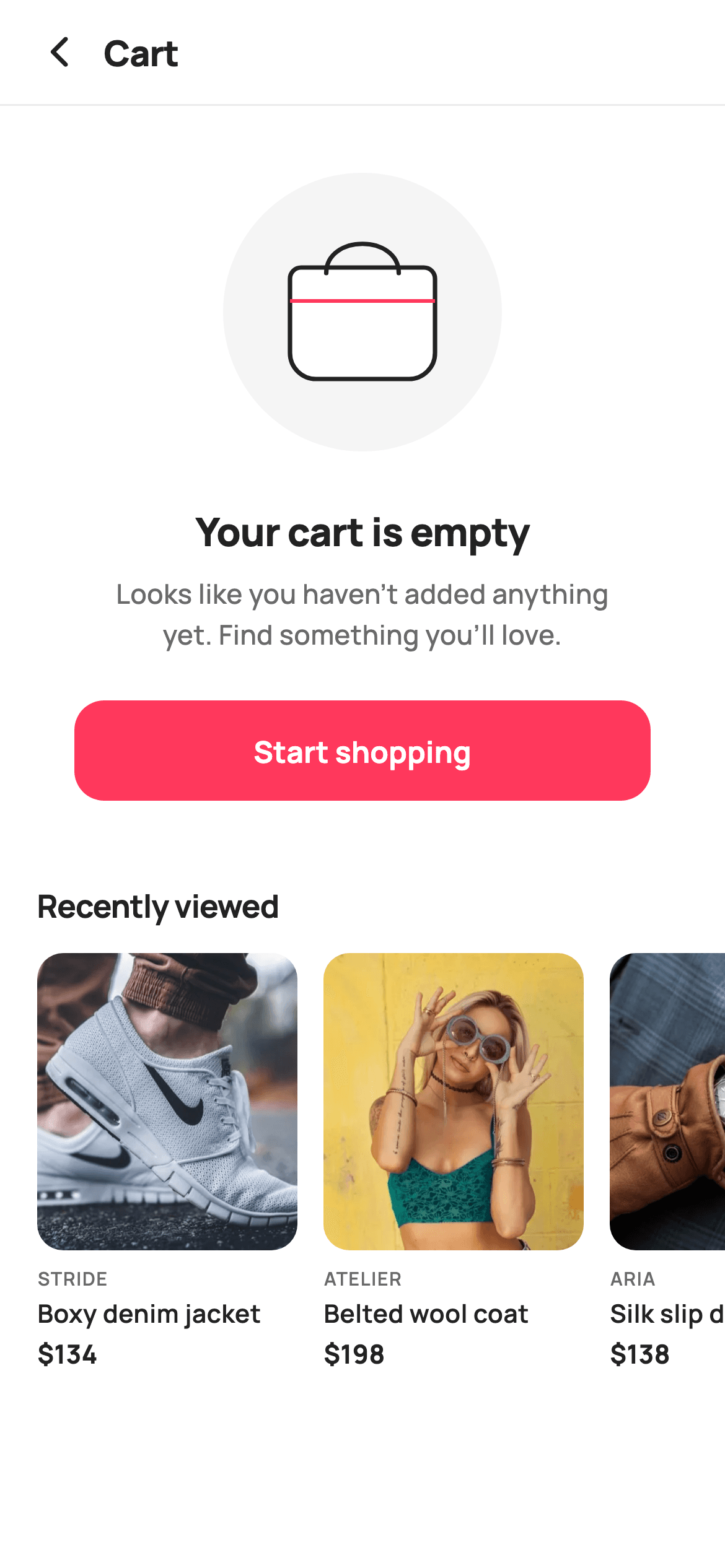
An empty cart is a dead end unless you give it somewhere to go. This screen pairs the usual zero-state — illustration, headline, reassuring line, CTA — with a 'Recently viewed' rail that puts four real products back in front of the shopper. The illustration is a `CustomPainter`, not a PNG or a Lottie file: a grey circle backdrop, a stroked bag with a curved handle, and a single brand-red stripe, in about fifty lines that add nothing to your asset bundle.
Watch the Flutter UI walkthrough
A short screen recording of Empty Cart running, if you'd rather see it before you read the code. The written tutorial below covers everything in it.
Can't see the video? Watch it on YouTube.
What you'll build
- ✓A hand-painted empty-bag illustration built from a circle, an `RRect` with mismatched corner radii, and one cubic curve
- ✓A centred zero-state block with a headline, a width-constrained body line, and a 54px CTA
- ✓A 'Recently viewed' horizontal rail so the dead end still offers a route back into the catalogue
- ✓A stateless screen — every interaction reports through a callback, nothing is stored
- ✓A scrollable layout that survives short devices instead of overflowing
Step-by-step build
Create the file
Add a new file at lib/ecom_cart_empty/ecom_cart_empty_screen.dart in your Flutter project.
Register the bundled fonts
No external packages — this is pure Flutter. It does bundle its design font (Manrope), so drop the font file into fonts/ and declare it in pubspec.yaml:
flutter:
  fonts:
    - family: Manrope
      fonts:
- asset: fonts/Manrope-Regular.ttfBuild it, piece by piece
Here's how the screen goes together. Each block below is a real slice of the code with a plain-English explanation — paste them in order, or grab the whole file from the next section.
A stateless zero-state and its recovery data
class EcomCartEmptyScreen extends StatelessWidget {
  const EcomCartEmptyScreen({
    super.key,
    this.onBack,
    this.onStartShopping,
    this.onProduct,
  });

  final VoidCallback? onBack;
  final VoidCallback? onStartShopping;
  final ValueChanged<String>? onProduct;

  static const String _font = 'Manrope';
  static const Color _canvas = Color(0xFFFFFFFF);
  static const Color _ink = Color(0xFF222222);
  static const Color _muted = Color(0xFF6A6A6A);
  static const Color _brand = Color(0xFFFF385C);
  static const Color _imageBg = Color(0xFFF5F5F5);
  static const Color _hairline = Color(0xFFEBEBEB);

  static const String _dir = 'lib/screens/ecommerce/ecom_cart_empty/images';

  static const List<_P> _recent = <_P>[
    _P('Boxy denim jacket', 'Stride', 134, 'p04.webp'),
    _P('Belted wool coat', 'Atelier', 198, 'p05.webp'),
    _P('Silk slip dress', 'Aria', 138, 'p06.webp'),
    _P('Cropped trench', 'Atelier', 158, 'p07.webp'),
  ];
The screen is a `StatelessWidget` with three callbacks — `onBack`, `onStartShopping`, and a `ValueChanged<String> onProduct` for the rail. There's genuinely nothing to hold in state: an empty cart has no quantities to edit. The `_recent` list of four `_P` products is what turns this from a dead end into a recovery screen, and in a real app you'd pass it in rather than hard-coding it. Tokens and data are `static const` on the widget class, which is what allows `_rail()` and `_header()` to be plain methods.
The centred zero-state block
  @override
  Widget build(BuildContext context) {
    return Theme(
      data: ThemeData.light(useMaterial3: true),
      child: Scaffold(
        backgroundColor: _canvas,
        body: SafeArea(
          child: Column(
            children: <Widget>[
              _header(),
              const Divider(height: 1, color: _hairline),
              Expanded(
                child: ListView(
                  padding: const EdgeInsets.only(bottom: 28),
                  children: <Widget>[
                    const SizedBox(height: 36),
                    Center(
                      child: SizedBox(
                        width: 150,
                        height: 150,
                        child: CustomPaint(painter: _EmptyArtPainter()),
                      ),
                    ),
                    const SizedBox(height: 28),
                    const Text(
                      'Your cart is empty',
                      textAlign: TextAlign.center,
                      style: TextStyle(
                        fontFamily: _font,
                        fontSize: 21,
                        fontWeight: FontWeight.w800,
                        letterSpacing: -0.3,
                        color: _ink,
                      ),
                    ),
                    const SizedBox(height: 8),
                    const Padding(
                      padding: EdgeInsets.symmetric(horizontal: 48),
                      child: Text(
                        'Looks like you haven’t added anything yet. '
                        'Find something you’ll love.',
                        textAlign: TextAlign.center,
                        style: TextStyle(
                          fontFamily: _font,
                          fontSize: 14.5,
                          fontWeight: FontWeight.w500,
                          height: 1.5,
                          color: _muted,
                        ),
                      ),
                    ),
                    const SizedBox(height: 24),
                    Padding(
                      padding: const EdgeInsets.symmetric(horizontal: 40),
                      child: SizedBox(
                        height: 54,
                        child: FilledButton(
                          onPressed: onStartShopping,
                          style: FilledButton.styleFrom(
                            backgroundColor: _brand,
                            foregroundColor: _canvas,
                            shape: RoundedRectangleBorder(
                              borderRadius: BorderRadius.circular(16),
                            ),
                          ),
                          child: const Text(
                            'Start shopping',
                            style: TextStyle(
                              fontFamily: _font,
                              fontSize: 16,
                              fontWeight: FontWeight.w700,
                            ),
                          ),
                        ),
                      ),
                    ),
                    const SizedBox(height: 44),
Everything lives inside a `ListView` rather than a `Column`, which matters more than it looks: the illustration, copy, CTA and rail together exceed a small phone's height, and a `Column` would overflow while the list simply scrolls. The 150×150 `CustomPaint` is wrapped in `Center`; the headline is 21px `w800` with `textAlign: TextAlign.center`; and the supporting line is constrained by `EdgeInsets.symmetric(horizontal: 48)` with `height: 1.5`. That generous horizontal padding is the trick behind the tidy two-line wrap — you're setting a comfortable measure rather than letting text run the full width. The CTA is inset 40px on each side, so it reads as a focal button rather than a full-bleed action bar.
The recently-viewed rail
  Widget _rail() {
    return SizedBox(
      height: 226,
      child: ListView.separated(
        scrollDirection: Axis.horizontal,
        padding: const EdgeInsets.symmetric(horizontal: 20),
        itemCount: _recent.length,
        separatorBuilder: (_, _) => const SizedBox(width: 14),
        itemBuilder: (BuildContext context, int i) {
          final _P p = _recent[i];
          return GestureDetector(
            onTap: () => onProduct?.call(p.title),
            child: SizedBox(
              width: 140,
              child: Column(
                crossAxisAlignment: CrossAxisAlignment.start,
                children: <Widget>[
                  Expanded(
                    child: ClipRRect(
                      borderRadius: BorderRadius.circular(14),
                      child: Stack(
                        fit: StackFit.expand,
                        children: <Widget>[
                          Container(color: _imageBg),
                          Image.asset('$_dir/${p.asset}', fit: BoxFit.cover),
                        ],
                      ),
                    ),
                  ),
                  const SizedBox(height: 8),
                  Text(
                    p.brand.toUpperCase(),
                    style: const TextStyle(
                      fontFamily: _font,
                      fontSize: 10,
                      fontWeight: FontWeight.w600,
                      letterSpacing: 0.6,
                      color: _muted,
                    ),
                  ),
                  const SizedBox(height: 2),
                  Text(
                    p.title,
                    maxLines: 1,
                    overflow: TextOverflow.ellipsis,
                    style: const TextStyle(
                      fontFamily: _font,
                      fontSize: 13.5,
                      fontWeight: FontWeight.w600,
                      color: _ink,
                    ),
                  ),
                  const SizedBox(height: 3),
                  Text(
                    '\$${p.price}',
                    style: const TextStyle(
                      fontFamily: _font,
                      fontSize: 14,
                      fontWeight: FontWeight.w700,
                      color: _ink,
                    ),
                  ),
                ],
              ),
            ),
          );
        },
      ),
    );
  }
A 226px-tall `SizedBox` bounds a horizontal `ListView.separated` — a horizontal list always needs a bounded height from its parent. Each card is a fixed 140px wide with its image inside `Expanded`, so the photo absorbs whatever height the three text lines leave over; that's what keeps every card the same height regardless of title length. The `Stack` under the `ClipRRect` layers an `_imageBg` placeholder beneath the photo so there's a neutral tile while it decodes. Titles use `maxLines: 1` with `TextOverflow.ellipsis` — mandatory at 140px — and each card reports its own title through `onProduct`.
Painting the empty bag
class _EmptyArtPainter extends CustomPainter {
  @override
  void paint(Canvas canvas, Size size) {
    final double w = size.width;
    final double h = size.height;

    // Rounded backdrop.
    canvas.drawCircle(
      Offset(w / 2, h / 2),
      w / 2,
      Paint()..color = const Color(0xFFF5F5F5),
    );

    // Bag body.
    final Rect body = Rect.fromLTWH(w * 0.24, h * 0.34, w * 0.52, h * 0.40);
    final RRect bag = RRect.fromRectAndCorners(
      body,
      topLeft: const Radius.circular(6),
      topRight: const Radius.circular(6),
      bottomLeft: const Radius.circular(14),
      bottomRight: const Radius.circular(14),
    );
    canvas.drawRRect(bag, Paint()..color = Colors.white);
    canvas.drawRRect(
      bag,
      Paint()
        ..style = PaintingStyle.stroke
        ..strokeWidth = 2.4
        ..color = const Color(0xFF222222),
    );

    // Handle.
    final Path handle = Path()
      ..moveTo(w * 0.37, h * 0.36)
      ..cubicTo(w * 0.37, h * 0.22, w * 0.63, h * 0.22, w * 0.63, h * 0.36);
    canvas.drawPath(
      handle,
      Paint()
        ..style = PaintingStyle.stroke
        ..strokeWidth = 2.4
        ..strokeCap = StrokeCap.round
        ..color = const Color(0xFF222222),
    );

    // Brand accent stripe across the bag.
    canvas.drawLine(
      Offset(w * 0.24, h * 0.46),
      Offset(w * 0.76, h * 0.46),
      Paint()
        ..strokeWidth = 2
        ..color = const Color(0xFFFF385C),
    );
  }

  @override
  bool shouldRepaint(_EmptyArtPainter oldDelegate) => false;
}
Every coordinate is a fraction of `w` and `h`, so the art scales with whatever box you give it. It draws in four passes. A full-width `drawCircle` in #F5F5F5 lays down the soft backdrop. The bag body uses `RRect.fromRectAndCorners` with deliberately mismatched radii — 6px at the top, 14px at the bottom — which is what gives a flat-topped, soft-bottomed paper-bag silhouette rather than a generic rounded box; it's drawn twice, once filled white and once as a 2.4px dark stroke, the standard fill-then-outline technique for line illustration. The handle is a single `cubicTo` whose two control points sit above the curve at `h * 0.22`, pulling it into an arc, with `StrokeCap.round` so the ends look drawn rather than cut. Finally one brand-red `drawLine` across the bag adds the accent. `shouldRepaint` returns `false` because the painter has no parameters.
Full code
The complete, ready-to-paste source. Free to use in your projects — one click copies it all.
import 'package:flutter/material.dart';

/// StyleCart — Empty Cart.
///
/// The zero-state for the bag: a painted empty-bag illustration, a reassuring
/// message, a "Start shopping" CTA and a recently-viewed rail to pull the
/// shopper back into the catalogue.
///
/// Self-contained per CONVENTIONS.md: pure Flutter, bundled Manrope, inline
/// Airbnb-style tokens, own light theme + SafeArea, bundled webp. The
/// illustration is a CustomPainter (no emoji glyph). Exposes callbacks only.
class EcomCartEmptyScreen extends StatelessWidget {
  const EcomCartEmptyScreen({
    super.key,
    this.onBack,
    this.onStartShopping,
    this.onProduct,
  });

  final VoidCallback? onBack;
  final VoidCallback? onStartShopping;
  final ValueChanged<String>? onProduct;

  static const String _font = 'Manrope';
  static const Color _canvas = Color(0xFFFFFFFF);
  static const Color _ink = Color(0xFF222222);
  static const Color _muted = Color(0xFF6A6A6A);
  static const Color _brand = Color(0xFFFF385C);
  static const Color _imageBg = Color(0xFFF5F5F5);
  static const Color _hairline = Color(0xFFEBEBEB);

  static const String _dir = 'lib/screens/ecommerce/ecom_cart_empty/images';

  static const List<_P> _recent = <_P>[
    _P('Boxy denim jacket', 'Stride', 134, 'p04.webp'),
    _P('Belted wool coat', 'Atelier', 198, 'p05.webp'),
    _P('Silk slip dress', 'Aria', 138, 'p06.webp'),
    _P('Cropped trench', 'Atelier', 158, 'p07.webp'),
  ];

  @override
  Widget build(BuildContext context) {
    return Theme(
      data: ThemeData.light(useMaterial3: true),
      child: Scaffold(
        backgroundColor: _canvas,
        body: SafeArea(
          child: Column(
            children: <Widget>[
              _header(),
              const Divider(height: 1, color: _hairline),
              Expanded(
                child: ListView(
                  padding: const EdgeInsets.only(bottom: 28),
                  children: <Widget>[
                    const SizedBox(height: 36),
                    Center(
                      child: SizedBox(
                        width: 150,
                        height: 150,
                        child: CustomPaint(painter: _EmptyArtPainter()),
                      ),
                    ),
                    const SizedBox(height: 28),
                    const Text(
                      'Your cart is empty',
                      textAlign: TextAlign.center,
                      style: TextStyle(
                        fontFamily: _font,
                        fontSize: 21,
                        fontWeight: FontWeight.w800,
                        letterSpacing: -0.3,
                        color: _ink,
                      ),
                    ),
                    const SizedBox(height: 8),
                    const Padding(
                      padding: EdgeInsets.symmetric(horizontal: 48),
                      child: Text(
                        'Looks like you haven’t added anything yet. '
                        'Find something you’ll love.',
                        textAlign: TextAlign.center,
                        style: TextStyle(
                          fontFamily: _font,
                          fontSize: 14.5,
                          fontWeight: FontWeight.w500,
                          height: 1.5,
                          color: _muted,
                        ),
                      ),
                    ),
                    const SizedBox(height: 24),
                    Padding(
                      padding: const EdgeInsets.symmetric(horizontal: 40),
                      child: SizedBox(
                        height: 54,
                        child: FilledButton(
                          onPressed: onStartShopping,
                          style: FilledButton.styleFrom(
                            backgroundColor: _brand,
                            foregroundColor: _canvas,
                            shape: RoundedRectangleBorder(
                              borderRadius: BorderRadius.circular(16),
                            ),
                          ),
                          child: const Text(
                            'Start shopping',
                            style: TextStyle(
                              fontFamily: _font,
                              fontSize: 16,
                              fontWeight: FontWeight.w700,
                            ),
                          ),
                        ),
                      ),
                    ),
                    const SizedBox(height: 44),
                    const Padding(
                      padding: EdgeInsets.fromLTRB(20, 0, 20, 14),
                      child: Text(
                        'Recently viewed',
                        style: TextStyle(
                          fontFamily: _font,
                          fontSize: 17,
                          fontWeight: FontWeight.w700,
                          letterSpacing: -0.3,
                          color: _ink,
                        ),
                      ),
                    ),
                    _rail(),
                  ],
                ),
              ),
            ],
          ),
        ),
      ),
    );
  }

  Widget _header() {
    return Padding(
      padding: const EdgeInsets.fromLTRB(8, 4, 20, 4),
      child: Row(
        children: <Widget>[
          IconButton(
            onPressed: onBack,
            icon: const Icon(Icons.arrow_back_ios_new_rounded,
                size: 20, color: _ink),
          ),
          const Expanded(
            child: Text(
              'Cart',
              style: TextStyle(
                fontFamily: _font,
                fontSize: 19,
                fontWeight: FontWeight.w800,
                letterSpacing: -0.3,
                color: _ink,
              ),
            ),
          ),
        ],
      ),
    );
  }

  Widget _rail() {
    return SizedBox(
      height: 226,
      child: ListView.separated(
        scrollDirection: Axis.horizontal,
        padding: const EdgeInsets.symmetric(horizontal: 20),
        itemCount: _recent.length,
        separatorBuilder: (_, _) => const SizedBox(width: 14),
        itemBuilder: (BuildContext context, int i) {
          final _P p = _recent[i];
          return GestureDetector(
            onTap: () => onProduct?.call(p.title),
            child: SizedBox(
              width: 140,
              child: Column(
                crossAxisAlignment: CrossAxisAlignment.start,
                children: <Widget>[
                  Expanded(
                    child: ClipRRect(
                      borderRadius: BorderRadius.circular(14),
                      child: Stack(
                        fit: StackFit.expand,
                        children: <Widget>[
                          Container(color: _imageBg),
                          Image.asset('$_dir/${p.asset}', fit: BoxFit.cover),
                        ],
                      ),
                    ),
                  ),
                  const SizedBox(height: 8),
                  Text(
                    p.brand.toUpperCase(),
                    style: const TextStyle(
                      fontFamily: _font,
                      fontSize: 10,
                      fontWeight: FontWeight.w600,
                      letterSpacing: 0.6,
                      color: _muted,
                    ),
                  ),
                  const SizedBox(height: 2),
                  Text(
                    p.title,
                    maxLines: 1,
                    overflow: TextOverflow.ellipsis,
                    style: const TextStyle(
                      fontFamily: _font,
                      fontSize: 13.5,
                      fontWeight: FontWeight.w600,
                      color: _ink,
                    ),
                  ),
                  const SizedBox(height: 3),
                  Text(
                    '\$${p.price}',
                    style: const TextStyle(
                      fontFamily: _font,
                      fontSize: 14,
                      fontWeight: FontWeight.w700,
                      color: _ink,
                    ),
                  ),
                ],
              ),
            ),
          );
        },
      ),
    );
  }
}

class _P {
  const _P(this.title, this.brand, this.price, this.asset);
  final String title;
  final String brand;
  final int price;
  final String asset;
}

/// Paints a soft empty shopping bag with a dashed "nothing inside" hint.
class _EmptyArtPainter extends CustomPainter {
  @override
  void paint(Canvas canvas, Size size) {
    final double w = size.width;
    final double h = size.height;

    // Rounded backdrop.
    canvas.drawCircle(
      Offset(w / 2, h / 2),
      w / 2,
      Paint()..color = const Color(0xFFF5F5F5),
    );

    // Bag body.
    final Rect body = Rect.fromLTWH(w * 0.24, h * 0.34, w * 0.52, h * 0.40);
    final RRect bag = RRect.fromRectAndCorners(
      body,
      topLeft: const Radius.circular(6),
      topRight: const Radius.circular(6),
      bottomLeft: const Radius.circular(14),
      bottomRight: const Radius.circular(14),
    );
    canvas.drawRRect(bag, Paint()..color = Colors.white);
    canvas.drawRRect(
      bag,
      Paint()
        ..style = PaintingStyle.stroke
        ..strokeWidth = 2.4
        ..color = const Color(0xFF222222),
    );

    // Handle.
    final Path handle = Path()
      ..moveTo(w * 0.37, h * 0.36)
      ..cubicTo(w * 0.37, h * 0.22, w * 0.63, h * 0.22, w * 0.63, h * 0.36);
    canvas.drawPath(
      handle,
      Paint()
        ..style = PaintingStyle.stroke
        ..strokeWidth = 2.4
        ..strokeCap = StrokeCap.round
        ..color = const Color(0xFF222222),
    );

    // Brand accent stripe across the bag.
    canvas.drawLine(
      Offset(w * 0.24, h * 0.46),
      Offset(w * 0.76, h * 0.46),
      Paint()
        ..strokeWidth = 2
        ..color = const Color(0xFFFF385C),
    );
  }

  @override
  bool shouldRepaint(_EmptyArtPainter oldDelegate) => false;
}
Plus bundled 9 binary assets (fonts/images). The CLI and MCP install those for you automatically.
Two faster ways to add it
Copy-paste works, but you can skip it entirely.
1. FlutterKit CLI
One command drops this screen — and its fonts — straight into your project.
$ flutterkit add ecom-cart-empty2. AI agent (MCP)
Connect FlutterKit's MCP server in Claude or Cursor and just ask your agent to install ecom-cart-empty — it fetches and writes the files for you.
FAQ
Is this empty cart screen free to use?
Yes. The full Dart source on this page is free for personal and commercial apps. Copy it from the code block, install it with the FlutterKit CLI (flutterkit add ecom-cart-empty), or add it through an AI agent over MCP.
Does it need an illustration asset or Lottie?
No. The empty-bag artwork is a CustomPainter drawn with Canvas primitives, so there's no SVG, PNG, or Lottie dependency and nothing extra in your bundle. The only assets are the four bundled WebP photos in the recently-viewed rail and the Manrope font family.
How do I reuse the illustration at a different size?
Change the SizedBox around the CustomPaint — every coordinate in _EmptyArtPainter is expressed as a fraction of the painted size, so the whole drawing scales. The only fixed values are the 2.4px and 2px stroke widths, which you may want to scale proportionally if you go much larger.
Which Flutter version does it target?
It uses super parameters, FilledButton, Material 3, and a wildcard lambda (_, _) in the separatorBuilder, so it targets Flutter 3.10+ with Dart 3.7+ for the wildcard. On an older SDK, write the separator as (_, __) and it compiles.


