How to Build an E-commerce Welcome Back Screen in Flutter (Full Code + Preview)
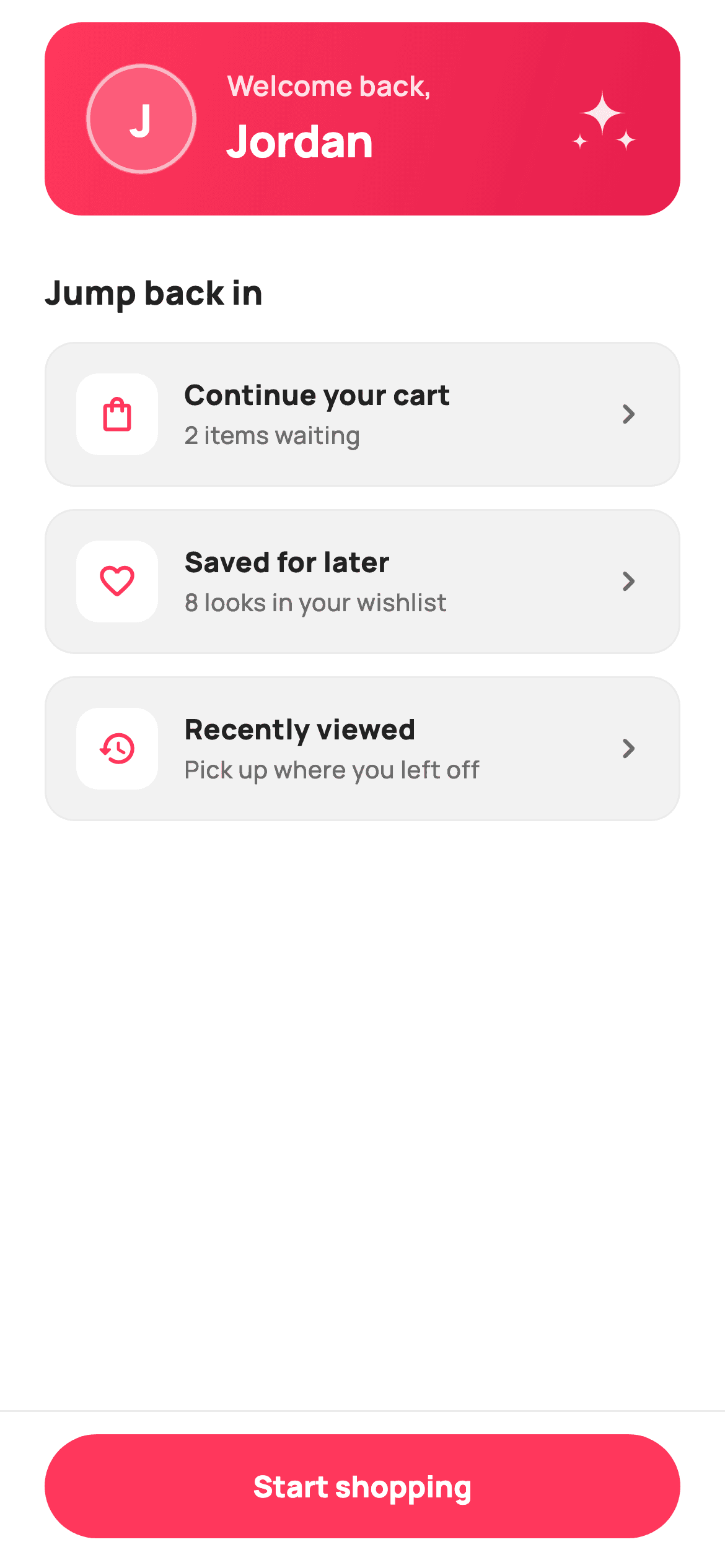
Returning shoppers shouldn't land on a generic home feed. This tutorial builds StyleCart's Welcome Back screen in Flutter — a coral gradient greeting card with a custom-painted initial avatar and a sparkle accent, a 'Jump back in' list that resumes the user's cart, wishlist and recently-viewed, and a pinned 'Start shopping' button above a hairline divider. You'll learn how CustomPainter replaces image assets for the monogram, and how a Column plus Expanded keeps the CTA docked while the content above scrolls.
Watch the Flutter UI walkthrough
A short screen recording of Welcome Back running, if you'd rather see it before you read the code. The written tutorial below covers everything in it.
Can't see the video? Watch it on YouTube.
What you'll build
- ✓A gradient greeting card that reads the shopper's first name and derives its avatar initial automatically
- ✓A vector monogram avatar and sparkle accent painted with CustomPainter — no PNG, no emoji glyph
- ✓A tappable 'Jump back in' list built from a small private data class, each row reporting its own label
- ✓A docked bottom CTA bar that stays put while the content above it scrolls
Step-by-step build
Create the file
Add a new file at lib/ecom_auth_welcome_back/ecom_auth_welcome_back_screen.dart in your Flutter project.
Register the bundled fonts
No external packages — this is pure Flutter. It does bundle its design font (Manrope), so drop the font file into fonts/ and declare it in pubspec.yaml:
flutter:
  fonts:
    - family: Manrope
      fonts:
- asset: fonts/Manrope-Regular.ttfBuild it, piece by piece
Here's how the screen goes together. Each block below is a real slice of the code with a plain-English explanation — paste them in order, or grab the whole file from the next section.
The screen class, its callbacks, and the colour tokens
import 'package:flutter/material.dart';

/// StyleCart — Welcome Back.
///
/// Personalised post-auth greeting: a brand greeting card with a painted monogram,
/// a quick-resume row (continue where you left off) and a "Start shopping" CTA.
/// Self-contained per CONVENTIONS.md: pure Flutter, bundled Manrope, inline
/// Airbnb-style tokens, own light theme + SafeArea. All marks are CustomPainters
/// (no asset, no emoji glyph). Exposes callbacks only — the gallery wires nav.
class EcomAuthWelcomeBackScreen extends StatelessWidget {
  const EcomAuthWelcomeBackScreen({
    super.key,
    this.name = 'Jordan',
    this.onStartShopping,
    this.onResume,
  });

  /// First name for the greeting.
  final String name;

  /// Tapped "Start shopping".
  final VoidCallback? onStartShopping;

  /// Tapped a quick-resume item (passes its label).
  final ValueChanged<String>? onResume;

  static const String _font = 'Manrope';
  static const Color _canvas = Color(0xFFFFFFFF);
  static const Color _ink = Color(0xFF222222);
  static const Color _muted = Color(0xFF6A6A6A);
  static const Color _brand = Color(0xFFFF385C);
  static const Color _surface = Color(0xFFF2F2F2);
  static const Color _hairline = Color(0xFFEBEBEB);

  String get _initial => name.trim().isEmpty ? '?' : name.trim()[0].toUpperCase();
EcomAuthWelcomeBackScreen is a StatelessWidget — nothing on this screen changes after it is drawn, so there is no state to hold. The constructor takes three things: a `name` that defaults to 'Jordan', and two optional callbacks, `onStartShopping` and `onResume`. Note that `onResume` is a `ValueChanged<String>`, not a plain VoidCallback, so the row that was tapped can pass its own title back to the parent. Below them sit the design tokens as static consts — `_brand` (#FF385C) is the coral used for the gradient and icons, `_surface` (#F2F2F2) is the grey row fill, `_hairline` (#EBEBEB) is the 1px border colour. The `_initial` getter is the one piece of real logic: it trims the name, falls back to '?' if it is empty, and upper-cases the first character for the avatar.
Building the gradient greeting card
  @override
  Widget build(BuildContext context) {
    const List<_Resume> resume = <_Resume>[
      _Resume('Continue your cart', '2 items waiting', Icons.shopping_bag_outlined),
      _Resume('Saved for later', '8 looks in your wishlist', Icons.favorite_border_rounded),
      _Resume('Recently viewed', 'Pick up where you left off', Icons.history_rounded),
    ];

    return Theme(
      data: ThemeData.light(useMaterial3: true),
      child: Scaffold(
        backgroundColor: _canvas,
        body: SafeArea(
          child: Column(
            children: <Widget>[
              Expanded(
                child: SingleChildScrollView(
                  padding: const EdgeInsets.fromLTRB(24, 12, 24, 24),
                  child: Column(
                    crossAxisAlignment: CrossAxisAlignment.stretch,
                    children: <Widget>[
                      // Greeting card.
                      Container(
                        padding: const EdgeInsets.all(22),
                        decoration: BoxDecoration(
                          borderRadius: BorderRadius.circular(20),
                          gradient: const LinearGradient(
                            begin: Alignment.topLeft,
                            end: Alignment.bottomRight,
                            colors: <Color>[Color(0xFFFF385C), Color(0xFFE61E4D)],
                          ),
                        ),
                        child: Row(
                          children: <Widget>[
                            SizedBox(
                              width: 60,
                              height: 60,
                              child: CustomPaint(
                                painter: _AvatarPainter(initial: _initial),
                              ),
                            ),
                            const SizedBox(width: 16),
                            Expanded(
                              child: Column(
                                crossAxisAlignment: CrossAxisAlignment.start,
                                children: <Widget>[
                                  Text(
                                    'Welcome back,',
                                    style: TextStyle(
                                      fontFamily: _font,
                                      fontSize: 15,
                                      fontWeight: FontWeight.w600,
                                      color: _canvas.withValues(alpha: 0.85),
                                    ),
                                  ),
                                  const SizedBox(height: 2),
                                  Text(
                                    name,
                                    style: const TextStyle(
                                      fontFamily: _font,
                                      fontSize: 24,
                                      fontWeight: FontWeight.w800,
                                      letterSpacing: -0.4,
                                      color: _canvas,
                                    ),
                                  ),
                                ],
                              ),
                            ),
                            SizedBox(
                              width: 40,
                              height: 40,
                              child: CustomPaint(painter: _SparklePainter()),
                            ),
                          ],
                        ),
                      ),
build() first declares a const list of three `_Resume` records — the resume items are hard-coded data, which keeps the screen self-contained and easy to swap for real values. The screen wraps itself in its own `Theme(data: ThemeData.light(useMaterial3: true))` so it looks identical no matter what theme the host app uses. The greeting card is a Container with a 20px radius and a LinearGradient running topLeft→bottomRight from #FF385C to the deeper #E61E4D. Inside it, a Row places three things: a 60×60 CustomPaint drawing the monogram avatar, an Expanded column holding 'Welcome back,' at 85% white opacity above the name at 24px w800, and a 40×40 CustomPaint sparkle on the right. The Expanded in the middle is what lets a long name take all remaining width without overflowing.
The 'Jump back in' resume rows
                      const SizedBox(height: 28),
                      const Text(
                        'Jump back in',
                        style: TextStyle(
                          fontFamily: _font,
                          fontSize: 18,
                          fontWeight: FontWeight.w800,
                          color: _ink,
                        ),
                      ),
                      const SizedBox(height: 14),
                      ...resume.map((_Resume r) => Padding(
                            padding: const EdgeInsets.only(bottom: 12),
                            child: GestureDetector(
                              onTap: () => onResume?.call(r.title),
                              child: Container(
                                padding: const EdgeInsets.all(16),
                                decoration: BoxDecoration(
                                  color: _surface,
                                  borderRadius: BorderRadius.circular(16),
                                  border: Border.all(color: _hairline),
                                ),
                                child: Row(
                                  children: <Widget>[
                                    Container(
                                      width: 44,
                                      height: 44,
                                      decoration: BoxDecoration(
                                        color: _canvas,
                                        borderRadius: BorderRadius.circular(12),
                                      ),
                                      child: Icon(r.icon,
                                          size: 22, color: _brand),
                                    ),
                                    const SizedBox(width: 14),
                                    Expanded(
                                      child: Column(
                                        crossAxisAlignment:
                                            CrossAxisAlignment.start,
                                        children: <Widget>[
                                          Text(
                                            r.title,
                                            style: const TextStyle(
                                              fontFamily: _font,
                                              fontSize: 15,
                                              fontWeight: FontWeight.w800,
                                              color: _ink,
                                            ),
                                          ),
                                          const SizedBox(height: 2),
                                          Text(
                                            r.subtitle,
                                            style: const TextStyle(
                                              fontFamily: _font,
                                              fontSize: 13,
                                              fontWeight: FontWeight.w500,
                                              color: _muted,
                                            ),
                                          ),
                                        ],
                                      ),
                                    ),
                                    const Icon(Icons.chevron_right_rounded,
                                        size: 22, color: _muted),
                                  ],
                                ),
                              ),
                            ),
                          )),
                    ],
                  ),
                ),
              ),
After a 28px gap comes the 'Jump back in' heading, then the rows are generated with a spread: `...resume.map((r) => ...)` turns each `_Resume` into a Padding-wrapped GestureDetector. Tapping a row calls `onResume?.call(r.title)` — the `?.` means the screen is safe to drop in with no callback wired at all. Each row is a grey `_surface` Container with a 16px radius and a `_hairline` border, holding a 44×44 white tile with the item's icon tinted coral, the title and subtitle stacked in an Expanded column, and a trailing chevron. Because the whole Column lives inside a SingleChildScrollView with 24px horizontal padding, adding more resume items simply makes the list scroll.
The docked 'Start shopping' bar
              Container(
                padding: const EdgeInsets.fromLTRB(24, 12, 24, 16),
                decoration: const BoxDecoration(
                  color: _canvas,
                  border: Border(top: BorderSide(color: _hairline)),
                ),
                child: SizedBox(
                  height: 56,
                  width: double.infinity,
                  child: FilledButton(
                    onPressed: onStartShopping,
                    style: FilledButton.styleFrom(
                      backgroundColor: _brand,
                      foregroundColor: _canvas,
                      shape: const StadiumBorder(),
                      textStyle: const TextStyle(
                        fontFamily: _font,
                        fontSize: 16,
                        fontWeight: FontWeight.w800,
                      ),
                    ),
                    child: const Text('Start shopping'),
                  ),
                ),
              ),
            ],
          ),
        ),
      ),
    );
  }
}

class _Resume {
  const _Resume(this.title, this.subtitle, this.icon);
  final String title;
  final String subtitle;
  final IconData icon;
}
This is the pattern that keeps the CTA visible. The body is a Column whose first child is `Expanded(child: SingleChildScrollView(...))` and whose second child is this bar — so the scroll view absorbs all leftover height and the bar is pinned to the bottom without a BottomNavigationBar or Stack. The bar is a white Container with a single top BorderSide in `_hairline`, wrapping a 56px-tall full-width FilledButton in the coral brand colour with a `StadiumBorder()` for the fully-rounded pill shape. Below the widget tree, `_Resume` is a tiny immutable class holding a title, subtitle and IconData — a typed record is safer here than a Map of strings.
Painting the monogram avatar
/// Paints a white-on-glass circular avatar with the user's initial.
class _AvatarPainter extends CustomPainter {
  const _AvatarPainter({required this.initial});
  final String initial;

  @override
  void paint(Canvas c, Size size) {
    final Offset center = Offset(size.width / 2, size.height / 2);
    final double r = size.width / 2;
    c.drawCircle(center, r, Paint()..color = Colors.white.withValues(alpha: 0.20));
    c.drawCircle(
      center,
      r - 1.5,
      Paint()
        ..style = PaintingStyle.stroke
        ..strokeWidth = 2
        ..color = Colors.white.withValues(alpha: 0.55),
    );
    final TextPainter tp = TextPainter(
      text: TextSpan(
        text: initial,
        style: TextStyle(
          fontFamily: 'Manrope',
          fontSize: size.width * 0.4,
          fontWeight: FontWeight.w800,
          color: Colors.white,
        ),
      ),
      textDirection: TextDirection.ltr,
    )..layout();
    tp.paint(c, Offset(center.dx - tp.width / 2, center.dy - tp.height / 2));
  }

  @override
  bool shouldRepaint(_AvatarPainter oldDelegate) =>
      oldDelegate.initial != initial;
}
_AvatarPainter draws the avatar with two circles and a piece of text instead of loading an image. It fills a circle at 20% white opacity, then strokes a second circle 1.5px smaller with a 2px line at 55% opacity — that inset stroke is what gives the 'glass' ring look on the gradient. The initial itself is drawn with a TextPainter: you build a TextSpan, call `.layout()`, then paint it at `center - (tp.width/2, tp.height/2)` to centre it manually, because a Canvas has no automatic text alignment. Note the font size is `size.width * 0.4`, so the letter scales with the avatar rather than being a fixed number. `shouldRepaint` returns true only when the initial actually changes.
Painting the sparkle accent
/// Paints a small four-point sparkle — a celebratory accent on the card.
class _SparklePainter extends CustomPainter {
  @override
  void paint(Canvas c, Size size) {
    final Paint p = Paint()..color = Colors.white.withValues(alpha: 0.9);
    final double w = size.width;
    final double h = size.height;

    void star(Offset center, double s) {
      final Path path = Path()
        ..moveTo(center.dx, center.dy - s)
        ..quadraticBezierTo(center.dx, center.dy, center.dx + s, center.dy)
        ..quadraticBezierTo(center.dx, center.dy, center.dx, center.dy + s)
        ..quadraticBezierTo(center.dx, center.dy, center.dx - s, center.dy)
        ..quadraticBezierTo(center.dx, center.dy, center.dx, center.dy - s)
        ..close();
      c.drawPath(path, p);
    }

    star(Offset(w * 0.5, h * 0.42), w * 0.32);
    star(Offset(w * 0.82, h * 0.78), w * 0.16);
    star(Offset(w * 0.2, h * 0.8), w * 0.12);
  }

  @override
  bool shouldRepaint(_SparklePainter oldDelegate) => false;
}
_SparklePainter draws the little four-point twinkle in the card's top-right corner. The local `star()` function builds each shape from four quadraticBezierTo curves that all pull toward the centre point — that shared control point is what pinches the sides inward and turns a diamond into a sparkle. It is called three times with different centres and sizes (0.32, 0.16 and 0.12 of the width) to make one large star and two small ones, all positioned as fractions of the canvas so the group scales with the box. `shouldRepaint` returns false because the drawing never depends on changing input.
Full code
The complete, ready-to-paste source. Free to use in your projects — one click copies it all.
import 'package:flutter/material.dart';
/// StyleCart — Welcome Back.
///
/// Personalised post-auth greeting: a brand greeting card with a painted monogram,
/// a quick-resume row (continue where you left off) and a "Start shopping" CTA.
/// Self-contained per CONVENTIONS.md: pure Flutter, bundled Manrope, inline
/// Airbnb-style tokens, own light theme + SafeArea. All marks are CustomPainters
/// (no asset, no emoji glyph). Exposes callbacks only — the gallery wires nav.
class EcomAuthWelcomeBackScreen extends StatelessWidget {
const EcomAuthWelcomeBackScreen({
super.key,
this.name = 'Jordan',
this.onStartShopping,
this.onResume,
});
/// First name for the greeting.
final String name;
/// Tapped "Start shopping".
final VoidCallback? onStartShopping;
/// Tapped a quick-resume item (passes its label).
final ValueChanged<String>? onResume;
static const String _font = 'Manrope';
static const Color _canvas = Color(0xFFFFFFFF);
static const Color _ink = Color(0xFF222222);
static const Color _muted = Color(0xFF6A6A6A);
static const Color _brand = Color(0xFFFF385C);
static const Color _surface = Color(0xFFF2F2F2);
static const Color _hairline = Color(0xFFEBEBEB);
String get _initial => name.trim().isEmpty ? '?' : name.trim()[0].toUpperCase();
@override
Widget build(BuildContext context) {
const List<_Resume> resume = <_Resume>[
_Resume('Continue your cart', '2 items waiting', Icons.shopping_bag_outlined),
_Resume('Saved for later', '8 looks in your wishlist', Icons.favorite_border_rounded),
_Resume('Recently viewed', 'Pick up where you left off', Icons.history_rounded),
];
return Theme(
data: ThemeData.light(useMaterial3: true),
child: Scaffold(
backgroundColor: _canvas,
body: SafeArea(
child: Column(
children: <Widget>[
Expanded(
child: SingleChildScrollView(
padding: const EdgeInsets.fromLTRB(24, 12, 24, 24),
child: Column(
crossAxisAlignment: CrossAxisAlignment.stretch,
children: <Widget>[
// Greeting card.
Container(
padding: const EdgeInsets.all(22),
decoration: BoxDecoration(
borderRadius: BorderRadius.circular(20),
gradient: const LinearGradient(
begin: Alignment.topLeft,
end: Alignment.bottomRight,
colors: <Color>[Color(0xFFFF385C), Color(0xFFE61E4D)],
),
),
child: Row(
children: <Widget>[
SizedBox(
width: 60,
height: 60,
child: CustomPaint(
painter: _AvatarPainter(initial: _initial),
),
),
const SizedBox(width: 16),
Expanded(
child: Column(
crossAxisAlignment: CrossAxisAlignment.start,
children: <Widget>[
Text(
'Welcome back,',
style: TextStyle(
fontFamily: _font,
fontSize: 15,
fontWeight: FontWeight.w600,
color: _canvas.withValues(alpha: 0.85),
),
),
const SizedBox(height: 2),
Text(
name,
style: const TextStyle(
fontFamily: _font,
fontSize: 24,
fontWeight: FontWeight.w800,
letterSpacing: -0.4,
color: _canvas,
),
),
],
),
),
SizedBox(
width: 40,
height: 40,
child: CustomPaint(painter: _SparklePainter()),
),
],
),
),
const SizedBox(height: 28),
const Text(
'Jump back in',
style: TextStyle(
fontFamily: _font,
fontSize: 18,
fontWeight: FontWeight.w800,
color: _ink,
),
),
const SizedBox(height: 14),
...resume.map((_Resume r) => Padding(
padding: const EdgeInsets.only(bottom: 12),
child: GestureDetector(
onTap: () => onResume?.call(r.title),
child: Container(
padding: const EdgeInsets.all(16),
decoration: BoxDecoration(
color: _surface,
borderRadius: BorderRadius.circular(16),
border: Border.all(color: _hairline),
),
child: Row(
children: <Widget>[
Container(
width: 44,
height: 44,
decoration: BoxDecoration(
color: _canvas,
borderRadius: BorderRadius.circular(12),
),
child: Icon(r.icon,
size: 22, color: _brand),
),
const SizedBox(width: 14),
Expanded(
child: Column(
crossAxisAlignment:
CrossAxisAlignment.start,
children: <Widget>[
Text(
r.title,
style: const TextStyle(
fontFamily: _font,
fontSize: 15,
fontWeight: FontWeight.w800,
color: _ink,
),
),
const SizedBox(height: 2),
Text(
r.subtitle,
style: const TextStyle(
fontFamily: _font,
fontSize: 13,
fontWeight: FontWeight.w500,
color: _muted,
),
),
],
),
),
const Icon(Icons.chevron_right_rounded,
size: 22, color: _muted),
],
),
),
),
)),
],
),
),
),
Container(
padding: const EdgeInsets.fromLTRB(24, 12, 24, 16),
decoration: const BoxDecoration(
color: _canvas,
border: Border(top: BorderSide(color: _hairline)),
),
child: SizedBox(
height: 56,
width: double.infinity,
child: FilledButton(
onPressed: onStartShopping,
style: FilledButton.styleFrom(
backgroundColor: _brand,
foregroundColor: _canvas,
shape: const StadiumBorder(),
textStyle: const TextStyle(
fontFamily: _font,
fontSize: 16,
fontWeight: FontWeight.w800,
),
),
child: const Text('Start shopping'),
),
),
),
],
),
),
),
);
}
}
class _Resume {
const _Resume(this.title, this.subtitle, this.icon);
final String title;
final String subtitle;
final IconData icon;
}
/// Paints a white-on-glass circular avatar with the user's initial.
class _AvatarPainter extends CustomPainter {
const _AvatarPainter({required this.initial});
final String initial;
@override
void paint(Canvas c, Size size) {
final Offset center = Offset(size.width / 2, size.height / 2);
final double r = size.width / 2;
c.drawCircle(center, r, Paint()..color = Colors.white.withValues(alpha: 0.20));
c.drawCircle(
center,
r - 1.5,
Paint()
..style = PaintingStyle.stroke
..strokeWidth = 2
..color = Colors.white.withValues(alpha: 0.55),
);
final TextPainter tp = TextPainter(
text: TextSpan(
text: initial,
style: TextStyle(
fontFamily: 'Manrope',
fontSize: size.width * 0.4,
fontWeight: FontWeight.w800,
color: Colors.white,
),
),
textDirection: TextDirection.ltr,
)..layout();
tp.paint(c, Offset(center.dx - tp.width / 2, center.dy - tp.height / 2));
}
@override
bool shouldRepaint(_AvatarPainter oldDelegate) =>
oldDelegate.initial != initial;
}
/// Paints a small four-point sparkle — a celebratory accent on the card.
class _SparklePainter extends CustomPainter {
@override
void paint(Canvas c, Size size) {
final Paint p = Paint()..color = Colors.white.withValues(alpha: 0.9);
final double w = size.width;
final double h = size.height;
void star(Offset center, double s) {
final Path path = Path()
..moveTo(center.dx, center.dy - s)
..quadraticBezierTo(center.dx, center.dy, center.dx + s, center.dy)
..quadraticBezierTo(center.dx, center.dy, center.dx, center.dy + s)
..quadraticBezierTo(center.dx, center.dy, center.dx - s, center.dy)
..quadraticBezierTo(center.dx, center.dy, center.dx, center.dy - s)
..close();
c.drawPath(path, p);
}
star(Offset(w * 0.5, h * 0.42), w * 0.32);
star(Offset(w * 0.82, h * 0.78), w * 0.16);
star(Offset(w * 0.2, h * 0.8), w * 0.12);
}
@override
bool shouldRepaint(_SparklePainter oldDelegate) => false;
}
Plus bundled 5 binary assets (fonts/images). The CLI and MCP install those for you automatically.
Two faster ways to add it
Copy-paste works, but you can skip it entirely.
1. FlutterKit CLI
One command drops this screen — and its fonts — straight into your project.
$ flutterkit add ecom-auth-welcome-back2. AI agent (MCP)
Connect FlutterKit's MCP server in Claude or Cursor and just ask your agent to install ecom-auth-welcome-back — it fetches and writes the files for you.
FAQ
Is this Flutter welcome back screen free to use?
Yes. The complete Dart source on this page is free to copy into your own projects, personal or commercial. You can paste it directly, install it with the FlutterKit CLI (flutterkit add ecom-auth-welcome-back), or have an AI agent add it for you over MCP.
How do I show a real user's name and resume items?
Pass the signed-in user's first name into the `name` constructor argument — the avatar initial is derived from it automatically by the `_initial` getter, so you only set one value. For the resume rows, replace the const `resume` list inside build() with your own data and handle the `onResume` callback, which hands you back the title of whichever row was tapped.
Does it need any external packages or image assets?
No. It is pure Flutter built on the material library, and both the avatar monogram and the sparkle are drawn with CustomPainter rather than loaded as images. The only extra asset is the bundled Manrope font, which you register in pubspec.yaml as shown in step 2 — the CLI and MCP install those font files for you.
Which Flutter version does it target?
It uses modern APIs like Color.withValues() and super parameters, so it targets Flutter 3.22+ (Dart 3). On an older SDK, swap the withValues(alpha: 0.85) calls for withOpacity(0.85) and it will compile unchanged.


