How to Build a 6-Digit OTP Verification Screen in Flutter (Full Code + Preview)
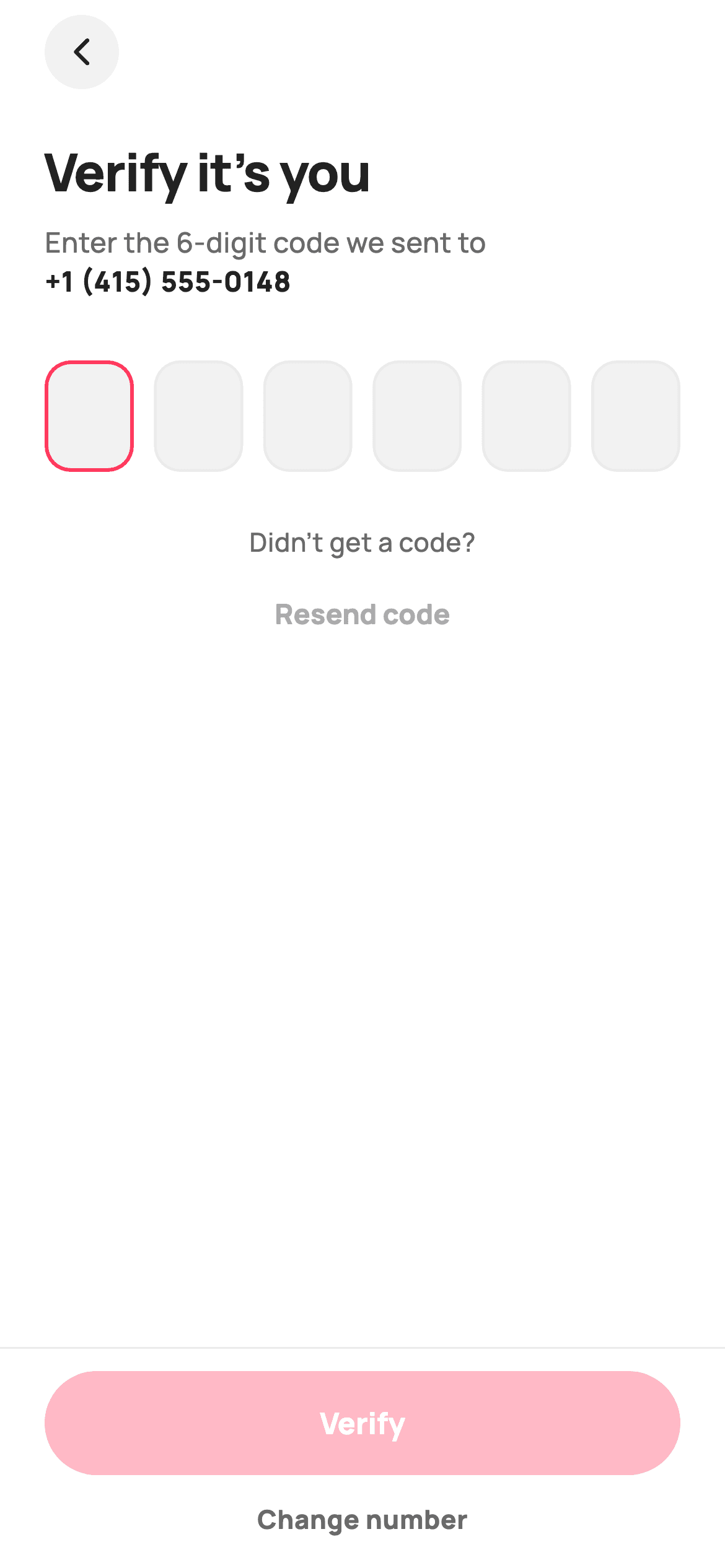
Most six-box OTP screens are built the hard way — six TextFields, six FocusNodes, and a pile of code to jump focus forward on type and backward on backspace, which still breaks when the user pastes a code. This one uses the trick that avoids all of it: a single invisible TextField holds the whole code, and six read-only boxes just render its characters. You get paste support, digits-only filtering, and correct backspace behaviour for free, plus a Verify button that stays disabled until all six digits land.
Watch the Flutter UI walkthrough
A short screen recording of Verify code running, if you'd rather see it before you read the code. The written tutorial below covers everything in it.
Can't see the video? Watch it on YouTube.
What you'll build
- ✓A 6-digit OTP field built from one hidden `TextField` and six presentational boxes — no per-box focus juggling
- ✓Digits-only input with a hard 6-character cap via `FilteringTextInputFormatter` and `LengthLimitingTextInputFormatter`
- ✓Boxes with three visual states: empty (grey fill), filled (white with dark border), and active (2px brand-red border)
- ✓Auto-submit that fires `onVerified` the moment the sixth digit is typed
- ✓A pinned Verify button that disables itself — at 35% brand-red — until the code is complete
Step-by-step build
Create the file
Add a new file at lib/ecom_auth_otp/ecom_auth_otp_screen.dart in your Flutter project.
Register the bundled fonts
No external packages — this is pure Flutter. It does bundle its design font (Manrope), so drop the font file into fonts/ and declare it in pubspec.yaml:
flutter:
  fonts:
    - family: Manrope
      fonts:
- asset: fonts/Manrope-Regular.ttfBuild it, piece by piece
Here's how the screen goes together. Each block below is a real slice of the code with a plain-English explanation — paste them in order, or grab the whole file from the next section.
Inputs, tokens, and the two-object state
class EcomAuthOtpScreen extends StatefulWidget {
  const EcomAuthOtpScreen({
    super.key,
    this.destination = '+1 (415) 555-0148',
    this.onVerified,
    this.onResend,
    this.onChangeNumber,
  });

  /// Masked phone/email the code was sent to (shown in the subtitle).
  final String destination;

  /// Fired when all six digits are entered.
  final ValueChanged<String>? onVerified;

  /// Tapped "Resend code".
  final VoidCallback? onResend;

  /// Tapped "Change number".
  final VoidCallback? onChangeNumber;

  @override
  State<EcomAuthOtpScreen> createState() => _EcomAuthOtpScreenState();
}

class _EcomAuthOtpScreenState extends State<EcomAuthOtpScreen> {
  static const String _font = 'Manrope';
  static const Color _canvas = Color(0xFFFFFFFF);
  static const Color _ink = Color(0xFF222222);
  static const Color _muted = Color(0xFF6A6A6A);
  static const Color _brand = Color(0xFFFF385C);
  static const Color _surface = Color(0xFFF2F2F2);
  static const Color _hairline = Color(0xFFEBEBEB);

  static const int _length = 6;
  final TextEditingController _controller = TextEditingController();
  final FocusNode _focus = FocusNode();

  @override
  void dispose() {
    _controller.dispose();
    _focus.dispose();
    super.dispose();
  }

  String get _code => _controller.text;

  void _onChanged(String value) {
    setState(() {});
    if (value.length == _length) {
      widget.onVerified?.call(value);
    }
  }
The widget takes a `destination` string (defaulted to a masked number for previews) plus `onVerified`, `onResend`, and `onChangeNumber`. `onVerified` is a `ValueChanged<String>` so it hands the finished code straight to the caller. The state is deliberately tiny: `_length = 6`, one `TextEditingController` holding the entire code, and one `FocusNode`. The `_code` getter just reads `_controller.text` — there is no second copy of the digits anywhere, which is why the boxes can never fall out of sync. `_onChanged` calls an empty `setState(() {})` purely to trigger a repaint of the boxes, then auto-fires `onVerified` once `value.length` hits six.
Header with a rich-text destination
  @override
  Widget build(BuildContext context) {
    final bool complete = _code.length == _length;
    return Theme(
      data: ThemeData.light(useMaterial3: true),
      child: Scaffold(
        backgroundColor: _canvas,
        body: SafeArea(
          child: Column(
            children: <Widget>[
              Expanded(
                child: SingleChildScrollView(
                  padding: const EdgeInsets.fromLTRB(24, 8, 24, 24),
                  child: Column(
                    crossAxisAlignment: CrossAxisAlignment.stretch,
                    children: <Widget>[
                      Align(
                        alignment: Alignment.centerLeft,
                        child: GestureDetector(
                          onTap: () => Navigator.maybePop(context),
                          child: Container(
                            width: 40,
                            height: 40,
                            decoration: const BoxDecoration(
                              color: _surface,
                              shape: BoxShape.circle,
                            ),
                            child: const Icon(Icons.arrow_back_ios_new_rounded,
                                size: 18, color: _ink),
                          ),
                        ),
                      ),
                      const SizedBox(height: 24),
                      const Text(
                        'Verify it’s you',
                        style: TextStyle(
                          fontFamily: _font,
                          fontSize: 28,
                          fontWeight: FontWeight.w800,
                          letterSpacing: -0.6,
                          color: _ink,
                        ),
                      ),
                      const SizedBox(height: 8),
                      Text.rich(
                        TextSpan(
                          text: 'Enter the 6-digit code we sent to\n',
                          style: const TextStyle(
                            fontFamily: _font,
                            fontSize: 15,
                            height: 1.4,
                            fontWeight: FontWeight.w500,
                            color: _muted,
                          ),
                          children: <InlineSpan>[
                            TextSpan(
                              text: widget.destination,
                              style: const TextStyle(
                                fontWeight: FontWeight.w800,
                                color: _ink,
                              ),
                            ),
                          ],
                        ),
                      ),
`complete` is computed once at the top of `build` and later gates the CTA. The layout is the same scroll-plus-pinned-bar pattern as the login screen: `Expanded(child: SingleChildScrollView(...))` above a fixed `Container`. The subtitle is a `Text.rich`, which lets one paragraph mix two styles — the grey `w500` explanation, then a `TextSpan` carrying the caller's `destination` in `w800` `_ink` so the phone number pops without being a separate widget. The `\n` in the parent span forces the break, and `height: 1.4` sets the line spacing.
The hidden field that drives everything
                      // Hidden input drives the visible boxes.
                      Stack(
                        children: <Widget>[
                          Opacity(
                            opacity: 0,
                            child: TextField(
                              controller: _controller,
                              focusNode: _focus,
                              keyboardType: TextInputType.number,
                              maxLength: _length,
                              showCursor: false,
                              onChanged: _onChanged,
                              inputFormatters: <TextInputFormatter>[
                                FilteringTextInputFormatter.digitsOnly,
                                LengthLimitingTextInputFormatter(_length),
                              ],
                              decoration: const InputDecoration(
                                counterText: '',
                                border: InputBorder.none,
                              ),
                            ),
                          ),
This is the core trick. A `Stack` layers a real `TextField` wrapped in `Opacity(opacity: 0)` underneath the visible boxes. It's invisible but still fully functional: it owns the focus, raises the numeric keyboard via `TextInputType.number`, and receives paste events. Two `inputFormatters` police the content — `FilteringTextInputFormatter.digitsOnly` silently drops letters and spaces (so pasting '123 456' still works), and `LengthLimitingTextInputFormatter(6)` refuses a seventh character. `showCursor: false` and `counterText: ''` hide the caret and the '0/6' counter that `maxLength` would otherwise draw.
Rendering six boxes from one string
                          GestureDetector(
                            onTap: () => _focus.requestFocus(),
                            child: Row(
                              mainAxisAlignment: MainAxisAlignment.spaceBetween,
                              children: List<Widget>.generate(_length, (int i) {
                                final bool filled = i < _code.length;
                                final bool active = i == _code.length;
                                return _OtpBox(
                                  digit: filled ? _code[i] : '',
                                  active: active,
                                );
                              }),
                            ),
                          ),
                        ],
                      ),
The visible layer is a `GestureDetector` whose `onTap` calls `_focus.requestFocus()` — tapping anywhere on the boxes opens the keyboard for the hidden field. Inside, `List<Widget>.generate(_length, ...)` builds the six cells, and each index derives its own state by comparing itself to the code's length: `filled = i < _code.length` means this slot already has a digit, and `active = i == _code.length` marks the single slot the next keystroke will land in. The digit itself is just `_code[i]`. Because all three come from one string, backspace, paste, and autofill all update the boxes correctly with no extra handling.
Resend and the disabled-until-complete CTA
                      const SizedBox(height: 28),
                      Center(
                        child: Column(
                          children: <Widget>[
                            const Text(
                              'Didn’t get a code?',
                              style: TextStyle(
                                fontFamily: _font,
                                fontSize: 14,
                                fontWeight: FontWeight.w500,
                                color: _muted,
                              ),
                            ),
                            const SizedBox(height: 4),
                            TextButton(
                              onPressed: widget.onResend,
                              style: TextButton.styleFrom(
                                foregroundColor: _brand,
                                textStyle: const TextStyle(
                                  fontFamily: _font,
                                  fontSize: 15,
                                  fontWeight: FontWeight.w800,
                                ),
                              ),
                              child: const Text('Resend code'),
                            ),
                          ],
                        ),
                      ),
                    ],
                  ),
                ),
              ),
              Container(
                padding: const EdgeInsets.fromLTRB(24, 12, 24, 16),
                decoration: const BoxDecoration(
                  color: _canvas,
                  border: Border(top: BorderSide(color: _hairline)),
                ),
                child: Column(
                  mainAxisSize: MainAxisSize.min,
                  children: <Widget>[
                    SizedBox(
                      height: 56,
                      width: double.infinity,
                      child: FilledButton(
                        onPressed:
                            complete ? () => widget.onVerified?.call(_code) : null,
                        style: FilledButton.styleFrom(
                          backgroundColor: _brand,
                          foregroundColor: _canvas,
                          disabledBackgroundColor: _brand.withValues(alpha: 0.35),
                          disabledForegroundColor: _canvas,
                          shape: const StadiumBorder(),
                          textStyle: const TextStyle(
                            fontFamily: _font,
                            fontSize: 16,
                            fontWeight: FontWeight.w800,
                          ),
                        ),
                        child: const Text('Verify'),
                      ),
                    ),
                    const SizedBox(height: 14),
                    GestureDetector(
                      onTap: widget.onChangeNumber,
                      child: const Text(
                        'Change number',
                        style: TextStyle(
                          fontFamily: _font,
                          fontSize: 14,
                          fontWeight: FontWeight.w800,
                          color: _muted,
                        ),
                      ),
                    ),
                  ],
                ),
              ),
            ],
          ),
        ),
      ),
    );
  }
The resend group is a static label plus a brand-red `TextButton` — note the file comment: there's no live `Timer` countdown here, which keeps the screen deterministic for golden tests; add one in your own build if you need a cooldown. The bottom bar repeats the hairline-top `Container` pattern, and the Verify `FilledButton` passes `onPressed: complete ? ... : null`. Passing `null` is what actually disables a Flutter button, and `disabledBackgroundColor: _brand.withValues(alpha: 0.35)` styles that disabled state as a faded brand red rather than Material's default grey, while `disabledForegroundColor` keeps the label white and legible.
The three-state OTP cell
class _OtpBox extends StatelessWidget {
  const _OtpBox({required this.digit, required this.active});
  final String digit;
  final bool active;

  @override
  Widget build(BuildContext context) {
    final bool filled = digit.isNotEmpty;
    return Container(
      width: 48,
      height: 60,
      alignment: Alignment.center,
      decoration: BoxDecoration(
        color: filled
            ? _EcomAuthOtpScreenState._canvas
            : _EcomAuthOtpScreenState._surface,
        borderRadius: BorderRadius.circular(14),
        border: Border.all(
          color: active
              ? _EcomAuthOtpScreenState._brand
              : (filled
                  ? _EcomAuthOtpScreenState._ink
                  : _EcomAuthOtpScreenState._hairline),
          width: active ? 2 : 1.5,
        ),
      ),
      child: Text(
        digit,
        style: const TextStyle(
          fontFamily: _EcomAuthOtpScreenState._font,
          fontSize: 24,
          fontWeight: FontWeight.w800,
          color: _EcomAuthOtpScreenState._ink,
        ),
      ),
    );
  }
}
`_OtpBox` is stateless — it only renders what it's told. Each cell is 48×60 with a 14px radius, and the entire visual logic lives in the `decoration`. The fill flips from `_surface` grey to `_canvas` white as soon as a digit lands, so filled cells visibly lift off the row. The border colour is a nested conditional with a clear priority: brand red if this is the active cell, otherwise dark `_ink` if it holds a digit, otherwise the faint `_hairline`. The active cell also thickens from 1.5 to 2px, which reads as a cursor without needing an animated one. `alignment: Alignment.center` plus 24px `w800` type centres the digit in the box.
Full code
The complete, ready-to-paste source. Free to use in your projects — one click copies it all.
import 'package:flutter/material.dart';
import 'package:flutter/services.dart';

/// StyleCart — Verify Code.
///
/// 6-digit OTP entry rendered as six boxes driven by a single hidden field
/// (digits-only), with a resend control and a change-number link. Self-contained
/// per CONVENTIONS.md: pure Flutter, bundled Manrope, inline Airbnb-style tokens,
/// own light theme + SafeArea, no emoji glyphs. No live Timer (golden-safe) — the
/// resend hint is static. Exposes callbacks only — the gallery wires navigation.
class EcomAuthOtpScreen extends StatefulWidget {
  const EcomAuthOtpScreen({
    super.key,
    this.destination = '+1 (415) 555-0148',
    this.onVerified,
    this.onResend,
    this.onChangeNumber,
  });

  /// Masked phone/email the code was sent to (shown in the subtitle).
  final String destination;

  /// Fired when all six digits are entered.
  final ValueChanged<String>? onVerified;

  /// Tapped "Resend code".
  final VoidCallback? onResend;

  /// Tapped "Change number".
  final VoidCallback? onChangeNumber;

  @override
  State<EcomAuthOtpScreen> createState() => _EcomAuthOtpScreenState();
}

class _EcomAuthOtpScreenState extends State<EcomAuthOtpScreen> {
  static const String _font = 'Manrope';
  static const Color _canvas = Color(0xFFFFFFFF);
  static const Color _ink = Color(0xFF222222);
  static const Color _muted = Color(0xFF6A6A6A);
  static const Color _brand = Color(0xFFFF385C);
  static const Color _surface = Color(0xFFF2F2F2);
  static const Color _hairline = Color(0xFFEBEBEB);

  static const int _length = 6;
  final TextEditingController _controller = TextEditingController();
  final FocusNode _focus = FocusNode();

  @override
  void dispose() {
    _controller.dispose();
    _focus.dispose();
    super.dispose();
  }

  String get _code => _controller.text;

  void _onChanged(String value) {
    setState(() {});
    if (value.length == _length) {
      widget.onVerified?.call(value);
    }
  }

  @override
  Widget build(BuildContext context) {
    final bool complete = _code.length == _length;
    return Theme(
      data: ThemeData.light(useMaterial3: true),
      child: Scaffold(
        backgroundColor: _canvas,
        body: SafeArea(
          child: Column(
            children: <Widget>[
              Expanded(
                child: SingleChildScrollView(
                  padding: const EdgeInsets.fromLTRB(24, 8, 24, 24),
                  child: Column(
                    crossAxisAlignment: CrossAxisAlignment.stretch,
                    children: <Widget>[
                      Align(
                        alignment: Alignment.centerLeft,
                        child: GestureDetector(
                          onTap: () => Navigator.maybePop(context),
                          child: Container(
                            width: 40,
                            height: 40,
                            decoration: const BoxDecoration(
                              color: _surface,
                              shape: BoxShape.circle,
                            ),
                            child: const Icon(Icons.arrow_back_ios_new_rounded,
                                size: 18, color: _ink),
                          ),
                        ),
                      ),
                      const SizedBox(height: 24),
                      const Text(
                        'Verify it’s you',
                        style: TextStyle(
                          fontFamily: _font,
                          fontSize: 28,
                          fontWeight: FontWeight.w800,
                          letterSpacing: -0.6,
                          color: _ink,
                        ),
                      ),
                      const SizedBox(height: 8),
                      Text.rich(
                        TextSpan(
                          text: 'Enter the 6-digit code we sent to\n',
                          style: const TextStyle(
                            fontFamily: _font,
                            fontSize: 15,
                            height: 1.4,
                            fontWeight: FontWeight.w500,
                            color: _muted,
                          ),
                          children: <InlineSpan>[
                            TextSpan(
                              text: widget.destination,
                              style: const TextStyle(
                                fontWeight: FontWeight.w800,
                                color: _ink,
                              ),
                            ),
                          ],
                        ),
                      ),
                      const SizedBox(height: 32),
                      // Hidden input drives the visible boxes.
                      Stack(
                        children: <Widget>[
                          Opacity(
                            opacity: 0,
                            child: TextField(
                              controller: _controller,
                              focusNode: _focus,
                              keyboardType: TextInputType.number,
                              maxLength: _length,
                              showCursor: false,
                              onChanged: _onChanged,
                              inputFormatters: <TextInputFormatter>[
                                FilteringTextInputFormatter.digitsOnly,
                                LengthLimitingTextInputFormatter(_length),
                              ],
                              decoration: const InputDecoration(
                                counterText: '',
                                border: InputBorder.none,
                              ),
                            ),
                          ),
                          GestureDetector(
                            onTap: () => _focus.requestFocus(),
                            child: Row(
                              mainAxisAlignment: MainAxisAlignment.spaceBetween,
                              children: List<Widget>.generate(_length, (int i) {
                                final bool filled = i < _code.length;
                                final bool active = i == _code.length;
                                return _OtpBox(
                                  digit: filled ? _code[i] : '',
                                  active: active,
                                );
                              }),
                            ),
                          ),
                        ],
                      ),
                      const SizedBox(height: 28),
                      Center(
                        child: Column(
                          children: <Widget>[
                            const Text(
                              'Didn’t get a code?',
                              style: TextStyle(
                                fontFamily: _font,
                                fontSize: 14,
                                fontWeight: FontWeight.w500,
                                color: _muted,
                              ),
                            ),
                            const SizedBox(height: 4),
                            TextButton(
                              onPressed: widget.onResend,
                              style: TextButton.styleFrom(
                                foregroundColor: _brand,
                                textStyle: const TextStyle(
                                  fontFamily: _font,
                                  fontSize: 15,
                                  fontWeight: FontWeight.w800,
                                ),
                              ),
                              child: const Text('Resend code'),
                            ),
                          ],
                        ),
                      ),
                    ],
                  ),
                ),
              ),
              Container(
                padding: const EdgeInsets.fromLTRB(24, 12, 24, 16),
                decoration: const BoxDecoration(
                  color: _canvas,
                  border: Border(top: BorderSide(color: _hairline)),
                ),
                child: Column(
                  mainAxisSize: MainAxisSize.min,
                  children: <Widget>[
                    SizedBox(
                      height: 56,
                      width: double.infinity,
                      child: FilledButton(
                        onPressed:
                            complete ? () => widget.onVerified?.call(_code) : null,
                        style: FilledButton.styleFrom(
                          backgroundColor: _brand,
                          foregroundColor: _canvas,
                          disabledBackgroundColor: _brand.withValues(alpha: 0.35),
                          disabledForegroundColor: _canvas,
                          shape: const StadiumBorder(),
                          textStyle: const TextStyle(
                            fontFamily: _font,
                            fontSize: 16,
                            fontWeight: FontWeight.w800,
                          ),
                        ),
                        child: const Text('Verify'),
                      ),
                    ),
                    const SizedBox(height: 14),
                    GestureDetector(
                      onTap: widget.onChangeNumber,
                      child: const Text(
                        'Change number',
                        style: TextStyle(
                          fontFamily: _font,
                          fontSize: 14,
                          fontWeight: FontWeight.w800,
                          color: _muted,
                        ),
                      ),
                    ),
                  ],
                ),
              ),
            ],
          ),
        ),
      ),
    );
  }
}

/// A single OTP cell — brand outline when active, filled surface when empty.
class _OtpBox extends StatelessWidget {
  const _OtpBox({required this.digit, required this.active});
  final String digit;
  final bool active;

  @override
  Widget build(BuildContext context) {
    final bool filled = digit.isNotEmpty;
    return Container(
      width: 48,
      height: 60,
      alignment: Alignment.center,
      decoration: BoxDecoration(
        color: filled
            ? _EcomAuthOtpScreenState._canvas
            : _EcomAuthOtpScreenState._surface,
        borderRadius: BorderRadius.circular(14),
        border: Border.all(
          color: active
              ? _EcomAuthOtpScreenState._brand
              : (filled
                  ? _EcomAuthOtpScreenState._ink
                  : _EcomAuthOtpScreenState._hairline),
          width: active ? 2 : 1.5,
        ),
      ),
      child: Text(
        digit,
        style: const TextStyle(
          fontFamily: _EcomAuthOtpScreenState._font,
          fontSize: 24,
          fontWeight: FontWeight.w800,
          color: _EcomAuthOtpScreenState._ink,
        ),
      ),
    );
  }
}
Plus bundled 5 binary assets (fonts/images). The CLI and MCP install those for you automatically.
Two faster ways to add it
Copy-paste works, but you can skip it entirely.
1. FlutterKit CLI
One command drops this screen — and its fonts — straight into your project.
$ flutterkit add ecom-auth-otp2. AI agent (MCP)
Connect FlutterKit's MCP server in Claude or Cursor and just ask your agent to install ecom-auth-otp — it fetches and writes the files for you.
FAQ
Is this Flutter OTP screen free to use?
Yes — the full Dart source here is free for personal and commercial apps. Copy it from the page, run flutterkit add ecom-auth-otp with the CLI, or have an AI agent install it over MCP.
Does it need a pinput or OTP package?
No. It's pure Flutter, using only material.dart and services.dart (the latter for the two input formatters). The single-hidden-field approach is exactly what most OTP packages do internally. The only asset to register is the bundled Manrope font.
Does SMS autofill work with this?
The hidden TextField is a real text field, so platform autofill can target it — wrap it in an AutofillGroup and add autofillHints: [AutofillHints.oneTimeCode] to opt in. On Android, full SMS Retriever support still needs a plugin such as sms_autofill to read the message.
Which Flutter version does it target?
It uses Color.withValues(alpha:), FilledButton, and super parameters, so it needs Flutter 3.27+ for withValues specifically. On an older SDK, swap _brand.withValues(alpha: 0.35) for _brand.withOpacity(0.35) and it compiles back to Flutter 3.10.


