How to Build a Crypto Transaction Receipt Screen in Flutter (Full Code + Preview)
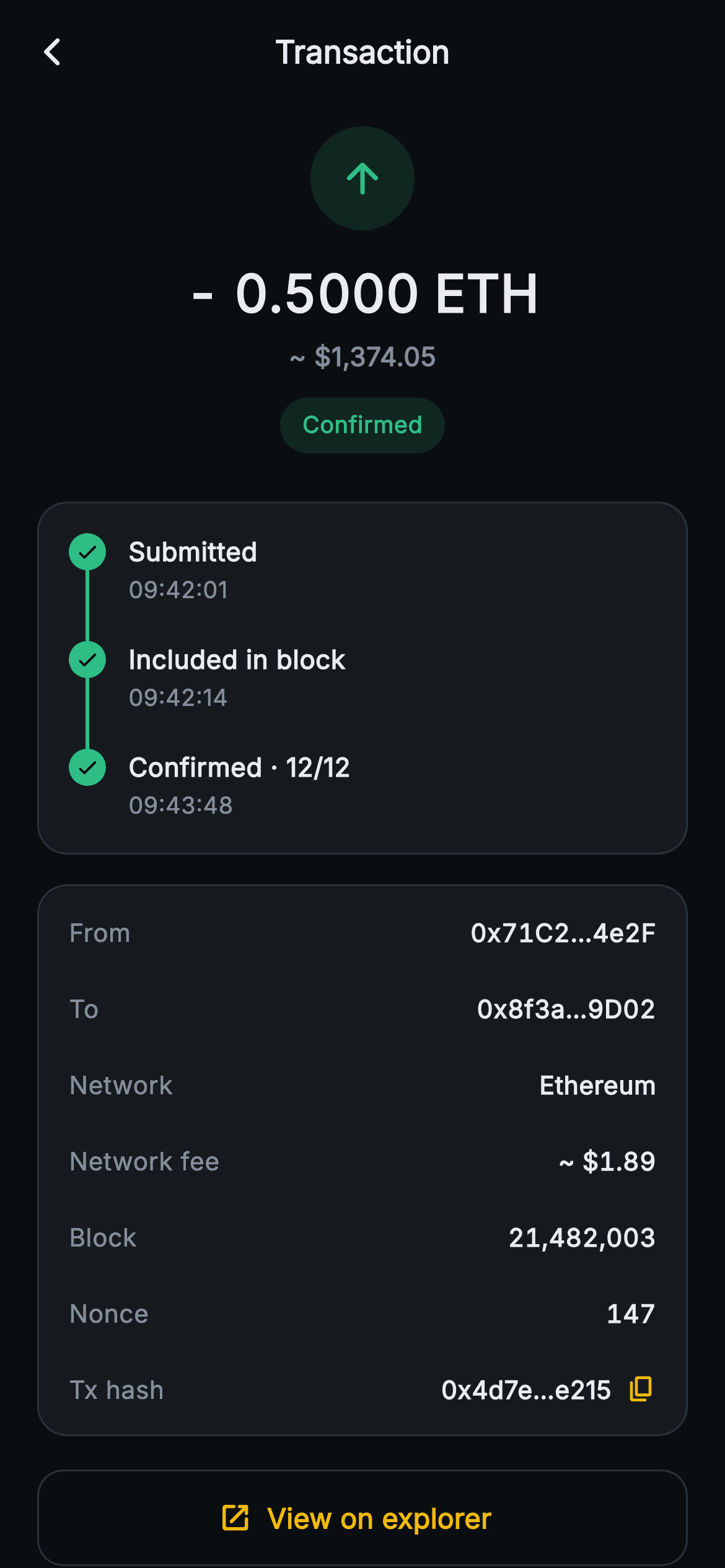
After tapping a row in their activity feed, a wallet user wants proof: did it land, when, what did it cost, and where can I verify it? This tutorial builds Aurum's single-transaction receipt in Flutter. It has a signed ETH amount with its dollar estimate, a Confirmed pill, a three-step confirmation timeline joined by a layout-built connector, a key/value card covering addresses, fee, block and nonce, a tx hash that copies its full value rather than the shortened label, and a View on explorer button.
What you'll build
- ✓A centred receipt hero: green 56px glyph disc, a 28px w800 '- 0.5000 ETH' in tabular figures, a muted fiat estimate and a 'Confirmed' status pill
- ✓A three-step confirmation timeline (Submitted, Included in block, Confirmed · 12/12) whose vertical connector is an IntrinsicHeight + Expanded 2px bar, not a painter
- ✓A hairline-bordered detail card listing From, To, Network, Network fee, Block and Nonce through one reusable _row helper
- ✓A Tx hash row that shows a short 0x4d7e…e215 but writes the full hash to the clipboard with Clipboard.setData and swaps its icon to a check
- ✓A full-width outlined 'View on explorer' action handed off through an onViewExplorer callback
Step-by-step build
Create the file
Add a new file at lib/web3_tx_detail/web3_tx_detail_screen.dart in your Flutter project.
Register the bundled fonts
No external packages — this is pure Flutter. It does bundle its design font (Inter), so drop the font file into fonts/ and declare it in pubspec.yaml:
flutter:
  fonts:
    - family: Inter
      fonts:
- asset: fonts/Inter-Regular.ttfBuild it, piece by piece
Here's how the screen goes together. Each block below is a real slice of the code with a plain-English explanation — paste them in order, or grab the whole file from the next section.
Receipt data held as constants, and one flag of state
import 'package:flutter/material.dart';
import 'package:flutter/services.dart';

/// Web3 — Transaction Detail. A status badge with painted confirmation steps,
/// the amount, fee, from / to rows, hash + block, and an explorer link.
/// Self-contained per CONVENTIONS.md: pure Flutter, bundled Inter font,
/// confirmation rail CustomPaint (no glyphs / no network image), forced dark
/// theme so it renders standalone as a route.
class Web3TxDetailScreen extends StatefulWidget {
  const Web3TxDetailScreen({super.key, this.onBack, this.onViewExplorer});

  final VoidCallback? onBack;
  final VoidCallback? onViewExplorer;

  @override
  State<Web3TxDetailScreen> createState() => _Web3TxDetailScreenState();
}

class _Web3TxDetailScreenState extends State<Web3TxDetailScreen> {
  static const String _font = 'Inter';
  static const Color _bg = Color(0xFF0B0E11);
  static const Color _surface = Color(0xFF161A1E);
  static const Color _brand = Color(0xFFF0B90B);
  static const Color _up = Color(0xFF2EBD85);
  static const Color _text = Color(0xFFEAECEF);
  static const Color _muted = Color(0xFF848E9C);
  static const Color _hairline = Color(0xFF2B3139);

  static const String _hash =
      '0x4d7e2a1c9f0b8e63d5a2c1b4e7f9a0d3c6b8e215';

  static const List<_Step> _steps = <_Step>[
    _Step('Submitted', '09:42:01', true),
    _Step('Included in block', '09:42:14', true),
    _Step('Confirmed · 12/12', '09:43:48', true),
  ];

  bool _copied = false;
The second import, `flutter/services.dart`, exists solely for the clipboard call in the hash row. `Web3TxDetailScreen` exposes just `onBack` and `onViewExplorer`, so the widget never needs to know which chain or explorer you use. Two constants carry the receipt: `_hash`, the full `0x4d7e…e215` string that gets copied (42 characters, which is address length; a real Ethereum tx hash is 66, so expect longer values from your RPC), and `_steps`, a const list of `_Step` records pairing a label, a clock time and a `done` flag. All three steps are `true` here, so the demo is a settled transaction. The only mutable field is `bool _copied`, which is why the screen is stateful at all. One honest note: the doc comment promises a 'confirmation rail CustomPaint', but the file contains no `CustomPaint`. The rail is built from plain layout widgets, as the third chunk shows.
The hero: amount first, status last
  @override
  Widget build(BuildContext context) {
    return Theme(
      data: ThemeData.dark(useMaterial3: true),
      child: Scaffold(
        backgroundColor: _bg,
        appBar: AppBar(
          backgroundColor: _bg,
          elevation: 0,
          centerTitle: true,
          leading: IconButton(
            onPressed: widget.onBack,
            icon: const Icon(Icons.arrow_back_ios_new_rounded,
                size: 18, color: _text),
          ),
          title: const Text(
            'Transaction',
            style: TextStyle(
              fontFamily: _font,
              fontSize: 17,
              fontWeight: FontWeight.w700,
              color: _text,
            ),
          ),
        ),
        body: SafeArea(
          top: false,
          child: ListView(
            padding: const EdgeInsets.fromLTRB(20, 12, 20, 24),
            children: <Widget>[
              Center(
                child: Column(
                  children: <Widget>[
                    Container(
                      width: 56,
                      height: 56,
                      decoration: BoxDecoration(
                        color: _up.withValues(alpha: 0.14),
                        shape: BoxShape.circle,
                      ),
                      child: const Icon(Icons.arrow_upward_rounded,
                          size: 26, color: _up),
                    ),
                    const SizedBox(height: 14),
                    const Text(
                      '- 0.5000 ETH',
                      style: TextStyle(
                        fontFamily: _font,
                        fontSize: 28,
                        fontWeight: FontWeight.w800,
                        fontFeatures: <FontFeature>[
                          FontFeature.tabularFigures()
                        ],
                        color: _text,
                      ),
                    ),
                    const SizedBox(height: 4),
                    const Text(
                      '~ \$1,374.05',
                      style: TextStyle(
                        fontFamily: _font,
                        fontSize: 14,
                        fontWeight: FontWeight.w600,
                        color: _muted,
                      ),
                    ),
                    const SizedBox(height: 12),
                    Container(
                      padding: const EdgeInsets.symmetric(
                          horizontal: 12, vertical: 6),
                      decoration: BoxDecoration(
                        color: _up.withValues(alpha: 0.14),
                        borderRadius: BorderRadius.circular(20),
                      ),
                      child: const Text(
                        'Confirmed',
                        style: TextStyle(
                          fontFamily: _font,
                          fontSize: 12.5,
                          fontWeight: FontWeight.w700,
                          color: _up,
                        ),
                      ),
                    ),
                  ],
                ),
              ),
Under the usual forced-dark wrapper and a flat 'Transaction' app bar, the hero is a centred Column read top to bottom as a sentence. The 56px disc holds `arrow_upward_rounded` in `_up` green at `withValues(alpha: 0.14)`. That is worth noticing, because on the history feed an outgoing send is drawn in red. Here the hue reports outcome rather than direction, and the same green is reused for the timeline nodes and the 'Confirmed' pill, so the page carries a single success colour. The amount '- 0.5000 ETH' is the loudest text on the page at 28px `w800` with `FontFeature.tabularFigures()`, then '~ $1,374.05' sits at 14px `_muted` with a tilde marking it as an estimate at today's rate. The status pill comes last: 12.5px `w700` text inside a 20-radius tinted capsule with `12×6` padding.
A confirmation timeline without a painter
              const SizedBox(height: 26),
              Container(
                padding: const EdgeInsets.all(16),
                decoration: BoxDecoration(
                  color: _surface,
                  borderRadius: BorderRadius.circular(16),
                  border: Border.all(color: _hairline),
                ),
                child: Column(
                  crossAxisAlignment: CrossAxisAlignment.start,
                  children: List<Widget>.generate(_steps.length, (int i) {
                    final _Step s = _steps[i];
                    return IntrinsicHeight(
                      child: Row(
                        crossAxisAlignment: CrossAxisAlignment.start,
                        children: <Widget>[
                          Column(
                            children: <Widget>[
                              Container(
                                width: 20,
                                height: 20,
                                decoration: BoxDecoration(
                                  color: s.done
                                      ? _up
                                      : _Web3TxDetailScreenState._hairline,
                                  shape: BoxShape.circle,
                                ),
                                child: Icon(
                                  s.done
                                      ? Icons.check_rounded
                                      : Icons.circle_outlined,
                                  size: 13,
                                  color: s.done ? _bg : _muted,
                                ),
                              ),
                              if (i != _steps.length - 1)
                                Expanded(
                                  child: Container(
                                    width: 2,
                                    color: _up,
                                  ),
                                ),
                            ],
                          ),
                          const SizedBox(width: 12),
                          Padding(
                            padding: EdgeInsets.only(
                                bottom: i == _steps.length - 1 ? 0 : 18),
                            child: Column(
                              crossAxisAlignment: CrossAxisAlignment.start,
                              children: <Widget>[
                                Text(
                                  s.label,
                                  style: const TextStyle(
                                    fontFamily: _font,
                                    fontSize: 14,
                                    fontWeight: FontWeight.w700,
                                    color: _text,
                                  ),
                                ),
                                const SizedBox(height: 2),
                                Text(
                                  s.time,
                                  style: const TextStyle(
                                    fontFamily: _font,
                                    fontSize: 12.5,
                                    color: _muted,
                                  ),
                                ),
                              ],
                            ),
                          ),
                        ],
                      ),
                    );
                  }),
                ),
              ),
Each step comes from `List<Widget>.generate` and is wrapped in `IntrinsicHeight`. That widget is the whole trick. The left Column holds a 20px node and then an `Expanded` 2px `Container`, but an Expanded inside an unbounded Row has no height to fill. `IntrinsicHeight` sizes the row to its tallest child, which is the label column, and the bar stretches to match. The 18px bottom padding on every label except the last, `i == _steps.length - 1 ? 0 : 18`, is therefore what sets the gap between nodes. The connector is skipped on the final step so the line doesn't trail into the card edge. Nodes branch on `s.done`: a green disc with a `_bg`-coloured check, or `_hairline` grey with `circle_outlined`. The connector colour is hard-coded to `_up` and doesn't check `done`, so a pending step would still get a green line above it.
Six facts in a borderless list
              const SizedBox(height: 16),
              Container(
                padding: const EdgeInsets.symmetric(horizontal: 16, vertical: 4),
                decoration: BoxDecoration(
                  color: _surface,
                  borderRadius: BorderRadius.circular(16),
                  border: Border.all(color: _hairline),
                ),
                child: Column(
                  children: <Widget>[
                    _row('From', '0x71C2…4e2F'),
                    _row('To', '0x8f3a…9D02'),
                    _row('Network', 'Ethereum'),
                    _row('Network fee', '~ \$1.89'),
                    _row('Block', '21,482,003'),
                    _row('Nonce', '147'),
The detail card uses the same `_surface` fill, 16 radius and `_hairline` border as the timeline card, so the two read as a pair. Its padding is `16` horizontal but only `4` vertical, because each row brings its own 11px of vertical padding and the edges come out at 15px, close to the sides. There are no dividers between rows. That rhythm alone separates them, which keeps six dense rows from turning into a grid. The order follows how people audit a send: who it went from and to, the network, what it cost, then the chain-level identifiers. Every value arrives pre-formatted. The addresses are already shortened to `0x71C2…4e2F` and `0x8f3a…9D02`, and 'Network fee' is a fiat figure, '~ $1.89', with no gas amount in ETH or gwei. To show gas, add a row. The helper takes any string.
Short hash on screen, full hash on the clipboard
                    Padding(
                      padding: const EdgeInsets.symmetric(vertical: 11),
                      child: Row(
                        children: <Widget>[
                          const Text(
                            'Tx hash',
                            style: TextStyle(
                              fontFamily: _font,
                              fontSize: 13.5,
                              color: _muted,
                            ),
                          ),
                          const Spacer(),
                          const Text(
                            '0x4d7e…e215',
                            style: TextStyle(
                              fontFamily: _font,
                              fontSize: 13.5,
                              fontWeight: FontWeight.w600,
                              color: _text,
                            ),
                          ),
                          const SizedBox(width: 8),
                          GestureDetector(
                            onTap: () {
                              Clipboard.setData(
                                  const ClipboardData(text: _hash));
                              setState(() => _copied = true);
                            },
                            behavior: HitTestBehavior.opaque,
                            child: Icon(
                              _copied
                                  ? Icons.check_rounded
                                  : Icons.copy_rounded,
                              size: 16,
                              color: _brand,
                            ),
                          ),
                        ],
                      ),
                    ),
                  ],
                ),
              ),
The Tx hash row repeats the `_row` layout inline because it needs a trailing action. The visible '0x4d7e…e215' is its own string literal, not derived from `_hash`. It matches the first six and last four characters by hand, so if you swap the hash, update both or build the short form with `substring`. The tap handler is the important part: `Clipboard.setData(const ClipboardData(text: _hash))` copies the whole string, never the truncated label, since a pasted ellipsis is useless in an explorer search box. `setState(() => _copied = true)` then swaps `copy_rounded` for `check_rounded` in gold. The flag is never reset and no SnackBar appears, so the check stays for the screen's lifetime. `HitTestBehavior.opaque` helps the 16px icon register taps, though the tappable area is still only as big as the icon. From and To rows cannot be copied.
Handing off to a block explorer
              const SizedBox(height: 18),
              SizedBox(
                width: double.infinity,
                height: 52,
                child: OutlinedButton.icon(
                  onPressed: widget.onViewExplorer,
                  style: OutlinedButton.styleFrom(
                    side: const BorderSide(color: _hairline),
                    shape: RoundedRectangleBorder(
                      borderRadius: BorderRadius.circular(14),
                    ),
                  ),
                  icon: const Icon(Icons.open_in_new_rounded,
                      size: 18, color: _brand),
                  label: const Text(
                    'View on explorer',
                    style: TextStyle(
                      fontFamily: _font,
                      fontSize: 15,
                      fontWeight: FontWeight.w700,
                      color: _brand,
                    ),
                  ),
                ),
              ),
            ],
          ),
        ),
      ),
    );
  }
The final action is an `OutlinedButton.icon`, full width and 52px tall, with an `open_in_new_rounded` icon and 'View on explorer' in gold `_brand`. An outline rather than a fill is the right weight. Nothing on a confirmed receipt needs doing, so verification is offered, not pushed. The border is `_hairline` and the radius is 14, slightly tighter than the cards' 16. The button calls `widget.onViewExplorer` directly. If that callback is null, Flutter disables the button. Because the icon and label colours are set explicitly, a disabled button looks exactly like an enabled one and simply ignores taps. The back `IconButton` behaves the same way with a null `onBack`. Always pass both callbacks when you mount the route.
The row helper and the step record
  Widget _row(String label, String value) {
    return Padding(
      padding: const EdgeInsets.symmetric(vertical: 11),
      child: Row(
        children: <Widget>[
          Text(
            label,
            style: const TextStyle(
              fontFamily: _font,
              fontSize: 13.5,
              color: _muted,
            ),
          ),
          const Spacer(),
          Text(
            value,
            style: const TextStyle(
              fontFamily: _font,
              fontSize: 13.5,
              fontWeight: FontWeight.w600,
              fontFeatures: <FontFeature>[FontFeature.tabularFigures()],
              color: _text,
            ),
          ),
        ],
      ),
    );
  }
}

class _Step {
  const _Step(this.label, this.time, this.done);

  final String label;
  final String time;
  final bool done;
}
`_row` is a Row of muted label, `Spacer`, then a `w600` value in 13.5px Inter with `FontFeature.tabularFigures()`. Tabular figures keep the digits in values like '21,482,003' and '147' evenly spaced. The `Spacer` has a catch: the value `Text` is neither `Flexible` nor ellipsised, so a long string such as an untruncated address or ENS name would overflow the card rather than shorten. That is why every value in the file arrives pre-shortened. If you bind live data, wrap the value in `Flexible` with `overflow: TextOverflow.ellipsis`. The `_Step` class at the bottom is a three-field const record, which is what lets `_steps` be a `static const` list. Map your RPC or indexer response into `_Step`s and the timeline needs no changes.
Full code
The complete, ready-to-paste source. Free to use in your projects — one click copies it all.
import 'package:flutter/material.dart';
import 'package:flutter/services.dart';
/// Web3 — Transaction Detail. A status badge with painted confirmation steps,
/// the amount, fee, from / to rows, hash + block, and an explorer link.
/// Self-contained per CONVENTIONS.md: pure Flutter, bundled Inter font,
/// confirmation rail CustomPaint (no glyphs / no network image), forced dark
/// theme so it renders standalone as a route.
class Web3TxDetailScreen extends StatefulWidget {
const Web3TxDetailScreen({super.key, this.onBack, this.onViewExplorer});
final VoidCallback? onBack;
final VoidCallback? onViewExplorer;
@override
State<Web3TxDetailScreen> createState() => _Web3TxDetailScreenState();
}
class _Web3TxDetailScreenState extends State<Web3TxDetailScreen> {
static const String _font = 'Inter';
static const Color _bg = Color(0xFF0B0E11);
static const Color _surface = Color(0xFF161A1E);
static const Color _brand = Color(0xFFF0B90B);
static const Color _up = Color(0xFF2EBD85);
static const Color _text = Color(0xFFEAECEF);
static const Color _muted = Color(0xFF848E9C);
static const Color _hairline = Color(0xFF2B3139);
static const String _hash =
'0x4d7e2a1c9f0b8e63d5a2c1b4e7f9a0d3c6b8e215';
static const List<_Step> _steps = <_Step>[
_Step('Submitted', '09:42:01', true),
_Step('Included in block', '09:42:14', true),
_Step('Confirmed · 12/12', '09:43:48', true),
];
bool _copied = false;
@override
Widget build(BuildContext context) {
return Theme(
data: ThemeData.dark(useMaterial3: true),
child: Scaffold(
backgroundColor: _bg,
appBar: AppBar(
backgroundColor: _bg,
elevation: 0,
centerTitle: true,
leading: IconButton(
onPressed: widget.onBack,
icon: const Icon(Icons.arrow_back_ios_new_rounded,
size: 18, color: _text),
),
title: const Text(
'Transaction',
style: TextStyle(
fontFamily: _font,
fontSize: 17,
fontWeight: FontWeight.w700,
color: _text,
),
),
),
body: SafeArea(
top: false,
child: ListView(
padding: const EdgeInsets.fromLTRB(20, 12, 20, 24),
children: <Widget>[
Center(
child: Column(
children: <Widget>[
Container(
width: 56,
height: 56,
decoration: BoxDecoration(
color: _up.withValues(alpha: 0.14),
shape: BoxShape.circle,
),
child: const Icon(Icons.arrow_upward_rounded,
size: 26, color: _up),
),
const SizedBox(height: 14),
const Text(
'- 0.5000 ETH',
style: TextStyle(
fontFamily: _font,
fontSize: 28,
fontWeight: FontWeight.w800,
fontFeatures: <FontFeature>[
FontFeature.tabularFigures()
],
color: _text,
),
),
const SizedBox(height: 4),
const Text(
'~ \$1,374.05',
style: TextStyle(
fontFamily: _font,
fontSize: 14,
fontWeight: FontWeight.w600,
color: _muted,
),
),
const SizedBox(height: 12),
Container(
padding: const EdgeInsets.symmetric(
horizontal: 12, vertical: 6),
decoration: BoxDecoration(
color: _up.withValues(alpha: 0.14),
borderRadius: BorderRadius.circular(20),
),
child: const Text(
'Confirmed',
style: TextStyle(
fontFamily: _font,
fontSize: 12.5,
fontWeight: FontWeight.w700,
color: _up,
),
),
),
],
),
),
const SizedBox(height: 26),
Container(
padding: const EdgeInsets.all(16),
decoration: BoxDecoration(
color: _surface,
borderRadius: BorderRadius.circular(16),
border: Border.all(color: _hairline),
),
child: Column(
crossAxisAlignment: CrossAxisAlignment.start,
children: List<Widget>.generate(_steps.length, (int i) {
final _Step s = _steps[i];
return IntrinsicHeight(
child: Row(
crossAxisAlignment: CrossAxisAlignment.start,
children: <Widget>[
Column(
children: <Widget>[
Container(
width: 20,
height: 20,
decoration: BoxDecoration(
color: s.done
? _up
: _Web3TxDetailScreenState._hairline,
shape: BoxShape.circle,
),
child: Icon(
s.done
? Icons.check_rounded
: Icons.circle_outlined,
size: 13,
color: s.done ? _bg : _muted,
),
),
if (i != _steps.length - 1)
Expanded(
child: Container(
width: 2,
color: _up,
),
),
],
),
const SizedBox(width: 12),
Padding(
padding: EdgeInsets.only(
bottom: i == _steps.length - 1 ? 0 : 18),
child: Column(
crossAxisAlignment: CrossAxisAlignment.start,
children: <Widget>[
Text(
s.label,
style: const TextStyle(
fontFamily: _font,
fontSize: 14,
fontWeight: FontWeight.w700,
color: _text,
),
),
const SizedBox(height: 2),
Text(
s.time,
style: const TextStyle(
fontFamily: _font,
fontSize: 12.5,
color: _muted,
),
),
],
),
),
],
),
);
}),
),
),
const SizedBox(height: 16),
Container(
padding: const EdgeInsets.symmetric(horizontal: 16, vertical: 4),
decoration: BoxDecoration(
color: _surface,
borderRadius: BorderRadius.circular(16),
border: Border.all(color: _hairline),
),
child: Column(
children: <Widget>[
_row('From', '0x71C2…4e2F'),
_row('To', '0x8f3a…9D02'),
_row('Network', 'Ethereum'),
_row('Network fee', '~ \$1.89'),
_row('Block', '21,482,003'),
_row('Nonce', '147'),
Padding(
padding: const EdgeInsets.symmetric(vertical: 11),
child: Row(
children: <Widget>[
const Text(
'Tx hash',
style: TextStyle(
fontFamily: _font,
fontSize: 13.5,
color: _muted,
),
),
const Spacer(),
const Text(
'0x4d7e…e215',
style: TextStyle(
fontFamily: _font,
fontSize: 13.5,
fontWeight: FontWeight.w600,
color: _text,
),
),
const SizedBox(width: 8),
GestureDetector(
onTap: () {
Clipboard.setData(
const ClipboardData(text: _hash));
setState(() => _copied = true);
},
behavior: HitTestBehavior.opaque,
child: Icon(
_copied
? Icons.check_rounded
: Icons.copy_rounded,
size: 16,
color: _brand,
),
),
],
),
),
],
),
),
const SizedBox(height: 18),
SizedBox(
width: double.infinity,
height: 52,
child: OutlinedButton.icon(
onPressed: widget.onViewExplorer,
style: OutlinedButton.styleFrom(
side: const BorderSide(color: _hairline),
shape: RoundedRectangleBorder(
borderRadius: BorderRadius.circular(14),
),
),
icon: const Icon(Icons.open_in_new_rounded,
size: 18, color: _brand),
label: const Text(
'View on explorer',
style: TextStyle(
fontFamily: _font,
fontSize: 15,
fontWeight: FontWeight.w700,
color: _brand,
),
),
),
),
],
),
),
),
);
}
Widget _row(String label, String value) {
return Padding(
padding: const EdgeInsets.symmetric(vertical: 11),
child: Row(
children: <Widget>[
Text(
label,
style: const TextStyle(
fontFamily: _font,
fontSize: 13.5,
color: _muted,
),
),
const Spacer(),
Text(
value,
style: const TextStyle(
fontFamily: _font,
fontSize: 13.5,
fontWeight: FontWeight.w600,
fontFeatures: <FontFeature>[FontFeature.tabularFigures()],
color: _text,
),
),
],
),
);
}
}
class _Step {
const _Step(this.label, this.time, this.done);
final String label;
final String time;
final bool done;
}
Plus bundled 1 binary asset (fonts/images). The CLI and MCP install those for you automatically.
Two faster ways to add it
Copy-paste works, but you can skip it entirely.
1. FlutterKit CLI
One command drops this screen — and its fonts — straight into your project.
$ flutterkit add web3-tx-detail2. AI agent (MCP)
Connect FlutterKit's MCP server in Claude or Cursor and just ask your agent to install web3-tx-detail — it fetches and writes the files for you.
FAQ
Can I ship this transaction receipt screen in a commercial wallet?
Yes. It is free for personal and commercial apps alike. Copy the Dart from this page, add it with the CLI command, or fetch it over MCP. You don't need a licence key or an account, and you don't have to credit anyone.
What packages and fonts does it depend on?
None outside the Flutter SDK. It imports only `material.dart` and `services.dart`, the second one for `Clipboard.setData`. Text is set in the bundled Inter font (`fontFamily: 'Inter'`), so nothing is fetched at runtime. To open a browser from the explorer button you'll add url_launcher in your own callback, but the screen itself doesn't need it.
What is the minimum Flutter version?
Flutter 3.22 or newer, because the glyph disc and status pill use `Color.withValues(alpha: 0.14)`. On an older SDK, change those two calls to `withOpacity(0.14)`. Also rewrite `super.key` in the constructor as `{Key? key, ...} : super(key: key)` if you are on a Dart version before 2.17.
How do I show a pending transaction with a live confirmation count?
Turn `_steps` into a parameter and set `done: false` on the steps not yet reached. The node then switches to the grey outlined circle. Also change the connector's hard-coded `_up` to `s.done ? _up : _hairline` so the line stops being green where progress stops. Build the third label from your poll, for example `'Confirmed · $n/12'`. Then swap the 'Confirmed' pill's text and tint for a 'Pending' state, using amber `_brand` rather than green.
How do I make 'View on explorer' open the real transaction page?
The button only fires `onViewExplorer`, so the URL is built in your callback. For Ethereum mainnet that is `https://etherscan.io/tx/` plus the full hash, launched with `url_launcher`'s `launchUrl(uri, mode: LaunchMode.externalApplication)`. Choose the base URL by network, such as Arbiscan or Polygonscan, since the screen's 'Network' row is just a display string.


