How to Build a Crypto Staking Amount Screen in Flutter (Full Code + Preview)
Staking asks for a commitment, so the amount step has to show the whole trade before anyone continues: how much is going in, what it is worth, how long it is tied up and what it should earn. This tutorial builds Aurum's Stake SOL screen in Flutter, with a 40px SOL figure and live dollar value, a Max pill, four lock-period chips from Flexible to 180 days, and an annual reward line that recalculates on every keypress. Review stake only enables for a positive amount within the balance.
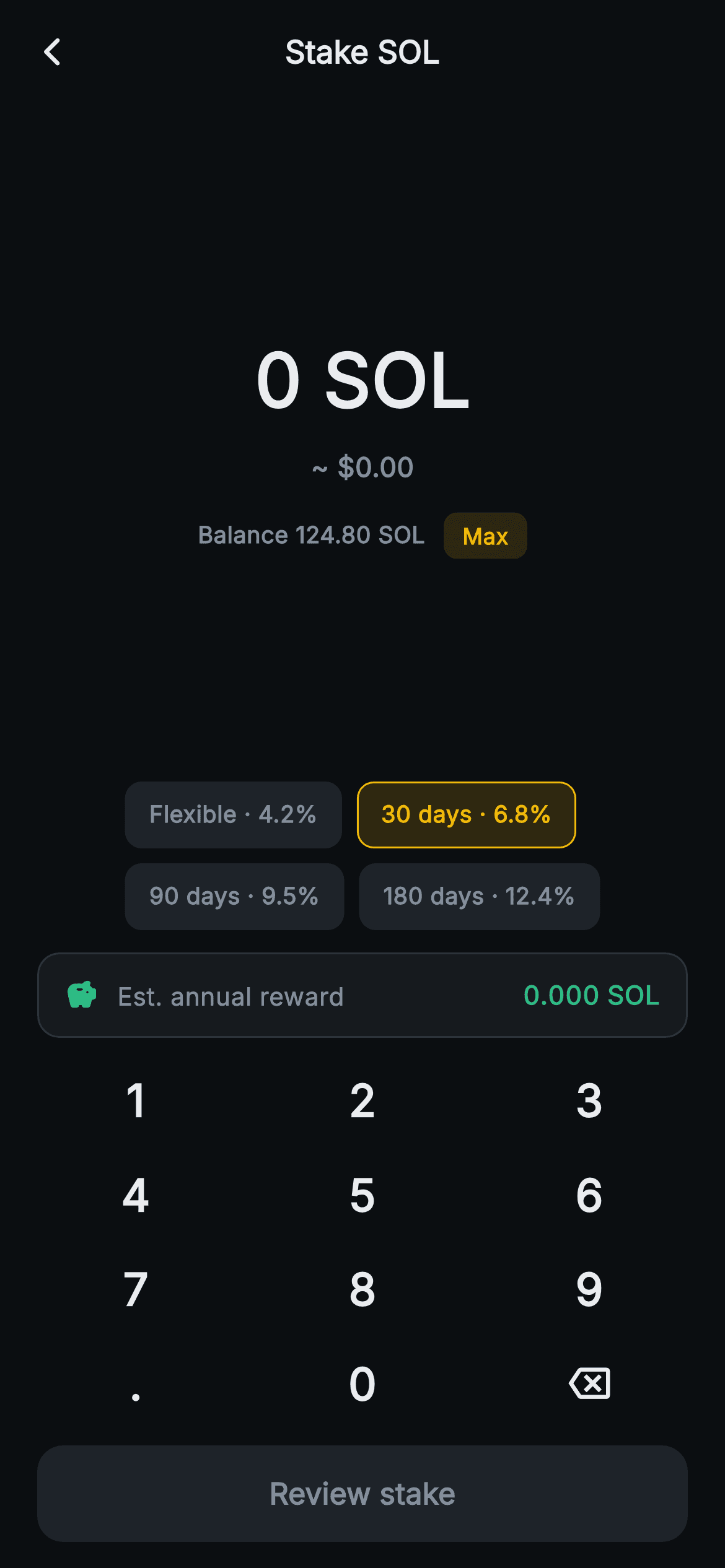
What you'll build
- ✓A chain of five getters that turns one entry string into a value, an APY, a projected reward, an over-balance flag and a validity flag
- ✓A numpad grammar that allows up to four decimal places of SOL and no more
- ✓An over-balance state that turns the figure red, swaps the balance line for 'Exceeds balance' and disables the button
- ✓Four lock-period chips (4.2% to 12.4% APY) that change the reward estimate without touching the amount
- ✓A green 'Est. annual reward' card computed as amount × APY, shown to three decimals
Step-by-step build
Create the file
Add a new file at lib/web3_stake_amount/web3_stake_amount_screen.dart in your Flutter project.
Register the bundled fonts
No external packages — this is pure Flutter. It does bundle its design font (Inter), so drop the font file into fonts/ and declare it in pubspec.yaml:
flutter:
  fonts:
    - family: Inter
      fonts:
- asset: fonts/Inter-Regular.ttfBuild it, piece by piece
Here's how the screen goes together. Each block below is a real slice of the code with a plain-English explanation — paste them in order, or grab the whole file from the next section.
Two constants, a tier table and five derived getters
import 'package:flutter/material.dart';

/// Web3 — Stake Amount. An amount entry with a painted numpad, a max pill, an
/// estimated-annual-reward line and lock-period chips. Self-contained per
/// CONVENTIONS.md: pure Flutter, bundled Inter font, no glyphs / no network
/// image, forced dark theme so it renders standalone as a route.
class Web3StakeAmountScreen extends StatefulWidget {
  const Web3StakeAmountScreen({super.key, this.onBack, this.onNext});

  final VoidCallback? onBack;
  final VoidCallback? onNext;

  @override
  State<Web3StakeAmountScreen> createState() => _Web3StakeAmountScreenState();
}

class _Web3StakeAmountScreenState extends State<Web3StakeAmountScreen> {
  static const String _font = 'Inter';
  static const Color _bg = Color(0xFF0B0E11);
  static const Color _surface = Color(0xFF161A1E);
  static const Color _surfaceAlt = Color(0xFF1E2329);
  static const Color _brand = Color(0xFFF0B90B);
  static const Color _up = Color(0xFF2EBD85);
  static const Color _down = Color(0xFFF6465D);
  static const Color _text = Color(0xFFEAECEF);
  static const Color _muted = Color(0xFF848E9C);
  static const Color _hairline = Color(0xFF2B3139);

  static const double _balance = 124.80; // SOL
  static const double _solUsd = 152.90;

  static const List<List<dynamic>> _tiers = <List<dynamic>>[
    <dynamic>['Flexible', 4.2],
    <dynamic>['30 days', 6.8],
    <dynamic>['90 days', 9.5],
    <dynamic>['180 days', 12.4],
  ];

  String _entry = '0';
  int _tier = 1;

  double get _value => double.tryParse(_entry) ?? 0;
  double get _apy => _tiers[_tier][1] as double;
  double get _reward => _value * (_apy / 100);
  bool get _over => _value > _balance;
  bool get _valid => _value > 0 && !_over;
The screen is a `StatefulWidget` with only `onBack` and `onNext`, and it keeps very little mutable state: `String _entry = '0'` and `int _tier = 1`. Everything else is calculated from those two fields. `_balance = 124.80` and `_solUsd = 152.90` are constants that stand in for wallet and price feeds. `_tiers` is a list of `[label, apy]` pairs, and `_tier = 1` preselects '30 days · 6.8%', the same rate the stake-success screen later confirms. Below that are the getters. `_value` parses the entry, `_apy` reads the active tier, `_reward` is `_value * (_apy / 100)`, `_over` compares against the balance, and `_valid` requires `_value > 0 && !_over`. Since each one is evaluated on every build, a keypress or chip tap updates the figure, reward and button together, and no cached number can go stale. Watch out for the `List<dynamic>` table with `as double` casts. If you add `['365 days', 15]` with an int literal, the cast throws on mobile.
A keypad grammar with a four-decimal ceiling
  void _tap(String k) {
    setState(() {
      if (k == '<') {
        _entry =
            _entry.length <= 1 ? '0' : _entry.substring(0, _entry.length - 1);
      } else if (k == '.') {
        if (!_entry.contains('.')) _entry = '$_entry.';
      } else {
        if (_entry == '0') {
          _entry = k;
        } else {
          final int dot = _entry.indexOf('.');
          if (dot >= 0 && _entry.length - dot > 4) return;
          _entry = '$_entry$k';
        }
      }
    });
  }
`_tap` receives one key string and changes `_entry` inside a single `setState`. Backspace (`'<'`) falls back to `'0'` instead of an empty string. The dot only appends when `_entry` doesn't already contain one, which gives you `0.` from a fresh screen. A digit typed over `'0'` replaces it. The SOL-specific rule is `_entry.length - dot > 4`. It counts the dot and everything after it, so once four decimal places exist the next digit is silently rejected. That keeps entries like `12.3456` possible while stopping noise like `12.34567891`, which no staking UI needs to show. Notice what is not capped: the whole-number part. There is no digit limit before the decimal point, so a long string of digits will eventually wrap the 40px headline onto a second line. A length guard on the integer part or a `FittedBox` around the figure fixes that.
A forced dark route and a figure that turns red
  @override
  Widget build(BuildContext context) {
    return Theme(
      data: ThemeData.dark(useMaterial3: true),
      child: Scaffold(
        backgroundColor: _bg,
        appBar: AppBar(
          backgroundColor: _bg,
          elevation: 0,
          centerTitle: true,
          leading: IconButton(
            onPressed: widget.onBack,
            icon: const Icon(Icons.arrow_back_ios_new_rounded,
                size: 18, color: _text),
          ),
          title: const Text(
            'Stake SOL',
            style: TextStyle(
              fontFamily: _font,
              fontSize: 17,
              fontWeight: FontWeight.w700,
              color: _text,
            ),
          ),
        ),
        body: SafeArea(
          top: false,
          child: Column(
            children: <Widget>[
              const Spacer(),
              Text(
                '$_entry SOL',
                style: TextStyle(
                  fontFamily: _font,
                  fontSize: 40,
                  fontWeight: FontWeight.w800,
                  fontFeatures: const <FontFeature>[
                    FontFeature.tabularFigures()
                  ],
                  color: _over ? _down : _text,
                ),
              ),
              const SizedBox(height: 8),
              Text(
                '~ \$${(_value * _solUsd).toStringAsFixed(2)}',
                style: const TextStyle(
                  fontFamily: _font,
                  fontSize: 14.5,
                  fontWeight: FontWeight.w600,
                  color: _muted,
                ),
              ),
The usual Aurum dark-theme wrapper and flat 'Stake SOL' app bar frame a body `Column` that opens with a `Spacer`. The headline is `'$_entry SOL'` at 40px `w800` with tabular figures, and its colour is the first place the over-balance check shows up: `_over ? _down : _text`. The figure turns `#F6465D` as soon as the amount exceeds 124.80, so the error appears on the number itself, not in a separate message. Under it, the dollar line `'~ \$${(_value * _solUsd).toStringAsFixed(2)}'` multiplies by the constant SOL price. It has no thousands separator, so staking the full balance reads `~ $19081.92`. Use `NumberFormat` from the `intl` package if you want grouping. This line always stays `_muted`, even when the amount is too large.
Balance line and the Max pill
              const SizedBox(height: 14),
              Row(
                mainAxisAlignment: MainAxisAlignment.center,
                children: <Widget>[
                  Text(
                    _over
                        ? 'Exceeds balance'
                        : 'Balance ${_balance.toStringAsFixed(2)} SOL',
                    style: TextStyle(
                      fontFamily: _font,
                      fontSize: 12.5,
                      fontWeight: FontWeight.w600,
                      color: _over ? _down : _muted,
                    ),
                  ),
                  const SizedBox(width: 10),
                  GestureDetector(
                    onTap: () => setState(
                        () => _entry = _balance.toStringAsFixed(2)),
                    behavior: HitTestBehavior.opaque,
                    child: Container(
                      padding: const EdgeInsets.symmetric(
                          horizontal: 10, vertical: 4),
                      decoration: BoxDecoration(
                        color: _brand.withValues(alpha: 0.14),
                        borderRadius: BorderRadius.circular(7),
                      ),
                      child: const Text(
                        'Max',
                        style: TextStyle(
                          fontFamily: _font,
                          fontSize: 12,
                          fontWeight: FontWeight.w700,
                          color: _brand,
                        ),
                      ),
                    ),
                  ),
                ],
              ),
This centred `Row` has two jobs. The label is a ternary that replaces the content, not only the colour: within range it reads 'Balance 124.80 SOL' in muted grey, and once `_over` is true the same slot reads 'Exceeds balance' in red. The warning appears exactly where the user was looking for the limit. Beside it, the Max pill is a `GestureDetector` with `HitTestBehavior.opaque` around a small `_brand.withValues(alpha: 0.14)` capsule, and its tap runs `setState(() => _entry = _balance.toStringAsFixed(2))`. Writing the balance as a formatted string, not a raw double, keeps `_entry` in the same shape the keypad produces (`124.80`), so backspace and further digits keep working afterwards. Typing one more digit after Max goes over the balance and turns the screen red. A second `Spacer` follows, which centres the amount group in the space above the chips.
Lock-period chips that only change the rate
              const Spacer(),
              Padding(
                padding: const EdgeInsets.symmetric(horizontal: 20),
                child: Wrap(
                  spacing: 8,
                  children: List<Widget>.generate(_tiers.length, (int i) {
                    final bool active = _tier == i;
                    return GestureDetector(
                      onTap: () => setState(() => _tier = i),
                      behavior: HitTestBehavior.opaque,
                      child: Container(
                        margin: const EdgeInsets.only(bottom: 8),
                        padding: const EdgeInsets.symmetric(
                            horizontal: 12, vertical: 8),
                        decoration: BoxDecoration(
                          color: active
                              ? _brand.withValues(alpha: 0.16)
                              : _surfaceAlt,
                          borderRadius: BorderRadius.circular(9),
                          border: Border.all(
                            color: active ? _brand : Colors.transparent,
                          ),
                        ),
                        child: Text(
                          '${_tiers[i][0]} · ${(_tiers[i][1] as double).toStringAsFixed(1)}%',
                          style: TextStyle(
                            fontFamily: _font,
                            fontSize: 12.5,
                            fontWeight: FontWeight.w700,
                            color: active ? _brand : _muted,
                          ),
                        ),
                      ),
                    );
                  }),
                ),
              ),
The four tiers render through `List<Widget>.generate` inside a `Wrap` with `spacing: 8`, so on a narrow phone '180 days · 12.4%' drops to a second row instead of overflowing. Each chip gets `margin: EdgeInsets.only(bottom: 8)` in place of `runSpacing`. That spaces any wrapped rows too, but it also leaves 8px under the last row, which is why only `SizedBox(height: 4)` follows. The active chip uses a 0.16 gold tint, a solid `_brand` border and gold text. Inactive chips use `_surfaceAlt` with a transparent border of the same width, so selecting a chip never shifts its neighbours by a pixel. Tapping sets `_tier = i` and nothing else. The amount stays as typed, and the reward getter picks up the new APY on the next build, so you can compare Flexible with 180 days for the same stake.
The estimated annual reward card
              const SizedBox(height: 4),
              Padding(
                padding: const EdgeInsets.symmetric(horizontal: 20),
                child: Container(
                  padding: const EdgeInsets.symmetric(
                      horizontal: 14, vertical: 12),
                  decoration: BoxDecoration(
                    color: _surface,
                    borderRadius: BorderRadius.circular(12),
                    border: Border.all(color: _hairline),
                  ),
                  child: Row(
                    children: <Widget>[
                      const Icon(Icons.savings_rounded, size: 18, color: _up),
                      const SizedBox(width: 10),
                      const Text(
                        'Est. annual reward',
                        style: TextStyle(
                          fontFamily: _font,
                          fontSize: 13.5,
                          color: _muted,
                        ),
                      ),
                      const Spacer(),
                      Text(
                        '${_reward.toStringAsFixed(3)} SOL',
                        style: const TextStyle(
                          fontFamily: _font,
                          fontSize: 14,
                          fontWeight: FontWeight.w800,
                          fontFeatures: <FontFeature>[
                            FontFeature.tabularFigures()
                          ],
                          color: _up,
                        ),
                      ),
                    ],
                  ),
                ),
              ),
The reward card is a `_surface` row with a 12px radius and a `_hairline` border: a green `savings_rounded` icon, the muted label 'Est. annual reward', a `Spacer`, then `'${_reward.toStringAsFixed(3)} SOL'` in green `w800` tabular figures. Three decimals fits the size of real yields. 50 SOL at 6.8% shows `3.400 SOL`, and the full balance on the 180-day tier shows `15.475 SOL`, where two decimals would round away visible differences between tiers. Two points about the maths. It is simple interest over one year, not compounded, and it is not prorated to the lock length, so the 30-day chip still shows a full year's projection. The label says 'annual', which keeps that honest. Also, the card does not check `_over`, so an amount above the balance still gets a green projection.
Numpad slot and the Review stake gate
              const SizedBox(height: 8),
              _Numpad(onTap: _tap),
              Padding(
                padding: const EdgeInsets.fromLTRB(20, 8, 20, 14),
                child: SizedBox(
                  width: double.infinity,
                  height: 52,
                  child: FilledButton(
                    onPressed: _valid ? widget.onNext : null,
                    style: FilledButton.styleFrom(
                      backgroundColor: _brand,
                      disabledBackgroundColor: _surfaceAlt,
                      shape: RoundedRectangleBorder(
                        borderRadius: BorderRadius.circular(14),
                      ),
                    ),
                    child: Text(
                      'Review stake',
                      style: TextStyle(
                        fontFamily: _font,
                        fontSize: 16,
                        fontWeight: FontWeight.w700,
                        color: _valid ? _bg : _muted,
                      ),
                    ),
                  ),
                ),
              ),
            ],
          ),
        ),
      ),
    );
  }
}
`_Numpad(onTap: _tap)` passes the state method straight in, so the pad never sees the entry string. Below it, the 52px full-width `FilledButton` is gated on `_valid`, the getter that combines both bounds: zero is rejected and anything over the balance is rejected. That one expression covers the empty start state, the over-balance state and every valid amount between them. `disabledBackgroundColor: _surfaceAlt` makes the off state a dark slab, not Material's default translucent grey. The label colour repeats the same ternary (`_valid ? _bg : _muted`), because an explicit `TextStyle.color` on the child overrides the button's own disabled foreground. `onNext` takes no arguments. To send the amount and tier on to the confirm step, change it to a callback with parameters, such as `void Function(double amount, double apy)`.
A fixed-count grid for the twelve keys
class _Numpad extends StatelessWidget {
  const _Numpad({required this.onTap});

  final ValueChanged<String> onTap;

  static const List<String> _keys = <String>[
    '1', '2', '3',
    '4', '5', '6',
    '7', '8', '9',
    '.', '0', '<',
  ];

  @override
  Widget build(BuildContext context) {
    return Padding(
      padding: const EdgeInsets.symmetric(horizontal: 12),
      child: GridView.count(
        crossAxisCount: 3,
        shrinkWrap: true,
        physics: const NeverScrollableScrollPhysics(),
        childAspectRatio: 2.4,
        children: _keys.map((String k) {
          return InkWell(
            onTap: () => onTap(k),
            borderRadius: BorderRadius.circular(12),
            child: Center(
              child: k == '<'
                  ? const Icon(Icons.backspace_outlined,
                      size: 22, color: _Web3StakeAmountScreenState._text)
                  : Text(
                      k,
                      style: const TextStyle(
                        fontFamily: _Web3StakeAmountScreenState._font,
                        fontSize: 24,
                        fontWeight: FontWeight.w700,
                        color: _Web3StakeAmountScreenState._text,
                      ),
                    ),
            ),
          );
        }).toList(),
      ),
    );
  }
}
`_Numpad` is stateless and exposes one `ValueChanged<String>`. Its twelve keys are a `static const` list formatted three per line in the source, so the code looks like the keypad it produces. It uses `GridView.count`, not a builder, because the item count is fixed and small. `shrinkWrap: true` with `NeverScrollableScrollPhysics` lets the grid sit in the `Column` at its natural height. `childAspectRatio: 2.4` makes each key more than twice as wide as it is tall, about 50px tall on a 390px-wide phone, which leaves room for the chips and reward card above. The `'<'` key renders `Icons.backspace_outlined` and the rest render 24px `w700` digits. Colours and the font come from `_Web3StakeAmountScreenState`'s private statics, which is allowed because both classes live in the same file.
Full code
The complete, ready-to-paste source. Free to use in your projects — one click copies it all.
import 'package:flutter/material.dart';

/// Web3 — Stake Amount. An amount entry with a painted numpad, a max pill, an
/// estimated-annual-reward line and lock-period chips. Self-contained per
/// CONVENTIONS.md: pure Flutter, bundled Inter font, no glyphs / no network
/// image, forced dark theme so it renders standalone as a route.
class Web3StakeAmountScreen extends StatefulWidget {
  const Web3StakeAmountScreen({super.key, this.onBack, this.onNext});

  final VoidCallback? onBack;
  final VoidCallback? onNext;

  @override
  State<Web3StakeAmountScreen> createState() => _Web3StakeAmountScreenState();
}

class _Web3StakeAmountScreenState extends State<Web3StakeAmountScreen> {
  static const String _font = 'Inter';
  static const Color _bg = Color(0xFF0B0E11);
  static const Color _surface = Color(0xFF161A1E);
  static const Color _surfaceAlt = Color(0xFF1E2329);
  static const Color _brand = Color(0xFFF0B90B);
  static const Color _up = Color(0xFF2EBD85);
  static const Color _down = Color(0xFFF6465D);
  static const Color _text = Color(0xFFEAECEF);
  static const Color _muted = Color(0xFF848E9C);
  static const Color _hairline = Color(0xFF2B3139);

  static const double _balance = 124.80; // SOL
  static const double _solUsd = 152.90;

  static const List<List<dynamic>> _tiers = <List<dynamic>>[
    <dynamic>['Flexible', 4.2],
    <dynamic>['30 days', 6.8],
    <dynamic>['90 days', 9.5],
    <dynamic>['180 days', 12.4],
  ];

  String _entry = '0';
  int _tier = 1;

  double get _value => double.tryParse(_entry) ?? 0;
  double get _apy => _tiers[_tier][1] as double;
  double get _reward => _value * (_apy / 100);
  bool get _over => _value > _balance;
  bool get _valid => _value > 0 && !_over;

  void _tap(String k) {
    setState(() {
      if (k == '<') {
        _entry =
            _entry.length <= 1 ? '0' : _entry.substring(0, _entry.length - 1);
      } else if (k == '.') {
        if (!_entry.contains('.')) _entry = '$_entry.';
      } else {
        if (_entry == '0') {
          _entry = k;
        } else {
          final int dot = _entry.indexOf('.');
          if (dot >= 0 && _entry.length - dot > 4) return;
          _entry = '$_entry$k';
        }
      }
    });
  }

  @override
  Widget build(BuildContext context) {
    return Theme(
      data: ThemeData.dark(useMaterial3: true),
      child: Scaffold(
        backgroundColor: _bg,
        appBar: AppBar(
          backgroundColor: _bg,
          elevation: 0,
          centerTitle: true,
          leading: IconButton(
            onPressed: widget.onBack,
            icon: const Icon(Icons.arrow_back_ios_new_rounded,
                size: 18, color: _text),
          ),
          title: const Text(
            'Stake SOL',
            style: TextStyle(
              fontFamily: _font,
              fontSize: 17,
              fontWeight: FontWeight.w700,
              color: _text,
            ),
          ),
        ),
        body: SafeArea(
          top: false,
          child: Column(
            children: <Widget>[
              const Spacer(),
              Text(
                '$_entry SOL',
                style: TextStyle(
                  fontFamily: _font,
                  fontSize: 40,
                  fontWeight: FontWeight.w800,
                  fontFeatures: const <FontFeature>[
                    FontFeature.tabularFigures()
                  ],
                  color: _over ? _down : _text,
                ),
              ),
              const SizedBox(height: 8),
              Text(
                '~ \$${(_value * _solUsd).toStringAsFixed(2)}',
                style: const TextStyle(
                  fontFamily: _font,
                  fontSize: 14.5,
                  fontWeight: FontWeight.w600,
                  color: _muted,
                ),
              ),
              const SizedBox(height: 14),
              Row(
                mainAxisAlignment: MainAxisAlignment.center,
                children: <Widget>[
                  Text(
                    _over
                        ? 'Exceeds balance'
                        : 'Balance ${_balance.toStringAsFixed(2)} SOL',
                    style: TextStyle(
                      fontFamily: _font,
                      fontSize: 12.5,
                      fontWeight: FontWeight.w600,
                      color: _over ? _down : _muted,
                    ),
                  ),
                  const SizedBox(width: 10),
                  GestureDetector(
                    onTap: () => setState(
                        () => _entry = _balance.toStringAsFixed(2)),
                    behavior: HitTestBehavior.opaque,
                    child: Container(
                      padding: const EdgeInsets.symmetric(
                          horizontal: 10, vertical: 4),
                      decoration: BoxDecoration(
                        color: _brand.withValues(alpha: 0.14),
                        borderRadius: BorderRadius.circular(7),
                      ),
                      child: const Text(
                        'Max',
                        style: TextStyle(
                          fontFamily: _font,
                          fontSize: 12,
                          fontWeight: FontWeight.w700,
                          color: _brand,
                        ),
                      ),
                    ),
                  ),
                ],
              ),
              const Spacer(),
              Padding(
                padding: const EdgeInsets.symmetric(horizontal: 20),
                child: Wrap(
                  spacing: 8,
                  children: List<Widget>.generate(_tiers.length, (int i) {
                    final bool active = _tier == i;
                    return GestureDetector(
                      onTap: () => setState(() => _tier = i),
                      behavior: HitTestBehavior.opaque,
                      child: Container(
                        margin: const EdgeInsets.only(bottom: 8),
                        padding: const EdgeInsets.symmetric(
                            horizontal: 12, vertical: 8),
                        decoration: BoxDecoration(
                          color: active
                              ? _brand.withValues(alpha: 0.16)
                              : _surfaceAlt,
                          borderRadius: BorderRadius.circular(9),
                          border: Border.all(
                            color: active ? _brand : Colors.transparent,
                          ),
                        ),
                        child: Text(
                          '${_tiers[i][0]} · ${(_tiers[i][1] as double).toStringAsFixed(1)}%',
                          style: TextStyle(
                            fontFamily: _font,
                            fontSize: 12.5,
                            fontWeight: FontWeight.w700,
                            color: active ? _brand : _muted,
                          ),
                        ),
                      ),
                    );
                  }),
                ),
              ),
              const SizedBox(height: 4),
              Padding(
                padding: const EdgeInsets.symmetric(horizontal: 20),
                child: Container(
                  padding: const EdgeInsets.symmetric(
                      horizontal: 14, vertical: 12),
                  decoration: BoxDecoration(
                    color: _surface,
                    borderRadius: BorderRadius.circular(12),
                    border: Border.all(color: _hairline),
                  ),
                  child: Row(
                    children: <Widget>[
                      const Icon(Icons.savings_rounded, size: 18, color: _up),
                      const SizedBox(width: 10),
                      const Text(
                        'Est. annual reward',
                        style: TextStyle(
                          fontFamily: _font,
                          fontSize: 13.5,
                          color: _muted,
                        ),
                      ),
                      const Spacer(),
                      Text(
                        '${_reward.toStringAsFixed(3)} SOL',
                        style: const TextStyle(
                          fontFamily: _font,
                          fontSize: 14,
                          fontWeight: FontWeight.w800,
                          fontFeatures: <FontFeature>[
                            FontFeature.tabularFigures()
                          ],
                          color: _up,
                        ),
                      ),
                    ],
                  ),
                ),
              ),
              const SizedBox(height: 8),
              _Numpad(onTap: _tap),
              Padding(
                padding: const EdgeInsets.fromLTRB(20, 8, 20, 14),
                child: SizedBox(
                  width: double.infinity,
                  height: 52,
                  child: FilledButton(
                    onPressed: _valid ? widget.onNext : null,
                    style: FilledButton.styleFrom(
                      backgroundColor: _brand,
                      disabledBackgroundColor: _surfaceAlt,
                      shape: RoundedRectangleBorder(
                        borderRadius: BorderRadius.circular(14),
                      ),
                    ),
                    child: Text(
                      'Review stake',
                      style: TextStyle(
                        fontFamily: _font,
                        fontSize: 16,
                        fontWeight: FontWeight.w700,
                        color: _valid ? _bg : _muted,
                      ),
                    ),
                  ),
                ),
              ),
            ],
          ),
        ),
      ),
    );
  }
}

class _Numpad extends StatelessWidget {
  const _Numpad({required this.onTap});

  final ValueChanged<String> onTap;

  static const List<String> _keys = <String>[
    '1', '2', '3',
    '4', '5', '6',
    '7', '8', '9',
    '.', '0', '<',
  ];

  @override
  Widget build(BuildContext context) {
    return Padding(
      padding: const EdgeInsets.symmetric(horizontal: 12),
      child: GridView.count(
        crossAxisCount: 3,
        shrinkWrap: true,
        physics: const NeverScrollableScrollPhysics(),
        childAspectRatio: 2.4,
        children: _keys.map((String k) {
          return InkWell(
            onTap: () => onTap(k),
            borderRadius: BorderRadius.circular(12),
            child: Center(
              child: k == '<'
                  ? const Icon(Icons.backspace_outlined,
                      size: 22, color: _Web3StakeAmountScreenState._text)
                  : Text(
                      k,
                      style: const TextStyle(
                        fontFamily: _Web3StakeAmountScreenState._font,
                        fontSize: 24,
                        fontWeight: FontWeight.w700,
                        color: _Web3StakeAmountScreenState._text,
                      ),
                    ),
            ),
          );
        }).toList(),
      ),
    );
  }
}
Plus bundled 1 binary asset (fonts/images). The CLI and MCP install those for you automatically.
Two faster ways to add it
Copy-paste works, but you can skip it entirely.
1. FlutterKit CLI
One command drops this screen — and its fonts — straight into your project.
$ flutterkit add web3-stake-amount2. AI agent (MCP)
Connect FlutterKit's MCP server in Claude or Cursor and just ask your agent to install web3-stake-amount — it fetches and writes the files for you.
FAQ
Can I ship this staking screen in a commercial wallet app?
Yes. The code is free for personal and commercial apps. Copy it from this page, add it with the CLI or fetch it over MCP, then ship it. You don't need a licence key or an account, and you don't need to credit anyone.
Does it depend on any packages or downloaded fonts?
No. The only import is `package:flutter/material.dart`. The numpad is a GridView, the chips and cards are Containers, and the two icons (`savings_rounded`, `backspace_outlined`) come from Material's built-in icon font. Every text style sets `fontFamily: 'Inter'`, and that font is bundled with the screen, so there is no `google_fonts` call at runtime.
What Flutter version is required?
Flutter 3.22 or later. The Max pill and the active lock chip tint gold with `Color.withValues(alpha: ...)`, and the constructor uses `super.key`. On an older SDK, change those two calls to `withOpacity(0.14)` and `withOpacity(0.16)`, and write the constructor as `{Key? key, this.onBack, this.onNext}) : super(key: key)`.
Should Max really stake the entire balance?
Not in production. Max currently sets `_entry` to the full 124.80, which leaves nothing for the transaction fee or the rent-exempt minimum a Solana stake account needs. Subtract a small reserve before formatting, for example `(_balance - reserve).toStringAsFixed(2)`. The screen also has no minimum stake. If your validator or pool enforces one, add `_value >= _min` to `_valid` and show a hint when the amount is below it.
How do I show the reward for the lock period instead of a full year?
Store the lock length in days with each tier (use 0 for Flexible). Then add a getter like `_value * (_apy / 100) * days / 365` and show it next to, or in place of, the annual figure. The current `_reward` is simple annual interest with no compounding, so for auto-compounding products use `_value * (pow(1 + apy / n, n) - 1)` with `dart:math`.


