How to Build a Crypto Payment Request Screen in Flutter (Full Code + Preview)
Handing someone a bare wallet address leaves the figure up to them, so invoices end up short. A request screen pins the number first. This tutorial builds Aurum's Request amount screen in Flutter: an autofocused field that accepts only digits and a dot, a caption that converts the ETH figure into a live USD estimate, a QR card that stays dimmed until an amount exists, a payment-link row that carries the typed figure, and a Share request button that stays disabled until there is something to ask for.
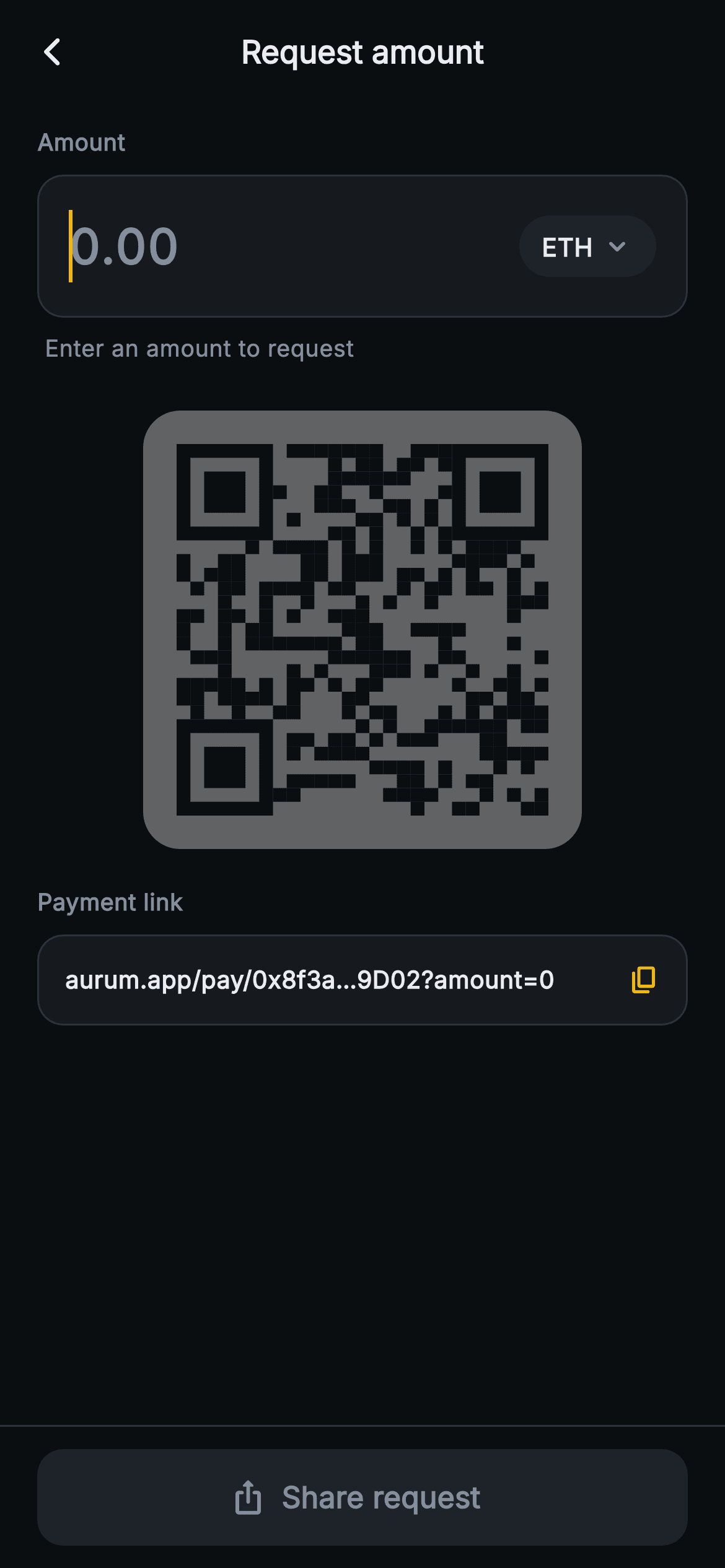
What you'll build
- ✓An autofocused amount TextField with a digits-and-dot FilteringTextInputFormatter, 26px tabular figures and an ETH pill beside it
- ✓Two derived getters, _value and _hasAmount, that feed the USD caption, QR opacity, link text and button state from a single parse
- ✓A caption that swaps between 'Enter an amount to request' and a '~ $… USD' estimate computed from a fixed 2748.10 rate
- ✓A payment-link row whose visible text and clipboard payload both append the current amount, with a copy icon that flips to a check
- ✓A pinned Share request FilledButton.icon whose fill, icon and label all switch off together while the amount is zero
Step-by-step build
Create the file
Add a new file at lib/web3_receive_request/web3_receive_request_screen.dart in your Flutter project.
Register the bundled fonts
No external packages — this is pure Flutter. It does bundle its design font (Inter), so drop the font file into fonts/ and declare it in pubspec.yaml:
flutter:
  fonts:
    - family: Inter
      fonts:
- asset: fonts/Inter-Regular.ttfBuild it, piece by piece
Here's how the screen goes together. Each block below is a real slice of the code with a plain-English explanation — paste them in order, or grab the whole file from the next section.
Two callbacks, a hard-coded rate, and two getters that run the screen
import 'package:flutter/material.dart';
import 'package:flutter/services.dart';

/// Web3 receive — Request Amount. An amount + coin entry that generates a
/// payment-request QR (seeded painter) and a shareable link row. Self-contained
/// per CONVENTIONS.md: pure Flutter, bundled Inter font, QR CustomPaint from a
/// fixed seed (no glyphs / no network image), forced dark theme so it renders
/// standalone as a route.
class Web3ReceiveRequestScreen extends StatefulWidget {
  const Web3ReceiveRequestScreen({super.key, this.onBack, this.onShare});

  final VoidCallback? onBack;
  final VoidCallback? onShare;

  @override
  State<Web3ReceiveRequestScreen> createState() =>
      _Web3ReceiveRequestScreenState();
}

class _Web3ReceiveRequestScreenState extends State<Web3ReceiveRequestScreen> {
  static const String _font = 'Inter';
  static const Color _bg = Color(0xFF0B0E11);
  static const Color _surface = Color(0xFF161A1E);
  static const Color _surfaceAlt = Color(0xFF1E2329);
  static const Color _brand = Color(0xFFF0B90B);
  static const Color _text = Color(0xFFEAECEF);
  static const Color _muted = Color(0xFF848E9C);
  static const Color _hairline = Color(0xFF2B3139);

  static const double _ethUsd = 2748.10;
  static const String _link = 'aurum.app/pay/0x8f3a…9D02?amount=';

  final TextEditingController _amount = TextEditingController();
  bool _copied = false;

  @override
  void dispose() {
    _amount.dispose();
    super.dispose();
  }

  double get _value => double.tryParse(_amount.text.replaceAll(',', '')) ?? 0;
  bool get _hasAmount => _value > 0;
The widget exposes only `onBack` and `onShare`, both plain `VoidCallback`s, and keeps the usual Aurum dark tokens as `static const` fields. Two constants are specific to this screen: `_ethUsd = 2748.10`, a fixed price that stands in for a live feed, and `_link`, the display prefix `aurum.app/pay/0x8f3a…9D02?amount=`. The prefix has the address already shortened with a real ellipsis character, so it is a label for the UI and not a URL you could open. The state holds a `TextEditingController` (disposed correctly) and one `bool _copied`. The important lines are the two getters. `_value` runs `double.tryParse` on the text after removing commas and falls back to `0`, so malformed input such as `1.2.3` simply counts as zero. `_hasAmount` is `_value > 0`, and the caption, QR, link and button all branch on it, so the five pieces of UI can never disagree about whether there is an amount.
Computing the fiat string once per build and framing the page
  @override
  Widget build(BuildContext context) {
    final String fiat = (_value * _ethUsd).toStringAsFixed(2);
    return Theme(
      data: ThemeData.dark(useMaterial3: true),
      child: Scaffold(
        backgroundColor: _bg,
        appBar: AppBar(
          backgroundColor: _bg,
          elevation: 0,
          centerTitle: true,
          leading: IconButton(
            onPressed: widget.onBack,
            icon: const Icon(Icons.arrow_back_ios_new_rounded,
                size: 18, color: _text),
          ),
          title: const Text(
            'Request amount',
            style: TextStyle(
              fontFamily: _font,
              fontSize: 17,
              fontWeight: FontWeight.w700,
              color: _text,
            ),
          ),
        ),
        body: SafeArea(
          top: false,
          child: ListView(
            padding: const EdgeInsets.fromLTRB(20, 12, 20, 24),
            children: <Widget>[
              const Text(
                'Amount',
                style: TextStyle(
                  fontFamily: _font,
                  fontSize: 12.5,
                  fontWeight: FontWeight.w700,
                  color: _muted,
                ),
              ),
              const SizedBox(height: 8),
The first line of `build` is `final String fiat = (_value * _ethUsd).toStringAsFixed(2)`. It runs on every rebuild, even when the field is empty, because it is cheap and it keeps the caption expression further down to a single interpolation. `toStringAsFixed(2)` gives cents precision but no thousands separators, so 10 ETH shows as `27481.00`. If you want grouping, swap in `NumberFormat` from the intl package. The forced dark `Theme` and the flat `_bg` AppBar match the other Aurum routes, and the 17px `w700` title reads 'Request amount'. The body is a `ListView` padded `fromLTRB(20, 12, 20, 24)` under `SafeArea(top: false)`, so when the keyboard rises from the autofocused field the QR and link can scroll instead of overflowing. A 12.5px `w700` muted 'Amount' label starts the form.
The amount field: autofocus, a character filter, and tabular figures
              Container(
                padding: const EdgeInsets.symmetric(horizontal: 16),
                decoration: BoxDecoration(
                  color: _surface,
                  borderRadius: BorderRadius.circular(14),
                  border: Border.all(color: _hairline),
                ),
                child: Row(
                  children: <Widget>[
                    Expanded(
                      child: TextField(
                        controller: _amount,
                        autofocus: true,
                        onChanged: (_) => setState(() {}),
                        keyboardType: const TextInputType.numberWithOptions(
                            decimal: true),
                        inputFormatters: <TextInputFormatter>[
                          FilteringTextInputFormatter.allow(RegExp(r'[0-9.]')),
                        ],
                        style: const TextStyle(
                          fontFamily: _font,
                          fontSize: 26,
                          fontWeight: FontWeight.w800,
                          fontFeatures: <FontFeature>[
                            FontFeature.tabularFigures()
                          ],
                          color: _text,
                        ),
                        cursorColor: _brand,
                        decoration: const InputDecoration(
                          isCollapsed: true,
                          border: InputBorder.none,
                          contentPadding: EdgeInsets.symmetric(vertical: 18),
                          hintText: '0.00',
                          hintStyle: TextStyle(
                            fontFamily: _font,
                            fontSize: 26,
                            fontWeight: FontWeight.w800,
                            color: _muted,
                          ),
                        ),
                      ),
                    ),
                    Container(
                      padding: const EdgeInsets.symmetric(
                          horizontal: 12, vertical: 7),
                      decoration: BoxDecoration(
                        color: _surfaceAlt,
                        borderRadius: BorderRadius.circular(20),
                      ),
                      child: const Row(
                        children: <Widget>[
                          Text(
                            'ETH',
                            style: TextStyle(
                              fontFamily: _font,
                              fontSize: 13.5,
                              fontWeight: FontWeight.w800,
                              color: _text,
                            ),
                          ),
                          SizedBox(width: 4),
                          Icon(Icons.keyboard_arrow_down_rounded,
                              size: 18, color: _muted),
                        ],
                      ),
                    ),
                  ],
                ),
              ),
The input sits in a `_surface` Container with a 14px radius and a hairline border. The `TextField` inside is collapsed (`isCollapsed: true`, `InputBorder.none`, 18px vertical padding), so the Container draws the field and the text controls its height. Four settings shape the entry. `autofocus: true` opens the keypad straight away, because typing a number is the only job here. `TextInputType.numberWithOptions(decimal: true)` requests a keypad that has a decimal key. `FilteringTextInputFormatter.allow(RegExp(r'[0-9.]'))` drops every other character, including pasted text, which makes the comma strip in `_value` defensive rather than necessary. `FontFeature.tabularFigures()` gives every digit the same width, so the 26px `w800` number does not shift sideways as you type. The hint `0.00` uses the same size and weight in `_muted`, so text replaces hint without a jump in size. `onChanged: (_) => setState(() {})` re-runs build on each keystroke. The rounded `_surfaceAlt` 'ETH' pill with a down chevron is purely visual: it has no tap handler and no asset list behind it.
Live USD caption and a QR that waits for a number
              const SizedBox(height: 8),
              Padding(
                padding: const EdgeInsets.only(left: 4),
                child: Text(
                  _hasAmount ? '~ \$$fiat USD' : 'Enter an amount to request',
                  style: const TextStyle(
                    fontFamily: _font,
                    fontSize: 12.5,
                    color: _muted,
                  ),
                ),
              ),
              const SizedBox(height: 24),
              Center(
                child: Opacity(
                  opacity: _hasAmount ? 1 : 0.35,
                  child: Container(
                    padding: const EdgeInsets.all(18),
                    decoration: BoxDecoration(
                      color: Colors.white,
                      borderRadius: BorderRadius.circular(20),
                    ),
                    child: SizedBox(
                      width: 200,
                      height: 200,
                      child: CustomPaint(painter: _QrPainter(seed: 770120)),
                    ),
                  ),
                ),
              ),
The caption below the field is one ternary: `_hasAmount ? '~ \$$fiat USD' : 'Enter an amount to request'`. The escaped `\$` prints a literal dollar sign and `$fiat` interpolates the value, and the leading tilde marks the figure as an estimate. The 4px left inset lines the caption up with the text inside the field. Next is the white QR card: 18px padding, a 20px radius, and a 200×200 `CustomPaint`, wrapped in `Opacity(opacity: _hasAmount ? 1 : 0.35)`. Dimming says the request is not ready yet without removing the card and shifting the layout. Note that this is a hard switch, not a fade, because `Opacity` does not animate. Replace it with `AnimatedOpacity` and a 200ms duration if you want the transition. Also note that the painter's seed is a constant `770120`, so the pattern does not change when the amount does.
The payment-link row and what actually reaches the clipboard
              const SizedBox(height: 20),
              const Text(
                'Payment link',
                style: TextStyle(
                  fontFamily: _font,
                  fontSize: 12.5,
                  fontWeight: FontWeight.w700,
                  color: _muted,
                ),
              ),
              const SizedBox(height: 8),
              Container(
                padding: const EdgeInsets.all(14),
                decoration: BoxDecoration(
                  color: _surface,
                  borderRadius: BorderRadius.circular(14),
                  border: Border.all(color: _hairline),
                ),
                child: Row(
                  children: <Widget>[
                    Expanded(
                      child: Text(
                        '$_link${_hasAmount ? _value.toString() : '0'}',
                        maxLines: 1,
                        overflow: TextOverflow.ellipsis,
                        style: const TextStyle(
                          fontFamily: _font,
                          fontSize: 13,
                          fontWeight: FontWeight.w600,
                          color: _text,
                        ),
                      ),
                    ),
                    const SizedBox(width: 10),
                    GestureDetector(
                      onTap: () {
                        Clipboard.setData(ClipboardData(
                            text:
                                '$_link${_hasAmount ? _value.toString() : '0'}'));
                        setState(() => _copied = true);
                      },
                      behavior: HitTestBehavior.opaque,
                      child: Icon(
                        _copied ? Icons.check_rounded : Icons.copy_rounded,
                        size: 17,
                        color: _brand,
                      ),
                    ),
                  ],
                ),
              ),
The 'Payment link' row repeats the field's surface, radius and border, and shows `'$_link${_hasAmount ? _value.toString() : '0'}'` on a single line with `TextOverflow.ellipsis`. The copy icon's `onTap` builds the same string again, passes it to `Clipboard.setData`, and then sets `_copied = true`, which swaps `copy_rounded` for `check_rounded`. Watch for three behaviours. First, the amount comes from `double.toString()`, not from the typed text, so `5` appears as `5.0` and `0.0000001` appears as `1e-7`. Second, copying is not gated the way sharing is, so with an empty field it copies `amount=0`. Third, `_copied` never resets, so if you copy and then change the amount, the check stays visible while the clipboard still holds the old figure. Setting `_copied = false` inside `onChanged` fixes the third point with one line.
Share request, disabled by a single condition
        bottomNavigationBar: Container(
          decoration: const BoxDecoration(
            color: _bg,
            border: Border(top: BorderSide(color: _hairline)),
          ),
          child: SafeArea(
            top: false,
            child: Padding(
              padding: const EdgeInsets.fromLTRB(20, 12, 20, 12),
              child: SizedBox(
                width: double.infinity,
                height: 52,
                child: FilledButton.icon(
                  onPressed: _hasAmount ? widget.onShare : null,
                  style: FilledButton.styleFrom(
                    backgroundColor: _brand,
                    disabledBackgroundColor: _surfaceAlt,
                    shape: RoundedRectangleBorder(
                      borderRadius: BorderRadius.circular(14),
                    ),
                  ),
                  icon: Icon(Icons.ios_share_rounded,
                      size: 20, color: _hasAmount ? _bg : _muted),
                  label: Text(
                    'Share request',
                    style: TextStyle(
                      fontFamily: _font,
                      fontSize: 16,
                      fontWeight: FontWeight.w700,
                      color: _hasAmount ? _bg : _muted,
                    ),
                  ),
                ),
              ),
            ),
          ),
        ),
The pinned bar is a `_bg` Container with a top hairline wrapped around `SafeArea(top: false)`, so its fill extends under the home indicator while the 52px button sits above it. The button is a `FilledButton.icon` with a 14px radius, the same corner as the field and the link row. `onPressed: _hasAmount ? widget.onShare : null` disables it, and two more uses of the same condition keep its appearance in step: the `ios_share_rounded` icon and the 16px `w700` 'Share request' label are near-black `_bg` on the amber fill when enabled and `_muted` when disabled, over `disabledBackgroundColor: _surfaceAlt`. If the label stayed fixed at `_bg`, it would disappear against the dark disabled fill. This button is the only gated action on the screen. Asking for nothing is never a valid request, so the screen withholds Share until it would send a real figure.
The painter, and the two numbers that differ from Receive
/// Deterministic QR-style matrix from a fixed seed (LCG, no Math.random).
class _QrPainter extends CustomPainter {
  const _QrPainter({required this.seed});

  final int seed;

  static const int _n = 27;

  @override
  void paint(Canvas canvas, Size size) {
    final double cell = size.width / _n;
    final Paint dark = Paint()..color = const Color(0xFF0B0E11);

    int state = seed & 0x7fffffff;
    int next() {
      state = (state * 1103515245 + 12345) & 0x7fffffff;
      return state;
    }

    bool inFinder(int r, int c) {
      bool block(int r0, int c0) =>
          r >= r0 && r < r0 + 7 && c >= c0 && c < c0 + 7;
      return block(0, 0) || block(0, _n - 7) || block(_n - 7, 0);
    }

    for (int r = 0; r < _n; r++) {
      for (int c = 0; c < _n; c++) {
        if (inFinder(r, c)) continue;
        if (next() % 100 < 48) {
          canvas.drawRect(
            Rect.fromLTWH(c * cell, r * cell, cell, cell),
            dark,
          );
        }
      }
    }

    void finder(int r0, int c0) {
      canvas.drawRect(
        Rect.fromLTWH(c0 * cell, r0 * cell, 7 * cell, 7 * cell),
        dark,
      );
      canvas.drawRect(
        Rect.fromLTWH((c0 + 1) * cell, (r0 + 1) * cell, 5 * cell, 5 * cell),
        Paint()..color = Colors.white,
      );
      canvas.drawRect(
        Rect.fromLTWH((c0 + 2) * cell, (r0 + 2) * cell, 3 * cell, 3 * cell),
        dark,
      );
    }

    finder(0, 0);
    finder(0, _n - 7);
    finder(_n - 7, 0);
  }

  @override
  bool shouldRepaint(_QrPainter oldDelegate) => oldDelegate.seed != seed;
}
`_QrPainter` uses the same seeded-LCG and finder-square approach as the Aurum Receive QR screen, so the differences are what matter here. The grid is `_n = 27` instead of 29, and the canvas is 200px instead of 220, which gives a cell of about 7.4px (`size.width / _n`). The smaller code leaves more vertical room for the amount field above it and the link row below. The seed is `770120`, so this pattern is visibly different from the plain receive code, and the three `finder(...)` calls still cover top-left, top-right and bottom-left. The painter takes only `seed`. It has no idea what amount was entered, so a sender scanning it would get nothing, because the matrix encodes no data. `shouldRepaint` compares seeds and returns false on every keystroke, which keeps typing cheap: the `Opacity` above it changes, the canvas does not.
Full code
The complete, ready-to-paste source. Free to use in your projects — one click copies it all.
import 'package:flutter/material.dart';
import 'package:flutter/services.dart';

/// Web3 receive — Request Amount. An amount + coin entry that generates a
/// payment-request QR (seeded painter) and a shareable link row. Self-contained
/// per CONVENTIONS.md: pure Flutter, bundled Inter font, QR CustomPaint from a
/// fixed seed (no glyphs / no network image), forced dark theme so it renders
/// standalone as a route.
class Web3ReceiveRequestScreen extends StatefulWidget {
  const Web3ReceiveRequestScreen({super.key, this.onBack, this.onShare});

  final VoidCallback? onBack;
  final VoidCallback? onShare;

  @override
  State<Web3ReceiveRequestScreen> createState() =>
      _Web3ReceiveRequestScreenState();
}

class _Web3ReceiveRequestScreenState extends State<Web3ReceiveRequestScreen> {
  static const String _font = 'Inter';
  static const Color _bg = Color(0xFF0B0E11);
  static const Color _surface = Color(0xFF161A1E);
  static const Color _surfaceAlt = Color(0xFF1E2329);
  static const Color _brand = Color(0xFFF0B90B);
  static const Color _text = Color(0xFFEAECEF);
  static const Color _muted = Color(0xFF848E9C);
  static const Color _hairline = Color(0xFF2B3139);

  static const double _ethUsd = 2748.10;
  static const String _link = 'aurum.app/pay/0x8f3a…9D02?amount=';

  final TextEditingController _amount = TextEditingController();
  bool _copied = false;

  @override
  void dispose() {
    _amount.dispose();
    super.dispose();
  }

  double get _value => double.tryParse(_amount.text.replaceAll(',', '')) ?? 0;
  bool get _hasAmount => _value > 0;

  @override
  Widget build(BuildContext context) {
    final String fiat = (_value * _ethUsd).toStringAsFixed(2);
    return Theme(
      data: ThemeData.dark(useMaterial3: true),
      child: Scaffold(
        backgroundColor: _bg,
        appBar: AppBar(
          backgroundColor: _bg,
          elevation: 0,
          centerTitle: true,
          leading: IconButton(
            onPressed: widget.onBack,
            icon: const Icon(Icons.arrow_back_ios_new_rounded,
                size: 18, color: _text),
          ),
          title: const Text(
            'Request amount',
            style: TextStyle(
              fontFamily: _font,
              fontSize: 17,
              fontWeight: FontWeight.w700,
              color: _text,
            ),
          ),
        ),
        body: SafeArea(
          top: false,
          child: ListView(
            padding: const EdgeInsets.fromLTRB(20, 12, 20, 24),
            children: <Widget>[
              const Text(
                'Amount',
                style: TextStyle(
                  fontFamily: _font,
                  fontSize: 12.5,
                  fontWeight: FontWeight.w700,
                  color: _muted,
                ),
              ),
              const SizedBox(height: 8),
              Container(
                padding: const EdgeInsets.symmetric(horizontal: 16),
                decoration: BoxDecoration(
                  color: _surface,
                  borderRadius: BorderRadius.circular(14),
                  border: Border.all(color: _hairline),
                ),
                child: Row(
                  children: <Widget>[
                    Expanded(
                      child: TextField(
                        controller: _amount,
                        autofocus: true,
                        onChanged: (_) => setState(() {}),
                        keyboardType: const TextInputType.numberWithOptions(
                            decimal: true),
                        inputFormatters: <TextInputFormatter>[
                          FilteringTextInputFormatter.allow(RegExp(r'[0-9.]')),
                        ],
                        style: const TextStyle(
                          fontFamily: _font,
                          fontSize: 26,
                          fontWeight: FontWeight.w800,
                          fontFeatures: <FontFeature>[
                            FontFeature.tabularFigures()
                          ],
                          color: _text,
                        ),
                        cursorColor: _brand,
                        decoration: const InputDecoration(
                          isCollapsed: true,
                          border: InputBorder.none,
                          contentPadding: EdgeInsets.symmetric(vertical: 18),
                          hintText: '0.00',
                          hintStyle: TextStyle(
                            fontFamily: _font,
                            fontSize: 26,
                            fontWeight: FontWeight.w800,
                            color: _muted,
                          ),
                        ),
                      ),
                    ),
                    Container(
                      padding: const EdgeInsets.symmetric(
                          horizontal: 12, vertical: 7),
                      decoration: BoxDecoration(
                        color: _surfaceAlt,
                        borderRadius: BorderRadius.circular(20),
                      ),
                      child: const Row(
                        children: <Widget>[
                          Text(
                            'ETH',
                            style: TextStyle(
                              fontFamily: _font,
                              fontSize: 13.5,
                              fontWeight: FontWeight.w800,
                              color: _text,
                            ),
                          ),
                          SizedBox(width: 4),
                          Icon(Icons.keyboard_arrow_down_rounded,
                              size: 18, color: _muted),
                        ],
                      ),
                    ),
                  ],
                ),
              ),
              const SizedBox(height: 8),
              Padding(
                padding: const EdgeInsets.only(left: 4),
                child: Text(
                  _hasAmount ? '~ \$$fiat USD' : 'Enter an amount to request',
                  style: const TextStyle(
                    fontFamily: _font,
                    fontSize: 12.5,
                    color: _muted,
                  ),
                ),
              ),
              const SizedBox(height: 24),
              Center(
                child: Opacity(
                  opacity: _hasAmount ? 1 : 0.35,
                  child: Container(
                    padding: const EdgeInsets.all(18),
                    decoration: BoxDecoration(
                      color: Colors.white,
                      borderRadius: BorderRadius.circular(20),
                    ),
                    child: SizedBox(
                      width: 200,
                      height: 200,
                      child: CustomPaint(painter: _QrPainter(seed: 770120)),
                    ),
                  ),
                ),
              ),
              const SizedBox(height: 20),
              const Text(
                'Payment link',
                style: TextStyle(
                  fontFamily: _font,
                  fontSize: 12.5,
                  fontWeight: FontWeight.w700,
                  color: _muted,
                ),
              ),
              const SizedBox(height: 8),
              Container(
                padding: const EdgeInsets.all(14),
                decoration: BoxDecoration(
                  color: _surface,
                  borderRadius: BorderRadius.circular(14),
                  border: Border.all(color: _hairline),
                ),
                child: Row(
                  children: <Widget>[
                    Expanded(
                      child: Text(
                        '$_link${_hasAmount ? _value.toString() : '0'}',
                        maxLines: 1,
                        overflow: TextOverflow.ellipsis,
                        style: const TextStyle(
                          fontFamily: _font,
                          fontSize: 13,
                          fontWeight: FontWeight.w600,
                          color: _text,
                        ),
                      ),
                    ),
                    const SizedBox(width: 10),
                    GestureDetector(
                      onTap: () {
                        Clipboard.setData(ClipboardData(
                            text:
                                '$_link${_hasAmount ? _value.toString() : '0'}'));
                        setState(() => _copied = true);
                      },
                      behavior: HitTestBehavior.opaque,
                      child: Icon(
                        _copied ? Icons.check_rounded : Icons.copy_rounded,
                        size: 17,
                        color: _brand,
                      ),
                    ),
                  ],
                ),
              ),
            ],
          ),
        ),
        bottomNavigationBar: Container(
          decoration: const BoxDecoration(
            color: _bg,
            border: Border(top: BorderSide(color: _hairline)),
          ),
          child: SafeArea(
            top: false,
            child: Padding(
              padding: const EdgeInsets.fromLTRB(20, 12, 20, 12),
              child: SizedBox(
                width: double.infinity,
                height: 52,
                child: FilledButton.icon(
                  onPressed: _hasAmount ? widget.onShare : null,
                  style: FilledButton.styleFrom(
                    backgroundColor: _brand,
                    disabledBackgroundColor: _surfaceAlt,
                    shape: RoundedRectangleBorder(
                      borderRadius: BorderRadius.circular(14),
                    ),
                  ),
                  icon: Icon(Icons.ios_share_rounded,
                      size: 20, color: _hasAmount ? _bg : _muted),
                  label: Text(
                    'Share request',
                    style: TextStyle(
                      fontFamily: _font,
                      fontSize: 16,
                      fontWeight: FontWeight.w700,
                      color: _hasAmount ? _bg : _muted,
                    ),
                  ),
                ),
              ),
            ),
          ),
        ),
      ),
    );
  }
}

/// Deterministic QR-style matrix from a fixed seed (LCG, no Math.random).
class _QrPainter extends CustomPainter {
  const _QrPainter({required this.seed});

  final int seed;

  static const int _n = 27;

  @override
  void paint(Canvas canvas, Size size) {
    final double cell = size.width / _n;
    final Paint dark = Paint()..color = const Color(0xFF0B0E11);

    int state = seed & 0x7fffffff;
    int next() {
      state = (state * 1103515245 + 12345) & 0x7fffffff;
      return state;
    }

    bool inFinder(int r, int c) {
      bool block(int r0, int c0) =>
          r >= r0 && r < r0 + 7 && c >= c0 && c < c0 + 7;
      return block(0, 0) || block(0, _n - 7) || block(_n - 7, 0);
    }

    for (int r = 0; r < _n; r++) {
      for (int c = 0; c < _n; c++) {
        if (inFinder(r, c)) continue;
        if (next() % 100 < 48) {
          canvas.drawRect(
            Rect.fromLTWH(c * cell, r * cell, cell, cell),
            dark,
          );
        }
      }
    }

    void finder(int r0, int c0) {
      canvas.drawRect(
        Rect.fromLTWH(c0 * cell, r0 * cell, 7 * cell, 7 * cell),
        dark,
      );
      canvas.drawRect(
        Rect.fromLTWH((c0 + 1) * cell, (r0 + 1) * cell, 5 * cell, 5 * cell),
        Paint()..color = Colors.white,
      );
      canvas.drawRect(
        Rect.fromLTWH((c0 + 2) * cell, (r0 + 2) * cell, 3 * cell, 3 * cell),
        dark,
      );
    }

    finder(0, 0);
    finder(0, _n - 7);
    finder(_n - 7, 0);
  }

  @override
  bool shouldRepaint(_QrPainter oldDelegate) => oldDelegate.seed != seed;
}
Plus bundled 1 binary asset (fonts/images). The CLI and MCP install those for you automatically.
Two faster ways to add it
Copy-paste works, but you can skip it entirely.
1. FlutterKit CLI
One command drops this screen — and its fonts — straight into your project.
$ flutterkit add web3-receive-request2. AI agent (MCP)
Connect FlutterKit's MCP server in Claude or Cursor and just ask your agent to install web3-receive-request — it fetches and writes the files for you.
FAQ
Can I ship this request-amount screen in a commercial wallet?
Yes. It is free to use, including in commercial products. Copy the file from this page or add it with `flutterkit add web3-receive-request`. You don't need a licence key, and you don't need to credit anyone.
Does the QR code contain the requested amount?
No. The painter draws a fixed 27×27 pattern from seed `770120`, and the amount only changes its opacity. The link text is not a working URL either, because the address in `_link` contains a literal ellipsis. For a real request, keep the full address in a field and encode an EIP-681 URI such as `ethereum:<address>?value=<amount in wei>` with a package like qr_flutter, using `QrImageView` inside the same white 200×200 card. Build the amount from the typed string or a decimal type rather than `double.toString()`, so tiny values don't become `1e-7`.
How does my app get the amount when Share request is tapped?
As written, it doesn't. `onShare` is a `VoidCallback`, so the host receives no arguments. Change the field to `final ValueChanged<String>? onShare;` and call `widget.onShare?.call('$_link$_value')` in a closure, only when `_hasAmount` is true. Then pass that string to a share sheet, for example with share_plus. With that change, the copy row and the button send the same payload.
Which packages and fonts does it depend on?
It uses no third-party packages, only Flutter's `material.dart` and `services.dart`. The second import supplies `Clipboard`, `TextInputFormatter` and `FilteringTextInputFormatter`. `FontFeature.tabularFigures()` comes from `dart:ui` through the material import. The Inter font is bundled at `lib/web3_receive_request/fonts/Inter.ttf` and selected with `fontFamily: 'Inter'`, so it works offline without google_fonts.
What Flutter version do I need?
Flutter 3.7 or newer, because that release added `FilledButton.icon`. Unlike most of the Aurum screens, this file never calls `Color.withValues`, so there is nothing to change to `withOpacity`. On an older SDK, replace the button with `ElevatedButton.icon` using the same style values, and expand the `super.key` constructor to `{Key? key, this.onBack, this.onShare} : super(key: key)`.


