How to Build a Crypto Receive QR Screen in Flutter (Full Code + Preview)
Every wallet needs a receive screen, and the failure mode is well known: someone sends tokens on the wrong network to a copied address and the funds are gone. This tutorial builds Aurum's Receive screen in Flutter — a QR drawn entirely by a CustomPainter on a white card, the full Ethereum address in a bordered panel with a copy chip that flips to 'Copied', Set amount and Share actions, and an amber warning that names the risk. No packages, no image assets: one Dart file you can drop into any wallet project.
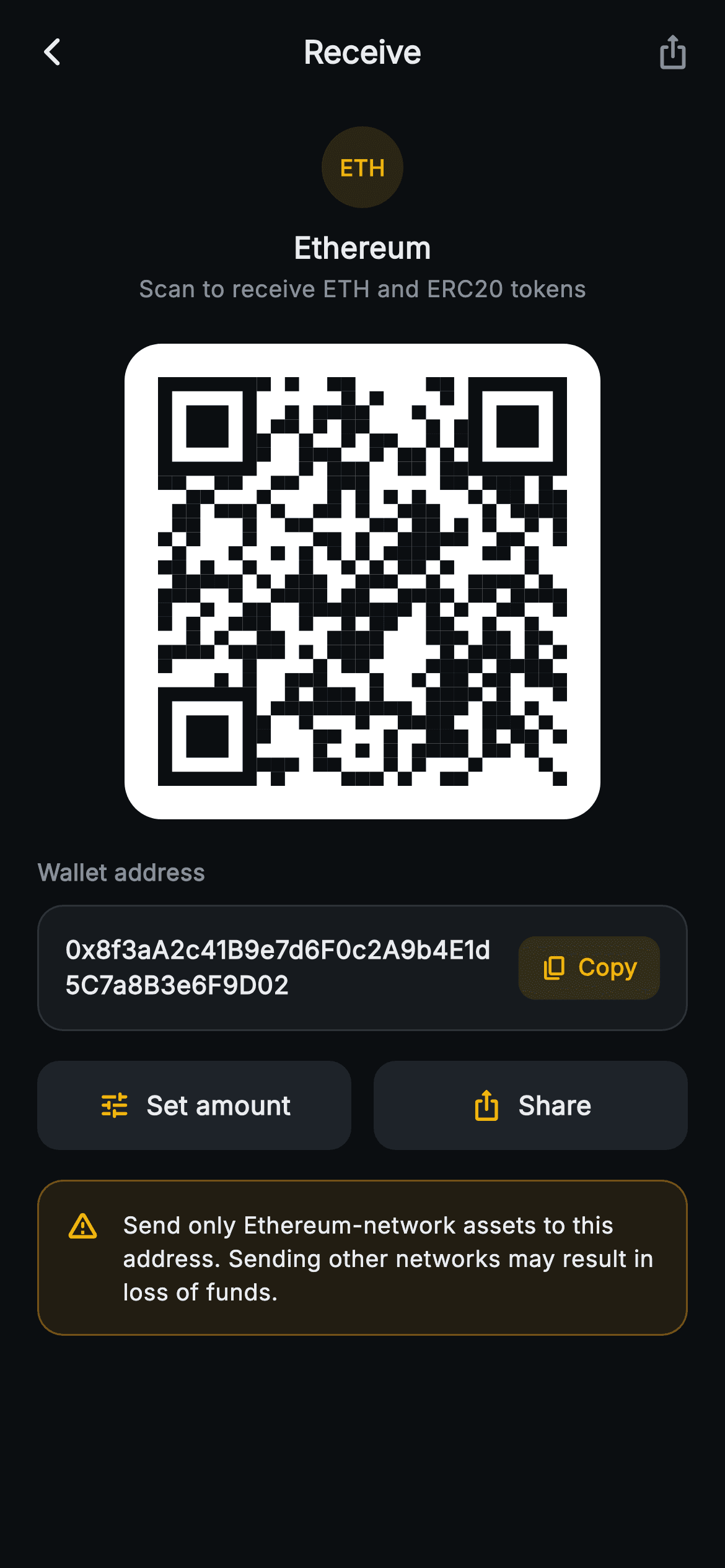
What you'll build
- ✓A 29×29 QR-style matrix painted by a CustomPainter — seeded LCG modules plus three hand-drawn finder squares, no image file and no package
- ✓A wallet-address panel showing the full 0x address across two lines, with a copy chip that swaps its icon and label to a check + 'Copied' via Clipboard.setData
- ✓An ETH token badge and header block above a white QR card on a forced-dark #0B0E11 theme
- ✓A reusable _ActionButton tile used twice for Set amount and Share, driven by optional callbacks
- ✓An amber wrong-network warning card that states the actual consequence — loss of funds
Step-by-step build
Create the file
Add a new file at lib/web3_receive_qr/web3_receive_qr_screen.dart in your Flutter project.
Register the bundled fonts
No external packages — this is pure Flutter. It does bundle its design font (Inter), so drop the font file into fonts/ and declare it in pubspec.yaml:
flutter:
  fonts:
    - family: Inter
      fonts:
- asset: fonts/Inter-Regular.ttfBuild it, piece by piece
Here's how the screen goes together. Each block below is a real slice of the code with a plain-English explanation — paste them in order, or grab the whole file from the next section.
Callbacks, a nine-colour dark palette, and one bit of state
import 'package:flutter/material.dart';
import 'package:flutter/services.dart';

/// Web3 receive — Receive. A large painted (deterministic, seeded) QR for the
/// wallet address, an address chip with copy, and share / set-amount actions.
/// Self-contained per CONVENTIONS.md: pure Flutter, bundled Inter font, QR
/// CustomPaint generated from a fixed seed (no glyphs / no network image),
/// forced dark theme so it renders standalone as a route.
class Web3ReceiveQrScreen extends StatefulWidget {
  const Web3ReceiveQrScreen({
    super.key,
    this.onBack,
    this.onShare,
    this.onSetAmount,
  });

  final VoidCallback? onBack;
  final VoidCallback? onShare;
  final VoidCallback? onSetAmount;

  @override
  State<Web3ReceiveQrScreen> createState() => _Web3ReceiveQrScreenState();
}

class _Web3ReceiveQrScreenState extends State<Web3ReceiveQrScreen> {
  static const String _font = 'Inter';
  static const Color _bg = Color(0xFF0B0E11);
  static const Color _surface = Color(0xFF161A1E);
  static const Color _surfaceAlt = Color(0xFF1E2329);
  static const Color _brand = Color(0xFFF0B90B);
  static const Color _warn = Color(0xFFF0A020);
  static const Color _text = Color(0xFFEAECEF);
  static const Color _muted = Color(0xFF848E9C);
  static const Color _hairline = Color(0xFF2B3139);

  static const String _address =
      '0x8f3aA2c41B9e7d6F0c2A9b4E1d5C7a8B3e6F9D02';

  bool _copied = false;
The second import, `flutter/services.dart`, is there for one call — `Clipboard.setData` later on. `Web3ReceiveQrScreen` is a `StatefulWidget` with three nullable `VoidCallback`s (`onBack`, `onShare`, `onSetAmount`), so it previews standalone and wires into a router when you're ready. The palette is Binance-flavoured: near-black `#0B0E11` background, `#161A1E` surface and `#1E2329` raised surface, brand amber `#F0B90B`, and a deliberately separate `_warn` orange `#F0A020` — the amber means tappable everywhere on this screen, so the alert gets its own hue rather than borrowing the action colour. The demo address is a `static const` 42-character 0x string at the top of the class, one edit away from your real one, and the only mutable state on the whole screen is `bool _copied`.
Forcing dark mode and framing the route
  @override
  Widget build(BuildContext context) {
    return Theme(
      data: ThemeData.dark(useMaterial3: true),
      child: Scaffold(
        backgroundColor: _bg,
        appBar: AppBar(
          backgroundColor: _bg,
          elevation: 0,
          centerTitle: true,
          leading: IconButton(
            onPressed: widget.onBack,
            icon: const Icon(Icons.arrow_back_ios_new_rounded,
                size: 18, color: _text),
          ),
          title: const Text(
            'Receive',
            style: TextStyle(
              fontFamily: _font,
              fontSize: 17,
              fontWeight: FontWeight.w700,
              color: _text,
            ),
          ),
          actions: <Widget>[
            IconButton(
              onPressed: widget.onShare,
              icon: const Icon(Icons.ios_share_rounded, size: 20, color: _muted),
            ),
            const SizedBox(width: 4),
          ],
        ),
        body: SafeArea(
          top: false,
          child: ListView(
            padding: const EdgeInsets.fromLTRB(20, 12, 20, 24),
`build` wraps everything in `Theme(data: ThemeData.dark(useMaterial3: true))`, so the screen stays dark even inside a light-themed host app — it is designed to render correctly as a standalone route. The `AppBar` paints itself in the same `_bg` as the scaffold with `elevation: 0`, which makes it read as the top of the page rather than a bar sitting on it: an 18px back chevron in `_text`, a centred 17px `w700` 'Receive' title, and an `ios_share` action in `_muted` — muted because the primary Share button lives in the body and the bar copy of it is a convenience. The body is `SafeArea(top: false)` (the AppBar already owns the notch) around a `ListView` padded `fromLTRB(20, 12, 20, 24)`, so nothing clips on a short phone.
The ETH badge and the white QR card
            children: <Widget>[
              Center(
                child: Column(
                  children: <Widget>[
                    Container(
                      width: 44,
                      height: 44,
                      decoration: BoxDecoration(
                        color: _brand.withValues(alpha: 0.14),
                        shape: BoxShape.circle,
                      ),
                      alignment: Alignment.center,
                      child: const Text(
                        'ETH',
                        style: TextStyle(
                          fontFamily: _font,
                          fontSize: 12,
                          fontWeight: FontWeight.w800,
                          color: _brand,
                        ),
                      ),
                    ),
                    const SizedBox(height: 10),
                    const Text(
                      'Ethereum',
                      style: TextStyle(
                        fontFamily: _font,
                        fontSize: 16,
                        fontWeight: FontWeight.w700,
                        color: _text,
                      ),
                    ),
                    const SizedBox(height: 2),
                    const Text(
                      'Scan to receive ETH and ERC20 tokens',
                      style: TextStyle(
                        fontFamily: _font,
                        fontSize: 12.5,
                        color: _muted,
                      ),
                    ),
                  ],
                ),
              ),
              const SizedBox(height: 20),
              Center(
                child: Container(
                  padding: const EdgeInsets.all(18),
                  decoration: BoxDecoration(
                    color: Colors.white,
                    borderRadius: BorderRadius.circular(20),
                  ),
                  child: SizedBox(
                    width: 220,
                    height: 220,
                    child: CustomPaint(painter: _QrPainter(seed: 20260628)),
                  ),
                ),
              ),
The header identifies the chain before the reader scans anything: a 44px circle filled with `_brand.withValues(alpha: 0.14)` holding 'ETH' at 12px `w800` in full amber — a token badge with zero logo assets — then 'Ethereum' at 16px `w700` and the 12.5px muted line 'Scan to receive ETH and ERC20 tokens'. The QR sits in a white `Container` with `borderRadius: 20` and 18px padding around a fixed 220×220 `SizedBox` hosting `CustomPaint(painter: _QrPainter(seed: 20260628))`. Two details matter here: the white card doubles as the quiet zone a scanner-style code needs against a dark app, and the fixed 220px width divides into the painter's 29 modules at ~7.6px per cell, so edges land crisply. The seed is a date-like constant — the pattern never changes between builds.
The full address and the Copy → Copied chip
              const SizedBox(height: 20),
              const Text(
                'Wallet address',
                style: TextStyle(
                  fontFamily: _font,
                  fontSize: 12.5,
                  fontWeight: FontWeight.w700,
                  color: _muted,
                ),
              ),
              const SizedBox(height: 8),
              Container(
                padding: const EdgeInsets.all(14),
                decoration: BoxDecoration(
                  color: _surface,
                  borderRadius: BorderRadius.circular(14),
                  border: Border.all(color: _hairline),
                ),
                child: Row(
                  children: <Widget>[
                    const Expanded(
                      child: Text(
                        _address,
                        style: TextStyle(
                          fontFamily: _font,
                          fontSize: 13.5,
                          fontWeight: FontWeight.w600,
                          height: 1.4,
                          color: _text,
                        ),
                      ),
                    ),
                    const SizedBox(width: 12),
                    GestureDetector(
                      onTap: () {
                        Clipboard.setData(
                            const ClipboardData(text: _address));
                        setState(() => _copied = true);
                      },
                      behavior: HitTestBehavior.opaque,
                      child: Container(
                        padding: const EdgeInsets.symmetric(
                            horizontal: 12, vertical: 8),
                        decoration: BoxDecoration(
                          color: _brand.withValues(alpha: 0.14),
                          borderRadius: BorderRadius.circular(9),
                        ),
                        child: Row(
                          children: <Widget>[
                            Icon(
                              _copied
                                  ? Icons.check_rounded
                                  : Icons.copy_rounded,
                              size: 15,
                              color: _brand,
                            ),
                            const SizedBox(width: 5),
                            Text(
                              _copied ? 'Copied' : 'Copy',
                              style: const TextStyle(
                                fontFamily: _font,
                                fontSize: 12.5,
                                fontWeight: FontWeight.w700,
                                color: _brand,
                              ),
                            ),
                          ],
                        ),
                      ),
                    ),
                  ],
                ),
              ),
Under a muted 'Wallet address' caption, a `_surface` panel with a `_hairline` border holds the address in an `Expanded` `Text` at 13.5px `w600`, `height: 1.4` — the full 42 characters, wrapping onto a second line rather than truncating to 0x8f3a…9D02. On a receive screen that is the right call: this is where a user verifies what actually landed on their clipboard. The chip beside it is a `GestureDetector` with `behavior: HitTestBehavior.opaque`, so the whole pill is tappable, not just its glyphs. Its `onTap` does two things in order: `Clipboard.setData(const ClipboardData(text: _address))`, then `setState(() => _copied = true)`. Both the icon and the label are ternaries on `_copied` — `copy_rounded` becomes `check_rounded`, 'Copy' becomes 'Copied' — and the pill reuses the exact tint recipe of the ETH badge, `_brand.withValues(alpha: 0.14)` behind full-amber content.
Two equal actions and the wrong-network warning
              const SizedBox(height: 16),
              Row(
                children: <Widget>[
                  Expanded(
                    child: _ActionButton(
                      icon: Icons.tune_rounded,
                      label: 'Set amount',
                      onTap: widget.onSetAmount,
                    ),
                  ),
                  const SizedBox(width: 12),
                  Expanded(
                    child: _ActionButton(
                      icon: Icons.ios_share_rounded,
                      label: 'Share',
                      onTap: widget.onShare,
                    ),
                  ),
                ],
              ),
              const SizedBox(height: 16),
              Container(
                padding: const EdgeInsets.all(14),
                decoration: BoxDecoration(
                  color: _warn.withValues(alpha: 0.10),
                  borderRadius: BorderRadius.circular(14),
                  border: Border.all(color: _warn.withValues(alpha: 0.4)),
                ),
                child: const Row(
                  crossAxisAlignment: CrossAxisAlignment.start,
                  children: <Widget>[
                    Icon(Icons.warning_amber_rounded, size: 19, color: _warn),
                    SizedBox(width: 12),
                    Expanded(
                      child: Text(
                        'Send only Ethereum-network assets to this address. '
                        'Sending other networks may result in loss of funds.',
                        style: TextStyle(
                          fontFamily: _font,
                          fontSize: 12.5,
                          height: 1.45,
                          fontWeight: FontWeight.w500,
                          color: _text,
                        ),
                      ),
                    ),
                  ],
                ),
              ),
            ],
          ),
        ),
      ),
    );
  }
'Set amount' and 'Share' are two `Expanded` `_ActionButton`s split by a 12px gap — equals, unlike a checkout's ranked buttons, because neither is the obvious next step on a receive screen. Share is wired to the same `widget.onShare` as the AppBar icon, so both entry points reach one handler. The warning card below is one colour at two alphas: `_warn.withValues(alpha: 0.10)` fill inside a `withValues(alpha: 0.4)` border of the same orange, which keeps fill and edge cohesive without a second hue. `crossAxisAlignment: CrossAxisAlignment.start` pins the 19px `warning_amber_rounded` icon to the first line of the wrapping text, and the copy says the quiet part out loud — 'may result in loss of funds' — instead of a vague 'be careful'. The whole Row is `const`; nothing in it ever changes.
_ActionButton — one tile, defined once
class _ActionButton extends StatelessWidget {
  const _ActionButton({required this.icon, required this.label, this.onTap});

  final IconData icon;
  final String label;
  final VoidCallback? onTap;

  @override
  Widget build(BuildContext context) {
    return GestureDetector(
      onTap: onTap,
      behavior: HitTestBehavior.opaque,
      child: Container(
        padding: const EdgeInsets.symmetric(vertical: 14),
        decoration: BoxDecoration(
          color: _Web3ReceiveQrScreenState._surfaceAlt,
          borderRadius: BorderRadius.circular(12),
        ),
        child: Row(
          mainAxisAlignment: MainAxisAlignment.center,
          children: <Widget>[
            Icon(icon, size: 18, color: _Web3ReceiveQrScreenState._brand),
            const SizedBox(width: 8),
            Text(
              label,
              style: const TextStyle(
                fontFamily: _Web3ReceiveQrScreenState._font,
                fontSize: 14,
                fontWeight: FontWeight.w700,
                color: _Web3ReceiveQrScreenState._text,
              ),
            ),
          ],
        ),
      ),
    );
  }
}
`_ActionButton` is a private `StatelessWidget` taking an `IconData`, a `label`, and a nullable `onTap`, so the two body actions can never drift apart in padding or type style. It is deliberately not a `FilledButton`: the design wants a flat `#1E2329` tile with a 12px radius and no Material splash or elevation, so it's a `GestureDetector` (again `HitTestBehavior.opaque`) around a `Container` with 14px vertical padding. The centred Row pairs an 18px icon in brand amber with a 14px `w700` label in `_text`. Note how it reads its colours — `_Web3ReceiveQrScreenState._surfaceAlt`, `._brand`, `._font` — reaching into the state class's static consts, which keeps the entire screen's design tokens in one place while staying a single self-contained file.
Painting the module grid with a seeded LCG
/// Deterministic QR-style matrix from a fixed seed (LCG, no Math.random).
class _QrPainter extends CustomPainter {
  const _QrPainter({required this.seed});

  final int seed;

  static const int _n = 29; // module grid size

  @override
  void paint(Canvas canvas, Size size) {
    final double cell = size.width / _n;
    final Paint dark = Paint()..color = const Color(0xFF0B0E11);

    int state = seed & 0x7fffffff;
    int next() {
      state = (state * 1103515245 + 12345) & 0x7fffffff;
      return state;
    }

    bool inFinder(int r, int c) {
      bool block(int r0, int c0) =>
          r >= r0 && r < r0 + 7 && c >= c0 && c < c0 + 7;
      return block(0, 0) || block(0, _n - 7) || block(_n - 7, 0);
    }

    for (int r = 0; r < _n; r++) {
      for (int c = 0; c < _n; c++) {
        if (inFinder(r, c)) continue;
        if (next() % 100 < 48) {
          canvas.drawRect(
            Rect.fromLTWH(c * cell, r * cell, cell, cell),
            dark,
          );
        }
      }
    }
`_QrPainter` builds a 29×29 grid (`_n = 29`), with `cell = size.width / _n` so the painter scales to whatever box it's given. Instead of importing `dart:math`, it defines a local `next()` closure implementing a linear congruential generator with the classic glibc constants — `state * 1103515245 + 12345`, masked to 31 bits with `& 0x7fffffff`. Seeded with the same number every time, it emits the same sequence every time: the pattern is deterministic, not random, which is why the code renders identically offline, in tests, and in screenshots. `inFinder` masks out three 7×7 corner blocks before drawing. The double loop then fills each remaining cell with 48% probability (`next() % 100 < 48`) — close to the roughly half-dark density of a real QR — using `#0B0E11` ink, the same near-black as the app background.
Finder squares and the repaint contract
    void finder(int r0, int c0) {
      canvas.drawRect(
        Rect.fromLTWH(c0 * cell, r0 * cell, 7 * cell, 7 * cell),
        dark,
      );
      canvas.drawRect(
        Rect.fromLTWH((c0 + 1) * cell, (r0 + 1) * cell, 5 * cell, 5 * cell),
        Paint()..color = Colors.white,
      );
      canvas.drawRect(
        Rect.fromLTWH((c0 + 2) * cell, (r0 + 2) * cell, 3 * cell, 3 * cell),
        dark,
      );
    }

    finder(0, 0);
    finder(0, _n - 7);
    finder(_n - 7, 0);
  }

  @override
  bool shouldRepaint(_QrPainter oldDelegate) => oldDelegate.seed != seed;
}
The `finder` closure draws the concentric target every real QR carries in its corners: a 7×7 dark square, a 5×5 white square inset one cell, and a 3×3 dark core — three plain `drawRect` calls, no strokes to reason about. It's called for top-left `(0, 0)`, top-right `(0, _n - 7)` and bottom-left `(_n - 7, 0)`, and pointedly not bottom-right, matching the actual QR spec — that asymmetry is what makes the pattern read as a genuine code at a glance. Because `inFinder` already skipped these cells in the data loop, the squares land on clean white. `shouldRepaint` compares seeds, so the canvas only redraws if you hand it a different seed — effectively never for a const painter.
Full code
The complete, ready-to-paste source. Free to use in your projects — one click copies it all.
import 'package:flutter/material.dart';
import 'package:flutter/services.dart';

/// Web3 receive — Receive. A large painted (deterministic, seeded) QR for the
/// wallet address, an address chip with copy, and share / set-amount actions.
/// Self-contained per CONVENTIONS.md: pure Flutter, bundled Inter font, QR
/// CustomPaint generated from a fixed seed (no glyphs / no network image),
/// forced dark theme so it renders standalone as a route.
class Web3ReceiveQrScreen extends StatefulWidget {
  const Web3ReceiveQrScreen({
    super.key,
    this.onBack,
    this.onShare,
    this.onSetAmount,
  });

  final VoidCallback? onBack;
  final VoidCallback? onShare;
  final VoidCallback? onSetAmount;

  @override
  State<Web3ReceiveQrScreen> createState() => _Web3ReceiveQrScreenState();
}

class _Web3ReceiveQrScreenState extends State<Web3ReceiveQrScreen> {
  static const String _font = 'Inter';
  static const Color _bg = Color(0xFF0B0E11);
  static const Color _surface = Color(0xFF161A1E);
  static const Color _surfaceAlt = Color(0xFF1E2329);
  static const Color _brand = Color(0xFFF0B90B);
  static const Color _warn = Color(0xFFF0A020);
  static const Color _text = Color(0xFFEAECEF);
  static const Color _muted = Color(0xFF848E9C);
  static const Color _hairline = Color(0xFF2B3139);

  static const String _address =
      '0x8f3aA2c41B9e7d6F0c2A9b4E1d5C7a8B3e6F9D02';

  bool _copied = false;

  @override
  Widget build(BuildContext context) {
    return Theme(
      data: ThemeData.dark(useMaterial3: true),
      child: Scaffold(
        backgroundColor: _bg,
        appBar: AppBar(
          backgroundColor: _bg,
          elevation: 0,
          centerTitle: true,
          leading: IconButton(
            onPressed: widget.onBack,
            icon: const Icon(Icons.arrow_back_ios_new_rounded,
                size: 18, color: _text),
          ),
          title: const Text(
            'Receive',
            style: TextStyle(
              fontFamily: _font,
              fontSize: 17,
              fontWeight: FontWeight.w700,
              color: _text,
            ),
          ),
          actions: <Widget>[
            IconButton(
              onPressed: widget.onShare,
              icon: const Icon(Icons.ios_share_rounded, size: 20, color: _muted),
            ),
            const SizedBox(width: 4),
          ],
        ),
        body: SafeArea(
          top: false,
          child: ListView(
            padding: const EdgeInsets.fromLTRB(20, 12, 20, 24),
            children: <Widget>[
              Center(
                child: Column(
                  children: <Widget>[
                    Container(
                      width: 44,
                      height: 44,
                      decoration: BoxDecoration(
                        color: _brand.withValues(alpha: 0.14),
                        shape: BoxShape.circle,
                      ),
                      alignment: Alignment.center,
                      child: const Text(
                        'ETH',
                        style: TextStyle(
                          fontFamily: _font,
                          fontSize: 12,
                          fontWeight: FontWeight.w800,
                          color: _brand,
                        ),
                      ),
                    ),
                    const SizedBox(height: 10),
                    const Text(
                      'Ethereum',
                      style: TextStyle(
                        fontFamily: _font,
                        fontSize: 16,
                        fontWeight: FontWeight.w700,
                        color: _text,
                      ),
                    ),
                    const SizedBox(height: 2),
                    const Text(
                      'Scan to receive ETH and ERC20 tokens',
                      style: TextStyle(
                        fontFamily: _font,
                        fontSize: 12.5,
                        color: _muted,
                      ),
                    ),
                  ],
                ),
              ),
              const SizedBox(height: 20),
              Center(
                child: Container(
                  padding: const EdgeInsets.all(18),
                  decoration: BoxDecoration(
                    color: Colors.white,
                    borderRadius: BorderRadius.circular(20),
                  ),
                  child: SizedBox(
                    width: 220,
                    height: 220,
                    child: CustomPaint(painter: _QrPainter(seed: 20260628)),
                  ),
                ),
              ),
              const SizedBox(height: 20),
              const Text(
                'Wallet address',
                style: TextStyle(
                  fontFamily: _font,
                  fontSize: 12.5,
                  fontWeight: FontWeight.w700,
                  color: _muted,
                ),
              ),
              const SizedBox(height: 8),
              Container(
                padding: const EdgeInsets.all(14),
                decoration: BoxDecoration(
                  color: _surface,
                  borderRadius: BorderRadius.circular(14),
                  border: Border.all(color: _hairline),
                ),
                child: Row(
                  children: <Widget>[
                    const Expanded(
                      child: Text(
                        _address,
                        style: TextStyle(
                          fontFamily: _font,
                          fontSize: 13.5,
                          fontWeight: FontWeight.w600,
                          height: 1.4,
                          color: _text,
                        ),
                      ),
                    ),
                    const SizedBox(width: 12),
                    GestureDetector(
                      onTap: () {
                        Clipboard.setData(
                            const ClipboardData(text: _address));
                        setState(() => _copied = true);
                      },
                      behavior: HitTestBehavior.opaque,
                      child: Container(
                        padding: const EdgeInsets.symmetric(
                            horizontal: 12, vertical: 8),
                        decoration: BoxDecoration(
                          color: _brand.withValues(alpha: 0.14),
                          borderRadius: BorderRadius.circular(9),
                        ),
                        child: Row(
                          children: <Widget>[
                            Icon(
                              _copied
                                  ? Icons.check_rounded
                                  : Icons.copy_rounded,
                              size: 15,
                              color: _brand,
                            ),
                            const SizedBox(width: 5),
                            Text(
                              _copied ? 'Copied' : 'Copy',
                              style: const TextStyle(
                                fontFamily: _font,
                                fontSize: 12.5,
                                fontWeight: FontWeight.w700,
                                color: _brand,
                              ),
                            ),
                          ],
                        ),
                      ),
                    ),
                  ],
                ),
              ),
              const SizedBox(height: 16),
              Row(
                children: <Widget>[
                  Expanded(
                    child: _ActionButton(
                      icon: Icons.tune_rounded,
                      label: 'Set amount',
                      onTap: widget.onSetAmount,
                    ),
                  ),
                  const SizedBox(width: 12),
                  Expanded(
                    child: _ActionButton(
                      icon: Icons.ios_share_rounded,
                      label: 'Share',
                      onTap: widget.onShare,
                    ),
                  ),
                ],
              ),
              const SizedBox(height: 16),
              Container(
                padding: const EdgeInsets.all(14),
                decoration: BoxDecoration(
                  color: _warn.withValues(alpha: 0.10),
                  borderRadius: BorderRadius.circular(14),
                  border: Border.all(color: _warn.withValues(alpha: 0.4)),
                ),
                child: const Row(
                  crossAxisAlignment: CrossAxisAlignment.start,
                  children: <Widget>[
                    Icon(Icons.warning_amber_rounded, size: 19, color: _warn),
                    SizedBox(width: 12),
                    Expanded(
                      child: Text(
                        'Send only Ethereum-network assets to this address. '
                        'Sending other networks may result in loss of funds.',
                        style: TextStyle(
                          fontFamily: _font,
                          fontSize: 12.5,
                          height: 1.45,
                          fontWeight: FontWeight.w500,
                          color: _text,
                        ),
                      ),
                    ),
                  ],
                ),
              ),
            ],
          ),
        ),
      ),
    );
  }
}

class _ActionButton extends StatelessWidget {
  const _ActionButton({required this.icon, required this.label, this.onTap});

  final IconData icon;
  final String label;
  final VoidCallback? onTap;

  @override
  Widget build(BuildContext context) {
    return GestureDetector(
      onTap: onTap,
      behavior: HitTestBehavior.opaque,
      child: Container(
        padding: const EdgeInsets.symmetric(vertical: 14),
        decoration: BoxDecoration(
          color: _Web3ReceiveQrScreenState._surfaceAlt,
          borderRadius: BorderRadius.circular(12),
        ),
        child: Row(
          mainAxisAlignment: MainAxisAlignment.center,
          children: <Widget>[
            Icon(icon, size: 18, color: _Web3ReceiveQrScreenState._brand),
            const SizedBox(width: 8),
            Text(
              label,
              style: const TextStyle(
                fontFamily: _Web3ReceiveQrScreenState._font,
                fontSize: 14,
                fontWeight: FontWeight.w700,
                color: _Web3ReceiveQrScreenState._text,
              ),
            ),
          ],
        ),
      ),
    );
  }
}

/// Deterministic QR-style matrix from a fixed seed (LCG, no Math.random).
class _QrPainter extends CustomPainter {
  const _QrPainter({required this.seed});

  final int seed;

  static const int _n = 29; // module grid size

  @override
  void paint(Canvas canvas, Size size) {
    final double cell = size.width / _n;
    final Paint dark = Paint()..color = const Color(0xFF0B0E11);

    int state = seed & 0x7fffffff;
    int next() {
      state = (state * 1103515245 + 12345) & 0x7fffffff;
      return state;
    }

    bool inFinder(int r, int c) {
      bool block(int r0, int c0) =>
          r >= r0 && r < r0 + 7 && c >= c0 && c < c0 + 7;
      return block(0, 0) || block(0, _n - 7) || block(_n - 7, 0);
    }

    for (int r = 0; r < _n; r++) {
      for (int c = 0; c < _n; c++) {
        if (inFinder(r, c)) continue;
        if (next() % 100 < 48) {
          canvas.drawRect(
            Rect.fromLTWH(c * cell, r * cell, cell, cell),
            dark,
          );
        }
      }
    }

    void finder(int r0, int c0) {
      canvas.drawRect(
        Rect.fromLTWH(c0 * cell, r0 * cell, 7 * cell, 7 * cell),
        dark,
      );
      canvas.drawRect(
        Rect.fromLTWH((c0 + 1) * cell, (r0 + 1) * cell, 5 * cell, 5 * cell),
        Paint()..color = Colors.white,
      );
      canvas.drawRect(
        Rect.fromLTWH((c0 + 2) * cell, (r0 + 2) * cell, 3 * cell, 3 * cell),
        dark,
      );
    }

    finder(0, 0);
    finder(0, _n - 7);
    finder(_n - 7, 0);
  }

  @override
  bool shouldRepaint(_QrPainter oldDelegate) => oldDelegate.seed != seed;
}
Plus bundled 1 binary asset (fonts/images). The CLI and MCP install those for you automatically.
Two faster ways to add it
Copy-paste works, but you can skip it entirely.
1. FlutterKit CLI
One command drops this screen — and its fonts — straight into your project.
$ flutterkit add web3-receive-qr2. AI agent (MCP)
Connect FlutterKit's MCP server in Claude or Cursor and just ask your agent to install web3-receive-qr — it fetches and writes the files for you.
FAQ
Is this crypto receive screen free to use commercially?
Yes — free, including commercial use. Copy the code from this page, install it via the CLI, or pull it through MCP and ship it in a production wallet. There is no licence key and no attribution requirement.
Is the painted QR code actually scannable?
No, and that's by design. `_QrPainter` draws a deterministic 29×29 pattern from a seeded LCG with real-looking finder squares, but it encodes nothing — it's a stand-in for previews and design work. To ship a scannable code, add `qr_flutter` and replace the `CustomPaint` inside the white card with `QrImageView(data: _address, size: 220)`; the card, padding and everything else stays as-is.
How do I make the 'Copied' chip reset back to 'Copy'?
As written, `_copied` flips to true on tap and stays there, which is fine for a single visit. To reset it, start a timer in the same `onTap`: `Timer(const Duration(seconds: 2), () { if (mounted) setState(() => _copied = false); })`, importing `dart:async`. The `mounted` guard matters because the user can pop the route before the timer fires.
Does this screen need any packages or font setup?
No third-party packages — the only imports are `flutter/material.dart` and `flutter/services.dart`, both from the SDK. The Inter font is bundled with the screen at `lib/web3_receive_qr/fonts/Inter.ttf` and referenced by `fontFamily: 'Inter'`, so there's no `google_fonts` dependency and no network fetch at runtime.
Which Flutter version does this code require?
Flutter 3.22 or newer: the tinted badge, copy chip and warning card all use `Color.withValues(alpha: ...)`, and the constructor uses `super.key`. On an older SDK, swap each `withValues(alpha: x)` for `withOpacity(x)` and expand the constructor to the `{Key? key} : super(key: key)` form.


