How to Build a Web3 dApp Directory Screen in Flutter (Full Code + Preview)
A wallet's Discover tab is where users leave their own balances and step into third-party apps, so the directory has to feel curated before anyone taps Open. This tutorial builds Aurum's dApp directory in Flutter: a search-or-paste-URL bar, a violet-to-blue featured banner, and DeFi, NFT and Games sections generated from one const table, each tile carrying a procedurally painted logo under a two-letter monogram. You end up with a self-contained screen, no image assets, and two callbacks to wire.
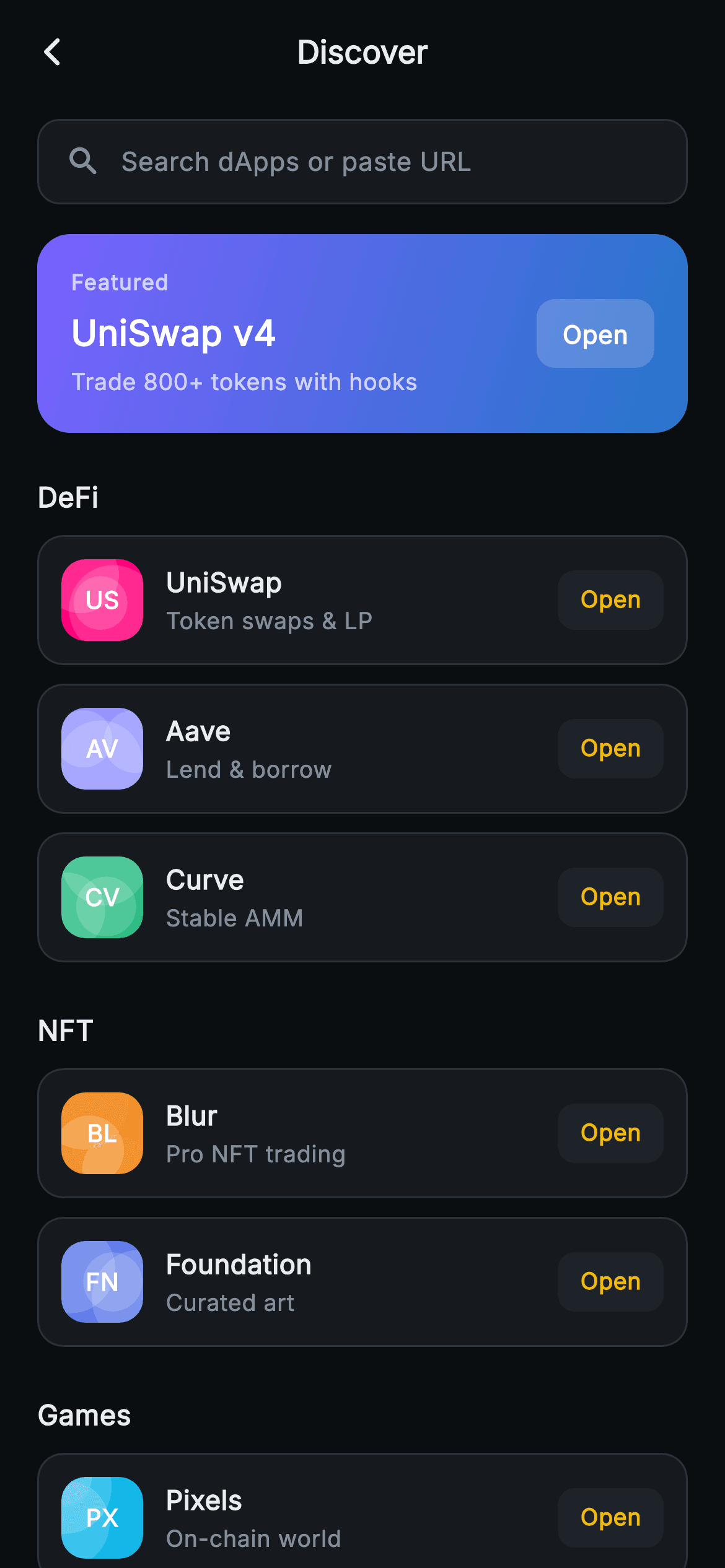
What you'll build
- ✓A const _Cat/_Dapp table that generates every section heading and tile, so adding a dApp is a one-line change
- ✓A full-width featured banner with a #7B61FF to #2775CA diagonal gradient and a frosted 18%-white Open pill
- ✓dApp tiles pairing a 44px painted logo and monogram with a name, a plain-language tagline and a gold Open chip
- ✓A seeded LCG CustomPainter that scatters three translucent circles inside a clipped rounded square, identical on every repaint
- ✓A search-or-paste-URL field styled and ready to be swapped for a real TextField
Step-by-step build
Create the file
Add a new file at lib/web3_discover_dapps/web3_discover_dapps_screen.dart in your Flutter project.
Register the bundled fonts
No external packages — this is pure Flutter. It does bundle its design font (Inter), so drop the font file into fonts/ and declare it in pubspec.yaml:
flutter:
  fonts:
    - family: Inter
      fonts:
- asset: fonts/Inter-Regular.ttfBuild it, piece by piece
Here's how the screen goes together. Each block below is a real slice of the code with a plain-English explanation — paste them in order, or grab the whole file from the next section.
A directory defined as data
import 'package:flutter/material.dart';

/// Web3 — Discover dApps. A featured banner plus categorised dApp tiles
/// (DeFi / NFT / Games) with painted geometric logos. Self-contained per
/// CONVENTIONS.md: pure Flutter, bundled Inter font, logo CustomPaint (no glyphs
/// / no network image), forced dark theme so it renders standalone as a route.
class Web3DiscoverDappsScreen extends StatelessWidget {
  const Web3DiscoverDappsScreen({super.key, this.onBack, this.onDappTap});

  final VoidCallback? onBack;
  final VoidCallback? onDappTap;

  static const String _font = 'Inter';
  static const Color _bg = Color(0xFF0B0E11);
  static const Color _surface = Color(0xFF161A1E);
  static const Color _surfaceAlt = Color(0xFF1E2329);
  static const Color _brand = Color(0xFFF0B90B);
  static const Color _text = Color(0xFFEAECEF);
  static const Color _muted = Color(0xFF848E9C);
  static const Color _hairline = Color(0xFF2B3139);

  static const List<_Cat> _cats = <_Cat>[
    _Cat('DeFi', <_Dapp>[
      _Dapp('UniSwap', 'Token swaps & LP', 'US', Color(0xFFFF007A), 3110),
      _Dapp('Aave', 'Lend & borrow', 'AV', Color(0xFF9896FF), 5520),
      _Dapp('Curve', 'Stable AMM', 'CV', Color(0xFF2EBD85), 7740),
    ]),
    _Cat('NFT', <_Dapp>[
      _Dapp('Blur', 'Pro NFT trading', 'BL', Color(0xFFF0810B), 1290),
      _Dapp('Foundation', 'Curated art', 'FN', Color(0xFF627EEA), 8810),
    ]),
    _Cat('Games', <_Dapp>[
      _Dapp('Pixels', 'On-chain world', 'PX', Color(0xFF14B8E8), 4420),
      _Dapp('Parallel', 'Card battler', 'PL', Color(0xFF7B61FF), 6630),
    ]),
  ];
`Web3DiscoverDappsScreen` is a `StatelessWidget` with just two optional callbacks, `onBack` and `onDappTap`: there is no selected category, no typed query and no favourite set, so nothing needs a `State` object. The colour constants are the usual Aurum set; the one to notice is `_surfaceAlt` (`#1E2329`), which appears only behind the tiles' Open chips. The real content is `_cats`, a `static const List<_Cat>` of three categories holding seven `_Dapp` records. Each record is five positional values: display name, tagline, two-letter monogram, brand tint and an integer seed. The tints nod to each project's identity (UniSwap's hot pink `#FF007A`, Aave's lavender `#9896FF`, Foundation's `#627EEA`), and the seed is what makes every painted logo different. The build method never names a single dApp, so reordering sections or adding a Bridges category is purely a data edit.
Route app bar and a placeholder search field
  @override
  Widget build(BuildContext context) {
    return Theme(
      data: ThemeData.dark(useMaterial3: true),
      child: Scaffold(
        backgroundColor: _bg,
        appBar: AppBar(
          backgroundColor: _bg,
          elevation: 0,
          centerTitle: true,
          leading: IconButton(
            onPressed: onBack,
            icon: const Icon(Icons.arrow_back_ios_new_rounded,
                size: 18, color: _text),
          ),
          title: const Text(
            'Discover',
            style: TextStyle(
              fontFamily: _font,
              fontSize: 17,
              fontWeight: FontWeight.w700,
              color: _text,
            ),
          ),
        ),
        body: SafeArea(
          top: false,
          child: ListView(
            padding: const EdgeInsets.fromLTRB(20, 8, 20, 24),
            children: <Widget>[
              Container(
                padding: const EdgeInsets.symmetric(horizontal: 14),
                height: 46,
                decoration: BoxDecoration(
                  color: _surface,
                  borderRadius: BorderRadius.circular(12),
                  border: Border.all(color: _hairline),
                ),
                child: Row(
                  children: const <Widget>[
                    Icon(Icons.search_rounded, size: 20, color: _muted),
                    SizedBox(width: 10),
                    Text(
                      'Search dApps or paste URL',
                      style: TextStyle(
                        fontFamily: _font,
                        fontSize: 14,
                        color: _muted,
                      ),
                    ),
                  ],
                ),
              ),
Inside the forced-dark `Theme`, the `AppBar` uses `centerTitle: true` with a 17px w700 'Discover' title and an 18px `arrow_back_ios_new_rounded` chevron wired to `onBack`: this screen is pushed as a route, not shown as a root tab, so it gets a back affordance and a centred title. The body is `SafeArea(top: false)` because the app bar already absorbs the status bar; only the bottom inset needs protecting. The `ListView` pads `fromLTRB(20, 8, 20, 24)`. The search bar is a 46px `Container` with a `_surface` fill, 12px radius and `_hairline` border holding a search icon and 'Search dApps or paste URL' in `_muted`. Be aware it is purely visual: a const `Row` with no `TextField` and no tap handler, so touching it does nothing. The hint wording is still worth keeping, because 'paste URL' tells users the box doubles as an address bar for dApps the directory does not list.
The featured banner
              const SizedBox(height: 16),
              GestureDetector(
                onTap: onDappTap,
                behavior: HitTestBehavior.opaque,
                child: Container(
                  padding: const EdgeInsets.all(18),
                  decoration: BoxDecoration(
                    gradient: const LinearGradient(
                      begin: Alignment.topLeft,
                      end: Alignment.bottomRight,
                      colors: <Color>[Color(0xFF7B61FF), Color(0xFF2775CA)],
                    ),
                    borderRadius: BorderRadius.circular(18),
                  ),
                  child: Row(
                    children: <Widget>[
                      Expanded(
                        child: Column(
                          crossAxisAlignment: CrossAxisAlignment.start,
                          children: const <Widget>[
                            Text(
                              'Featured',
                              style: TextStyle(
                                fontFamily: _font,
                                fontSize: 11.5,
                                fontWeight: FontWeight.w700,
                                letterSpacing: 0.6,
                                color: Colors.white70,
                              ),
                            ),
                            SizedBox(height: 6),
                            Text(
                              'UniSwap v4',
                              style: TextStyle(
                                fontFamily: _font,
                                fontSize: 19,
                                fontWeight: FontWeight.w800,
                                color: Colors.white,
                              ),
                            ),
                            SizedBox(height: 4),
                            Text(
                              'Trade 800+ tokens with hooks',
                              style: TextStyle(
                                fontFamily: _font,
                                fontSize: 12.5,
                                color: Colors.white70,
                              ),
                            ),
                          ],
                        ),
                      ),
                      Container(
                        padding: const EdgeInsets.symmetric(
                            horizontal: 14, vertical: 9),
                        decoration: BoxDecoration(
                          color: Colors.white.withValues(alpha: 0.18),
                          borderRadius: BorderRadius.circular(10),
                        ),
                        child: const Text(
                          'Open',
                          style: TextStyle(
                            fontFamily: _font,
                            fontSize: 13.5,
                            fontWeight: FontWeight.w700,
                            color: Colors.white,
                          ),
                        ),
                      ),
                    ],
                  ),
                ),
              ),
The banner is a `GestureDetector` with `HitTestBehavior.opaque` around the whole card, so a tap anywhere, padding included, fires `onDappTap`. Its `LinearGradient` runs `topLeft` to `bottomRight` from violet `#7B61FF` to blue `#2775CA`, the only gradient on the screen and deliberately outside the gold-on-black palette, which is why the eye lands here before the list. An 18px radius, larger than the tiles' 14px, marks it as a different tier. The copy column sits in `Expanded` so 'Trade 800+ tokens with hooks' wraps before it can collide with the button: a 'Featured' eyebrow at 11.5px w700 with `letterSpacing: 0.6` in `white70`, 'UniSwap v4' at 19px w800, then the subtitle at 12.5px. The Open pill is `Colors.white.withValues(alpha: 0.18)` so the gradient shows through; gold text there would fight the violet. It is decoration inside the banner's tap target, not a separate button.
Sections spread straight into the list
              const SizedBox(height: 8),
              ..._cats.map((_Cat cat) {
                return Column(
                  crossAxisAlignment: CrossAxisAlignment.start,
                  children: <Widget>[
                    const SizedBox(height: 16),
                    Text(
                      cat.name,
                      style: const TextStyle(
                        fontFamily: _font,
                        fontSize: 15,
                        fontWeight: FontWeight.w700,
                        color: _text,
                      ),
                    ),
                    const SizedBox(height: 10),
                    ...cat.dapps.map((_Dapp d) {
                      return Padding(
                        padding: const EdgeInsets.only(bottom: 10),
                        child: GestureDetector(
                          onTap: onDappTap,
                          behavior: HitTestBehavior.opaque,
                          child: Container(
                            padding: const EdgeInsets.all(12),
                            decoration: BoxDecoration(
                              color: _surface,
                              borderRadius: BorderRadius.circular(14),
                              border: Border.all(color: _hairline),
                            ),
After an 8px gap, `..._cats.map((_Cat cat) { ... })` spreads one `Column` per category directly into the `ListView`'s children. Each section column opens with its own `SizedBox(height: 16)`, so the first heading sits 24px below the banner and later headings 16px below the previous section. The heading is plain 15px w700 text, not a chip or tab, so every category is visible at once and the user scrolls rather than filters. A nested spread, `...cat.dapps.map`, builds the tiles, each wrapped in `Padding(bottom: 10)` rather than separated by dividers; because the gap follows every tile, the last one in a section still leaves room before the next heading. The tile shell is an opaque `GestureDetector` around a `Container` with 12px padding, `_surface` fill, a 14px radius and a hairline border. A plain `ListView` builds all seven tiles eagerly, which is fine here; a directory with hundreds of entries should move to `ListView.builder` or one `SliverList` per category.
Inside a tile: painted logo, tagline and the Open chip
                            child: Row(
                              children: <Widget>[
                                SizedBox(
                                  width: 44,
                                  height: 44,
                                  child: CustomPaint(
                                    painter: _LogoPainter(
                                        seed: d.seed, tint: d.tint),
                                    child: Center(
                                      child: Text(
                                        d.mono,
                                        style: const TextStyle(
                                          fontFamily: _font,
                                          fontSize: 13,
                                          fontWeight: FontWeight.w800,
                                          color: Colors.white,
                                        ),
                                      ),
                                    ),
                                  ),
                                ),
                                const SizedBox(width: 12),
                                Expanded(
                                  child: Column(
                                    crossAxisAlignment:
                                        CrossAxisAlignment.start,
                                    children: <Widget>[
                                      Text(
                                        d.name,
                                        style: const TextStyle(
                                          fontFamily: _font,
                                          fontSize: 14.5,
                                          fontWeight: FontWeight.w700,
                                          color: _text,
                                        ),
                                      ),
                                      const SizedBox(height: 2),
                                      Text(
                                        d.tagline,
                                        style: const TextStyle(
                                          fontFamily: _font,
                                          fontSize: 12.5,
                                          color: _muted,
                                        ),
                                      ),
                                    ],
                                  ),
                                ),
                                Container(
                                  padding: const EdgeInsets.symmetric(
                                      horizontal: 12, vertical: 7),
                                  decoration: BoxDecoration(
                                    color: _surfaceAlt,
                                    borderRadius: BorderRadius.circular(9),
                                  ),
                                  child: const Text(
                                    'Open',
                                    style: TextStyle(
                                      fontFamily: _font,
                                      fontSize: 12.5,
                                      fontWeight: FontWeight.w700,
                                      color: _brand,
                                    ),
                                  ),
                                ),
                              ],
                            ),
                          ),
                        ),
                      );
                    }),
                  ],
                );
              }),
            ],
          ),
        ),
      ),
    );
  }
}
The logo is a 44x44 `SizedBox` holding a `CustomPaint` whose `painter` is `_LogoPainter(seed: d.seed, tint: d.tint)` and whose `child` is the centred monogram at 13px w800 white. Using `painter` rather than `foregroundPainter` matters: it draws behind the child, so the letters always sit on top of the art. Two letters instead of one keep Pixels ('PX') and Parallel ('PL') distinguishable. The middle column is `Expanded`, with the name at 14.5px w700 and a 12.5px muted tagline two pixels below. The tagline carries real weight in a directory, because names like Curve or Blur tell a newcomer nothing, while 'Stable AMM' or 'Pro NFT trading' does. On the right, the Open chip pairs a raised `_surfaceAlt` fill and 9px radius with gold `_brand` text at 12.5px w700, keeping Aurum's accent on the action word. As with the banner, the chip is not separately tappable; the whole tile fires `onDappTap`.
Two tiny const models
class _Cat {
  const _Cat(this.name, this.dapps);

  final String name;
  final List<_Dapp> dapps;
}

class _Dapp {
  const _Dapp(this.name, this.tagline, this.mono, this.tint, this.seed);

  final String name;
  final String tagline;
  final String mono;
  final Color tint;
  final int seed;
}
`_Cat` and `_Dapp` are plain classes with final fields and `const` positional constructors. The `const` constructors are what allow `_cats` to be a compile-time constant: the whole nested table is canonicalised once and never reallocated when the screen rebuilds. Positional arguments keep the table dense, one dApp per line, which reads well at five fields; if you add a launch URL, chain ID or an audited badge, switch to named parameters before the call sites become guesswork. Both names start with an underscore, so they are private to this file. That becomes relevant the moment you want `onDappTap` to report which dApp was tapped: either make the class public or pass out a plain value such as its name or URL.
Seeded logos with a hand-rolled LCG
/// A seeded geometric "logo": translucent circles on a tinted rounded square
/// (LCG, no Math.random).
class _LogoPainter extends CustomPainter {
  const _LogoPainter({required this.seed, required this.tint});

  final int seed;
  final Color tint;

  @override
  void paint(Canvas canvas, Size size) {
    int state = seed & 0x7fffffff;
    double next() {
      state = (state * 1103515245 + 12345) & 0x7fffffff;
      return (state % 10000) / 10000.0;
    }

    final RRect bg = RRect.fromRectAndRadius(
      Offset.zero & size,
      const Radius.circular(13),
    );
    canvas.drawRRect(bg, Paint()..color = tint);
    canvas.save();
    canvas.clipRRect(bg);
    for (int i = 0; i < 3; i++) {
      canvas.drawCircle(
        Offset(next() * size.width, next() * size.height),
        size.width * (0.3 + next() * 0.3),
        Paint()..color = Colors.white.withValues(alpha: 0.16),
      );
    }
    canvas.restore();
  }

  @override
  bool shouldRepaint(_LogoPainter old) =>
      old.seed != seed || old.tint != tint;
}
`_LogoPainter` turns an integer into stable abstract art. It masks the seed to 31 bits, then defines a local `next()` that advances a linear congruential generator, `state * 1103515245 + 12345` masked again with `0x7fffffff` (the classic C library constants), and returns `(state % 10000) / 10000.0`, a value in [0, 1). It fills a 13px-radius `RRect` with the tint, calls `save()` and `clipRRect` so nothing spills past the rounded corners, then draws three circles. Each consumes three `next()` calls: x, y and a radius between 30% and 60% of the width, filled with white at 16% alpha, so overlaps stack into brighter lenses. `restore()` drops the clip. Using `Random` here would reshuffle every logo on each repaint; the LCG gives the same picture for the same seed every time, and `shouldRepaint` returns true only when `seed` or `tint` changes. On Flutter web, where integers are JavaScript doubles, the large product loses low bits, so a seed may draw a different but still stable pattern than on a phone.
Full code
The complete, ready-to-paste source. Free to use in your projects — one click copies it all.
import 'package:flutter/material.dart';
/// Web3 — Discover dApps. A featured banner plus categorised dApp tiles
/// (DeFi / NFT / Games) with painted geometric logos. Self-contained per
/// CONVENTIONS.md: pure Flutter, bundled Inter font, logo CustomPaint (no glyphs
/// / no network image), forced dark theme so it renders standalone as a route.
class Web3DiscoverDappsScreen extends StatelessWidget {
const Web3DiscoverDappsScreen({super.key, this.onBack, this.onDappTap});
final VoidCallback? onBack;
final VoidCallback? onDappTap;
static const String _font = 'Inter';
static const Color _bg = Color(0xFF0B0E11);
static const Color _surface = Color(0xFF161A1E);
static const Color _surfaceAlt = Color(0xFF1E2329);
static const Color _brand = Color(0xFFF0B90B);
static const Color _text = Color(0xFFEAECEF);
static const Color _muted = Color(0xFF848E9C);
static const Color _hairline = Color(0xFF2B3139);
static const List<_Cat> _cats = <_Cat>[
_Cat('DeFi', <_Dapp>[
_Dapp('UniSwap', 'Token swaps & LP', 'US', Color(0xFFFF007A), 3110),
_Dapp('Aave', 'Lend & borrow', 'AV', Color(0xFF9896FF), 5520),
_Dapp('Curve', 'Stable AMM', 'CV', Color(0xFF2EBD85), 7740),
]),
_Cat('NFT', <_Dapp>[
_Dapp('Blur', 'Pro NFT trading', 'BL', Color(0xFFF0810B), 1290),
_Dapp('Foundation', 'Curated art', 'FN', Color(0xFF627EEA), 8810),
]),
_Cat('Games', <_Dapp>[
_Dapp('Pixels', 'On-chain world', 'PX', Color(0xFF14B8E8), 4420),
_Dapp('Parallel', 'Card battler', 'PL', Color(0xFF7B61FF), 6630),
]),
];
@override
Widget build(BuildContext context) {
return Theme(
data: ThemeData.dark(useMaterial3: true),
child: Scaffold(
backgroundColor: _bg,
appBar: AppBar(
backgroundColor: _bg,
elevation: 0,
centerTitle: true,
leading: IconButton(
onPressed: onBack,
icon: const Icon(Icons.arrow_back_ios_new_rounded,
size: 18, color: _text),
),
title: const Text(
'Discover',
style: TextStyle(
fontFamily: _font,
fontSize: 17,
fontWeight: FontWeight.w700,
color: _text,
),
),
),
body: SafeArea(
top: false,
child: ListView(
padding: const EdgeInsets.fromLTRB(20, 8, 20, 24),
children: <Widget>[
Container(
padding: const EdgeInsets.symmetric(horizontal: 14),
height: 46,
decoration: BoxDecoration(
color: _surface,
borderRadius: BorderRadius.circular(12),
border: Border.all(color: _hairline),
),
child: Row(
children: const <Widget>[
Icon(Icons.search_rounded, size: 20, color: _muted),
SizedBox(width: 10),
Text(
'Search dApps or paste URL',
style: TextStyle(
fontFamily: _font,
fontSize: 14,
color: _muted,
),
),
],
),
),
const SizedBox(height: 16),
GestureDetector(
onTap: onDappTap,
behavior: HitTestBehavior.opaque,
child: Container(
padding: const EdgeInsets.all(18),
decoration: BoxDecoration(
gradient: const LinearGradient(
begin: Alignment.topLeft,
end: Alignment.bottomRight,
colors: <Color>[Color(0xFF7B61FF), Color(0xFF2775CA)],
),
borderRadius: BorderRadius.circular(18),
),
child: Row(
children: <Widget>[
Expanded(
child: Column(
crossAxisAlignment: CrossAxisAlignment.start,
children: const <Widget>[
Text(
'Featured',
style: TextStyle(
fontFamily: _font,
fontSize: 11.5,
fontWeight: FontWeight.w700,
letterSpacing: 0.6,
color: Colors.white70,
),
),
SizedBox(height: 6),
Text(
'UniSwap v4',
style: TextStyle(
fontFamily: _font,
fontSize: 19,
fontWeight: FontWeight.w800,
color: Colors.white,
),
),
SizedBox(height: 4),
Text(
'Trade 800+ tokens with hooks',
style: TextStyle(
fontFamily: _font,
fontSize: 12.5,
color: Colors.white70,
),
),
],
),
),
Container(
padding: const EdgeInsets.symmetric(
horizontal: 14, vertical: 9),
decoration: BoxDecoration(
color: Colors.white.withValues(alpha: 0.18),
borderRadius: BorderRadius.circular(10),
),
child: const Text(
'Open',
style: TextStyle(
fontFamily: _font,
fontSize: 13.5,
fontWeight: FontWeight.w700,
color: Colors.white,
),
),
),
],
),
),
),
const SizedBox(height: 8),
..._cats.map((_Cat cat) {
return Column(
crossAxisAlignment: CrossAxisAlignment.start,
children: <Widget>[
const SizedBox(height: 16),
Text(
cat.name,
style: const TextStyle(
fontFamily: _font,
fontSize: 15,
fontWeight: FontWeight.w700,
color: _text,
),
),
const SizedBox(height: 10),
...cat.dapps.map((_Dapp d) {
return Padding(
padding: const EdgeInsets.only(bottom: 10),
child: GestureDetector(
onTap: onDappTap,
behavior: HitTestBehavior.opaque,
child: Container(
padding: const EdgeInsets.all(12),
decoration: BoxDecoration(
color: _surface,
borderRadius: BorderRadius.circular(14),
border: Border.all(color: _hairline),
),
child: Row(
children: <Widget>[
SizedBox(
width: 44,
height: 44,
child: CustomPaint(
painter: _LogoPainter(
seed: d.seed, tint: d.tint),
child: Center(
child: Text(
d.mono,
style: const TextStyle(
fontFamily: _font,
fontSize: 13,
fontWeight: FontWeight.w800,
color: Colors.white,
),
),
),
),
),
const SizedBox(width: 12),
Expanded(
child: Column(
crossAxisAlignment:
CrossAxisAlignment.start,
children: <Widget>[
Text(
d.name,
style: const TextStyle(
fontFamily: _font,
fontSize: 14.5,
fontWeight: FontWeight.w700,
color: _text,
),
),
const SizedBox(height: 2),
Text(
d.tagline,
style: const TextStyle(
fontFamily: _font,
fontSize: 12.5,
color: _muted,
),
),
],
),
),
Container(
padding: const EdgeInsets.symmetric(
horizontal: 12, vertical: 7),
decoration: BoxDecoration(
color: _surfaceAlt,
borderRadius: BorderRadius.circular(9),
),
child: const Text(
'Open',
style: TextStyle(
fontFamily: _font,
fontSize: 12.5,
fontWeight: FontWeight.w700,
color: _brand,
),
),
),
],
),
),
),
);
}),
],
);
}),
],
),
),
),
);
}
}
class _Cat {
const _Cat(this.name, this.dapps);
final String name;
final List<_Dapp> dapps;
}
class _Dapp {
const _Dapp(this.name, this.tagline, this.mono, this.tint, this.seed);
final String name;
final String tagline;
final String mono;
final Color tint;
final int seed;
}
/// A seeded geometric "logo": translucent circles on a tinted rounded square
/// (LCG, no Math.random).
class _LogoPainter extends CustomPainter {
const _LogoPainter({required this.seed, required this.tint});
final int seed;
final Color tint;
@override
void paint(Canvas canvas, Size size) {
int state = seed & 0x7fffffff;
double next() {
state = (state * 1103515245 + 12345) & 0x7fffffff;
return (state % 10000) / 10000.0;
}
final RRect bg = RRect.fromRectAndRadius(
Offset.zero & size,
const Radius.circular(13),
);
canvas.drawRRect(bg, Paint()..color = tint);
canvas.save();
canvas.clipRRect(bg);
for (int i = 0; i < 3; i++) {
canvas.drawCircle(
Offset(next() * size.width, next() * size.height),
size.width * (0.3 + next() * 0.3),
Paint()..color = Colors.white.withValues(alpha: 0.16),
);
}
canvas.restore();
}
@override
bool shouldRepaint(_LogoPainter old) =>
old.seed != seed || old.tint != tint;
}
Plus bundled 1 binary asset (fonts/images). The CLI and MCP install those for you automatically.
Two faster ways to add it
Copy-paste works, but you can skip it entirely.
1. FlutterKit CLI
One command drops this screen — and its fonts — straight into your project.
$ flutterkit add web3-discover-dapps2. AI agent (MCP)
Connect FlutterKit's MCP server in Claude or Cursor and just ask your agent to install web3-discover-dapps — it fetches and writes the files for you.
FAQ
Can I ship this dApp directory in a commercial wallet app?
Yes. The screen is free for personal and commercial apps alike: copy it from this page, add it with the CLI command, or fetch it over MCP. There is no licence key to enter and no attribution to display.
Do the dApp logos need an icon pack, SVG package or network images?
None of those. Every logo is drawn by `_LogoPainter` from a seed and a tint, the icons come from Flutter's built-in Material set, and the file imports only `package:flutter/material.dart`. The one thing to bundle is the Inter font, referenced through `fontFamily: 'Inter'`; without it Flutter quietly falls back to the platform font.
What Flutter version does this screen need?
Flutter 3.22 or later. The banner's Open pill and the logo circles call `Color.withValues(alpha: ...)`, and the constructor uses the `super.key` parameter. For an older SDK, change `withValues(alpha: 0.18)` to `withOpacity(0.18)` (and likewise for 0.16), and write the constructor as `{Key? key, this.onBack, this.onDappTap}) : super(key: key)`.
How do I know which dApp the user tapped?
As written you cannot: `onDappTap` is a plain `VoidCallback`, and the banner plus all seven tiles call the same function with no argument. Add a `url` field to `_Dapp`, change the callback to `ValueChanged<String>`, and pass `() => onDappTap?.call(d.url)` in each tile and the featured URL in the banner. Your handler can then open an in-app webview or a connect-wallet prompt for that specific site.
Why can't I type in the search bar?
Because it is a styled `Container` with a `Text` hint, not an input. Replace the `Text` with an `Expanded(child: TextField(...))` using `InputDecoration.collapsed` so the 46px box keeps its look, then convert the screen to a `StatefulWidget` that filters `_cats` by name or tagline. If the input parses as a URL, skip filtering and hand it straight to your browser route.


