How to Build a Token Launchpad List Screen in Flutter (Full Code + Preview)
A launchpad list has to sort token sales into two questions at a glance: can I join this now, and how much of it is already gone? This tutorial builds Aurum's Launchpad screen in Flutter, three sale cards that each carry a generated logo, a Live or Upcoming pill, a progress ring, a deadline label, a raise bar and an allocation cap. You'll see how one boolean recolours an entire card, how a seeded painter replaces logo images, and which parts are static placeholders you will need to replace.
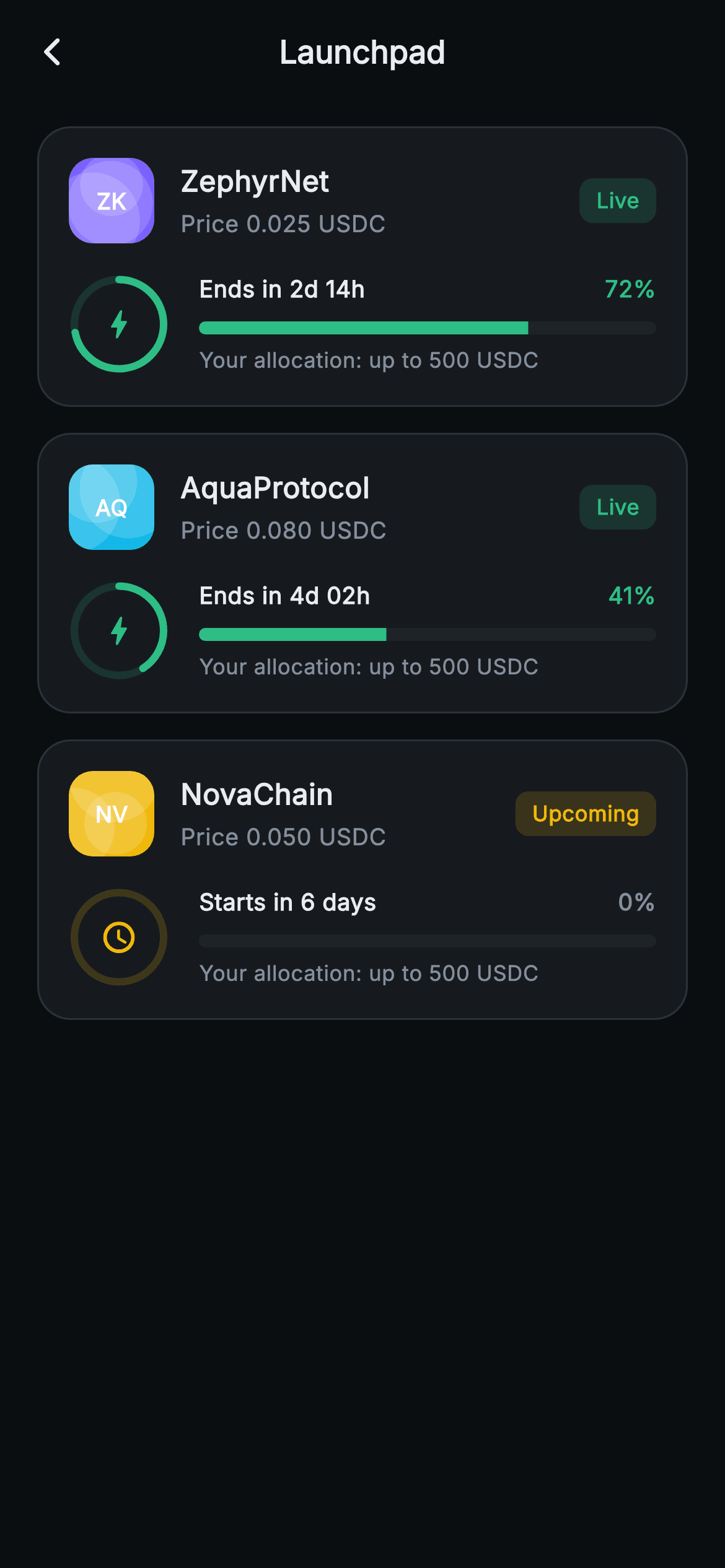
What you'll build
- ✓Token-sale cards built by ListView.separated from three const _Sale records
- ✓A Live/Upcoming status pill whose green-or-gold colour comes from one derived boolean
- ✓A 54px ring and a 7px LinearProgressIndicator both reporting the same raise fraction
- ✓Placeholder token logos painted by a seeded LCG, so each project keeps the same pattern on every build
- ✓Deadline copy that switches between 'Ends in 2d 14h' and 'Starts in 6 days' from one countdown string
Step-by-step build
Create the file
Add a new file at lib/web3_launchpad_list/web3_launchpad_list_screen.dart in your Flutter project.
Register the bundled fonts
No external packages — this is pure Flutter. It does bundle its design font (Inter), so drop the font file into fonts/ and declare it in pubspec.yaml:
flutter:
  fonts:
    - family: Inter
      fonts:
- asset: fonts/Inter-Regular.ttfBuild it, piece by piece
Here's how the screen goes together. Each block below is a real slice of the code with a plain-English explanation — paste them in order, or grab the whole file from the next section.
Two callbacks and three sales as const data
import 'dart:math' as math;

import 'package:flutter/material.dart';

/// Web3 — Launchpad. Upcoming / live token-sale cards with a painted countdown
/// ring, a raise-progress bar and an allocation row. Self-contained per
/// CONVENTIONS.md: pure Flutter, bundled Inter font, ring + logo CustomPaint (no
/// glyphs / no network image), forced dark theme so it renders standalone as a
/// route.
class Web3LaunchpadListScreen extends StatelessWidget {
  const Web3LaunchpadListScreen({super.key, this.onBack, this.onSaleTap});

  final VoidCallback? onBack;
  final VoidCallback? onSaleTap;

  static const String _font = 'Inter';
  static const Color _bg = Color(0xFF0B0E11);
  static const Color _surface = Color(0xFF161A1E);
  static const Color _surfaceAlt = Color(0xFF1E2329);
  static const Color _brand = Color(0xFFF0B90B);
  static const Color _up = Color(0xFF2EBD85);
  static const Color _text = Color(0xFFEAECEF);
  static const Color _muted = Color(0xFF848E9C);
  static const Color _hairline = Color(0xFF2B3139);

  static const List<_Sale> _sales = <_Sale>[
    _Sale('ZK', 'ZephyrNet', 'Live', 0.72, '2d 14h', '0.025 USDC',
        Color(0xFF7B61FF), 2110),
    _Sale('AQ', 'AquaProtocol', 'Live', 0.41, '4d 02h', '0.080 USDC',
        Color(0xFF14B8E8), 5530),
    _Sale('NV', 'NovaChain', 'Upcoming', 0.0, 'in 6 days', '0.050 USDC',
        Color(0xFFF0B90B), 7740),
  ];
`Web3LaunchpadListScreen` is stateless and takes only `onBack` and `onSaleTap`, both plain `VoidCallback?`. That second type matters: every card calls the same parameterless callback, so the host learns that a sale was tapped but not which one. You will want to change it to `ValueChanged<_Sale>` (or pass an id) before wiring navigation. It reuses the Aurum exchange palette and adds nothing new to it. The interesting part is `_sales`: each `_Sale` holds a ticker, name, status string, a progress double (0.72, 0.41, 0.0), a countdown fragment, a price, a tint and an integer seed. NovaChain's countdown is stored as 'in 6 days' rather than '6d', because the label code adds only 'Starts ' in front of it.
Shell, separated list and the live flag
  @override
  Widget build(BuildContext context) {
    return Theme(
      data: ThemeData.dark(useMaterial3: true),
      child: Scaffold(
        backgroundColor: _bg,
        appBar: AppBar(
          backgroundColor: _bg,
          elevation: 0,
          centerTitle: true,
          leading: IconButton(
            onPressed: onBack,
            icon: const Icon(Icons.arrow_back_ios_new_rounded,
                size: 18, color: _text),
          ),
          title: const Text(
            'Launchpad',
            style: TextStyle(
              fontFamily: _font,
              fontSize: 17,
              fontWeight: FontWeight.w700,
              color: _text,
            ),
          ),
        ),
        body: SafeArea(
          top: false,
          child: ListView.separated(
            padding: const EdgeInsets.fromLTRB(20, 12, 20, 24),
            itemCount: _sales.length,
            separatorBuilder: (BuildContext context, int i) =>
                const SizedBox(height: 14),
            itemBuilder: (BuildContext context, int i) {
              final _Sale s = _sales[i];
              final bool live = s.status == 'Live';
The scaffold sits inside a forced `ThemeData.dark` wrapper, with a flat centred 'Launchpad' AppBar and an 18px back chevron. The body uses `ListView.separated` and a `separatorBuilder` that returns a 14px `SizedBox`, so the gaps are placed between cards and never after the last one, and the 24px bottom padding stays exact. `SafeArea(top: false)` lets the AppBar deal with the notch while protecting the last card from the home indicator. The key line is `final bool live = s.status == 'Live';`. Everything below this line branches on that one boolean: pill colour, ring fill, icon, deadline wording, percent colour and bar colour. Comparing strings is fragile, because 'live' in lower case would quietly render as Upcoming, so an enum is the safer type once real data arrives.
Card header: seeded logo, name, price and status pill
              return GestureDetector(
                onTap: onSaleTap,
                behavior: HitTestBehavior.opaque,
                child: Container(
                  padding: const EdgeInsets.all(16),
                  decoration: BoxDecoration(
                    color: _surface,
                    borderRadius: BorderRadius.circular(18),
                    border: Border.all(color: _hairline),
                  ),
                  child: Column(
                    children: <Widget>[
                      Row(
                        children: <Widget>[
                          SizedBox(
                            width: 46,
                            height: 46,
                            child: CustomPaint(
                              painter: _LogoPainter(seed: s.seed, tint: s.tint),
                              child: Center(
                                child: Text(
                                  s.ticker,
                                  style: const TextStyle(
                                    fontFamily: _font,
                                    fontSize: 12,
                                    fontWeight: FontWeight.w800,
                                    color: Colors.white,
                                  ),
                                ),
                              ),
                            ),
                          ),
                          const SizedBox(width: 14),
                          Expanded(
                            child: Column(
                              crossAxisAlignment: CrossAxisAlignment.start,
                              children: <Widget>[
                                Text(
                                  s.name,
                                  style: const TextStyle(
                                    fontFamily: _font,
                                    fontSize: 15.5,
                                    fontWeight: FontWeight.w800,
                                    color: _text,
                                  ),
                                ),
                                const SizedBox(height: 4),
                                Text(
                                  'Price ${s.price}',
                                  style: const TextStyle(
                                    fontFamily: _font,
                                    fontSize: 12.5,
                                    color: _muted,
                                  ),
                                ),
                              ],
                            ),
                          ),
                          Container(
                            padding: const EdgeInsets.symmetric(
                                horizontal: 9, vertical: 4),
                            decoration: BoxDecoration(
                              color: (live ? _up : _brand)
                                  .withValues(alpha: 0.16),
                              borderRadius: BorderRadius.circular(7),
                            ),
                            child: Text(
                              s.status,
                              style: TextStyle(
                                fontFamily: _font,
                                fontSize: 11.5,
                                fontWeight: FontWeight.w700,
                                color: live ? _up : _brand,
                              ),
                            ),
                          ),
                        ],
                      ),
Each card is a `GestureDetector` with `HitTestBehavior.opaque`, which makes the whole 18px-radius `_surface` panel tappable, including its padding. The header row starts with a 46×46 `CustomPaint` that runs `_LogoPainter` and carries the ticker ('ZK', 'AQ', 'NV') as its child in 12px `w800` white. Because the text is the painter's child, it draws above the painted shapes. An `Expanded` column then stacks the project name at 15.5px `w800` over a muted 'Price 0.025 USDC' line. The `Expanded` is what pushes the pill to the far right. The pill fills with `(live ? _up : _brand).withValues(alpha: 0.16)` and uses the full-strength colour for its label, so green means 'open now' and gold means 'not yet' without any extra icon.
Ring, deadline and raise bar
                      const SizedBox(height: 16),
                      Row(
                        children: <Widget>[
                          SizedBox(
                            width: 54,
                            height: 54,
                            child: CustomPaint(
                              painter: _RingPainter(
                                fraction: live ? s.progress : 0.0,
                                color: live ? _up : _brand,
                              ),
                              child: Center(
                                child: Icon(
                                  live
                                      ? Icons.bolt_rounded
                                      : Icons.schedule_rounded,
                                  size: 20,
                                  color: live ? _up : _brand,
                                ),
                              ),
                            ),
                          ),
                          const SizedBox(width: 16),
                          Expanded(
                            child: Column(
                              crossAxisAlignment: CrossAxisAlignment.start,
                              children: <Widget>[
                                Row(
                                  children: <Widget>[
                                    Text(
                                      live ? 'Ends in ${s.countdown}' : 'Starts ${s.countdown}',
                                      style: const TextStyle(
                                        fontFamily: _font,
                                        fontSize: 12.5,
                                        fontWeight: FontWeight.w600,
                                        color: _text,
                                      ),
                                    ),
                                    const Spacer(),
                                    Text(
                                      '${(s.progress * 100).round()}%',
                                      style: TextStyle(
                                        fontFamily: _font,
                                        fontSize: 12.5,
                                        fontWeight: FontWeight.w800,
                                        color: live ? _up : _muted,
                                      ),
                                    ),
                                  ],
                                ),
                                const SizedBox(height: 8),
                                ClipRRect(
                                  borderRadius: BorderRadius.circular(4),
                                  child: LinearProgressIndicator(
                                    value: s.progress,
                                    minHeight: 7,
                                    backgroundColor: _surfaceAlt,
                                    valueColor: AlwaysStoppedAnimation<Color>(
                                        live ? _up : _brand),
                                  ),
                                ),
The second row pairs a 54px `_RingPainter` with a `bolt_rounded` icon for live sales or `schedule_rounded` for upcoming ones. Note what the ring measures: its `fraction` is `live ? s.progress : 0.0`, which is the same raise fraction the bar shows below it, not time remaining. The registry calls it a countdown ring, but nothing in the code links its arc to the deadline. Next to it, the label reads `'Ends in ${s.countdown}'` or `'Starts ${s.countdown}'`. These are fixed strings, so nothing ticks. A `Spacer` pushes `(s.progress * 100).round()` to the right, green when live and muted for an upcoming sale's 0%. The bar is a `LinearProgressIndicator` with `minHeight: 7` on a `_surfaceAlt` track, wrapped in a `ClipRRect` with a 4px radius because the indicator itself draws square ends.
Allocation line and the _Sale record
                                const SizedBox(height: 6),
                                const Text(
                                  'Your allocation: up to 500 USDC',
                                  style: TextStyle(
                                    fontFamily: _font,
                                    fontSize: 11.5,
                                    color: _muted,
                                  ),
                                ),
                              ],
                            ),
                          ),
                        ],
                      ),
                    ],
                  ),
                ),
              );
            },
          ),
        ),
      ),
    );
  }
}

class _Sale {
  const _Sale(this.ticker, this.name, this.status, this.progress,
      this.countdown, this.price, this.tint, this.seed);

  final String ticker;
  final String name;
  final String status;
  final double progress;
  final String countdown;
  final String price;
  final Color tint;
  final int seed;
}
Under the bar, 'Your allocation: up to 500 USDC' is a `const Text` at 11.5px in `_muted`. It is hard-coded, so all three cards show the same cap, and there is no field for an amount the user has already committed. If your launchpad sets tiered caps, or shows 'You committed 120 USDC', add those to `_Sale` and interpolate them here. The record itself is a const class with eight positional fields. Positional is compact for three literal rows, but it is easy to swap `countdown` and `price`, which are both strings. Named parameters would be safer once the data comes from an API. Since `progress` is a plain double from 0 to 1, you can compute it directly as raised divided by the hard cap.
_LogoPainter: a deterministic placeholder logo
/// A seeded geometric "logo": two overlapping translucent shapes on a tinted
/// rounded square (LCG, no Math.random).
class _LogoPainter extends CustomPainter {
  const _LogoPainter({required this.seed, required this.tint});

  final int seed;
  final Color tint;

  @override
  void paint(Canvas canvas, Size size) {
    int state = seed & 0x7fffffff;
    double next() {
      state = (state * 1103515245 + 12345) & 0x7fffffff;
      return (state % 10000) / 10000.0;
    }

    final RRect bg = RRect.fromRectAndRadius(
      Offset.zero & size,
      const Radius.circular(13),
    );
    canvas.drawRRect(bg, Paint()..color = tint);
    canvas.save();
    canvas.clipRRect(bg);
    for (int i = 0; i < 3; i++) {
      canvas.drawCircle(
        Offset(next() * size.width, next() * size.height),
        size.width * (0.3 + next() * 0.3),
        Paint()..color = Colors.white.withValues(alpha: 0.16),
      );
    }
    canvas.restore();
  }

  @override
  bool shouldRepaint(_LogoPainter old) =>
      old.seed != seed || old.tint != tint;
}
Instead of loading network images, the painter generates a stable logo from `seed`. It masks the seed to 31 bits and steps a linear congruential generator, `state * 1103515245 + 12345`, through the local `next()` closure, which returns a value from 0 to 1. It fills a 13px-radius `RRect` with the sale's tint, then calls `clipRRect` so overflowing circles are cut to the tile. Three white circles at 16% alpha, each with a random centre and a radius of 30–60% of the width, overlap into a different pattern for each project. The doc comment says two shapes, but the loop draws three. On native platforms the same seed always gives the same pattern. Flutter web stores ints as JavaScript doubles, so this multiply can lose precision and give a different, still repeatable pattern there. `shouldRepaint` compares only seed and tint.
_RingPainter: track first, arc only when there is progress
class _RingPainter extends CustomPainter {
  const _RingPainter({required this.fraction, required this.color});

  final double fraction;
  final Color color;

  @override
  void paint(Canvas canvas, Size size) {
    final Offset c = Offset(size.width / 2, size.height / 2);
    final double r = size.width / 2 - 3;
    canvas.drawCircle(
      c,
      r,
      Paint()
        ..style = PaintingStyle.stroke
        ..strokeWidth = 4
        ..color = color.withValues(alpha: 0.18),
    );
    if (fraction > 0) {
      canvas.drawArc(
        Rect.fromCircle(center: c, radius: r),
        -math.pi / 2,
        2 * math.pi * fraction.clamp(0.0, 1.0),
        false,
        Paint()
          ..style = PaintingStyle.stroke
          ..strokeWidth = 4
          ..strokeCap = StrokeCap.round
          ..color = color,
      );
    }
  }

  @override
  bool shouldRepaint(_RingPainter old) =>
      old.fraction != fraction || old.color != color;
}
The ring's radius is `size.width / 2 - 3`. Those 3px are half of the 4px stroke plus a pixel of margin, so the line is never clipped at the box edge. The painter always draws a full track circle at 18% alpha of the given colour, which is why an upcoming sale shows a faint gold ring instead of an empty space. The arc is drawn only inside `if (fraction > 0)`, starting at `-math.pi / 2` (twelve o'clock) and sweeping `2 * math.pi * fraction.clamp(0.0, 1.0)` clockwise, with `StrokeCap.round` for soft ends. The guard matters because with a round cap, even a zero-length arc would leave a visible dot. The clamp keeps an oversubscribed sale (raise above 100%) from wrapping past a full circle. `shouldRepaint` checks both fields, so animating `fraction` would work without changes.
Full code
The complete, ready-to-paste source. Free to use in your projects — one click copies it all.
import 'dart:math' as math;
import 'package:flutter/material.dart';
/// Web3 — Launchpad. Upcoming / live token-sale cards with a painted countdown
/// ring, a raise-progress bar and an allocation row. Self-contained per
/// CONVENTIONS.md: pure Flutter, bundled Inter font, ring + logo CustomPaint (no
/// glyphs / no network image), forced dark theme so it renders standalone as a
/// route.
class Web3LaunchpadListScreen extends StatelessWidget {
const Web3LaunchpadListScreen({super.key, this.onBack, this.onSaleTap});
final VoidCallback? onBack;
final VoidCallback? onSaleTap;
static const String _font = 'Inter';
static const Color _bg = Color(0xFF0B0E11);
static const Color _surface = Color(0xFF161A1E);
static const Color _surfaceAlt = Color(0xFF1E2329);
static const Color _brand = Color(0xFFF0B90B);
static const Color _up = Color(0xFF2EBD85);
static const Color _text = Color(0xFFEAECEF);
static const Color _muted = Color(0xFF848E9C);
static const Color _hairline = Color(0xFF2B3139);
static const List<_Sale> _sales = <_Sale>[
_Sale('ZK', 'ZephyrNet', 'Live', 0.72, '2d 14h', '0.025 USDC',
Color(0xFF7B61FF), 2110),
_Sale('AQ', 'AquaProtocol', 'Live', 0.41, '4d 02h', '0.080 USDC',
Color(0xFF14B8E8), 5530),
_Sale('NV', 'NovaChain', 'Upcoming', 0.0, 'in 6 days', '0.050 USDC',
Color(0xFFF0B90B), 7740),
];
@override
Widget build(BuildContext context) {
return Theme(
data: ThemeData.dark(useMaterial3: true),
child: Scaffold(
backgroundColor: _bg,
appBar: AppBar(
backgroundColor: _bg,
elevation: 0,
centerTitle: true,
leading: IconButton(
onPressed: onBack,
icon: const Icon(Icons.arrow_back_ios_new_rounded,
size: 18, color: _text),
),
title: const Text(
'Launchpad',
style: TextStyle(
fontFamily: _font,
fontSize: 17,
fontWeight: FontWeight.w700,
color: _text,
),
),
),
body: SafeArea(
top: false,
child: ListView.separated(
padding: const EdgeInsets.fromLTRB(20, 12, 20, 24),
itemCount: _sales.length,
separatorBuilder: (BuildContext context, int i) =>
const SizedBox(height: 14),
itemBuilder: (BuildContext context, int i) {
final _Sale s = _sales[i];
final bool live = s.status == 'Live';
return GestureDetector(
onTap: onSaleTap,
behavior: HitTestBehavior.opaque,
child: Container(
padding: const EdgeInsets.all(16),
decoration: BoxDecoration(
color: _surface,
borderRadius: BorderRadius.circular(18),
border: Border.all(color: _hairline),
),
child: Column(
children: <Widget>[
Row(
children: <Widget>[
SizedBox(
width: 46,
height: 46,
child: CustomPaint(
painter: _LogoPainter(seed: s.seed, tint: s.tint),
child: Center(
child: Text(
s.ticker,
style: const TextStyle(
fontFamily: _font,
fontSize: 12,
fontWeight: FontWeight.w800,
color: Colors.white,
),
),
),
),
),
const SizedBox(width: 14),
Expanded(
child: Column(
crossAxisAlignment: CrossAxisAlignment.start,
children: <Widget>[
Text(
s.name,
style: const TextStyle(
fontFamily: _font,
fontSize: 15.5,
fontWeight: FontWeight.w800,
color: _text,
),
),
const SizedBox(height: 4),
Text(
'Price ${s.price}',
style: const TextStyle(
fontFamily: _font,
fontSize: 12.5,
color: _muted,
),
),
],
),
),
Container(
padding: const EdgeInsets.symmetric(
horizontal: 9, vertical: 4),
decoration: BoxDecoration(
color: (live ? _up : _brand)
.withValues(alpha: 0.16),
borderRadius: BorderRadius.circular(7),
),
child: Text(
s.status,
style: TextStyle(
fontFamily: _font,
fontSize: 11.5,
fontWeight: FontWeight.w700,
color: live ? _up : _brand,
),
),
),
],
),
const SizedBox(height: 16),
Row(
children: <Widget>[
SizedBox(
width: 54,
height: 54,
child: CustomPaint(
painter: _RingPainter(
fraction: live ? s.progress : 0.0,
color: live ? _up : _brand,
),
child: Center(
child: Icon(
live
? Icons.bolt_rounded
: Icons.schedule_rounded,
size: 20,
color: live ? _up : _brand,
),
),
),
),
const SizedBox(width: 16),
Expanded(
child: Column(
crossAxisAlignment: CrossAxisAlignment.start,
children: <Widget>[
Row(
children: <Widget>[
Text(
live ? 'Ends in ${s.countdown}' : 'Starts ${s.countdown}',
style: const TextStyle(
fontFamily: _font,
fontSize: 12.5,
fontWeight: FontWeight.w600,
color: _text,
),
),
const Spacer(),
Text(
'${(s.progress * 100).round()}%',
style: TextStyle(
fontFamily: _font,
fontSize: 12.5,
fontWeight: FontWeight.w800,
color: live ? _up : _muted,
),
),
],
),
const SizedBox(height: 8),
ClipRRect(
borderRadius: BorderRadius.circular(4),
child: LinearProgressIndicator(
value: s.progress,
minHeight: 7,
backgroundColor: _surfaceAlt,
valueColor: AlwaysStoppedAnimation<Color>(
live ? _up : _brand),
),
),
const SizedBox(height: 6),
const Text(
'Your allocation: up to 500 USDC',
style: TextStyle(
fontFamily: _font,
fontSize: 11.5,
color: _muted,
),
),
],
),
),
],
),
],
),
),
);
},
),
),
),
);
}
}
class _Sale {
const _Sale(this.ticker, this.name, this.status, this.progress,
this.countdown, this.price, this.tint, this.seed);
final String ticker;
final String name;
final String status;
final double progress;
final String countdown;
final String price;
final Color tint;
final int seed;
}
/// A seeded geometric "logo": two overlapping translucent shapes on a tinted
/// rounded square (LCG, no Math.random).
class _LogoPainter extends CustomPainter {
const _LogoPainter({required this.seed, required this.tint});
final int seed;
final Color tint;
@override
void paint(Canvas canvas, Size size) {
int state = seed & 0x7fffffff;
double next() {
state = (state * 1103515245 + 12345) & 0x7fffffff;
return (state % 10000) / 10000.0;
}
final RRect bg = RRect.fromRectAndRadius(
Offset.zero & size,
const Radius.circular(13),
);
canvas.drawRRect(bg, Paint()..color = tint);
canvas.save();
canvas.clipRRect(bg);
for (int i = 0; i < 3; i++) {
canvas.drawCircle(
Offset(next() * size.width, next() * size.height),
size.width * (0.3 + next() * 0.3),
Paint()..color = Colors.white.withValues(alpha: 0.16),
);
}
canvas.restore();
}
@override
bool shouldRepaint(_LogoPainter old) =>
old.seed != seed || old.tint != tint;
}
class _RingPainter extends CustomPainter {
const _RingPainter({required this.fraction, required this.color});
final double fraction;
final Color color;
@override
void paint(Canvas canvas, Size size) {
final Offset c = Offset(size.width / 2, size.height / 2);
final double r = size.width / 2 - 3;
canvas.drawCircle(
c,
r,
Paint()
..style = PaintingStyle.stroke
..strokeWidth = 4
..color = color.withValues(alpha: 0.18),
);
if (fraction > 0) {
canvas.drawArc(
Rect.fromCircle(center: c, radius: r),
-math.pi / 2,
2 * math.pi * fraction.clamp(0.0, 1.0),
false,
Paint()
..style = PaintingStyle.stroke
..strokeWidth = 4
..strokeCap = StrokeCap.round
..color = color,
);
}
}
@override
bool shouldRepaint(_RingPainter old) =>
old.fraction != fraction || old.color != color;
}
Plus bundled 1 binary asset (fonts/images). The CLI and MCP install those for you automatically.
Two faster ways to add it
Copy-paste works, but you can skip it entirely.
1. FlutterKit CLI
One command drops this screen — and its fonts — straight into your project.
$ flutterkit add web3-launchpad-list2. AI agent (MCP)
Connect FlutterKit's MCP server in Claude or Cursor and just ask your agent to install web3-launchpad-list — it fetches and writes the files for you.
FAQ
Can I ship this launchpad screen in a commercial app?
Yes. Copy it from this page, add it with `flutterkit add web3-launchpad-list`, or pull it through MCP, and use it in client or commercial projects. You don't need a licence key or a sign-up, and no attribution is required.
Does it need any packages or font setup?
No packages. The only import beyond Material is `dart:math`, which the ring uses for pi. The logos and rings are both CustomPainters, so there are no image assets either. The text uses `fontFamily: 'Inter'`, which ships with the screen. Declare it in pubspec.yaml, or delete the `_font` references to fall back to the system typeface.
What Flutter version is required?
Flutter 3.22 or later. The status pill, the ring track and the logo circles all call `Color.withValues(alpha: ...)`. On older SDKs, replace each one with `withOpacity(...)` using the same value. The constructor also uses the `super.key` shorthand, which needs Dart 2.17. On anything older, write `{Key? key, ...} : super(key: key)`.
How do I make the countdown actually tick?
Store a `DateTime` end (or start) time on each sale instead of the '2d 14h' string. Convert the screen to a StatefulWidget and run a `Timer.periodic` every second or minute, cancelled in `dispose`. Format `endsAt.difference(DateTime.now())` into days and hours. When the difference passes zero, flip the status so the card changes state.
Why do the ring and the bar show the same number?
Both read `s.progress`, so on a live card they repeat the same raise fraction. That is a design choice in this version, not a bug. To make the ring a real countdown, give `_RingPainter` the share of the sale window that has passed. The ring then shows time and the bar shows money, so each one adds information.


