How to Build an In-App dApp Browser in Flutter (Full Code + Preview)
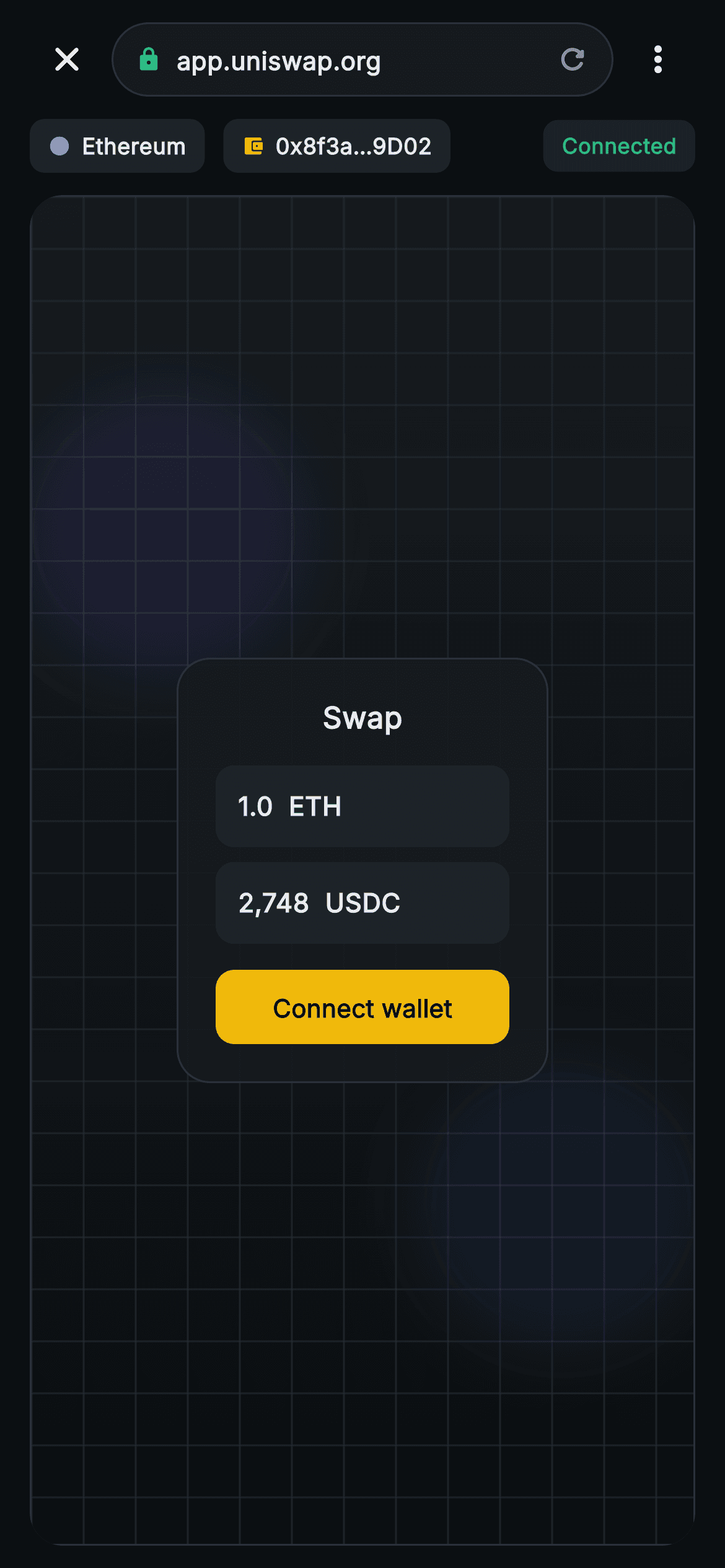
When a wallet opens a dApp inside the app, the user needs to see at a glance which site they are on, whether the connection is encrypted, and which account the page can see. This tutorial builds Aurum's in-app browser chrome in Flutter: a pill URL bar with a green padlock and clipped host, network and account chips beside a Connected badge, and a framed viewport holding a mock Swap card. The page body is a painted placeholder, and you'll see exactly where webview_flutter slots in.
What you'll build
- ✓A pill-shaped URL bar with a green lock_rounded padlock, an ellipsis-clipped app.uniswap.org host and a refresh glyph, flanked by close and overflow buttons
- ✓An Ethereum network chip and a 0x8f3a…9D02 account chip produced by one _chip builder, with a green Connected badge pushed to the right edge by a Spacer
- ✓A rounded, anti-aliased viewport frame clipping a CustomPainter canvas (gradient, 28px grid, two blurred blobs) that stands in for rendered web content
- ✓A centred translucent mock Swap card whose amber Connect wallet button is the one control wired to a callback, onConnect
- ✓A clear path to replace the mock body with a real WebViewWidget and drive the URL bar from navigation events
Step-by-step build
Create the file
Add a new file at lib/web3_dapp_browser/web3_dapp_browser_screen.dart in your Flutter project.
Register the bundled fonts
No external packages — this is pure Flutter. It does bundle its design font (Inter), so drop the font file into fonts/ and declare it in pubspec.yaml:
flutter:
  fonts:
    - family: Inter
      fonts:
- asset: fonts/Inter-Regular.ttfBuild it, piece by piece
Here's how the screen goes together. Each block below is a real slice of the code with a plain-English explanation — paste them in order, or grab the whole file from the next section.
Browser chrome with no navigation state
import 'package:flutter/material.dart';

/// Web3 — dApp Browser. In-app browser chrome (URL bar, network chip, account
/// chip) over a painted dApp placeholder canvas, with a connect action. Self-
/// contained per CONVENTIONS.md: pure Flutter, bundled Inter font, canvas
/// CustomPaint (no glyphs / no network image), forced dark theme so it renders
/// standalone as a route.
class Web3DappBrowserScreen extends StatelessWidget {
  const Web3DappBrowserScreen({
    super.key,
    this.onClose,
    this.onConnect,
  });

  final VoidCallback? onClose;
  final VoidCallback? onConnect;

  static const String _font = 'Inter';
  static const Color _bg = Color(0xFF0B0E11);
  static const Color _surface = Color(0xFF161A1E);
  static const Color _surfaceAlt = Color(0xFF1E2329);
  static const Color _brand = Color(0xFFF0B90B);
  static const Color _up = Color(0xFF2EBD85);
  static const Color _text = Color(0xFFEAECEF);
  static const Color _muted = Color(0xFF848E9C);
  static const Color _hairline = Color(0xFF2B3139);
The doc comment states the contract plainly: browser chrome over a painted placeholder canvas. That framing matters, because nothing in this file loads a URL, and it is why `Web3DappBrowserScreen` can be a `StatelessWidget`. A real browser owns navigation state (current URL, load progress, whether it can go back), whereas this one renders fixed chrome, so all it exposes are two nullable callbacks: `onClose` for the X and `onConnect` for the dApp's button. The colours are the shared Aurum constants; the one doing unique work here is `_up` green `#2EBD85`, reused for both the padlock and the Connected badge so 'encrypted' and 'linked' read as the same reassuring signal.
The URL row: close, address pill, overflow
  @override
  Widget build(BuildContext context) {
    return Theme(
      data: ThemeData.dark(useMaterial3: true),
      child: Scaffold(
        backgroundColor: _bg,
        body: SafeArea(
          child: Column(
            children: <Widget>[
              // Browser chrome.
              Padding(
                padding: const EdgeInsets.fromLTRB(12, 8, 12, 8),
                child: Row(
                  children: <Widget>[
                    IconButton(
                      onPressed: onClose,
                      icon: const Icon(Icons.close_rounded,
                          size: 22, color: _text),
                    ),
                    Expanded(
                      child: Container(
                        height: 40,
                        padding: const EdgeInsets.symmetric(horizontal: 12),
                        decoration: BoxDecoration(
                          color: _surface,
                          borderRadius: BorderRadius.circular(20),
                          border: Border.all(color: _hairline),
                        ),
                        child: Row(
                          children: const <Widget>[
                            Icon(Icons.lock_rounded, size: 14, color: _up),
                            SizedBox(width: 8),
                            Expanded(
                              child: Text(
                                'app.uniswap.org',
                                maxLines: 1,
                                overflow: TextOverflow.ellipsis,
                                style: TextStyle(
                                  fontFamily: _font,
                                  fontSize: 13.5,
                                  fontWeight: FontWeight.w600,
                                  color: _text,
                                ),
                              ),
                            ),
                            Icon(Icons.refresh_rounded,
                                size: 18, color: _muted),
                          ],
                        ),
                      ),
                    ),
                    IconButton(
                      onPressed: () {},
                      icon: const Icon(Icons.more_vert_rounded,
                          size: 22, color: _text),
                    ),
                  ],
                ),
              ),
Under the forced-dark `Theme`, the body is a bare `Column` inside a full `SafeArea` with no `AppBar`, because in a browser the URL row is the top bar and a title would only repeat the host. The row runs close `IconButton`, an `Expanded` address pill, then an overflow `IconButton`. The pill is a 40px-high `Container` with `BorderRadius.circular(20)`, exactly half its height, so both ends are true semicircles. A 14px `Icons.lock_rounded` in green leads, then only the origin 'app.uniswap.org' rather than a full https path, since the origin is what a user checks against phishing. That `Text` sits in its own `Expanded` with `maxLines: 1` and `TextOverflow.ellipsis`, so a long subdomain truncates instead of pushing the refresh glyph out of the pill. Honest caveats: the padlock is hard-coded rather than derived from the scheme, the refresh glyph is a plain `Icon` with no tap handler, and the overflow button's `onPressed: () {}` makes it look enabled and ripple while doing nothing.
Network and account chips with a Connected badge
              // Network + account chips.
              Padding(
                padding: const EdgeInsets.fromLTRB(16, 0, 16, 8),
                child: Row(
                  children: <Widget>[
                    _chip(
                      const Color(0xFF627EEA),
                      'Ethereum',
                      Icons.circle,
                    ),
                    const SizedBox(width: 10),
                    _chip(_brand, '0x8f3a…9D02', Icons.account_balance_wallet_rounded),
                    const Spacer(),
                    Container(
                      padding: const EdgeInsets.symmetric(
                          horizontal: 10, vertical: 6),
                      decoration: BoxDecoration(
                        color: _up.withValues(alpha: 0.16),
                        borderRadius: BorderRadius.circular(8),
                      ),
                      child: const Text(
                        'Connected',
                        style: TextStyle(
                          fontFamily: _font,
                          fontSize: 11.5,
                          fontWeight: FontWeight.w700,
                          color: _up,
                        ),
                      ),
                    ),
                  ],
                ),
              ),
The second row answers 'what can this page see?'. Two `_chip` calls sit on the left: 'Ethereum' with `Icons.circle` tinted `#627EEA`, Ethereum's own brand blue, acting as a network dot, and the account '0x8f3a…9D02' with a wallet icon in amber. The address keeps four hex characters at each end, the form people compare against their wallet. A `Spacer` then shoves the 'Connected' badge to the far right, separating session state from identity. The badge is green on green, `_up.withValues(alpha: 0.16)` fill under full `_up` 11.5px `w700` text, with the same 8px radius as the chips so all three read as one family. This row uses 16px side padding, 4px more than the URL row, which aligns the chips with the viewport frame below rather than the icon buttons above.
The viewport frame where a WebView belongs
              // dApp canvas placeholder.
              Expanded(
                child: Container(
                  margin: const EdgeInsets.fromLTRB(16, 4, 16, 12),
                  decoration: BoxDecoration(
                    borderRadius: BorderRadius.circular(18),
                    border: Border.all(color: _hairline),
                  ),
                  clipBehavior: Clip.antiAlias,
                  child: Stack(
                    children: <Widget>[
                      Positioned.fill(
                        child: CustomPaint(painter: _CanvasPainter()),
                      ),
This is the slot a real browser fills with its web view, and it is built to be swapped. `Expanded` hands the frame every pixel the chrome leaves over, so the 'page' grows with the device. The `Container` carries an 18px radius and hairline border, and `clipBehavior: Clip.antiAlias` is the line that matters: without it the painted canvas would draw square corners straight through the rounded border. Inside, a `Stack` layers a `Positioned.fill` `CustomPaint`, which forces the painter's `size` to match the frame, beneath the centred mock content. To go live you replace this Stack's children with a single `WebViewWidget` and leave the margin, border and clipping exactly as they are.
A mock Swap card standing in for the dApp
                      Center(
                        child: Column(
                          mainAxisSize: MainAxisSize.min,
                          children: <Widget>[
                            Container(
                              width: 200,
                              padding: const EdgeInsets.all(20),
                              decoration: BoxDecoration(
                                color: _surface.withValues(alpha: 0.92),
                                borderRadius: BorderRadius.circular(18),
                                border: Border.all(color: _hairline),
                              ),
                              child: Column(
                                children: <Widget>[
                                  const Text(
                                    'Swap',
                                    style: TextStyle(
                                      fontFamily: _font,
                                      fontSize: 16,
                                      fontWeight: FontWeight.w800,
                                      color: _text,
                                    ),
                                  ),
                                  const SizedBox(height: 14),
                                  _fakeField('1.0  ETH'),
                                  const SizedBox(height: 8),
                                  _fakeField('2,748  USDC'),
                                  const SizedBox(height: 14),
                                  SizedBox(
                                    width: double.infinity,
                                    height: 40,
                                    child: FilledButton(
                                      onPressed: onConnect,
                                      style: FilledButton.styleFrom(
                                        backgroundColor: _brand,
                                        shape: RoundedRectangleBorder(
                                          borderRadius:
                                              BorderRadius.circular(10),
                                        ),
                                      ),
                                      child: const Text(
                                        'Connect wallet',
                                        style: TextStyle(
                                          fontFamily: _font,
                                          fontSize: 13.5,
                                          fontWeight: FontWeight.w700,
                                          color: _bg,
                                        ),
                                      ),
                                    ),
                                  ),
                                ],
                              ),
                            ),
                          ],
                        ),
                      ),
                    ],
                  ),
                ),
              ),
            ],
          ),
        ),
      ),
    );
  }
Floating mid-canvas is a fake dApp interface: a fixed 200px-wide card on `_surface.withValues(alpha: 0.92)`, so the grid and blobs faintly show through like a glass panel on a real swap site. It holds a 16px `w800` 'Swap' title, two `_fakeField` rows reading '1.0 ETH' and '2,748 USDC' (the double space separates amount from ticker without needing a Row), and a 40px full-width amber `FilledButton` labelled 'Connect wallet' in `_bg` text. That button is the only live control on the page; it fires `onConnect`, where your app would show a connection approval sheet. Keep in mind this card is Flutter widgets, not HTML: in a real browser the button belongs to the website and the request reaches you through an injected provider. `Center` around a `MainAxisSize.min` Column keeps the card at its natural height whatever the frame size.
Two small builders: chips and read-only fields
  Widget _chip(Color dot, String label, IconData icon) {
    return Container(
      padding: const EdgeInsets.symmetric(horizontal: 10, vertical: 6),
      decoration: BoxDecoration(
        color: _surfaceAlt,
        borderRadius: BorderRadius.circular(8),
      ),
      child: Row(
        children: <Widget>[
          Icon(icon, size: 12, color: dot),
          const SizedBox(width: 6),
          Text(
            label,
            style: const TextStyle(
              fontFamily: _font,
              fontSize: 12,
              fontWeight: FontWeight.w700,
              color: _text,
            ),
          ),
        ],
      ),
    );
  }

  Widget _fakeField(String s) {
    return Container(
      width: double.infinity,
      padding: const EdgeInsets.symmetric(horizontal: 12, vertical: 12),
      decoration: BoxDecoration(
        color: _surfaceAlt,
        borderRadius: BorderRadius.circular(10),
      ),
      child: Text(
        s,
        style: const TextStyle(
          fontFamily: _font,
          fontSize: 14,
          fontWeight: FontWeight.w700,
          color: _text,
        ),
      ),
    );
  }
}
`_chip` takes a colour, a label and an icon, and the colour parameter is named `dot` because it tints only the icon; the label is always `_text` and the fill always `_surfaceAlt` `#1E2329`, a step lighter than the URL pill, so chips read as tags rather than inputs. Passing `Icons.circle` at size 12 yields a solid status dot without an extra widget, while passing the wallet icon yields an account glyph from the same builder. The inner Row needs no `MainAxisSize.min` because the outer Row offers unbounded width, so it shrink-wraps its content anyway. `_fakeField` is a full-width `_surfaceAlt` box with 10px radius, 12px padding and 14px `w700` text. It is deliberately a `Container` and `Text`, not a `TextField`, which is honest: nothing on the mock page accepts input.
Painting a placeholder page with no network image
/// A soft gradient canvas with a faint grid, standing in for rendered dApp web
/// content (no network image).
class _CanvasPainter extends CustomPainter {
  @override
  void paint(Canvas canvas, Size size) {
    canvas.drawRect(
      Offset.zero & size,
      Paint()
        ..shader = const LinearGradient(
          begin: Alignment.topCenter,
          end: Alignment.bottomCenter,
          colors: <Color>[Color(0xFF161A1E), Color(0xFF0B0E11)],
        ).createShader(Offset.zero & size),
    );
    final Paint grid = Paint()
      ..color = const Color(0xFF2B3139).withValues(alpha: 0.5)
      ..strokeWidth = 1;
    const double step = 28;
    for (double x = 0; x < size.width; x += step) {
      canvas.drawLine(Offset(x, 0), Offset(x, size.height), grid);
    }
    for (double y = 0; y < size.height; y += step) {
      canvas.drawLine(Offset(0, y), Offset(size.width, y), grid);
    }
    // A couple of decorative blobs.
    for (int i = 0; i < 2; i++) {
      canvas.drawCircle(
        Offset(size.width * (0.2 + 0.6 * i), size.height * (0.25 + 0.5 * i)),
        size.width * 0.22,
        Paint()
          ..color = (i == 0
                  ? const Color(0xFF7B61FF)
                  : const Color(0xFF2775CA))
              .withValues(alpha: 0.10)
          ..maskFilter = const MaskFilter.blur(BlurStyle.normal, 18),
      );
    }
  }

  @override
  bool shouldRepaint(_CanvasPainter old) => false;
}
`_CanvasPainter` suggests 'a page is rendered here' without fetching anything. First a `LinearGradient` shader runs from `#161A1E` at the top to `#0B0E11` at the bottom, so the viewport starts a shade lighter than the scaffold and reads as its own surface. Next a grid: one `Paint` in the hairline colour at 50% alpha with a 1px stroke, and two loops stepping by `step = 28`, vertical lines across the width and horizontal lines down the height. The loops start at 0, so the grid anchors top-left and simply crops at the right and bottom. Finally two circles: the expressions `0.2 + 0.6 * i` and `0.25 + 0.5 * i` put them at opposite corners, each with radius `size.width * 0.22`, in violet `#7B61FF` and blue `#2775CA` at 10% alpha, softened by `MaskFilter.blur(BlurStyle.normal, 18)`. `shouldRepaint` returns false because the painter holds no fields.
Full code
The complete, ready-to-paste source. Free to use in your projects — one click copies it all.
import 'package:flutter/material.dart';

/// Web3 — dApp Browser. In-app browser chrome (URL bar, network chip, account
/// chip) over a painted dApp placeholder canvas, with a connect action. Self-
/// contained per CONVENTIONS.md: pure Flutter, bundled Inter font, canvas
/// CustomPaint (no glyphs / no network image), forced dark theme so it renders
/// standalone as a route.
class Web3DappBrowserScreen extends StatelessWidget {
  const Web3DappBrowserScreen({
    super.key,
    this.onClose,
    this.onConnect,
  });

  final VoidCallback? onClose;
  final VoidCallback? onConnect;

  static const String _font = 'Inter';
  static const Color _bg = Color(0xFF0B0E11);
  static const Color _surface = Color(0xFF161A1E);
  static const Color _surfaceAlt = Color(0xFF1E2329);
  static const Color _brand = Color(0xFFF0B90B);
  static const Color _up = Color(0xFF2EBD85);
  static const Color _text = Color(0xFFEAECEF);
  static const Color _muted = Color(0xFF848E9C);
  static const Color _hairline = Color(0xFF2B3139);

  @override
  Widget build(BuildContext context) {
    return Theme(
      data: ThemeData.dark(useMaterial3: true),
      child: Scaffold(
        backgroundColor: _bg,
        body: SafeArea(
          child: Column(
            children: <Widget>[
              // Browser chrome.
              Padding(
                padding: const EdgeInsets.fromLTRB(12, 8, 12, 8),
                child: Row(
                  children: <Widget>[
                    IconButton(
                      onPressed: onClose,
                      icon: const Icon(Icons.close_rounded,
                          size: 22, color: _text),
                    ),
                    Expanded(
                      child: Container(
                        height: 40,
                        padding: const EdgeInsets.symmetric(horizontal: 12),
                        decoration: BoxDecoration(
                          color: _surface,
                          borderRadius: BorderRadius.circular(20),
                          border: Border.all(color: _hairline),
                        ),
                        child: Row(
                          children: const <Widget>[
                            Icon(Icons.lock_rounded, size: 14, color: _up),
                            SizedBox(width: 8),
                            Expanded(
                              child: Text(
                                'app.uniswap.org',
                                maxLines: 1,
                                overflow: TextOverflow.ellipsis,
                                style: TextStyle(
                                  fontFamily: _font,
                                  fontSize: 13.5,
                                  fontWeight: FontWeight.w600,
                                  color: _text,
                                ),
                              ),
                            ),
                            Icon(Icons.refresh_rounded,
                                size: 18, color: _muted),
                          ],
                        ),
                      ),
                    ),
                    IconButton(
                      onPressed: () {},
                      icon: const Icon(Icons.more_vert_rounded,
                          size: 22, color: _text),
                    ),
                  ],
                ),
              ),
              // Network + account chips.
              Padding(
                padding: const EdgeInsets.fromLTRB(16, 0, 16, 8),
                child: Row(
                  children: <Widget>[
                    _chip(
                      const Color(0xFF627EEA),
                      'Ethereum',
                      Icons.circle,
                    ),
                    const SizedBox(width: 10),
                    _chip(_brand, '0x8f3a…9D02', Icons.account_balance_wallet_rounded),
                    const Spacer(),
                    Container(
                      padding: const EdgeInsets.symmetric(
                          horizontal: 10, vertical: 6),
                      decoration: BoxDecoration(
                        color: _up.withValues(alpha: 0.16),
                        borderRadius: BorderRadius.circular(8),
                      ),
                      child: const Text(
                        'Connected',
                        style: TextStyle(
                          fontFamily: _font,
                          fontSize: 11.5,
                          fontWeight: FontWeight.w700,
                          color: _up,
                        ),
                      ),
                    ),
                  ],
                ),
              ),
              // dApp canvas placeholder.
              Expanded(
                child: Container(
                  margin: const EdgeInsets.fromLTRB(16, 4, 16, 12),
                  decoration: BoxDecoration(
                    borderRadius: BorderRadius.circular(18),
                    border: Border.all(color: _hairline),
                  ),
                  clipBehavior: Clip.antiAlias,
                  child: Stack(
                    children: <Widget>[
                      Positioned.fill(
                        child: CustomPaint(painter: _CanvasPainter()),
                      ),
                      Center(
                        child: Column(
                          mainAxisSize: MainAxisSize.min,
                          children: <Widget>[
                            Container(
                              width: 200,
                              padding: const EdgeInsets.all(20),
                              decoration: BoxDecoration(
                                color: _surface.withValues(alpha: 0.92),
                                borderRadius: BorderRadius.circular(18),
                                border: Border.all(color: _hairline),
                              ),
                              child: Column(
                                children: <Widget>[
                                  const Text(
                                    'Swap',
                                    style: TextStyle(
                                      fontFamily: _font,
                                      fontSize: 16,
                                      fontWeight: FontWeight.w800,
                                      color: _text,
                                    ),
                                  ),
                                  const SizedBox(height: 14),
                                  _fakeField('1.0  ETH'),
                                  const SizedBox(height: 8),
                                  _fakeField('2,748  USDC'),
                                  const SizedBox(height: 14),
                                  SizedBox(
                                    width: double.infinity,
                                    height: 40,
                                    child: FilledButton(
                                      onPressed: onConnect,
                                      style: FilledButton.styleFrom(
                                        backgroundColor: _brand,
                                        shape: RoundedRectangleBorder(
                                          borderRadius:
                                              BorderRadius.circular(10),
                                        ),
                                      ),
                                      child: const Text(
                                        'Connect wallet',
                                        style: TextStyle(
                                          fontFamily: _font,
                                          fontSize: 13.5,
                                          fontWeight: FontWeight.w700,
                                          color: _bg,
                                        ),
                                      ),
                                    ),
                                  ),
                                ],
                              ),
                            ),
                          ],
                        ),
                      ),
                    ],
                  ),
                ),
              ),
            ],
          ),
        ),
      ),
    );
  }

  Widget _chip(Color dot, String label, IconData icon) {
    return Container(
      padding: const EdgeInsets.symmetric(horizontal: 10, vertical: 6),
      decoration: BoxDecoration(
        color: _surfaceAlt,
        borderRadius: BorderRadius.circular(8),
      ),
      child: Row(
        children: <Widget>[
          Icon(icon, size: 12, color: dot),
          const SizedBox(width: 6),
          Text(
            label,
            style: const TextStyle(
              fontFamily: _font,
              fontSize: 12,
              fontWeight: FontWeight.w700,
              color: _text,
            ),
          ),
        ],
      ),
    );
  }

  Widget _fakeField(String s) {
    return Container(
      width: double.infinity,
      padding: const EdgeInsets.symmetric(horizontal: 12, vertical: 12),
      decoration: BoxDecoration(
        color: _surfaceAlt,
        borderRadius: BorderRadius.circular(10),
      ),
      child: Text(
        s,
        style: const TextStyle(
          fontFamily: _font,
          fontSize: 14,
          fontWeight: FontWeight.w700,
          color: _text,
        ),
      ),
    );
  }
}

/// A soft gradient canvas with a faint grid, standing in for rendered dApp web
/// content (no network image).
class _CanvasPainter extends CustomPainter {
  @override
  void paint(Canvas canvas, Size size) {
    canvas.drawRect(
      Offset.zero & size,
      Paint()
        ..shader = const LinearGradient(
          begin: Alignment.topCenter,
          end: Alignment.bottomCenter,
          colors: <Color>[Color(0xFF161A1E), Color(0xFF0B0E11)],
        ).createShader(Offset.zero & size),
    );
    final Paint grid = Paint()
      ..color = const Color(0xFF2B3139).withValues(alpha: 0.5)
      ..strokeWidth = 1;
    const double step = 28;
    for (double x = 0; x < size.width; x += step) {
      canvas.drawLine(Offset(x, 0), Offset(x, size.height), grid);
    }
    for (double y = 0; y < size.height; y += step) {
      canvas.drawLine(Offset(0, y), Offset(size.width, y), grid);
    }
    // A couple of decorative blobs.
    for (int i = 0; i < 2; i++) {
      canvas.drawCircle(
        Offset(size.width * (0.2 + 0.6 * i), size.height * (0.25 + 0.5 * i)),
        size.width * 0.22,
        Paint()
          ..color = (i == 0
                  ? const Color(0xFF7B61FF)
                  : const Color(0xFF2775CA))
              .withValues(alpha: 0.10)
          ..maskFilter = const MaskFilter.blur(BlurStyle.normal, 18),
      );
    }
  }

  @override
  bool shouldRepaint(_CanvasPainter old) => false;
}
Plus bundled 1 binary asset (fonts/images). The CLI and MCP install those for you automatically.
Two faster ways to add it
Copy-paste works, but you can skip it entirely.
1. FlutterKit CLI
One command drops this screen — and its fonts — straight into your project.
$ flutterkit add web3-dapp-browser2. AI agent (MCP)
Connect FlutterKit's MCP server in Claude or Cursor and just ask your agent to install web3-dapp-browser — it fetches and writes the files for you.
FAQ
Can I ship this dApp browser screen in a commercial wallet?
Yes. It is free for any project, commercial included. Copy the code from this page, add it with the CLI, or pull it through MCP and put it in a production app. You do not need a licence key, and there is no attribution line to include.
How do I replace the painted placeholder with a real website?
Add `webview_flutter`, turn the screen into a `StatefulWidget`, and create a `WebViewController()..setJavaScriptMode(JavaScriptMode.unrestricted)..loadRequest(Uri.parse('https://app.uniswap.org'))`. In the viewport `Stack`, replace the `CustomPaint` and Swap card with `WebViewWidget(controller: _controller)`. Use `setNavigationDelegate(NavigationDelegate(onUrlChange: ...))` to store the current `Uri` in state, then render `uri.host` in the pill and point the refresh glyph at `_controller.reload()`. A real wallet connection takes more work than this: you inject an EIP-1193 `window.ethereum` shim with `runJavaScript` and handle its requests through `addJavaScriptChannel`.
The padlock, chips and Connected badge never change. How do I make them live?
They are literals in the file: the lock is always green, the host is always 'app.uniswap.org', and the badge always reads 'Connected', even while the mock page shows a 'Connect wallet' button, which a live build would never do. Hold the current `Uri`, chain and session in state. Show the lock only when `uri.scheme == 'https'` and use a warning icon otherwise. Feed the chain name and colour into `_chip`, and render the badge only once the site has an approved session for that account.
Does it need any packages or font setup?
As written, no. The single import is `package:flutter/material.dart`, the page body is a `CustomPainter`, and there is no web view dependency until you choose to add one. Text uses `fontFamily: 'Inter'`, bundled with the screen at `lib/web3_dapp_browser/fonts/Inter.ttf`, so nothing is fetched at runtime and no google_fonts package is involved.
Which Flutter version does this screen require?
Flutter 3.22 or newer. The Connected badge, the translucent Swap card and the painter's grid and blobs all call `Color.withValues(alpha: ...)`, and the constructor uses the `super.key` super parameter. On an older SDK, change each `withValues(alpha: x)` to `withOpacity(x)` and write the constructor as `{Key? key, this.onClose, this.onConnect} : super(key: key)`.


