How to Build a Crypto Deposit Coin Picker Screen in Flutter (Full Code + Preview)
Every crypto deposit starts with the same question: which asset are you receiving? Get that step wrong — or hide how many networks a coin supports — and users end up sending USDT over the wrong chain. This tutorial walks through Aurum's coin picker in Flutter: a dark, exchange-style list of nine assets with live search over ticker and name, circular badges painted from each coin's brand colour with no image assets, and a per-coin network count that sets up the next step. You get the full Dart file, explained chunk by chunk.
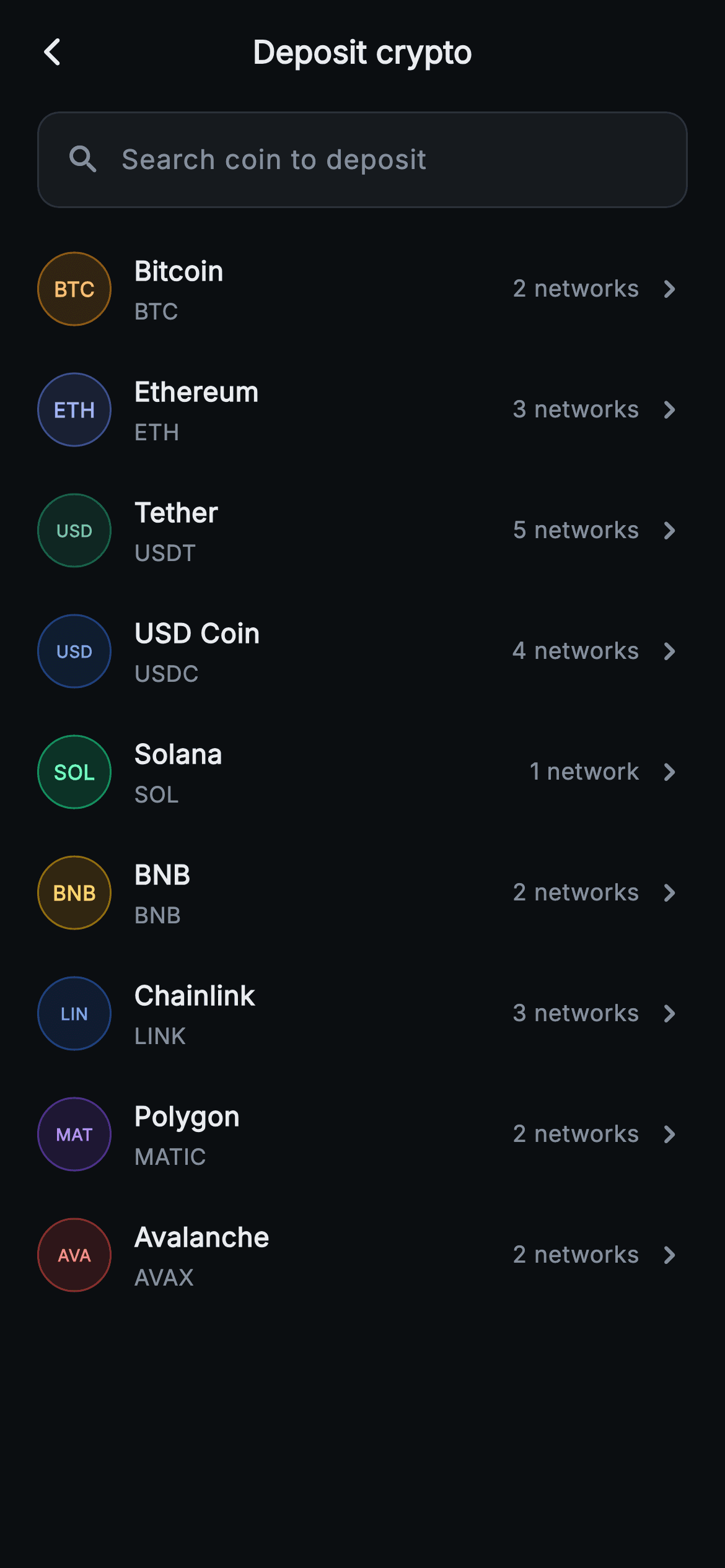
What you'll build
- ✓A live search field that filters nine coins by ticker or name on every keystroke via setState
- ✓Circular ticker badges built from each coin's brand tint — a 16% fill, a 50% ring, no logo images or icon fonts
- ✓Coin rows pairing name and symbol with a smart-pluralised '2 networks' / '1 network' trailing hint
- ✓A forced ThemeData.dark wrapper so the screen renders correctly as a standalone route in any app
- ✓Backend-agnostic onSelect(ticker) and onBack callbacks ready to wire into a real wallet or exchange flow
Step-by-step build
Create the file
Add a new file at lib/web3_deposit_select_coin/web3_deposit_select_coin_screen.dart in your Flutter project.
Register the bundled fonts
No external packages — this is pure Flutter. It does bundle its design font (Inter), so drop the font file into fonts/ and declare it in pubspec.yaml:
flutter:
  fonts:
    - family: Inter
      fonts:
- asset: fonts/Inter-Regular.ttfBuild it, piece by piece
Here's how the screen goes together. Each block below is a real slice of the code with a plain-English explanation — paste them in order, or grab the whole file from the next section.
A StatefulWidget with exactly two exits
import 'package:flutter/material.dart';

/// Web3 deposit — Select coin. A searchable list of coins to receive on-chain
/// with painted ticker badges and a network count. Self-contained per
/// CONVENTIONS.md: pure Flutter, bundled Inter font, painted ticker badges
/// (no glyphs / no network image), forced dark theme so it renders standalone
/// as a route.
class Web3DepositSelectCoinScreen extends StatefulWidget {
  const Web3DepositSelectCoinScreen({super.key, this.onBack, this.onSelect});

  final VoidCallback? onBack;
  final ValueChanged<String>? onSelect;

  @override
  State<Web3DepositSelectCoinScreen> createState() =>
      _Web3DepositSelectCoinScreenState();
}
`Web3DepositSelectCoinScreen` takes only `onBack` and `onSelect` — a `VoidCallback?` and a `ValueChanged<String>?`. The select callback hands back the ticker string ('BTC', 'USDT'), not a coin object, which is a deliberately thin contract: the parent flow only needs to know which asset to fetch deposit networks for next, and a string survives navigation arguments, deep links and analytics events without a shared model class. Unlike the flow's later confirmation screens this one is stateful, because the search query has to live somewhere and this screen owns it.
The palette and the coin table
class _Web3DepositSelectCoinScreenState
    extends State<Web3DepositSelectCoinScreen> {
  static const String _font = 'Inter';
  static const Color _bg = Color(0xFF0B0E11);
  static const Color _surface = Color(0xFF161A1E);
  static const Color _text = Color(0xFFEAECEF);
  static const Color _muted = Color(0xFF848E9C);
  static const Color _hairline = Color(0xFF2B3139);

  // ticker, name, networkCount, tint
  static const List<_Coin> _coins = <_Coin>[
    _Coin('BTC', 'Bitcoin', 2, Color(0xFFF7931A)),
    _Coin('ETH', 'Ethereum', 3, Color(0xFF627EEA)),
    _Coin('USDT', 'Tether', 5, Color(0xFF26A17B)),
    _Coin('USDC', 'USD Coin', 4, Color(0xFF2775CA)),
    _Coin('SOL', 'Solana', 1, Color(0xFF14F195)),
    _Coin('BNB', 'BNB', 2, Color(0xFFF0B90B)),
    _Coin('LINK', 'Chainlink', 3, Color(0xFF2A5ADA)),
    _Coin('MATIC', 'Polygon', 2, Color(0xFF8247E5)),
    _Coin('AVAX', 'Avalanche', 2, Color(0xFFE84142)),
  ];

  String _query = '';
Five colour constants define the whole exchange look: `#0B0E11` background, `#161A1E` surface, `#EAECEF` text, `#848E9C` muted and a `#2B3139` hairline — near-black with grey-blue text, the register users already trust from trading apps. The interesting part is `_coins`: each `_Coin` carries a ticker, a name, a network count and a `tint` set to the asset's real brand colour — `#F7931A` for Bitcoin, `#627EEA` for Ethereum, `#26A17B` for Tether. Storing the brand colour as data is what lets the row widget later paint a recognisable badge for every coin without shipping a single logo file. `_query` is the screen's only piece of mutable state.
Search as a getter, not a second list
  List<_Coin> get _filtered {
    if (_query.isEmpty) return _coins;
    final String q = _query.toLowerCase();
    return _coins
        .where((_Coin c) =>
            c.ticker.toLowerCase().contains(q) ||
            c.name.toLowerCase().contains(q))
        .toList();
  }
`_filtered` is a computed getter, not a cached `List` updated in handlers — the classic source of stale-filter bugs. It lowercases the query once, then matches `contains` against both `c.ticker` and `c.name`, so typing 'sol' finds Solana and typing 'usd' finds Tether ('USDT'), USD Coin and nothing else. Substring matching rather than prefix matching matters for crypto in particular: people search 'poly' for MATIC and 'chain' for LINK, where the ticker and the household name share almost no letters. The empty-query early return skips the whole `where` pass for the common case.
Forcing dark mode at the root
  @override
  Widget build(BuildContext context) {
    final List<_Coin> list = _filtered;
    return Theme(
      data: ThemeData.dark(useMaterial3: true),
      child: Scaffold(
        backgroundColor: _bg,
        appBar: AppBar(
          backgroundColor: _bg,
          elevation: 0,
          centerTitle: true,
          leading: IconButton(
            onPressed: widget.onBack,
            icon: const Icon(Icons.arrow_back_ios_new_rounded,
                size: 18, color: _text),
          ),
          title: const Text(
            'Deposit crypto',
            style: TextStyle(
              fontFamily: _font,
              fontSize: 17,
              fontWeight: FontWeight.w700,
              color: _text,
            ),
          ),
        ),
`build` wraps everything in `Theme(data: ThemeData.dark(useMaterial3: true))` before the `Scaffold`. That is not decoration — the `TextField` further down inherits its selection handles, and the `InkWell` rows inherit their ripple, from the ambient theme; without the wrapper a light-themed host app would produce dark splashes and handles on a near-black screen. The `AppBar` matches `_bg` with `elevation: 0` so it fuses with the body, centres a 17px `w700` 'Deposit crypto' title, and uses `Icons.arrow_back_ios_new_rounded` at 18px wired to `widget.onBack` — a back chevron, not a close icon, because this is step one of a flow, not the end of one.
A search field that keeps the exchange look
        body: SafeArea(
          top: false,
          child: Column(
            children: <Widget>[
              Padding(
                padding: const EdgeInsets.fromLTRB(20, 4, 20, 8),
                child: Container(
                  padding: const EdgeInsets.symmetric(horizontal: 14),
                  decoration: BoxDecoration(
                    color: _surface,
                    borderRadius: BorderRadius.circular(12),
                    border: Border.all(color: _hairline),
                  ),
                  child: Row(
                    children: <Widget>[
                      const Icon(Icons.search_rounded, size: 20, color: _muted),
                      const SizedBox(width: 10),
                      Expanded(
                        child: TextField(
                          onChanged: (String v) => setState(() => _query = v),
                          style: const TextStyle(
                            fontFamily: _font,
                            fontSize: 14.5,
                            color: _text,
                          ),
                          cursorColor: const Color(0xFFF0B90B),
                          decoration: const InputDecoration(
                            isCollapsed: true,
                            border: InputBorder.none,
                            contentPadding: EdgeInsets.symmetric(vertical: 14),
                            hintText: 'Search coin to deposit',
                            hintStyle: TextStyle(
                              fontFamily: _font,
                              fontSize: 14.5,
                              color: _muted,
                            ),
                          ),
                        ),
                      ),
                    ],
                  ),
                ),
              ),
Rather than a Material `TextField` with an `OutlineInputBorder`, the field is a plain `TextField` stripped bare — `isCollapsed: true`, `border: InputBorder.none` — sitting inside a hand-built `Container` with the `_surface` fill, a 12px radius and a `_hairline` border. That split is what keeps the box pixel-identical to the coin rows' visual language instead of Material's floating-label styling. `onChanged` writes straight into `setState(() => _query = v)`, so the list below re-filters on every keystroke with no debounce — fine for nine local items. One detail worth stealing: `cursorColor` is `#F0B90B`, the exchange-gold accent, the only warm colour on the screen.
The list, and the empty state it needs
              Expanded(
                child: list.isEmpty
                    ? const Center(
                        child: Text(
                          'No coins match your search.',
                          style: TextStyle(
                            fontFamily: _font,
                            fontSize: 13.5,
                            color: _muted,
                          ),
                        ),
                      )
                    : ListView.separated(
                        padding: const EdgeInsets.symmetric(
                            horizontal: 20, vertical: 4),
                        itemCount: list.length,
                        separatorBuilder: (BuildContext context, int i) =>
                            const SizedBox(height: 2),
                        itemBuilder: (BuildContext context, int i) {
                          final _Coin c = list[i];
                          return _CoinRow(
                            coin: c,
                            onTap: () => widget.onSelect?.call(c.ticker),
                          );
                        },
                      ),
              ),
            ],
          ),
        ),
      ),
    );
  }
}
The body's `Expanded` holds a ternary: when `_filtered` comes back empty, a centred muted 'No coins match your search.' replaces the list, because a silently blank scroll area after typing a typo reads as a broken screen. Otherwise `ListView.separated` renders the rows with a 2px separator — the rows carry their own 11px vertical padding, so the near-zero separator keeps tap targets tall while the list stays visually dense like an exchange. Each `itemBuilder` returns a `_CoinRow` whose `onTap` calls `widget.onSelect?.call(c.ticker)`, converting a row tap into the string the next screen needs. Note `itemCount: list.length` and `list[i]` both read the filtered list, never `_coins`.
A typedef trick and the coin model
typedef _S = _Web3DepositSelectCoinScreenState;

class _Coin {
  const _Coin(this.ticker, this.name, this.networks, this.tint);

  final String ticker;
  final String name;
  final int networks;
  final Color tint;
}
`typedef _S = _Web3DepositSelectCoinScreenState;` is a two-character alias that lets `_CoinRow`, a separate class, reach the State's private constants as `_S._font` and `_S._muted` instead of repeating the palette or threading five colours through a constructor. It works because both classes share a library, and it keeps every colour defined exactly once. `_Coin` itself is a four-field `const` value class — ticker, name, networks, tint — small enough that the entire seed list compiles into the constant pool at build time.
The coin row and its painted badge
class _CoinRow extends StatelessWidget {
  const _CoinRow({required this.coin, required this.onTap});

  final _Coin coin;
  final VoidCallback onTap;

  @override
  Widget build(BuildContext context) {
    return Material(
      color: Colors.transparent,
      child: InkWell(
        borderRadius: BorderRadius.circular(14),
        onTap: onTap,
        child: Padding(
          padding: const EdgeInsets.symmetric(vertical: 11),
          child: Row(
            children: <Widget>[
              Container(
                width: 40,
                height: 40,
                decoration: BoxDecoration(
                  color: coin.tint.withValues(alpha: 0.16),
                  shape: BoxShape.circle,
                  border: Border.all(color: coin.tint.withValues(alpha: 0.5)),
                ),
                alignment: Alignment.center,
                child: Text(
                  coin.ticker.length <= 3
                      ? coin.ticker
                      : coin.ticker.substring(0, 3),
                  style: TextStyle(
                    fontFamily: _S._font,
                    fontSize: coin.ticker.length >= 4 ? 9 : 11,
                    fontWeight: FontWeight.w700,
                    color: Color.lerp(coin.tint, Colors.white, 0.4),
                  ),
                ),
              ),
              const SizedBox(width: 12),
              Expanded(
                child: Column(
                  crossAxisAlignment: CrossAxisAlignment.start,
                  children: <Widget>[
                    Text(
                      coin.name,
                      style: const TextStyle(
                        fontFamily: _S._font,
                        fontSize: 14.5,
                        fontWeight: FontWeight.w600,
                        color: _S._text,
                      ),
                    ),
                    const SizedBox(height: 3),
                    Text(
                      coin.ticker,
                      style: const TextStyle(
                        fontFamily: _S._font,
                        fontSize: 12,
                        color: _S._muted,
                      ),
                    ),
                  ],
                ),
              ),
              Text(
                '${coin.networks} ${coin.networks == 1 ? 'network' : 'networks'}',
                style: const TextStyle(
                  fontFamily: _S._font,
                  fontSize: 12.5,
                  color: _S._muted,
                ),
              ),
              const SizedBox(width: 6),
              const Icon(Icons.keyboard_arrow_right_rounded,
                  size: 20, color: _S._muted),
            ],
          ),
        ),
      ),
    );
  }
}
`_CoinRow` wraps its `Row` in `Material(color: Colors.transparent)` plus `InkWell` so the ripple actually renders over the dark scaffold — an `InkWell` without a `Material` ancestor draws nothing. The badge is the screen's signature move: a 40px circle filled with `coin.tint.withValues(alpha: 0.16)`, ringed by the same tint at `0.5`, with the ticker as text — `Color.lerp(coin.tint, Colors.white, 0.4)` lightens each brand colour just enough to pass on its own dim fill. Two guards handle long tickers: `substring(0, 3)` truncates 'MATIC' to 'MAT', and the font drops from 11 to 9 when the ticker is 4+ characters. The trailing text interpolates `coin.networks` with a `== 1 ? 'network' : 'networks'` ternary, so Solana reads '1 network' while Tether reads '5 networks' — the number that decides how complex the next screen will be.
Full code
The complete, ready-to-paste source. Free to use in your projects — one click copies it all.
import 'package:flutter/material.dart';

/// Web3 deposit — Select coin. A searchable list of coins to receive on-chain
/// with painted ticker badges and a network count. Self-contained per
/// CONVENTIONS.md: pure Flutter, bundled Inter font, painted ticker badges
/// (no glyphs / no network image), forced dark theme so it renders standalone
/// as a route.
class Web3DepositSelectCoinScreen extends StatefulWidget {
  const Web3DepositSelectCoinScreen({super.key, this.onBack, this.onSelect});

  final VoidCallback? onBack;
  final ValueChanged<String>? onSelect;

  @override
  State<Web3DepositSelectCoinScreen> createState() =>
      _Web3DepositSelectCoinScreenState();
}

class _Web3DepositSelectCoinScreenState
    extends State<Web3DepositSelectCoinScreen> {
  static const String _font = 'Inter';
  static const Color _bg = Color(0xFF0B0E11);
  static const Color _surface = Color(0xFF161A1E);
  static const Color _text = Color(0xFFEAECEF);
  static const Color _muted = Color(0xFF848E9C);
  static const Color _hairline = Color(0xFF2B3139);

  // ticker, name, networkCount, tint
  static const List<_Coin> _coins = <_Coin>[
    _Coin('BTC', 'Bitcoin', 2, Color(0xFFF7931A)),
    _Coin('ETH', 'Ethereum', 3, Color(0xFF627EEA)),
    _Coin('USDT', 'Tether', 5, Color(0xFF26A17B)),
    _Coin('USDC', 'USD Coin', 4, Color(0xFF2775CA)),
    _Coin('SOL', 'Solana', 1, Color(0xFF14F195)),
    _Coin('BNB', 'BNB', 2, Color(0xFFF0B90B)),
    _Coin('LINK', 'Chainlink', 3, Color(0xFF2A5ADA)),
    _Coin('MATIC', 'Polygon', 2, Color(0xFF8247E5)),
    _Coin('AVAX', 'Avalanche', 2, Color(0xFFE84142)),
  ];

  String _query = '';

  List<_Coin> get _filtered {
    if (_query.isEmpty) return _coins;
    final String q = _query.toLowerCase();
    return _coins
        .where((_Coin c) =>
            c.ticker.toLowerCase().contains(q) ||
            c.name.toLowerCase().contains(q))
        .toList();
  }

  @override
  Widget build(BuildContext context) {
    final List<_Coin> list = _filtered;
    return Theme(
      data: ThemeData.dark(useMaterial3: true),
      child: Scaffold(
        backgroundColor: _bg,
        appBar: AppBar(
          backgroundColor: _bg,
          elevation: 0,
          centerTitle: true,
          leading: IconButton(
            onPressed: widget.onBack,
            icon: const Icon(Icons.arrow_back_ios_new_rounded,
                size: 18, color: _text),
          ),
          title: const Text(
            'Deposit crypto',
            style: TextStyle(
              fontFamily: _font,
              fontSize: 17,
              fontWeight: FontWeight.w700,
              color: _text,
            ),
          ),
        ),
        body: SafeArea(
          top: false,
          child: Column(
            children: <Widget>[
              Padding(
                padding: const EdgeInsets.fromLTRB(20, 4, 20, 8),
                child: Container(
                  padding: const EdgeInsets.symmetric(horizontal: 14),
                  decoration: BoxDecoration(
                    color: _surface,
                    borderRadius: BorderRadius.circular(12),
                    border: Border.all(color: _hairline),
                  ),
                  child: Row(
                    children: <Widget>[
                      const Icon(Icons.search_rounded, size: 20, color: _muted),
                      const SizedBox(width: 10),
                      Expanded(
                        child: TextField(
                          onChanged: (String v) => setState(() => _query = v),
                          style: const TextStyle(
                            fontFamily: _font,
                            fontSize: 14.5,
                            color: _text,
                          ),
                          cursorColor: const Color(0xFFF0B90B),
                          decoration: const InputDecoration(
                            isCollapsed: true,
                            border: InputBorder.none,
                            contentPadding: EdgeInsets.symmetric(vertical: 14),
                            hintText: 'Search coin to deposit',
                            hintStyle: TextStyle(
                              fontFamily: _font,
                              fontSize: 14.5,
                              color: _muted,
                            ),
                          ),
                        ),
                      ),
                    ],
                  ),
                ),
              ),
              Expanded(
                child: list.isEmpty
                    ? const Center(
                        child: Text(
                          'No coins match your search.',
                          style: TextStyle(
                            fontFamily: _font,
                            fontSize: 13.5,
                            color: _muted,
                          ),
                        ),
                      )
                    : ListView.separated(
                        padding: const EdgeInsets.symmetric(
                            horizontal: 20, vertical: 4),
                        itemCount: list.length,
                        separatorBuilder: (BuildContext context, int i) =>
                            const SizedBox(height: 2),
                        itemBuilder: (BuildContext context, int i) {
                          final _Coin c = list[i];
                          return _CoinRow(
                            coin: c,
                            onTap: () => widget.onSelect?.call(c.ticker),
                          );
                        },
                      ),
              ),
            ],
          ),
        ),
      ),
    );
  }
}

typedef _S = _Web3DepositSelectCoinScreenState;

class _Coin {
  const _Coin(this.ticker, this.name, this.networks, this.tint);

  final String ticker;
  final String name;
  final int networks;
  final Color tint;
}

class _CoinRow extends StatelessWidget {
  const _CoinRow({required this.coin, required this.onTap});

  final _Coin coin;
  final VoidCallback onTap;

  @override
  Widget build(BuildContext context) {
    return Material(
      color: Colors.transparent,
      child: InkWell(
        borderRadius: BorderRadius.circular(14),
        onTap: onTap,
        child: Padding(
          padding: const EdgeInsets.symmetric(vertical: 11),
          child: Row(
            children: <Widget>[
              Container(
                width: 40,
                height: 40,
                decoration: BoxDecoration(
                  color: coin.tint.withValues(alpha: 0.16),
                  shape: BoxShape.circle,
                  border: Border.all(color: coin.tint.withValues(alpha: 0.5)),
                ),
                alignment: Alignment.center,
                child: Text(
                  coin.ticker.length <= 3
                      ? coin.ticker
                      : coin.ticker.substring(0, 3),
                  style: TextStyle(
                    fontFamily: _S._font,
                    fontSize: coin.ticker.length >= 4 ? 9 : 11,
                    fontWeight: FontWeight.w700,
                    color: Color.lerp(coin.tint, Colors.white, 0.4),
                  ),
                ),
              ),
              const SizedBox(width: 12),
              Expanded(
                child: Column(
                  crossAxisAlignment: CrossAxisAlignment.start,
                  children: <Widget>[
                    Text(
                      coin.name,
                      style: const TextStyle(
                        fontFamily: _S._font,
                        fontSize: 14.5,
                        fontWeight: FontWeight.w600,
                        color: _S._text,
                      ),
                    ),
                    const SizedBox(height: 3),
                    Text(
                      coin.ticker,
                      style: const TextStyle(
                        fontFamily: _S._font,
                        fontSize: 12,
                        color: _S._muted,
                      ),
                    ),
                  ],
                ),
              ),
              Text(
                '${coin.networks} ${coin.networks == 1 ? 'network' : 'networks'}',
                style: const TextStyle(
                  fontFamily: _S._font,
                  fontSize: 12.5,
                  color: _S._muted,
                ),
              ),
              const SizedBox(width: 6),
              const Icon(Icons.keyboard_arrow_right_rounded,
                  size: 20, color: _S._muted),
            ],
          ),
        ),
      ),
    );
  }
}
Plus bundled 1 binary asset (fonts/images). The CLI and MCP install those for you automatically.
Two faster ways to add it
Copy-paste works, but you can skip it entirely.
1. FlutterKit CLI
One command drops this screen — and its fonts — straight into your project.
$ flutterkit add web3-deposit-select-coin2. AI agent (MCP)
Connect FlutterKit's MCP server in Claude or Cursor and just ask your agent to install web3-deposit-select-coin — it fetches and writes the files for you.
FAQ
Is this deposit coin picker free to use commercially?
Yes. Copy the code from this page, install it with the CLI command, or pull it through MCP and ship it in a commercial wallet or exchange app. There is no licence key, no attribution requirement and no paid tier behind it.
Does this screen need any packages or icon assets for the coin logos?
No — it is pure Flutter with an empty dependency list. The badges are drawn from each coin's brand hex stored in the `_Coin` model (16% fill, 50% ring, lightened ticker text), so there are no PNG logos, no SVGs and no icon font. The only bundled asset is the Inter font file the typography uses.
Which Flutter version does this require?
Flutter 3.22 or newer: the badge colours use `Color.withValues(alpha: 0.16)` and the constructor uses `super.key`. On an older SDK, replace the two `withValues` calls with `withOpacity(0.16)` and `withOpacity(0.5)` and expand the constructor to the `{Key? key} : super(key: key)` form.
How do I load real balances or a live coin list instead of the nine seeded assets?
Replace the `static const _coins` list with data from your backend — keep the `_Coin` shape (ticker, name, network count, tint) and everything else keeps working, because `_filtered`, the `ListView` and `_CoinRow` all read from that one list. If your API does not return brand colours, keep a small ticker-to-tint map locally and fall back to a neutral grey for unknown assets.
Why does each row show a network count before the user has picked anything?
Because the count is the honest preview of the next step. Depositing USDT means choosing between five chains, while Solana has exactly one — surfacing that here tells users whether another decision is coming and quietly warns them that networks matter, which is the single biggest source of lost deposits in crypto apps.


