Aurum · Deposit Address
Aurum · Deposit Address is a production-ready Web3 Flutter screen from FlutterKit — free, with full source code.
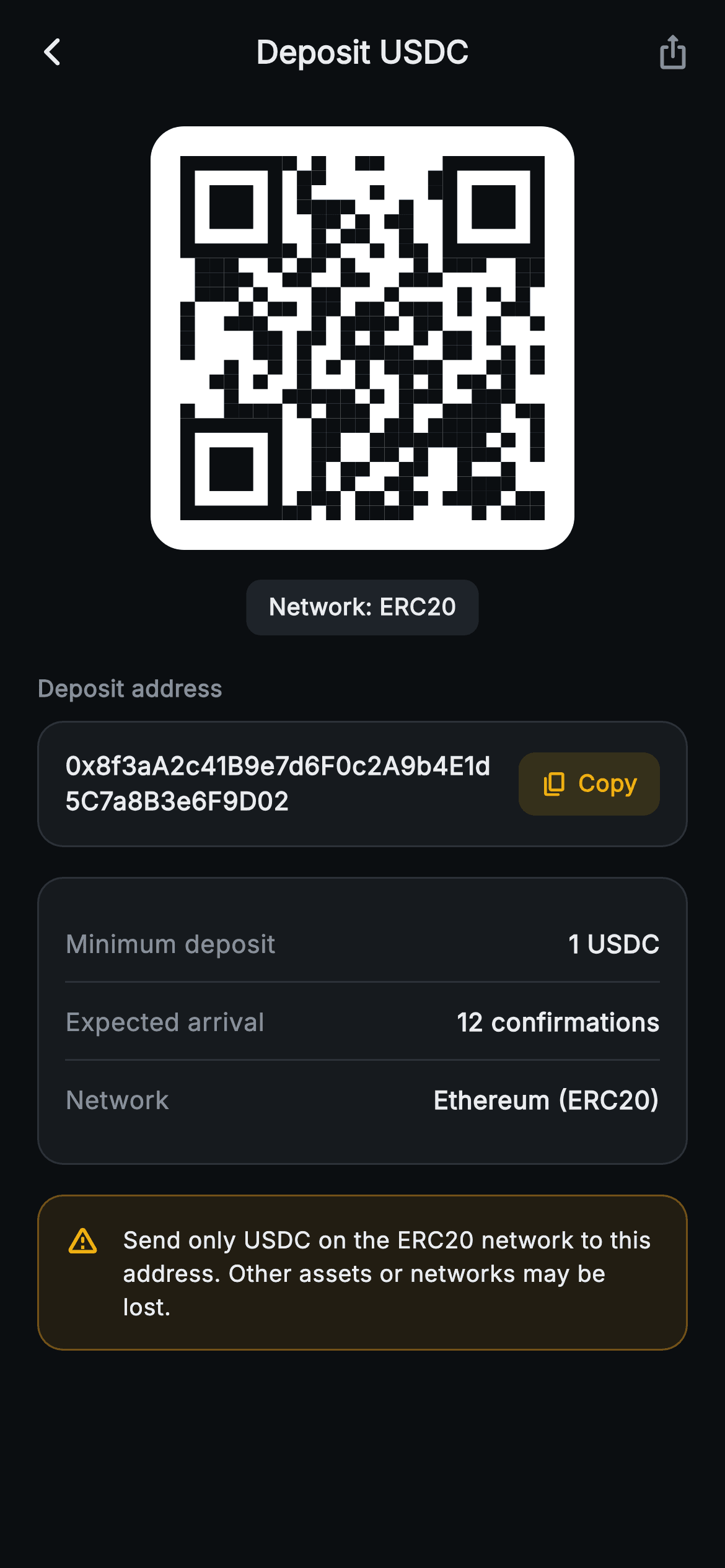
The final step of Aurum's deposit flow, themed "Deposit USDC" on a near-black (0xFF0B0E11) canvas. At the top sits a crisp QR code rendered entirely by a CustomPainter (_QrPainter): a 25x25 module grid drawn from a fixed integer seed via a tiny LCG, with three real finder squares in the corners and deterministic data cells — no image asset, no glyph, no network call, so it renders identically offline. The QR sits on a rounded white card, with a "Network: ERC20" pill beneath it. Below, a "Deposit address" label introduces a bordered card showing the full 0x… wallet string in Inter, paired with a gold-tinted Copy chip; tapping it fires Clipboard.setData and flips the icon/label to a check + "Copied" via setState. A second card lists Minimum deposit (1 USDC), Expected arrival (12 confirmations) and Network (Ethereum / ERC20) as hairline-divided _InfoRow widgets. An amber banner closes the screen with a wrong-network loss notice. Back and iOS-share actions are exposed as onBack/onShare callbacks. Pure Flutter, bundled Inter font, forced dark theme.
Full tutorial coming soon.
The step-by-step walkthrough and complete Dart source for this screen haven't been published yet. They'll be free when they are — no sign-up, no payment. In the meantime, browse the screens that already have their tutorial.
What's included
- ✓_QrPainter CustomPainter that builds a 25x25 QR matrix from a fixed seed (LCG, deterministic) with three corner finder patterns — no image asset or glyph
- ✓Tap-to-copy address row: Clipboard.setData on the 0x ERC20 string with a setState-driven Copy → Copied check-icon swap
- ✓Rounded white QR card plus a 'Network: ERC20' pill, on the 0xFF0B0E11 dark Binance-style palette
- ✓_InfoRow detail card listing Minimum deposit (1 USDC), Expected arrival (12 confirmations) and Network with hairline dividers
- ✓Amber wrong-network warning banner ('Send only USDC on the ERC20 network…') with warning_amber icon
- ✓onBack and onShare VoidCallback hooks plus an AppBar iOS-share action, fully backend-agnostic; bundled Inter font, forced dark Theme
Use cases
- ✓Crypto wallet receive screen where users scan a QR or copy an ERC20 address to fund their account
- ✓Centralized exchange deposit confirmation step after a user picks a coin and network
- ✓DeFi or stablecoin app onboarding that needs a safe USDC funding flow with wrong-network warnings
- ✓Web3 payment app showing a shareable, copyable receiving address with min-deposit and confirmation details


