How to Build a Blockchain Network Selector for Crypto Deposits in Flutter (Full Code + Preview)
Picking the wrong chain is the classic way a crypto deposit vanishes: USDC sent over BEP20 to an address that only watches Ethereum may never arrive. This tutorial builds the step after coin selection in Aurum's deposit flow, a Flutter screen listing four networks as tappable cards, each with its fee and arrival estimate on one line, a gold Recommended tag, a hand-drawn radio, a permanent loss warning, and a Continue button that returns the chosen network. One StatefulWidget, one integer of state, no packages.
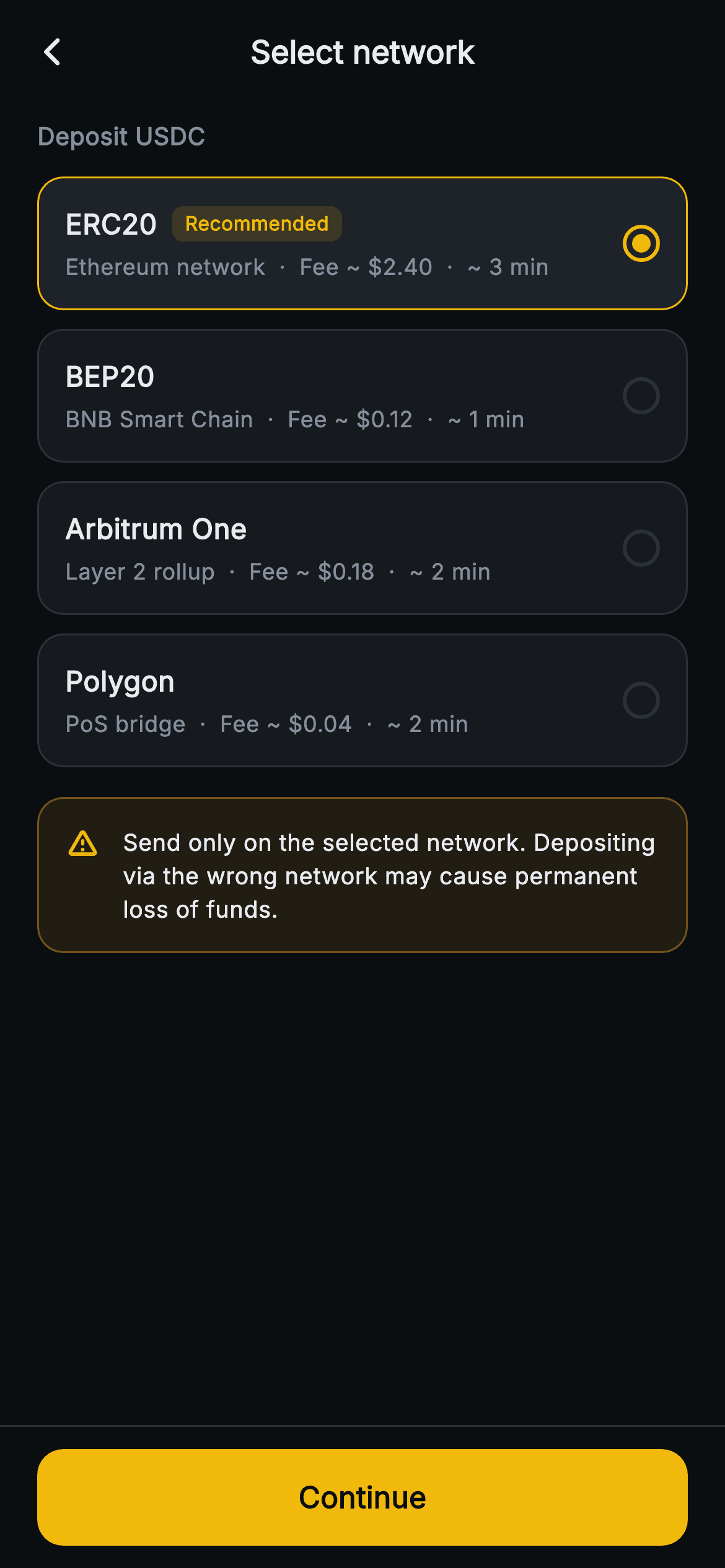
What you'll build
- ✓Four tappable network cards (ERC20, BEP20, Arbitrum One, Polygon) driven by a positional data table and a single _selected index
- ✓A selected state that swaps the card fill to #1E2329 and its border to gold without changing border width, so nothing shifts on tap
- ✓A one-line metadata string per card fusing chain subtitle, fee estimate and arrival time, plus a tinted Recommended pill on ERC20
- ✓A radio indicator built from a bordered 20px circle and a 10px inset dot instead of Material's Radio widget
- ✓An amber wrong-network warning banner and a pinned Continue button that hands the chosen network name to onConfirm
Step-by-step build
Create the file
Add a new file at lib/web3_deposit_network/web3_deposit_network_screen.dart in your Flutter project.
Register the bundled fonts
No external packages — this is pure Flutter. It does bundle its design font (Inter), so drop the font file into fonts/ and declare it in pubspec.yaml:
flutter:
  fonts:
    - family: Inter
      fonts:
- asset: fonts/Inter-Regular.ttfBuild it, piece by piece
Here's how the screen goes together. Each block below is a real slice of the code with a plain-English explanation — paste them in order, or grab the whole file from the next section.
A contract that returns a network name
import 'package:flutter/material.dart';

/// Web3 deposit — Select network. Network options (ERC20 / BEP20 / etc) with
/// fee and arrival-time rows, a radio selection and a wrong-network warning
/// banner. Self-contained per CONVENTIONS.md: pure Flutter, bundled Inter font,
/// no glyphs / no network image, forced dark theme so it renders standalone as
/// a route.
class Web3DepositNetworkScreen extends StatefulWidget {
  const Web3DepositNetworkScreen({super.key, this.onBack, this.onConfirm});

  final VoidCallback? onBack;
  final ValueChanged<String>? onConfirm;

  @override
  State<Web3DepositNetworkScreen> createState() =>
      _Web3DepositNetworkScreenState();
}
`Web3DepositNetworkScreen` exposes `onBack` and `onConfirm`, where `onConfirm` is a `ValueChanged<String>?`. The string it emits is the card's display label, such as 'ERC20' or 'Arbitrum One', with a space in it, so treat it as a label and map it to a chain ID or network code before it reaches an API call. There is no parameter for the asset being deposited: the coin chosen on the previous screen does not flow in, and the 'Deposit USDC' heading further down is a literal. The widget is stateful for one reason only. It has to remember which card is selected between taps.
Two extra colours, a positional network table, and a preselected default
class _Web3DepositNetworkScreenState extends State<Web3DepositNetworkScreen> {
  static const String _font = 'Inter';
  static const Color _bg = Color(0xFF0B0E11);
  static const Color _surface = Color(0xFF161A1E);
  static const Color _surfaceAlt = Color(0xFF1E2329);
  static const Color _brand = Color(0xFFF0B90B);
  static const Color _warn = Color(0xFFF0A020);
  static const Color _text = Color(0xFFEAECEF);
  static const Color _muted = Color(0xFF848E9C);
  static const Color _hairline = Color(0xFF2B3139);

  // name, subtitle, fee, time, recommended
  static const List<List<dynamic>> _networks = <List<dynamic>>[
    <dynamic>['ERC20', 'Ethereum network', '~ \$2.40', '~ 3 min', true],
    <dynamic>['BEP20', 'BNB Smart Chain', '~ \$0.12', '~ 1 min', false],
    <dynamic>['Arbitrum One', 'Layer 2 rollup', '~ \$0.18', '~ 2 min', false],
    <dynamic>['Polygon', 'PoS bridge', '~ \$0.04', '~ 2 min', false],
  ];

  int _selected = 0;
Most constants are the flow's shared near-black palette. Two are specific to this screen. `_surfaceAlt` (`#1E2329`) exists only to lift the selected card one step brighter than `_surface`. `_warn` (`#F0A020`) is a separate, slightly more orange amber than the `#F0B90B` brand gold, so the caution banner never reads as a selected card or a brand element. `_networks` is a `List<List<dynamic>>` whose schema lives in the comment above it: name, subtitle, fee, time, recommended. The fees are preformatted strings with an escaped dollar (`'~ \$2.40'`), and they are hard-coded, not fetched. The `true` recommended flag sits on ERC20 even though that is the costliest row at ~$2.40 against Polygon's ~$0.04. Nothing in the code calculates it. `int _selected = 0` preselects that first row.
App bar and the asset reminder
  @override
  Widget build(BuildContext context) {
    return Theme(
      data: ThemeData.dark(useMaterial3: true),
      child: Scaffold(
        backgroundColor: _bg,
        appBar: AppBar(
          backgroundColor: _bg,
          elevation: 0,
          centerTitle: true,
          leading: IconButton(
            onPressed: widget.onBack,
            icon: const Icon(Icons.arrow_back_ios_new_rounded,
                size: 18, color: _text),
          ),
          title: const Text(
            'Select network',
            style: TextStyle(
              fontFamily: _font,
              fontSize: 17,
              fontWeight: FontWeight.w700,
              color: _text,
            ),
          ),
        ),
        body: SafeArea(
          top: false,
          child: ListView(
            padding: const EdgeInsets.fromLTRB(20, 8, 20, 20),
            children: <Widget>[
              const Text(
                'Deposit USDC',
                style: TextStyle(
                  fontFamily: _font,
                  fontSize: 13,
                  fontWeight: FontWeight.w700,
                  color: _muted,
                ),
              ),
              const SizedBox(height: 12),
Inside the dark `Theme` wrapper, the `AppBar` blends into the `_bg` canvas with `elevation: 0`. It centres a 17px `w700` 'Select network' title and puts an 18px `arrow_back_ios_new_rounded` chevron on `widget.onBack`. The body is a `ListView` padded `fromLTRB(20, 8, 20, 20)` inside `SafeArea(top: false)`, so a fifth or sixth chain, or a short phone, scrolls instead of overflowing. The first child is a 13px `w700` muted 'Deposit USDC' label. Even that small line is there for safety: the network list only makes sense for one specific asset, and naming it above the cards stops a user from picking a chain while thinking about a different coin. In production, fill this from the previous step's ticker.
Generating the cards and flipping selection
              Column(
                children: List<Widget>.generate(_networks.length, (int i) {
                  final List<dynamic> n = _networks[i];
                  final bool sel = _selected == i;
                  return GestureDetector(
                    onTap: () => setState(() => _selected = i),
                    behavior: HitTestBehavior.opaque,
                    child: Container(
                      margin: const EdgeInsets.only(bottom: 10),
                      padding: const EdgeInsets.all(14),
                      decoration: BoxDecoration(
                        color: sel ? _surfaceAlt : _surface,
                        borderRadius: BorderRadius.circular(14),
                        border: Border.all(color: sel ? _brand : _hairline),
                      ),
The rows come from `List<Widget>.generate` inside a plain `Column`, not a nested `ListView.builder`. The cards already live inside the outer `ListView`, and a second scrollable there would need `shrinkWrap` and a physics override for four items. Each iteration reads its row `n` and computes `sel = _selected == i` once, and every visual branch below keys off that boolean. Tapping calls `setState(() => _selected = i)`. `HitTestBehavior.opaque` lets the whole card rectangle take the tap, wherever the finger lands. The decoration switches between `_surfaceAlt` with a `_brand` border and `_surface` with a `_hairline` border. Both borders keep the default 1px width, so selecting a card recolours it without moving a single pixel. `GestureDetector` draws no ripple, so the instant fill and border change is the only tap feedback.
Name, Recommended pill, and the fused metadata line
                      child: Row(
                        children: <Widget>[
                          Expanded(
                            child: Column(
                              crossAxisAlignment: CrossAxisAlignment.start,
                              children: <Widget>[
                                Row(
                                  children: <Widget>[
                                    Text(
                                      n[0] as String,
                                      style: const TextStyle(
                                        fontFamily: _font,
                                        fontSize: 15,
                                        fontWeight: FontWeight.w700,
                                        color: _text,
                                      ),
                                    ),
                                    if (n[4] as bool) ...<Widget>[
                                      const SizedBox(width: 8),
                                      Container(
                                        padding: const EdgeInsets.symmetric(
                                            horizontal: 7, vertical: 2),
                                        decoration: BoxDecoration(
                                          color:
                                              _brand.withValues(alpha: 0.14),
                                          borderRadius:
                                              BorderRadius.circular(6),
                                        ),
                                        child: const Text(
                                          'Recommended',
                                          style: TextStyle(
                                            fontFamily: _font,
                                            fontSize: 10.5,
                                            fontWeight: FontWeight.w700,
                                            color: _brand,
                                          ),
                                        ),
                                      ),
                                    ],
                                  ],
                                ),
                                const SizedBox(height: 4),
                                Text(
                                  '${n[1]}  ·  Fee ${n[2]}  ·  ${n[3]}',
                                  style: const TextStyle(
                                    fontFamily: _font,
                                    fontSize: 12,
                                    color: _muted,
                                  ),
                                ),
                              ],
                            ),
                          ),
The left side is an `Expanded` column. The top row prints `n[0] as String` at 15px `w700`. Casts like this one appear on every read because the table is `dynamic`. The badge uses a collection-if with a spread, `if (n[4] as bool) ...<Widget>[...]`, so the 8px spacer and the pill appear or disappear together, and rows without the flag leave no stray gap. The pill is a `Container` filled with `_brand.withValues(alpha: 0.14)` at a 6px radius, holding 10.5px `w700` gold text. Below it, a single interpolated string, `'${n[1]} · Fee ${n[2]} · ${n[3]}'`, puts subtitle, fee and arrival time on one 12px muted line, with double spaces around each middle dot for breathing room. That keeps every card two lines tall. The trade-off is that subtitles vary in length, so the fees don't line up in a column you can scan straight down.
A radio drawn from two circles
                          const SizedBox(width: 12),
                          Container(
                            width: 20,
                            height: 20,
                            decoration: BoxDecoration(
                              shape: BoxShape.circle,
                              border: Border.all(
                                color: sel ? _brand : _hairline,
                                width: 2,
                              ),
                            ),
                            child: sel
                                ? const Padding(
                                    padding: EdgeInsets.all(3),
                                    child: DecoratedBox(
                                      decoration: BoxDecoration(
                                        color: _brand,
                                        shape: BoxShape.circle,
                                      ),
                                    ),
                                  )
                                : null,
                          ),
                        ],
                      ),
                    ),
                  );
                }),
              ),
After a 12px gap, the indicator is a 20x20 `Container` with `BoxShape.circle` and a 2px border, gold when selected and hairline grey otherwise. When `sel` is true its child is `Padding(3)` around a gold `DecoratedBox` circle. `Container` insets its child by the border width, so the dot comes out at 10px, centred inside a 2px ring with a 3px gap. Unselected cards pass `null` and show an empty ring. A Material `Radio` would bring its own `groupValue` wiring, a splash, a larger tap target and colours from the theme. Here the radio is purely visual, and the card is the real control. One gap to close before shipping is that nothing tells a screen reader which card is selected. Wrap each card in `Semantics(selected: sel, button: true)`.
The wrong-network banner
              const SizedBox(height: 6),
              Container(
                padding: const EdgeInsets.all(14),
                decoration: BoxDecoration(
                  color: _warn.withValues(alpha: 0.10),
                  borderRadius: BorderRadius.circular(14),
                  border: Border.all(color: _warn.withValues(alpha: 0.4)),
                ),
                child: const Row(
                  crossAxisAlignment: CrossAxisAlignment.start,
                  children: <Widget>[
                    Icon(Icons.warning_amber_rounded, size: 19, color: _warn),
                    SizedBox(width: 12),
                    Expanded(
                      child: Text(
                        'Send only on the selected network. Depositing via the '
                        'wrong network may cause permanent loss of funds.',
                        style: TextStyle(
                          fontFamily: _font,
                          fontSize: 12.5,
                          height: 1.45,
                          fontWeight: FontWeight.w500,
                          color: _text,
                        ),
                      ),
                    ),
                  ],
                ),
              ),
A 6px `SizedBox` adds to the last card's 10px bottom margin, giving 16px before the banner. The banner uses the same 14px radius and 14px padding as the cards, so it reads as part of the list. Its colour comes from `_warn` at two strengths: `0.10` for the fill and `0.4` for the border. The message itself is drawn in neutral `_text` at 12.5px `w500` with `height: 1.45`, and that keeps two lines of caution readable on a tinted fill. The orange is left to the 19px `warning_amber_rounded` icon and the frame. `crossAxisAlignment: CrossAxisAlignment.start` keeps the icon beside the first line once the sentence wraps. The whole `Row` is `const` because the banner never changes. It isn't triggered by a bad pick, since the screen has no way to know which network the sending wallet will actually use.
A Continue bar that is always live
        bottomNavigationBar: Container(
          decoration: const BoxDecoration(
            color: _bg,
            border: Border(top: BorderSide(color: _hairline)),
          ),
          child: SafeArea(
            top: false,
            child: Padding(
              padding: const EdgeInsets.fromLTRB(20, 12, 20, 12),
              child: SizedBox(
                width: double.infinity,
                height: 52,
                child: FilledButton(
                  onPressed: () => widget.onConfirm
                      ?.call(_networks[_selected][0] as String),
                  style: FilledButton.styleFrom(
                    backgroundColor: _brand,
                    shape: RoundedRectangleBorder(
                      borderRadius: BorderRadius.circular(14),
                    ),
                  ),
                  child: const Text(
                    'Continue',
                    style: TextStyle(
                      fontFamily: _font,
                      fontSize: 16,
                      fontWeight: FontWeight.w700,
                      color: _bg,
                    ),
                  ),
                ),
              ),
            ),
          ),
        ),
The action sits in `bottomNavigationBar`, so it stays pinned while the list scrolls. It is a `_bg` `Container` with a hairline top border wrapping `SafeArea(top: false)`, which carries the background under the home indicator and keeps the button above it. The `FilledButton` is full-width at 52px tall with a 14px radius matching the cards. Its 16px `w700` 'Continue' label is drawn in `_bg`, dark text on gold for contrast. `onPressed` is never null, so the button is always enabled. That is consistent because `_selected` always points at a valid row. At tap time it reads `_networks[_selected][0] as String` and passes that label to `widget.onConfirm`. If no `onConfirm` is supplied, the `?.call` means the button still looks active but does nothing.
Full code
The complete, ready-to-paste source. Free to use in your projects — one click copies it all.
import 'package:flutter/material.dart';

/// Web3 deposit — Select network. Network options (ERC20 / BEP20 / etc) with
/// fee and arrival-time rows, a radio selection and a wrong-network warning
/// banner. Self-contained per CONVENTIONS.md: pure Flutter, bundled Inter font,
/// no glyphs / no network image, forced dark theme so it renders standalone as
/// a route.
class Web3DepositNetworkScreen extends StatefulWidget {
  const Web3DepositNetworkScreen({super.key, this.onBack, this.onConfirm});

  final VoidCallback? onBack;
  final ValueChanged<String>? onConfirm;

  @override
  State<Web3DepositNetworkScreen> createState() =>
      _Web3DepositNetworkScreenState();
}

class _Web3DepositNetworkScreenState extends State<Web3DepositNetworkScreen> {
  static const String _font = 'Inter';
  static const Color _bg = Color(0xFF0B0E11);
  static const Color _surface = Color(0xFF161A1E);
  static const Color _surfaceAlt = Color(0xFF1E2329);
  static const Color _brand = Color(0xFFF0B90B);
  static const Color _warn = Color(0xFFF0A020);
  static const Color _text = Color(0xFFEAECEF);
  static const Color _muted = Color(0xFF848E9C);
  static const Color _hairline = Color(0xFF2B3139);

  // name, subtitle, fee, time, recommended
  static const List<List<dynamic>> _networks = <List<dynamic>>[
    <dynamic>['ERC20', 'Ethereum network', '~ \$2.40', '~ 3 min', true],
    <dynamic>['BEP20', 'BNB Smart Chain', '~ \$0.12', '~ 1 min', false],
    <dynamic>['Arbitrum One', 'Layer 2 rollup', '~ \$0.18', '~ 2 min', false],
    <dynamic>['Polygon', 'PoS bridge', '~ \$0.04', '~ 2 min', false],
  ];

  int _selected = 0;

  @override
  Widget build(BuildContext context) {
    return Theme(
      data: ThemeData.dark(useMaterial3: true),
      child: Scaffold(
        backgroundColor: _bg,
        appBar: AppBar(
          backgroundColor: _bg,
          elevation: 0,
          centerTitle: true,
          leading: IconButton(
            onPressed: widget.onBack,
            icon: const Icon(Icons.arrow_back_ios_new_rounded,
                size: 18, color: _text),
          ),
          title: const Text(
            'Select network',
            style: TextStyle(
              fontFamily: _font,
              fontSize: 17,
              fontWeight: FontWeight.w700,
              color: _text,
            ),
          ),
        ),
        body: SafeArea(
          top: false,
          child: ListView(
            padding: const EdgeInsets.fromLTRB(20, 8, 20, 20),
            children: <Widget>[
              const Text(
                'Deposit USDC',
                style: TextStyle(
                  fontFamily: _font,
                  fontSize: 13,
                  fontWeight: FontWeight.w700,
                  color: _muted,
                ),
              ),
              const SizedBox(height: 12),
              Column(
                children: List<Widget>.generate(_networks.length, (int i) {
                  final List<dynamic> n = _networks[i];
                  final bool sel = _selected == i;
                  return GestureDetector(
                    onTap: () => setState(() => _selected = i),
                    behavior: HitTestBehavior.opaque,
                    child: Container(
                      margin: const EdgeInsets.only(bottom: 10),
                      padding: const EdgeInsets.all(14),
                      decoration: BoxDecoration(
                        color: sel ? _surfaceAlt : _surface,
                        borderRadius: BorderRadius.circular(14),
                        border: Border.all(color: sel ? _brand : _hairline),
                      ),
                      child: Row(
                        children: <Widget>[
                          Expanded(
                            child: Column(
                              crossAxisAlignment: CrossAxisAlignment.start,
                              children: <Widget>[
                                Row(
                                  children: <Widget>[
                                    Text(
                                      n[0] as String,
                                      style: const TextStyle(
                                        fontFamily: _font,
                                        fontSize: 15,
                                        fontWeight: FontWeight.w700,
                                        color: _text,
                                      ),
                                    ),
                                    if (n[4] as bool) ...<Widget>[
                                      const SizedBox(width: 8),
                                      Container(
                                        padding: const EdgeInsets.symmetric(
                                            horizontal: 7, vertical: 2),
                                        decoration: BoxDecoration(
                                          color:
                                              _brand.withValues(alpha: 0.14),
                                          borderRadius:
                                              BorderRadius.circular(6),
                                        ),
                                        child: const Text(
                                          'Recommended',
                                          style: TextStyle(
                                            fontFamily: _font,
                                            fontSize: 10.5,
                                            fontWeight: FontWeight.w700,
                                            color: _brand,
                                          ),
                                        ),
                                      ),
                                    ],
                                  ],
                                ),
                                const SizedBox(height: 4),
                                Text(
                                  '${n[1]}  ·  Fee ${n[2]}  ·  ${n[3]}',
                                  style: const TextStyle(
                                    fontFamily: _font,
                                    fontSize: 12,
                                    color: _muted,
                                  ),
                                ),
                              ],
                            ),
                          ),
                          const SizedBox(width: 12),
                          Container(
                            width: 20,
                            height: 20,
                            decoration: BoxDecoration(
                              shape: BoxShape.circle,
                              border: Border.all(
                                color: sel ? _brand : _hairline,
                                width: 2,
                              ),
                            ),
                            child: sel
                                ? const Padding(
                                    padding: EdgeInsets.all(3),
                                    child: DecoratedBox(
                                      decoration: BoxDecoration(
                                        color: _brand,
                                        shape: BoxShape.circle,
                                      ),
                                    ),
                                  )
                                : null,
                          ),
                        ],
                      ),
                    ),
                  );
                }),
              ),
              const SizedBox(height: 6),
              Container(
                padding: const EdgeInsets.all(14),
                decoration: BoxDecoration(
                  color: _warn.withValues(alpha: 0.10),
                  borderRadius: BorderRadius.circular(14),
                  border: Border.all(color: _warn.withValues(alpha: 0.4)),
                ),
                child: const Row(
                  crossAxisAlignment: CrossAxisAlignment.start,
                  children: <Widget>[
                    Icon(Icons.warning_amber_rounded, size: 19, color: _warn),
                    SizedBox(width: 12),
                    Expanded(
                      child: Text(
                        'Send only on the selected network. Depositing via the '
                        'wrong network may cause permanent loss of funds.',
                        style: TextStyle(
                          fontFamily: _font,
                          fontSize: 12.5,
                          height: 1.45,
                          fontWeight: FontWeight.w500,
                          color: _text,
                        ),
                      ),
                    ),
                  ],
                ),
              ),
            ],
          ),
        ),
        bottomNavigationBar: Container(
          decoration: const BoxDecoration(
            color: _bg,
            border: Border(top: BorderSide(color: _hairline)),
          ),
          child: SafeArea(
            top: false,
            child: Padding(
              padding: const EdgeInsets.fromLTRB(20, 12, 20, 12),
              child: SizedBox(
                width: double.infinity,
                height: 52,
                child: FilledButton(
                  onPressed: () => widget.onConfirm
                      ?.call(_networks[_selected][0] as String),
                  style: FilledButton.styleFrom(
                    backgroundColor: _brand,
                    shape: RoundedRectangleBorder(
                      borderRadius: BorderRadius.circular(14),
                    ),
                  ),
                  child: const Text(
                    'Continue',
                    style: TextStyle(
                      fontFamily: _font,
                      fontSize: 16,
                      fontWeight: FontWeight.w700,
                      color: _bg,
                    ),
                  ),
                ),
              ),
            ),
          ),
        ),
      ),
    );
  }
}
Plus bundled 1 binary asset (fonts/images). The CLI and MCP install those for you automatically.
Two faster ways to add it
Copy-paste works, but you can skip it entirely.
1. FlutterKit CLI
One command drops this screen — and its fonts — straight into your project.
$ flutterkit add web3-deposit-network2. AI agent (MCP)
Connect FlutterKit's MCP server in Claude or Cursor and just ask your agent to install web3-deposit-network — it fetches and writes the files for you.
FAQ
Can I use this deposit network screen in a commercial wallet or exchange app?
Yes. Copy the file, add it with the CLI command, or pull it over MCP, then ship it in a paid product. You don't need a licence key or account, and no attribution is required.
What packages or fonts does it depend on?
It needs no third-party packages, only `package:flutter/material.dart`. The radio, pill and banner are all `Container` and `DecoratedBox` decorations, and the two icons (`arrow_back_ios_new_rounded`, `warning_amber_rounded`) come from Flutter's built-in Material icon font. Typography uses `fontFamily: 'Inter'`, which is bundled with the screen. Register it in your pubspec, or the text falls back to the platform font.
What is the minimum Flutter version?
Use Flutter 3.22 or newer. The pill and banner tints use `Color.withValues(alpha: ...)` in three places (0.14, 0.10 and 0.4), and the constructor uses `super.key`. On an older SDK, change each call to `withOpacity(0.14)` and so on, and rewrite the constructor as `{Key? key, this.onBack, this.onConfirm}) : super(key: key)`.
How do I load real networks, live fees and a minimum deposit per coin?
Swap the `List<List<dynamic>>` for a typed record or small class, for example `({String id, String name, String subtitle, String fee, String eta, bool recommended})`, so the `as String` casts go away. Load the list from your exchange's per-asset network endpoint. Add an `asset` parameter to replace the hard-coded 'Deposit USDC', and have `onConfirm` return the network `id` rather than its label. The current code has no minimum-deposit field. If your backend returns one, add it as a fourth item on the metadata line.
Should the screen preselect a network, or make the user choose one?
As written, `_selected = 0` preselects ERC20, so Continue works immediately. That is quick, but someone in a hurry can confirm a chain they never looked at. To force a deliberate choice, make the field `int? _selected`, start it at null, compute `sel` against it as before, and set `onPressed` to null until a card has been tapped. Whichever way you go, put the `recommended` flag on the chain your deposit address supports by default. In this demo it is a hand-set flag, not a judgement about the lowest fee.


