How to Build a dApp Connection Request Sheet in Flutter (Full Code + Preview)
When a decentralised app asks to link to a wallet, the user is granting standing access, so the prompt must say who is asking, which account they get and what they can do with it. This tutorial builds Aurum's connection sheet in Flutter: a tap-to-dismiss scrim, a seeded painted dApp badge above the requesting host, a two-account radio picker, a plain-language permissions panel, and a Reject and Connect pair that share the width but not the weight. It is one StatefulWidget with two callbacks.
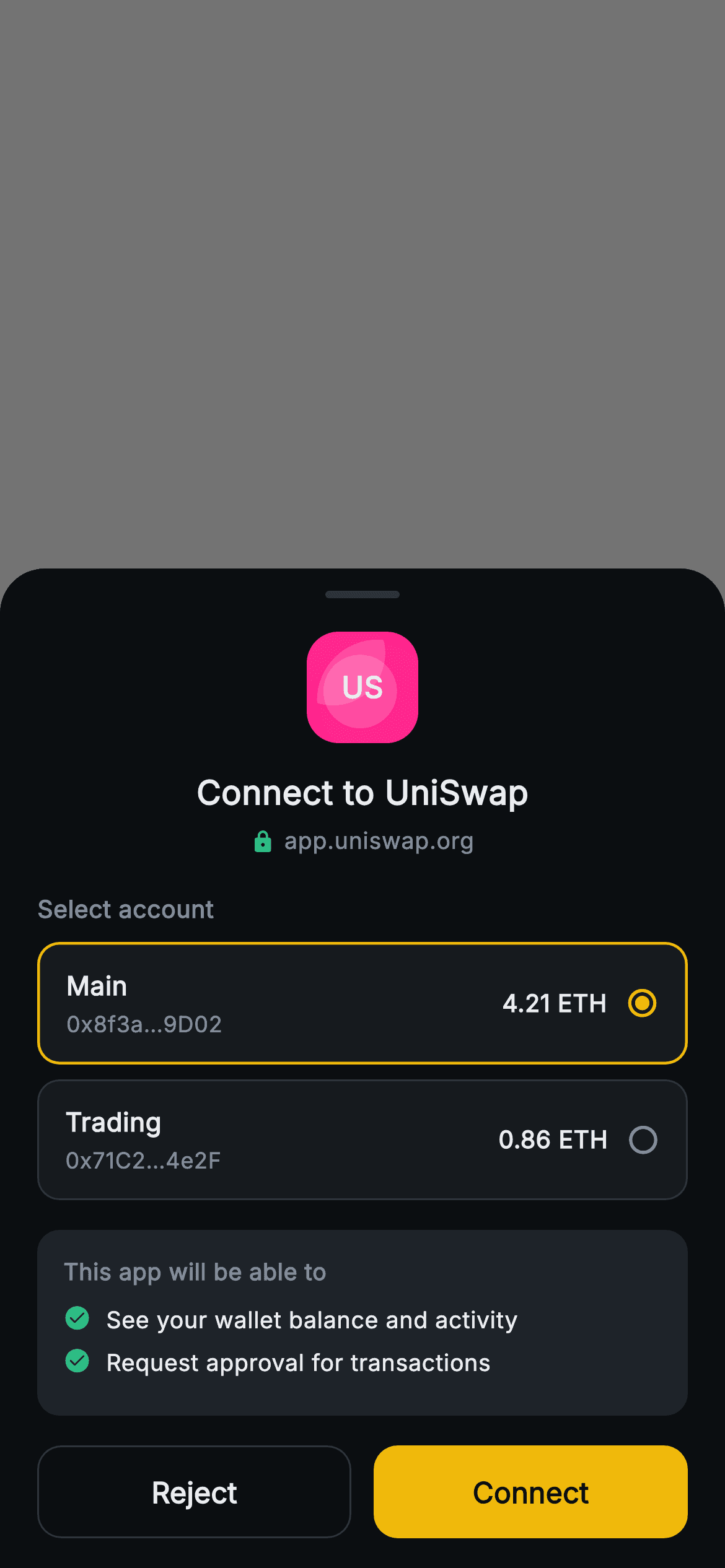
What you'll build
- ✓A bottom sheet over a 55% black scrim where tapping anywhere outside the sheet counts as Reject
- ✓A dApp identity block: a 60px painted badge, a 'Connect to UniSwap' title and a lock-marked origin host
- ✓An account picker whose cards swap a radio icon and a 1.5px gold border on the selected wallet
- ✓A 'This app will be able to' panel that lists granted permissions as check-marked lines
- ✓A deterministic logo painter driven by a tiny seeded random generator, so the badge never changes between frames
Step-by-step build
Create the file
Add a new file at lib/web3_connect_request/web3_connect_request_screen.dart in your Flutter project.
Register the bundled fonts
No external packages — this is pure Flutter. It does bundle its design font (Inter), so drop the font file into fonts/ and declare it in pubspec.yaml:
flutter:
  fonts:
    - family: Inter
      fonts:
- asset: fonts/Inter-Regular.ttfBuild it, piece by piece
Here's how the screen goes together. Each block below is a real slice of the code with a plain-English explanation — paste them in order, or grab the whole file from the next section.
Two exits, two accounts, two permissions
import 'package:flutter/material.dart';

/// Web3 — Connect Wallet. A connection-request sheet over a scrim: dApp logo,
/// requested-permissions list, account selector and an approve / reject bar.
/// Self-contained per CONVENTIONS.md: pure Flutter, bundled Inter font, logo
/// CustomPaint (no glyphs / no network image), forced dark theme so it renders
/// standalone as a route.
class Web3ConnectRequestScreen extends StatefulWidget {
  const Web3ConnectRequestScreen({
    super.key,
    this.onApprove,
    this.onReject,
  });

  final VoidCallback? onApprove;
  final VoidCallback? onReject;

  @override
  State<Web3ConnectRequestScreen> createState() =>
      _Web3ConnectRequestScreenState();
}

class _Web3ConnectRequestScreenState extends State<Web3ConnectRequestScreen> {
  static const String _font = 'Inter';
  static const Color _bg = Color(0xFF0B0E11);
  static const Color _surface = Color(0xFF161A1E);
  static const Color _surfaceAlt = Color(0xFF1E2329);
  static const Color _brand = Color(0xFFF0B90B);
  static const Color _up = Color(0xFF2EBD85);
  static const Color _text = Color(0xFFEAECEF);
  static const Color _muted = Color(0xFF848E9C);
  static const Color _hairline = Color(0xFF2B3139);

  static const List<List<String>> _accounts = <List<String>>[
    <String>['Main', '0x8f3a…9D02', '4.21 ETH'],
    <String>['Trading', '0x71C2…4e2F', '0.86 ETH'],
  ];

  static const List<String> _perms = <String>[
    'See your wallet balance and activity',
    'Request approval for transactions',
  ];

  int _account = 0;
The public surface is just `onApprove` and `onReject`, both nullable `VoidCallback`s, so the host app decides what connecting actually does — open a WalletConnect session, store an allow-list entry, close the route. It is a `StatefulWidget` for one reason: `int _account = 0`, the index of the wallet the user picks. Accounts are a `List<List<String>>` read positionally later (`a[0]` label, `a[1]` masked address, `a[2]` balance), and the two permission sentences live in `_perms` as plain strings. Keeping both as const data means the request's contents can be swapped without touching layout. The colour constants are the shared Aurum set; the ones that matter here are `_up` green for trust cues and `_brand` gold for selection and the approve action.
A scrim that rejects, and a sheet that doesn't
  @override
  Widget build(BuildContext context) {
    return Theme(
      data: ThemeData.dark(useMaterial3: true),
      child: Scaffold(
        backgroundColor: Colors.black.withValues(alpha: 0.55),
        body: Stack(
          children: <Widget>[
            Positioned.fill(
              child: GestureDetector(
                onTap: widget.onReject,
                behavior: HitTestBehavior.opaque,
              ),
            ),
            Align(
              alignment: Alignment.bottomCenter,
              child: Container(
                decoration: const BoxDecoration(
                  color: _bg,
                  borderRadius:
                      BorderRadius.vertical(top: Radius.circular(24)),
                ),
                child: SafeArea(
                  top: false,
                  child: Padding(
                    padding: const EdgeInsets.fromLTRB(20, 12, 20, 16),
                    child: Column(
                      mainAxisSize: MainAxisSize.min,
                      children: <Widget>[
                        Container(
                          width: 40,
                          height: 4,
                          decoration: BoxDecoration(
                            color: _hairline,
                            borderRadius: BorderRadius.circular(2),
                          ),
                        ),
The Scaffold's own `backgroundColor` is `Colors.black.withValues(alpha: 0.55)` — the whole route is the scrim. Its first Stack child is a `Positioned.fill` `GestureDetector` with `HitTestBehavior.opaque` and no child, wired straight to `widget.onReject`, so a tap anywhere on the dimmed area dismisses the request the safe way. The sheet is an `Align(bottomCenter)` Container added after it, and because a decorated Container claims hits inside its box and the Stack stops at the first child that is hit, taps on the sheet's blank areas never fall through to the reject handler. The sheet rounds only its top corners at 24, wraps content in `SafeArea(top: false)` so the buttons clear the home indicator, and uses `MainAxisSize.min` so it is only as tall as its content. The 40x4 handle is a visual cue only; there is no drag-to-dismiss gesture attached.
Who is asking: badge, name and origin
                        const SizedBox(height: 18),
                        SizedBox(
                          width: 60,
                          height: 60,
                          child: CustomPaint(
                            painter: _LogoPainter(
                                seed: 3110, tint: Color(0xFFFF007A)),
                            child: const Center(
                              child: Text(
                                'US',
                                style: TextStyle(
                                  fontFamily: _font,
                                  fontSize: 16,
                                  fontWeight: FontWeight.w800,
                                  color: Colors.white,
                                ),
                              ),
                            ),
                          ),
                        ),
                        const SizedBox(height: 14),
                        const Text(
                          'Connect to UniSwap',
                          style: TextStyle(
                            fontFamily: _font,
                            fontSize: 18,
                            fontWeight: FontWeight.w800,
                            color: _text,
                          ),
                        ),
                        const SizedBox(height: 4),
                        Row(
                          mainAxisAlignment: MainAxisAlignment.center,
                          children: const <Widget>[
                            Icon(Icons.lock_rounded, size: 13, color: _up),
                            SizedBox(width: 5),
                            Text(
                              'app.uniswap.org',
                              style: TextStyle(
                                fontFamily: _font,
                                fontSize: 12.5,
                                color: _muted,
                              ),
                            ),
                          ],
                        ),
Identity comes first because it is the thing a user must judge before anything else. A 60x60 `CustomPaint` renders the badge from `_LogoPainter(seed: 3110, tint: Color(0xFFFF007A))`, with a centred white 'US' monogram at 16px `w800` as its child, so there is no network image to fail or leak a request. Below it sits 'Connect to UniSwap' at 18px `w800`, then the origin row: a 13px `Icons.lock_rounded` in `_up` green beside 'app.uniswap.org' in muted 12.5px. Showing the exact host, not just a friendly name, is what lets someone spot a look-alike phishing domain. Be aware the lock is hard-coded: there is no unverified or warning variant in this file, so a real wallet must feed in its own verification result and swap the icon and colour.
Choosing which wallet to expose
                        const SizedBox(height: 18),
                        const Align(
                          alignment: Alignment.centerLeft,
                          child: Text(
                            'Select account',
                            style: TextStyle(
                              fontFamily: _font,
                              fontSize: 13,
                              fontWeight: FontWeight.w700,
                              color: _muted,
                            ),
                          ),
                        ),
                        const SizedBox(height: 8),
                        ...List<Widget>.generate(_accounts.length, (int i) {
                          final List<String> a = _accounts[i];
                          final bool active = _account == i;
                          return Padding(
                            padding: const EdgeInsets.only(bottom: 8),
                            child: GestureDetector(
                              onTap: () => setState(() => _account = i),
                              behavior: HitTestBehavior.opaque,
                              child: Container(
                                padding: const EdgeInsets.symmetric(
                                    horizontal: 14, vertical: 12),
                                decoration: BoxDecoration(
                                  color: _surface,
                                  borderRadius: BorderRadius.circular(12),
                                  border: Border.all(
                                    color: active ? _brand : _hairline,
                                    width: active ? 1.5 : 1,
                                  ),
                                ),
                                child: Row(
                                  children: <Widget>[
                                    Expanded(
                                      child: Column(
                                        crossAxisAlignment:
                                            CrossAxisAlignment.start,
                                        children: <Widget>[
                                          Text(
                                            a[0],
                                            style: const TextStyle(
                                              fontFamily: _font,
                                              fontSize: 14,
                                              fontWeight: FontWeight.w700,
                                              color: _text,
                                            ),
                                          ),
                                          const SizedBox(height: 2),
                                          Text(
                                            a[1],
                                            style: const TextStyle(
                                              fontFamily: _font,
                                              fontSize: 12,
                                              color: _muted,
                                            ),
                                          ),
                                        ],
                                      ),
                                    ),
                                    Text(
                                      a[2],
                                      style: const TextStyle(
                                        fontFamily: _font,
                                        fontSize: 13,
                                        fontWeight: FontWeight.w700,
                                        color: _text,
                                      ),
                                    ),
                                    const SizedBox(width: 10),
                                    Icon(
                                      active
                                          ? Icons.radio_button_checked_rounded
                                          : Icons
                                              .radio_button_unchecked_rounded,
                                      size: 18,
                                      color: active ? _brand : _muted,
                                    ),
                                  ],
                                ),
                              ),
                            ),
                          );
                        }),
'Select account' is pinned left with `Align(centerLeft)` because the parent Column centres everything else. Cards are produced with `List<Widget>.generate` and spread into the Column; each computes `active = _account == i` and wraps itself in a `GestureDetector` with `HitTestBehavior.opaque`, so the whole card, gaps included, is tappable and calls `setState(() => _account = i)`. Selection shows three ways at once: the border turns `_brand` and thickens from 1 to 1.5, and the trailing icon swaps between `radio_button_unchecked_rounded` in muted grey and `radio_button_checked_rounded` in gold. The label and masked address stack in an `Expanded` Column so a long name never pushes the balance off-screen. One subtlety: Container adds the border width to its padding, so the selected card's content shifts by half a pixel; keep a fixed 1.5px border with a hairline colour if that matters to you.
Spelling out what the dApp gets
                        const SizedBox(height: 8),
                        Container(
                          padding: const EdgeInsets.all(14),
                          decoration: BoxDecoration(
                            color: _surfaceAlt,
                            borderRadius: BorderRadius.circular(12),
                          ),
                          child: Column(
                            crossAxisAlignment: CrossAxisAlignment.start,
                            children: <Widget>[
                              const Text(
                                'This app will be able to',
                                style: TextStyle(
                                  fontFamily: _font,
                                  fontSize: 12.5,
                                  fontWeight: FontWeight.w700,
                                  color: _muted,
                                ),
                              ),
                              const SizedBox(height: 8),
                              ..._perms.map((String p) => Padding(
                                    padding:
                                        const EdgeInsets.only(bottom: 6),
                                    child: Row(
                                      crossAxisAlignment:
                                          CrossAxisAlignment.start,
                                      children: <Widget>[
                                        const Icon(Icons.check_circle_rounded,
                                            size: 15, color: _up),
                                        const SizedBox(width: 8),
                                        Expanded(
                                          child: Text(
                                            p,
                                            style: const TextStyle(
                                              fontFamily: _font,
                                              fontSize: 12.5,
                                              height: 1.35,
                                              color: _text,
                                            ),
                                          ),
                                        ),
                                      ],
                                    ),
                                  )),
                            ],
                          ),
                        ),
The permissions panel uses `_surfaceAlt` (`#1E2329`), one step lighter than the account cards, which separates 'what you are granting' from 'what you are choosing'. Its header, 'This app will be able to', turns each line into the end of a sentence, so the permissions read as consequences rather than jargon like eth_accounts. `_perms.map` emits a Row per entry with a 15px green `check_circle_rounded`, `crossAxisAlignment.start` and `Expanded` text at `height: 1.35`, so a wrapped permission keeps its icon beside the first line. Note what is absent: neither line mentions moving funds or signing, which is accurate for a connection — signing and transactions arrive later as separate prompts, and the second permission says exactly that.
Reject and Connect, equal width, unequal weight
                        const SizedBox(height: 16),
                        Row(
                          children: <Widget>[
                            Expanded(
                              child: SizedBox(
                                height: 50,
                                child: OutlinedButton(
                                  onPressed: widget.onReject,
                                  style: OutlinedButton.styleFrom(
                                    side: const BorderSide(color: _hairline),
                                    shape: RoundedRectangleBorder(
                                      borderRadius: BorderRadius.circular(13),
                                    ),
                                  ),
                                  child: const Text(
                                    'Reject',
                                    style: TextStyle(
                                      fontFamily: _font,
                                      fontSize: 15.5,
                                      fontWeight: FontWeight.w700,
                                      color: _text,
                                    ),
                                  ),
                                ),
                              ),
                            ),
                            const SizedBox(width: 12),
                            Expanded(
                              child: SizedBox(
                                height: 50,
                                child: FilledButton(
                                  onPressed: widget.onApprove,
                                  style: FilledButton.styleFrom(
                                    backgroundColor: _brand,
                                    shape: RoundedRectangleBorder(
                                      borderRadius: BorderRadius.circular(13),
                                    ),
                                  ),
                                  child: const Text(
                                    'Connect',
                                    style: TextStyle(
                                      fontFamily: _font,
                                      fontSize: 15.5,
                                      fontWeight: FontWeight.w700,
                                      color: _bg,
                                    ),
                                  ),
                                ),
                              ),
                            ),
                          ],
                        ),
                      ],
                    ),
                  ),
                ),
              ),
            ),
          ],
        ),
      ),
    );
  }
}
The action row gives each button an `Expanded` half and a 50px `SizedBox` height, separated by 12px. Equal width is deliberate: on a permission prompt, refusing is a first-class answer, not a small text link the user has to hunt for. Weight still differs. Reject is an `OutlinedButton` with a `_hairline` side and `_text` label; Connect is a `FilledButton` with `_brand` gold background and a `_bg` near-black label for contrast. Both use 13px corner radii and 15.5px `w700` labels, so the only visual difference is fill, which signals the expected path without hiding the alternative. Each `onPressed` passes the widget callback straight through, so a null callback disables the button automatically through Material's own logic.
A seeded painter for a stable placeholder logo
/// A seeded geometric "logo": translucent circles on a tinted rounded square.
class _LogoPainter extends CustomPainter {
  const _LogoPainter({required this.seed, required this.tint});

  final int seed;
  final Color tint;

  @override
  void paint(Canvas canvas, Size size) {
    int state = seed & 0x7fffffff;
    double next() {
      state = (state * 1103515245 + 12345) & 0x7fffffff;
      return (state % 10000) / 10000.0;
    }

    final RRect bg = RRect.fromRectAndRadius(
      Offset.zero & size,
      const Radius.circular(17),
    );
    canvas.drawRRect(bg, Paint()..color = tint);
    canvas.save();
    canvas.clipRRect(bg);
    for (int i = 0; i < 3; i++) {
      canvas.drawCircle(
        Offset(next() * size.width, next() * size.height),
        size.width * (0.3 + next() * 0.3),
        Paint()..color = Colors.white.withValues(alpha: 0.16),
      );
    }
    canvas.restore();
  }

  @override
  bool shouldRepaint(_LogoPainter old) =>
      old.seed != seed || old.tint != tint;
}
`_LogoPainter` builds a tiny linear congruential generator inside `paint`: `state` starts as `seed & 0x7fffffff`, and each `next()` call applies `state * 1103515245 + 12345`, masks to 31 bits and returns `(state % 10000) / 10000.0`. Because the sequence restarts from the seed on every paint, the badge is identical on every frame and every rebuild, which `Random()` would not guarantee. It draws a tint-coloured `RRect` with radius 17, saves the canvas, clips to that rounded square, and paints three white circles at 16% alpha with radii between 30% and 60% of the width, then restores. `shouldRepaint` compares `seed` and `tint`, so changing either for a different dApp triggers exactly one repaint.
Full code
The complete, ready-to-paste source. Free to use in your projects — one click copies it all.
import 'package:flutter/material.dart';
/// Web3 — Connect Wallet. A connection-request sheet over a scrim: dApp logo,
/// requested-permissions list, account selector and an approve / reject bar.
/// Self-contained per CONVENTIONS.md: pure Flutter, bundled Inter font, logo
/// CustomPaint (no glyphs / no network image), forced dark theme so it renders
/// standalone as a route.
class Web3ConnectRequestScreen extends StatefulWidget {
const Web3ConnectRequestScreen({
super.key,
this.onApprove,
this.onReject,
});
final VoidCallback? onApprove;
final VoidCallback? onReject;
@override
State<Web3ConnectRequestScreen> createState() =>
_Web3ConnectRequestScreenState();
}
class _Web3ConnectRequestScreenState extends State<Web3ConnectRequestScreen> {
static const String _font = 'Inter';
static const Color _bg = Color(0xFF0B0E11);
static const Color _surface = Color(0xFF161A1E);
static const Color _surfaceAlt = Color(0xFF1E2329);
static const Color _brand = Color(0xFFF0B90B);
static const Color _up = Color(0xFF2EBD85);
static const Color _text = Color(0xFFEAECEF);
static const Color _muted = Color(0xFF848E9C);
static const Color _hairline = Color(0xFF2B3139);
static const List<List<String>> _accounts = <List<String>>[
<String>['Main', '0x8f3a…9D02', '4.21 ETH'],
<String>['Trading', '0x71C2…4e2F', '0.86 ETH'],
];
static const List<String> _perms = <String>[
'See your wallet balance and activity',
'Request approval for transactions',
];
int _account = 0;
@override
Widget build(BuildContext context) {
return Theme(
data: ThemeData.dark(useMaterial3: true),
child: Scaffold(
backgroundColor: Colors.black.withValues(alpha: 0.55),
body: Stack(
children: <Widget>[
Positioned.fill(
child: GestureDetector(
onTap: widget.onReject,
behavior: HitTestBehavior.opaque,
),
),
Align(
alignment: Alignment.bottomCenter,
child: Container(
decoration: const BoxDecoration(
color: _bg,
borderRadius:
BorderRadius.vertical(top: Radius.circular(24)),
),
child: SafeArea(
top: false,
child: Padding(
padding: const EdgeInsets.fromLTRB(20, 12, 20, 16),
child: Column(
mainAxisSize: MainAxisSize.min,
children: <Widget>[
Container(
width: 40,
height: 4,
decoration: BoxDecoration(
color: _hairline,
borderRadius: BorderRadius.circular(2),
),
),
const SizedBox(height: 18),
SizedBox(
width: 60,
height: 60,
child: CustomPaint(
painter: _LogoPainter(
seed: 3110, tint: Color(0xFFFF007A)),
child: const Center(
child: Text(
'US',
style: TextStyle(
fontFamily: _font,
fontSize: 16,
fontWeight: FontWeight.w800,
color: Colors.white,
),
),
),
),
),
const SizedBox(height: 14),
const Text(
'Connect to UniSwap',
style: TextStyle(
fontFamily: _font,
fontSize: 18,
fontWeight: FontWeight.w800,
color: _text,
),
),
const SizedBox(height: 4),
Row(
mainAxisAlignment: MainAxisAlignment.center,
children: const <Widget>[
Icon(Icons.lock_rounded, size: 13, color: _up),
SizedBox(width: 5),
Text(
'app.uniswap.org',
style: TextStyle(
fontFamily: _font,
fontSize: 12.5,
color: _muted,
),
),
],
),
const SizedBox(height: 18),
const Align(
alignment: Alignment.centerLeft,
child: Text(
'Select account',
style: TextStyle(
fontFamily: _font,
fontSize: 13,
fontWeight: FontWeight.w700,
color: _muted,
),
),
),
const SizedBox(height: 8),
...List<Widget>.generate(_accounts.length, (int i) {
final List<String> a = _accounts[i];
final bool active = _account == i;
return Padding(
padding: const EdgeInsets.only(bottom: 8),
child: GestureDetector(
onTap: () => setState(() => _account = i),
behavior: HitTestBehavior.opaque,
child: Container(
padding: const EdgeInsets.symmetric(
horizontal: 14, vertical: 12),
decoration: BoxDecoration(
color: _surface,
borderRadius: BorderRadius.circular(12),
border: Border.all(
color: active ? _brand : _hairline,
width: active ? 1.5 : 1,
),
),
child: Row(
children: <Widget>[
Expanded(
child: Column(
crossAxisAlignment:
CrossAxisAlignment.start,
children: <Widget>[
Text(
a[0],
style: const TextStyle(
fontFamily: _font,
fontSize: 14,
fontWeight: FontWeight.w700,
color: _text,
),
),
const SizedBox(height: 2),
Text(
a[1],
style: const TextStyle(
fontFamily: _font,
fontSize: 12,
color: _muted,
),
),
],
),
),
Text(
a[2],
style: const TextStyle(
fontFamily: _font,
fontSize: 13,
fontWeight: FontWeight.w700,
color: _text,
),
),
const SizedBox(width: 10),
Icon(
active
? Icons.radio_button_checked_rounded
: Icons
.radio_button_unchecked_rounded,
size: 18,
color: active ? _brand : _muted,
),
],
),
),
),
);
}),
const SizedBox(height: 8),
Container(
padding: const EdgeInsets.all(14),
decoration: BoxDecoration(
color: _surfaceAlt,
borderRadius: BorderRadius.circular(12),
),
child: Column(
crossAxisAlignment: CrossAxisAlignment.start,
children: <Widget>[
const Text(
'This app will be able to',
style: TextStyle(
fontFamily: _font,
fontSize: 12.5,
fontWeight: FontWeight.w700,
color: _muted,
),
),
const SizedBox(height: 8),
..._perms.map((String p) => Padding(
padding:
const EdgeInsets.only(bottom: 6),
child: Row(
crossAxisAlignment:
CrossAxisAlignment.start,
children: <Widget>[
const Icon(Icons.check_circle_rounded,
size: 15, color: _up),
const SizedBox(width: 8),
Expanded(
child: Text(
p,
style: const TextStyle(
fontFamily: _font,
fontSize: 12.5,
height: 1.35,
color: _text,
),
),
),
],
),
)),
],
),
),
const SizedBox(height: 16),
Row(
children: <Widget>[
Expanded(
child: SizedBox(
height: 50,
child: OutlinedButton(
onPressed: widget.onReject,
style: OutlinedButton.styleFrom(
side: const BorderSide(color: _hairline),
shape: RoundedRectangleBorder(
borderRadius: BorderRadius.circular(13),
),
),
child: const Text(
'Reject',
style: TextStyle(
fontFamily: _font,
fontSize: 15.5,
fontWeight: FontWeight.w700,
color: _text,
),
),
),
),
),
const SizedBox(width: 12),
Expanded(
child: SizedBox(
height: 50,
child: FilledButton(
onPressed: widget.onApprove,
style: FilledButton.styleFrom(
backgroundColor: _brand,
shape: RoundedRectangleBorder(
borderRadius: BorderRadius.circular(13),
),
),
child: const Text(
'Connect',
style: TextStyle(
fontFamily: _font,
fontSize: 15.5,
fontWeight: FontWeight.w700,
color: _bg,
),
),
),
),
),
],
),
],
),
),
),
),
),
],
),
),
);
}
}
/// A seeded geometric "logo": translucent circles on a tinted rounded square.
class _LogoPainter extends CustomPainter {
const _LogoPainter({required this.seed, required this.tint});
final int seed;
final Color tint;
@override
void paint(Canvas canvas, Size size) {
int state = seed & 0x7fffffff;
double next() {
state = (state * 1103515245 + 12345) & 0x7fffffff;
return (state % 10000) / 10000.0;
}
final RRect bg = RRect.fromRectAndRadius(
Offset.zero & size,
const Radius.circular(17),
);
canvas.drawRRect(bg, Paint()..color = tint);
canvas.save();
canvas.clipRRect(bg);
for (int i = 0; i < 3; i++) {
canvas.drawCircle(
Offset(next() * size.width, next() * size.height),
size.width * (0.3 + next() * 0.3),
Paint()..color = Colors.white.withValues(alpha: 0.16),
);
}
canvas.restore();
}
@override
bool shouldRepaint(_LogoPainter old) =>
old.seed != seed || old.tint != tint;
}
Plus bundled 1 binary asset (fonts/images). The CLI and MCP install those for you automatically.
Two faster ways to add it
Copy-paste works, but you can skip it entirely.
1. FlutterKit CLI
One command drops this screen — and its fonts — straight into your project.
$ flutterkit add web3-connect-request2. AI agent (MCP)
Connect FlutterKit's MCP server in Claude or Cursor and just ask your agent to install web3-connect-request — it fetches and writes the files for you.
FAQ
Can I ship this connect sheet in a commercial wallet app?
Yes. The sheet and its logo painter are free to use in personal or commercial apps, with no licence key to enter and no attribution required. Copy the file, add it with the CLI, or pull it through MCP.
How does my approve handler know which account was selected?
As written it can't: `onApprove` is a plain `VoidCallback`, and `_account` stays private to the state. Change the field to `ValueChanged<int>? onApprove` (or pass the address string) and call `widget.onApprove?.call(_account)` from the Connect button. Also replace the hard-coded `_accounts` and `_perms` with constructor parameters filled from your WalletConnect proposal.
Why is the scrim solid black instead of showing the dApp behind it?
The 55% black is the Scaffold background, so it only shows the previous screen if the route underneath is still painted. Push it with `PageRouteBuilder(opaque: false, pageBuilder: ...)` rather than `MaterialPageRoute`, which is opaque and hides the page below.
Does it need any packages or custom fonts?
No packages: it is pure Flutter with Material icons and a `CustomPaint` badge. The only external asset is the Inter font named in `fontFamily: 'Inter'`, which you register in pubspec.yaml; without it Flutter quietly falls back to the platform font.
What Flutter version does this require?
Flutter 3.22 or later, since the scrim and the painter's circles use `Color.withValues(alpha: ...)`. On older SDKs replace those with `withOpacity(0.55)` and `withOpacity(0.16)`, and rewrite the `super.key` constructor parameter as `Key? key` with `: super(key: key)` if you are below Dart 2.17.


