How to Build a Create Account Screen with Live Username Checks in Flutter (Full Code + Preview)
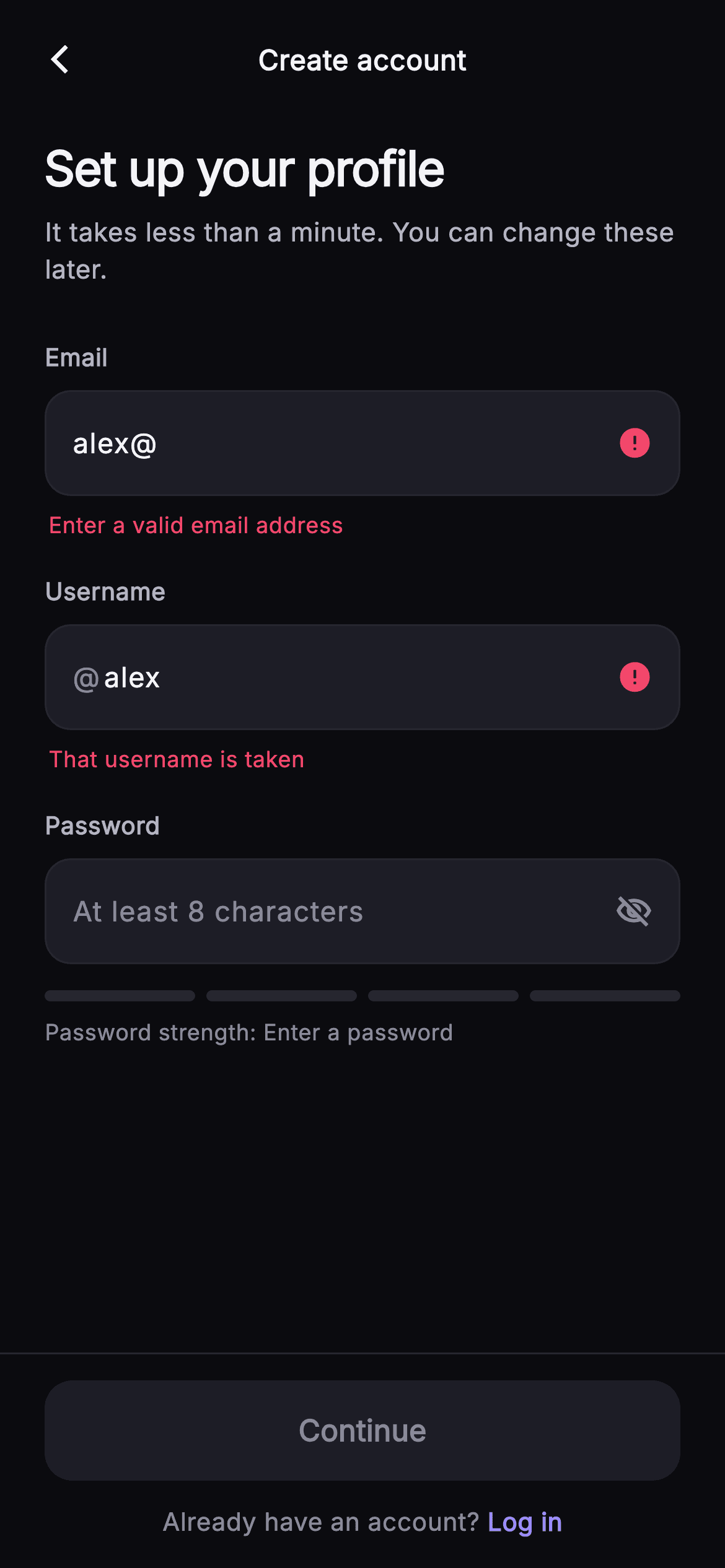
Account creation is where most sign-up flows lose people: they type, they submit, and only then learn the handle was taken or the password was too weak. This tutorial builds Pulse's Create Account screen in Flutter, where three TextEditingController listeners re-run every rule on each keystroke — an email regex, a username checked against a taken set, and a 0–4 password score — so a green check, a red 'That username is taken', and a four-segment painted strength bar all answer before you ever press Continue.
Watch the Flutter UI walkthrough
A short screen recording of Pulse · Create Account running, if you'd rather see it before you read the code. The written tutorial below covers everything in it.
Can't see the video? Watch it on YouTube.
What you'll build
- ✓Three controllers wired to one `_onChange` listener so every rule recomputes per keystroke
- ✓An `@`-prefixed username field that reports 'That username is taken' or a green 'Available'
- ✓A four-segment meter whose lit bars all share one colour, recolouring red → amber → lilac → green
- ✓A `_canSubmit` getter that keeps the 54px Continue button null-disabled until four rules pass
- ✓A reusable `_Field` shell where `isCollapsed` hands all the chrome back to your own Container
Step-by-step build
Create the file
Add a new file at lib/social_auth_signup/social_auth_signup_screen.dart in your Flutter project.
Register the bundled fonts
No external packages — this is pure Flutter. It does bundle its design font (Inter), so drop the font file into fonts/ and declare it in pubspec.yaml:
flutter:
  fonts:
    - family: Inter
      fonts:
- asset: fonts/Inter-Regular.ttfBuild it, piece by piece
Here's how the screen goes together. Each block below is a real slice of the code with a plain-English explanation — paste them in order, or grab the whole file from the next section.
Callbacks in, palette on the widget class
import 'package:flutter/material.dart';

/// Sign Up — create a Pulse account with email, username, and password. Fields
/// carry live inline validation (a valid email shows a painted check; a taken
/// username shows an error), and the password field drives a painted strength
/// bar that grades weak → strong. Self-contained per CONVENTIONS.md: pure
/// Flutter, bundled Inter font, own dark theme, SafeArea. The primary CTA sits
/// in a pinned bottom bar at a fixed height.
class SocialAuthSignupScreen extends StatefulWidget {
  const SocialAuthSignupScreen({
    super.key,
    this.onBack,
    this.onContinue,
    this.onLogin,
  });

  final VoidCallback? onBack;
  final VoidCallback? onContinue;
  final VoidCallback? onLogin;

  static const String _font = 'Inter';
  static const Color _bg = Color(0xFF0B0B0F);
  static const Color _surfaceAlt = Color(0xFF1D1D26);
  static const Color _brand = Color(0xFF6E56F7);
  static const Color _accent = Color(0xFF9B8CFF);
  static const Color _success = Color(0xFF34D399);
  static const Color _danger = Color(0xFFF4476B);
  static const Color _hairline = Color(0xFF26262F);
  static const Color _textHi = Color(0xFFF4F4F7);
  static const Color _textLo = Color(0xFFB5B5C2);
  static const Color _muted = Color(0xFF8A8A99);

  @override
  State<SocialAuthSignupScreen> createState() => _SocialAuthSignupScreenState();
}
`SocialAuthSignupScreen` takes three nullable callbacks — `onBack`, `onContinue`, `onLogin` — and nothing else, so the host app owns navigation and the actual account creation. The eleven colours are `static const` on the widget class rather than in a separate theme file, which is why every private sub-widget below can write `SocialAuthSignupScreen._textHi` with no imports and no `InheritedWidget`. Note that `_brand` indigo `#6E56F7` and `_accent` lilac `#9B8CFF` are different roles: `_brand` is spent only on the Continue fill, while `_accent` carries the text cursor, the 'Log in' link and the mid-range strength label, so nothing on screen competes with the CTA.
Seeded controllers and the fake availability set
class _SocialAuthSignupScreenState extends State<SocialAuthSignupScreen> {
  final TextEditingController _email = TextEditingController(text: 'alex@');
  final TextEditingController _username = TextEditingController(text: 'alex');
  final TextEditingController _password = TextEditingController();
  bool _obscure = true;

  static const Set<String> _taken = <String>{'alex', 'admin', 'pulse'};

  @override
  void initState() {
    super.initState();
    _email.addListener(_onChange);
    _username.addListener(_onChange);
    _password.addListener(_onChange);
  }

  void _onChange() => setState(() {});

  @override
  void dispose() {
    _email.dispose();
    _username.dispose();
    _password.dispose();
    super.dispose();
  }
The email controller starts at `'alex@'` and the username at `'alex'` — and `'alex'` is inside `_taken`, so the demo opens already showing a red error icon on email and a red 'That username is taken' underneath the handle. That is deliberate: both failure states are visible in a screenshot without anyone typing. `_taken` is a `static const Set<String>` of three names standing in for a server lookup; a Set gives O(1) `contains`, and it is the single seam you swap for an async check. `initState` attaches the same `_onChange` to all three controllers, and `_onChange` is nothing but `setState(() {})`. `dispose` releases all three — a controller you construct is yours to tear down.
Four rules, expressed as getters
  bool get _emailValid =>
      RegExp(r'^[^@\s]+@[^@\s]+\.[^@\s]+$').hasMatch(_email.text.trim());

  bool get _usernameTaken =>
      _username.text.trim().isNotEmpty &&
      _taken.contains(_username.text.trim().toLowerCase());

  int get _strength {
    final String p = _password.text;
    if (p.isEmpty) return 0;
    int s = 0;
    if (p.length >= 8) s++;
    if (RegExp(r'[A-Z]').hasMatch(p) && RegExp(r'[a-z]').hasMatch(p)) s++;
    if (RegExp(r'[0-9]').hasMatch(p)) s++;
    if (RegExp(r'[^A-Za-z0-9]').hasMatch(p)) s++;
    return s;
  }

  bool get _canSubmit =>
      _emailValid &&
      !_usernameTaken &&
      _username.text.trim().length >= 3 &&
      _strength >= 2;
All validation is local — there is no network call anywhere in this file. `_emailValid` runs `^[^@\s]+@[^@\s]+\.[^@\s]+$`, which insists on a dot in the domain, so the seeded `'alex@'` fails until it becomes something like `alex@pulse.app`. `_usernameTaken` lowercases the trimmed text before the set lookup, catching 'Alex' as well as 'alex', and short-circuits on empty so a blank field is never called taken. `_strength` scores 0–4: one point each for eight characters, mixed case, a digit, and a non-alphanumeric. `_canSubmit` then requires a valid email, a free username of at least three characters, and `_strength >= 2` — 'Fair' is the floor.
The form body, and when feedback is allowed to appear
  @override
  Widget build(BuildContext context) {
    return Theme(
      data: ThemeData.dark(useMaterial3: true),
      child: Scaffold(
        backgroundColor: SocialAuthSignupScreen._bg,
        body: SafeArea(
          child: Column(
            children: <Widget>[
              _TopBar(title: 'Create account', onBack: widget.onBack),
              Expanded(
                child: ListView(
                  padding: const EdgeInsets.fromLTRB(24, 8, 24, 24),
                  children: <Widget>[
                    const Text(
                      'Set up your profile',
                      style: TextStyle(
                        fontFamily: SocialAuthSignupScreen._font,
                        fontSize: 26,
                        fontWeight: FontWeight.w700,
                        letterSpacing: -0.6,
                        color: SocialAuthSignupScreen._textHi,
                      ),
                    ),
                    const SizedBox(height: 6),
                    const Text(
                      "It takes less than a minute. You can change these later.",
                      style: TextStyle(
                        fontFamily: SocialAuthSignupScreen._font,
                        fontSize: 14,
                        height: 1.4,
                        color: SocialAuthSignupScreen._textLo,
                      ),
                    ),
                    const SizedBox(height: 28),
                    _Field(
                      label: 'Email',
                      controller: _email,
                      hint: 'you@example.com',
                      keyboardType: TextInputType.emailAddress,
                      trailing: _email.text.isEmpty
                          ? null
                          : _StatusIcon(ok: _emailValid),
                      helper: _email.text.isEmpty || _emailValid
                          ? null
                          : const _HelperText(
                              text: 'Enter a valid email address',
                              error: true,
                            ),
                    ),
                    const SizedBox(height: 18),
                    _Field(
                      label: 'Username',
                      controller: _username,
                      prefix: '@',
                      hint: 'username',
                      trailing: _username.text.isEmpty
                          ? null
                          : _StatusIcon(ok: !_usernameTaken),
                      helper: _username.text.isEmpty
                          ? null
                          : _usernameTaken
                              ? const _HelperText(
                                  text: 'That username is taken',
                                  error: true,
                                )
                              : const _HelperText(
                                  text: 'Available',
                                  error: false,
                                ),
                    ),
                    const SizedBox(height: 18),
                    _Field(
                      label: 'Password',
                      controller: _password,
                      hint: 'At least 8 characters',
                      obscure: _obscure,
                      trailing: GestureDetector(
                        onTap: () => setState(() => _obscure = !_obscure),
                        child: Icon(
                          _obscure
                              ? Icons.visibility_off_outlined
                              : Icons.visibility_outlined,
                          size: 20,
                          color: SocialAuthSignupScreen._muted,
                        ),
                      ),
                    ),
                    const SizedBox(height: 14),
                    _StrengthMeter(strength: _strength),
                  ],
                ),
              ),
              _PinnedBar(
                enabled: _canSubmit,
                onSubmit: widget.onContinue,
                onLogin: widget.onLogin,
              ),
            ],
          ),
        ),
      ),
    );
  }
}
A `Theme(data: ThemeData.dark(useMaterial3: true))` wraps the Scaffold so the screen keeps its dark palette inside a light host app. The Column is `_TopBar` / `Expanded(ListView)` / `_PinnedBar`, which is what lets the fields scroll under the keyboard while the CTA stays anchored. Each field computes its own feedback inline: `_email.text.isEmpty ? null : _StatusIcon(ok: _emailValid)` means an untouched form is never scolded, and the email helper appears only when the text is both non-empty and invalid. The username helper is a nested ternary with a positive branch — a green 'Available' — so success is stated, not merely implied by silence. The password field's `trailing` is a `GestureDetector` flipping `_obscure`.
A field shell that owns all of its own chrome
class _Field extends StatelessWidget {
  const _Field({
    required this.label,
    required this.controller,
    this.hint,
    this.prefix,
    this.trailing,
    this.helper,
    this.obscure = false,
    this.keyboardType,
  });

  final String label;
  final TextEditingController controller;
  final String? hint;
  final String? prefix;
  final Widget? trailing;
  final Widget? helper;
  final bool obscure;
  final TextInputType? keyboardType;

  @override
  Widget build(BuildContext context) {
    return Column(
      crossAxisAlignment: CrossAxisAlignment.start,
      children: <Widget>[
        Text(
          label,
          style: const TextStyle(
            fontFamily: SocialAuthSignupScreen._font,
            fontSize: 13,
            fontWeight: FontWeight.w600,
            color: SocialAuthSignupScreen._textLo,
          ),
        ),
        const SizedBox(height: 8),
        Container(
          decoration: BoxDecoration(
            color: SocialAuthSignupScreen._surfaceAlt,
            borderRadius: BorderRadius.circular(14),
            border: Border.all(color: SocialAuthSignupScreen._hairline),
          ),
          padding: const EdgeInsets.symmetric(horizontal: 14),
          child: Row(
            children: <Widget>[
              if (prefix != null)
                Padding(
                  padding: const EdgeInsets.only(right: 2),
                  child: Text(
                    prefix!,
                    style: const TextStyle(
                      fontFamily: SocialAuthSignupScreen._font,
                      fontSize: 15,
                      fontWeight: FontWeight.w500,
                      color: SocialAuthSignupScreen._muted,
                    ),
                  ),
                ),
              Expanded(
                child: TextField(
                  controller: controller,
                  obscureText: obscure,
                  keyboardType: keyboardType,
                  cursorColor: SocialAuthSignupScreen._accent,
                  style: const TextStyle(
                    fontFamily: SocialAuthSignupScreen._font,
                    fontSize: 15,
                    fontWeight: FontWeight.w500,
                    color: SocialAuthSignupScreen._textHi,
                  ),
                  decoration: InputDecoration(
                    isCollapsed: true,
                    contentPadding: const EdgeInsets.symmetric(vertical: 16),
                    border: InputBorder.none,
                    hintText: hint,
                    hintStyle: const TextStyle(
                      fontFamily: SocialAuthSignupScreen._font,
                      fontSize: 15,
                      color: SocialAuthSignupScreen._muted,
                    ),
                  ),
                ),
              ),
              if (trailing != null) ...<Widget>[
                const SizedBox(width: 8),
                trailing!,
              ],
            ],
          ),
        ),
        if (helper != null)
          Padding(
            padding: const EdgeInsets.only(top: 7, left: 2),
            child: helper!,
          ),
      ],
    );
  }
}
`_Field` puts a 13px `w600` label above a `_surfaceAlt` Container with a 14px radius and a `_hairline` border. Inside, the optional `prefix` Text carries only `EdgeInsets.only(right: 2)`, so '@' and the handle read as one token instead of two words. The `TextField` sets `isCollapsed: true`, `border: InputBorder.none` and `contentPadding` of 16 vertical — that trio strips every bit of Material's built-in decoration, handing the box height entirely to the Container's padding. The trailing widget is spliced in with a collection-`if` spread plus an 8px gap, so a field with no status icon spends no width on one. The helper sits outside the box at `top: 7, left: 2`, which keeps the input's height fixed as messages appear and vanish.
Two one-bool widgets that cannot disagree
class _StatusIcon extends StatelessWidget {
  const _StatusIcon({required this.ok});
  final bool ok;

  @override
  Widget build(BuildContext context) {
    return Icon(
      ok ? Icons.check_circle : Icons.error,
      size: 19,
      color: ok
          ? SocialAuthSignupScreen._success
          : SocialAuthSignupScreen._danger,
    );
  }
}

class _HelperText extends StatelessWidget {
  const _HelperText({required this.text, required this.error});
  final String text;
  final bool error;

  @override
  Widget build(BuildContext context) {
    return Text(
      text,
      style: TextStyle(
        fontFamily: SocialAuthSignupScreen._font,
        fontSize: 12,
        fontWeight: FontWeight.w500,
        color: error
            ? SocialAuthSignupScreen._danger
            : SocialAuthSignupScreen._success,
      ),
    );
  }
}
`_StatusIcon` and `_HelperText` are each driven by a single boolean rather than by a colour passed in from the call site. `_StatusIcon` picks `Icons.check_circle` in `_success` green or `Icons.error` in `_danger` red at 19px — filled glyphs, because an outlined check would go mushy at that size inside the field row. `_HelperText` reuses the same green/red pair at 12px `w500`. Encoding the two states as one bool in one widget is what guarantees the icon and the sentence beneath it never end up in different colours; two separate widgets each taking a `Color` is exactly how that drift starts.
Painting the strength meter
class _StrengthMeter extends StatelessWidget {
  const _StrengthMeter({required this.strength});
  final int strength;

  static const List<String> _labels = <String>[
    'Enter a password',
    'Weak',
    'Fair',
    'Good',
    'Strong',
  ];

  @override
  Widget build(BuildContext context) {
    return Column(
      crossAxisAlignment: CrossAxisAlignment.start,
      children: <Widget>[
        SizedBox(
          height: 6,
          child: CustomPaint(
            size: const Size(double.infinity, 6),
            painter: _StrengthBarPainter(strength: strength),
          ),
        ),
        const SizedBox(height: 8),
        Text(
          'Password strength: ${_labels[strength]}',
          style: TextStyle(
            fontFamily: SocialAuthSignupScreen._font,
            fontSize: 12,
            fontWeight: FontWeight.w500,
            color: strength >= 3
                ? SocialAuthSignupScreen._success
                : strength == 0
                    ? SocialAuthSignupScreen._muted
                    : SocialAuthSignupScreen._accent,
          ),
        ),
      ],
    );
  }
}

class _StrengthBarPainter extends CustomPainter {
  const _StrengthBarPainter({required this.strength});
  final int strength;

  @override
  void paint(Canvas canvas, Size size) {
    const int segments = 4;
    const double gap = 6;
    final double segW = (size.width - gap * (segments - 1)) / segments;
    const List<Color> colors = <Color>[
      Color(0xFFF4476B),
      Color(0xFFFBBF24),
      Color(0xFF9B8CFF),
      Color(0xFF34D399),
    ];
    for (int i = 0; i < segments; i++) {
      final bool on = i < strength;
      final Rect r = Rect.fromLTWH(i * (segW + gap), 0, segW, size.height);
      canvas.drawRRect(
        RRect.fromRectAndRadius(r, const Radius.circular(3)),
        Paint()
          ..color = on
              ? colors[(strength - 1).clamp(0, 3)]
              : const Color(0xFF26262F),
      );
    }
  }

  @override
  bool shouldRepaint(covariant _StrengthBarPainter oldDelegate) =>
      oldDelegate.strength != strength;
}
`_labels` holds five strings and is indexed straight by `strength`, so slot 0 reads 'Enter a password' — the meter refuses to call an empty field weak. The label colour steps `_muted` at 0, `_accent` in the middle, `_success` at 3 or more. In the painter, `segW = (size.width - gap * (segments - 1)) / segments` subtracts only the three 6px gaps, so four segments end flush with the right edge. The interesting move is `colors[(strength - 1).clamp(0, 3)]`: every lit segment shares one colour, so the whole bar recolours red → amber → lilac → green as the score climbs, rather than showing a rainbow of past grades. `clamp` guards the -1 index at strength 0. `shouldRepaint` compares `strength` alone.
The pinned bar and its null-disabled button
class _PinnedBar extends StatelessWidget {
  const _PinnedBar({
    required this.enabled,
    this.onSubmit,
    this.onLogin,
  });
  final bool enabled;
  final VoidCallback? onSubmit;
  final VoidCallback? onLogin;

  @override
  Widget build(BuildContext context) {
    return Container(
      decoration: const BoxDecoration(
        color: SocialAuthSignupScreen._bg,
        border: Border(
          top: BorderSide(color: SocialAuthSignupScreen._hairline),
        ),
      ),
      padding: const EdgeInsets.fromLTRB(24, 14, 24, 16),
      child: Column(
        mainAxisSize: MainAxisSize.min,
        children: <Widget>[
          SizedBox(
            width: double.infinity,
            height: 54,
            child: FilledButton(
              onPressed: enabled ? onSubmit : null,
              style: FilledButton.styleFrom(
                backgroundColor: SocialAuthSignupScreen._brand,
                foregroundColor: Colors.white,
                disabledBackgroundColor: SocialAuthSignupScreen._surfaceAlt,
                disabledForegroundColor: SocialAuthSignupScreen._muted,
                shape: RoundedRectangleBorder(
                  borderRadius: BorderRadius.circular(15),
                ),
              ),
              child: const Text(
                'Continue',
                style: TextStyle(
                  fontFamily: SocialAuthSignupScreen._font,
                  fontSize: 16,
                  fontWeight: FontWeight.w600,
                ),
              ),
            ),
          ),
          const SizedBox(height: 12),
          GestureDetector(
            onTap: onLogin,
            child: Text.rich(
              const TextSpan(
                text: 'Already have an account? ',
                style: TextStyle(
                  fontFamily: SocialAuthSignupScreen._font,
                  fontSize: 13.5,
                  color: SocialAuthSignupScreen._muted,
                ),
                children: <TextSpan>[
                  TextSpan(
                    text: 'Log in',
                    style: TextStyle(
                      color: SocialAuthSignupScreen._accent,
                      fontWeight: FontWeight.w600,
                    ),
                  ),
                ],
              ),
            ),
          ),
        ],
      ),
    );
  }
}
`_PinnedBar` is a Container with a top `BorderSide` only, filled `_bg` so the scrolling list disappears cleanly behind it, and a Column at `MainAxisSize.min` so the bar is exactly as tall as its contents. The 54px `FilledButton` uses `onPressed: enabled ? onSubmit : null` — passing literal null is what actually disables a button in Flutter — with `disabledBackgroundColor: _surfaceAlt` and `disabledForegroundColor: _muted`, so the dormant CTA matches the input surfaces and reads as 'not finished yet' rather than broken. Because the whole Column sits inside `SafeArea`, this bar stops above the home indicator. The footer is one `Text.rich` inside one `GestureDetector`, so the entire sentence is tappable instead of just the two-word 'Log in'.
Full code
The complete, ready-to-paste source. Free to use in your projects — one click copies it all.
import 'package:flutter/material.dart';
/// Sign Up — create a Pulse account with email, username, and password. Fields
/// carry live inline validation (a valid email shows a painted check; a taken
/// username shows an error), and the password field drives a painted strength
/// bar that grades weak → strong. Self-contained per CONVENTIONS.md: pure
/// Flutter, bundled Inter font, own dark theme, SafeArea. The primary CTA sits
/// in a pinned bottom bar at a fixed height.
class SocialAuthSignupScreen extends StatefulWidget {
const SocialAuthSignupScreen({
super.key,
this.onBack,
this.onContinue,
this.onLogin,
});
final VoidCallback? onBack;
final VoidCallback? onContinue;
final VoidCallback? onLogin;
static const String _font = 'Inter';
static const Color _bg = Color(0xFF0B0B0F);
static const Color _surfaceAlt = Color(0xFF1D1D26);
static const Color _brand = Color(0xFF6E56F7);
static const Color _accent = Color(0xFF9B8CFF);
static const Color _success = Color(0xFF34D399);
static const Color _danger = Color(0xFFF4476B);
static const Color _hairline = Color(0xFF26262F);
static const Color _textHi = Color(0xFFF4F4F7);
static const Color _textLo = Color(0xFFB5B5C2);
static const Color _muted = Color(0xFF8A8A99);
@override
State<SocialAuthSignupScreen> createState() => _SocialAuthSignupScreenState();
}
class _SocialAuthSignupScreenState extends State<SocialAuthSignupScreen> {
final TextEditingController _email = TextEditingController(text: 'alex@');
final TextEditingController _username = TextEditingController(text: 'alex');
final TextEditingController _password = TextEditingController();
bool _obscure = true;
static const Set<String> _taken = <String>{'alex', 'admin', 'pulse'};
@override
void initState() {
super.initState();
_email.addListener(_onChange);
_username.addListener(_onChange);
_password.addListener(_onChange);
}
void _onChange() => setState(() {});
@override
void dispose() {
_email.dispose();
_username.dispose();
_password.dispose();
super.dispose();
}
bool get _emailValid =>
RegExp(r'^[^@\s]+@[^@\s]+\.[^@\s]+$').hasMatch(_email.text.trim());
bool get _usernameTaken =>
_username.text.trim().isNotEmpty &&
_taken.contains(_username.text.trim().toLowerCase());
int get _strength {
final String p = _password.text;
if (p.isEmpty) return 0;
int s = 0;
if (p.length >= 8) s++;
if (RegExp(r'[A-Z]').hasMatch(p) && RegExp(r'[a-z]').hasMatch(p)) s++;
if (RegExp(r'[0-9]').hasMatch(p)) s++;
if (RegExp(r'[^A-Za-z0-9]').hasMatch(p)) s++;
return s;
}
bool get _canSubmit =>
_emailValid &&
!_usernameTaken &&
_username.text.trim().length >= 3 &&
_strength >= 2;
@override
Widget build(BuildContext context) {
return Theme(
data: ThemeData.dark(useMaterial3: true),
child: Scaffold(
backgroundColor: SocialAuthSignupScreen._bg,
body: SafeArea(
child: Column(
children: <Widget>[
_TopBar(title: 'Create account', onBack: widget.onBack),
Expanded(
child: ListView(
padding: const EdgeInsets.fromLTRB(24, 8, 24, 24),
children: <Widget>[
const Text(
'Set up your profile',
style: TextStyle(
fontFamily: SocialAuthSignupScreen._font,
fontSize: 26,
fontWeight: FontWeight.w700,
letterSpacing: -0.6,
color: SocialAuthSignupScreen._textHi,
),
),
const SizedBox(height: 6),
const Text(
"It takes less than a minute. You can change these later.",
style: TextStyle(
fontFamily: SocialAuthSignupScreen._font,
fontSize: 14,
height: 1.4,
color: SocialAuthSignupScreen._textLo,
),
),
const SizedBox(height: 28),
_Field(
label: 'Email',
controller: _email,
hint: 'you@example.com',
keyboardType: TextInputType.emailAddress,
trailing: _email.text.isEmpty
? null
: _StatusIcon(ok: _emailValid),
helper: _email.text.isEmpty || _emailValid
? null
: const _HelperText(
text: 'Enter a valid email address',
error: true,
),
),
const SizedBox(height: 18),
_Field(
label: 'Username',
controller: _username,
prefix: '@',
hint: 'username',
trailing: _username.text.isEmpty
? null
: _StatusIcon(ok: !_usernameTaken),
helper: _username.text.isEmpty
? null
: _usernameTaken
? const _HelperText(
text: 'That username is taken',
error: true,
)
: const _HelperText(
text: 'Available',
error: false,
),
),
const SizedBox(height: 18),
_Field(
label: 'Password',
controller: _password,
hint: 'At least 8 characters',
obscure: _obscure,
trailing: GestureDetector(
onTap: () => setState(() => _obscure = !_obscure),
child: Icon(
_obscure
? Icons.visibility_off_outlined
: Icons.visibility_outlined,
size: 20,
color: SocialAuthSignupScreen._muted,
),
),
),
const SizedBox(height: 14),
_StrengthMeter(strength: _strength),
],
),
),
_PinnedBar(
enabled: _canSubmit,
onSubmit: widget.onContinue,
onLogin: widget.onLogin,
),
],
),
),
),
);
}
}
class _TopBar extends StatelessWidget {
const _TopBar({required this.title, this.onBack});
final String title;
final VoidCallback? onBack;
@override
Widget build(BuildContext context) {
return Padding(
padding: const EdgeInsets.fromLTRB(8, 8, 8, 8),
child: Row(
children: <Widget>[
IconButton(
onPressed: onBack,
icon: const Icon(Icons.arrow_back_ios_new,
size: 18, color: SocialAuthSignupScreen._textHi),
),
Expanded(
child: Text(
title,
textAlign: TextAlign.center,
style: const TextStyle(
fontFamily: SocialAuthSignupScreen._font,
fontSize: 15,
fontWeight: FontWeight.w600,
color: SocialAuthSignupScreen._textHi,
),
),
),
const SizedBox(width: 48),
],
),
);
}
}
class _Field extends StatelessWidget {
const _Field({
required this.label,
required this.controller,
this.hint,
this.prefix,
this.trailing,
this.helper,
this.obscure = false,
this.keyboardType,
});
final String label;
final TextEditingController controller;
final String? hint;
final String? prefix;
final Widget? trailing;
final Widget? helper;
final bool obscure;
final TextInputType? keyboardType;
@override
Widget build(BuildContext context) {
return Column(
crossAxisAlignment: CrossAxisAlignment.start,
children: <Widget>[
Text(
label,
style: const TextStyle(
fontFamily: SocialAuthSignupScreen._font,
fontSize: 13,
fontWeight: FontWeight.w600,
color: SocialAuthSignupScreen._textLo,
),
),
const SizedBox(height: 8),
Container(
decoration: BoxDecoration(
color: SocialAuthSignupScreen._surfaceAlt,
borderRadius: BorderRadius.circular(14),
border: Border.all(color: SocialAuthSignupScreen._hairline),
),
padding: const EdgeInsets.symmetric(horizontal: 14),
child: Row(
children: <Widget>[
if (prefix != null)
Padding(
padding: const EdgeInsets.only(right: 2),
child: Text(
prefix!,
style: const TextStyle(
fontFamily: SocialAuthSignupScreen._font,
fontSize: 15,
fontWeight: FontWeight.w500,
color: SocialAuthSignupScreen._muted,
),
),
),
Expanded(
child: TextField(
controller: controller,
obscureText: obscure,
keyboardType: keyboardType,
cursorColor: SocialAuthSignupScreen._accent,
style: const TextStyle(
fontFamily: SocialAuthSignupScreen._font,
fontSize: 15,
fontWeight: FontWeight.w500,
color: SocialAuthSignupScreen._textHi,
),
decoration: InputDecoration(
isCollapsed: true,
contentPadding: const EdgeInsets.symmetric(vertical: 16),
border: InputBorder.none,
hintText: hint,
hintStyle: const TextStyle(
fontFamily: SocialAuthSignupScreen._font,
fontSize: 15,
color: SocialAuthSignupScreen._muted,
),
),
),
),
if (trailing != null) ...<Widget>[
const SizedBox(width: 8),
trailing!,
],
],
),
),
if (helper != null)
Padding(
padding: const EdgeInsets.only(top: 7, left: 2),
child: helper!,
),
],
);
}
}
class _StatusIcon extends StatelessWidget {
const _StatusIcon({required this.ok});
final bool ok;
@override
Widget build(BuildContext context) {
return Icon(
ok ? Icons.check_circle : Icons.error,
size: 19,
color: ok
? SocialAuthSignupScreen._success
: SocialAuthSignupScreen._danger,
);
}
}
class _HelperText extends StatelessWidget {
const _HelperText({required this.text, required this.error});
final String text;
final bool error;
@override
Widget build(BuildContext context) {
return Text(
text,
style: TextStyle(
fontFamily: SocialAuthSignupScreen._font,
fontSize: 12,
fontWeight: FontWeight.w500,
color: error
? SocialAuthSignupScreen._danger
: SocialAuthSignupScreen._success,
),
);
}
}
class _StrengthMeter extends StatelessWidget {
const _StrengthMeter({required this.strength});
final int strength;
static const List<String> _labels = <String>[
'Enter a password',
'Weak',
'Fair',
'Good',
'Strong',
];
@override
Widget build(BuildContext context) {
return Column(
crossAxisAlignment: CrossAxisAlignment.start,
children: <Widget>[
SizedBox(
height: 6,
child: CustomPaint(
size: const Size(double.infinity, 6),
painter: _StrengthBarPainter(strength: strength),
),
),
const SizedBox(height: 8),
Text(
'Password strength: ${_labels[strength]}',
style: TextStyle(
fontFamily: SocialAuthSignupScreen._font,
fontSize: 12,
fontWeight: FontWeight.w500,
color: strength >= 3
? SocialAuthSignupScreen._success
: strength == 0
? SocialAuthSignupScreen._muted
: SocialAuthSignupScreen._accent,
),
),
],
);
}
}
class _StrengthBarPainter extends CustomPainter {
const _StrengthBarPainter({required this.strength});
final int strength;
@override
void paint(Canvas canvas, Size size) {
const int segments = 4;
const double gap = 6;
final double segW = (size.width - gap * (segments - 1)) / segments;
const List<Color> colors = <Color>[
Color(0xFFF4476B),
Color(0xFFFBBF24),
Color(0xFF9B8CFF),
Color(0xFF34D399),
];
for (int i = 0; i < segments; i++) {
final bool on = i < strength;
final Rect r = Rect.fromLTWH(i * (segW + gap), 0, segW, size.height);
canvas.drawRRect(
RRect.fromRectAndRadius(r, const Radius.circular(3)),
Paint()
..color = on
? colors[(strength - 1).clamp(0, 3)]
: const Color(0xFF26262F),
);
}
}
@override
bool shouldRepaint(covariant _StrengthBarPainter oldDelegate) =>
oldDelegate.strength != strength;
}
class _PinnedBar extends StatelessWidget {
const _PinnedBar({
required this.enabled,
this.onSubmit,
this.onLogin,
});
final bool enabled;
final VoidCallback? onSubmit;
final VoidCallback? onLogin;
@override
Widget build(BuildContext context) {
return Container(
decoration: const BoxDecoration(
color: SocialAuthSignupScreen._bg,
border: Border(
top: BorderSide(color: SocialAuthSignupScreen._hairline),
),
),
padding: const EdgeInsets.fromLTRB(24, 14, 24, 16),
child: Column(
mainAxisSize: MainAxisSize.min,
children: <Widget>[
SizedBox(
width: double.infinity,
height: 54,
child: FilledButton(
onPressed: enabled ? onSubmit : null,
style: FilledButton.styleFrom(
backgroundColor: SocialAuthSignupScreen._brand,
foregroundColor: Colors.white,
disabledBackgroundColor: SocialAuthSignupScreen._surfaceAlt,
disabledForegroundColor: SocialAuthSignupScreen._muted,
shape: RoundedRectangleBorder(
borderRadius: BorderRadius.circular(15),
),
),
child: const Text(
'Continue',
style: TextStyle(
fontFamily: SocialAuthSignupScreen._font,
fontSize: 16,
fontWeight: FontWeight.w600,
),
),
),
),
const SizedBox(height: 12),
GestureDetector(
onTap: onLogin,
child: Text.rich(
const TextSpan(
text: 'Already have an account? ',
style: TextStyle(
fontFamily: SocialAuthSignupScreen._font,
fontSize: 13.5,
color: SocialAuthSignupScreen._muted,
),
children: <TextSpan>[
TextSpan(
text: 'Log in',
style: TextStyle(
color: SocialAuthSignupScreen._accent,
fontWeight: FontWeight.w600,
),
),
],
),
),
),
],
),
);
}
}
Plus bundled 1 binary asset (fonts/images). The CLI and MCP install those for you automatically.
Two faster ways to add it
Copy-paste works, but you can skip it entirely.
1. FlutterKit CLI
One command drops this screen — and its fonts — straight into your project.
$ flutterkit add social-auth-signup2. AI agent (MCP)
Connect FlutterKit's MCP server in Claude or Cursor and just ask your agent to install social-auth-signup — it fetches and writes the files for you.
FAQ
Is this create-account screen free to use in a commercial app?
Yes. FlutterKit is free — there is no paid tier, no licence key and no attribution line. You do not need an account with us to take the code: copy the Dart from this page, run the CLI command, or pull it through MCP. The sign-up form you are building here is your own app's, not ours.
How do I replace the fake username check with a real availability API?
`_taken` is the only seam. Swap it for a nullable `bool? _available` field, debounce the `_username` listener by roughly 400ms, call your backend, then `setState` the result. Keep `_usernameTaken` as a getter reading that field so `_canSubmit` and the trailing icon keep working unchanged, and add a spinner branch to `trailing` for the in-flight state. `onContinue` is where your real create-user call belongs.
Why does a username show a green check while Continue stays disabled?
Because the two ask different questions. `_StatusIcon(ok: !_usernameTaken)` only knows whether the handle is in the taken set, while `_canSubmit` additionally requires `_username.text.trim().length >= 3`. Type 'zo' and you get a check but no enabled button. If you want them to agree, move the length test into the trailing expression too — or drop the minimum.
Which packages or fonts does it need?
None beyond Flutter itself. The strength meter is a 30-line `CustomPainter`, the check and error marks are Material icons, and there are no network images. The only asset is the bundled Inter font, referenced as `fontFamily: 'Inter'` — remove that line and it falls back to the platform default without breaking the layout.
Which Flutter version does this need?
Flutter 3.7 or newer covers it: the newest APIs used are `FilledButton` and Material 3, and this file contains no `Color.withValues` at all. On an SDK older than 3.0 you would also expand `{super.key, ...}` back to `{Key? key, ...}) : super(key: key)`. If you paste it beside code that still calls `withValues(alpha:)`, that helper is the 3.22+ replacement for `withOpacity(...)`.


