How to Build a Password Reset Screen with a Check-Your-Inbox State in Flutter (Full Code + Preview)
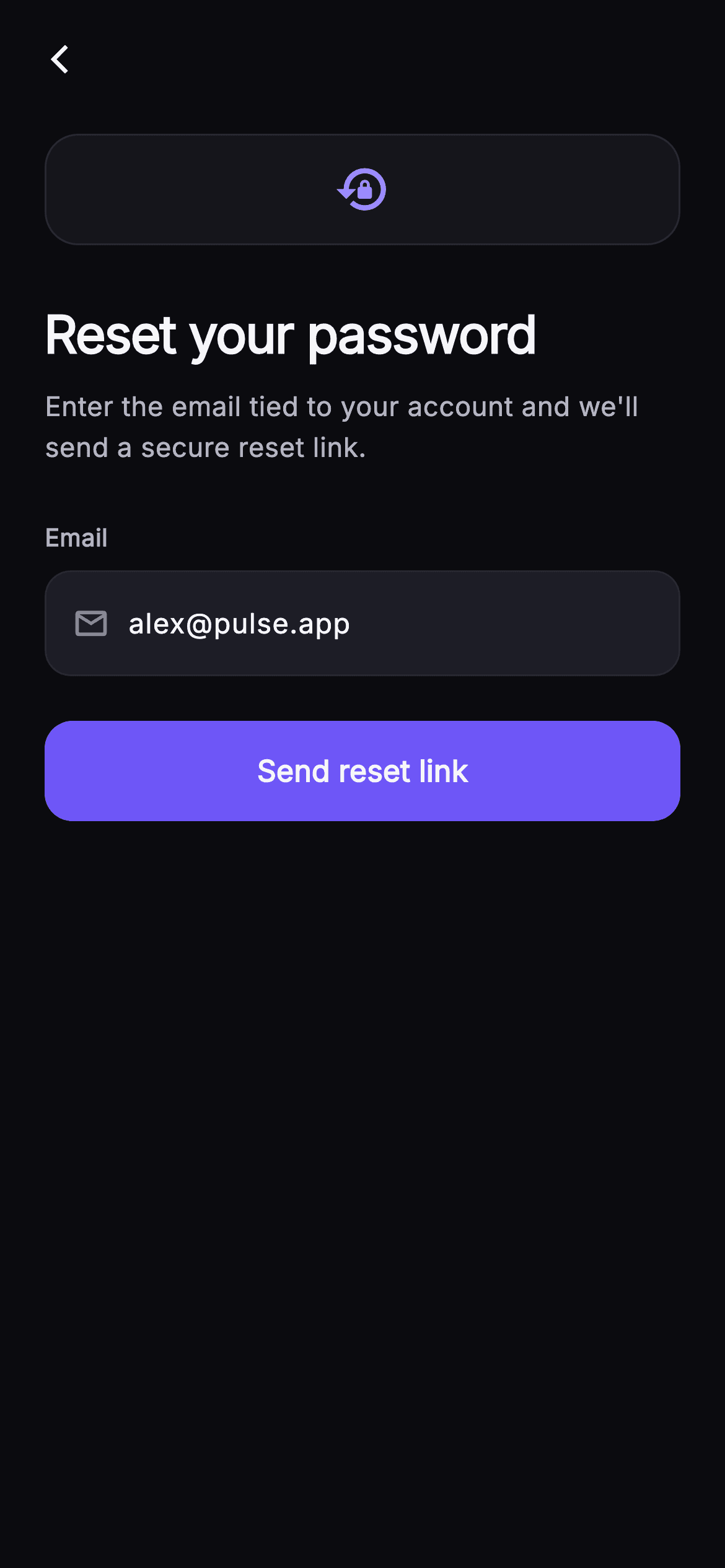
Forgetting a password shouldn't cost a user a navigation stack. Pulse's reset screen keeps the request form and the 'Check your inbox' confirmation inside one StatefulWidget, cross-fading between them with an AnimatedSwitcher keyed by ValueKey. You'll build a lock_reset key badge, a mail-icon email field whose TextEditingController listener re-runs a RegExp check on every keystroke to enable or grey out the send button, then a painted green tick, the typed address echoed back in bold, and a resend link that walks the state backwards.
Watch the Flutter UI walkthrough
A short screen recording of Pulse · Reset Password running, if you'd rather see it before you read the code. The written tutorial below covers everything in it.
Can't see the video? Watch it on YouTube.
What you'll build
- ✓One widget holding two states — request form and sent confirmation — swapped by an AnimatedSwitcher with ValueKey('form') and ValueKey('sent')
- ✓A live-validated email field: a controller listener plus a RegExp that enables the #6E56F7 send button and greys it to #1D1D26 when the address is malformed
- ✓A confirmation that echoes the exact address typed, built with Text.rich so only the email renders bold
- ✓A 40x40 CustomPaint tick stroked in three points inside a translucent green circle, no asset or icon pack
- ✓A 'Didn't get it? Resend' TextButton that reverses the state flag instead of pushing another route
Step-by-step build
Create the file
Add a new file at lib/social_auth_forgot/social_auth_forgot_screen.dart in your Flutter project.
Register the bundled fonts
No external packages — this is pure Flutter. It does bundle its design font (Inter), so drop the font file into fonts/ and declare it in pubspec.yaml:
flutter:
  fonts:
    - family: Inter
      fonts:
- asset: fonts/Inter-Regular.ttfBuild it, piece by piece
Here's how the screen goes together. Each block below is a real slice of the code with a plain-English explanation — paste them in order, or grab the whole file from the next section.
Callbacks out, palette in
import 'package:flutter/material.dart';

/// Reset Password — request a reset link by email. The screen has two inline
/// states: the entry form, and a painted success confirmation ("Check your
/// inbox") shown after the link is sent, with a resend option and a "Back to
/// log in" CTA. Self-contained per CONVENTIONS.md: pure Flutter, bundled Inter
/// font, own dark theme, SafeArea.
class SocialAuthForgotScreen extends StatefulWidget {
  const SocialAuthForgotScreen({
    super.key,
    this.onBack,
    this.onBackToLogin,
  });

  final VoidCallback? onBack;
  final VoidCallback? onBackToLogin;

  static const String _font = 'Inter';
  static const Color _bg = Color(0xFF0B0B0F);
  static const Color _surface = Color(0xFF15151B);
  static const Color _surfaceAlt = Color(0xFF1D1D26);
  static const Color _brand = Color(0xFF6E56F7);
  static const Color _accent = Color(0xFF9B8CFF);
  static const Color _success = Color(0xFF34D399);
  static const Color _hairline = Color(0xFF26262F);
  static const Color _textHi = Color(0xFFF4F4F7);
  static const Color _textLo = Color(0xFFB5B5C2);
  static const Color _muted = Color(0xFF8A8A99);

  @override
  State<SocialAuthForgotScreen> createState() => _SocialAuthForgotScreenState();
}
`SocialAuthForgotScreen` exposes only two hooks — `onBack` and `onBackToLogin` — because everything else this screen does is internal state, not navigation. The eleven colour constants are static on the widget class rather than on the State, so the two private badge widgets further down can reference `SocialAuthForgotScreen._surface` without a constructor parameter or an InheritedWidget. Note the split between `_brand` #6E56F7 (buttons) and `_accent` #9B8CFF (the key glyph and text cursor): the lighter tint is used wherever indigo sits directly on the #0B0B0F background, where the saturated brand colour would be hard to read.
The controller, its listener, and the validity getter
class _SocialAuthForgotScreenState extends State<SocialAuthForgotScreen> {
  final TextEditingController _email =
      TextEditingController(text: 'alex@pulse.app');
  bool _sent = false;

  @override
  void initState() {
    super.initState();
    _email.addListener(() => setState(() {}));
  }

  @override
  void dispose() {
    _email.dispose();
    super.dispose();
  }

  bool get _valid =>
      RegExp(r'^[^@\s]+@[^@\s]+\.[^@\s]+$').hasMatch(_email.text.trim());
`_email` is created inline with `text: 'alex@pulse.app'` so the demo opens in a valid state, and `initState` attaches `_email.addListener(() => setState(() {}))`. That one line is what makes the send button react per keystroke — the TextField repaints itself, but the button's `onPressed` lives outside it and would otherwise never rebuild. `dispose` releases the controller before `super.dispose()`; skipping it leaks the listener and the field's focus node. `_valid` is a computed getter, not stored state, so it can never fall out of sync: the RegExp `^[^@\s]+@[^@\s]+\.[^@\s]+$` runs against the trimmed text on every build.
Dark theme, back arrow, and the state switch
  @override
  Widget build(BuildContext context) {
    return Theme(
      data: ThemeData.dark(useMaterial3: true),
      child: Scaffold(
        backgroundColor: SocialAuthForgotScreen._bg,
        body: SafeArea(
          child: Column(
            children: <Widget>[
              Padding(
                padding: const EdgeInsets.fromLTRB(8, 8, 8, 0),
                child: Align(
                  alignment: Alignment.centerLeft,
                  child: IconButton(
                    onPressed: widget.onBack,
                    icon: const Icon(Icons.arrow_back_ios_new,
                        size: 18, color: SocialAuthForgotScreen._textHi),
                  ),
                ),
              ),
              Expanded(
                child: AnimatedSwitcher(
                  duration: const Duration(milliseconds: 260),
                  child: _sent ? _buildSent() : _buildForm(),
                ),
              ),
            ],
          ),
        ),
      ),
    );
  }
The whole tree is wrapped in `Theme(data: ThemeData.dark(useMaterial3: true))` so the screen keeps its dark look even when dropped into a light host app — the IconButton splash and TextField selection handles both come from that theme. Structurally it is a Column of two things: a fixed back row inside `SafeArea`, and an `Expanded` AnimatedSwitcher. Keeping the arrow outside the switcher means it never animates or shifts while the body cross-fades over 260ms. The switcher's child is a plain ternary on `_sent`, which works only because `_buildForm` and `_buildSent` carry different `ValueKey`s.
Key badge, copy, and the email input
  Widget _buildForm() {
    return ListView(
      key: const ValueKey<String>('form'),
      padding: const EdgeInsets.fromLTRB(24, 16, 24, 24),
      children: <Widget>[
        const _KeyBadge(),
        const SizedBox(height: 28),
        const Text(
          'Reset your password',
          style: TextStyle(
            fontFamily: SocialAuthForgotScreen._font,
            fontSize: 28,
            fontWeight: FontWeight.w700,
            letterSpacing: -0.7,
            color: SocialAuthForgotScreen._textHi,
          ),
        ),
        const SizedBox(height: 8),
        const Text(
          "Enter the email tied to your account and we'll send a secure reset link.",
          style: TextStyle(
            fontFamily: SocialAuthForgotScreen._font,
            fontSize: 14.5,
            height: 1.5,
            color: SocialAuthForgotScreen._textLo,
          ),
        ),
        const SizedBox(height: 28),
        const Text(
          'Email',
          style: TextStyle(
            fontFamily: SocialAuthForgotScreen._font,
            fontSize: 13,
            fontWeight: FontWeight.w600,
            color: SocialAuthForgotScreen._textLo,
          ),
        ),
        const SizedBox(height: 8),
        Container(
          decoration: BoxDecoration(
            color: SocialAuthForgotScreen._surfaceAlt,
            borderRadius: BorderRadius.circular(14),
            border: Border.all(color: SocialAuthForgotScreen._hairline),
          ),
          padding: const EdgeInsets.symmetric(horizontal: 14),
          child: Row(
            children: <Widget>[
              const Icon(Icons.mail_outline,
                  size: 20, color: SocialAuthForgotScreen._muted),
              const SizedBox(width: 10),
              Expanded(
                child: TextField(
                  controller: _email,
                  keyboardType: TextInputType.emailAddress,
                  cursorColor: SocialAuthForgotScreen._accent,
                  style: const TextStyle(
                    fontFamily: SocialAuthForgotScreen._font,
                    fontSize: 15,
                    fontWeight: FontWeight.w500,
                    color: SocialAuthForgotScreen._textHi,
                  ),
                  decoration: const InputDecoration(
                    isCollapsed: true,
                    contentPadding: EdgeInsets.symmetric(vertical: 16),
                    border: InputBorder.none,
                    hintText: 'you@example.com',
                    hintStyle: TextStyle(
                      fontFamily: SocialAuthForgotScreen._font,
                      fontSize: 15,
                      color: SocialAuthForgotScreen._muted,
                    ),
                  ),
                ),
              ),
            ],
          ),
        ),
The form is a `ListView` — not a Column — so the content scrolls instead of overflowing once the keyboard takes half the screen. The heading sits at 28px `w700` with `letterSpacing: -0.7`, tightened because large Inter tracks loosely by default. The field itself is hand-built rather than using an OutlineInputBorder: a #1D1D26 Container with a 14px radius and a #26262F hairline, holding a Row of a `mail_outline` icon and an `Expanded` TextField. The decoration sets `isCollapsed: true` and its own `contentPadding: EdgeInsets.symmetric(vertical: 16)`, which strips Material's built-in padding so the icon lines up with the text baseline.
A button that gates on the address
        const SizedBox(height: 24),
        SizedBox(
          width: double.infinity,
          height: 54,
          child: FilledButton(
            onPressed: _valid ? () => setState(() => _sent = true) : null,
            style: FilledButton.styleFrom(
              backgroundColor: SocialAuthForgotScreen._brand,
              foregroundColor: Colors.white,
              disabledBackgroundColor: SocialAuthForgotScreen._surfaceAlt,
              disabledForegroundColor: SocialAuthForgotScreen._muted,
              shape: RoundedRectangleBorder(
                borderRadius: BorderRadius.circular(15),
              ),
            ),
            child: const Text(
              'Send reset link',
              style: TextStyle(
                fontFamily: SocialAuthForgotScreen._font,
                fontSize: 16,
                fontWeight: FontWeight.w600,
              ),
            ),
          ),
        ),
      ],
    );
  }
`onPressed: _valid ? () => setState(() => _sent = true) : null` is the whole gate — passing `null` is what actually disables a `FilledButton`, and the style then supplies `disabledBackgroundColor: _surfaceAlt` with `disabledForegroundColor: _muted` so the disabled state reads as an inert #1D1D26 slab rather than a dimmed indigo one. Full width comes from wrapping in a `SizedBox(width: double.infinity, height: 54)`; 54px is a comfortable thumb target and matches the 'Back to log in' button in the sent state, so the two states line up visually. The 15px radius sits a hair tighter than the field's 14px.
Confirming with the address they typed
  Widget _buildSent() {
    return ListView(
      key: const ValueKey<String>('sent'),
      padding: const EdgeInsets.fromLTRB(24, 16, 24, 24),
      children: <Widget>[
        const SizedBox(height: 12),
        const Center(child: _SuccessBadge()),
        const SizedBox(height: 28),
        const Text(
          'Check your inbox',
          textAlign: TextAlign.center,
          style: TextStyle(
            fontFamily: SocialAuthForgotScreen._font,
            fontSize: 26,
            fontWeight: FontWeight.w700,
            letterSpacing: -0.6,
            color: SocialAuthForgotScreen._textHi,
          ),
        ),
        const SizedBox(height: 10),
        Text.rich(
          TextSpan(
            text: 'We sent a password reset link to\n',
            style: const TextStyle(
              fontFamily: SocialAuthForgotScreen._font,
              fontSize: 14.5,
              height: 1.5,
              color: SocialAuthForgotScreen._textLo,
            ),
            children: <TextSpan>[
              TextSpan(
                text: _email.text.trim(),
                style: const TextStyle(
                  fontWeight: FontWeight.w600,
                  color: SocialAuthForgotScreen._textHi,
                ),
              ),
            ],
          ),
          textAlign: TextAlign.center,
        ),
The sent view opens with the `_SuccessBadge` centred and a 26px 'Check your inbox' heading — two points smaller than the form's, because the badge already carries the visual weight. The interesting piece is `Text.rich`: the base TextSpan holds 'We sent a password reset link to\n' in muted #B5B5C2, and a child span renders `_email.text.trim()` in `w600` #F4F4F7. Echoing the exact address back is the cheapest way to catch a typo — someone who typed the wrong domain sees it immediately and taps Resend, rather than waiting for mail that will never arrive.
Expiry notice, primary exit, and resend
        Container(
          padding: const EdgeInsets.all(16),
          decoration: BoxDecoration(
            color: SocialAuthForgotScreen._surface,
            borderRadius: BorderRadius.circular(14),
            border: Border.all(color: SocialAuthForgotScreen._hairline),
          ),
          child: const Row(
            children: <Widget>[
              Icon(Icons.info_outline,
                  size: 18, color: SocialAuthForgotScreen._accent),
              SizedBox(width: 10),
              Expanded(
                child: Text(
                  'The link expires in 30 minutes. Check your spam folder if it doesn’t arrive.',
                  style: TextStyle(
                    fontFamily: SocialAuthForgotScreen._font,
                    fontSize: 13,
                    height: 1.45,
                    color: SocialAuthForgotScreen._textLo,
                  ),
                ),
              ),
            ],
          ),
        ),
        const SizedBox(height: 28),
        SizedBox(
          width: double.infinity,
          height: 54,
          child: FilledButton(
            onPressed: widget.onBackToLogin,
            style: FilledButton.styleFrom(
              backgroundColor: SocialAuthForgotScreen._brand,
              foregroundColor: Colors.white,
              shape: RoundedRectangleBorder(
                borderRadius: BorderRadius.circular(15),
              ),
            ),
            child: const Text(
              'Back to log in',
              style: TextStyle(
                fontFamily: SocialAuthForgotScreen._font,
                fontSize: 16,
                fontWeight: FontWeight.w600,
              ),
            ),
          ),
        ),
        const SizedBox(height: 8),
        Center(
          child: TextButton(
            onPressed: () => setState(() => _sent = false),
            style: TextButton.styleFrom(
              foregroundColor: SocialAuthForgotScreen._muted,
            ),
            child: const Text(
              "Didn't get it? Resend",
              style: TextStyle(
                fontFamily: SocialAuthForgotScreen._font,
                fontSize: 13.5,
                fontWeight: FontWeight.w600,
              ),
            ),
          ),
        ),
      ],
    );
  }
A #15151B card with an `info_outline` glyph states that the link expires in 30 minutes and points at the spam folder — the two questions every reset flow generates, answered before they are asked. Below it the ranking is deliberate: 'Back to log in' takes the filled #6E56F7 button and `widget.onBackToLogin`, because most people leave for their mail app and return via login; 'Didn't get it? Resend' is a muted `TextButton` that simply runs `setState(() => _sent = false)`. Resend returns to the form rather than firing a second send, so the address can be corrected first. There is no cooldown timer here — add one before wiring a real mailer.
Two badges and a three-point tick
class _KeyBadge extends StatelessWidget {
  const _KeyBadge();

  @override
  Widget build(BuildContext context) {
    return Container(
      width: 60,
      height: 60,
      decoration: BoxDecoration(
        color: SocialAuthForgotScreen._surface,
        borderRadius: BorderRadius.circular(18),
        border: Border.all(color: SocialAuthForgotScreen._hairline),
      ),
      child: const Icon(Icons.lock_reset,
          size: 30, color: SocialAuthForgotScreen._accent),
    );
  }
}

class _SuccessBadge extends StatelessWidget {
  const _SuccessBadge();

  @override
  Widget build(BuildContext context) {
    return Container(
      width: 84,
      height: 84,
      decoration: BoxDecoration(
        shape: BoxShape.circle,
        color: SocialAuthForgotScreen._success.withValues(alpha: 0.12),
        border: Border.all(
          color: SocialAuthForgotScreen._success.withValues(alpha: 0.4),
        ),
      ),
      child: const Center(
        child: SizedBox(
          width: 40,
          height: 40,
          child: CustomPaint(painter: _CheckPainter()),
        ),
      ),
    );
  }
}

class _CheckPainter extends CustomPainter {
  const _CheckPainter();

  @override
  void paint(Canvas canvas, Size size) {
    final double w = size.width;
    final double h = size.height;
    final Paint p = Paint()
      ..style = PaintingStyle.stroke
      ..strokeWidth = 4
      ..strokeCap = StrokeCap.round
      ..strokeJoin = StrokeJoin.round
      ..color = SocialAuthForgotScreen._success;
    final Path path = Path()
      ..moveTo(w * 0.24, h * 0.52)
      ..lineTo(w * 0.42, h * 0.7)
      ..lineTo(w * 0.76, h * 0.32);
    canvas.drawPath(path, p);
  }

  @override
  bool shouldRepaint(covariant _CheckPainter oldDelegate) => false;
}
`_KeyBadge` is a 60x60 rounded square, 18px radius, in #15151B with a hairline border and a 30px `lock_reset` icon in accent — a squircle that reads as an app-style tile rather than a floating glyph. `_SuccessBadge` is 84x84 and circular, using `_success.withValues(alpha: 0.12)` for the fill and `alpha: 0.4` for the border, so one green derives both layers. Inside it a 40x40 `CustomPaint` runs `_CheckPainter`, a `Path` of exactly three points — (0.24, 0.52) to (0.42, 0.7) to (0.76, 0.32) — stroked at 4px with round cap and join. Fractional coordinates mean the tick scales with whatever SizedBox you give it, and `shouldRepaint` returns false since nothing varies.
Full code
The complete, ready-to-paste source. Free to use in your projects — one click copies it all.
import 'package:flutter/material.dart';

/// Reset Password — request a reset link by email. The screen has two inline
/// states: the entry form, and a painted success confirmation ("Check your
/// inbox") shown after the link is sent, with a resend option and a "Back to
/// log in" CTA. Self-contained per CONVENTIONS.md: pure Flutter, bundled Inter
/// font, own dark theme, SafeArea.
class SocialAuthForgotScreen extends StatefulWidget {
  const SocialAuthForgotScreen({
    super.key,
    this.onBack,
    this.onBackToLogin,
  });

  final VoidCallback? onBack;
  final VoidCallback? onBackToLogin;

  static const String _font = 'Inter';
  static const Color _bg = Color(0xFF0B0B0F);
  static const Color _surface = Color(0xFF15151B);
  static const Color _surfaceAlt = Color(0xFF1D1D26);
  static const Color _brand = Color(0xFF6E56F7);
  static const Color _accent = Color(0xFF9B8CFF);
  static const Color _success = Color(0xFF34D399);
  static const Color _hairline = Color(0xFF26262F);
  static const Color _textHi = Color(0xFFF4F4F7);
  static const Color _textLo = Color(0xFFB5B5C2);
  static const Color _muted = Color(0xFF8A8A99);

  @override
  State<SocialAuthForgotScreen> createState() => _SocialAuthForgotScreenState();
}

class _SocialAuthForgotScreenState extends State<SocialAuthForgotScreen> {
  final TextEditingController _email =
      TextEditingController(text: 'alex@pulse.app');
  bool _sent = false;

  @override
  void initState() {
    super.initState();
    _email.addListener(() => setState(() {}));
  }

  @override
  void dispose() {
    _email.dispose();
    super.dispose();
  }

  bool get _valid =>
      RegExp(r'^[^@\s]+@[^@\s]+\.[^@\s]+$').hasMatch(_email.text.trim());

  @override
  Widget build(BuildContext context) {
    return Theme(
      data: ThemeData.dark(useMaterial3: true),
      child: Scaffold(
        backgroundColor: SocialAuthForgotScreen._bg,
        body: SafeArea(
          child: Column(
            children: <Widget>[
              Padding(
                padding: const EdgeInsets.fromLTRB(8, 8, 8, 0),
                child: Align(
                  alignment: Alignment.centerLeft,
                  child: IconButton(
                    onPressed: widget.onBack,
                    icon: const Icon(Icons.arrow_back_ios_new,
                        size: 18, color: SocialAuthForgotScreen._textHi),
                  ),
                ),
              ),
              Expanded(
                child: AnimatedSwitcher(
                  duration: const Duration(milliseconds: 260),
                  child: _sent ? _buildSent() : _buildForm(),
                ),
              ),
            ],
          ),
        ),
      ),
    );
  }

  Widget _buildForm() {
    return ListView(
      key: const ValueKey<String>('form'),
      padding: const EdgeInsets.fromLTRB(24, 16, 24, 24),
      children: <Widget>[
        const _KeyBadge(),
        const SizedBox(height: 28),
        const Text(
          'Reset your password',
          style: TextStyle(
            fontFamily: SocialAuthForgotScreen._font,
            fontSize: 28,
            fontWeight: FontWeight.w700,
            letterSpacing: -0.7,
            color: SocialAuthForgotScreen._textHi,
          ),
        ),
        const SizedBox(height: 8),
        const Text(
          "Enter the email tied to your account and we'll send a secure reset link.",
          style: TextStyle(
            fontFamily: SocialAuthForgotScreen._font,
            fontSize: 14.5,
            height: 1.5,
            color: SocialAuthForgotScreen._textLo,
          ),
        ),
        const SizedBox(height: 28),
        const Text(
          'Email',
          style: TextStyle(
            fontFamily: SocialAuthForgotScreen._font,
            fontSize: 13,
            fontWeight: FontWeight.w600,
            color: SocialAuthForgotScreen._textLo,
          ),
        ),
        const SizedBox(height: 8),
        Container(
          decoration: BoxDecoration(
            color: SocialAuthForgotScreen._surfaceAlt,
            borderRadius: BorderRadius.circular(14),
            border: Border.all(color: SocialAuthForgotScreen._hairline),
          ),
          padding: const EdgeInsets.symmetric(horizontal: 14),
          child: Row(
            children: <Widget>[
              const Icon(Icons.mail_outline,
                  size: 20, color: SocialAuthForgotScreen._muted),
              const SizedBox(width: 10),
              Expanded(
                child: TextField(
                  controller: _email,
                  keyboardType: TextInputType.emailAddress,
                  cursorColor: SocialAuthForgotScreen._accent,
                  style: const TextStyle(
                    fontFamily: SocialAuthForgotScreen._font,
                    fontSize: 15,
                    fontWeight: FontWeight.w500,
                    color: SocialAuthForgotScreen._textHi,
                  ),
                  decoration: const InputDecoration(
                    isCollapsed: true,
                    contentPadding: EdgeInsets.symmetric(vertical: 16),
                    border: InputBorder.none,
                    hintText: 'you@example.com',
                    hintStyle: TextStyle(
                      fontFamily: SocialAuthForgotScreen._font,
                      fontSize: 15,
                      color: SocialAuthForgotScreen._muted,
                    ),
                  ),
                ),
              ),
            ],
          ),
        ),
        const SizedBox(height: 24),
        SizedBox(
          width: double.infinity,
          height: 54,
          child: FilledButton(
            onPressed: _valid ? () => setState(() => _sent = true) : null,
            style: FilledButton.styleFrom(
              backgroundColor: SocialAuthForgotScreen._brand,
              foregroundColor: Colors.white,
              disabledBackgroundColor: SocialAuthForgotScreen._surfaceAlt,
              disabledForegroundColor: SocialAuthForgotScreen._muted,
              shape: RoundedRectangleBorder(
                borderRadius: BorderRadius.circular(15),
              ),
            ),
            child: const Text(
              'Send reset link',
              style: TextStyle(
                fontFamily: SocialAuthForgotScreen._font,
                fontSize: 16,
                fontWeight: FontWeight.w600,
              ),
            ),
          ),
        ),
      ],
    );
  }

  Widget _buildSent() {
    return ListView(
      key: const ValueKey<String>('sent'),
      padding: const EdgeInsets.fromLTRB(24, 16, 24, 24),
      children: <Widget>[
        const SizedBox(height: 12),
        const Center(child: _SuccessBadge()),
        const SizedBox(height: 28),
        const Text(
          'Check your inbox',
          textAlign: TextAlign.center,
          style: TextStyle(
            fontFamily: SocialAuthForgotScreen._font,
            fontSize: 26,
            fontWeight: FontWeight.w700,
            letterSpacing: -0.6,
            color: SocialAuthForgotScreen._textHi,
          ),
        ),
        const SizedBox(height: 10),
        Text.rich(
          TextSpan(
            text: 'We sent a password reset link to\n',
            style: const TextStyle(
              fontFamily: SocialAuthForgotScreen._font,
              fontSize: 14.5,
              height: 1.5,
              color: SocialAuthForgotScreen._textLo,
            ),
            children: <TextSpan>[
              TextSpan(
                text: _email.text.trim(),
                style: const TextStyle(
                  fontWeight: FontWeight.w600,
                  color: SocialAuthForgotScreen._textHi,
                ),
              ),
            ],
          ),
          textAlign: TextAlign.center,
        ),
        const SizedBox(height: 28),
        Container(
          padding: const EdgeInsets.all(16),
          decoration: BoxDecoration(
            color: SocialAuthForgotScreen._surface,
            borderRadius: BorderRadius.circular(14),
            border: Border.all(color: SocialAuthForgotScreen._hairline),
          ),
          child: const Row(
            children: <Widget>[
              Icon(Icons.info_outline,
                  size: 18, color: SocialAuthForgotScreen._accent),
              SizedBox(width: 10),
              Expanded(
                child: Text(
                  'The link expires in 30 minutes. Check your spam folder if it doesn’t arrive.',
                  style: TextStyle(
                    fontFamily: SocialAuthForgotScreen._font,
                    fontSize: 13,
                    height: 1.45,
                    color: SocialAuthForgotScreen._textLo,
                  ),
                ),
              ),
            ],
          ),
        ),
        const SizedBox(height: 28),
        SizedBox(
          width: double.infinity,
          height: 54,
          child: FilledButton(
            onPressed: widget.onBackToLogin,
            style: FilledButton.styleFrom(
              backgroundColor: SocialAuthForgotScreen._brand,
              foregroundColor: Colors.white,
              shape: RoundedRectangleBorder(
                borderRadius: BorderRadius.circular(15),
              ),
            ),
            child: const Text(
              'Back to log in',
              style: TextStyle(
                fontFamily: SocialAuthForgotScreen._font,
                fontSize: 16,
                fontWeight: FontWeight.w600,
              ),
            ),
          ),
        ),
        const SizedBox(height: 8),
        Center(
          child: TextButton(
            onPressed: () => setState(() => _sent = false),
            style: TextButton.styleFrom(
              foregroundColor: SocialAuthForgotScreen._muted,
            ),
            child: const Text(
              "Didn't get it? Resend",
              style: TextStyle(
                fontFamily: SocialAuthForgotScreen._font,
                fontSize: 13.5,
                fontWeight: FontWeight.w600,
              ),
            ),
          ),
        ),
      ],
    );
  }
}

class _KeyBadge extends StatelessWidget {
  const _KeyBadge();

  @override
  Widget build(BuildContext context) {
    return Container(
      width: 60,
      height: 60,
      decoration: BoxDecoration(
        color: SocialAuthForgotScreen._surface,
        borderRadius: BorderRadius.circular(18),
        border: Border.all(color: SocialAuthForgotScreen._hairline),
      ),
      child: const Icon(Icons.lock_reset,
          size: 30, color: SocialAuthForgotScreen._accent),
    );
  }
}

class _SuccessBadge extends StatelessWidget {
  const _SuccessBadge();

  @override
  Widget build(BuildContext context) {
    return Container(
      width: 84,
      height: 84,
      decoration: BoxDecoration(
        shape: BoxShape.circle,
        color: SocialAuthForgotScreen._success.withValues(alpha: 0.12),
        border: Border.all(
          color: SocialAuthForgotScreen._success.withValues(alpha: 0.4),
        ),
      ),
      child: const Center(
        child: SizedBox(
          width: 40,
          height: 40,
          child: CustomPaint(painter: _CheckPainter()),
        ),
      ),
    );
  }
}

class _CheckPainter extends CustomPainter {
  const _CheckPainter();

  @override
  void paint(Canvas canvas, Size size) {
    final double w = size.width;
    final double h = size.height;
    final Paint p = Paint()
      ..style = PaintingStyle.stroke
      ..strokeWidth = 4
      ..strokeCap = StrokeCap.round
      ..strokeJoin = StrokeJoin.round
      ..color = SocialAuthForgotScreen._success;
    final Path path = Path()
      ..moveTo(w * 0.24, h * 0.52)
      ..lineTo(w * 0.42, h * 0.7)
      ..lineTo(w * 0.76, h * 0.32);
    canvas.drawPath(path, p);
  }

  @override
  bool shouldRepaint(covariant _CheckPainter oldDelegate) => false;
}
Plus bundled 1 binary asset (fonts/images). The CLI and MCP install those for you automatically.
Two faster ways to add it
Copy-paste works, but you can skip it entirely.
1. FlutterKit CLI
One command drops this screen — and its fonts — straight into your project.
$ flutterkit add social-auth-forgot2. AI agent (MCP)
Connect FlutterKit's MCP server in Claude or Cursor and just ask your agent to install social-auth-forgot — it fetches and writes the files for you.
FAQ
Can I use this reset password screen in a commercial app?
Yes. FlutterKit is free — there is no paid tier, no licence key, no attribution line and no account needed to take the code. Copy the Dart from this page, install it with the CLI, or pull it through MCP, and ship it in a paid product if you like.
Does it need any packages or a font file?
No packages at all — it is pure `flutter/material`, and the tick is a CustomPainter rather than an SVG. The only asset is the Inter family referenced as `fontFamily: 'Inter'`; declare it in your pubspec, or delete the `fontFamily` lines and the screen falls back to the platform default with no other change.
Which Flutter version does this need?
Flutter 3.22 or newer, because `_SuccessBadge` uses `Color.withValues(alpha: 0.12)` and the constructor uses `super.key`. On an older SDK swap both `withValues` calls for `withOpacity(0.12)` and `withOpacity(0.4)`, and expand the constructor to `const SocialAuthForgotScreen({Key? key, ...}) : super(key: key)`.
How do I wire this to a real password reset email?
Replace `setState(() => _sent = true)` with your call — `FirebaseAuth.instance.sendPasswordResetEmail(email: _email.text.trim())` or a POST to your own endpoint — and flip `_sent` in the success path. Add a `_sending` bool to show a spinner in the button meanwhile. Deliberately do not branch on 'account not found': confirming which addresses are registered leaks user data, which is why the copy says a link was sent either way.
Why does Resend go back to the form instead of sending again?
Because the most common reason a reset mail never arrives is a mistyped address, and this screen has no cooldown. Returning to `_buildForm` with the text preserved lets the user fix the domain before trying again. If you want a true resend, call your mailer directly from that TextButton and gate it behind a Timer-driven countdown so it cannot be tapped repeatedly.


