How to Build a Stock Order Placed Screen in Flutter (Full Code + Preview)
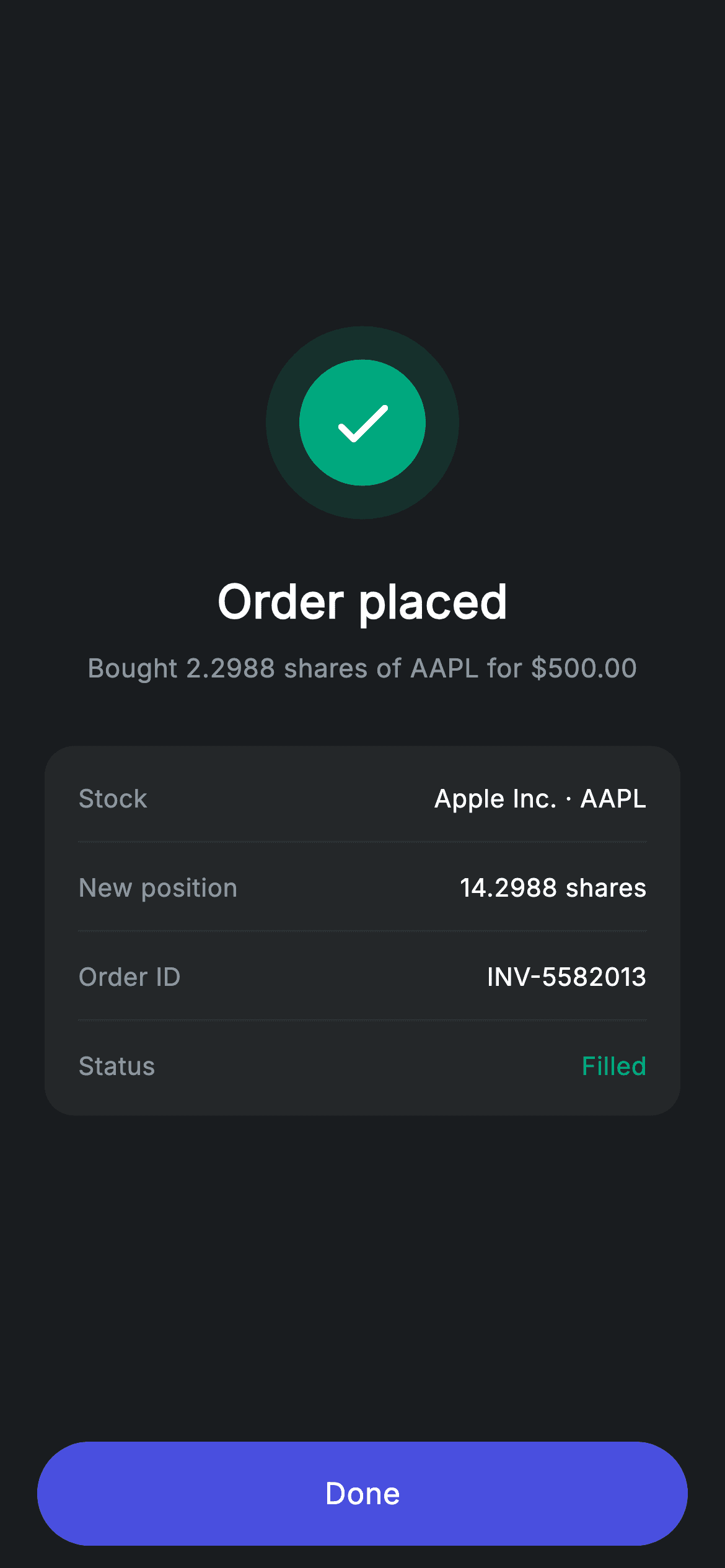
Fractional investing changes what a confirmation has to say. When someone buys $500 of Apple rather than a whole number of shares, the important figure is the odd quantity that came back — 2.2988 shares — and how it added to what they already held. This tutorial builds Nova's order-placed screen in Flutter around exactly that: a teal check badge, a summary line pairing the fractional quantity with the dollar amount spent, and a four-row receipt whose New position line does the addition for the reader.
Watch the Flutter UI walkthrough
A short screen recording of Stock Order Success running, if you'd rather see it before you read the code. The written tutorial below covers everything in it.
Can't see the video? Watch it on YouTube.
What you'll build
- ✓A confirmation summary written for fractional share orders rather than whole units
- ✓A receipt card whose New position row saves the reader from doing the arithmetic
- ✓A four-decimal quantity format that matches how fractional brokers actually report fills
- ✓A Done button anchored outside the scroll area so it is always in thumb reach
Step-by-step build
Create the file
Add a new file at lib/fintech_stock_success/fintech_stock_success_screen.dart in your Flutter project.
Register the bundled fonts
No external packages — this is pure Flutter. It does bundle its design font (Inter), so drop the font file into fonts/ and declare it in pubspec.yaml:
flutter:
  fonts:
    - family: Inter
      fonts:
- asset: fonts/Inter-Regular.ttfBuild it, piece by piece
Here's how the screen goes together. Each block below is a real slice of the code with a plain-English explanation — paste them in order, or grab the whole file from the next section.
A confirmation written for dollar-based orders
import 'package:flutter/material.dart';

/// Stock success — order placed confirmation (Revolut-inspired design system).
///
/// Self-contained per CONVENTIONS.md: pure Flutter only, the exact design font
/// (Inter) is bundled under `fonts/`, the success badge is painted (no emoji/
/// network), and the screen forces its own dark theme. The updated position
/// makes the confirmation feel complete.
class FintechStockSuccessScreen extends StatelessWidget {
  const FintechStockSuccessScreen({super.key, this.onDone});

  final VoidCallback? onDone;

  static const String _font = 'Inter';
  static const Color _bg = Color(0xFF191C1F);
  static const Color _surface = Color(0xFF242729);
  static const Color _brand = Color(0xFF494FDF);
  static const Color _teal = Color(0xFF00A87E);
  static const Color _muted = Color(0xFF8D969E);
  static const Color _hairline = Color(0xFF2E3235);

  @override
  Widget build(BuildContext context) {
    return Theme(
      data: ThemeData.dark(useMaterial3: true),
      child: Scaffold(
        backgroundColor: _bg,
        body: SafeArea(
          child: Column(
            children: <Widget>[
              Expanded(
                child: Padding(
                  padding: const EdgeInsets.symmetric(horizontal: 24),
                  child: Column(
                    mainAxisAlignment: MainAxisAlignment.center,
                    children: <Widget>[
                      _buildBadge(),
                      const SizedBox(height: 26),
                      const Text(
                        'Order placed',
                        style: TextStyle(
                          fontFamily: _font,
                          fontSize: 25,
                          fontWeight: FontWeight.w600,
                          letterSpacing: 0.24,
                          color: Colors.white,
                        ),
                      ),
                      const SizedBox(height: 8),
                      const Text(
                        r'Bought 2.2988 shares of AAPL for $500.00',
                        textAlign: TextAlign.center,
                        style: TextStyle(
                          fontFamily: _font,
                          fontSize: 14,
                          letterSpacing: 0.24,
                          color: _muted,
                        ),
                      ),
                      const SizedBox(height: 32),
                      _buildCard(),
                    ],
                  ),
                ),
              ),
              _buildButton(),
            ],
          ),
        ),
      ),
    );
  }
The screen is stateless with one `onDone` — a filled order has nothing left to change. The line that carries the meaning is `r'Bought 2.2988 shares of AAPL for $500.00'`. Its order is deliberate: quantity first, then cost. In fractional investing the customer chose the dollar amount and the broker computed the shares, so the number they have not seen before is the quantity, and it belongs at the front of the sentence. Four decimal places is not decoration either — that is the precision fractional brokers report fills at, and rounding to two would make the position arithmetic below fail to add up. The `r` prefix keeps `$500.00` a literal rather than a Dart interpolation. `textAlign: TextAlign.center` handles the wrap on narrow devices.
The success badge
  Widget _buildBadge() {
    return Container(
      width: 104,
      height: 104,
      decoration: BoxDecoration(
        color: _teal.withValues(alpha: 0.14),
        shape: BoxShape.circle,
      ),
      child: Center(
        child: Container(
          width: 68,
          height: 68,
          decoration: const BoxDecoration(color: _teal, shape: BoxShape.circle),
          child: const Icon(Icons.check_rounded, size: 38, color: Colors.white),
        ),
      ),
    );
  }
A 104px circle at `_teal.withValues(alpha: 0.14)` wrapping a solid 68px `_teal` circle with a 38px check. The 18px tinted ring that results reads as a soft halo with no `BoxShadow` and no blur — worth knowing because shadows on a near-black background tend to look like dirt rather than depth. Both circles are drawn from the same constant, so the entire badge restyles from one value, and swapping in a red or amber turns the same construction into an error or pending mark.
A receipt that does the arithmetic for you
  Widget _buildCard() {
    return Container(
      padding: const EdgeInsets.symmetric(horizontal: 18, vertical: 4),
      decoration: BoxDecoration(
        color: _surface,
        borderRadius: BorderRadius.circular(16),
      ),
      child: Column(
        children: <Widget>[
          _row('Stock', 'Apple Inc. · AAPL'),
          const Divider(height: 1, color: _hairline),
          _row('New position', '14.2988 shares'),
          const Divider(height: 1, color: _hairline),
          _row('Order ID', 'INV-5582013'),
          const Divider(height: 1, color: _hairline),
          _row('Status', 'Filled', valueColor: _teal),
        ],
      ),
    );
  }

  Widget _row(String label, String value, {Color? valueColor}) {
    return Padding(
      padding: const EdgeInsets.symmetric(vertical: 14),
      child: Row(
        mainAxisAlignment: MainAxisAlignment.spaceBetween,
        children: <Widget>[
          Text(
            label,
            style: const TextStyle(
              fontFamily: _font,
              fontSize: 13.5,
              letterSpacing: 0.24,
              color: _muted,
            ),
          ),
          Text(
            value,
            style: TextStyle(
              fontFamily: _font,
              fontSize: 13.5,
              fontWeight: FontWeight.w500,
              letterSpacing: 0.24,
              color: valueColor ?? Colors.white,
            ),
          ),
        ],
      ),
    );
  }
`_buildCard` is a `_surface` container with `vertical: 4` padding, its rhythm set by each row's own `vertical: 14` so the hairline `Divider(height: 1)` lands centred between lines. The four rows are chosen to answer the questions a filled order raises. 'New position' reading 14.2988 shares is the one doing real work — the reader held 12, bought 2.2988, and the screen has already added them rather than leaving a subtraction for later. 'Order ID' gives something quotable to support, and 'Status: Filled' distinguishes an executed order from a queued one, which matters for a market that may have been closed. `_row` keeps labels 13.5px `_muted` against values at the same size in white `w500`, with its single optional `valueColor` used once to tint 'Filled' teal back to the badge.
The Done button
  Widget _buildButton() {
    return Padding(
      padding: const EdgeInsets.fromLTRB(20, 0, 20, 12),
      child: SizedBox(
        width: double.infinity,
        height: 56,
        child: Material(
          color: _brand,
          borderRadius: BorderRadius.circular(9999),
          child: InkWell(
            borderRadius: BorderRadius.circular(9999),
            onTap: onDone,
            child: const Center(
              child: Text(
                'Done',
                style: TextStyle(
                  fontFamily: _font,
                  fontSize: 16,
                  fontWeight: FontWeight.w500,
                  letterSpacing: 0.24,
                  color: Colors.white,
                ),
              ),
            ),
          ),
        ),
      ),
    );
  }
The button sits outside the `Expanded`, which anchors it to the bottom of the screen while the badge and card centre themselves in the space above — the shape stays correct whether the receipt has four rows or eight. It is the app's standard pill: `SizedBox(width: double.infinity, height: 56)` around a `Material` filled `_brand` at `BorderRadius.circular(9999)`, with the `InkWell` repeating that radius so the ripple is clipped to the pill rather than washing into square corners. `onTap` receives `onDone` directly, so a null callback simply makes the button inert.
Full code
The complete, ready-to-paste source. Free to use in your projects — one click copies it all.
import 'package:flutter/material.dart';

/// Stock success — order placed confirmation (Revolut-inspired design system).
///
/// Self-contained per CONVENTIONS.md: pure Flutter only, the exact design font
/// (Inter) is bundled under `fonts/`, the success badge is painted (no emoji/
/// network), and the screen forces its own dark theme. The updated position
/// makes the confirmation feel complete.
class FintechStockSuccessScreen extends StatelessWidget {
  const FintechStockSuccessScreen({super.key, this.onDone});

  final VoidCallback? onDone;

  static const String _font = 'Inter';
  static const Color _bg = Color(0xFF191C1F);
  static const Color _surface = Color(0xFF242729);
  static const Color _brand = Color(0xFF494FDF);
  static const Color _teal = Color(0xFF00A87E);
  static const Color _muted = Color(0xFF8D969E);
  static const Color _hairline = Color(0xFF2E3235);

  @override
  Widget build(BuildContext context) {
    return Theme(
      data: ThemeData.dark(useMaterial3: true),
      child: Scaffold(
        backgroundColor: _bg,
        body: SafeArea(
          child: Column(
            children: <Widget>[
              Expanded(
                child: Padding(
                  padding: const EdgeInsets.symmetric(horizontal: 24),
                  child: Column(
                    mainAxisAlignment: MainAxisAlignment.center,
                    children: <Widget>[
                      _buildBadge(),
                      const SizedBox(height: 26),
                      const Text(
                        'Order placed',
                        style: TextStyle(
                          fontFamily: _font,
                          fontSize: 25,
                          fontWeight: FontWeight.w600,
                          letterSpacing: 0.24,
                          color: Colors.white,
                        ),
                      ),
                      const SizedBox(height: 8),
                      const Text(
                        r'Bought 2.2988 shares of AAPL for $500.00',
                        textAlign: TextAlign.center,
                        style: TextStyle(
                          fontFamily: _font,
                          fontSize: 14,
                          letterSpacing: 0.24,
                          color: _muted,
                        ),
                      ),
                      const SizedBox(height: 32),
                      _buildCard(),
                    ],
                  ),
                ),
              ),
              _buildButton(),
            ],
          ),
        ),
      ),
    );
  }

  Widget _buildBadge() {
    return Container(
      width: 104,
      height: 104,
      decoration: BoxDecoration(
        color: _teal.withValues(alpha: 0.14),
        shape: BoxShape.circle,
      ),
      child: Center(
        child: Container(
          width: 68,
          height: 68,
          decoration: const BoxDecoration(color: _teal, shape: BoxShape.circle),
          child: const Icon(Icons.check_rounded, size: 38, color: Colors.white),
        ),
      ),
    );
  }

  Widget _buildCard() {
    return Container(
      padding: const EdgeInsets.symmetric(horizontal: 18, vertical: 4),
      decoration: BoxDecoration(
        color: _surface,
        borderRadius: BorderRadius.circular(16),
      ),
      child: Column(
        children: <Widget>[
          _row('Stock', 'Apple Inc. · AAPL'),
          const Divider(height: 1, color: _hairline),
          _row('New position', '14.2988 shares'),
          const Divider(height: 1, color: _hairline),
          _row('Order ID', 'INV-5582013'),
          const Divider(height: 1, color: _hairline),
          _row('Status', 'Filled', valueColor: _teal),
        ],
      ),
    );
  }

  Widget _row(String label, String value, {Color? valueColor}) {
    return Padding(
      padding: const EdgeInsets.symmetric(vertical: 14),
      child: Row(
        mainAxisAlignment: MainAxisAlignment.spaceBetween,
        children: <Widget>[
          Text(
            label,
            style: const TextStyle(
              fontFamily: _font,
              fontSize: 13.5,
              letterSpacing: 0.24,
              color: _muted,
            ),
          ),
          Text(
            value,
            style: TextStyle(
              fontFamily: _font,
              fontSize: 13.5,
              fontWeight: FontWeight.w500,
              letterSpacing: 0.24,
              color: valueColor ?? Colors.white,
            ),
          ),
        ],
      ),
    );
  }

  Widget _buildButton() {
    return Padding(
      padding: const EdgeInsets.fromLTRB(20, 0, 20, 12),
      child: SizedBox(
        width: double.infinity,
        height: 56,
        child: Material(
          color: _brand,
          borderRadius: BorderRadius.circular(9999),
          child: InkWell(
            borderRadius: BorderRadius.circular(9999),
            onTap: onDone,
            child: const Center(
              child: Text(
                'Done',
                style: TextStyle(
                  fontFamily: _font,
                  fontSize: 16,
                  fontWeight: FontWeight.w500,
                  letterSpacing: 0.24,
                  color: Colors.white,
                ),
              ),
            ),
          ),
        ),
      ),
    );
  }
}
Plus bundled 1 binary asset (fonts/images). The CLI and MCP install those for you automatically.
Two faster ways to add it
Copy-paste works, but you can skip it entirely.
1. FlutterKit CLI
One command drops this screen — and its fonts — straight into your project.
$ flutterkit add fintech-stock-success2. AI agent (MCP)
Connect FlutterKit's MCP server in Claude or Cursor and just ask your agent to install fintech-stock-success — it fetches and writes the files for you.
FAQ
Is this order confirmation screen free for commercial use?
Yes. FlutterKit has no paid tier — this confirmation screen is free to copy from the page, install via the CLI, or pull over MCP, and free to ship inside a commercial trading or banking app with no attribution.
Why are share quantities shown to four decimal places?
Because the order was placed in dollars, not shares. A $500 buy at $217.50 fills at 2.2988 shares, and rounding that to two decimals would make the New position row fail to reconcile against the customer's real holding. Four places is the convention fractional brokers report fills at.
How do I pass in real order data?
Add constructor fields for the ticker, quantity, amount, new position, order ID and status, then replace the literals in the summary line and `_buildCard`. The widget is stateless, so no other change is needed — nothing has to be lifted into a State class.
Does it need any packages or image assets?
No. The only import is `package:flutter/material.dart`, and the badge is two nested Containers rather than an illustration. The bundled Inter font is the sole asset — register it under `fonts:` in your pubspec, or remove the `fontFamily` lines to use the system typeface.
Which Flutter version does this require?
Flutter 3.22 or newer, because the badge ring uses `Color.withValues(alpha: 0.14)`. On an older SDK use `withOpacity(0.14)` and expand the constructor to `const FintechStockSuccessScreen({Key? key, this.onDone}) : super(key: key);`.


