How to Build a Forgot Passcode Screen in Flutter (Full Code + Preview)
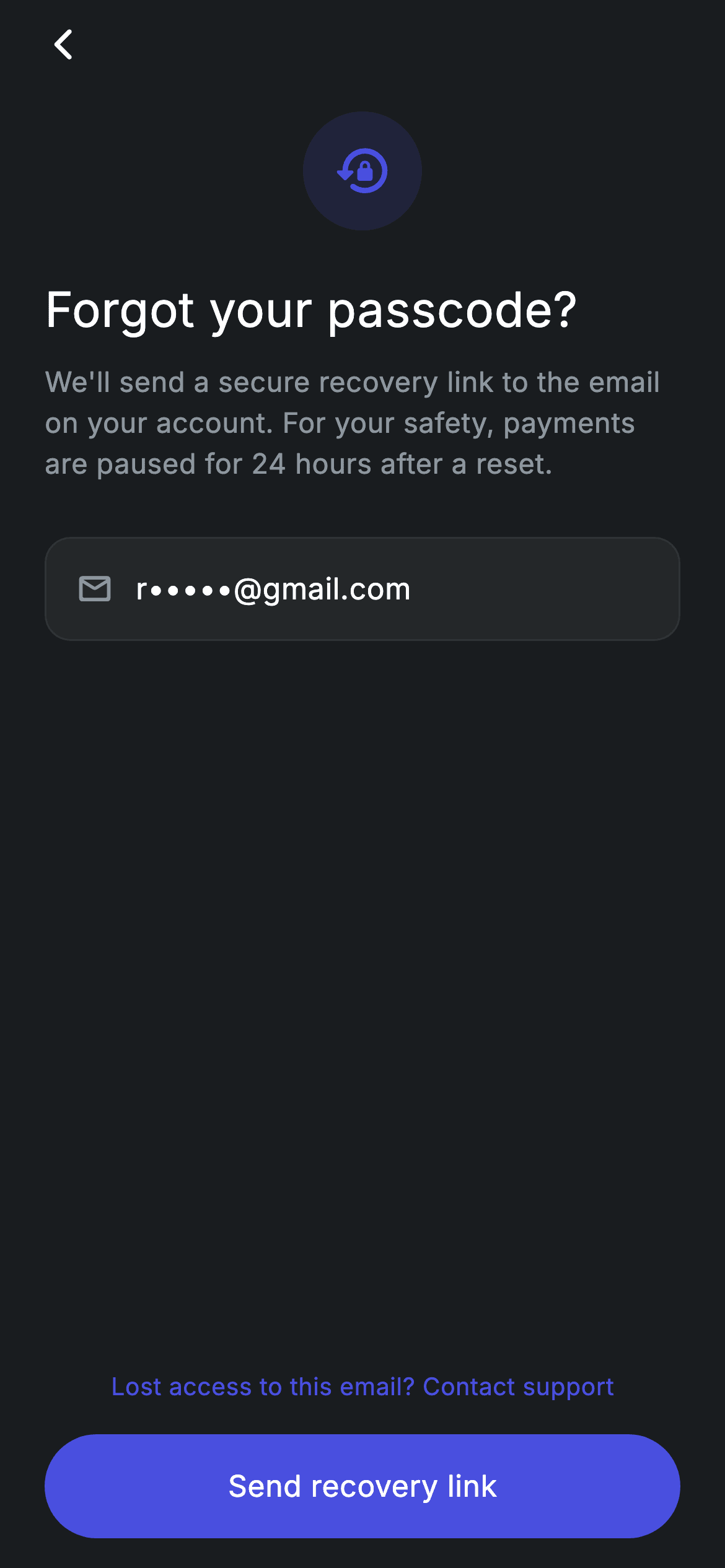
A recovery screen is where an app admits something went wrong, so this one stays deliberately calm: no form to fill in, no password rules, just the address already on the account and a single button. This tutorial builds it in Flutter — a tinted circle holding a lock_reset icon, a 26px heading, a notice warning that payments pause for 24 hours after a reset, and a read-only pill showing 'r•••••@gmail.com'. You'll see why that masked email is a Container rather than a TextField, and how three optional callbacks keep the widget free of navigation code.
Watch the Flutter UI walkthrough
A short screen recording of Fintech · Forgot Passcode running, if you'd rather see it before you read the code. The written tutorial below covers everything in it.
Can't see the video? Watch it on YouTube.
What you'll build
- ✓A dark #191C1F recovery screen laid out as a single stretched Column with a Spacer doing all the vertical work
- ✓A 64px circular badge that tints the brand indigo to 14% opacity behind a lock_reset icon
- ✓A masked-email display row built from a Container and a Row — read-only by construction, with no TextField to guard
- ✓A centered 'Contact support' text link and a fully-rounded 'Send recovery link' button with a real ink ripple
- ✓A stateless widget with onSendLink, onBack and onSupport callbacks so the screen can drop into any recovery flow
Step-by-step build
Create the file
Add a new file at lib/fintech_forgot_passcode/fintech_forgot_passcode_screen.dart in your Flutter project.
Register the bundled fonts
No external packages — this is pure Flutter. It does bundle its design font (Inter), so drop the font file into fonts/ and declare it in pubspec.yaml:
flutter:
  fonts:
    - family: Inter
      fonts:
- asset: fonts/Inter-Regular.ttfBuild it, piece by piece
Here's how the screen goes together. Each block below is a real slice of the code with a plain-English explanation — paste them in order, or grab the whole file from the next section.
A stateless screen with three optional callbacks
import 'package:flutter/material.dart';

/// Forgot Passcode — start passcode recovery. Self-contained per CONVENTIONS.md:
/// pure Flutter, bundled Inter font, forced dark theme so it renders standalone.
class FintechForgotPasscodeScreen extends StatelessWidget {
  const FintechForgotPasscodeScreen(
      {super.key, this.onSendLink, this.onBack, this.onSupport});

  final VoidCallback? onSendLink;
  final VoidCallback? onBack;
  final VoidCallback? onSupport;

  static const String _font = 'Inter';
  static const Color _bg = Color(0xFF191C1F);
  static const Color _surface = Color(0xFF242729);
  static const Color _brand = Color(0xFF494FDF);
  static const Color _muted = Color(0xFF8D969E);
  static const Color _hairline = Color(0xFF2E3235);
FintechForgotPasscodeScreen is a StatelessWidget because nothing on the screen ever changes — there's no input to track, so there's no state. Instead of navigating itself, it exposes three nullable VoidCallbacks — onSendLink, onBack and onSupport — and lets the parent decide what each tap does. Below them sit the design tokens: _bg (#191C1F) for the canvas, _surface (#242729) for the email field's fill, _brand (#494FDF) for the indigo accent, _muted (#8D969E) for secondary text, and _hairline (#2E3235) for the field's 1px border. Naming the palette once means retheming the screen is a five-line edit.
Forcing dark mode and adding a tappable back arrow
  @override
  Widget build(BuildContext context) {
    return Theme(
      data: ThemeData.dark(useMaterial3: true),
      child: Scaffold(
        backgroundColor: _bg,
        body: SafeArea(
          child: Padding(
            padding: const EdgeInsets.fromLTRB(24, 4, 24, 16),
            child: Column(
              crossAxisAlignment: CrossAxisAlignment.stretch,
              children: <Widget>[
                Align(
                  alignment: Alignment.centerLeft,
                  child: GestureDetector(
                    onTap: onBack ?? () => Navigator.of(context).maybePop(),
                    behavior: HitTestBehavior.opaque,
                    child: const SizedBox(
                      width: 40,
                      height: 40,
                      child: Align(
                        alignment: Alignment.centerLeft,
                        child: Icon(Icons.arrow_back_ios_new_rounded,
                            size: 20, color: Colors.white),
                      ),
                    ),
                  ),
                ),
                const SizedBox(height: 16),
build() wraps everything in Theme(data: ThemeData.dark(useMaterial3: true)) so the screen renders dark even if the host app is running a light theme — useful when you paste it into an existing project. Inside, the Scaffold is painted _bg, SafeArea clears the notch and home indicator, and a padding of EdgeInsets.fromLTRB(24, 4, 24, 16) gives 24px side gutters with a tighter top. The Column uses CrossAxisAlignment.stretch, which is why the email field and button later fill the full width without any extra sizing. The back control is a GestureDetector around a 40×40 SizedBox — the icon is only 20px, but the box gives it a comfortable tap target — and HitTestBehavior.opaque makes the empty space inside that box tappable too. Its onTap falls back to Navigator.of(context).maybePop() when no onBack is supplied, so the arrow works out of the box.
The lock badge, heading, and 24-hour safety notice
                Container(
                  width: 64,
                  height: 64,
                  decoration: BoxDecoration(
                    shape: BoxShape.circle,
                    color: _brand.withValues(alpha: 0.14),
                  ),
                  child: const Icon(Icons.lock_reset_rounded,
                      size: 32, color: _brand),
                ),
                const SizedBox(height: 24),
                const Text(
                  'Forgot your passcode?',
                  style: TextStyle(
                    fontFamily: _font,
                    fontSize: 26,
                    fontWeight: FontWeight.w500,
                    letterSpacing: 0.24,
                    color: Colors.white,
                  ),
                ),
                const SizedBox(height: 10),
                const Text(
                  'We\'ll send a secure recovery link to the email on your '
                  'account. For your safety, payments are paused for 24 hours '
                  'after a reset.',
                  style: TextStyle(
                    fontFamily: _font,
                    fontSize: 15,
                    fontWeight: FontWeight.w400,
                    height: 1.45,
                    letterSpacing: 0.24,
                    color: _muted,
                  ),
                ),
The icon badge is a 64×64 Container with BoxShape.circle filled by _brand.withValues(alpha: 0.14) — the same indigo as the button, dimmed to 14% so it reads as a soft halo rather than a second call to action — and a 32px Icons.lock_reset_rounded in full-strength _brand sits inside it. Then comes the heading, 'Forgot your passcode?' at 26px with FontWeight.w500 and 0.24 letterSpacing, followed 10px later by the body copy in 15px _muted with height: 1.45 for comfortable line spacing. That body string is written as three adjacent Dart string literals that the compiler concatenates, which keeps the source under the line limit, and it does real work: telling the user a recovery link is coming and that payments are paused for 24 hours after a reset sets expectations before they tap anything.
A masked email row that isn't a text field
                Container(
                  height: 56,
                  decoration: BoxDecoration(
                    color: _surface,
                    borderRadius: BorderRadius.circular(14),
                    border: Border.all(color: _hairline),
                  ),
                  padding: const EdgeInsets.symmetric(horizontal: 16),
                  child: const Row(
                    children: <Widget>[
                      Icon(Icons.mail_outline_rounded, size: 20, color: _muted),
                      SizedBox(width: 12),
                      Text(
                        'r•••••@gmail.com',
                        style: TextStyle(
                          fontFamily: _font,
                          fontSize: 16,
                          color: Colors.white,
                          letterSpacing: 0.24,
                        ),
                      ),
                    ],
                  ),
                ),
The email display looks like an input, but it's just a 56px-tall Container filled with _surface, rounded to 14px, and outlined with a 1px _hairline border. Inside is a const Row holding a 20px Icons.mail_outline_rounded in _muted, a 12px gap, and the masked address 'r•••••@gmail.com' in 16px white. Building it this way is a deliberate choice: the user isn't meant to type here — the address comes from their account — so there's no TextField, no controller, and nothing to validate or disable. The whole subtree is const, which means Flutter can skip rebuilding it entirely.
Spacer, support link, and the pill CTA
                const Spacer(),
                Center(
                  child: GestureDetector(
                    onTap: onSupport,
                    behavior: HitTestBehavior.opaque,
                    child: const Padding(
                      padding: EdgeInsets.all(8),
                      child: Text(
                        'Lost access to this email? Contact support',
                        style: TextStyle(
                          fontFamily: _font,
                          fontSize: 13,
                          fontWeight: FontWeight.w500,
                          letterSpacing: 0.24,
                          color: _brand,
                        ),
                      ),
                    ),
                  ),
                ),
                const SizedBox(height: 8),
                SizedBox(
                  height: 56,
                  child: Material(
                    color: _brand,
                    borderRadius: BorderRadius.circular(9999),
                    child: InkWell(
                      borderRadius: BorderRadius.circular(9999),
                      onTap: onSendLink,
                      child: const Center(
                        child: Text(
                          'Send recovery link',
                          style: TextStyle(
                            fontFamily: _font,
                            fontSize: 16,
                            fontWeight: FontWeight.w500,
                            letterSpacing: 0.24,
                            color: Colors.white,
                          ),
                        ),
                      ),
                    ),
                  ),
                ),
A single Spacer() absorbs all the leftover vertical space, which is what pins the last two elements to the bottom of the screen without any hard-coded offsets. The 'Lost access to this email? Contact support' link is centered, coloured _brand at 13px, and wrapped in EdgeInsets.all(8) inside a GestureDetector so the padding itself is tappable — an escape hatch for the one user the happy path can't help. The primary action is a 56px SizedBox holding a Material coloured _brand with borderRadius 9999 (any value past half the height gives a full pill) and an InkWell using the same radius so the ripple is clipped to the pill instead of spilling into the corners. Its onTap fires onSendLink directly — the screen doesn't send anything itself, it just reports the tap.
Full code
The complete, ready-to-paste source. Free to use in your projects — one click copies it all.
import 'package:flutter/material.dart';

/// Forgot Passcode — start passcode recovery. Self-contained per CONVENTIONS.md:
/// pure Flutter, bundled Inter font, forced dark theme so it renders standalone.
class FintechForgotPasscodeScreen extends StatelessWidget {
  const FintechForgotPasscodeScreen(
      {super.key, this.onSendLink, this.onBack, this.onSupport});

  final VoidCallback? onSendLink;
  final VoidCallback? onBack;
  final VoidCallback? onSupport;

  static const String _font = 'Inter';
  static const Color _bg = Color(0xFF191C1F);
  static const Color _surface = Color(0xFF242729);
  static const Color _brand = Color(0xFF494FDF);
  static const Color _muted = Color(0xFF8D969E);
  static const Color _hairline = Color(0xFF2E3235);

  @override
  Widget build(BuildContext context) {
    return Theme(
      data: ThemeData.dark(useMaterial3: true),
      child: Scaffold(
        backgroundColor: _bg,
        body: SafeArea(
          child: Padding(
            padding: const EdgeInsets.fromLTRB(24, 4, 24, 16),
            child: Column(
              crossAxisAlignment: CrossAxisAlignment.stretch,
              children: <Widget>[
                Align(
                  alignment: Alignment.centerLeft,
                  child: GestureDetector(
                    onTap: onBack ?? () => Navigator.of(context).maybePop(),
                    behavior: HitTestBehavior.opaque,
                    child: const SizedBox(
                      width: 40,
                      height: 40,
                      child: Align(
                        alignment: Alignment.centerLeft,
                        child: Icon(Icons.arrow_back_ios_new_rounded,
                            size: 20, color: Colors.white),
                      ),
                    ),
                  ),
                ),
                const SizedBox(height: 16),
                Container(
                  width: 64,
                  height: 64,
                  decoration: BoxDecoration(
                    shape: BoxShape.circle,
                    color: _brand.withValues(alpha: 0.14),
                  ),
                  child: const Icon(Icons.lock_reset_rounded,
                      size: 32, color: _brand),
                ),
                const SizedBox(height: 24),
                const Text(
                  'Forgot your passcode?',
                  style: TextStyle(
                    fontFamily: _font,
                    fontSize: 26,
                    fontWeight: FontWeight.w500,
                    letterSpacing: 0.24,
                    color: Colors.white,
                  ),
                ),
                const SizedBox(height: 10),
                const Text(
                  'We\'ll send a secure recovery link to the email on your '
                  'account. For your safety, payments are paused for 24 hours '
                  'after a reset.',
                  style: TextStyle(
                    fontFamily: _font,
                    fontSize: 15,
                    fontWeight: FontWeight.w400,
                    height: 1.45,
                    letterSpacing: 0.24,
                    color: _muted,
                  ),
                ),
                const SizedBox(height: 28),
                Container(
                  height: 56,
                  decoration: BoxDecoration(
                    color: _surface,
                    borderRadius: BorderRadius.circular(14),
                    border: Border.all(color: _hairline),
                  ),
                  padding: const EdgeInsets.symmetric(horizontal: 16),
                  child: const Row(
                    children: <Widget>[
                      Icon(Icons.mail_outline_rounded, size: 20, color: _muted),
                      SizedBox(width: 12),
                      Text(
                        'r•••••@gmail.com',
                        style: TextStyle(
                          fontFamily: _font,
                          fontSize: 16,
                          color: Colors.white,
                          letterSpacing: 0.24,
                        ),
                      ),
                    ],
                  ),
                ),
                const Spacer(),
                Center(
                  child: GestureDetector(
                    onTap: onSupport,
                    behavior: HitTestBehavior.opaque,
                    child: const Padding(
                      padding: EdgeInsets.all(8),
                      child: Text(
                        'Lost access to this email? Contact support',
                        style: TextStyle(
                          fontFamily: _font,
                          fontSize: 13,
                          fontWeight: FontWeight.w500,
                          letterSpacing: 0.24,
                          color: _brand,
                        ),
                      ),
                    ),
                  ),
                ),
                const SizedBox(height: 8),
                SizedBox(
                  height: 56,
                  child: Material(
                    color: _brand,
                    borderRadius: BorderRadius.circular(9999),
                    child: InkWell(
                      borderRadius: BorderRadius.circular(9999),
                      onTap: onSendLink,
                      child: const Center(
                        child: Text(
                          'Send recovery link',
                          style: TextStyle(
                            fontFamily: _font,
                            fontSize: 16,
                            fontWeight: FontWeight.w500,
                            letterSpacing: 0.24,
                            color: Colors.white,
                          ),
                        ),
                      ),
                    ),
                  ),
                ),
              ],
            ),
          ),
        ),
      ),
    );
  }
}
Plus bundled 1 binary asset (fonts/images). The CLI and MCP install those for you automatically.
Two faster ways to add it
Copy-paste works, but you can skip it entirely.
1. FlutterKit CLI
One command drops this screen — and its fonts — straight into your project.
$ flutterkit add fintech-forgot-passcode2. AI agent (MCP)
Connect FlutterKit's MCP server in Claude or Cursor and just ask your agent to install fintech-forgot-passcode — it fetches and writes the files for you.
FAQ
Can I use this forgot-passcode screen in a commercial banking app?
Yes. The full Dart on this page is free to copy into personal or commercial projects — paste it, run flutterkit add fintech-forgot-passcode, or let an AI agent install it through MCP. Swap the masked 'r•••••@gmail.com' string and the three callbacks for your own recovery logic and it's yours.
Do I need local_auth, an email package, or any dependency for this?
No. The file imports only package:flutter/material.dart — the lock_reset and mail_outline icons come from Flutter's built-in Material set, so there's nothing to install. The one bundled asset is the Inter font used across the heading, body copy and button, registered in pubspec.yaml as shown in step 2; the CLI and MCP install the .ttf for you. Sending the actual recovery email is a backend call you add yourself inside onSendLink.
What Flutter version does this screen need?
Flutter 3.22+ (Dart 3). It uses Color.withValues(alpha: 0.14) for the badge tint and super parameters in the constructor ({super.key, this.onSendLink, ...}). On an older SDK, change that one call to _brand.withOpacity(0.14) and replace the super parameter with Key? key : super(key: key); everything else, including ThemeData.dark(useMaterial3: true), compiles as far back as Flutter 3.10.


