How to Build a Card Design Picker Screen in Flutter (Full Code + Preview)
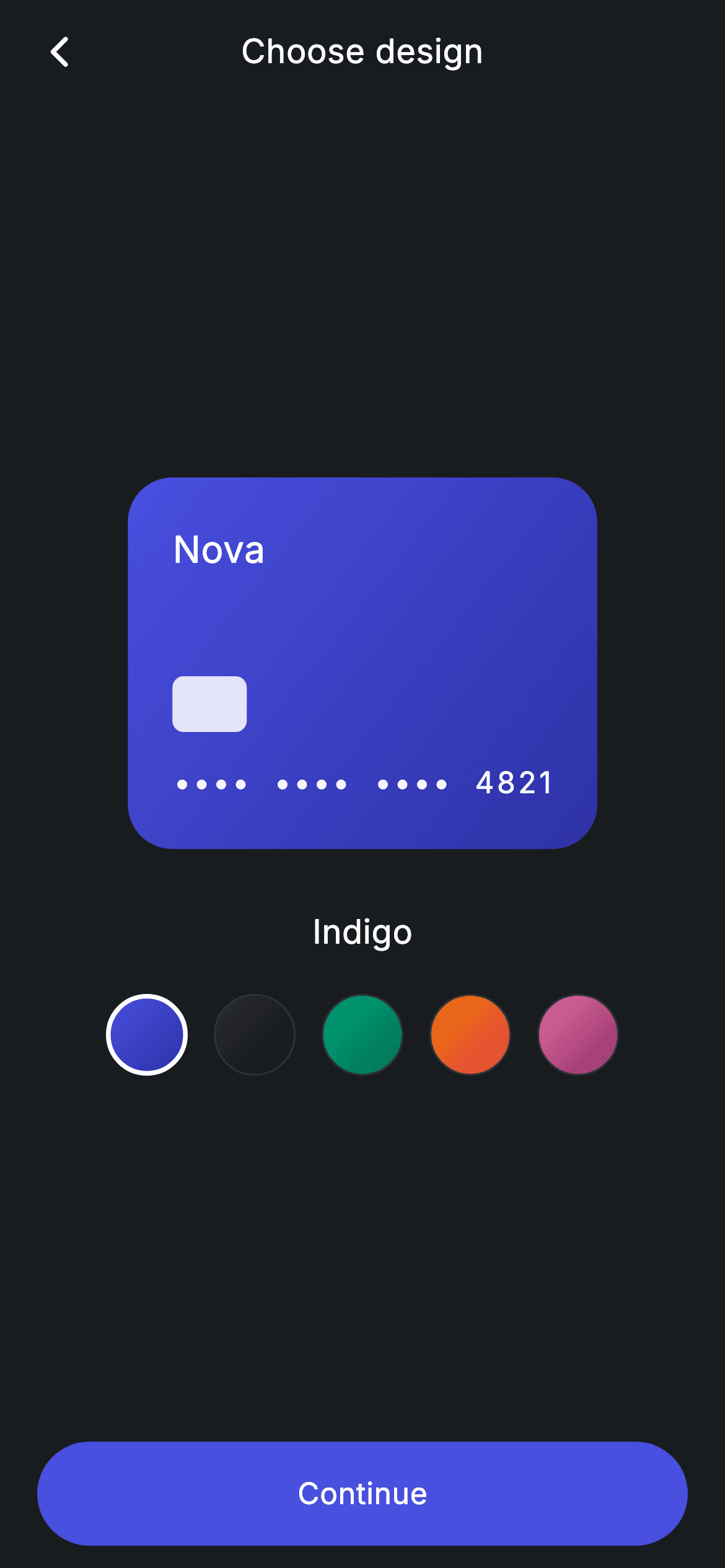
Picking a card colourway is a small moment in a banking app, but it only works if the preview reacts instantly. This tutorial builds exactly that in Flutter: a 200px gradient card showing 'Nova', a chip block and a masked •••• 4821 number, sitting above a row of five circular swatches. Tapping a swatch swaps the card's gradient through an AnimatedContainer and updates the name printed beneath it. You'll also see how a single Dart 3 record list holds all five designs and drives every part of the screen.
Watch the Flutter UI walkthrough
A short screen recording of Fintech · Card Design running, if you'd rather see it before you read the code. The written tutorial below covers everything in it.
Can't see the video? Watch it on YouTube.
What you'll build
- ✓A five-entry design catalogue (Indigo, Obsidian, Emerald, Sunset, Rose) stored as a Dart 3 record list, so adding a sixth colourway is a one-line change
- ✓A 200px tall preview card whose LinearGradient cross-fades over 300ms whenever the selection changes
- ✓Card artwork drawn entirely in Flutter — wordmark, translucent chip rectangle and a letter-spaced masked card number, no image assets
- ✓A row of 44px circular gradient swatches where the active one is ringed in 2.5px white and the rest in a dark hairline
- ✓A centred 'Choose design' app bar and a full-width pill Continue button wired to an onContinue callback
Step-by-step build
Create the file
Add a new file at lib/fintech_card_design_select/fintech_card_design_select_screen.dart in your Flutter project.
Register the bundled fonts
No external packages — this is pure Flutter. It does bundle its design font (Inter), so drop the font file into fonts/ and declare it in pubspec.yaml:
flutter:
  fonts:
    - family: Inter
      fonts:
- asset: fonts/Inter-Regular.ttfBuild it, piece by piece
Here's how the screen goes together. Each block below is a real slice of the code with a plain-English explanation — paste them in order, or grab the whole file from the next section.
Design tokens and the five-colourway record list
import 'package:flutter/material.dart';

/// Card Design Select — pick a card colourway with a live preview. Self-
/// contained per CONVENTIONS.md: pure Flutter, bundled Inter font, forced dark
/// theme. Stateful: the selected swatch updates the preview card.
class FintechCardDesignSelectScreen extends StatefulWidget {
  const FintechCardDesignSelectScreen({super.key, this.onBack, this.onContinue});

  final VoidCallback? onBack;
  final VoidCallback? onContinue;

  @override
  State<FintechCardDesignSelectScreen> createState() =>
      _FintechCardDesignSelectScreenState();
}

class _FintechCardDesignSelectScreenState
    extends State<FintechCardDesignSelectScreen> {
  static const String _font = 'Inter';
  static const Color _bg = Color(0xFF191C1F);
  static const Color _brand = Color(0xFF494FDF);
  static const Color _hairline = Color(0xFF2E3235);

  static const List<({String name, List<Color> colors})> _designs =
      <({String name, List<Color> colors})>[
    (name: 'Indigo', colors: <Color>[_brand, Color(0xFF2D31A6)]),
    (name: 'Obsidian', colors: <Color>[Color(0xFF2B2E31), Color(0xFF101113)]),
    (name: 'Emerald', colors: <Color>[Color(0xFF00A87E), Color(0xFF006B50)]),
    (name: 'Sunset', colors: <Color>[Color(0xFFEC7E00), Color(0xFFE23B4A)]),
    (name: 'Rose', colors: <Color>[Color(0xFFE36FA0), Color(0xFF8E2D6A)]),
  ];

  int _selected = 0;
FintechCardDesignSelectScreen is a StatefulWidget because one value changes at runtime: which swatch is active. It takes two optional callbacks, onBack and onContinue, so the parent decides what navigation means. Inside the state, four constants act as design tokens — the 'Inter' font family, the #191C1F page background, the #494FDF indigo brand colour and the #2E3235 hairline used for unselected swatch borders. The interesting part is _designs: a const List of Dart 3 records typed ({String name, List<Color> colors}). Each entry pairs a display name with a two-stop gradient, for example (name: 'Emerald', colors: [#00A87E, #006B50]). Using a record instead of a hand-written class means no boilerplate model file, and because the list is const the whole catalogue is built at compile time. The single int _selected = 0 is the entire state of the screen — it indexes into that list.
Forcing a dark theme and animating the preview card's gradient
  @override
  Widget build(BuildContext context) {
    final ({String name, List<Color> colors}) d = _designs[_selected];
    return Theme(
      data: ThemeData.dark(useMaterial3: true),
      child: Scaffold(
        backgroundColor: _bg,
        body: SafeArea(
          child: Column(
            crossAxisAlignment: CrossAxisAlignment.stretch,
            children: <Widget>[
              _appBar(context),
              const SizedBox(height: 8),
              Expanded(
                child: Column(
                  mainAxisAlignment: MainAxisAlignment.center,
                  children: <Widget>[
                    Padding(
                      padding: const EdgeInsets.symmetric(horizontal: 40),
                      child: AnimatedContainer(
                        duration: const Duration(milliseconds: 300),
                        height: 200,
                        padding: const EdgeInsets.all(24),
                        decoration: BoxDecoration(
                          borderRadius: BorderRadius.circular(24),
                          gradient: LinearGradient(
                            begin: Alignment.topLeft,
                            end: Alignment.bottomRight,
                            colors: d.colors,
                          ),
                        ),
build() starts by reading the active record into a local d = _designs[_selected], so every widget below can just ask for d.name and d.colors. Wrapping the Scaffold in Theme(data: ThemeData.dark(useMaterial3: true)) makes the screen render dark no matter what the host app's theme is — handy when you drop this screen into a light app. The body is a SafeArea + Column with crossAxisAlignment.stretch, and the middle section is wrapped in Expanded so the card group stays vertically centred while the Continue button stays pinned to the bottom. The preview itself is an AnimatedContainer with a 300ms duration: because its BoxDecoration gradient uses d.colors, calling setState with a new index makes Flutter tween between the old and new gradient instead of snapping. It's a fixed 200px tall, 24px inner padding, 24px corner radius, and the LinearGradient runs topLeft → bottomRight.
Drawing the card face: wordmark, chip and masked number
                        child: Column(
                          crossAxisAlignment: CrossAxisAlignment.start,
                          children: <Widget>[
                            const Text(
                              'Nova',
                              style: TextStyle(
                                fontFamily: _font,
                                fontSize: 20,
                                fontWeight: FontWeight.w500,
                                color: Colors.white,
                              ),
                            ),
                            const Spacer(),
                            Container(
                              width: 40,
                              height: 30,
                              decoration: BoxDecoration(
                                color: Colors.white.withValues(alpha: 0.85),
                                borderRadius: BorderRadius.circular(6),
                              ),
                            ),
                            const SizedBox(height: 16),
                            Text(
                              '••••  ••••  ••••  4821',
                              style: TextStyle(
                                fontFamily: _font,
                                fontSize: 16,
                                fontWeight: FontWeight.w500,
                                letterSpacing: 1.5,
                                color: Colors.white.withValues(alpha: 0.95),
                              ),
                            ),
                          ],
                        ),
                      ),
                    ),
The card's contents are a left-aligned Column with no images at all. 'Nova' is the brand wordmark at 20px w500 white. A Spacer() then pushes the rest to the bottom of the 200px box, which is what gives the card its real-world layout. The chip is just a 40×30 Container filled with white at 85% opacity (Colors.white.withValues(alpha: 0.85)) and a 6px radius — a rounded rectangle is all you need to read as a chip. Below it, the masked number '•••• •••• •••• 4821' is a plain Text at 16px with letterSpacing: 1.5 and white at 95% opacity; the double spaces between groups plus the letter spacing are what make it look embossed rather than typed. Note the last four digits are hard-coded mock data — there's no card object behind this screen.
The design name and the tappable swatch row
                    const SizedBox(height: 32),
                    Text(
                      d.name,
                      style: const TextStyle(
                        fontFamily: _font,
                        fontSize: 18,
                        fontWeight: FontWeight.w500,
                        letterSpacing: 0.24,
                        color: Colors.white,
                      ),
                    ),
                    const SizedBox(height: 20),
                    Row(
                      mainAxisAlignment: MainAxisAlignment.center,
                      children: <Widget>[
                        for (int i = 0; i < _designs.length; i++)
                          GestureDetector(
                            onTap: () => setState(() => _selected = i),
                            child: Container(
                              width: 44,
                              height: 44,
                              margin: const EdgeInsets.symmetric(horizontal: 7),
                              decoration: BoxDecoration(
                                shape: BoxShape.circle,
                                gradient: LinearGradient(
                                  begin: Alignment.topLeft,
                                  end: Alignment.bottomRight,
                                  colors: _designs[i].colors,
                                ),
                                border: Border.all(
                                  color: i == _selected
                                      ? Colors.white
                                      : _hairline,
                                  width: i == _selected ? 2.5 : 1,
                                ),
                              ),
                            ),
                          ),
                      ],
                    ),
                  ],
                ),
              ),
32px below the card, a Text renders d.name at 18px with letterSpacing 0.24, so the label reads 'Indigo' or 'Sunset' in sync with the preview. The swatch row is built with a collection-for loop — `for (int i = 0; i < _designs.length; i++)` directly inside the Row's children list — which means the row grows automatically if you add a sixth entry to _designs. Each swatch is a GestureDetector whose onTap calls setState(() => _selected = i), a 44×44 Container with BoxShape.circle and the same LinearGradient as its design, and 7px of horizontal margin on each side. Selection is communicated purely through the border: the active index gets a 2.5px white ring, everything else gets a 1px #2E3235 hairline. That one ternary pair is the whole selected/unselected visual state.
The pill Continue button
              Padding(
                padding: const EdgeInsets.fromLTRB(20, 4, 20, 12),
                child: SizedBox(
                  height: 56,
                  child: Material(
                    color: _brand,
                    borderRadius: BorderRadius.circular(9999),
                    child: InkWell(
                      borderRadius: BorderRadius.circular(9999),
                      onTap: widget.onContinue,
                      child: const Center(
                        child: Text(
                          'Continue',
                          style: TextStyle(
                            fontFamily: _font,
                            fontSize: 16,
                            fontWeight: FontWeight.w500,
                            letterSpacing: 0.24,
                            color: Colors.white,
                          ),
                        ),
                      ),
                    ),
                  ),
                ),
              ),
            ],
          ),
        ),
      ),
    );
  }
The footer is a 56px tall SizedBox padded 20px from each side and 12px from the bottom. It's built from Material + InkWell rather than ElevatedButton so the shape is exactly what you want: the Material carries the #494FDF brand fill and a 9999 corner radius (the standard trick for a fully rounded pill), and the InkWell repeats that same radius so the ripple is clipped to the pill instead of spilling into the corners. onTap fires widget.onContinue directly — if the parent passes null the button is inert, so the screen has no opinion about where 'continue' goes. The label is centred 16px w500 Inter in white with the same 0.24 letter spacing used across the screen.
The custom centred app bar
  Widget _appBar(BuildContext context) {
    return Padding(
      padding: const EdgeInsets.fromLTRB(8, 4, 8, 4),
      child: Row(
        children: <Widget>[
          IconButton(
            onPressed: widget.onBack ?? () => Navigator.of(context).maybePop(),
            icon: const Icon(Icons.arrow_back_ios_new_rounded,
                size: 20, color: Colors.white),
          ),
          const Expanded(
            child: Text(
              'Choose design',
              textAlign: TextAlign.center,
              style: TextStyle(
                fontFamily: _font,
                fontSize: 18,
                fontWeight: FontWeight.w500,
                letterSpacing: 0.24,
                color: Colors.white,
              ),
            ),
          ),
          const SizedBox(width: 48),
        ],
      ),
    );
  }
}
Instead of Scaffold's appBar, _appBar() builds a plain Padding + Row so it inherits the #191C1F background with no elevation or tint. The back IconButton uses Icons.arrow_back_ios_new_rounded at 20px and falls back gracefully: widget.onBack ?? () => Navigator.of(context).maybePop() means it pops the route when no callback is supplied, and maybePop (rather than pop) is safe even if this is the first route on the stack. The 'Choose design' title sits in an Expanded with textAlign: TextAlign.center, and the trailing SizedBox(width: 48) balances the width of the leading IconButton — without it the title would sit slightly left of centre.
Full code
The complete, ready-to-paste source. Free to use in your projects — one click copies it all.
import 'package:flutter/material.dart';

/// Card Design Select — pick a card colourway with a live preview. Self-
/// contained per CONVENTIONS.md: pure Flutter, bundled Inter font, forced dark
/// theme. Stateful: the selected swatch updates the preview card.
class FintechCardDesignSelectScreen extends StatefulWidget {
  const FintechCardDesignSelectScreen({super.key, this.onBack, this.onContinue});

  final VoidCallback? onBack;
  final VoidCallback? onContinue;

  @override
  State<FintechCardDesignSelectScreen> createState() =>
      _FintechCardDesignSelectScreenState();
}

class _FintechCardDesignSelectScreenState
    extends State<FintechCardDesignSelectScreen> {
  static const String _font = 'Inter';
  static const Color _bg = Color(0xFF191C1F);
  static const Color _brand = Color(0xFF494FDF);
  static const Color _hairline = Color(0xFF2E3235);

  static const List<({String name, List<Color> colors})> _designs =
      <({String name, List<Color> colors})>[
    (name: 'Indigo', colors: <Color>[_brand, Color(0xFF2D31A6)]),
    (name: 'Obsidian', colors: <Color>[Color(0xFF2B2E31), Color(0xFF101113)]),
    (name: 'Emerald', colors: <Color>[Color(0xFF00A87E), Color(0xFF006B50)]),
    (name: 'Sunset', colors: <Color>[Color(0xFFEC7E00), Color(0xFFE23B4A)]),
    (name: 'Rose', colors: <Color>[Color(0xFFE36FA0), Color(0xFF8E2D6A)]),
  ];

  int _selected = 0;

  @override
  Widget build(BuildContext context) {
    final ({String name, List<Color> colors}) d = _designs[_selected];
    return Theme(
      data: ThemeData.dark(useMaterial3: true),
      child: Scaffold(
        backgroundColor: _bg,
        body: SafeArea(
          child: Column(
            crossAxisAlignment: CrossAxisAlignment.stretch,
            children: <Widget>[
              _appBar(context),
              const SizedBox(height: 8),
              Expanded(
                child: Column(
                  mainAxisAlignment: MainAxisAlignment.center,
                  children: <Widget>[
                    Padding(
                      padding: const EdgeInsets.symmetric(horizontal: 40),
                      child: AnimatedContainer(
                        duration: const Duration(milliseconds: 300),
                        height: 200,
                        padding: const EdgeInsets.all(24),
                        decoration: BoxDecoration(
                          borderRadius: BorderRadius.circular(24),
                          gradient: LinearGradient(
                            begin: Alignment.topLeft,
                            end: Alignment.bottomRight,
                            colors: d.colors,
                          ),
                        ),
                        child: Column(
                          crossAxisAlignment: CrossAxisAlignment.start,
                          children: <Widget>[
                            const Text(
                              'Nova',
                              style: TextStyle(
                                fontFamily: _font,
                                fontSize: 20,
                                fontWeight: FontWeight.w500,
                                color: Colors.white,
                              ),
                            ),
                            const Spacer(),
                            Container(
                              width: 40,
                              height: 30,
                              decoration: BoxDecoration(
                                color: Colors.white.withValues(alpha: 0.85),
                                borderRadius: BorderRadius.circular(6),
                              ),
                            ),
                            const SizedBox(height: 16),
                            Text(
                              '••••  ••••  ••••  4821',
                              style: TextStyle(
                                fontFamily: _font,
                                fontSize: 16,
                                fontWeight: FontWeight.w500,
                                letterSpacing: 1.5,
                                color: Colors.white.withValues(alpha: 0.95),
                              ),
                            ),
                          ],
                        ),
                      ),
                    ),
                    const SizedBox(height: 32),
                    Text(
                      d.name,
                      style: const TextStyle(
                        fontFamily: _font,
                        fontSize: 18,
                        fontWeight: FontWeight.w500,
                        letterSpacing: 0.24,
                        color: Colors.white,
                      ),
                    ),
                    const SizedBox(height: 20),
                    Row(
                      mainAxisAlignment: MainAxisAlignment.center,
                      children: <Widget>[
                        for (int i = 0; i < _designs.length; i++)
                          GestureDetector(
                            onTap: () => setState(() => _selected = i),
                            child: Container(
                              width: 44,
                              height: 44,
                              margin: const EdgeInsets.symmetric(horizontal: 7),
                              decoration: BoxDecoration(
                                shape: BoxShape.circle,
                                gradient: LinearGradient(
                                  begin: Alignment.topLeft,
                                  end: Alignment.bottomRight,
                                  colors: _designs[i].colors,
                                ),
                                border: Border.all(
                                  color: i == _selected
                                      ? Colors.white
                                      : _hairline,
                                  width: i == _selected ? 2.5 : 1,
                                ),
                              ),
                            ),
                          ),
                      ],
                    ),
                  ],
                ),
              ),
              Padding(
                padding: const EdgeInsets.fromLTRB(20, 4, 20, 12),
                child: SizedBox(
                  height: 56,
                  child: Material(
                    color: _brand,
                    borderRadius: BorderRadius.circular(9999),
                    child: InkWell(
                      borderRadius: BorderRadius.circular(9999),
                      onTap: widget.onContinue,
                      child: const Center(
                        child: Text(
                          'Continue',
                          style: TextStyle(
                            fontFamily: _font,
                            fontSize: 16,
                            fontWeight: FontWeight.w500,
                            letterSpacing: 0.24,
                            color: Colors.white,
                          ),
                        ),
                      ),
                    ),
                  ),
                ),
              ),
            ],
          ),
        ),
      ),
    );
  }

  Widget _appBar(BuildContext context) {
    return Padding(
      padding: const EdgeInsets.fromLTRB(8, 4, 8, 4),
      child: Row(
        children: <Widget>[
          IconButton(
            onPressed: widget.onBack ?? () => Navigator.of(context).maybePop(),
            icon: const Icon(Icons.arrow_back_ios_new_rounded,
                size: 20, color: Colors.white),
          ),
          const Expanded(
            child: Text(
              'Choose design',
              textAlign: TextAlign.center,
              style: TextStyle(
                fontFamily: _font,
                fontSize: 18,
                fontWeight: FontWeight.w500,
                letterSpacing: 0.24,
                color: Colors.white,
              ),
            ),
          ),
          const SizedBox(width: 48),
        ],
      ),
    );
  }
}
Plus bundled 1 binary asset (fonts/images). The CLI and MCP install those for you automatically.
Two faster ways to add it
Copy-paste works, but you can skip it entirely.
1. FlutterKit CLI
One command drops this screen — and its fonts — straight into your project.
$ flutterkit add fintech-card-design-select2. AI agent (MCP)
Connect FlutterKit's MCP server in Claude or Cursor and just ask your agent to install fintech-card-design-select — it fetches and writes the files for you.
FAQ
Can I use this card design picker in a commercial app?
Yes. The complete Dart for this screen is free to copy and ship in personal or commercial projects. Paste it from this page, run flutterkit add fintech-card-design-select with the CLI, or let an AI agent install it for you over MCP.
Do the gradients or swatches need any third-party packages?
No — everything here is pure Flutter. The gradient card is a BoxDecoration with a LinearGradient, the swatches are Containers with BoxShape.circle, and the animation is the built-in AnimatedContainer. The only asset is the bundled Inter font, which you register in pubspec.yaml as shown in step 2; the CLI and MCP copy that font file in for you.
What Flutter SDK does this screen need?
The _designs catalogue uses Dart 3 record types, so you need Dart 3 (Flutter 3.10+) at minimum, and the chip and card number call Color.withValues(alpha: ...), which arrived in Flutter 3.27. On an older SDK, replace withValues(alpha: 0.85) with withOpacity(0.85) and withValues(alpha: 0.95) with withOpacity(0.95); if you're below Dart 3, swap the record list for a small class holding a name and a List<Color>.


