Notification preferences
Notification preferences is a production-ready E-commerce Flutter screen from FlutterKit — free, with full source code.
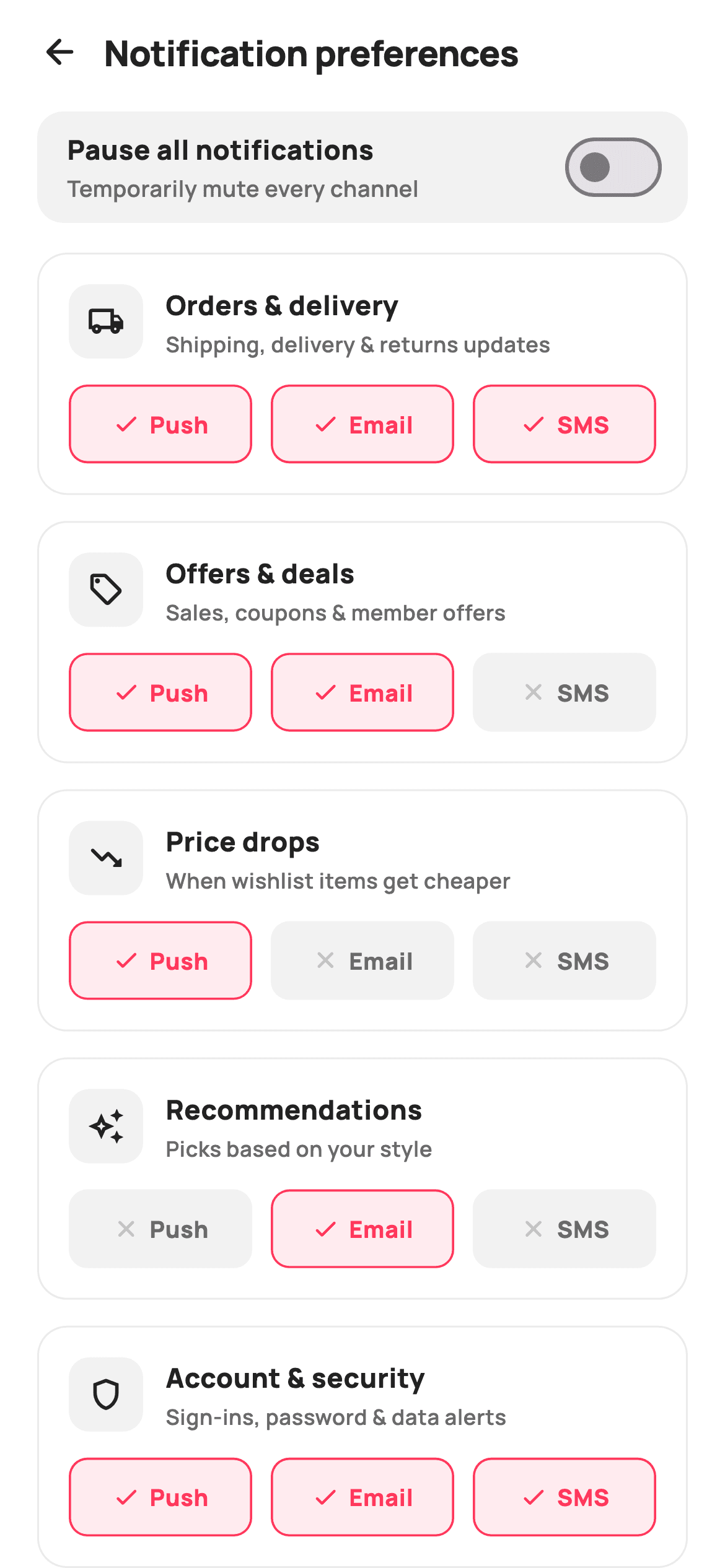
A production-ready Flutter notification preferences screen for any shopping or marketplace app. Each category — Orders & delivery, Offers & deals, Price drops, Recommendations, Account & security — is its own card with an icon, description and three painted channel pills (Push, Email, SMS) that flip independently with check/close states. A "Pause all notifications" master switch at the top dims and disables the whole matrix at once. Self-contained, painter-free, exposes callbacks only and works with any backend.
Full tutorial coming soon.
The step-by-step walkthrough and complete Dart source for this screen haven't been published yet. They'll be free when they are — no sign-up, no payment. In the meantime, browse the screens that already have their tutorial.
What's included
- ✓Per-category × per-channel matrix (Push / Email / SMS) of independently toggling pills
- ✓Painted on/off pill states with check / close icons and accent borders
- ✓Pause-all master Switch that dims and disables every category card
- ✓Five labelled category cards with icon, title and helper subtitle
- ✓Header row with back-button callback
- ✓Self-contained light theme with bundled Manrope fonts, no painters
Use cases
- ✓E-commerce and marketplace apps
- ✓Retail / fashion shopping apps
- ✓Any app with multi-channel notification settings
- ✓Account / profile preference screens


