How to Build a Product Questions and Answers Screen in Flutter (Full Code + Preview)
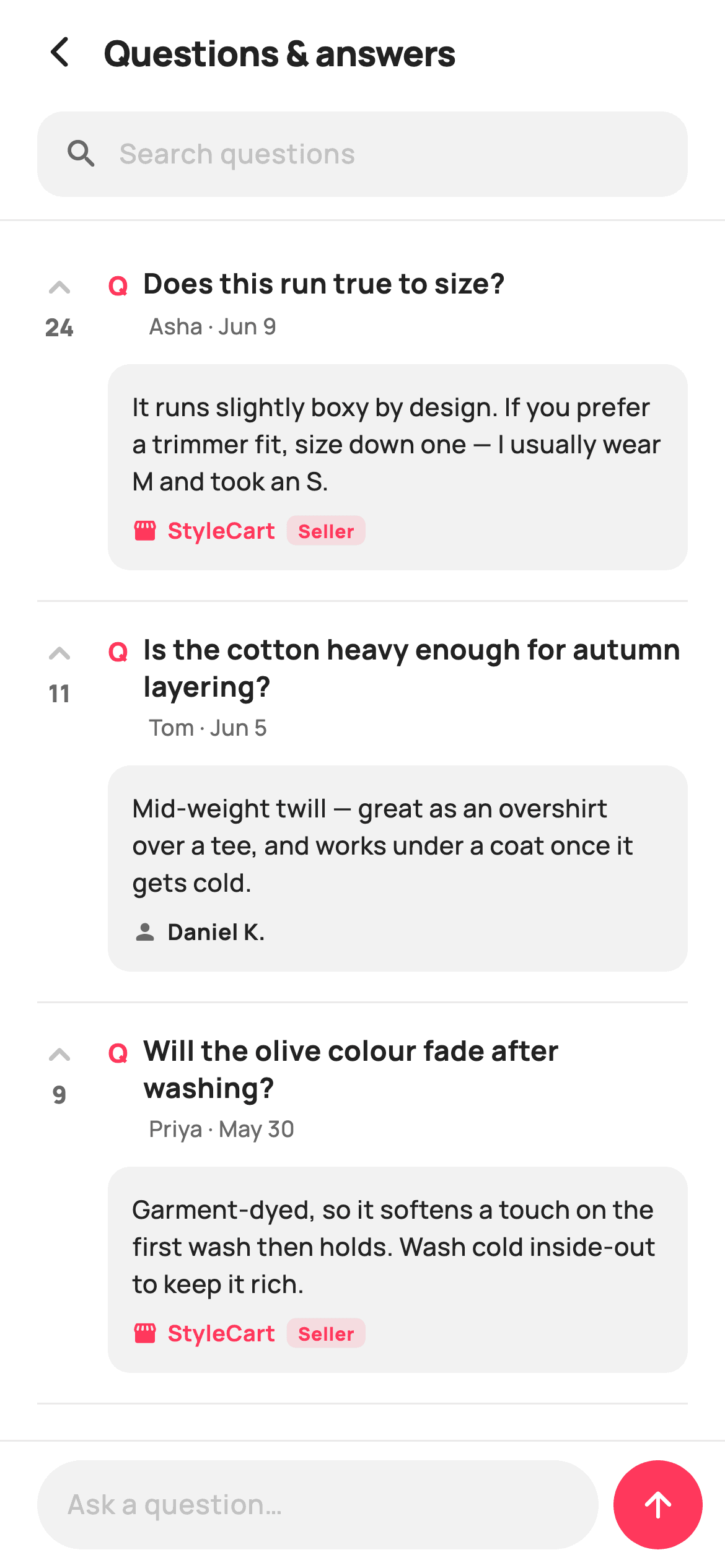
Shoppers ask the questions a product description never answers — fit, fabric weight, whether the buttons are real horn. This tutorial builds StyleCart's buyer Q&A screen in Flutter: a searchable, divided list where every question carries a tappable upvote arrow with a live count, the asker's name and date, and one best answer boxed in a grey panel. Answers are attributed with a storefront or person icon and a brand Seller pill when the shop replied, and a pinned composer bar lets anyone ask their own.
Watch the Flutter UI walkthrough
A short screen recording of Questions & Answers running, if you'd rather see it before you read the code. The written tutorial below covers everything in it.
Can't see the video? Watch it on YouTube.
What you'll build
- ✓A `_Qa` model that pairs one question with its single best answer, an answerer and a mutable vote count
- ✓An upvote arrow and count that recolour to brand coral together, backed by a `Set<int>` of voted indexes
- ✓Answer attribution that switches icon, colour and a `Seller` pill depending on who replied
- ✓A rounded 'Search questions' field above a `ListView.separated` divided by hairlines
- ✓A pinned composer with a 48px rounded input and a circular coral send button that hands the text to `onAsk`
Step-by-step build
Create the file
Add a new file at lib/ecom_product_qna/ecom_product_qna_screen.dart in your Flutter project.
Register the bundled fonts
No external packages — this is pure Flutter. It does bundle its design font (Manrope), so drop the font file into fonts/ and declare it in pubspec.yaml:
flutter:
  fonts:
    - family: Manrope
      fonts:
- asset: fonts/Manrope-Regular.ttfBuild it, piece by piece
Here's how the screen goes together. Each block below is a real slice of the code with a plain-English explanation — paste them in order, or grab the whole file from the next section.
A stateful screen with two controllers and a flat palette
import 'package:flutter/material.dart';

/// StyleCart — Questions & Answers.
///
/// Buyer Q&A for a product: a search field, a list of questions each with its
/// best answer (tagged seller or shopper), an upvote toggle and an answer count,
/// plus a pinned "ask a question" composer bar.
///
/// Self-contained per CONVENTIONS.md: pure Flutter, bundled Manrope, inline
/// Airbnb-style tokens, own light theme + SafeArea, no images (icons only).
/// Exposes callbacks only; the registry wires navigation.
class EcomProductQnaScreen extends StatefulWidget {
  const EcomProductQnaScreen({
    super.key,
    this.onBack,
    this.onAsk,
  });

  final VoidCallback? onBack;
  final ValueChanged<String>? onAsk;

  @override
  State<EcomProductQnaScreen> createState() => _EcomProductQnaScreenState();
}

class _EcomProductQnaScreenState extends State<EcomProductQnaScreen> {
  static const String _font = 'Manrope';
  static const Color _canvas = Color(0xFFFFFFFF);
  static const Color _ink = Color(0xFF222222);
  static const Color _muted = Color(0xFF6A6A6A);
  static const Color _faint = Color(0xFFC1C1C1);
  static const Color _brand = Color(0xFFFF385C);
  static const Color _surface = Color(0xFFF2F2F2);
  static const Color _hairline = Color(0xFFEBEBEB);

  final TextEditingController _ask = TextEditingController();
  final TextEditingController _search = TextEditingController();
`EcomProductQnaScreen` is a `StatefulWidget` because votes change locally, and it exposes only `onBack` and `onAsk` — `ValueChanged<String>` on the latter, so the host receives whatever the shopper typed rather than the widget deciding what to do with it. The palette is seven `static const Color` fields on the state: `_ink` `#222222` for question text, `_muted` `#6A6A6A` for metadata, `_faint` `#C1C1C1` for the un-voted arrow and hints, `_brand` `#FF385C` for anything the reader has acted on, `_surface` `#F2F2F2` for the answer panels and inputs, `_hairline` `#EBEBEB` for dividers. Two separate `TextEditingController`s exist because searching and asking are different jobs.
The Q&A model list, the voted set, and the toggle
  final List<_Qa> _items = <_Qa>[
    _Qa(
      'Does this run true to size?',
      'Asha · Jun 9',
      'It runs slightly boxy by design. If you prefer a trimmer fit, size down one — I usually wear M and took an S.',
      'StyleCart',
      true,
      24,
    ),
    _Qa(
      'Is the cotton heavy enough for autumn layering?',
      'Tom · Jun 5',
      'Mid-weight twill — great as an overshirt over a tee, and works under a coat once it gets cold.',
      'Daniel K.',
      false,
      11,
    ),
    _Qa(
      'Will the olive colour fade after washing?',
      'Priya · May 30',
      'Garment-dyed, so it softens a touch on the first wash then holds. Wash cold inside-out to keep it rich.',
      'StyleCart',
      true,
      9,
    ),
    _Qa(
      'Are the buttons real horn?',
      'Marco · May 24',
      'They\'re corozo (tagua nut) — natural and hard-wearing, very close to horn.',
      'StyleCart',
      true,
      6,
    ),
  ];

  final Set<int> _voted = <int>{};

  @override
  void dispose() {
    _ask.dispose();
    _search.dispose();
    super.dispose();
  }

  void _toggle(int i) {
    setState(() {
      if (_voted.contains(i)) {
        _voted.remove(i);
        _items[i].votes--;
      } else {
        _voted.add(i);
        _items[i].votes++;
      }
    });
  }
Four `_Qa` records seed the list, each holding a question, an `asker` string that packs name and date into one line ('Asha · Jun 9'), a single best answer, the answerer, a `bySeller` flag and a starting vote count. Only the best answer is stored — no reply thread — which is what keeps a shopping Q&A skimmable. Vote state is deliberately split: `_voted` is a `Set<int>` of indexes that says whether *you* voted, while `q.votes` is the public tally. `_toggle` mutates both inside `setState`, incrementing or decrementing so the number moves with the arrow, and `dispose` releases both controllers.
A column that pins the composer and scrolls only the list
  @override
  Widget build(BuildContext context) {
    return Theme(
      data: ThemeData.light(useMaterial3: true),
      child: Scaffold(
        backgroundColor: _canvas,
        body: SafeArea(
          child: Column(
            children: <Widget>[
              _header(),
              _searchBar(),
              const Divider(height: 1, color: _hairline),
              Expanded(
                child: ListView.separated(
                  padding: const EdgeInsets.fromLTRB(20, 8, 20, 24),
                  itemCount: _items.length,
                  separatorBuilder: (_, _) =>
                      const Divider(height: 1, color: _hairline),
                  itemBuilder: (BuildContext context, int i) =>
                      _card(_items[i], i),
                ),
              ),
              _composer(),
            ],
          ),
        ),
      ),
    );
  }
`build` wraps everything in `Theme(data: ThemeData.light(useMaterial3: true))` so the screen renders identically inside a dark host app. Inside `SafeArea` a `Column` stacks header, search bar, a 1px `Divider`, an `Expanded` list and the composer — the `Expanded` is what makes only the questions scroll while the search field stays reachable and the ask bar stays pinned to the bottom. `ListView.separated` draws a `_hairline` divider between cards rather than boxing each one, which suits a text-heavy list; its separator uses Dart's `(_, _)` wildcard parameters, since neither the context nor the index is needed.
A header that is a back arrow plus a title
  Widget _header() {
    return Padding(
      padding: const EdgeInsets.fromLTRB(8, 4, 20, 4),
      child: Row(
        children: <Widget>[
          IconButton(
            onPressed: widget.onBack,
            icon: const Icon(Icons.arrow_back_ios_new_rounded,
                size: 20, color: _ink),
          ),
          const Expanded(
            child: Text(
              'Questions & answers',
              style: TextStyle(
                fontFamily: _font,
                fontSize: 19,
                fontWeight: FontWeight.w800,
                letterSpacing: -0.3,
                color: _ink,
              ),
            ),
          ),
        ],
      ),
    );
  }
The header is a plain `Row` in a `Padding` of `fromLTRB(8, 4, 20, 4)` — the left inset drops to 8 because `IconButton` carries its own 48px touch target, so a full 20 would push the arrow visibly off-grid against the 20px list padding below. `Icons.arrow_back_ios_new_rounded` at 20px signals a push route rather than a modal dismissal, since Q&A is opened from a product page. The title 'Questions & answers' sits in an `Expanded` at 19px `w800` with `letterSpacing: -0.3`; tightening the tracking on a heavy weight stops the two words from looking loose at that size.
The search field as a filled pill, not a bordered input
  Widget _searchBar() {
    return Padding(
      padding: const EdgeInsets.fromLTRB(20, 4, 20, 12),
      child: Container(
        height: 46,
        padding: const EdgeInsets.symmetric(horizontal: 14),
        decoration: BoxDecoration(
          color: _surface,
          borderRadius: BorderRadius.circular(14),
        ),
        child: Row(
          children: <Widget>[
            const Icon(Icons.search_rounded, size: 20, color: _muted),
            const SizedBox(width: 10),
            Expanded(
              child: TextField(
                controller: _search,
                cursorColor: _brand,
                style: const TextStyle(
                  fontFamily: _font,
                  fontSize: 14.5,
                  fontWeight: FontWeight.w600,
                  color: _ink,
                ),
                decoration: const InputDecoration(
                  isDense: true,
                  border: InputBorder.none,
                  hintText: 'Search questions',
                  hintStyle: TextStyle(
                    fontFamily: _font,
                    fontSize: 14.5,
                    fontWeight: FontWeight.w500,
                    color: _faint,
                  ),
                ),
              ),
            ),
          ],
        ),
      ),
    );
  }
The search bar is a 46px `Container` filled `_surface` with `BorderRadius.circular(14)`, holding a 20px `Icons.search_rounded` in `_muted`, a 10px gap and an `Expanded` `TextField`. The `TextField` sets `border: InputBorder.none` and `isDense: true` so Material's own underline and generous vertical padding do not fight the container — the box supplies the shape, the field supplies only text. `cursorColor: _brand` is the one coral touch. Typed text is 14.5px `w600` while the 'Search questions' hint is `w500` in `_faint`, so a real query reads heavier than the placeholder it replaced.
The vote column, the Q marker and the asker line
  Widget _card(_Qa q, int i) {
    final bool voted = _voted.contains(i);
    return Padding(
      padding: const EdgeInsets.symmetric(vertical: 16),
      child: Row(
        crossAxisAlignment: CrossAxisAlignment.start,
        children: <Widget>[
          GestureDetector(
            onTap: () => _toggle(i),
            child: Column(
              children: <Widget>[
                Icon(
                  Icons.keyboard_arrow_up_rounded,
                  size: 24,
                  color: voted ? _brand : _faint,
                ),
                Text(
                  '${q.votes}',
                  style: TextStyle(
                    fontFamily: _font,
                    fontSize: 13,
                    fontWeight: FontWeight.w800,
                    color: voted ? _brand : _muted,
                  ),
                ),
              ],
            ),
          ),
          const SizedBox(width: 14),
          Expanded(
            child: Column(
              crossAxisAlignment: CrossAxisAlignment.start,
              children: <Widget>[
                Row(
                  crossAxisAlignment: CrossAxisAlignment.start,
                  children: <Widget>[
                    const Padding(
                      padding: EdgeInsets.only(top: 1),
                      child: Text(
                        'Q',
                        style: TextStyle(
                          fontFamily: _font,
                          fontSize: 14,
                          fontWeight: FontWeight.w800,
                          color: _brand,
                        ),
                      ),
                    ),
                    const SizedBox(width: 8),
                    Expanded(
                      child: Text(
                        q.question,
                        style: const TextStyle(
                          fontFamily: _font,
                          fontSize: 15,
                          fontWeight: FontWeight.w700,
                          height: 1.3,
                          color: _ink,
                        ),
                      ),
                    ),
                  ],
                ),
                const SizedBox(height: 3),
                Padding(
                  padding: const EdgeInsets.only(left: 22),
                  child: Text(
                    q.asker,
                    style: const TextStyle(
                      fontFamily: _font,
                      fontSize: 12,
                      fontWeight: FontWeight.w500,
                      color: _muted,
                    ),
                  ),
                ),
Each card is a `Row` with `crossAxisAlignment: CrossAxisAlignment.start`, so the vote control stays beside the first line of a question that wraps. The `GestureDetector` wraps a whole `Column` — 24px `Icons.keyboard_arrow_up_rounded` above a 13px `w800` count — so arrow and number are one target, and both read `voted ? _brand : ...` so they flip to coral together. The question is prefixed by a coral 'Q' nudged down 1px to align optically with 15px text, and the `asker` line beneath is indented `left: 22` to clear that marker, keeping 'Asha · Jun 9' hanging under the question rather than the letter.
The answer panel and its seller badge
                const SizedBox(height: 12),
                Container(
                  padding: const EdgeInsets.all(13),
                  decoration: BoxDecoration(
                    color: _surface,
                    borderRadius: BorderRadius.circular(12),
                  ),
                  child: Column(
                    crossAxisAlignment: CrossAxisAlignment.start,
                    children: <Widget>[
                      Text(
                        q.answer,
                        style: const TextStyle(
                          fontFamily: _font,
                          fontSize: 13.5,
                          fontWeight: FontWeight.w500,
                          height: 1.45,
                          color: _ink,
                        ),
                      ),
                      const SizedBox(height: 8),
                      Row(
                        children: <Widget>[
                          Icon(
                            q.bySeller
                                ? Icons.storefront_rounded
                                : Icons.person_rounded,
                            size: 14,
                            color: q.bySeller ? _brand : _muted,
                          ),
                          const SizedBox(width: 5),
                          Text(
                            q.answerer,
                            style: TextStyle(
                              fontFamily: _font,
                              fontSize: 12,
                              fontWeight: FontWeight.w700,
                              color: q.bySeller ? _brand : _ink,
                            ),
                          ),
                          if (q.bySeller) ...<Widget>[
                            const SizedBox(width: 6),
                            Container(
                              padding: const EdgeInsets.symmetric(
                                  horizontal: 6, vertical: 1),
                              decoration: BoxDecoration(
                                color: _brand.withValues(alpha: 0.12),
                                borderRadius: BorderRadius.circular(5),
                              ),
                              child: const Text(
                                'Seller',
                                style: TextStyle(
                                  fontFamily: _font,
                                  fontSize: 10,
                                  fontWeight: FontWeight.w800,
                                  color: _brand,
                                ),
                              ),
                            ),
                          ],
                        ],
                      ),
                    ],
                  ),
                ),
              ],
            ),
          ),
        ],
      ),
    );
  }
The answer sits in a `_surface` container with 13px padding and a 12px radius — a tinted block is what visually separates a reply from the question without a second divider. Body text is 13.5px `w500` at `height: 1.45` for comfortable multi-line reading. The attribution row is where trust is built: `q.bySeller` picks `Icons.storefront_rounded` in `_brand` over `Icons.person_rounded` in `_muted`, colours the name coral instead of ink, and spreads a collection-`if` that appends a `Seller` pill at `_brand.withValues(alpha: 0.12)`. Three signals for one boolean means an official answer is unmistakable at a glance.
The pinned composer, the send button and the model
  Widget _composer() {
    return Container(
      decoration: const BoxDecoration(
        color: _canvas,
        border: Border(top: BorderSide(color: _hairline)),
      ),
      child: SafeArea(
        top: false,
        child: Padding(
          padding: const EdgeInsets.fromLTRB(20, 10, 12, 10),
          child: Row(
            children: <Widget>[
              Expanded(
                child: Container(
                  height: 48,
                  padding: const EdgeInsets.symmetric(horizontal: 16),
                  decoration: BoxDecoration(
                    color: _surface,
                    borderRadius: BorderRadius.circular(24),
                  ),
                  child: Align(
                    alignment: Alignment.centerLeft,
                    child: TextField(
                      controller: _ask,
                      cursorColor: _brand,
                      style: const TextStyle(
                        fontFamily: _font,
                        fontSize: 14.5,
                        fontWeight: FontWeight.w600,
                        color: _ink,
                      ),
                      decoration: const InputDecoration(
                        isDense: true,
                        border: InputBorder.none,
                        hintText: 'Ask a question…',
                        hintStyle: TextStyle(
                          fontFamily: _font,
                          fontSize: 14.5,
                          fontWeight: FontWeight.w500,
                          color: _faint,
                        ),
                      ),
                    ),
                  ),
                ),
              ),
              const SizedBox(width: 8),
              GestureDetector(
                onTap: () => widget.onAsk?.call(_ask.text),
                child: Container(
                  width: 48,
                  height: 48,
                  alignment: Alignment.center,
                  decoration: const BoxDecoration(
                    color: _brand,
                    shape: BoxShape.circle,
                  ),
                  child: const Icon(Icons.arrow_upward_rounded,
                      size: 22, color: _canvas),
                ),
              ),
            ],
          ),
        ),
      ),
    );
  }
}

class _Qa {
  _Qa(this.question, this.asker, this.answer, this.answerer, this.bySeller,
      this.votes);
  final String question;
  final String asker;
  final String answer;
  final String answerer;
  final bool bySeller;
  int votes;
}
`_composer` is a `_canvas` container with a top `_hairline` border wrapping `SafeArea(top: false)` — the border is on the outer container so the white background runs under the home indicator while the controls stay above it. The input is a 48px `_surface` pill at radius 24 (exactly half its height, giving true stadium ends), and the 48×48 circular `_brand` button beside it matches that height so the pair reads as one bar. Tapping calls `widget.onAsk?.call(_ask.text)` and nothing else — the screen never clears or posts, leaving submission to the host. `_Qa` closes the file with `votes` as the only non-final field.
Full code
The complete, ready-to-paste source. Free to use in your projects — one click copies it all.
import 'package:flutter/material.dart';
/// StyleCart — Questions & Answers.
///
/// Buyer Q&A for a product: a search field, a list of questions each with its
/// best answer (tagged seller or shopper), an upvote toggle and an answer count,
/// plus a pinned "ask a question" composer bar.
///
/// Self-contained per CONVENTIONS.md: pure Flutter, bundled Manrope, inline
/// Airbnb-style tokens, own light theme + SafeArea, no images (icons only).
/// Exposes callbacks only; the registry wires navigation.
class EcomProductQnaScreen extends StatefulWidget {
const EcomProductQnaScreen({
super.key,
this.onBack,
this.onAsk,
});
final VoidCallback? onBack;
final ValueChanged<String>? onAsk;
@override
State<EcomProductQnaScreen> createState() => _EcomProductQnaScreenState();
}
class _EcomProductQnaScreenState extends State<EcomProductQnaScreen> {
static const String _font = 'Manrope';
static const Color _canvas = Color(0xFFFFFFFF);
static const Color _ink = Color(0xFF222222);
static const Color _muted = Color(0xFF6A6A6A);
static const Color _faint = Color(0xFFC1C1C1);
static const Color _brand = Color(0xFFFF385C);
static const Color _surface = Color(0xFFF2F2F2);
static const Color _hairline = Color(0xFFEBEBEB);
final TextEditingController _ask = TextEditingController();
final TextEditingController _search = TextEditingController();
final List<_Qa> _items = <_Qa>[
_Qa(
'Does this run true to size?',
'Asha · Jun 9',
'It runs slightly boxy by design. If you prefer a trimmer fit, size down one — I usually wear M and took an S.',
'StyleCart',
true,
24,
),
_Qa(
'Is the cotton heavy enough for autumn layering?',
'Tom · Jun 5',
'Mid-weight twill — great as an overshirt over a tee, and works under a coat once it gets cold.',
'Daniel K.',
false,
11,
),
_Qa(
'Will the olive colour fade after washing?',
'Priya · May 30',
'Garment-dyed, so it softens a touch on the first wash then holds. Wash cold inside-out to keep it rich.',
'StyleCart',
true,
9,
),
_Qa(
'Are the buttons real horn?',
'Marco · May 24',
'They\'re corozo (tagua nut) — natural and hard-wearing, very close to horn.',
'StyleCart',
true,
6,
),
];
final Set<int> _voted = <int>{};
@override
void dispose() {
_ask.dispose();
_search.dispose();
super.dispose();
}
void _toggle(int i) {
setState(() {
if (_voted.contains(i)) {
_voted.remove(i);
_items[i].votes--;
} else {
_voted.add(i);
_items[i].votes++;
}
});
}
@override
Widget build(BuildContext context) {
return Theme(
data: ThemeData.light(useMaterial3: true),
child: Scaffold(
backgroundColor: _canvas,
body: SafeArea(
child: Column(
children: <Widget>[
_header(),
_searchBar(),
const Divider(height: 1, color: _hairline),
Expanded(
child: ListView.separated(
padding: const EdgeInsets.fromLTRB(20, 8, 20, 24),
itemCount: _items.length,
separatorBuilder: (_, _) =>
const Divider(height: 1, color: _hairline),
itemBuilder: (BuildContext context, int i) =>
_card(_items[i], i),
),
),
_composer(),
],
),
),
),
);
}
Widget _header() {
return Padding(
padding: const EdgeInsets.fromLTRB(8, 4, 20, 4),
child: Row(
children: <Widget>[
IconButton(
onPressed: widget.onBack,
icon: const Icon(Icons.arrow_back_ios_new_rounded,
size: 20, color: _ink),
),
const Expanded(
child: Text(
'Questions & answers',
style: TextStyle(
fontFamily: _font,
fontSize: 19,
fontWeight: FontWeight.w800,
letterSpacing: -0.3,
color: _ink,
),
),
),
],
),
);
}
Widget _searchBar() {
return Padding(
padding: const EdgeInsets.fromLTRB(20, 4, 20, 12),
child: Container(
height: 46,
padding: const EdgeInsets.symmetric(horizontal: 14),
decoration: BoxDecoration(
color: _surface,
borderRadius: BorderRadius.circular(14),
),
child: Row(
children: <Widget>[
const Icon(Icons.search_rounded, size: 20, color: _muted),
const SizedBox(width: 10),
Expanded(
child: TextField(
controller: _search,
cursorColor: _brand,
style: const TextStyle(
fontFamily: _font,
fontSize: 14.5,
fontWeight: FontWeight.w600,
color: _ink,
),
decoration: const InputDecoration(
isDense: true,
border: InputBorder.none,
hintText: 'Search questions',
hintStyle: TextStyle(
fontFamily: _font,
fontSize: 14.5,
fontWeight: FontWeight.w500,
color: _faint,
),
),
),
),
],
),
),
);
}
Widget _card(_Qa q, int i) {
final bool voted = _voted.contains(i);
return Padding(
padding: const EdgeInsets.symmetric(vertical: 16),
child: Row(
crossAxisAlignment: CrossAxisAlignment.start,
children: <Widget>[
GestureDetector(
onTap: () => _toggle(i),
child: Column(
children: <Widget>[
Icon(
Icons.keyboard_arrow_up_rounded,
size: 24,
color: voted ? _brand : _faint,
),
Text(
'${q.votes}',
style: TextStyle(
fontFamily: _font,
fontSize: 13,
fontWeight: FontWeight.w800,
color: voted ? _brand : _muted,
),
),
],
),
),
const SizedBox(width: 14),
Expanded(
child: Column(
crossAxisAlignment: CrossAxisAlignment.start,
children: <Widget>[
Row(
crossAxisAlignment: CrossAxisAlignment.start,
children: <Widget>[
const Padding(
padding: EdgeInsets.only(top: 1),
child: Text(
'Q',
style: TextStyle(
fontFamily: _font,
fontSize: 14,
fontWeight: FontWeight.w800,
color: _brand,
),
),
),
const SizedBox(width: 8),
Expanded(
child: Text(
q.question,
style: const TextStyle(
fontFamily: _font,
fontSize: 15,
fontWeight: FontWeight.w700,
height: 1.3,
color: _ink,
),
),
),
],
),
const SizedBox(height: 3),
Padding(
padding: const EdgeInsets.only(left: 22),
child: Text(
q.asker,
style: const TextStyle(
fontFamily: _font,
fontSize: 12,
fontWeight: FontWeight.w500,
color: _muted,
),
),
),
const SizedBox(height: 12),
Container(
padding: const EdgeInsets.all(13),
decoration: BoxDecoration(
color: _surface,
borderRadius: BorderRadius.circular(12),
),
child: Column(
crossAxisAlignment: CrossAxisAlignment.start,
children: <Widget>[
Text(
q.answer,
style: const TextStyle(
fontFamily: _font,
fontSize: 13.5,
fontWeight: FontWeight.w500,
height: 1.45,
color: _ink,
),
),
const SizedBox(height: 8),
Row(
children: <Widget>[
Icon(
q.bySeller
? Icons.storefront_rounded
: Icons.person_rounded,
size: 14,
color: q.bySeller ? _brand : _muted,
),
const SizedBox(width: 5),
Text(
q.answerer,
style: TextStyle(
fontFamily: _font,
fontSize: 12,
fontWeight: FontWeight.w700,
color: q.bySeller ? _brand : _ink,
),
),
if (q.bySeller) ...<Widget>[
const SizedBox(width: 6),
Container(
padding: const EdgeInsets.symmetric(
horizontal: 6, vertical: 1),
decoration: BoxDecoration(
color: _brand.withValues(alpha: 0.12),
borderRadius: BorderRadius.circular(5),
),
child: const Text(
'Seller',
style: TextStyle(
fontFamily: _font,
fontSize: 10,
fontWeight: FontWeight.w800,
color: _brand,
),
),
),
],
],
),
],
),
),
],
),
),
],
),
);
}
Widget _composer() {
return Container(
decoration: const BoxDecoration(
color: _canvas,
border: Border(top: BorderSide(color: _hairline)),
),
child: SafeArea(
top: false,
child: Padding(
padding: const EdgeInsets.fromLTRB(20, 10, 12, 10),
child: Row(
children: <Widget>[
Expanded(
child: Container(
height: 48,
padding: const EdgeInsets.symmetric(horizontal: 16),
decoration: BoxDecoration(
color: _surface,
borderRadius: BorderRadius.circular(24),
),
child: Align(
alignment: Alignment.centerLeft,
child: TextField(
controller: _ask,
cursorColor: _brand,
style: const TextStyle(
fontFamily: _font,
fontSize: 14.5,
fontWeight: FontWeight.w600,
color: _ink,
),
decoration: const InputDecoration(
isDense: true,
border: InputBorder.none,
hintText: 'Ask a question…',
hintStyle: TextStyle(
fontFamily: _font,
fontSize: 14.5,
fontWeight: FontWeight.w500,
color: _faint,
),
),
),
),
),
),
const SizedBox(width: 8),
GestureDetector(
onTap: () => widget.onAsk?.call(_ask.text),
child: Container(
width: 48,
height: 48,
alignment: Alignment.center,
decoration: const BoxDecoration(
color: _brand,
shape: BoxShape.circle,
),
child: const Icon(Icons.arrow_upward_rounded,
size: 22, color: _canvas),
),
),
],
),
),
),
);
}
}
class _Qa {
_Qa(this.question, this.asker, this.answer, this.answerer, this.bySeller,
this.votes);
final String question;
final String asker;
final String answer;
final String answerer;
final bool bySeller;
int votes;
}
Plus bundled 5 binary assets (fonts/images). The CLI and MCP install those for you automatically.
Two faster ways to add it
Copy-paste works, but you can skip it entirely.
1. FlutterKit CLI
One command drops this screen — and its fonts — straight into your project.
$ flutterkit add ecom-product-qna2. AI agent (MCP)
Connect FlutterKit's MCP server in Claude or Cursor and just ask your agent to install ecom-product-qna — it fetches and writes the files for you.
FAQ
Can I use this Q&A screen in a commercial app for free?
Yes. FlutterKit is free — there is no paid tier, no licence key and no sign-up. Copy the Dart from this page, install it with the CLI, or pull it through MCP, and ship it in a store app. Attribution is not required.
Does the search field actually filter the questions?
Not in this file. `_search` is wired to the `TextField` but nothing listens to it, so the list always renders all four `_Qa` items. To make it live, add an `onChanged` that stores the query in state and build the list from `_items.where((q) => q.question.toLowerCase().contains(query))` — keep the original indexes if you do, because `_voted` and `_toggle` are keyed by list position.
How do I stop one person voting twice against a real backend?
The `Set<int> _voted` here is per-session and index-keyed, which is fine for a demo but not for a server. Swap the index for the question's own id, seed the set from whatever your API returns for the signed-in shopper, and send the toggle as an optimistic request — increment `q.votes` immediately, then roll back in the failure branch so the count never lies for long.
Which packages and fonts does it need?
No packages at all — it is pure `package:flutter/material.dart`, and every glyph is a built-in rounded Material icon, so there are no image assets. The one dependency is the Manrope font, referenced as the `_font` constant; bundle it in `pubspec.yaml` or point `_font` at a family you already ship.
Which Flutter version does this need?
Flutter 3.22 or newer for `_brand.withValues(alpha: 0.12)` on the Seller pill, plus a Dart 3.7-era SDK for the `(_, _)` wildcard parameters in `separatorBuilder`. On an older SDK use `withOpacity(0.12)`, rename the separator parameters to `(_, __)`, and expand the constructor to the `{Key? key}) : super(key: key)` form.


