Raise a Request
Raise a Request is a production-ready E-commerce Flutter screen from FlutterKit — free, with full source code.
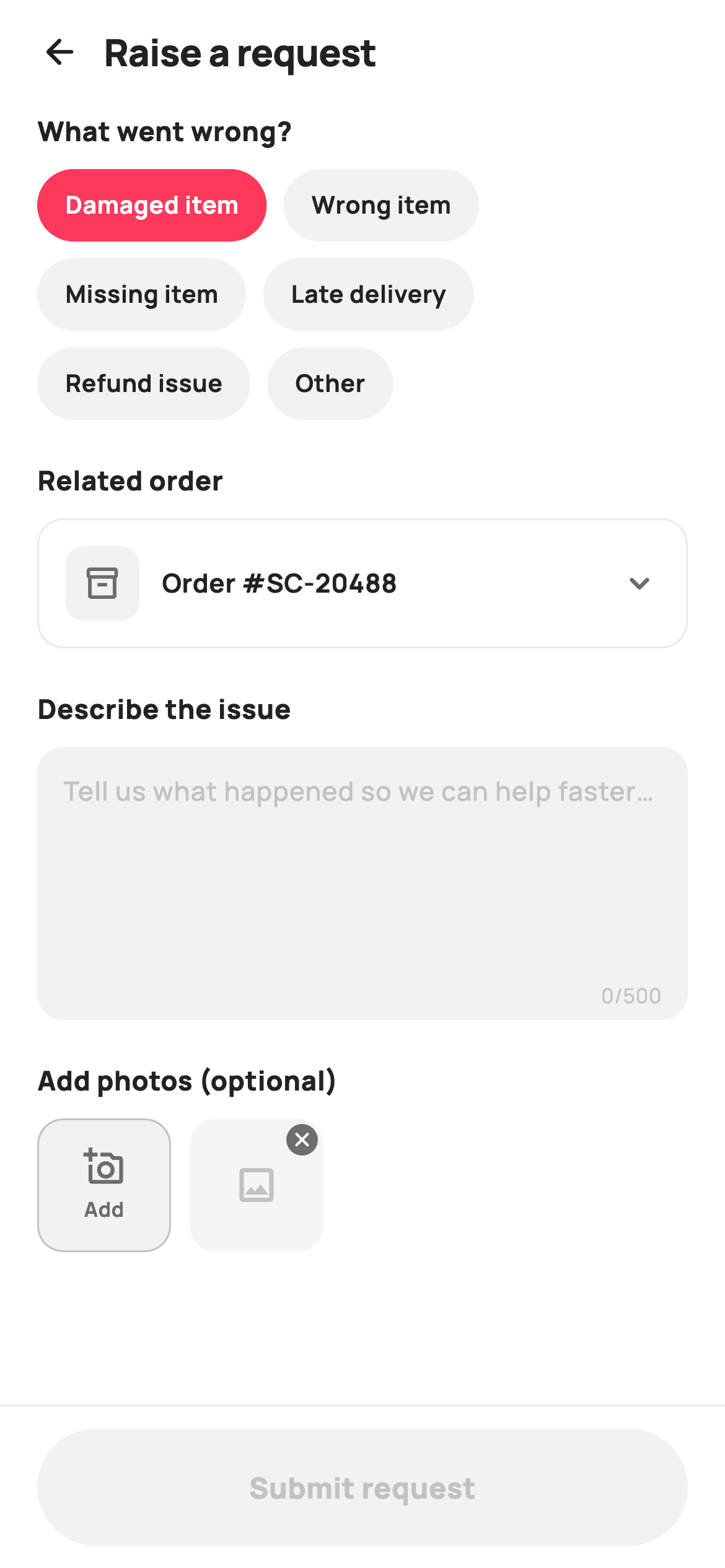
A production-ready Flutter support-request screen for any shopping or marketplace app. Buyers pick what went wrong from pill chips (Damaged item, Wrong item, Missing item, Late delivery, Refund issue, Other), choose the related order from a bottom-sheet picker, describe the problem in a 500-character counted text field, and optionally attach photos via an Add tile with removable thumbnails. A pinned Submit bar stays disabled until the description is long enough, then flips to an inline success view with a ticket ID and expected reply time. Self-contained and backend-agnostic.
Full tutorial coming soon.
The step-by-step walkthrough and complete Dart source for this screen haven't been published yet. They'll be free when they are — no sign-up, no payment. In the meantime, browse the screens that already have their tutorial.
What's included
- ✓Selectable issue-type chips in a wrapping pill row
- ✓Related-order row that opens a bottom-sheet order picker
- ✓Multi-line description field with a 0/500 character counter
- ✓Photo-upload row: Add tile plus removable thumbnail placeholders
- ✓Validation-gated pinned Submit request bar
- ✓Inline submitted success state with ticket ID and reply-time note
Use cases
- ✓E-commerce and marketplace apps
- ✓Food-delivery and grocery order support
- ✓Any in-app help, complaint or refund-request flow
- ✓Logistics and returns support screens


